
BNCVGAHR - Video Converter Speco Technologies - Free user manual and instructions
Find the device manual for free BNCVGAHR Speco Technologies in PDF.


| Product Type | BNC to VGA Converter |
| Input Connector | BNC (female) |
| Output Connector | VGA (female, 15-pin D-sub) |
| Supported Input Formats | NTSC, PAL (composite video via BNC) |
| Maximum Output Resolution | 1920 x 1080 (Full HD) |
| Power Supply | 5V DC via USB or external adapter |
| Power Consumption | ~2.5W |
| Dimensions (W x D x H) | 68 x 55 x 22 mm |
| Weight | ~80 g |
| Operating Temperature | 0°C to 50°C |
| Storage Temperature | -20°C to 60°C |
| Housing Material | Metal (aluminum) |
| LED Indicators | Power and signal status |
| Compatible Systems | Analog CCTV cameras, DVRs, VCRs |
| Installation | Plug and play, no drivers required |
| Maintenance | Keep connectors clean; avoid moisture |
| Safety | Short-circuit protection; CE, FCC compliant |
| Spare Parts / Repairability | Non-repairable; replace unit if defective |
| Warranty | 1 year limited |
Frequently Asked Questions - BNCVGAHR Speco Technologies
User questions about BNCVGAHR Speco Technologies
0 question about this device. Answer the ones you know or ask your own.
Ask a new question about this device
Download the instructions for your Video Converter in PDF format for free! Find your manual BNCVGAHR - Speco Technologies and take your electronic device back in hand. On this page are published all the documents necessary for the use of your device. BNCVGAHR by Speco Technologies.
USER MANUAL BNCVGAHR Speco Technologies

natural_image
Black electronic device with three labeled buttons (ON, MENU, EXIT) and mounting holes (no readable text beyond labels)Features:
- Dual output: 1 x DB15 for VGA monitors and 1 x BNC for TV monitors.
● Supports NTSC/PAL video systems with 50 to 60Hz frame rate detection (NTSC/PAL). - DEINTERLACED and Scan rate conversion output mode: 640x 480, 800x600, 1024 x 768, up to 1280x1024@60Hz.
● Built in ESD protection.
● Auto memory to save adjustments.
● Built in video auto gain control for good quality picture.
● Power Supply Included.
Operation Controls and Function:
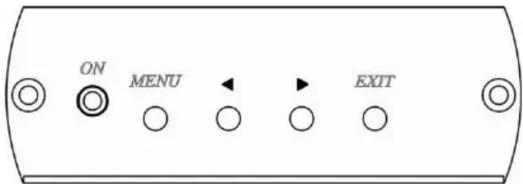
MENU: Enter OSD mode
EXIT: Leave OSD mode
OSD Menu:
Button Function: ◀ Up / Down
BRIGHTNESS
CONTRAST
SATURATION
HUE
SHARPNESS
RESOLUTION
Features Menu:
Button Function: ◀ Select feature setup & decrease / increase value, press MENU for next function
BRIGHTNESS
CONTRAST
SATURATION
HUE
SHARPNESS
RESOLUTION:
Button Function: Press ▶ to select resolution.
640X480
800×600
1024x768
1280×1024
After setup, press Exit to save and leave OSD mode.
Notes:
- The OSD menu will close in 20 seconds if there is no activity.
- The OSD menu will only display in VGA output mode.
- To restore factory default values, unplug the power adaptor then hold the Exit button and plug the power adaptor back in.
NOTE: A wrong Resolution setting will cause the picture to not display. In that event, please restore factory default values.
View of Connection and Installation:

Panel View:

Specifications:
| ITEM NO. BNCVGAHR | |
| Input Signal | BNC, 75Ω, 1 Vp-p |
| Output Signal VGA: 0.7 Vp-p | RGB, 15 pin D female connector |
| BNC, 75Ω, 1 Vp-p | |
| Power Consumption 800mA (Max.) | |
| Power Supply DC5V 1Amp Regulated Power Supply | |
| Temperature | Operation: 32°F to 131°F, Storage: -4°F to 185°F, Humidity: up to 95% |
| Dimension L x W x H | 3.5" x 3.7" x 1.2" |
| Weight | 0.45 Lbs. |
RoHS CE FC
Speco Technologies is constantly developing and improving products.
We reserve the right to modify product design and specifications without notice and without incurring any obligation.
Speco Technologies • 200 New Highway • Amityville • NY • 11701 • www.specotech.com
Rev. 03/31/20
Brand : Speco Technologies
Model : BNCVGAHR
Category : Video Converter