USB-455 - USB Cable Steren - Free user manual and instructions
Find the device manual for free USB-455 Steren in PDF.


| Product Type | USB OTG (On-The-Go) Cable |
| Brand | Steren |
| Model | USB-455 |
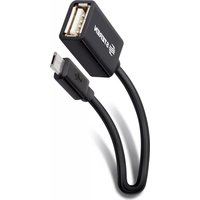
| Connector A | USB Type A (Female) |
| Connector B | Micro USB Type B (5-pin Male) |
| Compatible Devices | Android smartphones with OTG support, especially Samsung Galaxy S3 and S4 |
| Supported Peripherals | USB flash drives, external hard drives, keyboards, mice, game controllers |
| Data Transfer Speed | Up to USB 2.0 (480 Mbps) |
| Power Delivery | Passive (device-powered, no external power needed) |
| Cable Length | Approximately 15 cm (6 inches) |
| Weight | Approximately 20 g |
| Construction | Flexible PVC cable, molded connectors |
| Color | Black (typical) |
| Operating System | Android (with OTG support) |
| Warranty | 1 year against defects |
| Certifications | USB-IF compliant (assumed) |
| Usage | Expand smartphone functionality by connecting USB peripherals |
| Care Instructions | Keep dry, avoid sharp bends, disconnect when not in use |
| Included Accessories | OTG cable only |
Frequently Asked Questions - USB-455 Steren
User questions about USB-455 Steren
0 question about this device. Answer the ones you know or ask your own.
Ask a new question about this device
Download the instructions for your USB Cable in PDF format for free! Find your manual USB-455 - Steren and take your electronic device back in hand. On this page are published all the documents necessary for the use of your device. USB-455 by Steren.
USER MANUAL USB-455 Steren
natural_image
Illustration of a black USB connector with a metallic cable, placed on a grid-patterned surface (no text or symbols)0915a
Before using your new Steren's
product, please read this instruction
manual to prevent any damage.
IMPORTANTE / IMPORTANT
The instructions of this manual are for reference about the product. There may be differences due to updates. Please check our website (www.steren.com) to obtain the latest version of the instruction manual.
CARACTERÍSTICAS / HIGHLIGHTS
The OTG cable can be used to plug peripheral devices to some smartphones with that protocol.
It is compatible specially with Galaxy S3 and S4, there you can connect flash drives, keyboards and mouse having functions similar to PC.
It features USB A type and micro USB B type (5 pin) to plug into the phone.
INSTRUCCIONES / INSTRUCTIONS
-
Connect the micro USB end to the port of your phone.
-
In the USB port you can connect memories, hard drives, keyboards, mice and video game controls.

natural_image
Illustration of a smartphone connected to a USB port, with icons indicating data transfer (no text or symbols)All other company brands, logos and product names mentioned are trademarks of their respective owners.

Product design and specifications are subject to change without notice.

[NO TEXT]


STEREN
STEREN PRODUCTO EMPACADO S.A. DE C.V.
Biólogo Maximino Martínez No. 3408 Int. 2, 3 y 4, San Salvador Xochimanca,
Del. Azcapotzalco, México, D.F. 02870, RFC: SPE941215H43
ELECTRÓNICA STEREN DEL CENTRO, S.A. DE C.V.
Rep. del Salvador 20 A y B, Centro, 06000, Del. Cuauhtémoc,
This Steren product is warranted under normal usage against defects in workmanship and materials to the original purchaser for one year from
the date of purchase.
CONDITIONS
1.- This warranty card with all the required information, invoice or purchase ticket, product box or package, and product, must be presented when warranty service is required.
2.- If the product stills on the warranty time, the company will repair it free of charge.
3.- The repairing time will not exceed 30 natural days, from the day the claim was received.
4.- Steren sell parts, components, consumables and accessories to customer, as well as warranty service, at any of the addresses mentioned later.
THIS WARRANTY IS VOID IN THE NEXT CASES:
If the product has been damaged by an accident, acts of God, mishandling, leaky batteries, failure to follow enclosed instructions, improper repair by unauthorized personnel, improper safe keeping, among others.
a) The consumer can also claim the warranty service in the purchase establishment.
b) If you lose the warranty card, we can reissue it, if you show the invoice or purchase ticket.
RETAILER INFORMATION
Name of the retailer
Address
Product
Brand
Serial number
Date of delivery
In case your product fails or have questions, please contact your nearest dealer. If you are in Mexico, please give a call to our Call Center.
01 800 500 9000
Brand : Steren
Model : USB-455
Category : USB Cable