Elite s355 - Lectern AmpliVox - Free user manual and instructions
Find the device manual for free Elite s355 AmpliVox in PDF.


| Product Type | Portable PA System |
| Brand | AmpliVox |
| Model | Elite s355 |
| Dimensions (H x W x D) | 14 x 10 x 8 inches (approx.) |
| Weight | 12 lbs (approx.) |
| Power Source | AC adapter or internal rechargeable battery |
| Battery Type | Sealed lead-acid or lithium-ion |
| Battery Life | Up to 8 hours at moderate volume |
| Amplifier Power | 50W RMS |
| Speaker Configuration | Single 8-inch woofer and 1-inch tweeter |
| Frequency Response | 80 Hz – 16 kHz |
| Wireless Microphone | UHF handheld or headset (optional) |
| Audio Inputs | 1/4" and XLR combo jack, 3.5mm aux |
| Audio Outputs | Line out, headphone out |
| Bluetooth | Yes, for streaming audio |
| USB Port | For charging devices or playing MP3 |
| SD Card Slot | Yes |
| Remote Control | Included |
| Mobility | Built-in handle and wheels |
| Included Accessories | AC power adapter, wireless microphone, remote control |
| Maintenance | Clean with a dry cloth; avoid liquids |
| Safety Certifications | CE, FCC |
| Manufacturer Support | 1-year limited warranty |
Frequently Asked Questions - Elite s355 AmpliVox
User questions about Elite s355 AmpliVox
0 question about this device. Answer the ones you know or ask your own.
Ask a new question about this device
Download the instructions for your Lectern in PDF format for free! Find your manual Elite s355 - AmpliVox and take your electronic device back in hand. On this page are published all the documents necessary for the use of your device. Elite s355 by AmpliVox.
USER MANUAL Elite s355 AmpliVox
natural_image
Line drawing of a simple stand with a microphone and base, no text or symbols presentEasy Step-By-Step Instructions for S355 Elite Lectern Assembly
The Elite Lectern is designed for easy assembly. If you have any questions about assembling or using your new sound system, or if you want more information about accessories, call AmpliVox's customer service line.
The lectern is carefully packed to minimize shipping damage. If your unit was damaged in shipping call our toll-free customer service line or visit our web site at http://www.ampli.com
1-800-267-5486

AMPLiVox®
PORTABLE SOUND SYSTEMS
Packing List:
- Lectern Top
• Top Mounting Plate - Column
- Base
• Amplifier Mounting Plate
• Amplifier (S-805A)
• Amplifier Mounting Bracket (S-1300)
• Hand-held mic (S-2030A) - 15' Mic cable
• Microphone Mounting Bracket (already attached)
• Gooseneck & mic holder - 2 large bolts
• 2 large washers
• 4 Phillip's Head screws -
1 2" bolt
• 4 #8 black screws (w/S1300)
• 2 #4 black screws (w/S1300) -
Unpack all pieces. Save the packing and the box in case you need to return the lectern for any reason. Make sure you have all the pieces and check for any damage.
- Attach the column to the base. Place the base on the floor with the block facing up. Take the column and turn it until it drops down over the block; it will only fit one way. Turn the assembly on its side and use one of the large bolts and washers to screw the base to the column.

mounting plate. Turn center column and base right-side up. Place the top mounting plate into the column; it will only fit one way. Using the second large bolt and washer, screw the plate to the column.


natural_image
Simple line drawing of a lever or fulcrum with weights and a labeled section (no text or symbols)- Attach lectern top. Using the 4 Philip's Head screws attach the lectern top to the top mounting plate as shown above. When the lectern top is attached the book stop should be lower than the attached microphone mounting bracket.
- Attach amplifier mounting plate. Pull the speaker cable through the hole in the amplifier mounting plate and align the plate on the column. Secure the plate using the 2" bolt.

natural_image
Technical line drawing of a mechanical assembly with no visible text or symbols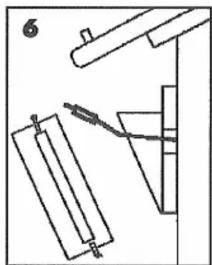
natural_image
Pure mechanical diagram showing a lever and lever assembly without any text, numbers, or symbols- Attach the Amplifier mounting bracket. Using the 4 #8 black screws attach the mounting bracket to the mounting plate; the holes are pre-drilled.
- Install batteries in amplifier. Refer to the amp instruction sheet for battery installation information.
- Install Amplifier. The amplifier slips into the bracket; use the 2 #4 screws to secure the amp in the bracket (see figure 6).
- Attach gooseneck. Screw gooseneck with mic holder onto the mic base.
- Install Mic. Place mic into mic holder and insert mic plug into "dynamic" jack on amp.
Refer to the S-805A amplifier operating instructions for information about the amp controls.
If you purchased any optional accessories such as a wireless kit, lapel mic, Universal AC Adapter/Recharger, extra speakers, tripods, etc. refer to the instructions packed with them for installation and usage information.
Your Elite Lectern is now complete. Thousands of AmpliVox sound products have been in use since we first began shipping in 1961. We hope you enjoy many years of use from your new Elite Lectern.
Remember, if you have any questions or comments, call our toll-free customer service line.
1-800-267-5486
Optional Accessories
Batteries
S-1430 Alkaline D-Cell Batteries; set of 10 \$25.00
S-1465 NiCad battery pack; 4.5 amp hours \$165.00
Power Supplies
S-1460 International AC Adapter/Recharger; 110/220 volts; 50/60 Hz.....\$109.00
S-1462 DC Car Adapter Kit; 12 volts.....\$43.00
Wireless Kits
S-1600 Wireless Lapel Mic Kit......\$308.00
S-1610 Wireless Headset Mic Kit \$299.00
S-1620 Wireless Hand Held Mic Kit .....\$299.00
Microphones
S-2030 Lapel Mic; with 12 ft. extension ....\$55.00
S-2040 Headset Mic; with 12 ft. extension.....\$121.00
S-2030A Replacement Hand-Held Mic and Cable \$99.00
S-1720 Mic Extension Cord; 25-ft.....\$65.00
Extra Speaker & Tripod
S-1201 Companion Speaker \$209.00
S-1080 Tripod for speaker \$188.00
Lamps
S-1100 Reading Lamp (5")......\$55.00
Prices subject to change without notice
Brand : AmpliVox
Model : Elite s355
Category : Lectern