
Surge - Bicycle Octane - Free user manual and instructions
Find the device manual for free Surge Octane in PDF.


| Product Type | Indoor Cycle Bike (Commercial/Institutional) |
| Max User Weight | 350 lbs (159 kg) |
| Power Source | Self-generated (no electrical outlet required) |
| Resistance Levels | 1–20, speed-independent braking |
| Brake System | Red Brake Lever on Handlebar Mount Assembly |
| Console | LCD display with workout programs, Bluetooth and ANT+ connectivity |
| Workout Programs | Quick Start, MAX 14 INTERVAL, Interval, Calorie Goal, Distance Goal, MAX CIRCUIT |
| Seat Adjustment | Vertical and horizontal via Locking Knob |
| Handlebar Adjustment | Vertical via Locking Knob |
| Pedals | Left and right, with foot straps |
| Leveling Feet | Adjustable for stability |
| Bottle Holder | Yes, for average-size drink bottle |
| Frame Warranty | 5 years |
| Mechanical Parts Warranty | 2 years (excluding wear items) |
| Wear Items Warranty | 3 months (saddle, pedals) |
| Labor Warranty | 1 year |
| Cleaning Instructions | Use mild detergent solution or isopropyl alcohol for console; no acidic cleaners |
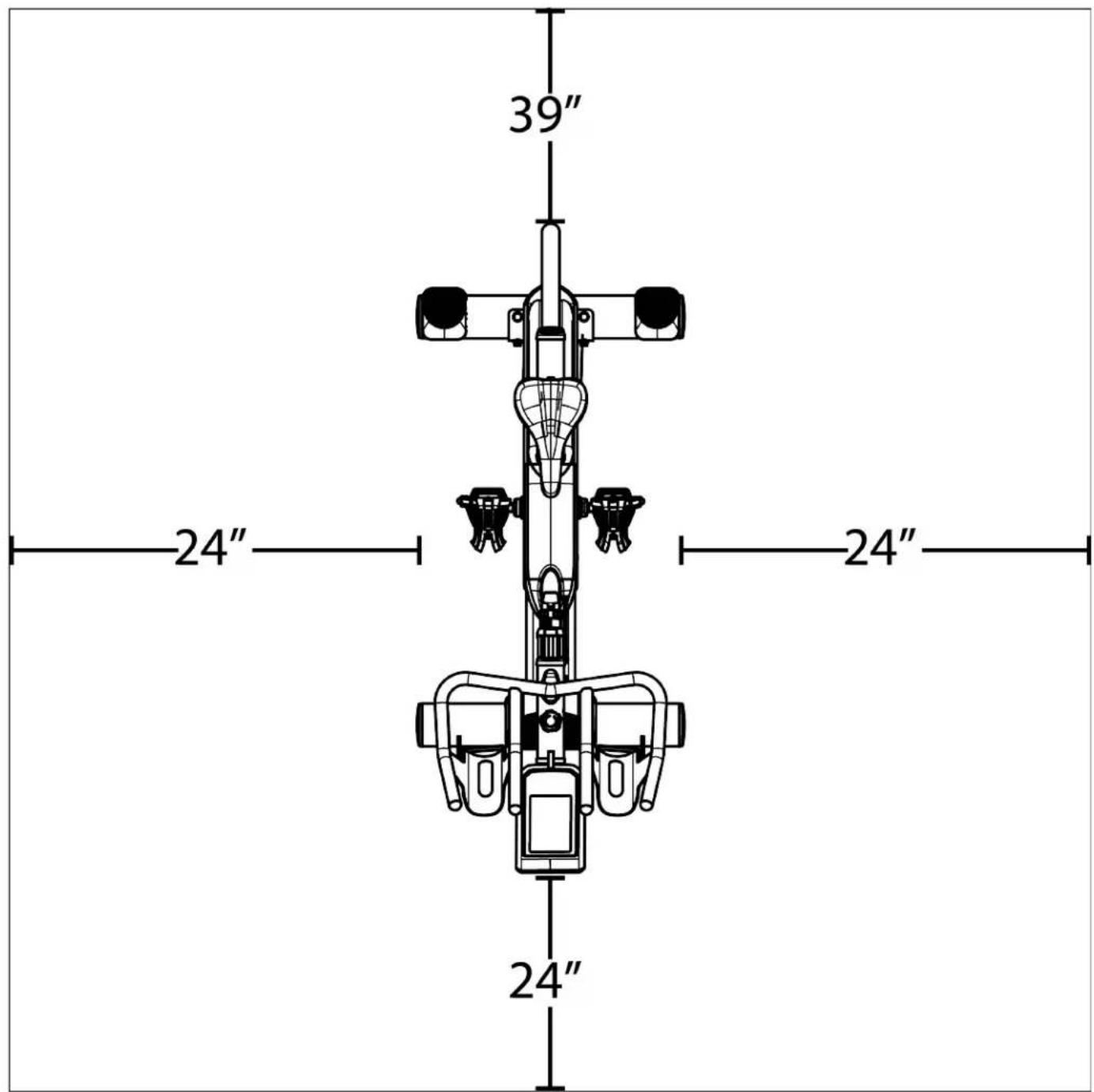
| Space Requirements | 39" (0.99m) safety zone at rear, 24" (0.6m) from sides |
| Intended Use | Commercial/institutional (dues-paying facilities) |
| Compliance | Applicable codes and regulations; California Proposition 65 |
Frequently Asked Questions - Surge Octane
User questions about Surge Octane
0 question about this device. Answer the ones you know or ask your own.
Ask a new question about this device
Download the instructions for your Bicycle in PDF format for free! Find your manual Surge - Octane and take your electronic device back in hand. On this page are published all the documents necessary for the use of your device. Surge by Octane.
USER MANUAL Surge Octane
CHAPTER 1: SAFETY INSTRUCTIONS
IMPORTANT:
All products shown are prototype. Actual product delivered may vary.
Product specifications, features & software are subject to change without notice.
For the most up-to-date owner's manual please visit www.octanefitness.com.
For documents in additional languages please visit www.octanefitness.com/resources/document-library/
IMPORTANTE:
CHAPTER 1: SAFETY INSTRUCTIONS
TABLE OF CONTENTS:
Chapter 1: Safety Instructions
Safety Instructions....4
Space Requirements 7
Warning Decals....8
Compliances....8
Proper Training Position 8
Chapter 2: Assembly Instructions
Provided Tools....10
Carton Contents....11
Assembly Steps....12
Wiring Diagram....20
Chapter 3: Product Overview
Product Overview 22
Chapter 4: Care & Maintenance
Care & Maintenance 24
Cleaning the Equipment....24
Lubrication....24
Other Scheduled Preventive Maintenance....25
Long Term Storage 25
Chapter 5: Customer Service
Contacting Service 26
Contacting Sales 26
Reporting Freight or Parts Damage 27
Chapter 6: Additional Information
Console Overview 28
Workout Summary....31
Keypad Buttons....32
Software Management 34
Chapter 7: Warranty Information
Warranty Registration....36
CHAPTER 1: SAFETY INSTRUCTIONS
IMPORTANT SAFETY INSTRUCTIONS SAVE THESE SAFETY INSTRUCTIONS
This equipment is intended for a commercial or institutional setting. This owner's manual should be accessible to all personal trainers, faculty, and members.

WARNING: EQUIPMENT.
ALL EXERCISERS MUST READ ALL INSTRUCTIONS BEFORE USING THE

WARNING: Heart rate monitoring systems may be inaccurate. Over exercise may result in serious
injury or death. If you feel faint, stop exercising immediately.

WARNING: Equipment should be immediately taken out of use if it fails to work properly or when a
warning is presented electronically.
OCTANE STRONGLY recommends seeing a physician for a complete medical exam before undertaking an exercise program, particularly if the user has a family history of high blood pressure or heart disease, is over the age of 45, smokes, has high cholesterol, is obese or has not exercised regularly in the past year. Additionally, OCTANE recommends consulting a fitness professional on the correct use of this product. If at any time while exercising the user experiences faintness, dizziness, pain or shortness of breath, he or she must stop immediately.

WARNING: Do not move the equipment by lifting the console. Do not use the console as a handlebar during a workout.

WARNING: This product contains chemicals known to the state of California to cause cancer and birth defects or other reproductive harm.

WARNING: Keep equipment stable on flat ground.

WARNING: Incorrect use of equipment or excessive use of equipment may lead to serious injury or death. If you feel faint, stop exercising immediately.

WARNING: Ensure the Flywheel is free from any obstructions that would hinder mechanical movement. Maintain a safe distance between the flywheel and all body parts (e.g. fingers) and clothing to help prevent serious injury.
WARNING: Ensure the equipment is used in a monitored environment.
WARNING: When pedaling the equipment, foot straps must be used to help prevent serious injury or death.
WARNING: The Seat Mount Assembly must always meet the minimum insertion depth notated on the shaft to help prevent serious injury or death.
CHAPTER 1: SAFETY INSTRUCTIONS

WARNING: Replace warning labels that may be worn, damaged, or missing.

WARNING: Replace any non-working or damaged components, remove the unit from service until repair is performed.

WARNING: To reduce the risk of burns, fire, and electric shock or injury to persons, follow these instructions:
- Do not operate the equipment while being covered with a blanket, plastic, or anything that insulates or stops airflow.

WARNING: Risk of personal injury-crushing hazard when equipment is in operation - Keep feet, hands, and fingers away from moving parts.

CAUTION:
- Do not use typing or web surfing features at excessive speeds. Always stabilize yourself by holding a stationary handle when using typing or web surfing features (Varies by console option).
• Health related injuries may result from incorrect or excessive use of exercise equipment.
- Do not use the contact heart rate grips as a handlebar during a workout.
- Any changes or modifications to this equipment could void the product warranty.
• The Cycle Bike bike is self-generated and does not require the use of an electrical outlet with the LCD console.
- The batteries within self-generated equipment contain materials that are considered hazardous to the environment. Federal law requires proper disposal of these batteries.
- Do not use this product in areas where aerosol spray products are being used or where oxygen is being administered. Such substances create the danger of combustion and explosion.
• Always follow the console instructions for proper operation. Close supervision is necessary when used near children under the age of 15, or disabled persons.
- Do not use this product outdoors, near water, while wet, or in areas if high humidity including extreme temperature changes.
- Never operate a OCTANE product with the air openings blocked. Keep air openings free of lint, hair or any obstructing material.
- Never place liquids of any type directly on the unit except in the accessory tray or bottle holders. Containers with lids are recommended.
- Wear shoes with rubber or high traction soles. Do not use shoes with heels, leather soles, cleats or spikes. Make sure no stones are embedded in the soles. Do not use this product in bare feet. Keep all loose clothing, shoelaces and towels away from moving parts.
- Speed and power specifications determined during testing for this product exist within a range of plus or minus ten percent of the stated values.
- Do not use gasoline or other organic solvents for normal cleaning, wiping, and maintenance of labels. Only use water for cleaning.
CHAPTER 1: SAFETY INSTRUCTIONS
CAUTION:
- Do not reach into or underneath the unit, or tip it on its side during operation.
- Use correct ergonomic positioning while operating the bike.
- Do not allow animals on or near the equipment while in operation.
- Do not exceed maximum user weight of 350 lbs (159 kg).
- Avoid exiting bike while the pedals are still in motion.
- When using this exercise machine, basic precautions should always be followed.
- Use this bike only for its intended use as described in this manual.
- Do not use attachments not recommended by the manufacturer.
- Allow only trained personnel to service this equipment.
- Avoid the possibility of bystanders being struck or caught between moving parts by making sure that they are out of reach of the bike while it is in motion.
- Allow only one person at a time on the bike while it's operating.
- It is the sole responsibility of the owner/operator to ensure regular and scheduled maintenance is performed.
- This appliance can be used by children aged from 8 years and above and persons with reduced physical, sensory or mental capabilities or lack of experience and knowledge if they have been given supervision or instruction concerning use of the appliance in a safe way and understand the hazards involved.
• Children shall not play with the appliance.
- Cleaning and user maintenance shall not be made by children without supervision.
• The braking system is speed-independent.
Residential/Commercial Use

WARNING: Risk of personal injury - Keep children under the age of 13 away from the machine.
IMPORTANT SAFETY INSTRUCTIONS Read all instructions before using this appliance.

WARNING: To reduce the risk of burns, fire, electric shock, or injury, the following items must be observed:
- This appliance is not intended for use by people with reduced physical, sensory, or mental capabilities, or lack of experience and knowledge, unless they have been given supervision or instruction concerning use of the appliance by a person responsible for their safety. Keep children under the age of 13 away from this machine.
- Use this appliance only for its intended use as described in this manual. Do not use attachments not recommended by the manufacturer.
- Never drop or insert any object into any opening.
- Do not use outdoors.
- Do not operate where aerosol (spray) products are being used or where oxygen is being administered.
- Keep children away from extended feet pedals.
• SAVE THESE INSTRUCTIONS
CHAPTER 1: SAFETY INSTRUCTIONS
SPACE REQUIREMENTS:
OCTANE's recommendation is to leave a 39" (0.99m) safety zone at rear of bike. The sides of the bike should be at least 24" (0.6m) away from the wall or obstructions. (See Fig 1)
CHAPTER 1: SAFETY INSTRUCTIONS
WARNING DECALS:

WARNING: Replace warning labels that may be worn, damaged, or missing.
To replace any worn or missing decals contact OCTANE FITNESS by visiting www.OctaneFitness.com or contact customer service at 888-628-2634 (U.S. & Canada)/763-757-2662 (Latin America, Asia, and Asian Pacific).
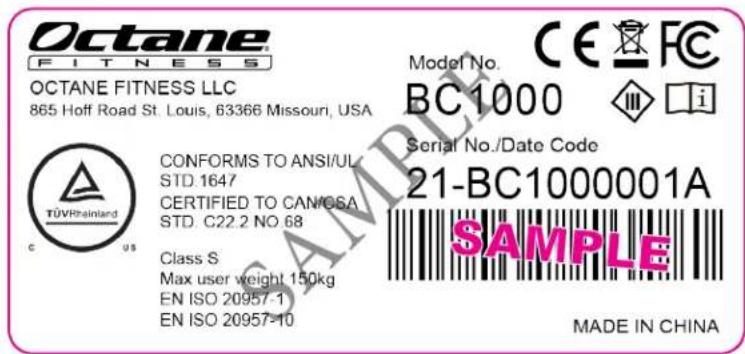


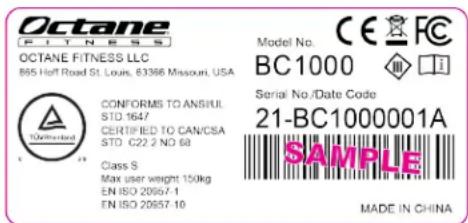
Note: The two numbers before the “-” refers to the year of manufacturing.
COMPLIANCES:
This equipment complies with all applicable codes and regulations. For a complete list of compliances, please visit www.octanefitness.com.
PROPER TRAINING POSITION:
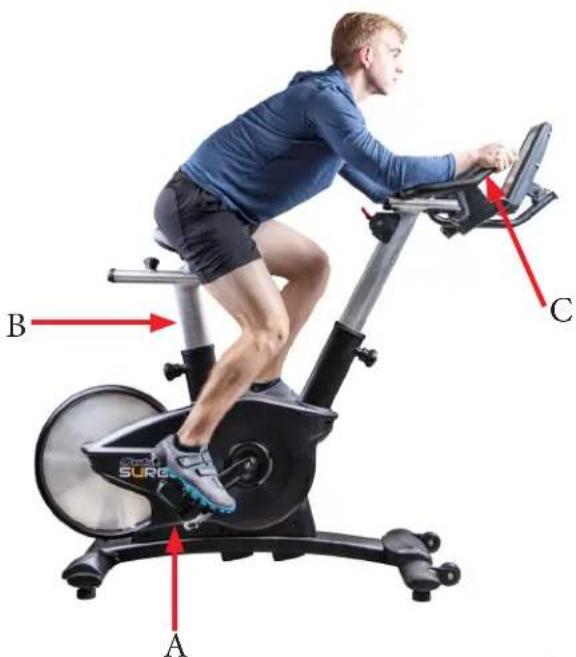
- Once seated, users should place their feet on the pedals (A).
- When pedaling, the user should be able to extend their legs fully while pedaling; if users do not have enough room to fully extend their legs, they should adjust their seat position (B) until their legs are able to comfortably extend. Additionally, if users legs feel overly stretched when they're extended, the seat needs a lower adjustment.
- During a workout, the user's hands must grasp the handlebars (C).
- To brake during a workout, toggle down the Red Brake Lever located on the Handlebar Mount Assembly.
- To safely exit, confirm the workout has ended and the console has returned to the Home screen in addition to the pedals coming to a complete stop. While firmly grasping the handlebars to maintain balance, slowly slide your body off the seat and feet from the pedals to transition to a standing position free from the bike.
Page # 8 of 41
CHAPTER 1: SAFETY INSTRUCTIONS
IMPORTANT SAFETY INSTRUCTIONS
- Read and understand all instructions and warnings prior to use.
- Obtain a medical exam before beginning any exercise program. If at any time during exercise you feel faint, dizzy, or experience pain, stop and consult your physician.
- Obtain proper instruction prior to use.
• This unit is intended for commercial use only.
- Inspect the unit for incorrect, worn, or loose components and do not use until corrected, replaced, or tightened prior to use.
- Do not wear loose or dangling clothing while using the unit.
- Care should be used when mounting or dismounting the unit.
- Read, understand, and test the emergency stop procedures before use.
- Do not exceed maximum user weight of 350 lbs.
- Keep the top side of the moving surface clean and dry.
- Keep children and animals away.
- Use caution when moving and assembling unit.
- All exercise equipment is potentially hazardous. If attention is not paid to the conditions of equipment usage, death or serious injury could occur.
- Save these instructions.
*Should you need technical assistance in assembly of your OCTANE Fitness product, contact OCTANE Fitness Technical Support at 888-628-2634 (U.S. & Canada)/763-757-2662 (Latin America, Asia, and Asian Pacific).
CHAPTER 2: ASSEMBLY GUIDE
PRE-ASSEMBLY CHECKLIST:
Required Tools:
| Allen Wrench(3mm, 4mm, 6mm) | 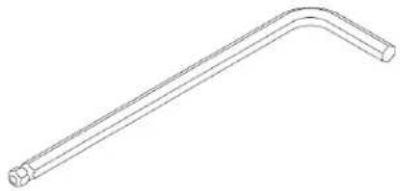 | |
| Open End Wrench (13mm, 15mm, 17mm) | 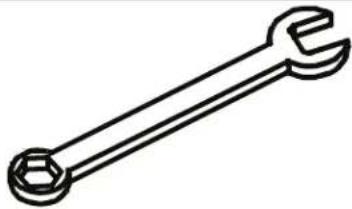 | |
CHAPTER 2: ASSEMBLY GUIDE
PRE-ASSEMBLY CHECKLIST:
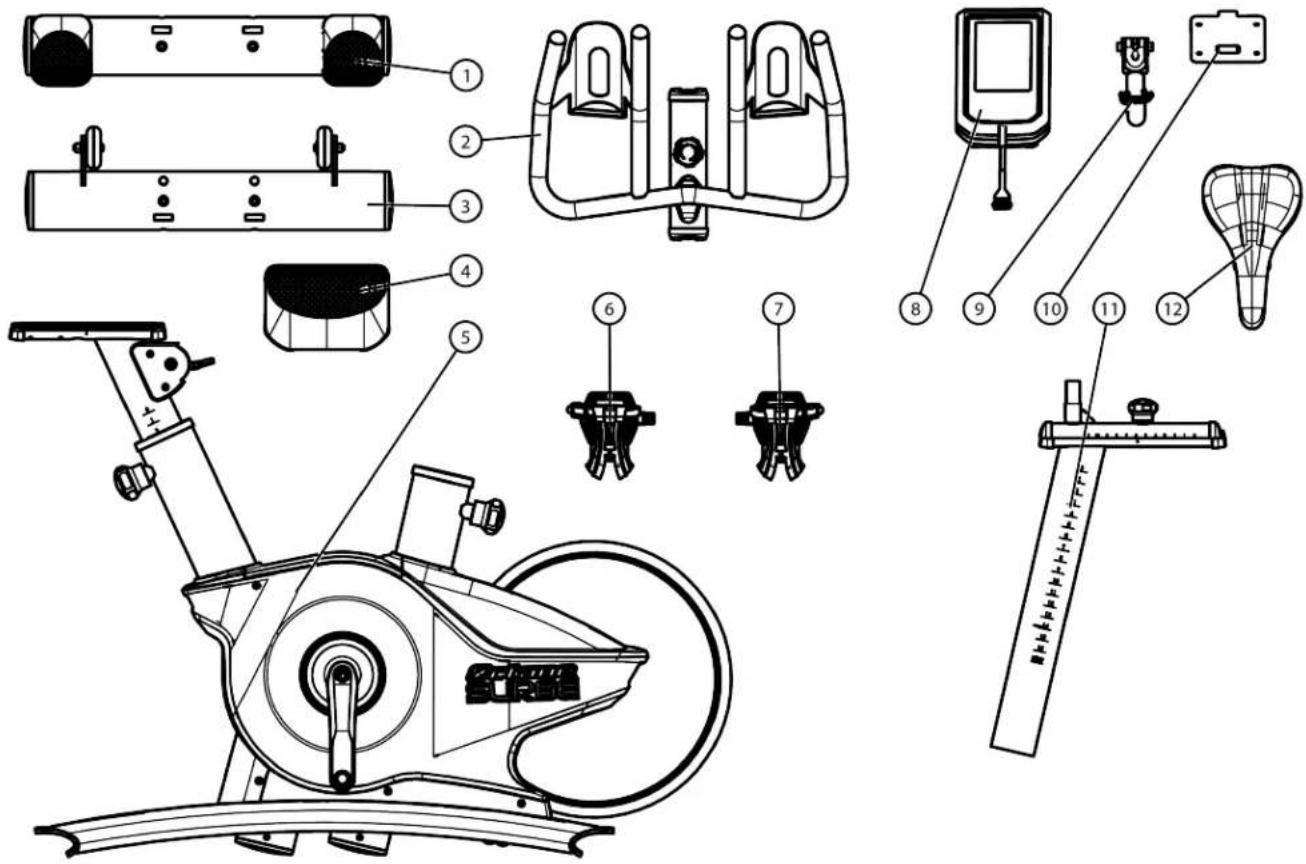
Carton One Contents:
| Item Part Number Description Quantity | |||
| 1 BC10300 REAR STABILIZER BAR 1 | |||
| 2 BC10420 HANDLEBAR ASSEMBLY 1 | |||
| 3 BC10200 FRONT STABILIZER BAR 1 | |||
| 4 BC10220 FOOT COVER 1 | |||
| 5 BC10100 MAINFRAME ASSEMBLY 1 | |||
| 6 | BC1013014R | RIGHT PEDAL | 1 |
| 7 | BC1013014L | LEFT PEDAL | 1 |
| 8 BC10900 | CONSOLE 1 | ||
| 9 BC10610 CONSOLE MOUNTING ASSEMBLY 1 | |||
| 10 | SM0033A | CONSOLE MOUNTING BRACKET | 1 |
| 11 | BC10510 | SEAT MOUNT ASSEMBLY | 1 |
| 12 | BC10520 | SEAT ASSEMBLY | 1 |
CHAPTER 2: ASSEMBLY GUIDE
ASSEMBLY STEPS:
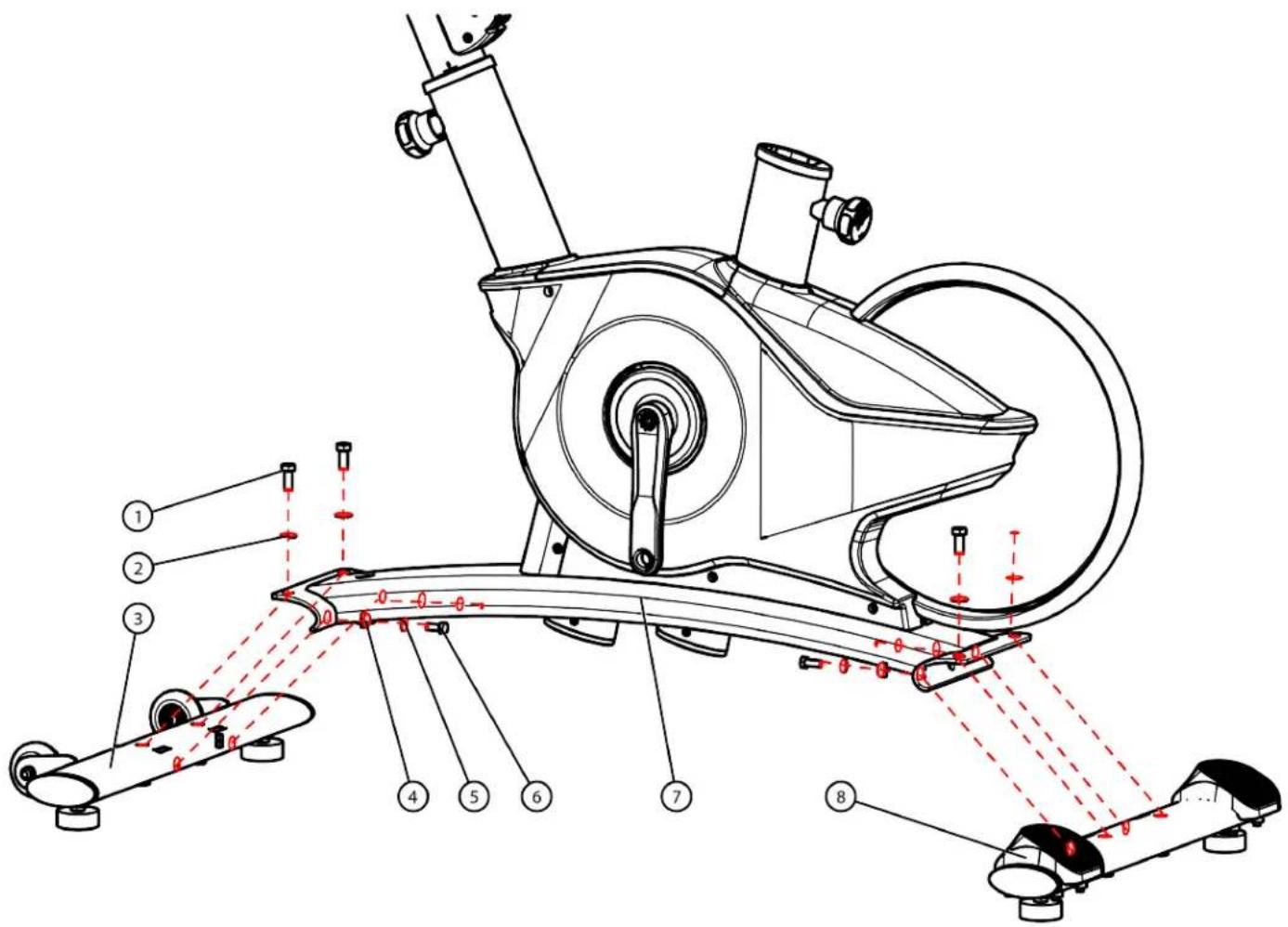
Step 1 (Front and Rear Stabilizer Bars):
Secure the Front and Rear Stabilizer Bars to the Mainframe Assembly using the identified hardware.
| Item Part Number Description Quantity | |||
| 1 C | 507A HH SCREW, M10 X 25 MM 4 | ||
| 2 C | 997 FLAT WASHER, M10, 11 X 20 X 2 MM 4 | ||
| 3 BC | 10200 FRONT STABILIZER BAR 1 | ||
| 4 | BC1011019 | CURVED WASHER, M8, 18 X 8.5 X 6.5 MM | 4 |
| 5 | C1093A | FLAT WASHER, M8, 9 X 16 X 1.6 MM | 4 |
| 6 | C2000 | HH SCREW, M8 X 20MM | 4 |
| 7 BC | 10100 | MAINFRAME ASSEMBLY 1 | |
| 8 BC | 10300 | REAR STABILIZER BAR 1 | |
CHAPTER 2: ASSEMBLY GUIDE
ASSEMBLY STEPS:
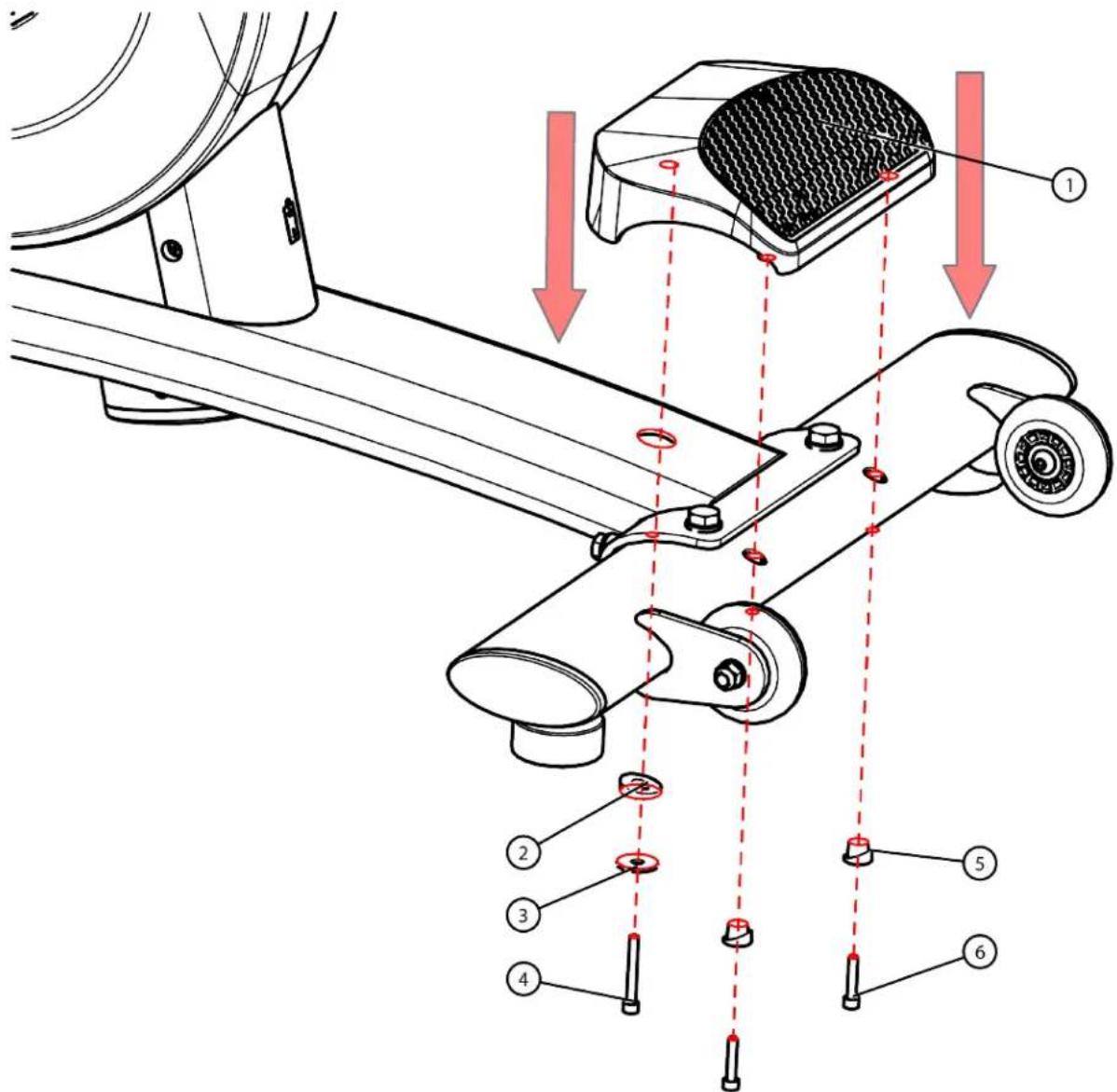
Step 2 (Foot Cover):
Secure the Foot Cover to the Front Stabilizer Bar using the identified hardware.
| Item Part Number Description Quantity | |||
| 1 BC10220 FOOT COVER 1 | |||
| 2 BC1011002 WASHER, CURVED, 23.5 X 10.5 X 7.1 MM | 1 | ||
| 3 CC-36-011B WASHER, FLAT, M6, 6.6 X 23 X 2 MM 1 | |||
| 4 | C2002 | SHCS, M5 X 40MM | 1 |
| 5 BC10230 WASHER, CURVED, 16 X 6 X 11 MM 2 | |||
| 6 | C2003 | SHCS, M5 X 25 MM | 2 |
CHAPTER 2: ASSEMBLY GUIDE
ASSEMBLY STEPS:
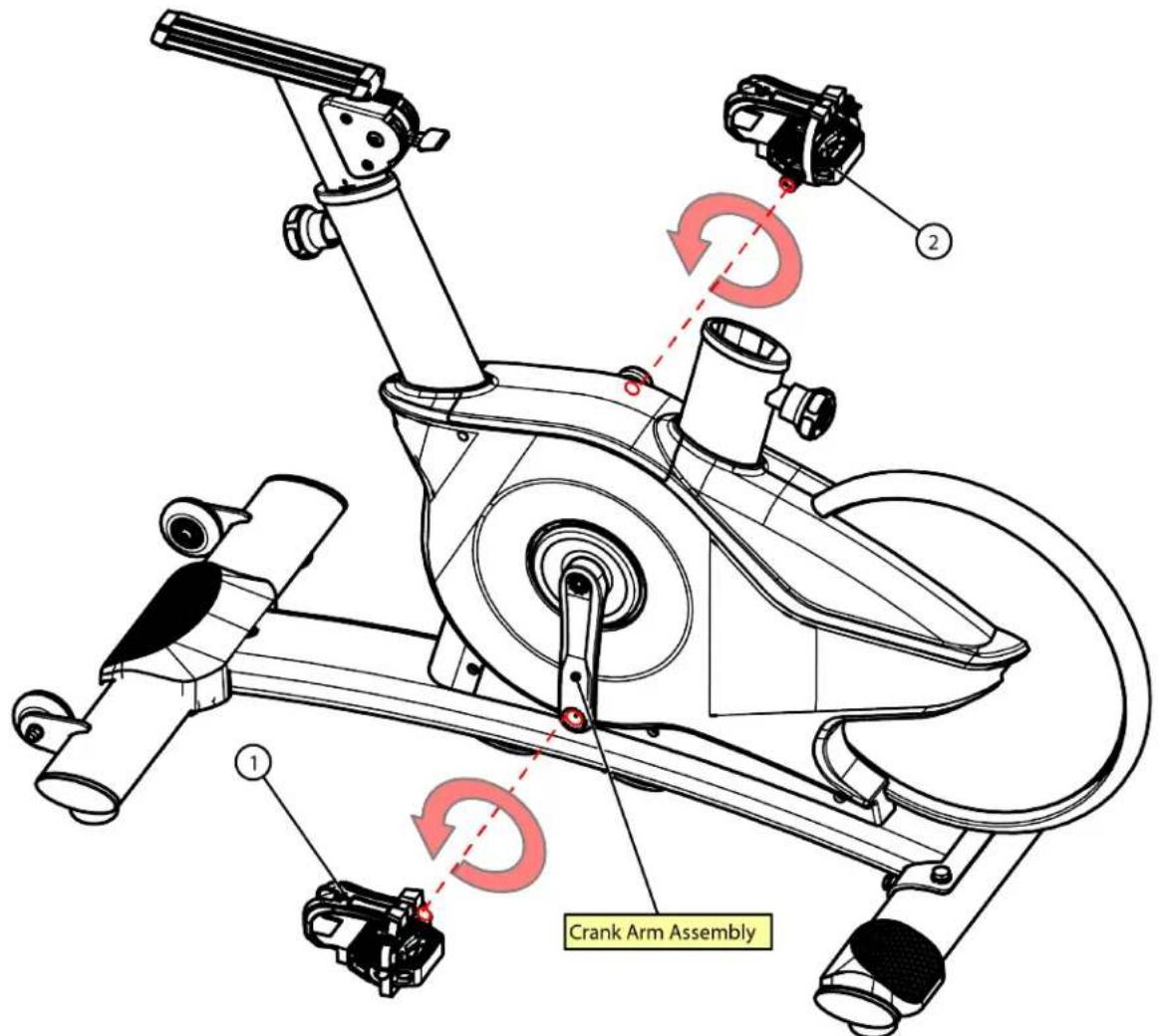
Step 3 (Foot Pedals):
Secure the Left and Right Foot Pedals to the Left and Right Crank Arm Assemblies.
Note: Ensure proper alignment of the Foot Pedal threads inside the corresponding holes on the Crank Arm Assembly.
| Item Part Number Description Quantity | ||
| 1 BC1013014L LEFT | FOOT | 1 |
| PEDAL | ||
| 2 BC1013014R RIGHT | FOOT | 1 |
| PEDAL | ||
Note: The Left Pedal is threaded into the Crank Arm Assembly hole counter-clockwise, but the Right Pedal is threaded into the Crank Arm Assembly hole clockwise.
Note: It is recommended to torque each pedal to 100 N*m.
CHAPTER 2: ASSEMBLY GUIDE
ASSEMBLY STEPS:
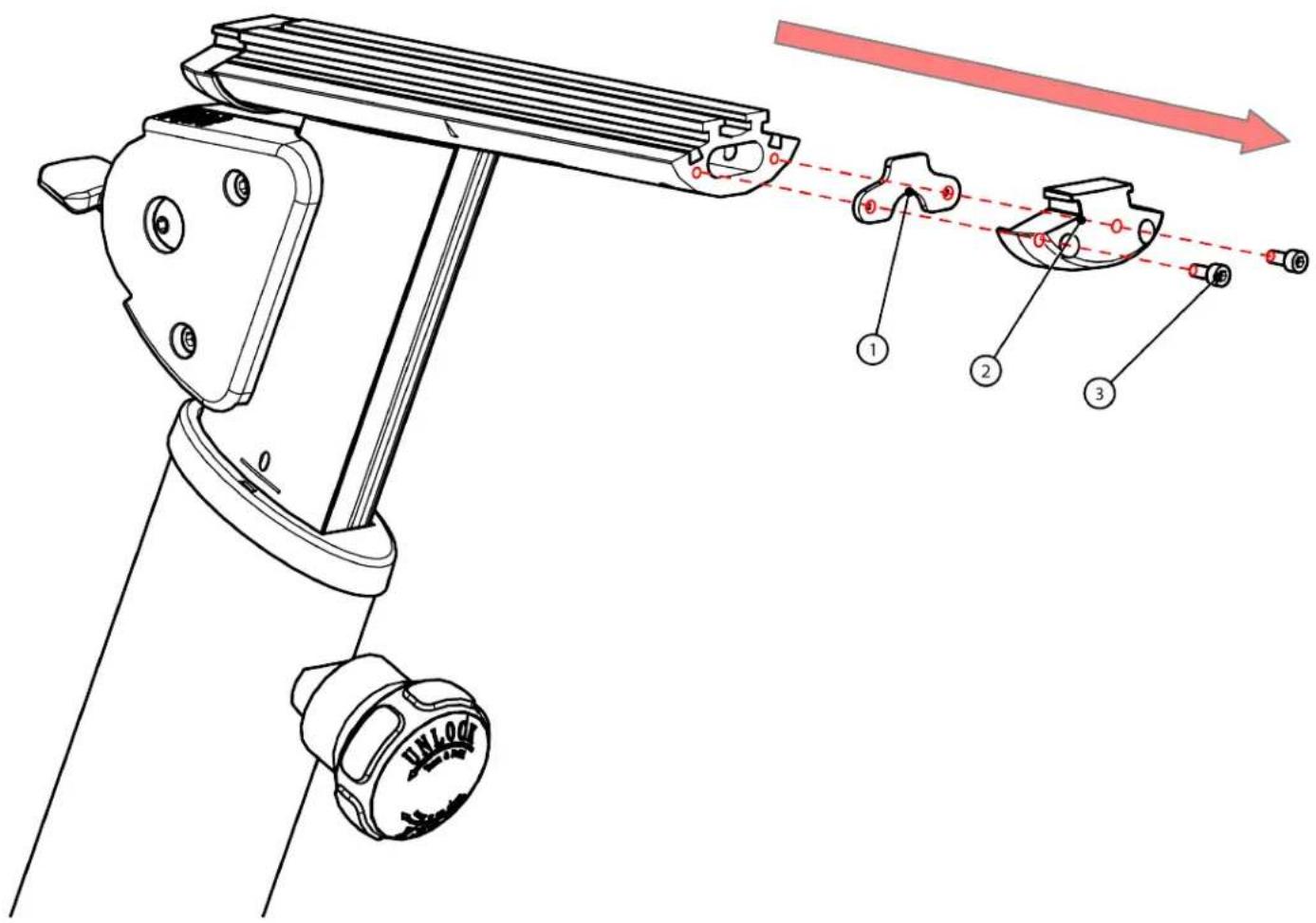
Step 4-1 (Handlebar Mount Assembly):
Remove the identified hardware from the Handlebar Mount Assembly.
Note: The hardware from this assembly step will be reassembled to the Handlebar Mount Assembly in Step 4-2 (Handlebar Assembly).
| Item Part Number Description Quantity | _ |
| 1 BC1041020 MOUNTING BRACKET 1 | |
| 2 BC1041030 END CAP 1 | |
| 3 C2004 SHCS, M4 X 10MM 2 |
CHAPTER 2: ASSEMBLY GUIDE
ASSEMBLY STEPS:
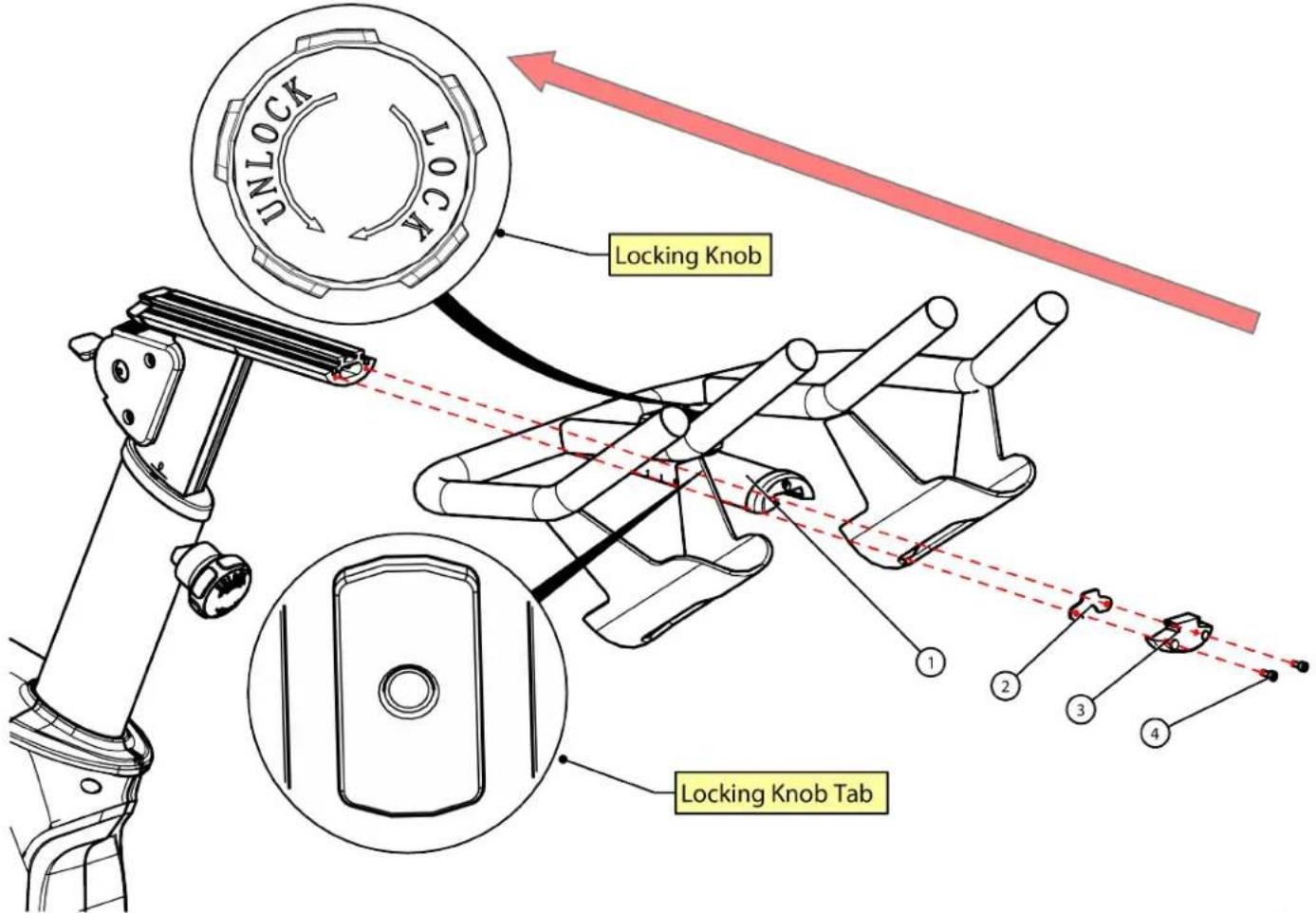
Step 4-2 (Handlebar Assembly):
Rotate the Locking Knob counterclockwise to the unlocked position with the Locking Knob Tab parallel to the Handlebar Mount Assembly.
| Item Part Number Description Quantity | ____ | ||
| 1 BC10420 HANDLE BAR ASSEMBLY 1 | |||
| 2 BC1041020 MOUNTING BRACKET 1 | |||
| 3 BC1041030 END CAP 1 | |||
| 4 | C2004 | SHCS, M4 X 10MM | 2 |
Next, slide the Handlebar Assembly onto the Handlebar Mount Assembly.
Next, rotate the Locking Knob clockwise to the locked position.
Lastly, reassemble the hardware from Step 4-1 (Handlebar Mount Assembly) to the Handlebar Mount Assembly.
CHAPTER 2: ASSEMBLY GUIDE
ASSEMBLY STEPS:
Step 5 (Seat Mount Assembly):
Turn and pull the Mainframe Assembly Locking Knob to slide the Seat Mount Assembly into the Mainframe Assembly and then release the Locking Knob after achieving the desired user sitting height.
| Item Part Number Description Quantity | ____ | ||
| 1 BC10520 SEAT ASSEMBLY 1 | |||
| 2 BC10510 SEAT MOUNTASSEMBLY | 1 | ||
Next, position the Seat Assembly onto the Seat Mount Assembly as shown below. Secure the Seat Assembly in place using the two lock nuts.
Lastly, rotate and hold the Seat Mount Assembly Locking Knob to adjust the location of the Seat Assembly.
![graph TD A["Seat Mount Assembly Locking Knob"] --> B["Mainframe Assembly Locking Knob"] B --> C["Lock Nuts"] C --> D["Lock"] style A fill:#f9f,stroke:#333 style B fill:#f9f,stroke:#333 style C fill:#ccf,stroke:#333 style D fill:#cfc,stroke:#333](/content/2026/05/1059515/images/1d4090a5424cffa4d787178cbca9a2145449255a7b5ea72a1ee85edb3755a5eb.jpg)
CHAPTER 2: ASSEMBLY GUIDE
ASSEMBLY STEPS:
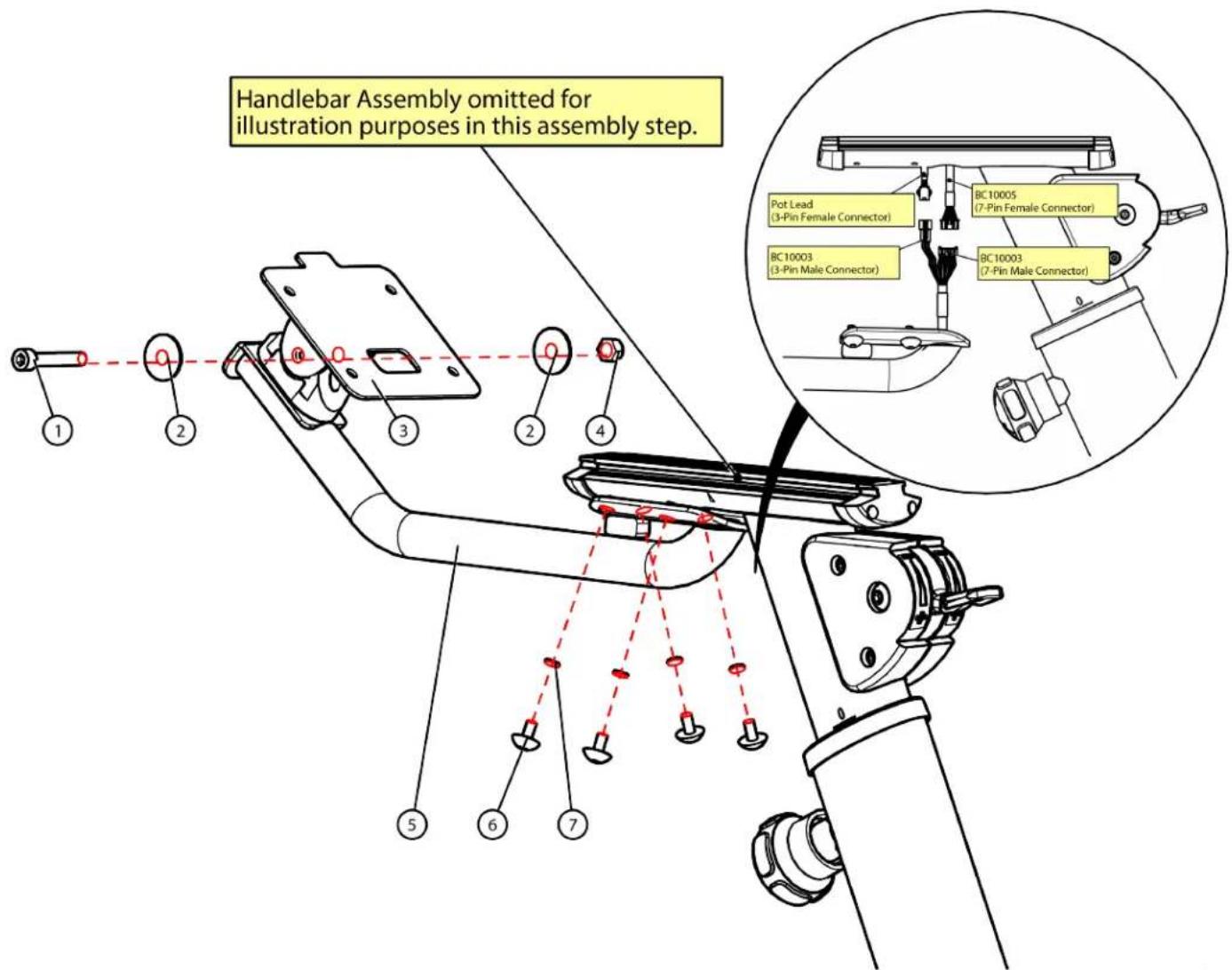
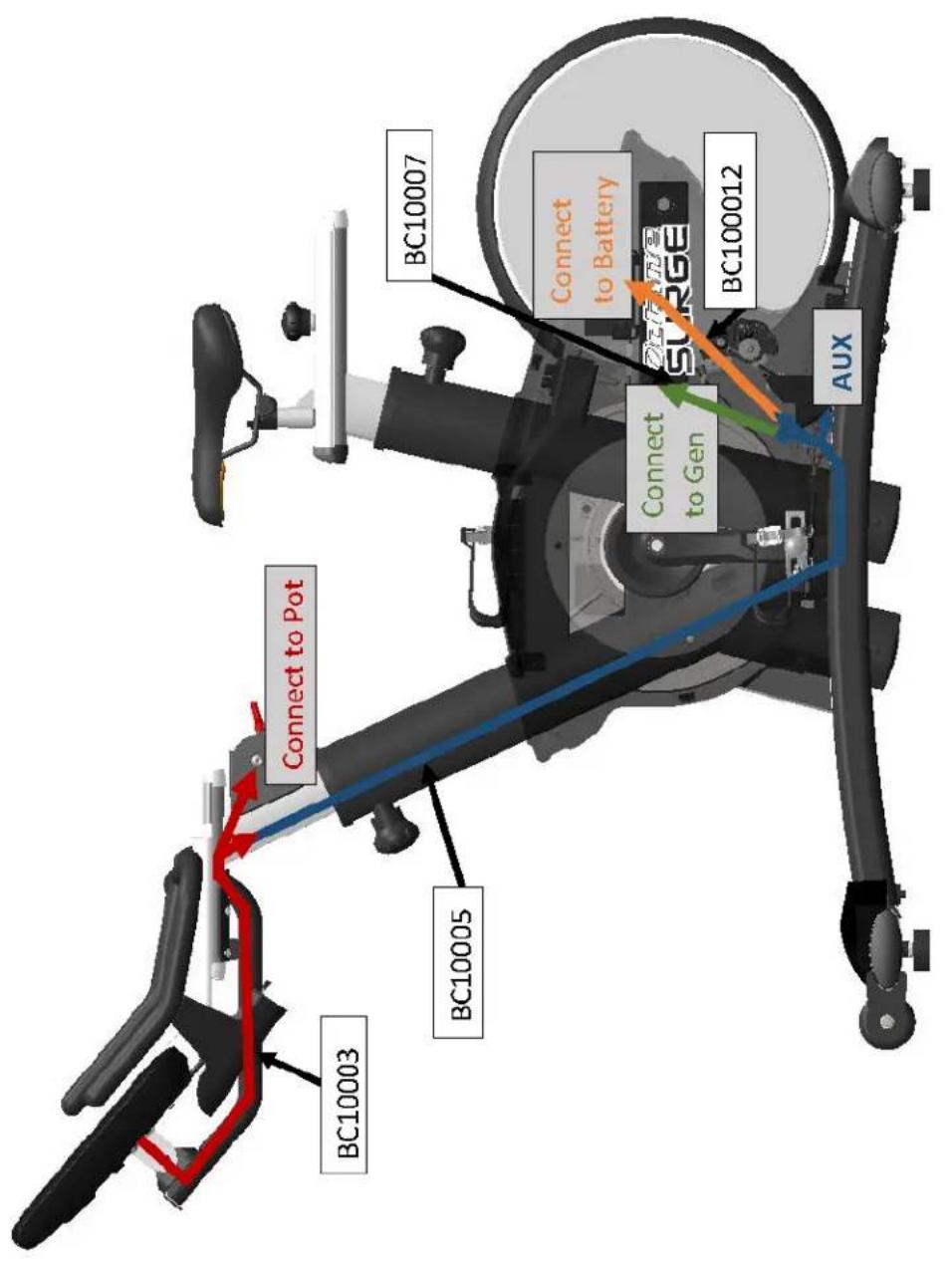
Step 6 (Console Mast Assembly):
Make the wiring connections shown below.
Next, secure the Console Arm Assembly to the Mainframe Assembly using the identified hardware.
Lastly, secure the Console Mounting Bracket to the Console Arm Assembly using the identified hardware.
| Item Part Number Description Quantity | ____ | ||
| 1 SM0025A SHCS, M8 X 50 1 | |||
| 2 C1093A FLAT WASHER, M8 2 | |||
| 3 SM0033A CONSOLE MOUNTINGBRACKET | 1 | ||
| 4 SM0033 NYLON LOCK NUT, M8 1 | |||
| 5 BC10610 | CONSOLE ARM ASSEMBLY | 1 | |
| 6 C1301A | BHCS, M6 X 12 4 | ||
| 7 SD0077 | LOCK WASHER, M6 | 4 | |
CHAPTER 2: ASSEMBLY GUIDE
ASSEMBLY STEPS:
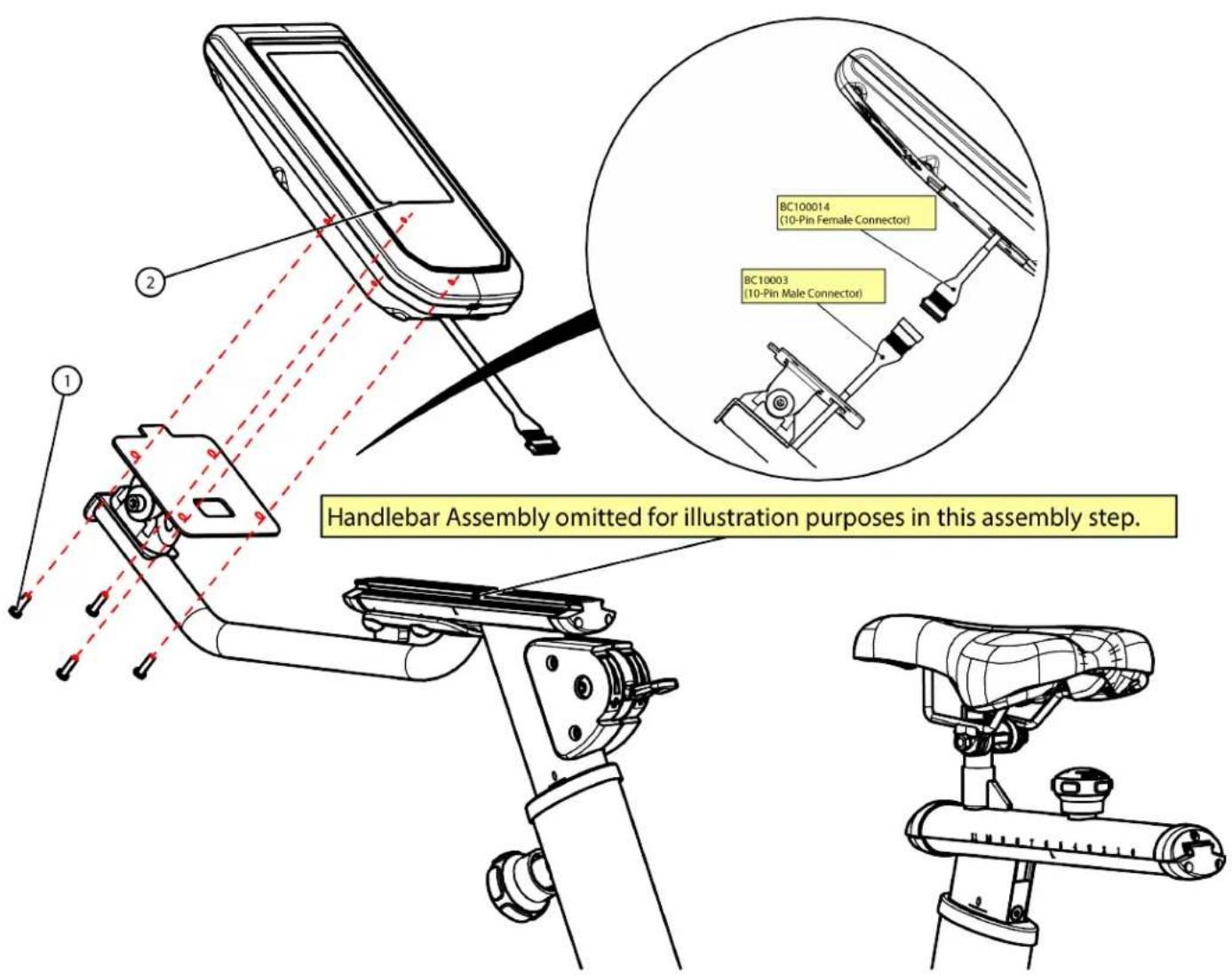
Step 7 (Console):
Make the wiring connection shown below.
| Item Part Number Description Quantity | ||||
| 1 | C1003A | PHCS, M5 | X 15MM 4 | |
| 2 | BC | 10900 | CONSOLE 1 | |
Next, secure the Console to the Console Mounting Bracket using the identified hardware.
CHAPTER 2: ASSEMBLY GUIDE
WIRING DIAGRAM:
![graph TD A["CONSOLE BC10900"] -->|T21018-400512| B["PCB100014"] B --> C["PCB10003"] C --> D["PCB10005"] D --> E["AUX"] D --> F["BT1-480319-0"] D --> G["BT1-480318-0"] D --> H["FUSF"] D --> I["BT1-208 FUSE HOLDER"] D --> J["SLA BATTERY FP1208 12V 0.8Ah"] D --> K["GEN SunUp G12S03 BC1012030"] C --> L[…](/content/2026/05/1059515/images/8d07bf5dd7b2e31478992b0b26fb8452f6d4dbdf8f90cd80bb7a0118c498b522.jpg)
CHAPTER 2: ASSEMBLY GUIDE
WIRING DIAGRAM:
CHAPTER 3: PRODUCT OVERVIEW
CHAPTER 3: PRODUCT OVERVIEW
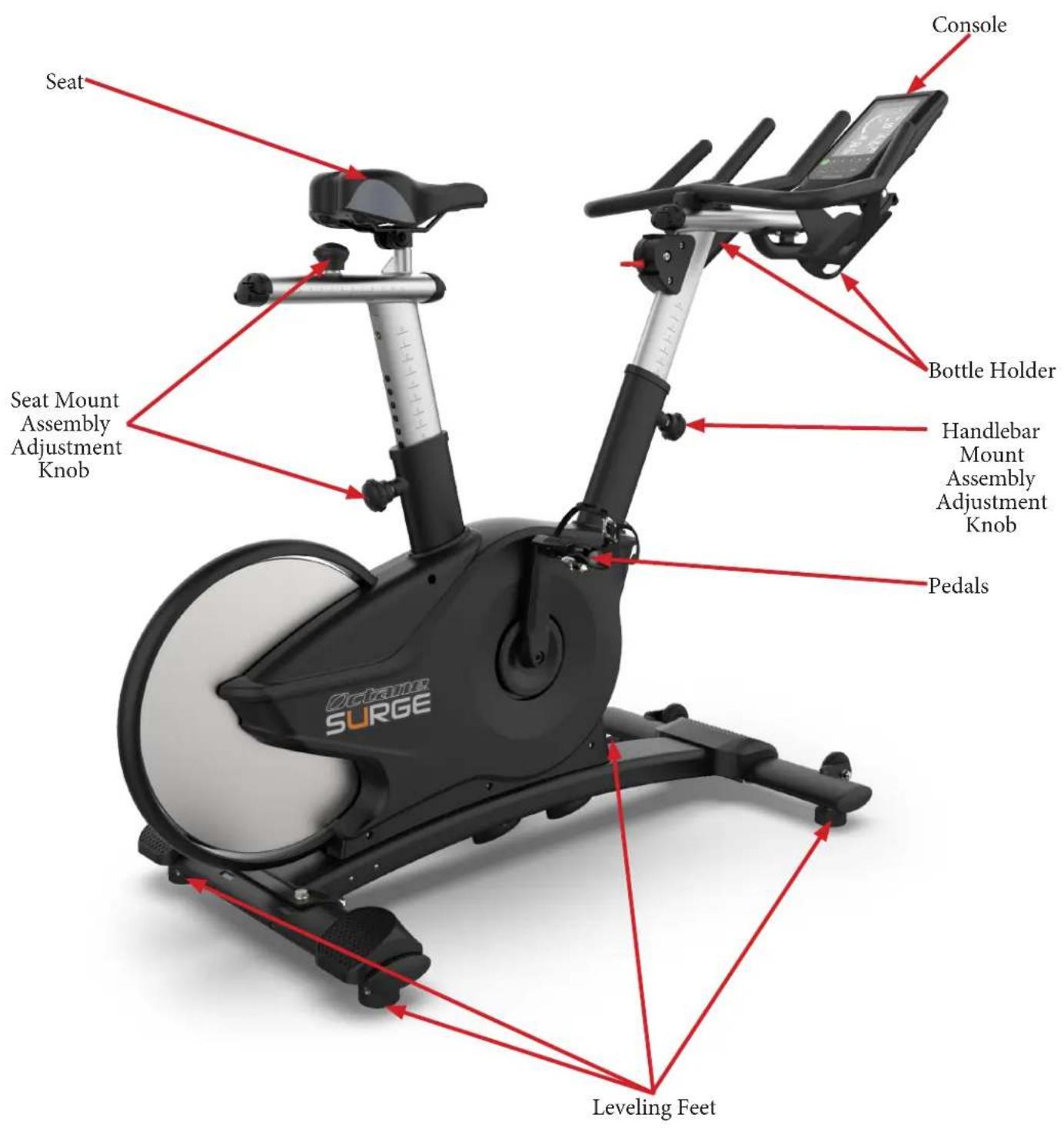
Seat:
Provides the user a place to sit during a workout.
Console:
The Console allows the user to set up a workout program and control the bike during a workout.
Seat Mount Assembly Adjustment Knob:
Used to adjust the vertical and horizontal positions of the Seat Mount Assembly to a comfortable position for the user.
Bottle Holder:
Holds an average size drink bottle for convenient use during a workout.
Handlebar Mount Assembly Adjustment Knob:
Used to adjust the vertical position of the Handlebar Mount Assembly to a comfortable position for the user.
Pedals:
Moving part of the bike that provides resistance to the lower body during a workout.
Leveling Feet:
An adjustable system used to aid in the leveling of the bike.
Red Brake Lever:
Enables the braking and complete stop of motion for the Cycle Bike.
CHAPTER 4: CARE & MAINTENANCE
CARE & MAINTENANCE:
It is important to perform the minor maintenance tasks described in this section. Failure to maintain the bike as described here could void the OCTANE Fitness Warranty.
Inspection:
OCTANE Fitness is not responsible for performing or scheduling regular maintenance or inspections.
Users should inspect the bike daily. Look and listen for slipping belts, loose fasteners, unusual noises, verify pedals are at the correct torque specification, and any other indications that the equipment may be in need of service. If any of these are noticed, obtain service. Do not attempt to use the bike until proper service has been performed or damaged parts have been replaced.
Important:
If you determine that the bike needs service, make sure that the bike cannot be used inadvertently. Make sure other users know that the bike needs service.
To order parts or to contact a OCTANE Authorized Service representative, please visit www.octanefitness.com.
CLEANING THE EQUIPMENT:
After Each Use:
Use GymWipes ™ Antibacterial wipes or spray a solution of 30 parts water to 1 part mild detergent to dampen a soft cloth and wipe all exposed surfaces.
Use a LCD/screen cleaner or spray a solution of 1 part 91% isopropyl alcohol and 1 part water to dampen a soft cloth and wipe the surface of the console. This helps remove fingerprints, dust, and dirt.
Weekly:
Vacuum any dust or dirt that might have accumulated under or around the bike or any cover vents.
* Clogged air vents can prevent adequate cooling, causing a shortened life.
CAUTION:
Do not use any acidic cleaners. Doing so will weaken the paint or powder coatings and may void the OCTANE Fitness Warranty. Never pour water or spray liquids on any part of the bike. Allow the bike to dry completely before using. Frequently vacuum the floor underneath the unit to prevent the accumulation of dust and dirt, which can affect the smooth operation of the unit.
CHAPTER 4: CARE & MAINTENANCE
OTHER SCHEDULED PREVENTIVE MAINTENANCE:
OCTANE recommends that quarterly scheduled maintenance be performed by a qualified service technician. Please contact your dealer or visit www.octanefitness.com to contact a local OCTANE authorized service technician.
Scheduled Preventive Maintenance:
- Check error log in console.
- Move unit and vacuum underneath.
- Check belt tension and tracking.
- Inspect all fasteners.
- Inspect all electrical connections.
- Inspect all components for abnormal or premature wear.
- Remove shroud covers and vacuum any debris out of the speed sensor, control electronics and moving parts.

CAUTION:
Use only OCTANE Fitness certified service providers.
LONG TERM STORAGE:
When the bike is not in use for any length of time, ensure it is positioned so that it will not become damaged or interfere with people or other equipment.
Storing the Chest Strap:
Store the chest strap in a place where it remains free of dust and dirt such as, in a closet or drawer. Be sure to protect the chest strap from extremes in temperature. Do not store it in a place that may be exposed to temperatures below 32° F ( 0° C). To clean the chest strap, use a sponge or soft cloth dampened in mild soap and water. Dry the surface thoroughly with a clean towel.
CHAPTER 5: CUSTOMER SERVICE
CONTACTING SERVICE:
OCTANE Fitness recommends that you gather the serial number, model number, and a brief description of the reason for the request. After information has been gathered you may choose to contact your selling dealer or local service company to set an appointment. (If you are not familiar with who is in your area, you may visit our website at www.octanefitness.com and use our dealer locator to obtain the contact information for the closest dealer).
You may also contact OCTANE Fitness' customer support team by calling 888.628.2634 or e-mailing us at service@octanefitness.com Monday – Friday during normal business hours.
OCTANE SUPPORT CENTER
PHONE: 888-628-2634
MONDAY-FRIDAY, 8AM-6PM CST
CUSTOMERSERVICE@OCTANEFITNESS.COM
CONTACTING SALES:
Interested in OCTANE Products? Please contact us with any sales or product inquires so that we may direct you to the appropriate sales representative to answer your questions.
OCTANE SUPPORT CENTER
PHONE: 888-628-2634
MONDAY-FRIDAY, 8AM-6PM CST
CUSTOMERSERVICE@OCTANEFITNESS.COM
CHAPTER 5: CUSTOMER SERVICE
REPORTING FREIGHT OR PARTS DAMAGE:
Unfortunately, sometimes materials can be damaged during shipment. If materials are damaged during shipment, please follow the guidelines below to determine the appropriate process for you to follow in case of damages.
Severe Damage:
Obvious damage to external packaging / internal product. Please refuse the shipment and it will be returned to OCTANE Fitness by the carrier. Contact the OCTANE Fitness customer support team by calling 888.628.2634 Monday-Friday during normal business hours to notify us that the shipment has been refused. Once we have received the damaged shipment, a replacement shipment will be sent to you. Only refuse the damaged piece if the shipment is multiple boxes.
Slight Damage:
The box may have minimal damages and you are not sure if the actual product is damaged or not. You must sign the bill of lading as damaged when accepting the shipment. Once you have opened the box and you have determined something is indeed damaged please gather the serial number, model number, description and photos of damages. Please make sure the photos include the damaged product as well as the damaged box the product arrived in. Contact the OCTANE Fitness customer support team by calling 888.628.2634 Monday-Friday during normal business hours.
Concealed Damage:
You may receive a shipment that looks intact and discover once the box has been opened that there are hidden damages. Please notify the carrier immediately. We will not be able to file a claim if the carrier is not notified in a timely manner. Once you have called the carrier you will need to gather the serial number, model number, description and photos of damages. Contact the OCTANE Fitness customer support team by calling 888.883.8783 Monday-Friday during normal business hours.
CHAPTER 6: ADDITIONAL INFORMATION
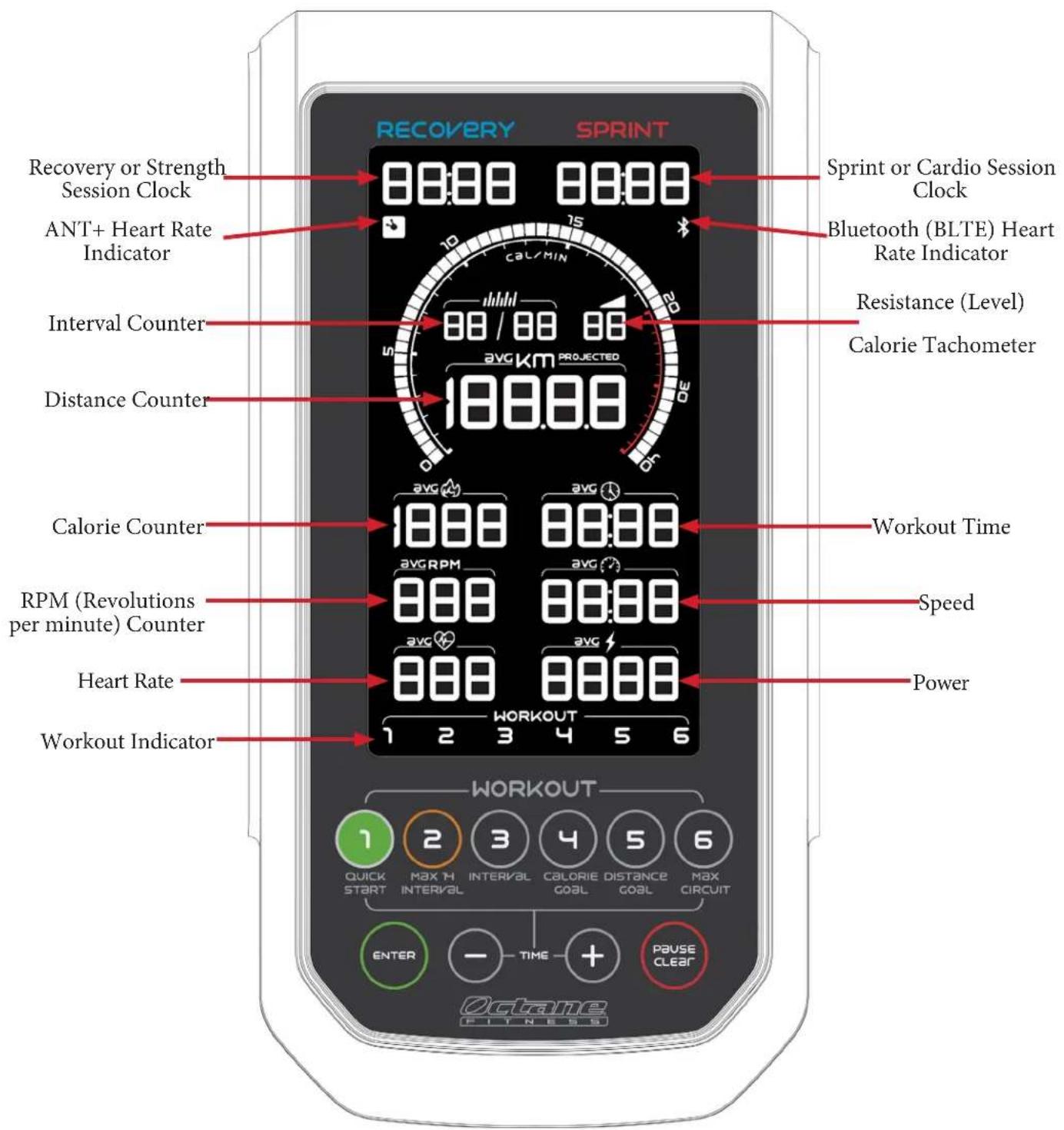
CONSOLE OVERVIEW:
CHAPTER 6: ADDITIONAL INFORMATION
Recovery or Strength Session Clock:
Counts down the time, in minutes and seconds, for the current recovery interval in the MAX 14 INTERVAL or Interval program. For MAX 14 INTERVAL, recovery intervals are 80 seconds (0:80). For the Interval program, the default value is 30 seconds (0:30) and may be adjusted using the Time (+ / -) keypad buttons to any value between 0:05 and 9:55, in 5-second increments. Press Enter to save selections.
ANT+:
When lit, this icon indicates that ANT+™ wireless communications is active and detecting signal from the optional wireless heart rate chest strap.
Interval Counter:
Displays your progress in an interval program by indicating the current interval number and the total number of intervals in the program. For example, 04/08 indicates that you are currently in the 4th interval of a total of 8 intervals.
When setting up the Interval program, use the Time (+ / -) keypad buttons when the second set of digits is flashing to set your desired number of intervals, then press Enter to save the default or adjusted value. The default value for intervals is 00/08 (8 interval rounds); you may program up to 99 rounds.
Distance Counter:
This counter displays an estimate of the total distance (in miles/kilometers) “travelled” during the workout, counting up.
When setting up the Distance Goal program, the default distance goal is 5 miles (8 km). Use the Time (-) and (+) keypad button to set a goal between 0.1 and 199.9 (in increments of 0.1). Press Enter to save the default or adjusted value.
Calorie Counter:
This counter dynamically displays an estimate of total calories burned during the workout. Average (avg) calories/per minute is displayed during cooldown following a programmed workout.
When setting up the Calorie Goal program, the default calorie goal is 50. Use the Time (-) keypad button to set a goal between 5 and 45 (in increments of 5), or use the Time (+) keypad button to set a goal between 55 and 1999 (in increments of 50). Press Enter to save the default or adjusted value.
RPM (RPM Counter):
This counter displays RPM during a workout. Average (avg) RPM is displayed during cooldown following a programmed workout.
CHAPTER 6: ADDITIONAL INFORMATION
Heart Rate:
This section displays your approximate current heart rate in beats per minute (BPM). Average (avg) heart rate and peak heart rate, in beats per minute, are displayed during cooldown following a programmed workout.
Note: For heart rate data to be displayed here, you must be wearing a compatible wireless heart rate transmitter, and either the ANT+ or Bluetooth connectivity indicator must be illuminated.

WARNING! Consult a physician before you start an exercise program. Stop exercising if you feel pain or less in your chest, become short of breath, or feel faint. Contact your doctor before you use the machine. The heart rate displayed is an approximation and should be used for reference only.
Workout Indicator:
The illuminated number corresponds to the workout selected by pressing a button on the keypad. The available workouts are the following:
- MAX 14 INTERVAL (pre-set interval program)
- Interval (custom interval program)
- Calorie Goal
- Distance Goal
-
MAX CIRCUIT (instructor-led group training)
-
Quick Start (simple program without programming options; also initiates if you begin pedaling without pressing a button)
Note: Descriptions of each program can be found in Octane Fitness Product Programs and Features (PN 110751-001), available for review or download at http://www.octanefitness.com.
Sprint Session Clock:
Counts down the time, in minutes and seconds, for the current sprint interval in the MAX 14 INTERVAL. Interval, or MAX CIRCUIT program. For MAX 14 INTERVAL, sprint intervals are 25 seconds (0:25). For the Interval program, the default value is 30 seconds (0:30) and may be adjusted using the Time (+ / - ) keypad buttons to any value between 0:05 and 9:55, in five second increments. Press Enter to save selections.
Bluetooth (BLTE) Indicator:
When lit, this icon indicates that Bluetooth * wireless communications is active and detecting a signal from a heart rate monitor, tablet, or other device or app.
Resistance (Level):
Displays the Resistance Level (1-20), where 1 is the lowest resistance level and 20 is the highest. Use the resistance adjustment lever below the console to increase or decrease your resistance level.
CHAPTER 6: ADDITIONAL INFORMATION
Calorie Tachometer:
The calorie tachometer is the centerpiece of the LCD, giving you real-time feedback regarding your calories/minute burn rate, the peak calories/minute point of your workout, and a “peak range” at +/- 20% of your peak point. During interval programs, this peak range of illuminated segments on the tachometer indicates your target range surrounding your peak point.
Workout Time:
Displays total workout time, counting up from 0:00. The timer goes up to 99 minutes:59 seconds, then the display rolls over to hours:minutes.
In the MAX 14 INTERVAL program, the default workout time is 14 minutes. Use the Time (+ / -) keypad to select 3.5, 7, 21, or 28 minutes. Press Enter to save the selected value.
Speed:
Displays your speed in miles per hour or kilometers per hour. Average speed is displayed during cooldown following a programmed workout. Note: The numeric value displayed for Speed is an approximation based on the real-time workout data of the user.
Power:
Displays the current estimate of power you are producing, in watts. Average estimated watts per minute (avg) and total estimated watts are displayed during cooldown following a programmed workout. Note: The numeric value displayed for Power is an approximation based on the real-time workout data of the user.
WORKOUT SUMMARY:
During a cooldown phase after the completion of a programmed workout (MAX 14 INTERVAL, Interval, Calorie Goal, or Distance Goal), the following fields are displayed on the LCD. (Where two values are listed, the values alternate on the display in two second intervals.)
- Peak calorie/minute achieved
- Total distance
- Average calories/minute and total calories
- Average RPM
- Average Speed
- Average heart rate and peak heart rate (if using a wireless heart rate monitor)
- Average estimated watts/minute and total estimated watts.
CHAPTER 6: ADDITIONAL INFORMATION
KEYPAD BUTTONS:
![graph TD A["1 QUICK START"] --> B["2 MAX 7H INTERVAL"] B --> C["3 INTERVAL"] C --> D["4 CALORIE GOAL"] D --> E["5 DISTANCE GOAL"] E --> F["6 MAX CIRCUIT"] G["ENTER"] --> H["TIME"] H --> I["+"] J["PAUSE CLEAR"] --> K["+"]](/content/2026/05/1059515/images/add65f7330f294ea56daf54247305b2b5abc0238be4c34f1b1a1ff5696f1ae4a.jpg)
Quick Start:
The easiest way for you to start your workout is to begin pedaling, or press the Quick Start button, initiating a simple workout without intervals or a defined duration. The workout timer counts up from 00:00. You may change the level of resistance using the resistance lever.
If you do not press any keypad button within six seconds after the Octane console first becomes active (such as when you first step on the machine and move the pedals), then you will automatically enter the Quick Start program.
MAX 14 INTERVAL:
Press MAX 14 INTERVAL then press Enter to begin a High Intensity Interval Training (HIIT) program with a pre-programmed duration and pre-set sprint and recovery intervals of 25 and 80 seconds, respectively. The default program lasts 14 minutes; press enter when the Time flashes “14” to select this option.
You may choose a longer or shorter workout by pressing the Time (+) or (-) button when the Time value is flashing during setup. Options are 3.5 minutes, 7 minutes, 14 minutes (default), 21 minutes, or 28 minutes. Press Enter to save your selection. The interval durations remain the same but the total number of intervals increases or decreases according to the total time selected for the workout.
Interval:
Press Interval then press Enter to program a custom interval program.
Next, program the sprint session time by pressing Enter to accept the default value of 0:30, or press the Time (+) or (-) buttons to select a time between 0:05 to 9:55 and then press Enter.
Next, program the recovery session time by pressing Enter to accept the default value of 0:30, or press the Time (+) or (-) buttons to select a time between 0:05 to 9:55 and then press Enter.
Next, program the number of interval rounds by pressing Enter to accept the default value of 00/08, or press the Time (+) or (-) buttons to select a number of rounds between 01 and 99, then press Enter.
Lastly, enter weight by pressing Enter to accept the default value of 150 lbs. (68 kg) and press Enter to continue, or use the Time (+) or (−) buttons to change the value to any weight between 70 and 350 pounds (30 and 160 kilograms) and press Enter to save the adjusted value.
CHAPTER 6: ADDITIONAL INFORMATION
Calorie Goal:
Press Calorie Goal, and then press Enter to quickly enter a program with a duration that you choose.
Next, program the workout duration by pressing Enter to accept the default value of 30:00, or press the Time (+) or (-) buttons to select a time between 1:00 to 99:00 and then press Enter. The default value is 30:00.
Lastly, enter your weight by pressing Enter twice to accept the default value of 150 lbs. (68 kg), or use the Time (+ / -) buttons to change the value to any weight between 70 and 350 pounds (30 and 160 kilograms).
Distance Goal:
Press Distance Goal, and then program the distance goal by pressing Enter to accept the default value of 5 miles (8 km), or press the Time (+) or (-) buttons to select a distance between 0.1 - 199.0 in 0.1 increments and then press Enter.
MAX CIRCUIT:
Quickly begin an instructor-led program with other users and without defined interval times or a set duration. Simply press MAX CIRCUIT and get started. You (and your instructor) fully control the intervals as you work together on and off the machine.
Pause Clear:
Press once to pause your workout. Pause time is displayed in the Workout Time field, counting down. Or, if you stop pedaling for 2 seconds or more during a workout, the unit will automatically begin a pause phase. In either case, simply press a key (other than Quick Start or MAX CIRCUIT) or start pedaling to resume your workout.
When in Pause mode, if you wish to begin a Quick Start or MAX CIRCUIT program, press the appropriate program key to begin.
When programming a workout, press Pause Clear if you make a mistake and wish to start over. The console returns to the beginning of the workout set-up process.
Press the Pause Clear button twice within two seconds at any time during set-up or a workout to reset the console.
Time:
Press the (+) or (-) to increase or decrease the time of your workout, in 1 minute increments. The standard workout time is 30:00. Press the Time button during the workout to add time to the workout (Quick Start and MAX CiRCUIT excluded). The maximum time is 99:00.
Enter:
Press Enter after pressing a keypad program button and after changing values when programming a workout or changing workout time.
CHAPTER 6: ADDITIONAL INFORMATION
SOFTWARE MANAGEMENT:
The console software includes management functions to help you make the most of your experience, including simple diagnostics to help with troubleshooting and Club (user) settings that may be customized to suit your environment. To access these functions, press and hold both the Time (+) and Time (−) keys for three seconds, or until you hear a bell. Use the (+) key to scroll through the diagnostics and club setting described below. Press Enter to show the details of a function, to make a change to a user setting, or to run a diagnostic test. To exit diagnostics, press Pause Clear until the console resets.
Should you encounter errors or have questions regarding diagnostics, please contact Octane Fitness Customer Service for assistance.
Available options may vary depending upon your software version.
| Code Type | Description | ____ |
| diaG nost 1 | Diagnostic | Firmware. The firmware version, model and console serial number information. Firmware version number is displayed in the middle of the screen. Model number is displayed in the lower right. The console serial number is displayed across the lower part of the screen (across several fields). Boot code version is displayed in the lower left. Press Pause Clear twice to step back to scrolling mode. |
| diaG nost 2 | Diagnostic | LCD Display Test. Initiates a sequential illumination of all individual segments of the LCD. Press Pause Clear twice to step back to scrolling mode. |
| diaG nost 3 | Diagnostic | Keypad Test. Press Enter, then press each of the 10 keypad buttons. The name or number of the pressed button shows on the display and the key counter increments by 1. When all 10 keys have been successfully tested, “PASS” appears in the display. Press Pause Clear twice to step back to scrolling mode. |
| diaG nost 4 | Diagnostic | Radio Board Communications. The console sends test data to the lower board; “PASS” appears in the display if return data is received. Radio firmware version and heart rate are displayed in the lower right and lower left part of the screen. Press Pause Clear twice to step back to scrolling mode. |
| diaG nost 5 | Diagnostic | Resistance Level. Move the resistance level all the way forward and back. Level number is displayed in the Level field, strokes in the middle, and ADC value and RPM in the lower half of the screen. If ADC is too high or too low, an error displays in the lower half of the screen. |
| diaG nost 6 | Diagnostic | Battery. Installed battery and generator volts values are displayed in the lower part of the screen. Battery state shows near the bottom of the screen; if it is blank or reads “chrg” (charging”), the battery is good. |
CHAPTER 6: ADDITIONAL INFORMATION
| Code Type | Description | ____ |
| CLUB UNIT | Club Setting | Unit of Measurement. Press Enter and then Time (+) or Time (-) to scroll between miles and kilometers. Press Enter to save selection. |
| CLUB BELL | Club Setting | Bell Volume. Sets the decibel level of the bell that provides signals during workouts. The options are Off, 1 (softest), 2 or 3 (loudest), and the default value is 3. Press Enter, then Time (+) or Time (-) keys to scroll through the options. Press Pause Clear once to save your selection and step back to scrolling mode. |
| CLUB Brit | Club Setting | Brightness. Sets the brightness of the display. The default value is 100. Press Enter, then use the Time (+) or Time (-) keys to increase or decrease the brightness, in 5% increments. Press Pause Clear once to save your selection and step back to scrolling mode. |
| USAG U1 R | Usage | Revolutions. Displays the total number of revolutions for the unit. The data is displayed in thousands, shown vertically in two groups of three at the lower left of the screen. The display dynamically changes if you are pedaling vs. rowing. If desired, press and hold Quick Start and Pause Clear simultaneously for three seconds to reset the counter to zero. Press Pause Clear twice to step back to scrolling mode. |
| USAG U2 St | Usage | Total hours. Displays the total number of hours and minutes of operation for the unit. The data is shown vertically in two groups at the lower left of the screen; hours on top, minutes underneath. If desired, press and hold Quick Start and Pause Clear simultaneously for three seconds to reset the counter to zero. Press Pause Clear twice to step back to scrolling mode. |
CHAPTER 7: WARRANTY INFORMATION
Save Time and Register Online!
Activate Multiple Warranties at octanefitness.com
All OCTANE® Fitness products are distributed by OCTANE and are warranted to the original registered product purchaser and the parts of the OCTANE product (the "Product") listed below, under normal use and service, shall be free of manufacturing defects in workmanship and materials only for the period of time beginning from the original date of purchase set forth below:
| Frame* 5 Years | |
| PartsMechanical Parts (Drive Mechanism, Breaking System, Cranks)Wear Items (Saddle, Pedals) | 2 Years3 Months |
| LaborPartsWear Items | 1 Year3 Months |
NOTE: Warranty valid for USA and Canada only.
NOTE: Failure to register this product will result in no servicing or authorization of parts to be shipped.
NOTE: Buying after-market products from a 3rd party will result in voided warranty.
NOTE: This product is intended for Commercial use which includes facilities where usage is in excess of 8 hours per day. This includes all dues-paying facilities (regardless of usage) as well as many non-dues-paying facilities. If this product will not be used in this particular setting, please contact OCTANE as this warranty is void.
Frame: The frame is warranted for defects in material and workmanship for five years from the date of purchase. The frame is warranted for labor and freight (for parts shipped from OCTANE) for one year from date of purchase.* This limited warranty on structural frame does not include paint or coatings.
Parts: The Cycle Bike's mechanical parts are warranted for defects in material and workmanship for two years with one year labor warranty. The Cycle Bike's wear items are warranted for defects in material and workmanship for three months with three months labor warranty. This limited warranty does not cover damage or equipment failure resulting from or caused by improper assembly/installation, failure to follow instructions and warnings in owner's manual, accident, misuse, abuse, unauthorized modification, or failure to provide reasonable and necessary maintenance.* OCTANE Fitness shall not warrant the performance of the heart rate system on its
products, as the heart rate system performance varies, based on user's physiology, age, method of use and other factors.* This limited warranty shall not apply to software version upgrades.
Cosmetics: The Cycle Bike's wear items are warranted for defects in material and workmanship for six months with one year labor warranty. This limited warranty does not cover damage or equipment failure resulting from or caused by improper assembly/installation, failure to follow instructions and warnings in owner's manual, accident, misuse, abuse, unauthorized modification, or failure to provide reasonable and necessary maintenance. This limited warranty will apply to but may not be limited to plastic covers, shrouds, caps, badges, overlays, paint, coatings, and grips.
Labor: Labor is covered for a period of one year from the date of purchase unless otherwise expressed within this limited warranty as long as a OCTANE authorized service provider performs the service. Service that requires over 50 miles of travel may be subject to additional charges. Reasonable and necessary maintenance guidelines can be found in the owner's manual.
Claims Procedure: OCTANE Limited Warranty service may be obtained by contacting the authorized OCTANE dealer from whom the Product was purchased. If the dealer from whom the Product was purchased is no longer an authorized OCTANE dealer, then OCTANE Limited Warranty service may be obtained by contacting OCTANE directly at:
Octane Support Center
Phone: 888-628-2634
Monday-Friday, 8am-6pm CST
customerservice@octanefitness.com
CHAPTER 7: WARRANTY INFORMATION
Save Time and Register Online!
Activate Multiple Warranties at octanefitness.com
- THIS LIMITED WARRANTY GIVES YOU SPECIFIC LEGAL RIGHTS AND YOU MANY ALSO HAVE OTHER RIGHTS, WHICH VARY FROM STATE TO STATE.
- This Limited Warranty can be processed only if the Warranty Registration Form is completed on-line; or if the attached form is filled in, signed by the original purchaser and mailed to OCTANE within 30 days of purchaser's receipt of this Product. The serial number must be intact on the Product for this Limited Warranty to be valid.
- This Limited Warranty applies to the product only while the Product remains in the possession of the original purchaser and is not transferable.
- This Limited Warranty becomes VALID ONLY if the Product is initially assembled/installed by a OCTANE authorized dealer/ technician (if anyone other than a OCTANE authorized dealer/ technician initially assembles and installs the Product, this Limited Warranty will be void unless the written authorization of OCTANE is first obtained).
- This Limited Warranty does not cover damage or equipment failure resulting from or caused by improper assembly/installation, failure to follow instructions and warnings in owner's manual, accident, misuse, abuse, unauthorized modification, or failure to provide reasonable and necessary maintenance (as referenced in the owner's manual.)
- This Limited Warranty applies only to the cost of repair or replacement of parts and does not include labor (beyond the above warranty period), transportation, service, return and freight charges associated therewith except as expressly specified herein.
- This Limited Warranty shall not apply to: Service calls to correct installation of the equipment or instruction to owners on how to use the equipment; or any labor costs incurred beyond the applicable labor warranty period.
- This Limited Warranty, which is given expressly and in lieu of all other express warranties, constitutes the only warranty made by OCTANE.
- This Limited Warranty becomes INVALID if the unit is assembled, placed for use, or placed in storage in a location that is not inside and protected from all outside weather elements including, but not limited to, rain, snow, sleet, and extreme heat or cold temperatures. Contact OCTANE for any questions regarding an approved location for the use of the unit.
- ANY IMPLIED WARRANTY, INCLUDING WITHOUT LIMITATION THE WARRANTIES OF MERCHANTABILITY AND FITNESS FOR A PARTICULAR PURPOSE, IS LIMITED IN DURATION AND REMEDY TO THE TIME PERIOD COVERED BY THE LIMITED WARRANTY. SOME STATES DO NOT ALLOW
Keep this page for your records
LIMITATIONS ON HOW LONG AN IMPLIED WARRANTY LASTS, SO THE ABOVE LIMITATION MAY NOT APPLY TO YOU.
- THE REMEDIES DESCRIBED ABOVE ARE YOUR SOLE AND EXCLUSIVE REMEDIES AND OCTANE'S ENTIRE LIABILITY FOR ANY BREACH OF THIS LIMITED WARRANTY. OCTANE'S LIABILITY SHALL UNDER NO CIRCUMSTANCES EXCEED THE ACTUAL AMOUNT PAID BY YOU FOR THE PRODUCT, NOR SHALL OCTANE UNDER ANY CIRCUMSTANCES BE LIABLE FOR ANY CONSEQUENTIAL, INCIDENTAL, SPECIAL OR PUNITIVE DAMAGES OR LOSSES, WHETHER DIRECT OR INDIRECT. SOME STATES DO NOT ALLOW THE EXCLUSION OR LIMITATION OF INCIDENTAL OR CONSEQUENTIAL DAMAGES, SO THE ABOVE LIMITATION OR EXCLUSION MAY NOT APPLY TO YOU.
NOTE TO AUTHORIZED WARRANTY LABOR PROVIDERS:
Warranty labor reimbursement or warranty parts rights may not be transferred to, reassigned to, a third party without the express written consent of OCTANE. Even jobbing out warranty labor requires OCTANE's written approval.
BC1000 CYCLE BIKE SERIAL NUMBERS:
The BC1000 Cycle Bike comes with a serial number on the base. The serial number on the base is on the rear stabilizer bar. Please write down your serial number below and keep for your records.
BASE SERIAL NUMBER:
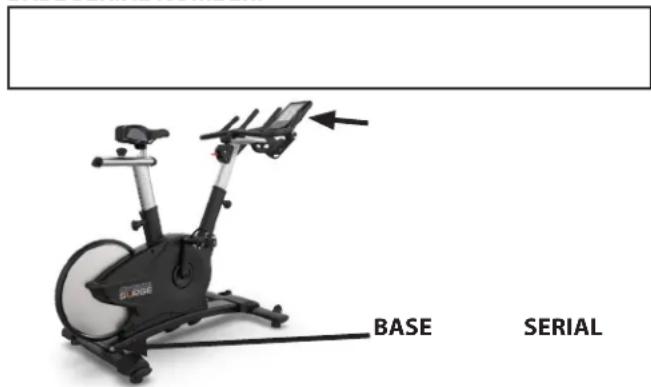
SAMPLE SERIAL NUMBER STICKER:

CHAPTER 7: WARRANTY INFORMATION
Thank you for purchasing a OCTANE product. To validate the OCTANE product warranty the fast and easy way, please go on-line now to octanefitness.com and register your product. The information you provide will never be distributed to any other individuals or agencies for any purpose. If you prefer to mail your warranty card, have the owner of the product complete the information below and return it to OCTANE Fitness within 30 days from the date of equipment installation.
Please Note: Failure to register this product will result in no servicing or authorization of parts to be shipped.
To mail your warranty information, mail the completed information to: Service Dept., Octane Fitness, 865 Hoff Rd., St. Louis, MO, 63366 (or save postage and register online at www.octanefitness.com)
Commercial Warranty Registration
PLEASE PROVIDE BOTH SERIAL NUMBERS BELOW. REQUIRED FOR WARRANTY REGISTRATION:
CONSOLE SERIAL NUMBER:
BASE SERIAL NUMBER:
Model Type
Date of Purchase
Your Company Name
Contact First Name
Contact Last Name
Address
City
_State
ZIP
Email Address
Website
Phone
Fax
- Where did you first learn about OCTANE?
a. Dealer b. Website
____ c. Advertisement ____ d. Referral
____ e. Current Customer ____ f. Other
- Why did you purchase a OCTANE product?
a. Design/Appearance
b. Dealer Suggestion
c. Price/Value
d. Quality Construction
e. Performance
f. OCTANE Reputation
__ g. Other_
The Ground Truth image displays a single, solid horizontal line, which is a stylistic or background element (like a ruled paper line or separator), not a placeholder for text. According to Rule 2, such stylistic/background lines must be ignored by the OCR result. The OCR content provided is "", which consists of no characters. This correctly represents the line in the GT by ignoring it entirely. Since the OCR output includes no underscores for this line, this complies with the “Stylistic/Background Lines (Ignore)” rule. Therefore, the OCR result is consistent with the Ground Truth.
- Please indicate your type of facility:
a. Apartment/Condo
b. Corporate Fitness Center
c. Municipality
d. Health Club/Gym/Spa
e. Hotel/Resort
f. Military Base
g. Student Rec Center
h. Other
- What other types of equipment does your company currently own?
a. Treadmill
Brand ____
b. Bike
Brand
c. Elliptical
Brand
d. Free Weights/Gym
Brand
- How many people use your facility on a daily basis?
a. <25
b. 25-75
c. 76-150
d. 150+
- Do you plan to purchase more fitness equipment in the next 6-12 months?
____ Yes ____ No
- If you answered "yes" to question 6, what type do you plan to purchase?
a. Treadmill
b. Elliptical
c. Stationary Bike
d. Free Weights
e. Gym
f. Other
- Would you recommend OCTANE to other club owners?
____ Yes ____ No
- You are a valued OCTANE customer and your suggestions allow us to continually improve your experience. Is there anything else you would like us to know? Please explain:
CHAPTER 7: WARRANTY INFORMATION
Save Time and Register Online!
Activate Multiple Warranties at octanefitness.com
All OCTANE® Fitness products are distributed by OCTANE and are warranted to the original registered product purchaser and the parts of the OCTANE product (the "Product") listed below, under normal use and service, shall be free of manufacturing defects in workmanship and materials only for the period of time beginning from the original date of purchase set forth below:
| Frame* 5 Years | |
| PartsMechanical Parts (Drive Mechanism, Breaking System, Cranks)Wear Items (Saddle, Pedals) | 3 Years6 Months |
| LaborPartsWear Items | 1 Year6 months |
NOTE: Warranty valid for USA and Canada only.
NOTE: Failure to register this product will result in no servicing or authorization of parts to be shipped.
NOTE: Buying after-market products from a 3rd party will result in voided warranty.
NOTE: This product is intended for Residential use. If this product will not be used in this particular setting, please contact OCTANE as is warranty is void.
Frame: The frame is warranted for defects in material and workmanship for five years from the date of purchase. The frame is warranted for labor and freight (for parts shipped from OCTANE) for one year from date of purchase.* This limited warranty on structural frame does not include paint or coatings.
Parts: The Cycle Bike's mechanical parts are warranted for defects in material and workmanship for three years with one year labor warranty. The Cycle Bike's wear items are warranted for defects in material and workmanship for six months with six months labor warranty. This limited warranty does not cover damage or equipment failure resulting from or caused by improper assembly/installation, failure to follow instructions and warnings in owner's manual, accident, misuse, abuse, unauthorized modification, or failure to provide reasonable and necessary maintenance.* OCTANE Fitness shall not warrant the performance of the heart rate system on its products, as the heart rate system performance varies, based on user's physiology, age, method of use and other factors.* This limited warranty shall not apply to software version
upgrades.
Cosmetics: The Cycle Bike's wear items are warranted for defects in material and workmanship for six months with one year labor warranty. This limited warranty does not cover damage or equipment failure resulting from or caused by improper assembly/installation, failure to follow instructions and warnings in owner's manual, accident, misuse, abuse, unauthorized modification, or failure to provide reasonable and necessary maintenance. This limited warranty will apply to but may not be limited to plastic covers, shrouds, caps, badges, overlays, paint, coatings, and grips.
Labor: Labor is covered for a period of one year from the date of purchase unless otherwise expressed within this limited warranty as long as a OCTANE authorized service provider performs the service. Service that requires over 50 miles of travel may be subject to additional charges. Reasonable and necessary maintenance guidelines can be found in the owner's manual.
Claims Procedure: OCTANE Limited Warranty service may be obtained by contacting the authorized OCTANE dealer from whom the Product was purchased. If the dealer from whom the Product was purchased is no longer an authorized OCTANE dealer, then OCTANE Limited Warranty service may be obtained by contacting OCTANE directly at:
Octane Support Center
Phone: 888-628-2634
Monday-Friday, 8am-6pm CST
customerservice@octanefitness.com
CHAPTER 7: WARRANTY INFORMATION
Save Time and Register Online!
Activate Multiple Warranties at octanefitness.com
- THIS LIMITED WARRANTY GIVES YOU SPECIFIC LEGAL RIGHTS AND YOU MANY ALSO HAVE OTHER RIGHTS, WHICH VARY FROM STATE TO STATE.
- This Limited Warranty can be processed only if the Warranty Registration Form is completed on-line; or if the attached form is filled in, signed by the original purchaser and mailed to OCTANE within 30 days of purchaser's receipt of this Product. The serial number must be intact on the Product for this Limited Warranty to be valid.
- This Limited Warranty applies to the product only while the Product remains in the possession of the original purchaser and is not transferable.
- This Limited Warranty becomes VALID ONLY if the Product is initially assembled/installed by a OCTANE authorized dealer/ technician (if anyone other than a OCTANE authorized dealer/ technician initially assembles and installs the Product, this Limited Warranty will be void unless the written authorization of OCTANE is first obtained).
- This Limited Warranty does not cover damage or equipment failure resulting from or caused by improper assembly/ installation, failure to follow instructions and warnings in owner's manual, accident, misuse, abuse, unauthorized modification, or failure to provide reasonable and necessary maintenance (as referenced in the owner's manual.)
- This Limited Warranty applies only to the cost of repair or replacement of parts and does not include labor (beyond the above warranty period), transportation, service, return and freight charges associated therewith except as expressly specified herein.
- This Limited Warranty shall not apply to: Service calls to correct installation of the equipment or instruction to owners on how to use the equipment; or any labor costs incurred beyond the applicable labor warranty period.
- This Limited Warranty, which is given expressly and in lieu of all other express warranties, constitutes the only warranty made by OCTANE.
- This Limited Warranty becomes INVALID if the unit is assembled, placed for use, or placed in storage in a location that is not inside and protected from all outside weather elements including, but not limited to, rain, snow, sleet, and extreme heat or cold temperatures. Contact OCTANE for any questions regarding an approved location for the use of the unit.
- ANY IMPLIED WARRANTY, INCLUDING WITHOUT LIMITATION THE WARRANTIES OF MERCHANTABILITY AND FITNESS FOR A PARTICULAR PURPOSE, IS LIMITED IN DURATION AND REMEDY TO THE TIME PERIOD COVERED BY THE LIMITED WARRANTY. SOME STATES DO NOT ALLOW
Keep this page for your records
LIMITATIONS ON HOW LONG AN IMPLIED WARRANTY LASTS, SO THE ABOVE LIMITATION MAY NOT APPLY TO YOU.
- THE REMEDIES DESCRIBED ABOVE ARE YOUR SOLE AND EXCLUSIVE REMEDIES AND OCTANE'S ENTIRE LIABILITY FOR ANY BREACH OF THIS LIMITED WARRANTY. OCTANE'S LIABILITY SHALL UNDER NO CIRCUMSTANCES EXCEED THE ACTUAL AMOUNT PAID BY YOU FOR THE PRODUCT, NOR SHALL OCTANE UNDER ANY CIRCUMSTANCES BE LIABLE FOR ANY CONSEQUENTIAL, INCIDENTAL, SPECIAL OR PUNITIVE DAMAGES OR LOSSES, WHETHER DIRECT OR INDIRECT. SOME STATES DO NOT ALLOW THE EXCLUSION OR LIMITATION OF INCIDENTAL OR CONSEQUENTIAL DAMAGES, SO THE ABOVE LIMITATION OR EXCLUSION MAY NOT APPLY TO YOU.
NOTE TO AUTHORIZED WARRANTY LABOR PROVIDERS:
Warranty labor reimbursement or warranty parts rights may not be transferred to, reassigned to, a third party without the express written consent of OCTANE. Even jobbing out warranty labor requires OCTANE's written approval.
BC1000 CYCLE BIKE SERIAL NUMBERS:
The BC1000 Cycle Bike comes with a serial number on the base. The serial number on the base is on the rear stabilizer bar. Please write down your serial number below and keep for your records.
BASE SERIAL NUMBER:
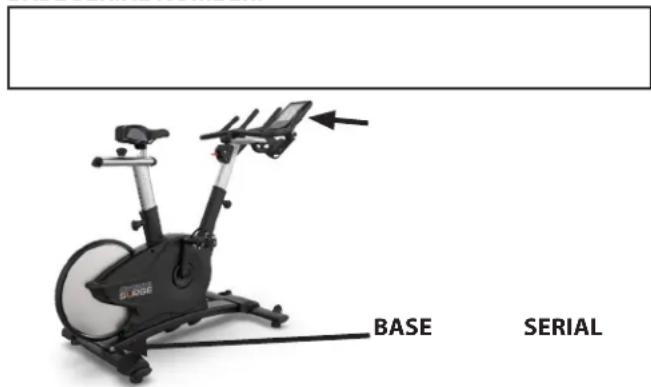
SAMPLE SERIAL NUMBER STICKER:
CHAPTER 7: WARRANTY INFORMATION
Thank you for purchasing a OCTANE product. To validate the OCTANE product warranty the fast and easy way, please go on-line now to octanefitness.com and register your product. The information you provide will never be distributed to any other individuals or agencies for any purpose. If you prefer to mail your warranty card, have the owner of the product complete the information below and return it to OCTANE Fitness within 30 days from the date of equipment installation.
Please Note: Failure to register this product will result in no servicing or authorization of parts to be shipped.
To mail your warranty information, mail the completed information to: Service Dept., Octane Fitness, 865 Hoff Rd., St. Louis, MO, 63366 (or save postage and register online at www.octanefitness.com)
Commercial Warranty Registration
PLEASE PROVIDE THE BASE SERIAL NUMBER BELOW. REQUIRED FOR WARRANTY REGISTRATION:
BASE SERIAL NUMBER:

Model Type
Date of Purchase
Your Company Name____
Contact First Name
Contact Last Name
Address
City State ZIP
Email Address____ Website ____
Phone____Fax____
- Where did you first learn about OCTANE?
a. Dealer b. Website
____ c. Advertisement ____ d. Referral
____ e. Current Customer ____ f. Other ____
- Why did you purchase a OCTANE product?
a. Design/Appearance b. Dealer Suggestion
____ c. Price/Value ____ d. Quality Construction
____ e. Performance ____ f. OCTANE Reputation
__ g. Other ____
- Please indicate your type of facility:
____ a. Apartment/Condo ____ b. Corporate Fitness Center
____ c. Municipality ____ d. Health Club/Gym/Spa
____ e. Hotel/Resort ____ f. Military Base
____ g. Student Rec Center ____ h. Other
- What other types of equipment does your company currently own?
a. Treadmill Brand
b. Bike Brand
c. Elliptical Brand
d. Free Weights/Gym Brand
- How many people use your facility on a daily basis?
a. <25 b. 25-75
_ c. 76-150 _ d. 150+
- Do you plan to purchase more fitness equipment in the next 6-12 months?
____ Yes ____ No
- If you answered "yes" to question 6, what type do you plan to purchase?
a. Treadmill b. Elliptical
____ c. Stationary Bike ____ d. Free Weights
____ e. Gym ____ f. Other ____
- Would you recommend OCTANE to other club owners?
____ Yes ____ No
- You are a valued OCTANE customer and your suggestions allow us to continually improve your experience. Is there anything else you would like us to know? Please explain:

- CHAPTER 1: SAFETY INSTRUCTIONS
- IMPORTANT
- IMPORTANTE
- TABLE OF CONTENTS
- CHAPTER 2: ASSEMBLY INSTRUCTIONS
- CHAPTER 3: PRODUCT OVERVIEW
- CHAPTER 4: CARE & MAINTENANCE
- CHAPTER 5: CUSTOMER SERVICE
- CHAPTER 6: ADDITIONAL INFORMATION
- CHAPTER 7: WARRANTY INFORMATION
- IMPORTANT SAFETY INSTRUCTIONS SAVE THESE SAFETY INSTRUCTIONS
- CAUTION
- RESIDENTIAL/COMMERCIAL USE
- IMPORTANT SAFETY INSTRUCTIONS READ ALL INSTRUCTIONS BEFORE USING THIS APPLIANCE
- SPACE REQUIREMENTS
- WARNING DECALS
- COMPLIANCES
- PROPER TRAINING POSITION
- IMPORTANT SAFETY INSTRUCTIONS
- CHAPTER 2: ASSEMBLY GUIDE
- PRE-ASSEMBLY CHECKLIST
- ASSEMBLY STEPS
- STEP 1 (FRONT AND REAR STABILIZER BARS)
- STEP 2 (FOOT COVER)
- STEP 3 (FOOT PEDALS)
- STEP 4-1 (HANDLEBAR MOUNT ASSEMBLY)
- STEP 4-2 (HANDLEBAR ASSEMBLY)
- STEP 5 (SEAT MOUNT ASSEMBLY)
- STEP 7 (CONSOLE)
- WIRING DIAGRAM
- SEAT
- CONSOLE
- SEAT MOUNT ASSEMBLY ADJUSTMENT KNOB
- BOTTLE HOLDER
- HANDLEBAR MOUNT ASSEMBLY ADJUSTMENT KNOB
- PEDALS
- LEVELING FEET
- RED BRAKE LEVER
- CARE & MAINTENANCE
- INSPECTION
- CLEANING THE EQUIPMENT
- AFTER EACH USE
- WEEKLY
- OTHER SCHEDULED PREVENTIVE MAINTENANCE
- SCHEDULED PREVENTIVE MAINTENANCE
- LONG TERM STORAGE
- STORING THE CHEST STRAP
- CONTACTING SERVICE
- CONTACTING SALES
- REPORTING FREIGHT OR PARTS DAMAGE
- SEVERE DAMAGE
- SLIGHT DAMAGE
- CONCEALED DAMAGE
- RECOVERY OR STRENGTH SESSION CLOCK
- ANT
- INTERVAL COUNTER
- DISTANCE COUNTER
- CALORIE COUNTER
- RPM (RPM COUNTER)
- HEART RATE
- WORKOUT INDICATOR
- SPRINT SESSION CLOCK
- BLUETOOTH (BLTE) INDICATOR
- RESISTANCE (LEVEL)
- CALORIE TACHOMETER
- WORKOUT TIME
- SPEED
- POWER
- WORKOUT SUMMARY
- KEYPAD BUTTONS
- QUICK START
- MAX 14 INTERVAL
- INTERVAL
- CALORIE GOAL
- DISTANCE GOAL
- MAX CIRCUIT
- PAUSE CLEAR
- TIME
- ENTER
- SOFTWARE MANAGEMENT
- SAVE TIME AND REGISTER ONLINE
- ACTIVATE MULTIPLE WARRANTIES AT OCTANEFITNESS.COM
- COMMERCIAL WARRANTY REGISTRATION
- PLEASE PROVIDE BOTH SERIAL NUMBERS BELOW. REQUIRED FOR WARRANTY REGISTRATION
- CONSOLE SERIAL NUMBER
- BASE SERIAL NUMBER
- PLEASE PROVIDE THE BASE SERIAL NUMBER BELOW. REQUIRED FOR WARRANTY REGISTRATION
Brand : Octane
Model : Surge
Category : Bicycle