
KMS-3100 - Karaoke YAMAHA - Free user manual and instructions
Find the device manual for free KMS-3100 YAMAHA in PDF.


| Type | 4-way bass-reflex, non-magnetic shielding |
| Speaker Configuration | 4-way |
| Components | HF: 2.5 cm (1") core type x1; MF1: 10 cm (4") core type x1; MF2: 15 cm (5") core type x1; LF: 30 cm (12") core type x1 |
| Frequency Range (-10dB) | 45 Hz - 20 kHz |
| Crossover Frequency | 2 kHz - 3 kHz |
| Nominal Impedance | 8 Ω |
| Power Rating (Noise) | 275 W (IEC 100 Hz) |
| Power Rating (Program) | 550 W (IEC 100 Hz) |
| Power Rating (Maximum) | 1100 W (IEC 100 Hz) |
| Sensitivity (1W, 1m) | 89 dB SPL |
| Connector Type | Speakon / Banana |
| Dimensions (W x H x D) | 640 x 360 x 303 mm (25 1/4" x 15" x 15 1/8") |
| Weight | 18.6 kg (41 lbs) |
| Finish | Black PVC |
| Magnet Type | Non-magnetic shielding |
| Recommended Amplifier Power | Ensure output power is lower than speaker's power capacity to avoid damage |
| Mounting Options | Ceiling mount using screw holes (3/8"-16 UNC) with commercially available brackets |
| Grille Removal | Removable for maintenance; pull gently by hand |
| Included Accessories | Owner's Manual, Technical Specifications leaflet |
Frequently Asked Questions - KMS-3100 YAMAHA
User questions about KMS-3100 YAMAHA
0 question about this device. Answer the ones you know or ask your own.
Ask a new question about this device
Download the instructions for your Karaoke in PDF format for free! Find your manual KMS-3100 - YAMAHA and take your electronic device back in hand. On this page are published all the documents necessary for the use of your device. KMS-3100 by YAMAHA.
USER MANUAL KMS-3100 YAMAHA
Thank you for selecting the Yamaha Karaoke Speaker System.
- The illustrations as shown in this manual are for instructional purposes only.
• The company names and product names in trademarks of their respective companies.
Included Accessories
• Technical Specifications (English only)
tem. Included
- Technical Specifications (E
- Owner's Manual (this leaf
ademarks or registered • Owner's Mandal (this
(No text)
PLEASE READ CAREFULLY BEFORE PROCEEDING
Please keep this manual in a safe place for future reference.
Warning
Always follow the basic precautions listed below to avoid the possibility of serious injury or even death from electrical shock, short-circuiting, damages, fire or other hazards. These precautions include, but are not limited to, the following:
Do not open
- This device contains no user-serviceable parts. If you are not a qualified service technician, do not open the device or attempt to disassemble the internal parts or modify them in any way. If it should appear to be malfunctioning, discontinue use immediately. Inspection must be performed only by qualified Yamaha service personnel.
Fire warning
- Do not put burning items, such as candles, on the device. A burning item may fall over and cause a fire.
Caution
Always follow the basic precautions listed below to avoid the possibility of physical injury to you or others, or damage to the device or other property. These precautions include, but are not limited to, the following: Location
• Do not place the device in an unstable position where it might accidentally fall over.
- Do not block the vents. This device has a port at the bottom to prevent the internal temperature from becoming too high. In particular, do not place the device on its side or upside down. Inadequate ventilation can result in overheating, possibly causing damage to the device(s), or even fire.
-
When installing the device:
-
Do not cover it with any cloth.
- Do not install it on a carpet or rug.
- Make sure the top surface faces up; do not install on its sides or upside down.
– Do not use the device in a confined, poorly-ventilated location.
Inadequate ventilation can result in overheating, possibly causing damage to the device(s), or even fire. - Do not press the rear panel of the device against the wall. Doing so may cause the plug to come in contact with the wall and detach from the speaker cable, resulting in short circuiting, malfunction, or even fire.
- Do not place the device in a location where it may come into contact with corrosive gases or salt air. Doing so may result in malfunction.
- Avoid being near the device during a disaster, such as an
the device may fall and cause injury, stay
away from the device quickly and move to a safe place.
- Before moving the device, remove all connected cables.
- When transporting or moving the device, always use two or more people. Attempting to lift the device by yourself may damage your back, result in other injury, or cause damage to the device itself.
- If you are not a qualified service technician, do not attempt to install the device. Always consult qualified Yamaha service personnel if the device installation requires construction work, and make sure to observe the following precautions.
– Choose mounting hardware and an installation location that are present the weight of the device.
that can support the weight of the device.
- Avoid locations that are exposed to constant vibration.
- Use the required tools to install the device.
– Inspect the device periodically.
Connections
- Before connecting the device to other devices, turn off the power for all devices. Before turning the power on or off for all devices, set all volume levels to minimum.
• Use only speaker cables for connecting speakers to the
speaker jacks. Use of other types of cables may result in fire
Handling caution
- Do not insert your fingers or hands in any gaps or openings on the device (ports).
- Avoid inserting or dropping foreign objects (paper, plastic, metal, etc.) into any gaps or openings on the device (ports) If this happens, turn off the power of external devices immediately and unplug the power cord from the AC outlet. Then have the device inspected by qualified Yamaha service personnel.
- Do not rest your weight on the device or place heavy objects on it, and avoid use excessive force on the buttons, switches or connectors.
- Do not use the speakers for a long period of time at a high or uncomfortable volume level, since this can cause permanent hearing loss. If you experience any hearing loss or ringing in the ears, consult a physician.
- Do not operate the device if the sound is distorting. Prolonged use in this condition could cause overheating and result in fire.
- When choosing a power amplifier for use with this device, make sure that the output power of the amplifier is lower than the power capacity of this device. If the output power is higher than the power capacity, malfunction or fire may occur.
- Do not input excessively loud signals that may result in clipping in the amplifier or cause the following:
- Feedback, when using a microphone
(1) 2017年1月1日
Specifications
| KMS-3100 KMS-2600 | |||
| Type | 3-way 4-speaker bass reflex / Non magnetic shielding | ||
| Components | HF | 2.5 cm (1") horn type ×1 | |
| MF1 | 10 cm (4") cone type ×1 | 12 cm (5") cone type ×1 | |
| MF2 12 | cm (5') cone type ×1 | ||
| LF | 30 cm (12") cone type ×1 | 25 cm (10 -) cone type ×1 | |
| Nominal impedance 8 Ω | |||
| Frequency range (-10dB) | 45 Hz to 30 kHz 47 | Hz to 30 kHz | |
| Crossover frequency 2 kHz, 3 kHz | |||
| Power rating*1(IEC 100h) | NOISE | 275 W 175 W | |
| PGM 50 | 0 W 350 W | ||
| MAX 110 | 100 W 700 W | ||
| Sensitivity (1W, 1m) 90 dB SPL 89 dB SPL | |||
| Connector | Screw / Banana | ||
| KMS-3100 KMS-2600 | ||
| Dimensions(W × H × D) | 640 × 380 × 383 mm(25 1/4" × 15" × 15 1/8") | 576 × 342 × 353 mm(22 11/16" × 13 1/2" × 13 7/8") |
| Weight | 18.6 kg (41 lbs) | 14.7 kg (32.4 lbs) |
| Finish | Black PVC | |
*1: IEC shaped Pink noise with 6 dB crest factor
The contents of this manual apply to the latest specifications as of the printing date. Since Yamaha makes continuous improvements to the product, this manual may not apply to the specifications of your particular product. To obtain the latest manual, access the Yamaha website then download the manual file. Since specifications, equipment or separately sold accessories may not be the same in every locale, please check with your Yamaha dealer.
- Care should be taken not to exceed the input power values noted above.
- The woofer employs a material for the surround to achieve high sound quality. The useful life of the speaker surround depends on usage conditions and environment (especially ultraviolet radiation exposure and humidity), etc. When the speaker surround reaches the end of its useful life, refer to you dealer for replacement.
[Non-Text]
Mouting the Speaker to a Ceiling
The information below is intended for an installation contractor. Be sure to request that a qualified technician install the device.
You can also use the screw holes on the top of the speaker for installing the
speaker on the ceiling by using commercially available mounting brackets. To fix the speaker to a mounting bracket, use the screws inserted to the screw
To fix the speaker to a mounting bracket, use the screws inserted to the screw holes of the speaker as the factory default status. If you use the commercially
Notes of the speaker as the history default status. If you use the commercially available screws, use the screws that matches to the following specifications:
Screw type....M8 Screw length....35 mm (1 3/8") or more

Caution
- The required length of a screw differs depending on the mounting bracket to be used. Select a screw which is suitable for use with the mounting bracket and can be fully inserted into the hole on the speaker.
- As this product is heavy, do not attach them to thin plywoods or soft wall surface materials, as the screws may tear free from flimsy surfaces, causing the speaker to fall and be damaged, or result in personal injury.
- Do not fasten the speaker to the ceiling with nails, adhesives, or other unsound hardware. Long-term use and vibrations may cause them to pull free.
- To avoid accidents resulting from tripping over loose speaker cables, fix these to the wall along with the speaker.
Removing/attaching the Speaker Grille
The information below is for maintenance purposes if the device is used for business.
If you are not a maintenance staff or an authorized service person, do not remove the grille in any way.
Caution
- Be careful not to scratch yourself with the edge of the speaker grille.
- Be sure to work on a stable place.
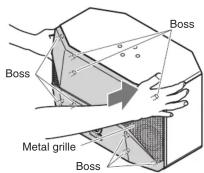
■ Removing the speaker grille
- Gently pull the grille to gradually detach it
from the speaker.
- Pull the grille toward you.


natural_image
Illustration of a device with a handle and internal components, no text or symbols present■ Attaching the speaker grille
Attach the grille to the speaker unit while gently pressing over the bosses with your hands.
Connecting to Your Amplifier
Caution
Before making connections, make sure that the amplifier is switched off.
■ When connecting the speaker cables
Notice
- Do not let the bare speaker wires touch each other as this could damage the speaker or the amplifier.
- Make sure you connect the speakers with the correct polarity—positive (+) terminals to positive (+) terminals, and negative (-) terminals to negative (-) terminals. If you get them crossed over, the sound will be unnatural and lack bass.
- Refer to the owner's manual that came with your amplifier.
■ How to connect the speaker cables

- Remove 10mm (3/8") of insulation, and twist the bare wires.
- Loosen the terminal knob.
- Insert the bare wire into the hole.
Note
Do not insert the insulation into the hole. Sound may not be produced.
4. Tighten the knob and secure the cable.
5. Test the firmness of the connection by pulling lightly.

Yamaha Pro Audio global web site: http://www.yamahaproaudio.com/Yamaha Manual Library http://www.yamaha.co.jp/manual/
■ When using a banana plug
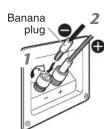
- Tighten the terminal knob. If it is not tight enough, the plug might not be inserted correctly
- Insert the banana plug.
C.S.G., PA Development Division © 2014 Yamaha Corporation Published 09/2014 发行 IPZC*.*-01A0 Printed in Indonesia
The Ground Truth image displays a single, solid horizontal line. According to Rule 2 (UNDERSCORE & LINE RULES), this is a stylistic or background line, not a placeholder underscore. Therefore, the OCR result must ignore it and output nothing or only meaningful text. The provided OCR content is "____", which consists of four underscores. This is an incorrect interpretation of the line as a placeholder, violating the rule that stylistic lines must be ignored. The OCR has hallucinated placeholder underscores where none should exist in the GT. Hence, the OCR result is inconsistent with the Ground Truth.
[Non-Text]
Brand : YAMAHA
Model : KMS-3100
Category : Karaoke