
Beauty Flex FTS-11B - Lighting Angler - Free user manual and instructions
Find the device manual for free Beauty Flex FTS-11B Angler in PDF.


| Product Type | Flexible LED Panel Light |
| Brand | Angler |
| Model | Beauty Flex FTS-11B |
| Dimensions | 11 x 11 inches (28 x 28 cm) |
| Weight | 1.2 kg (2.6 lbs) |
| Power Supply | AC 100-240V, 50/60Hz or DC 12V |
| Power Consumption | 30W |
| Color Temperature | 3200K to 5600K adjustable |
| Brightness Adjustment | Continuous dimming from 1% to 100% |
| CRI | >95 |
| Number of LEDs | 192 SMD LEDs |
| Flexibility | Bendable to various shapes |
| Mounting | 1/4-20 thread, stand or light stand compatible |
| Built-in Battery | Not provided; requires external battery pack (optional) |
| Control | Manual knobs for brightness and color temperature |
| Included Accessories | Power adapter, diffuser, carrying case |
| Cleaning | Use dry soft cloth; avoid liquids |
| Safety | Do not disassemble; avoid moisture; unplug when not in use |
| Spare Parts | Contact Angler support for replacement diffuser, power adapter |
| Repairability | Designed for professional repair; contact authorized service center |
Frequently Asked Questions - Beauty Flex FTS-11B Angler
User questions about Beauty Flex FTS-11B Angler
0 question about this device. Answer the ones you know or ask your own.
Ask a new question about this device
Download the instructions for your Lighting in PDF format for free! Find your manual Beauty Flex FTS-11B - Angler and take your electronic device back in hand. On this page are published all the documents necessary for the use of your device. Beauty Flex FTS-11B by Angler.
USER MANUAL Beauty Flex FTS-11B Angler
Aangler®
Thank you for choosing Angler.
The Angler Beauty Flex dual-arm light features two 11-inch bi-color LED panels mounted on flexible arms. It delivers multiple lighting possibilities that are perfect for photography, makeup application, live video streams, and video conferences. A flexible arm with a smartphone clamp is included. Precise multi-light placement with easy color temperature and brightness adjustment can be managed while you're in front of the lights and your camera. And a remote is included for wireless operation. The Beauty Flex light runs on AC or battery power, and it's designed with 258 SMD LEDs for impressive brightness and high color accuracy.
Precautions
▶ Please read and follow these instructions, and keep this manual in a safe place.
▶ Keep this unit away from water and any flammable gases or liquids.
Do not leave the device in a closed vehicle under the sun or in other areas subject to very high temperatures.
Do not attempt to disassemble or repair the equipment. There are high-voltage components inside the unit. Failure to observe this precaution could result in electric shock or product malfunction. This will void the warranty, and Angler will not be responsible for any damage.
▶ Use only the correct, recommended voltage.
▶ Make sure the unit is powered off when plugging it into a power source.
▶ Disconnect the power cord and remove the batteries when not in use.
▶ Do not stare directly at the lights when they are powered on.
▶ Use only parts provided by the manufacturer.
▶ Handle this product with care.
▶ Clean this product with only a soft, dry cloth.
▶ Keep this unit away from children.
▶ Make sure the item is intact and that there are no missing parts.
All images are for illustrative purposes only.

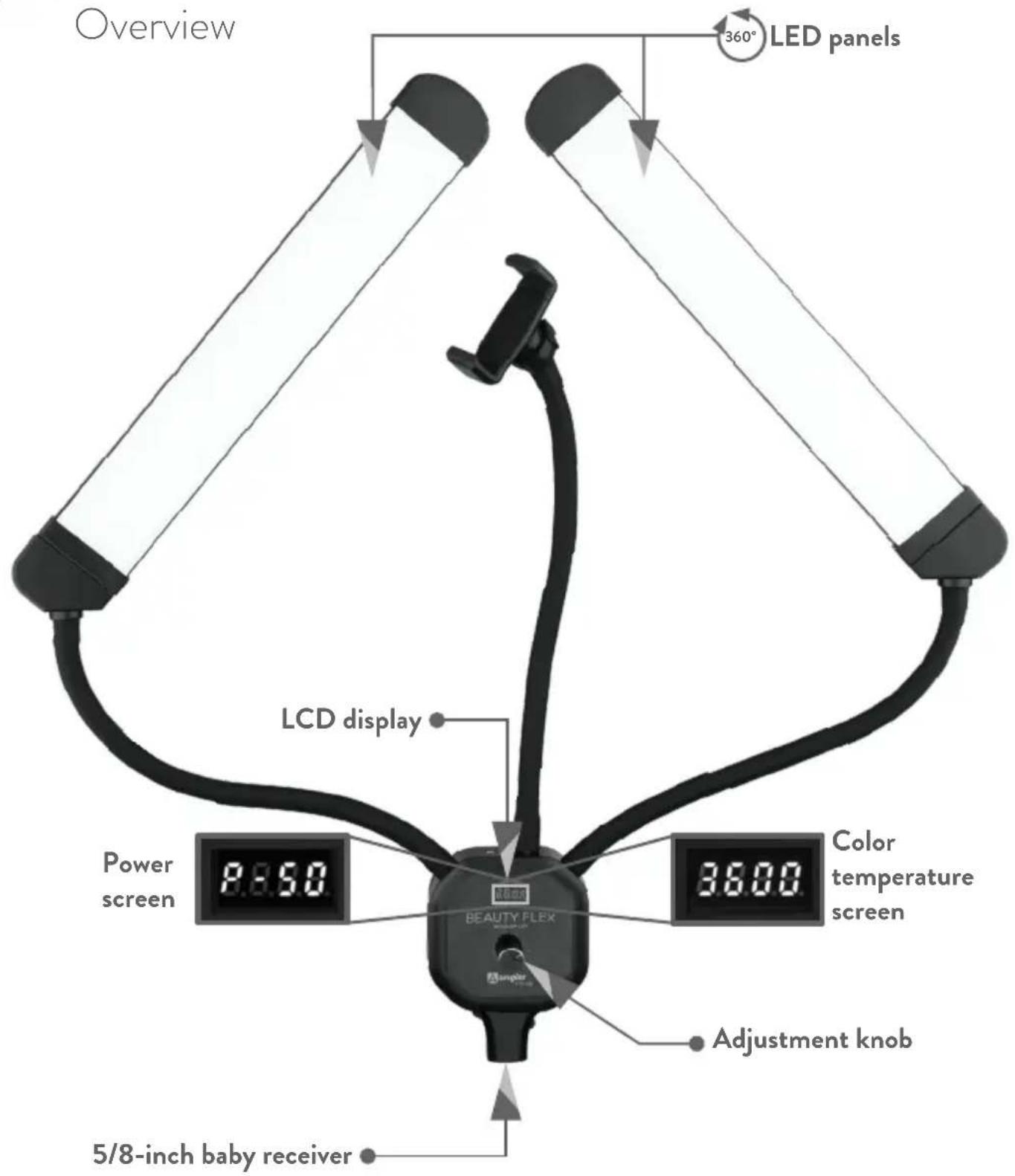
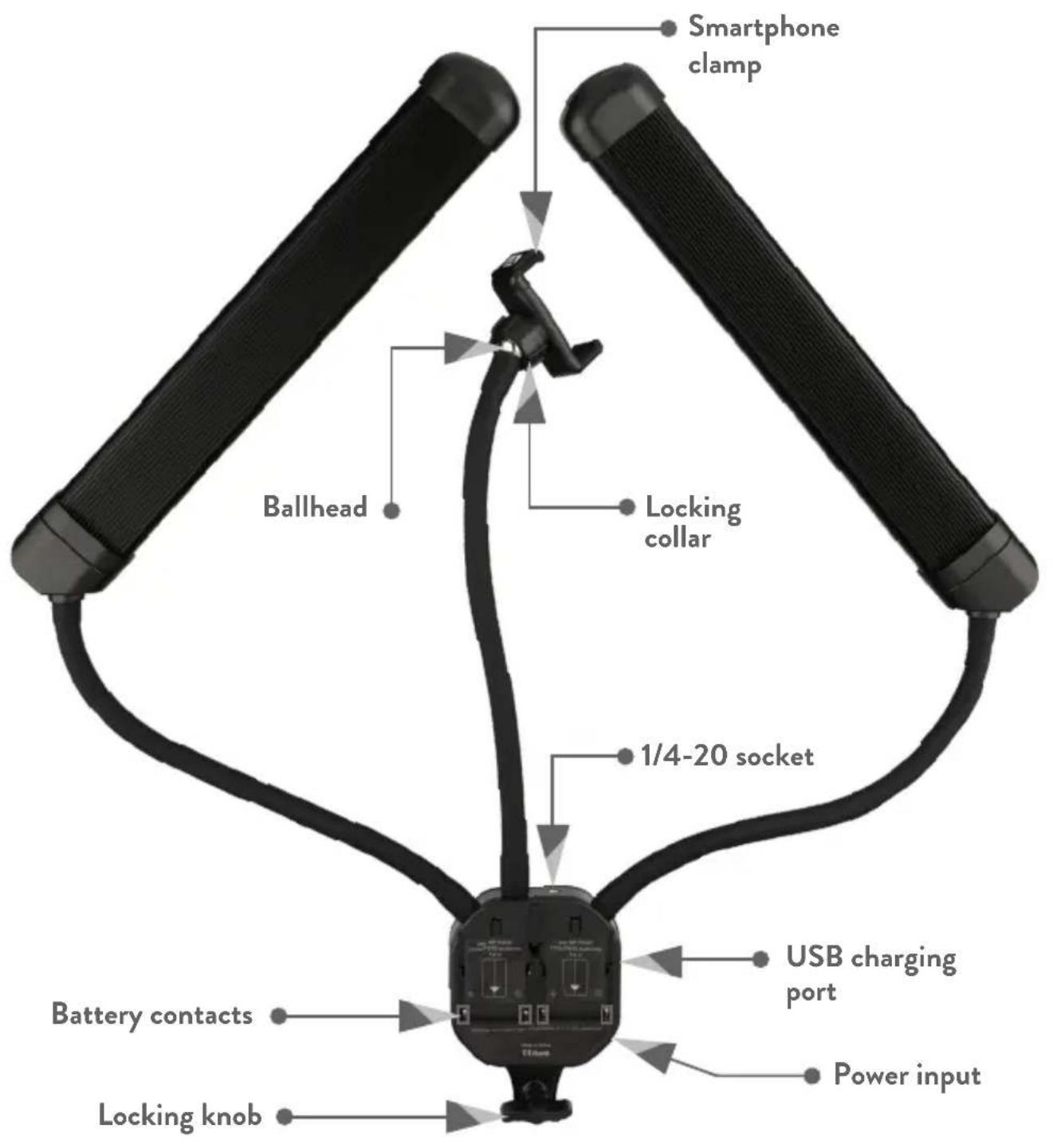
Also included: ▶ AC power cord ▶ Power cord ▶ Travel case ▶ Remote control
Mounting the Light
Light Stand
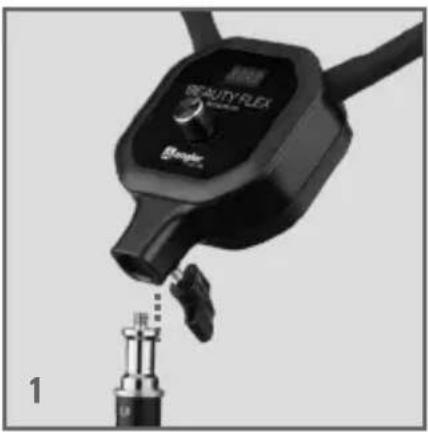
- To mount the Beauty Flex on a light stand, loosen the receiver's locking knob, and place the receiver onto the light stand's 5/8-inch pin.
-
Make sure the receiver fits completely around the pin before you tighten the locking knob. If it doesn't, continue to loosen the locking knob until the fixture drops down around the pin.
-
Tighten the locking knob until the light is secure.
Desktop
Many vlogs, podcasts, and YouTube videos are created at a desk or workstation. To mount the Beauty Flex to a desk or table, follow these steps:
- Attach a super clamp (sold separately) to the edge of your desk or tabletop. Use the wedge insert that comes with most super clamps for a snug fit, and tighten the locking handle.

-
Insert a 5/8-inch stud into the super clamp's receiver, and tighten the locking knob until secure.
-
Follow the instructions above for mounting the light to a light stand.
Powering On
AC Power
When operating on AC power, first remove the batteries.
-
Plug the power adapter into the light, and plug the power cord into an available outlet.
-
Press the adjustment knob to turn on the light. The LCD displays 000.
-
Press the adjustment knob again to display the power screen. Press the knob again to display the color temperature screen.
-
Press and hold the adjustment knob to turn the off the Beauty Flex.


Battery Power
When operating on battery power, unplug the power adapter from the AC outlet and from the light.
Upon startup, the screen displays 0000. Each zero represents approximate battery life in 25% increments: 0000 = 100%, 000 = 75%, 00 = 50%, and 0 = 25%.
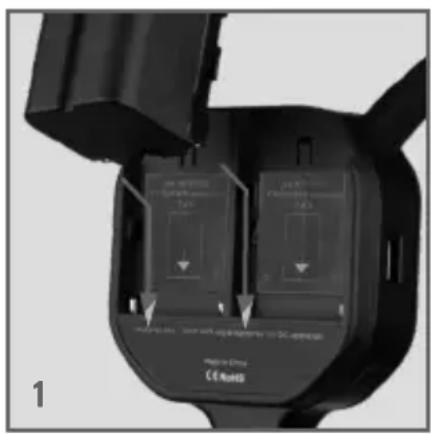
- Place two fully charged NP-F batteries into the battery plates, and slide them toward the contacts until the batteries are firmly in place.
- Press the adjustment knob to turn on the light. Press the knob again to display the power screen. Press the adjustment knob again to display the color temperature screen.
- Press and hold the adjustment knob to turn the off the Beauty Flex.
Tip: For uninterrupted operation, pack a few extra batteries in your gear bag.
Adjusting the Brightness and Color Temperature
Brightness
After turning on the Beauty Flex, press the adjustment knob to enter brightness mode. A Pappears onscreen with the most recent brightness setting.
Turn the adjustment knob to set the brightness from 0% to 100% in 1% increments.
Turning the brightness down to 0% is equivalent to sleep mode. The light is still powered on, but the LEDs are not illuminated. This an effective way to conserve battery life when the light is not in use.
Color Temperature
Press the adjustment knob again, and the four-digit color temperature will appear onscreen.
Turn the adjustment knob to set the color temperature from 3000 K to 6500 K in 100 K increments.
Tip: A color temperature of 3200 K is comparable to a tungsten bulb. A setting of 5600 K is equivalent to natural daylight.
Mounting a Smartphone
If the smartphone flex arm is not attached to the Beauty Flex light, screw it into one of the 1/4-20 accessory sockets on the top of the controller.
- Place the smartphone inside the clamp.
- Loosen the ballhead locking collar to adjust the orientation of the smartphone, and tighten it until secure.
Charging a Smartphone
The Beauty Flex light is outfitted with a USB Standard-A port to charge a smartphone.
A smartphone will recharge while the light is running on AC or battery power.
Connect your smartphone's charging cable to the Beauty Flex's USB port. Refer to the phone's display to monitor battery level.


Mounting Other Accessories
An additional flexible arm from Angler or an articulating arm (both sold separately) can be added to attach an accessory like a shotgun microphone. Screw the extra arm into one of the two 1/4-20 sockets at the top of the controller, and attach your accessory.
Remote Operation
Power Button
Press the power button to turn on the Beauty Flex light. The light will power up with the most recent color temperature and brightness settings. Press again to power off the light.
Daylight Button
Pressing the daylight button sets the light to 5600 K daylight-balance color temperature at 100% brightness.
Brightness Up/Down
The brightness control lets you adjust the light's brightness from 0% to 100% in 1% increments.
Color Temperature Control
The color temperature control adjusts the color temperature from 3000 to 6500 K in 100 K increments.

Auto Buttons
Use the Auto Buttons to automatically set the light to a warm, neutral, or cool color temperature at either 100% or 50% brightness.
Warm: 3000 K
Neutral: 4000 K
Cool: 6500 K
Save Button
Pressing the save button will place the current settings into the Beauty Flex's memory. The light will recall these settings the next time it's powered up.
Note: Any subsequent setting adjustments made manually will override these stored settings.
Lighting Tips
There is an endless variety of lighting styles that are most effective for different applications of the Beauty Flex. Here are a few to get you started.
Lighting

Alighting uses the Beauty Flex's two LEDs in an Pattern. Lighting enhances the model's features without casting heavy dramatic shadows, and it delivers interesting catchlights in the eyes. This lighting pattern is great for vlogs and live streams.
Clamshell
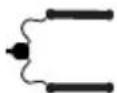
Clamshell lighting is created by placing the LEDs in front of the subject and at a 45-degree angle above and below their face. It provides a soft, even illumination that decreases facial lines and smooths the texture.
Rim

Rim, or kicker, lighting is a technique that positions the two accent lights beside or behind the subject. It highlights the edges of the hair or face and creates a dramatic halo effect with soft shadows. This lighting effect requires two separate light fixtures that are placed on either side of the subject.


Loop

Loop lighting gets its name from the loop-shaped shadow that forms next to and under the nose. Put the LED panels together to form a single light source, and place them slightly off-center and above the subject's eye line. This shadow pattern also defines the subject's bone structure by accentuating the chin line.
Rembrandt

Always-popular Rembrandt lighting produces compelling images with minimal equipment. Use the LED panels together as a single light source, and place them to the side of the subject so a small V-shaped light highlights the cheek and eye on the opposite side. Use a reflector opposite the light to create more volume in the shadows.
Butterfly
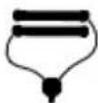
The glamorous portraits of the golden age of Hollywood were made with butterfly, or Paramount lighting. Use the LED panels together as a single light source, and place them above the subject's face to create the signature butterfly pattern under the nose.



Specifications
| COLOR TEMPERATURE 3000 TO 6500 K | |
| LED COUNT 258 | |
| CRI 96.8 (5600 K) | |
| TLCI 97 (5600 K) | |
| LIGHT INTENSITY @ 3 FT. | 827 LX (5600 K), 834 LX (4400 K), 805 LX (3200 K) |
| DIMMING 0% TO 100% IN 1% INCREMENTS | |
| AC INPUT POWER 100 TO 240 V AC, 50/60 HZ | |
| DC INPUT POWER 15 V, 3 A | |
| USB OUTPUT POWER 5 V, 2 A | |
| MAXIMUM CLAMP RANGE 3.25 IN. (8.2 CM) | |
| POWER SOURCE | LIGHT: AC ADAPTER, NP-F BATTERY ( × 2 )REMOTE: AAA BATTERY ( × 2 ) |
| POWER DRAW 50 W | |
| DIMENSIONS | LIVE LED AREA: 11 × 1.9 IN. (27.9 × 4.8 CM) EACH FLEX ARM LENGTH: 11 IN. (27.9 CM) |
| WEIGHT 2.3 LB. (1 KG) WITHOUT BATTERIES | |
One-Year Limited Warranty
This Angler product is warranted to the original purchaser to be free from defects in materials and workmanship under normal consumer use for a period of one (1) year from the original purchase date or thirty (30) days after replacement, whichever occurs later. The warranty provider's responsibility with respect to this limited warranty shall be limited solely to repair or replacement, at the provider's discretion, of any product that fails during normal use of this product in its intended manner and in its intended environment. Inoperability of the product or part(s) shall be determined by the warranty provider. If the product has been discontinued, the warranty provider reserves the right to replace it with a model of equivalent quality and function.
This warranty does not cover damage or defect caused by misuse, neglect, accident, alteration, abuse, improper installation or maintenance. EXCEPT AS PROVIDED HEREIN, THE WARRANTY PROVIDER MAKES NEITHER ANY EXPRESS WARRANTIES NOR ANY IMPLIED WARRANTIES, INCLUDING BUT NOT LIMITED TO ANY IMPLIED WARRANTY OF MERCHANTABILITY OR FITNESS FOR A PARTICULAR PURPOSE. This warranty provides you with specific legal rights, and you may also have additional rights that vary from state to state.
To obtain warranty coverage, contact the Angler Customer Service Department to obtain a return merchandise authorization (“RMA”) number, and return the defective product to Angler along with the RMA number and proof of purchase. Shipment of the defective product is at the purchaser’s own risk and expense.
For more information or to arrange service, visit www.anglerights.com or call Customer Service at 212-594-2353.
Product warranty provided by the Gradus Group. www.gradusgroup.com
Angler is a registered trademark of the Gradus Group.
© 2020 Gradus Group LLC. All Rights Reserved.

ANGLER®
A Gradus Group Brand
GG3
- THANK YOU FOR CHOOSING ANGLER
- PRECAUTIONS
- MOUNTING THE LIGHT
- LIGHT STAND
- DESKTOP
- POWERING ON
- AC POWER
- BATTERY POWER
- ADJUSTING THE BRIGHTNESS AND COLOR TEMPERATURE
- BRIGHTNESS
- COLOR TEMPERATURE
- MOUNTING A SMARTPHONE
- CHARGING A SMARTPHONE
- MOUNTING OTHER ACCESSORIES
- REMOTE OPERATION
- POWER BUTTON
- DAYLIGHT BUTTON
- BRIGHTNESS UP/DOWN
- COLOR TEMPERATURE CONTROL
- AUTO BUTTONS
- SAVE BUTTON
- LIGHTING TIPS
- LIGHTING
- CLAMSHELL
- RIM
- LOOP
- REMBRANDT
- BUTTERFLY
- ONE-YEAR LIMITED WARRANTY
Brand : Angler
Model : Beauty Flex FTS-11B
Category : Lighting