70798 - Cables for Computers and Peripherals iPort - Free user manual and instructions
Find the device manual for free 70798 iPort in PDF.


| Product Type | Cable for computers and peripherals |
| Brand | iPort |
| Model | 70798 |
| Cable Length | 1.5 meters (approximately) |
| Connector Type | Male to Male |
| Connector Material | Gold-plated contacts |
| Jacket Material | PVC |
| Cable Diameter | 5 mm |
| Weight | 50 grams |
| Max Data Transfer Rate | Up to 480 Mbps (USB 2.0) or 5 Gbps (USB 3.0) depending on variant |
| Shielding | Double shielded for minimal interference |
| Compliance | RoHS, UL |
| Operating Temperature Range | -20°C to 80°C |
| Storage Temperature Range | -30°C to 90°C |
| Primary Applications | Connecting computers to monitors, printers, external drives |
| Maintenance | Wipe with dry cloth; avoid moisture and kinks |
| Safety Precautions | Do not bend sharply; unplug by pulling the connector, not the cable |
Frequently Asked Questions - 70798 iPort
User questions about 70798 iPort
0 question about this device. Answer the ones you know or ask your own.
Ask a new question about this device
Download the instructions for your Cables for Computers and Peripherals in PDF format for free! Find your manual 70798 - iPort and take your electronic device back in hand. On this page are published all the documents necessary for the use of your device. 70798 by iPort.
USER MANUAL 70798 iPort
ELEGANTLY MOUNT IPAD ON ANY SURFACE.
IPORT Surface Mount is the most elegant way to mount iPad on a wall, solid surface or onto glass. Surface Mount allows access to the iPad power button, microphones and speakers. iPad is contained in a minimalist aluminum bezel and stays protected by engaging locking components in the bezel as well as on the surface.
By utilizing IPORT's PoE and a standard CAT cable, Surface Mount can be up to 300 ft. from a power source or can be hard-wired to a network employing Apple's USB to Ethernet.
Available in black, silver or white finishes, Surface Mount is the easiest way to install iPad on any surface while ensuring iPad blends into your space.

THE SYSTEM

BEZEL

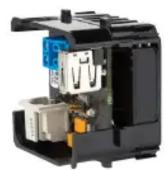
SPLITTER
AND
SYSTEM FINISHES


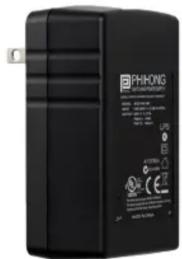
(OPTIONAL)
INJECTOR
BEZELS
Accessible power button

Security lock
Utilize iPad Microphone
High-grade precision machined aluminum
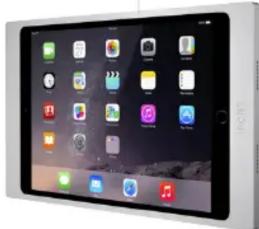
natural_image
Front view of a modern tablet device displaying multiple app icons on a dark screen (no readable text or symbols)Audio wave guides
iPad mini 4 | 5th gen
70722 BLACK \$300
70723 SILVER \$300
70724 WHITE \$300
iPad 5th gen | 6th gen
70703 BLACK \$355
70704 SILVER \$355
70705 WHITE \$355

Specs, Dims, CADs
and more.
iPad Air 3rd gen | iPad 10.2-inch 7th gen
70796 BLACK \$355
70797 SILVER \$355
70798 WHITE \$355
SPLITTER
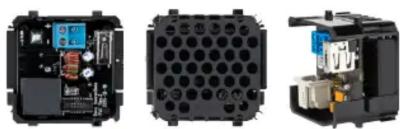
natural_image
Three views of an electronic device showing internal components and housing (no visible text or symbols)
Specs, Dims, CADs and more.
POWER
INPUT: 36-57V 0.4A DC (PoE IEEE 802.3af) via RJ-45
AUX INPUT: 18-24V, 0.8A DC via 2-pin connector
OUTPUT: 5V 2.4A DC Via USB-A
70718 BLACK \$130
INJECTOR
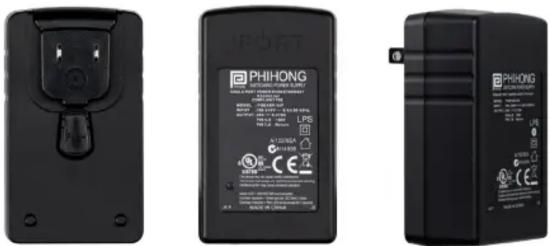
POWER
INPUT: 100-240V 0.8A AC
OUTPUT: 56V 0.275A IEEE 802.3af via RJ-45
(PIN 3,6 +56V PIN 1,2 Return)

Specs, Dims, CADs and more.
70719 BLACK \$54
ACCESSORIES

natural_image
Black rectangular device with network ports and a separate black USB cable (no text or symbols visible)REDPARK SPLITTER & CABLE
Use optionally for Power + Data to iPad in one solution.
POWER
INPUT: 36-57V 0.4A DC (PoE IEEE 802.3af) via RJ-45
OUTPUT: 5V 2A DC Via USB-B
72021 BLACK \$125

natural_image
Three vertical panels showing gray rectangular blocks with no visible text, numbers, or symbols.GLASS MOUNT KIT
Install any Bezel onto glass. Hide cabling with vinyl backer.
70720 GRAY \$22
Brand : iPort
Model : 70798
Category : Cables for Computers and Peripherals