
CPU-HURACAN-ARGB-X140 - Case Fan Gembird - Free user manual and instructions
Find the device manual for free CPU-HURACAN-ARGB-X140 Gembird in PDF.


| Product Type | CPU Cooler with Fan |
| Fan Size | 140 mm x 140 mm x 25 mm |
| Compatible Socket | Intel LGA 775/115x/1366/2011/2066, AMD AM4/AM3+/AM3/AM2+/AM2/FM2+/FM2/FM1 |
| Power Supply | 12 V DC, 0.3 A via 4-pin PWM connector |
| Lighting | ARGB 5V 3-pin connector, compatible with motherboard RGB sync |
| Fan Speed | 800–1800 RPM ± 10% |
| Airflow | Up to 70 CFM |
| Noise Level | 20–35 dBA |
| Bearing Type | Hydraulic Bearing |
| Material | Aluminum heatsink, plastic fan blades |
| Weight | Approx. 600 g (heatsink and fan) |
| Dimensions | 140 mm x 140 mm x 160 mm (LxWxH, heatsink with fan) |
| Included Accessories | Backplate, mounting clips, thermal paste, screws |
| Maintenance | Clean fan blades and heatsink with compressed air every 6 months |
| Safety | Disconnect power before installation; do not operate without CPU |
| Repairability | Fan replaceable; heatsink non-repairable |
| Warranty | 2 years |
Frequently Asked Questions - CPU-HURACAN-ARGB-X140 Gembird
User questions about CPU-HURACAN-ARGB-X140 Gembird
0 question about this device. Answer the ones you know or ask your own.
Ask a new question about this device
Download the instructions for your Case Fan in PDF format for free! Find your manual CPU-HURACAN-ARGB-X140 - Gembird and take your electronic device back in hand. On this page are published all the documents necessary for the use of your device. CPU-HURACAN-ARGB-X140 by Gembird.
USER MANUAL CPU-HURACAN-ARGB-X140 Gembird
natural_image
Close-up of a black CPU fan with visible blades and heatsink (no text or symbols)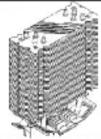
① X1
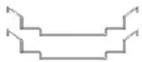
6 X2

②X1

⑦ X1
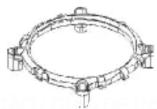
③ X1

④ X4

⑤ X4
INSTALLATION GUIDE / INSTRUKCJAINSTALACJI / GUIADE INSTALAÇÃO / GUÍADE INSTALACIÓN/ODHΓΟΣ ΕΓΚΑΤΑΣΤΑΣΗΣ
For Intel For AMD
1

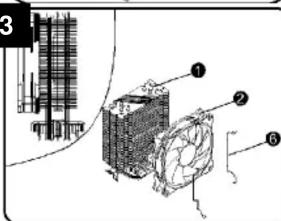
(EN) 1. Attach the fan to the heat sink with a 1 wire clip.
- Align the multifunction mounting plate with the mounting plate opening next to the processor socket on the system board
-
Apply heat conductive paste evenly on the processor
-
Attach the hooks on both sides of the radiator to the Intel bracket
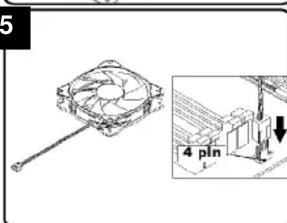
- Connect the power cable to the processor fan.
2

natural_image
Illustration of a computer motherboard with a hand holding the next component (no text or symbols visible)natural_image
Isometric technical drawing of a computer motherboard with CPU socket and RAM slots (no text or labels)2

3
4

natural_image
Isometric view of a computer motherboard with a highlighted CPU socket and an arrow indicating a component (no text or symbols present)4.1

5
(EN) 1. Install the processor, then install the bracket on the AMD motherboard. (Any questions please contact the motherboard supplier).
-
Apply heat conductive paste evenly on the processor.
-
Fasten the radiator fan with a wire buckle.
-
Attach the hooks on both sides of the radiator to the AMD bracket.
-
Connect the power cable to the "CPU-FAN" interface.
Brand : Gembird
Model : CPU-HURACAN-ARGB-X140
Category : Case Fan