FACW12SA-BL - Air conditioner Furrion - Free user manual and instructions
Find the device manual for free FACW12SA-BL Furrion in PDF.


| Product Type | Air Conditioner |
| Brand | Furrion |
| Model | FACW12SA-BL |
| Cooling Capacity | 12,000 BTU |
| Power Supply | 115V/60Hz, 12A |
| Dimensions (W x H x D) | 26.2 x 17.5 x 15.4 inches |
| Weight | 72 lbs |
| Refrigerant Type | R-410A |
| Airflow (High) | 350 CFM |
| Energy Efficiency Ratio (EER) | 10.5 |
| Thermostat Control | Digital with remote |
| Fan Speeds | 3 speeds (High, Medium, Low) |
| Operating Modes | Cool, Fan, Dry |
| Timer Function | 24-hour programmable timer |
| Filter Type | Washable mesh filter |
| Installation Type | Through-the-wall or window |
| Safety Features | Overheat protection, auto restart |
| Maintenance | Clean filter every 2 weeks; professional service annually |
| Spare Parts | Filter, remote control, batteries |
| Repairability | Modular design; replaceable compressor, fan motor, and control board |
Frequently Asked Questions - FACW12SA-BL Furrion
User questions about FACW12SA-BL Furrion
0 question about this device. Answer the ones you know or ask your own.
Ask a new question about this device
Download the instructions for your Air conditioner in PDF format for free! Find your manual FACW12SA-BL - Furrion and take your electronic device back in hand. On this page are published all the documents necessary for the use of your device. FACW12SA-BL by Furrion.
USER MANUAL FACW12SA-BL Furrion
Single Zone Basic Wall Thermostat
Instruction Manual
Model: FACW12SA-BL

Welcome
Thank you for purchasing this Furrion® Single Zone Basic Wall Thermostat. Before operating your new product, please read these instructions carefully. This instruction manual contains information for safe use, installation and maintenance of the product.
Please keep this instruction manual in a safe place for future reference. This will ensure safe use and reduce the risk of injury. Be sure to pass on this manual to new owners of this product.
The manufacturer does not accept responsibility for any damages due to not observing these instructions.
If you have any further questions regarding our products, please contact us at support@furrion.com
Contents
Welcome....1
Contents 2
About your Thermostat....3
Product Features....3
Control Buttons....3
LCD Icons 4
Installation 5
What's in the Box 5
Thermostat Installation 5
Operation....7
Turn On/Off the Thermostat....7
Temperature Format....7
Operation Mode 7
Set the Temperature 9
Set the Fan Speed 9
Special Features....10
Auto Fan 10
Compressor Time Delay....10
Power Interruption....10
LCD Error Code 10
Wiring Diagram 11
Specifications 12
Warranty....13
About your Thermostat
Product Features
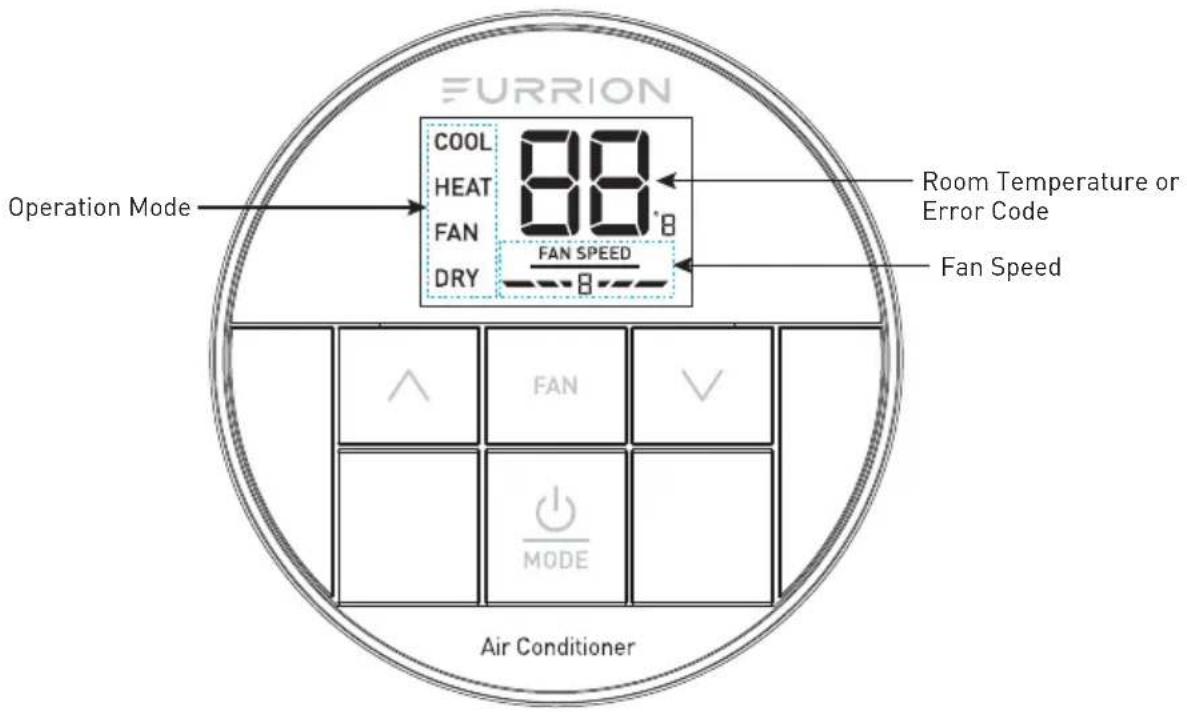
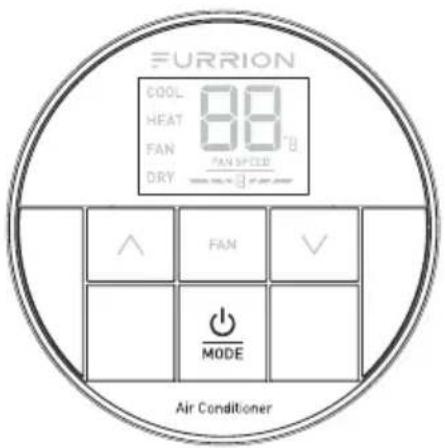
Your Single Zone LCD thermostat is equipped with a liquid crystal display (LCD) to indicate the temperature set-point in Fahrenheit(°F)/Centigrade(°C) and fan speed. It is also equipped with LCD to indicate the system available operation modes.
NOTE: The available operation modes will be different depending on the system installed in your RV.
• Liquid Crystal Display and Mode Indicators
- Auto Fan
• Room Temperature Display
• Fahrenheit(°F)/Centigrade(°C) Display
Control Buttons

About your Thermostat
LCD Icons
Installation
What's in the Box
Make sure you have all the following items included in the packaging. If any item is damaged or missing, contact your dealer.
-Thermostat x 1
-Instruction Manual x 1
-Warranty Card x 1
-Self-tapping Screw x 2
Thermostat Installation
- Select a suitable location that is not under direct influence from light, sun or other heat sources.
- Rotate the thermostat cover counterclockwise and pull out the base plate. (Fig. 1)

natural_image
Diagram showing a circular component with grid pattern being rotated, and a top view of its internal structure (no text or symbols)- Use the base plate as a template and drill a hole on the vehicle wall. Extend the four wire cables from the cutout area. Refer to the cable tag label for each cable definition. (Fig. 2)
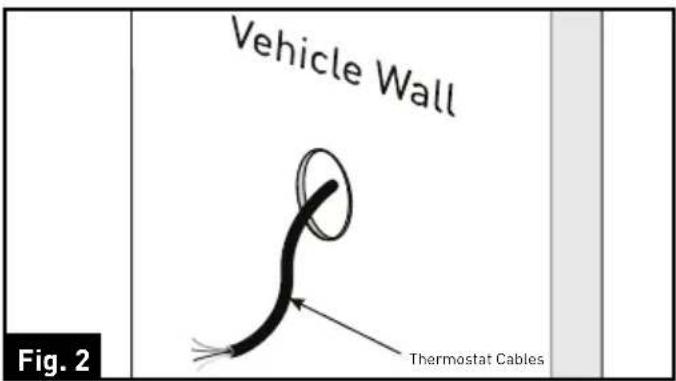
- Fix the base plate on the wall using 2 screws. (Fig. 3)
NOTE: Make sure the base plate is not covering the hole and squeezing the thermostat cables.

Installation
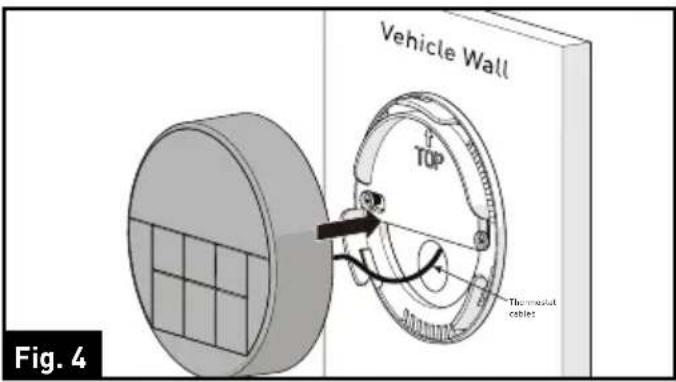
- Connect the cables to thermostat. Rotate the thermostat clockwise until it clips into place. (Fig. 4 and Fig. 5)

Operation
Your Furrion wall thermostat has been preprogrammed with factory default settings. Review the settings below and adjust to your comfort level.
| FACTORY SETTINGS | |
| HEATING 68°F / 20°C | |
| COOLING 72°F / 22°C | |
| FAN SPEED AUTO | |
| MODE COOL | |
| FURNACE DIFFERENTIAL 2°F | |
Turn On/Off the Thermostat
To turn On
Press and hold button for 3 seconds to turn on the thermostat. The thermostat LCD will be illuminated and the factory settings will be displayed on the LCD for first time use.
NOTE: The LCD will display the last setting if you have changed the parameters.
To turn Off
Press and hold ⏻ button for 3 seconds to turn off the thermostat.
Only the current room temperature will be displayed on the LCD.
Temperature Format

Simultaneously press both and ∨ buttons for 3 seconds to toggle the temperature format between Centigrade and Fahrenheit.
NOTE: °F indicates Fahrenheit and °C indicates Centigrade.
Operation Mode

After the thermostat is turned on, press ⏻ MODE button repeatedly to toggle through the available modes. The activated mode icon and temperature set-point will be displayed on the LCD. The thermostat will transmit the last selected operation mode command to the control box after 2 seconds without any operation.
Depending on the system installed, there
Operation
are 4 available modes (COOL, HEAT, FAN and DRY) for you to select. See the following tables for detailed information of each mode.
NOTE: The HEAT mode is only available after the furnace is enabled.
COOL MODE
| The system will cycle the compressor on and off based on the room temperature and the temperature set-point.The fan will be turned on after the compressor is running.There are 4 fan speed selections in this mode. | |
| Low | The fan operates continuously at low speed and theFAN SPEEDicon displays on the LCD. |
| Med | The fan operates continuously at medium speed and theFAN SPEEDicon displays on the LCD. |
| High | The fan operates continuously at high speed and theFAN SPEEDicon displays on the LCD. |
| Auto | The fan speed varies depending on the difference between the temperature set-point and room temperature. TheFAN SPEEDicon displays on the LCD. |
HEAT MODE
NOTE: The HEAT mode is only available when furnace is enabled.
- The system will cycle the furnace on and off based on the room temperature and temperature set-point.
- There are 4 fan speed selections in this mode.
- The fan speed selections only apply to the rooftop fan that is part of the Air Conditioner. The fan speed selection does not change the fan speed of the furnace.
| Low | The fan operates continuously at low speed and theFAN SPEEDicon displays on the LCD. |
| Med | The fan operates continuously at medium speed and theFAN SPEEDicon displays on the LCD. |
| High | The fan operates continuously at high speed and theFAN SPEEDicon displays on the LCD. |
| Auto | The fan speed varies depending on the difference between the temperature set-point and room temperature. TheFAN SPEEDicon displays on the LCD. |
| OFF | The fan is off. TheFAN SPEEDicon displays on the LCD. |
Operation
FAN MODE
| ● The temperature set-point is not available.● There are 3 fan speed selections in this mode. | |
| Low | The fan operates continuously at low speed and theFAN SPEEDicon displays on the LCD. |
| Med | The fan operates continuously at medium speed and theFAN SPEEDicon displays on the LCD. |
| High | The fan operates continuously at high speed and theFAN SPEEDicon displays on the LCD. |
DRY MODE
- Compressor runs continuously when room temperature is higher than set-point.
- Compressor cycles ON for 10 minutes and OFF for 6 minutes when room temperature is lower than set-point.
- The fan speed runs continuously at low speed.
Set the Temperature

The temperature set-point ranges from 60^ F\~ 86^ F ( 16^ C\~ 30^ C).
- Press button to toggle to your desired mode.
- Press / or button to increase or decrease the temperature set-point to your comfort level.
NOTE: The temperature set-point is not available in FAN mode.
Set the Fan Speed

- Press ⏻ button to toggle to your desired mode.
- Press FAN button to select AUTO, HIGH, MEDIUM or LOW fan speed.
NOTE: The fan speed selection is not available in DRY mode.
Special Features
Auto Fan
When the auto fan mode is selected, the fan speed will vary depending on the temperature difference between the temperature set-point and the room temperature.
| Temperature Difference | Fan Speed |
| >3°F | The fan operates on High level |
| >1°F | The fan operates on Med level |
| <-1°F | The fan operates on Low level |
Compressor Time Delay
A time delay of approximately three minutes occurs any time the compressor is required to begin the cooling cycle.
NOTE: The time delay occurs automatically after a mode is selected or a power event occurs to ensure pressure in the compressor is equalized appropriately, to prevent damage.
Power Interruption
In the event the power to the air conditioner or controller is interrupted, the system will restart automatically with the last status and operational parameter set-points once the power is restored.
LCD Error Code
The following error code will be displayed on the LCD when the system detects one of the following faults has occurred.
| LCD Error Code | |
| E1 | Indoor temperature sensor out of order. System will shut down. |
| E2 | Evaporator temperature sensor out of order. System will shut down. |
| E3 | Loss of communication between the thermostat and control box. System will shut down. |
| E4 | Condenser temperature sensor out of order. System will shut down. |
| E5 | Outdoor temperature sensor out of order. System will shut down. |
| L0 | Insufficient low level of +12V power supply. System will shut down. |
Wiring Diagram
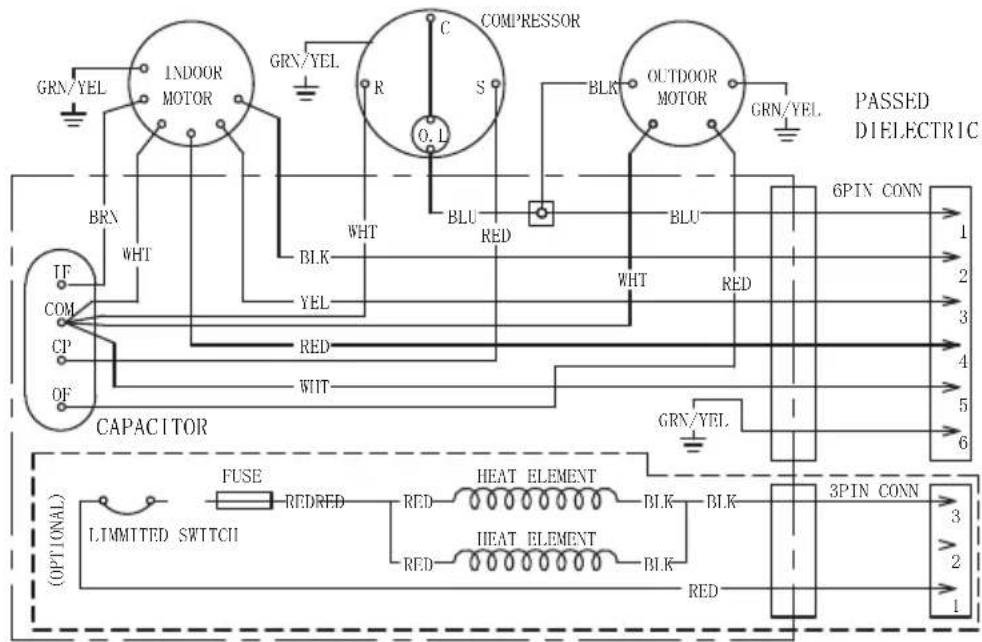
(CONN TO ATR DISTRIBUTION BOX)
USE COPPER CONDUCTORS ONLY.

flowchart
graph TD
    A["115VAC 60Hz 1φ"] --> B["BK"]
    A --> C["WHT"]
    A --> D["GRN/YEL"]
    A --> E["LOW"]
    A --> F["MED"]
    A --> G["HIGH"]
    A --> H["RED YEL"]
    A --> I["BLK"]
    B --> J["RY2"]
    C --> K["COM"]
    D --> L["ON"]
    E --> M["RLU"]
    F --> N["WHT"]
    G --> O["BLU"]
    H --> P["BLU"]
    I --> Q["BLU"]
    J --> R["GAY"]
    K --> S["RY7"]
    L --> T["WHT"]
    M --> U["CN6"]
    N --> V["CN8"]
    O --> W["CN3"]
    P --> X["CN5"]
    Q --> Y["CN1"]
    R --> Z["COIL SENSOR"]
    S --> AA["ROOM SENSOR"]
    T --> AB["12V GND"]
    U --> AC["RGB LED"]
    V --> AD["RED BLK"]
    W --> AE["+12V GND"]
    Z --> AF["PASSED DIELECTIC"]
    AA --> AG["PASSED DIELECTIC"]
    AB --> AH["PASSED DIELECTIC"]
    AC --> AI["PASSED DIELECTIC"]
    AD --> AJ["PASSED DIELECTIC"]
    AE --> AK["PASSED DIELECTIC"]
Specifications
| DC Input Power DC 12V | |
| Power Consumption <0.5W | |
| Baud Rate 9600bps | |
| Dimension 3 x 3 x ^15/16 " (75 x 75 x 22.5mm) | |
| Weight 0.06kg | |
| LCD Viewing angle 12 o'clock | |
Warranty
FURRION WARRANTS FOR A PERIOD OF 1 YEAR FROM DATE OF RETAIL PURCHASE BY THE ORIGINAL END-USE PURCHASER, THAT THIS PRODUCT, WHEN DELIVERED TO YOU IN NEW CONDITION, IN ORIGINAL PACKAGING, FROM A FURRION AUTHORIZED RESELLER AND USED IN NORMAL CONDITIONS, IS FREE FROM ANY DEFECTS IN MANUFACTURING, MATERIALS, AND WORKMANSHIP. IN CASE OF SUCH DEFECT, FURRION SHALL REPLACE OR REPAIR THE PRODUCT AT NO CHARGE TO YOU. THIS WARRANTY DOES NOT COVER: PRODUCTS WHERE THE ORIGINAL SERIAL NUMBERS HAVE BEEN REMOVED, ALTERED OR CANNOT READILY BE DETERMINED; DAMAGE OR LOSS CAUSED BY ACCIDENT, MISUSE, ABUSE, NEGLECT, PRODUCT MODIFICATION, FAILURE TO FOLLOW INSTRUCTIONS IN INSTRUCTION MANUAL, COMMERCIAL OR INDUSTRIAL USE; DAMAGE OR LOSS CAUSED TO THE DECORATIVE SURFACE OF PRODUCT; TO ANY DATA, SOFTWARE OR INFORMATION; AND NORMAL WEAR AND TEAR. THIS WARRANTY ONLY PROTECTS THE ORIGINAL END-USER ("YOU") AND IS NOT TRANSFERABLE; ANY ATTEMPT TO TRANSFER THIS WARRANTY SHALL MAKE IT IMMEDIATELY VOID. THIS WARRANTY IS ONLY VALID IN THE COUNTRY OF PURCHASE.
THIS WARRANTY AND REMEDIES SET FORTH ABOVE ARE EXCLUSIVE AND IN LIEU OF ALL OTHER WARRANTIES, REMEDIES AND CONDITIONS, WHETHER ORAL OR WRITTEN, EXPRESS OR IMPLIED. FURRION SPECIFICALLY DISCLAIMS ANY AND ALL IMPLIED WARRANTIES, INCLUDING, WITHOUT LIMITATION, WARRANTIES OF MERCHANTABILITY AND FITNESS FOR A PARTICULAR PURPOSE. IF FURRION CANNOT LAWFULLY DISCLAIM IMPLIED WARRANTIES UNDER THIS LIMITED WARRANTY, ALL SUCH WARRANTIES, INCLUDING WARRANTIES OF MERCHANTABILITY AND FITNESS FOR A PARTICULAR PURPOSE ARE LIMITED TO THE DURATION OF THIS WARRANTY.
No Furrion reseller, agent, or employee is authorized to make any modification, extension, or addition to this warranty.
Warranty
FURRION IS NOT RESPONSIBLE FOR DIRECT, INDIRECT, SPECIAL, INCIDENTAL OR CONSEQUENTIAL DAMAGES RESULTING FROM ANY BREACH OF WARRANTY OR CONDITION, OR UNDER ANY OTHER LEGAL THEORY, INCLUDING BUT NOT LIMITED TO LOST PROFITS, DOWNTIME, GOODWILL, DAMAGE TO OR REPLACEMENT OF ANY EQUIPMENT OR PROPERTY, ANY COSTS OF RECOVERING, REPROGRAMMING, OR REPRODUCING ANY PROGRAM OR DATA STORED IN OR USED WITH FURRION PRODUCTS. FURRION'S TOTAL LIABILITY IS LIMITED TO THE REPAIR OR REPLACEMENT OF THIS PRODUCT PURSUANT TO THE TERMS OF THIS WARRANTY. SOME STATES DO NOT ALLOW THE EXCLUSION OR LIMITATION OF INCIDENTAL OR CONSEQUENTIAL DAMAGES OR EXCLUSIONS OR LIMITATIONS ON THE DURATION OF IMPLIED WARRANTIES OR CONDITIONS, SO THE ABOVE LIMITATIONS OR EXCLUSIONS MAY NOT APPLY TO YOU. THIS WARRANTY GIVES YOU SPECIFIC LEGAL RIGHTS, AND YOU MAY ALSO HAVE OTHER RIGHTS THAT VARY BY STATE OR (WHERE APPLICABLE IN THE COUNTRIES WHERE FURRION HAS NON-US/CANADIAN AUTHORIZED DEALERS) COUNTRY. NO ACTION OR CLAIM TO ENFORCE THIS WARRANTY SHALL BE COMMENCED AFTER THE EXPIRATION OF THE WARRANTY PERIOD.
Keep your receipt, delivery slip, or other appropriate payment record to establish the warranty period. Service under this warranty must be obtained by contacting Furrion at warranty@furrion.com
Product features or specifications as described or illustrated are subject to change without notice.
FURRION
Furrion Innovation Center & Institute of Technology
● 52567 Independence Ct., Elkhart, IN 46514, USA ● Toll free:1-888-354-5792
- Email: support@furrion.com
©2007-2018 Furrion Ltd. Furrion® and the Furrion logo are trademarks licensed for use by Furrion Ltd. and registered in the U.S. and other countries.
FURRION.COM
- Single Zone Basic Wall Thermostat
- Welcome
- Contents
- Welcome....1
- Contents 2
- About your Thermostat....3
- Installation 5
- Operation....7
- Special Features....10
- Wiring Diagram 11
- Specifications 12
- Warranty....13
- About your Thermostat
- Product Features
- Control Buttons
- LCD Icons
- Installation
- What's in the Box
- Thermostat Installation
- Operation
- Turn On/Off the Thermostat
- To turn On
- To turn Off
- Temperature Format
- Operation Mode
- COOL MODE
- HEAT MODE
- FAN MODE
- DRY MODE
- Special Features
- Auto Fan
- Compressor Time Delay
- Power Interruption
- LCD Error Code
- Wiring Diagram
- Specifications
- Warranty
- FURRION
- Furrion Innovation Center & Institute of Technology
Brand : Furrion
Model : FACW12SA-BL
Category : Air conditioner