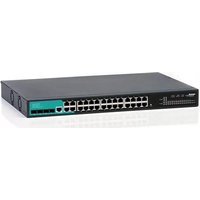
SW-MG28L4F-073 - Switch Mach Power - Free user manual and instructions
Find the device manual for free SW-MG28L4F-073 Mach Power in PDF.


| Product Type | Network Switch |
| Model | SW-MG28L4F-073 |
| Brand | Mach Power |
| Port Count | 28 Ports (24 Gigabit Ethernet + 4 SFP) |
| Uplink Interfaces | 4 SFP slots (support 1G SFP modules) |
| Switching Capacity | 56 Gbps |
| Forwarding Rate | 41.7 Mpps |
| MAC Address Table | 8K entries |
| Management | Unmanaged (Plug and Play) |
| Form Factor | Desktop / Rackmount (1U height) |
| Dimensions (W x D x H) | 440 x 180 x 44 mm |
| Weight | 2.5 kg |
| Power Supply | Internal AC 100-240V, 50/60Hz |
| Power Consumption | 30W (max) |
| Cooling | Fanless (silent operation) |
| Operating Temperature | 0°C to 40°C |
| Humidity | 10% to 90% non-condensing |
| LED Indicators | Power, Link/Activity per port |
| Standards Compliance | IEEE 802.3, 802.3u, 802.3ab, 802.3z |
| Mounting | Rackmount brackets included |
| Safety | CE, FCC, RoHS |
| Maintenance | Keep clean, avoid moisture, ensure ventilation |
Frequently Asked Questions - SW-MG28L4F-073 Mach Power
User questions about SW-MG28L4F-073 Mach Power
0 question about this device. Answer the ones you know or ask your own.
Ask a new question about this device
Download the instructions for your Switch in PDF format for free! Find your manual SW-MG28L4F-073 - Mach Power and take your electronic device back in hand. On this page are published all the documents necessary for the use of your device. SW-MG28L4F-073 by Mach Power.
USER MANUAL SW-MG28L4F-073 Mach Power
Description
The switch is a full Gigabit management switch, which uses the unique optical port design of the industry, breaking through the limitations of traditional multiplexing ports; reliable switching engine, broadband telecommunication power supply design, fast and efficient loop protection function, escorting the stable operation of your network; international "EEE" environmental protection and energy saving Standard design, effectively saving electricity and money for users.
This series of products provide users with brand-new technical characteristics and solutions in the aspects of security, reliability, multi-service integration, easy management and maintenance. It is the ideal convergence of office network, service network and resident network, access switch and the core switch of small and medium-sized enterprises and branches.
Main Features
Non-blocking High-speed Forwarding
Support L2 level wire-speed port switching, which enables all ports to forward packets without blocking.
High Speed and Efficiency Ring Protection
Real-time Monitoring: Built-in configuration-free ring protection, can provide real-time monitoring and find the network rings without delay.
Quick Alarm: The built-in buzzer quickly alarm when a ring is found, to warn the network administrator of ring problems.
Precise Localization: The ring problem interface indicator will flash slowly and periodically to help the network administrator precisely localize the ring port without any delay.
Intelligent Blocking: The switch can automatically block ring port when detect a ring problem, which can efficiently avoid broadcast storm caused by ring problem and secure the normal network communication.
Auto-recovery: After the ring problem is removed, the network will recover automatically, the buzzer stop alarming and ring port back to normal work.
Comprehensive Security Control Policies
Support link aggregation to enhance the network bandwidth and defend the network security with link backup.
Support multiple spanning tree protocols: STP, RSTP, provide rapid convergence and improved fault-tolerant capacity. The network sable operation and load balance are well guaranteed, also improved the reasonable use of network channels and redundant link.
Support the binding of user access interface, IP addresses and MAC addresses, to defend against inner network ARP attacks and Dos attacks.
Support the Back-pressure traffic control under Half-Duplex mode and IEEE 802.3x traffic control under Full-Duplex mode. The heavy traffic data peak can be switched stably without the concern of network paralysis caused by overload.
Convenient and Quick Management and Maintenance
Adopt simple visual Web-based interface, which helps users to handle various functions easily and conveniently.
Support Simple Network Management Protocol (SNMP) that the devices are convenient to configure and manage. Small and medium-sized enterprise customers can centralized manage the switch easily.
Support CLI command line management, suitable for professional network administrators.
Support Port Mirror Function, can monitor the ingress, egress or bi-direction packets.
Support resetting to factory defaults, make the maintenance more easily.
Innovative Energy Saving Design, the leader of low-carbon communication
Supports IEEE 802.3az(Energy Efficient Ethernet), port energy detection, CPU variable-frequency and device hibernate technology, greatly reducing energy consumption and noise without compromising performance and stability.
Technical Specification
Hardware Specifications
| Fixed Ports | 28 x 10/100/1000 Base-T ports |
| 4 x 1000 Base-X SFP ports(Combo) | |
| Consloe | 1 |
| Reset | 1 |
| Port Switching capacity | 56Gbps |
| Forwarding Rate | 42Mpps |
| Flash/RAM | 16MB/128MB |
| Temperature | Operating temperature: (-10 - 50)°C |
| Storage temperature: (-40 - 70)°C | |
| Humidity | Operating humidity: (10% - 90%) RH, non-condensing |
| Storage humidity: (5% - 90%) % RH, non-condensing | |
| Dimensions | 440(L) x 205(W) x 44(H) mm |
| Power | AC: 100 ~ 240VAC, 50 ~ 60Hz, 5V/6A |
| Power consumption | 30W |
| Weight | <3.5Kg |
| Lightning protection | 6KV |
| MAC address table | 8K |
| LED Indicator | Power,System ,Link/Act |
Software specifications
| Forwarding mode | Store-and-forward |
| Protocol and Standards | IEEE 802.3, 10 Base-T Ethernet; |
| IEEE 802.3u,100 BASE-TX; | |
| IEEE 802.3ab,1000 BASE-T; | |
| IEEE 802.3z,1000 BASE-X; | |
| IEEE 802.3az,EEE(Energy Efficient Ethernet); | |
| MAC Address | 8K MAC addresses,Support auto-update, two-way learning |
| VLAN | Based Port VLAN |
| Up to 4096 VLAN | |
| VLANs based on IEEE 802.1q | |
| Spanning Tree | STP Spanning Tree Protocol |
| RSTP Rapid Spanning Tree Protocol | |
| Port Aggregation | 8 aggregation groups,each containing up to 8 ports; |
| Port Mirroring | Send and receive two-way port mirroring |
| Ring network protocol | Support |
| Support ring protection | |
| Support for Downward Multiring | |
| Port Isolation, Port stream control | Downlink ports are isolated from each other and can communicate with uplink |
| Half duplex based on backpressure control | |
| Full duplex based on PAUSE frames | |
| Port speed limit | Port Based Input / Output Bandwidth Management |
| Multicast control | IGMPv1/2/3 and MLDv1/2 Snooping |
| IPv6 | Pingv6 |
| DHCP | DHCP Snooping |
| Storm suppression | Storm suppression for unknown Unicast, multicast, multicast, broadcast type |
| Storm suppression based on bandwidth regulation and storm filtering | |
| Security features | Based on Vlan, MAC binding |
| ACL Based on IP and MAC | |
| Security limit on the number of MAC addresses based on ports | |
| QOS | 802.1 P Port Queue Priority Algorithm |
| Cos/Tos,QOS tags | |
| WRR (Weighted Round Robin) | |
| Line order | Auto-MDIX, Automatic identification of straight and cross lines |
| Ping Detection | IPv4/IPv6 Ping Detection |
| Modalities for consultation | Port automatic negotiation |
| System maintenance | Detection of connectivity |
| Upgrade package upload | |
| See System log | |
| WEB factory configuration restored | |
| Management | WEB-based interface management |
| Telnet | |
| CLI Management (Command Line Interface) | |
| SNMP |
Brand : Mach Power
Model : SW-MG28L4F-073
Category : Switch