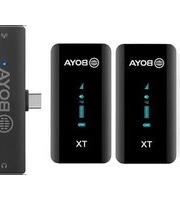
BY-XM6 K6 - Microphone BOYA - Free user manual and instructions
Find the device manual for free BY-XM6 K6 BOYA in PDF.


| Product Type | Wireless Microphone System |
| Model | BY-XM6 K6 |
| Brand | BOYA |
| Transmitter Dimensions | Approx. 63 x 22 x 14 mm (each) |
| Receiver Dimensions | Approx. 86 x 28 x 25 mm |
| Transmitter Weight | Approx. 12 g (each) |
| Receiver Weight | Approx. 30 g |
| Power Supply | Built-in rechargeable Li-ion battery (TX and RX) |
| Charging | USB-C charging cable included |
| Operating Frequency | 2.4 GHz ISM band |
| Operating Range | Up to 50 m (line of sight) |
| Battery Life | Approx. 6 hours (TX and RX) |
| Charging Time | Approx. 2 hours |
| Audio Output | 3.5mm TRS jack (unbalanced) |
| Polar Pattern | Omnidirectional (lavalier) |
| Frequency Response | 20 Hz - 20 kHz |
| Signal-to-Noise Ratio | >80 dB |
| Cleaning and Maintenance | Clean with a soft, dry cloth. Store in a dry place. |
| Safety Precautions | Do not expose to water or extreme temperatures. Use only included charger. |
| Spare Parts / Repairability | Contact BOYA support for replacement batteries or accessories. |
Frequently Asked Questions - BY-XM6 K6 BOYA
User questions about BY-XM6 K6 BOYA
0 question about this device. Answer the ones you know or ask your own.
Ask a new question about this device
Download the instructions for your Microphone in PDF format for free! Find your manual BY-XM6 K6 - BOYA and take your electronic device back in hand. On this page are published all the documents necessary for the use of your device. BY-XM6 K6 by BOYA.
USER MANUAL BY-XM6 K6 BOYA
Ultracompact 2.4GHz Dual-Channel Wireless Microphone System
2.4GHz 迷你双通道无线麦克风系统
BY-XM6-K
User Manual
用户手册

General Introduction
BOYA BY-XM6 is an incredibly lightweight, ultracompact and easy-to-use wireless microphone system for up to 2 people.
The microphone delivers exceptional, broadcast-quality sound to DSLR, mirrorless and video cameras, smartphones, tablets, computers, etc.
It is ideal for content creation, vlogging, mobile journalism and more.
Available Kits
| Model | Color | In the box |
| BY-XM6-K1 | Black | 1 × BY-XM6 TX 1 × BY-XM6 RX |
| BY-XM6-K1W | White | |
| BY-XM6-K1P | Pink | |
| BY-XM6-K1Y | Yellow | |
| BY-XM6-K1B | Blue | |
| BY-XM6-K1G | Green | |
| BY-XM6-K1O | Orange | |
| BY-XM6-K2 | Black | 2 × BY-XM6 TX 1 × BY-XM6 RX |
| BY-XM6-K2W | White | |
| BY-XM6-K2P | Pink | |
| BY-XM6-K2Y | Yellow | |
| BY-XM6-K2B | Blue | |
| BY-XM6-K2G | Green | |
| BY-XM6-K2O | Orange | |
| BY-XM6-K3 | Black | 1 × BY-XM6 TX 1 × BY-XM6 RXD |
| BY-XM6-K4 | Black | 2 × BY-XM6 TX 1 × BY-XM6 RXD |
| BY-XM6-K5 | Black | 1 × BY-XM6 TX 1 × BY-XM6 RXU |
| BY-XM6-K6 | Black | 2 × BY-XM6 TX 1 × BY-XM6 RXU |
Product Structure
Wireless Transmitter BY-XM6 TX
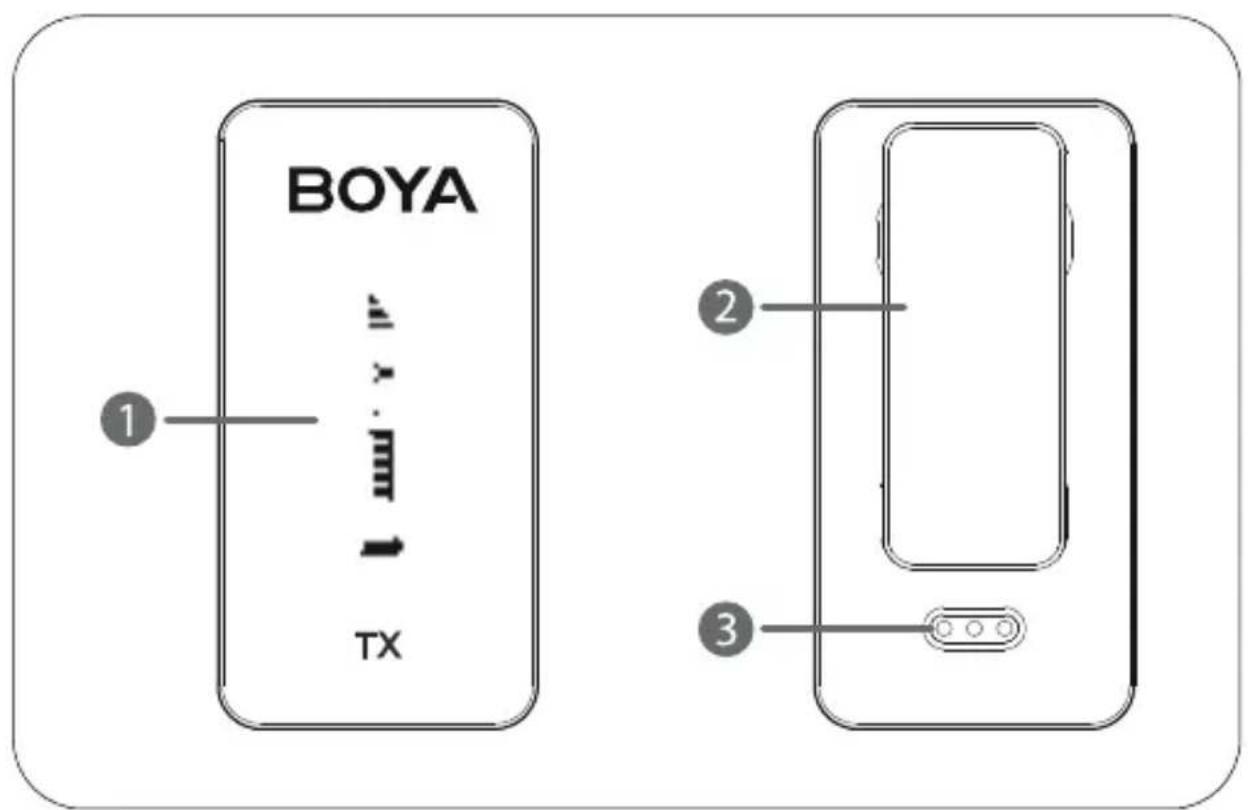
- OLED display
- For more details, please refer to "OLED Display Operation Guide".
2.Belt clip - Charging contacts
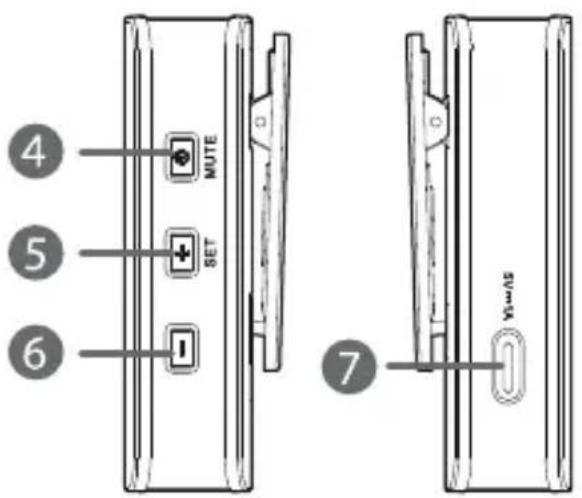
4. Power/Mute button
| Function | Operation |
| Power ON | Long press |
| Power OFF | |
| Mute ON | Short press |
| Mute OFF |

Note:
The function of mute is disabled by default, please enable it manually in the menu if necessary.
5. +/SET button
| Function | Operation |
| + | On home screen, short press to adjust mic gain. |
| On menu screen, short press to select different functions or values shown on the display. | |
| SET | On home screen, long press to enter the menu screen. |
| On menu screen, long press to enter the displayed menu. Then, long press again to confirm your option. |
6. - button
- On home screen, short press to adjust mic gain.
- On menu screen, short press to select different functions or values shown on the display;
- long press to return to home screen.
7. USB-C charging port (DC 5V)
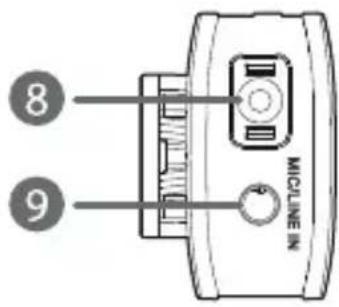
8. Built-in microphone
9. MIC/LINE IN jack
- It can be connected to the supplied 3.5mm lavalier microphone, or other 3.5mm TRS microphones or line-in devices.
Wireless Receiver BY-XM6 RX

- OLED display
- For more details, please refer to "OLED Display Operation Guide".
2.Belt clip - Charging contacts
4. Power/Mute button
| Function | Operation |
| Power ON | Long press |
| Power OFF | |
| Mute ON | Short press |
| Mute OFF |
Note:
The function of mute is disabled by default, please enable it manually in the menu if necessary.
5. +/SET button
| Function | Operation |
| + | On home screen, short press to increase volume. |
| On menu screen, short press to select different functions or values shown on the display. | |
| SET | On home screen, long press to enter the menu screen. |
| On menu screen, long press to enter the displayed menu. Then, long press again to confirm your option. |
6. - button
- On home screen, short press to decrease volume.
- On menu screen, short press to select different functions or values shown on the display;
- long press to return to home screen.
7. USB-C charging port (DC 5V)
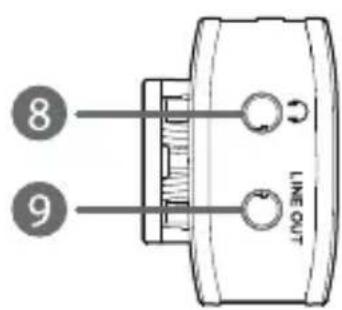
8. 3.5mm headphone output
- Connect headphones for audio monitoring.
9. LINE OUT jack
- Connect the BY-XM6 RX to a smartphone, tablet, camera, recorder or mixer with one of the supplied output cables.
BY-XM6 RXD: Compact Receiver with Lightning Connector
1. MFi certified Lightning connector
- It can be connected to an iOS Lightning device.
2. Status indicator
| Status | Indicator |
| Unpaired | Slowly flashing blue light |
| Pairing | Quickly flashing blue light |
| Paired Successfully | Solid blue light |
3. Pair button
4. Mono/Stereo switch
- The output mode can be toggled between mono and stereo. When in mono mode, the audio from the left and right channel will be mixed. When in stereo mode, the audio from the left and right channel will be separated to the left and right of the stereo output.
5. 3.5mm headphone jack
- Connect headphones for audio monitoring.
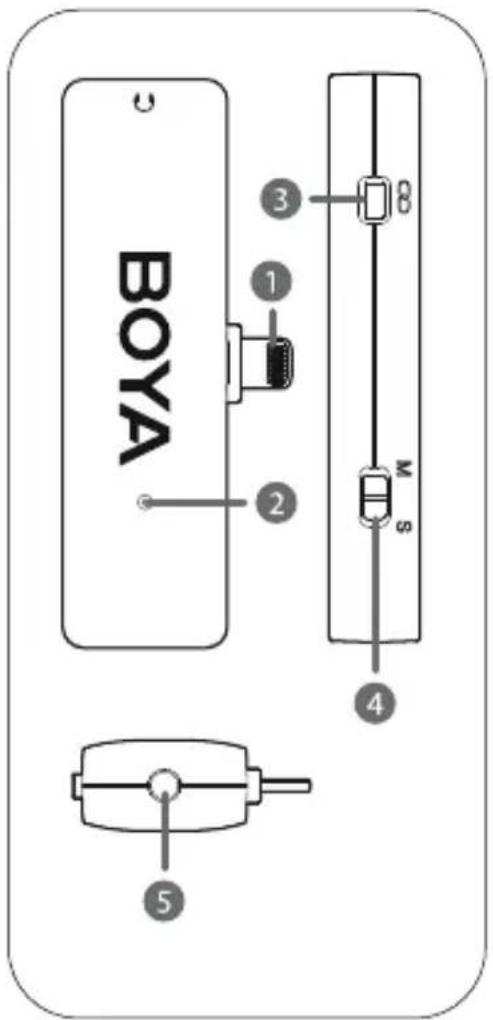
BY-XM6 RXU: Compact Receiver with USB-C Connector
1. USB-C connector
- It can be connected to an Android smartphone, tablet or other USB-C devices.
2. Status indicator
| Status | Indicator |
| Unpaired | Slowly flashing blue light |
| Pairing | Quickly flashing blue light |
| Paired Successfully | Solid blue light |
3. Pair button
4. Mono/Stereo switch
- The output mode can be toggled between mono and stereo. When in mono mode, the audio from the left and right channel will be mixed. When in stereo mode, the audio from the left and right channel will be separated to the left and right of the stereo output.
5.3.5mm headphone jack
- Connect headphones for audio monitoring.

Charging Case BY-XM6-K1BOX
For the BY-XM6-K1 / BY-XM6-K1 Colorful Mic Set

- Charging contacts
- OPEN button
- Press to open the case.
- Indicator button
- Press to light up the battery indicator and display current battery.
- Battery indicator
- USB-C charging port (DC 5V)
Charging Case BY-XM6-K2BOX
For the BY-XM6-K2 / BY-XM6-K2 Colorful Mic Set
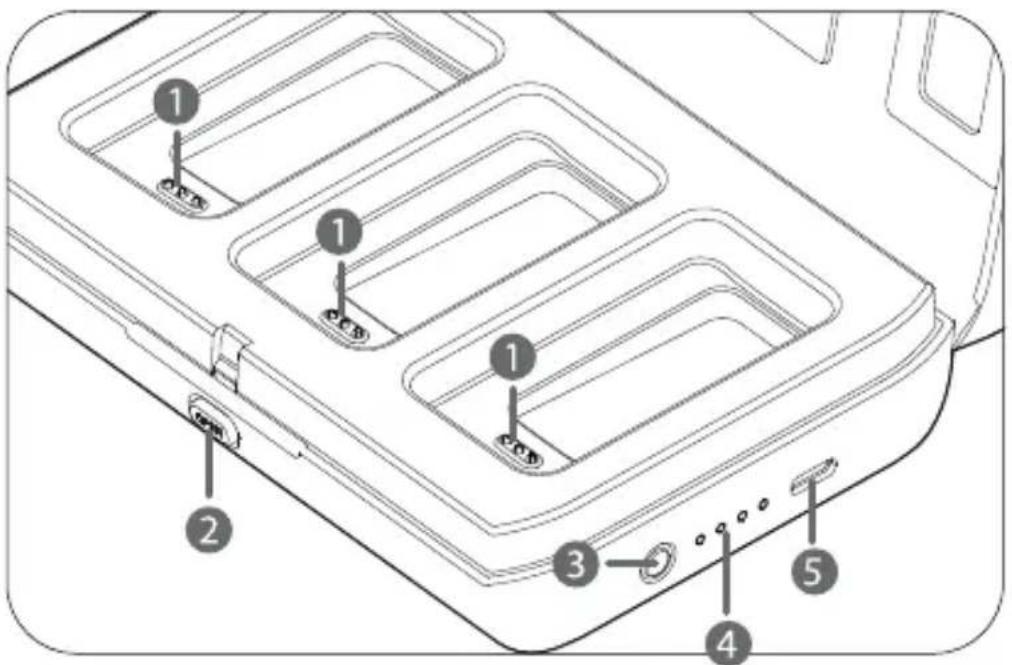
- Charging contacts
- OPEN button
- Press to open the case.
- Indicator button
- Press to light up the battery indicator and display current battery.
- Battery indicator
- USB-C charging port (DC 5V)
Charging Case BY-XM6-K35BOX
For the BY-XM6-K3 / BY-XM6-K5

- Charging contacts
- OPEN button
- Press to open the case.
- Indicator button
- Press to light up the battery indicator and display current battery.
- Battery indicator
- USB-C charging port (DC 5V)
Charging Case BY-XM6-K46BOX
For the BY-XM6-K4 / BY-XM6-K6
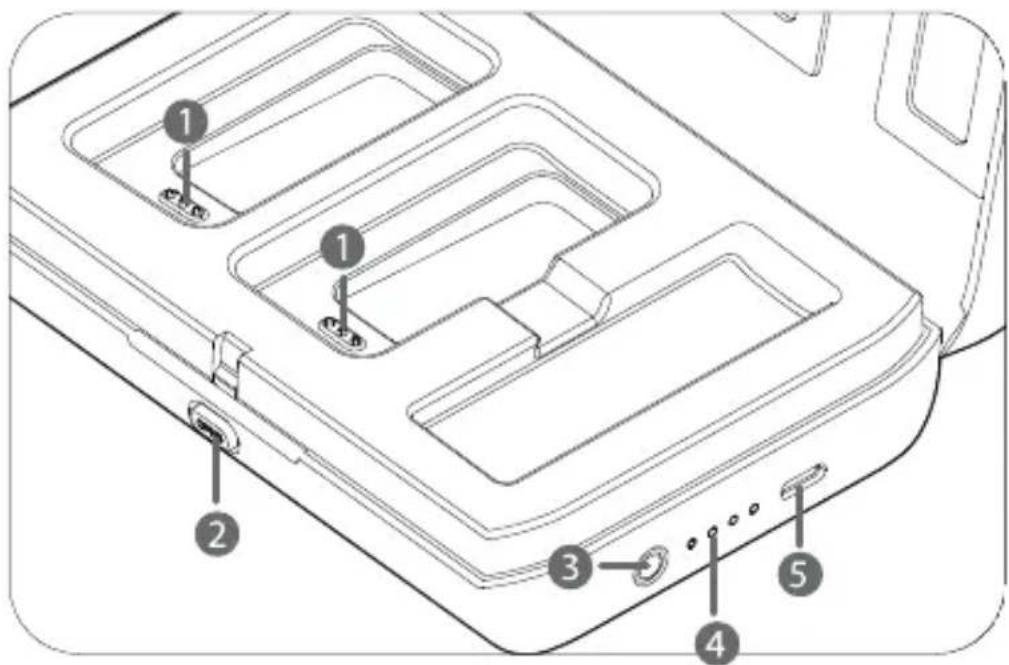
- Charging contacts
- OPEN button
- Press to open the case.
- Indicator button
- Press to light up the battery indicator and display current battery.
- Battery indicator
- USB-C charging port (DC 5V)
OLED Display Operation Guide
Wireless Transmitter BY-XM6 TX Home screen

If no operation is performed within 20 seconds on other screens, the display will automatically return to home screen.
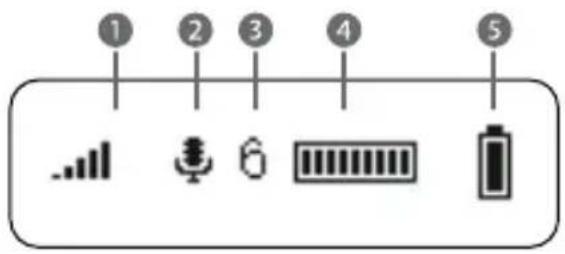
- Pairing indicator
Paired successfully Disconnected Pairing
- Input mode & Mute indicator

Mic in

Line in
MUTE Mute ON
- Mic gain
Displays the TX transmitter's mic gain level
on home screen, press +/- button to adjust the microphone's input gain level.
- Audio input level meter
Displays the audio input level.
- TX's battery level indicator
Displays the TX battery level. Please recharge the device immediately when the indicator starts flashing.
Menu screen

On home screen, long press SET button to enter menu screen. On menu screen, long press - button to return to home screen.
Mic Gain 6/6
Mic Gain Setting
Adjust the microphone's input gain level (0\~6).
Default is "5".
Input Mic In
Input Mode Setting
The input mode can be selected to Mic In or Line In. When Mic In mode selected, the transmitter can be connected to the supplied lavalier microphone, or other microphones with a 3.5mm TRS output. When Line In mode selected, the transmitter can be connected to line-level output devices.
Default is "Mic In".
Mute Disable
Mute Key Setting
Enable or disable mute key button function.
Default is "Disable".
Backlight On
Backlight Setting
Set backlight to always on or on for 10/30/60 seconds.
Default is "On".
Connect Yes?
Connect Setting
Pair with the receiver. For details of operation, please
refer to "Operation Guide".
Language English
Language Setting
English or Chinese are available.
Default is English.
Restore Yes?
Version of the BY-XM6 TX
Wireless Receiver BY-XM6 RX
Home screen

If no operation is performed within 20 seconds on other screens, the display will automatically return to home screen.
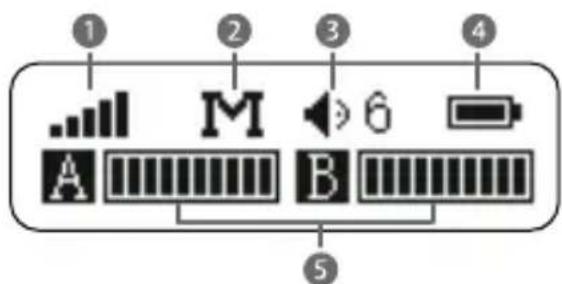
- Pairing indicator
Paired successfully Disconnected Pairing
- RX's output mode
M: Mono S: Stereo
- Output volume & Mute indicator
On home screen, press +/- button to adjust the volume.
× Mute ON Mute OFF
- RX's battery level indicator
Displays the RX battery level. Please recharge the device immediately when the indicator starts flashing.
- Audio input level meter
Displays the audio input level.
Menu screen

On home screen, long press SET button to enter menu screen. On menu screen, long press - button to return to home screen.

Output Volume Setting
Output volume can be set from 0 to 6. Default is "5".
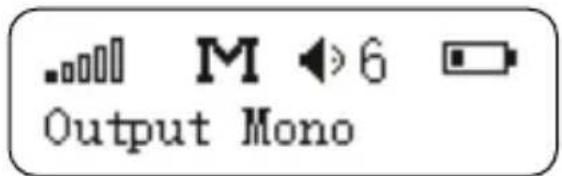
Output Mode Setting
The output mode can be set to either mono or stereo. When in mono mode, the audio from the transmitter, or transmitters will be mixed to both the left and right sides. When in stereo mode, the two transmitters' audio output will be separated to the left and right sides.
Default is mono.


Mute
Disable
Mute Key Setting
Enable or disable mute key button function.
Default is "Disable".


Backlight On
Backlight Setting
Set backlight to always on or on for 10/30/60 seconds.
Default is "On".


Connect Yes?
Connect Setting
Pair with the transmitter. For details of operation, please refer to
"Operation Guide".

Language English
Language Setting
English or Chinese are available.
Default is English.

Restore Yes?
Version of the BY-XM6 RX
Operation Guide
For the BY-XM6-K1/BY-XM6-K2 kit
- Long press the power button to turn on the transmitter and the receiver.
- Pairing
Before leaving factory, the system is pre-paired. Therefore, the connection will be established once they are powered on. If they are disconnected, please follow below steps:
① Long press the SET button to enter menu screen
② Use the + or -button to display the Connect setting menu on both transmitter and receiver.

RX

TX
③ Long press the SET button to select the menu.

RX

TX
④ Select Yes, and long press the SET button to confirm.
⑤ Transmitter and receiver will be successfully paired within 10s.
-
Connect the receiver to the mic input of a camera, recorder or mixer with the supplied 3.5mm TRS to TRS cable. Or connect the RX to a smartphone, tablet, or computer with the supplied 3.5mm TRS to TRRS cable.
-
You are ready to record.
For the BY-XM6-K3/BY-XM6-K4/BY-XM6-K5/BY-XM6-K6 kit
- Long press the power button to turn on the transmitter.
-
Plug the RXD into an iOS device or the RXU into an USB-C device.
-
Pairing
Before leaving factory, the system is pre-paired. Therefore, the connection will be established once they are powered on. If they are disconnected, please follow below steps:
①Long press the TX's SET button to enter menu screen
②Use the + or -button to display the Connect setting menu
Connect Yes?
TX
③Long press the SET button to select the menu.
Connect Yes?
TX
④Select Yes, and long press the SET button to confirm. The transmitter enters pairing mode.
⑤Then, press and hold the Pair button of the RXD/RXU for 3 seconds to enable pairing mode. The indicator will flash blue rapidly.
⑥Transmitter and receiver will be successfully paired within 10s. The indicator of the receiver will turn solid blue, while the indicator “□□□□” on the transmitter will change to □□□□.
4. You are ready to record.
Charging Guide
Please recharge the device when battery is low.
- Charge the TX transmitter(s) and RX receiver
| Status | Indicator |
| Charging | Flashing battery icon |
| Fully Charged | Full battery icon |
①Use the charging case to charge the TX transmitter(s) and RX receiver.

Note: The TX transmitter(s) and RX receiver will automatically turn off and after being placed in the charging case for 10 seconds.
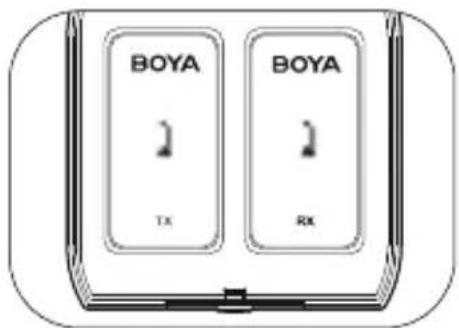
BY-XM6-K1BOX BY-XM6-K1 / BY-XM6-K1 Colorful Mic Set

BY-XM6-K35BOX BY-XM6-K3 / BY-XM6-K5
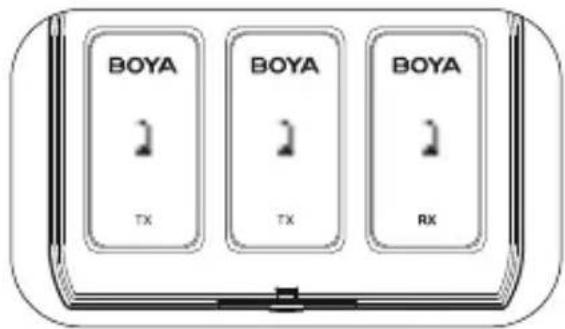
BY-XM6-K2BOX BY-XM6-K2 / BY-XM6-K2 Colorful Mic Set
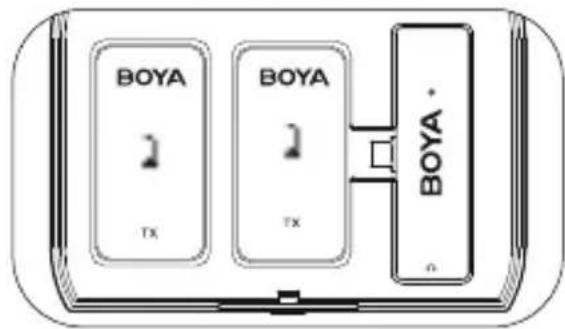
BY-XM6-K46BOX BY-XM6-K4 / BY-XM6-K6
②Use the supplied USB-C cable to charge the TX transmitter(s) and RX receiver.
2. Charge the charging case
Use the supplied USB-C cable to charge the charging case.
| Indicator | Status |
| Charging (Flashing blue light in cycle) | |
| Full charged | |
| Current battery level | |
| Low battery |
Features
- 2.4GHz wireless transmission technology
- Ideal for content creation, vlogging, mobile journalism, and more
- Delivers exceptional, broadcast-quality sound
- Ultracompact clip-on transmitter and dual-channel receiver
- Portable charging case for easy charging
- Easy-to-use OLED display
- Real-time headphone monitoring
- Operating range of up to 100m
- High-quality built-in microphone
- Lavalier microphone included
Specifications
BY-XM6 TX Transmitter
| Transmission Type | 2.4GHz Digital Frequency |
| Modulation | GFSK |
| Operating Range (without obstacle) | Up to 328ft (100m) |
| RF Output Power | <10mW |
| Polar Pattern | Omnidirectional |
| Frequency Response | 35Hz-18KHz |
| Maximum SPL | Built-in Microphone: 120dB SPL |
| Lavalier Microphone: 110dB SPL | |
| Sensitivity | Built-in Microphone: -39dB |
| Lavalier Microphone: -39dB | |
| SNR | >84dB |
| Power Requirements | Built-in Li-ion Battery or USB-C DC 5V or Charging Contact |
| Built-in Battery Life | Approx. 7 hours |
| Antenna | PIFA Antenna |
| Audio Inputs | 3.5mm TRS MIC/LINE IN Jack or Built-in Microphone |
| Weight | Approx. 32g(1.13oz) |
| Dimensions | 62.1x31.6x16.5mm |
| Operating Temperature | -10°C to 50°C |
| Storage Temperature | -20°C to +55°C |
BY-XM6 RX Receiver
| Transmission Type | 2.4GHz Digital Frequency |
| Modulation | GFSK |
| Operating Range (without obstacle) | Up to 328ft (100m) |
| Audio Output Connector | 3.5mm Headphone Jack |
| 3.5mm TRS Output Jack | |
| Audio Output Level | -60 dBV to -20dBV |
| Power Requirements | Built-in Li-ion Battery or USB-C DC 5V or Charging Contact |
| Built-in Battery Life | Approx. 7 hours |
| Antenna | PIFA Antenna |
| Weight | Approx. 32g(1.13oz) |
| Dimensions | 62.1×31.6×16.5mm |
| Operating Temperature | -10°C to 50°C |
| Storage Temperature | -20°C to +55°C |
BY-XM6 RXD Receiver
| Transmission Type | 2.4GHz ISM Frequency |
| Modulation | GFSK |
| Operating Range (without obstacle) | Up to 328ft (100m) |
| RF Output Power | <10mW |
| Audio Output Connector | 3.5mm Headphone Jack |
| MFi Certified Lightning Connector | |
| Power Requirements | Supplied by iOS Devices |
| Antenna | PIFA |
| Weight | 14.5g (0.51oz) |
| Dimensions | 75.6x23.15x12mm |
BY-XM6 RXU Receiver
| Transmission Type | 2.4GHz ISM Frequency |
| Modulation | GFSK |
| Operating Range (without obstacle) | Up to 328ft (100m) |
| RF Output Power | <10mW |
| Audio Output Connector | 3.5mm Headphone Jack |
| USB-C Connector | |
| Power Requirements | Supplied by USB-C Devices |
| Antenna | PIFA |
| Weight | 14.5g (0.51oz) |
| Dimensions | 75.6x23.15x12mm |
Charging Case
| Power Requirements | USB-C DC 5V/1.5A |
| Power Capacity | K1BOX / K35BOX: 2000mAh |
| K2BOX / K46BOX: 3000mAh | |
| Case's Charging Time | K1BOX / K35BOX: 3 hours |
| K2BOX / K46BOX: 4.5 hours | |
| Weight | K1BOX: 152g / K35BOX:143g |
| K2BOX: 200g / K46BOX:195g | |
| Dimensions | K1BOX / K35BOX: 96x96.8x35.6mm |
| K2BOX / K46BOX: 125x96.8x35.6mm | |
| Operating Temperature | -10°C to 50°C |
| Storage Temperature | -20°C to +55°C |
| Charging Cycle Times for Microphone | 2 |
Packing List
BY-XM6-K1 / BY-XM6-K1W / BY-XM6-K1P / BY-XM6-K1Y / BY-XM6-K1B / BY-XM6-K1G / BY-XM6-K1O
1× BY-XM6 TX Transmitter
1× BY-XM6 RX Receiver
1× BY-XM6-K1BOX Charging Case
1× USB-C Charging Cable
1× Lavalier Microphone
1× Mic Clip for Lavalier Microphone
1× Foam Windscreen for Lavalier Microphone
1× Fur Windshield for Built-in Microphone
1×3.5mm TRS to TRS Output Cable for Cameras
1×3.5mm TRS to TRRS Output Cable for Smartphones
BY-XM6-K2 / BY-XM6-K2W / BY-XM6-K2P / BY-XM6-K2Y / BY-XM6-K2B / BY-XM6-K2G / BY-XM6-K2O
2× BY-XM6 TX Transmitter
1× BY-XM6 RX Receiver
1× BY-XM6-K2BOX Charging Case
1× USB-C Charging Cable
2× Lavalier Microphone
2× Mic Clip for Lavalier Microphone
2× Foam Windscreen for Lavalier Microphone
2× Fur Windshield for Built-in Microphone
1×3.5mm TRS to TRS Output Cable for Cameras
1×3.5mm TRS to TRRS Output Cable for Smartphones
BY-XM6-K3
1× BY-XM6 TX Transmitter
1× BY-XM6 RXD Reveicer
1× BY-XM6-K35BOX Charging Case
1× USB-C Charging Cable
1× Lavalier Microphone
1× Mic Clip for Lavalier Microphone
1× Foam Windscreen for Lavalier Microphone
1× Fur Windshield for Built-in Microphone
BY-XM6-K4
2× BY-XM6 TX Transmitter
1× BY-XM6 RXD Reveicer
1× BY-XM6-K46BOX Charging Case
1× USB-C Charging Cable
2× Lavalier Microphone
2× Mic Clip for Lavalier Microphone
2× Foam Windscreen for Lavalier Microphone
2× Fur Windshield for Built-in Microphone
BY-XM6-K5
1× BY-XM6 TX Transmitter
1× BY-XM6 RXU Reveicer
1× BY-XM6-K35BOX Charging Case
1× USB-C Charging Cable
1× Lavalier Microphone
1× Mic Clip for Lavalier Microphone
1× Foam Windscreen for Lavalier Microphone
1× Fur Windshield for Built-in Microphone
BY-XM6-K6
2× BY-XM6 TX Transmitter
1× BY-XM6 RXU Reveicer
1× BY-XM6-K46BOX Charging Case
1× USB-C Charging Cable
2× Lavalier Microphone
2× Mic Clip for Lavalier Microphone
2× Foam Windscreen for Lavalier Microphone
2× Fur Windshield for Built-in Microphone
概述
感谢您选择BOYA!
8. 内置麦克风
9. 麦克风/线性输入孔
- 充电触点
- 按压式开关键
- 按下打开盖子。
- 充电触点
- 按压式开关键
- 按下打开盖子。
- 充电触点
- 按压式开关键
- 按下打开盖子。
- 充电触点
- 按压式开关键
- 按下打开盖子。
BY-XM6-K1 / BY-XM6-K1W / BY-XM6-K1P / BY-XM6-K1Y / BY-XM6-K1B / BY-XM6-K1G / BY-XM6-K1O
The BOYA logo is a trademark which is registered and owned by
Shenzhen Jiayz Photo Industrial., Ltd.
深圳市长丰影像器材有限公司
- ULTRACOMPACT 2.4GHZ DUAL-CHANNEL WIRELESS MICROPHONE SYSTEM
- GENERAL INTRODUCTION
- PRODUCT STRUCTURE
- WIRELESS TRANSMITTER BY-XM6 TX
- POWER/MUTE BUTTON
- NOTE
- SET BUTTON
- BUTTON
- USB-C CHARGING PORT (DC 5V)
- BUILT-IN MICROPHONE
- MIC/LINE IN JACK
- WIRELESS RECEIVER BY-XM6 RX
- 3.5MM HEADPHONE OUTPUT
- LINE OUT JACK
- BY-XM6 RXD: COMPACT RECEIVER WITH LIGHTNING CONNECTOR
- MFI CERTIFIED LIGHTNING CONNECTOR
- STATUS INDICATOR
- PAIR BUTTON
- MONO/STEREO SWITCH
- 3.5MM HEADPHONE JACK
- BY-XM6 RXU: COMPACT RECEIVER WITH USB-C CONNECTOR
- USB-C CONNECTOR
- 5.3.5MM HEADPHONE JACK
- CHARGING CASE BY-XM6-K1BOX
- FOR THE BY-XM6-K1 / BY-XM6-K1 COLORFUL MIC SET
- CHARGING CASE BY-XM6-K2BOX
- FOR THE BY-XM6-K2 / BY-XM6-K2 COLORFUL MIC SET
- CHARGING CASE BY-XM6-K35BOX
- CHARGING CASE BY-XM6-K46BOX
- OLED DISPLAY OPERATION GUIDE
- WIRELESS TRANSMITTER BY-XM6 TX HOME SCREEN
- MENU SCREEN
- MIC GAIN SETTING
- INPUT MODE SETTING
- MUTE DISABLE
- MUTE KEY SETTING
- BACKLIGHT ON
- BACKLIGHT SETTING
- CONNECT YES
- CONNECT SETTING
- LANGUAGE ENGLISH
- LANGUAGE SETTING
- RESTORE YES
- VERSION OF THE BY-XM6 TX
- HOME SCREEN
- OUTPUT VOLUME SETTING
- OUTPUT MODE SETTING
- VERSION OF THE BY-XM6 RX
- OPERATION GUIDE
- FOR THE BY-XM6-K1/BY-XM6-K2 KIT
- FOR THE BY-XM6-K3/BY-XM6-K4/BY-XM6-K5/BY-XM6-K6 KIT
- CHARGING GUIDE
- CHARGE THE CHARGING CASE
- FEATURES
- SPECIFICATIONS
- PACKING LIST
- BY-XM6-K3
- BY-XM6-K4
- BY-XM6-K5
- BY-XM6-K6
- 概述
- 内置麦克风
- 麦克风/线性输入孔
Brand : BOYA
Model : BY-XM6 K6
Category : Microphone