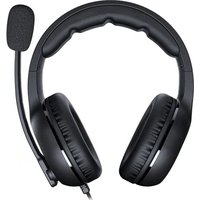
HX330 - Headphones Cougar - Free user manual and instructions
Find the device manual for free HX330 Cougar in PDF.


| Product Type | Wired Over-Ear Gaming Headset |
| Model | HX330 |
| Brand | Cougar |
| Driver Unit | 50mm Neodymium |
| Frequency Response | 20Hz - 20kHz |
| Impedance | 32Ω at 1kHz |
| Sensitivity | 98dB SPL at 1kHz |
| Microphone | Unidirectional, 6.0 x 5.0mm |
| Microphone Frequency Response | 100Hz - 10kHz |
| Microphone Sensitivity | -42dB ± 3dB |
| Cable Length | 2.0m braided cable |
| Connector | 3.5mm audio jack (inline remote with volume control and mute) |
| Ear Cup Design | Over-ear, memory foam earpads, leatherette cover |
| Headband | Adjustable metal headband with leatherette padding |
| Weight | Approximately 255g (without cable) |
| Dimensions (W x H x D) | 195 x 190 x 85mm |
| Power Source | No external power required (passive) |
| Compatibility | PC, Mac, PlayStation, Xbox, Nintendo Switch, mobile devices with 3.5mm port |
| Control Features | In-line volume wheel and microphone mute switch |
| Care and Cleaning | Wipe with a soft, dry cloth; do not use chemicals. Store in a cool, dry place. |
| Safety Warnings | Long-term high volume use may damage hearing. Keep away from children under 3 years (small parts). |
| Spare Parts and Repair | Cable and earpads replaceable. Contact Cougar support or authorized service center. |
| General Information | Gaming headset with high precision 50mm drivers, comfortable design for long sessions. |
Frequently Asked Questions - HX330 Cougar
User questions about HX330 Cougar
0 question about this device. Answer the ones you know or ask your own.
Ask a new question about this device
Download the instructions for your Headphones in PDF format for free! Find your manual HX330 - Cougar and take your electronic device back in hand. On this page are published all the documents necessary for the use of your device. HX330 by Cougar.
USER MANUAL HX330 Cougar
PRODUCT PARTS AND PACKAGE CONTENTS
A Pressure-free memory foam headband
B Pressure-free memory foam earpads
C Noise cancellation microphone
Volume and microphone mute control unit
E 4-Pole 3.5mm phone jack
F 3-Pole 3.5mm phone jack for PC adaptor
G Adjustable headband structure

FEATURES
ENGLISH
•50mm Driver: High-quality Stereo Sound
•Perfect Clarity: 9.7mm Noise Cancellation Microphone
- 270g ultra Lightweight Suspended Leatherlike Headband Design
•4 Pole to 3 Pole Adapter for Extra Compatibility
- Comfort and Isolation: Extra large Foam Earpad
• Crosstalk Reduction
- Adjustable Headband Structure
РУССКИЙ
| MICROPHONE | |
| Driver | 9.7mm |
| Mic Type | Noise Cancellation |
| Mic. Sensitivity at 1kHz | -50dB±3% |
| Mic. Frequency Response | 20Hz-20kHz |
| Mic. Impedance <2.2KΩ | |
The above specifications may vary by country or region
PACKAGE CONTAINS
| HX330 Gaming Headset |
| Audio & Mic Splitter |
| User Manual |
HARDWARE REQUIREMENTS
Single 4-pole Jack Devices
Dual 3-pole Jack Devices ( ( for usage with the audio/mic ) )
•Audio + Microphone: Separate 3.5 mm audio and microphone jacks
GLOBAL WARRANTY POLICY
WARRANTY PERIODS OF COUGAR GAMING DEVICES
Product: COUGAR HX330 gaming headset
Warranty : 1 Year
This warranty gives you specific legal rights. You may also have other rights granted under local law. These rights may vary.
WARRANTY AGREEMENT
- If the product has defects in material or manufacture, COUGAR will provide product repair and replacement service within the warranty period.
- Our warranty service is based on the date of the invoice or warranty card (must be affixed with the store stamp).
If you lose the aforementioned evidence, we will apply the original shipping date of the product as the beginning date of warranty period. The shipping date will be identified by the product serial number(S/N).
CONDITIONS WHERE FREE MAINTENANCE IS NOT PROVIDED
- Any fault or damage caused by natural disasters (including storm, fire, flood, thunder, earthquake, etc).
• Any fault or damage caused by accidental factors and man-made reasons (including hit, scrape, crash, moving, compression, stain, corrosion, use of incurred on unsuitable voltage, computer virus, riot, misuse, malicious damage, etc). - Use in an improper operating environment (including high temperature, high humidity, water inflow, etc).
-
Inability to provide the product warranty card, purchase receipt or invoice to prove the product is still within the warranty period and the shipping date of the product is out of warranty.
-
The warranty card or product serial number has been altered or its number is hard to identify.
- The warranty period has expired.
- Any fault or damage caused by non-compliance with regulations stated on the user manual or improper, rough and careless treatment.
- Any fault or damage caused by use of parts not certified by COUGAR original manufacturer.
- The problem is caused by improper repair or adjustment by the buyer or any manufacturer without authorization from COUGAR.
- The product is not acquired from an authorized distributor of the company or is acquired from illicit sources.
- Paper carton, instruction and other accessories are not warranted.
DISCLAIMERS
- COUGAR product is not authorized for use as critical components in life support device or for incorrect application software or malfunction of the product.
- COUGAR is not liable for the death or damage of person or loss of property when product is using as, including but not limited to, medical equipment, military equipment, traffic equipment and disaster prevention system.
- COUGAR is not liable for any damages, expenses, lost data, lost revenues, lost savings, lost profits, or any incidental or consequential damages due to using defect product of COUGAR.
If you have any question about the warranty, please feel free to contact us. Customer support: https://cougargaming.com/support/contact/upload/
LEGAL NOTICES
This manual was created by Compucase Enterprise and may not be completely or partially copied, passed on, distributed or stored without written consent by Compucase Enterprise.
COUGAR® is a registered brand of Compucase Enterprise Other product and company names mentioned in this documentation may be brands or trademarks of their respective owners.
Compucase Enterprise reserves the right to make changes concerning the contents of the manual and the technical data of the product without previous announcement.

All other registered trademarks belong to their respective companies.
MANUFACTURER CONTACT
Compucase Enterprise Co., Ltd.
No. 225, Lane 54, An Ho Road Sec. 2 Tainan, Taiwan, R.O.C
Tel:+886-6-356-0606
COUGAR USA Technical Service
Tel: (833) 256-3778
Mail: rma@compucaseusa.com
Service email : https://cougargaming.com/support/contact/upload/
More information you will find at cougargaming.com
Compucase Enterprise Co., Ltd.
All rights reserved.
Made in China

Warning! In order to avoid permanent hearing damage, please always use your headset at safe volume levels. Exposure to high sound levels for extended periods of time may cause permanent hearing damage and even loss.

Brand : Cougar
Model : HX330
Category : Headphones