
Indoor Siren - Home Automation SWANN - Free user manual and instructions
Find the device manual for free Indoor Siren SWANN in PDF.


| Product Type | Indoor Siren |
| Brand | Swann |
| Model | Indoor Siren (SNV-109E+52-0178) |
| Category | Home Automation |
| Power Source | 4 x D alkaline batteries (not included) |
| Connectivity | Wireless to Swann Smart DVR/Hub |
| Wireless Range | Effective range within typical home (exact distance not specified) |
| Sound Level | Extremely loud (user should wear earplugs or stay 3 m away) |
| Tamper Protection | Yes, enabled 5 minutes after power-up |
| Dimensions (approx) | 15 x 15 x 5 cm (estimated) |
| Weight (with batteries) | Approximately 500 g (estimated) |
| Mounting | Wall mount via 4 corner holes with screws and wall plugs |
| Operating Temperature | Indoor use only (typical home environment) |
| Compliance | FCC Part 15, CE |
| Battery Life | Depends on usage; check status via Smart Home portal |
| Cleaning Instructions | Wipe with a soft dry cloth. Do not use liquids or solvents. |
| Safety Warnings | Hearing protection required when testing; battery safety per local regulations |
| Warranty | Limited warranty (terms and conditions apply) |
| Repairability | Replace batteries; no user-serviceable parts inside. Contact Swann support for issues. |
Frequently Asked Questions - Indoor Siren SWANN
User questions about Indoor Siren SWANN
0 question about this device. Answer the ones you know or ask your own.
Ask a new question about this device
Download the instructions for your Home Automation in PDF format for free! Find your manual Indoor Siren - SWANN and take your electronic device back in hand. On this page are published all the documents necessary for the use of your device. Indoor Siren by SWANN.
USER MANUAL Indoor Siren SWANN
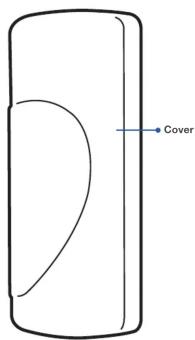
Thank you for choosing the Smart Home Indoor Siren - the ideal addition to your Smart Home system. Please take a moment to familiarize yourself with key parts of the siren.
Front
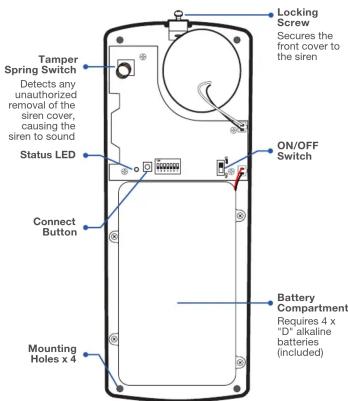
Internal Components
Limited Warranty Terms & Conditions
Swann Communications warrants this product against defects in workmanship and material for a period of one (1) year from its original purchase date. You must present your receipt of the same time to be required for any other person, or if you have been issued, the stated period will be repaired without charge for parts or labour or replaced at the sole discretion of Swann. The end user is responsible for all freight charges incurred to send the product to Swann's repair centres. The end user is responsible for all shipping costs incurred when shipping from end to any country other than the country of origin. This contract will be made by the recipient of the company, and the claims arising from the use of or the inability to use this product. Any costs associated with the fitting or removal of this product by a tradesman or other person or any other costs associated with its use are the responsibility of the end user. This warranty applies to the original purchaser of the product only and is not transferable to any third party. Unauthorized end user or third party has no recorded liability whatsoever for any loss arising from the use of any liability whatsoever void. By law some countries do not allow limitations on certain exclusions in this warranty. Where applicable by local laws, regulations and legal rights will take precedence.
FCC Statement
This device complies with part 15 of the FCC Rules. Operation is subject to the following two conditions: [1] This device may not cause harmful interference, and [2] This device must accept any interference received, including interference that may cause undesired operation.
CE marking on this product represents the product is in compliance with all directives that are applicable to it.
[Non-Text]
This marking indicates that this product should not be disposed with other household wastes throughout the EU. To prevent possible harm to the environment or human health from uncontrolled waste disposal, recycle it responsibly to promote the sustainable reuse of material resources. To return your used device, please use the return and collection systems or contact the retailer where the product was purchased. They can take this product for environment safe recycling.
Battery Safety Information
Caution: Keep batteries away from small children. Risk of explosion if battery is replaced by an incorrect type. Dispose of used batteries promptly in accordance with local regulations.
Need Help?
USA & Canada 1800 627 2799 Australia 1800 788 210
UK & Europe 0808 168 9031 New Zealand 0800 479 266
tech@swann.com
三
support.swann.com
SMARTHOME-ISVER1E
© Swann Communications 2018
Preparing the Siren Connecting the Siren Testing the Siren
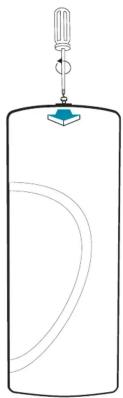
Loosen the locking screw located at the top of the siren and then remove the cover.
1 From the Smart Home web portal, click or tap My Settings > Sirens > add device. The System Setup screen is displayed and your Smart DVR/Hub automatically goes into pairing mode.
Note: You can skip this step if the System Setup screen is already displayed (during the Smart DVR/Hub registration process, or when you are setting up other smart home accessories).
2 Slide the siren's ON/OFF switch to the ON position.

3 Press and hold the siren's Connect button until the status LED blinks once. When the siren has paired with your Smart DVR/Hub, the status LED blinks twice.
4 Follow the on-screen instructions to complete the setup.
Before mounting the siren at the desired location, it is important that you test the siren to ensure that it is within effective wireless range of the Smart DVR/Hub from the selected mounting position.
CAUTION
The siren is extremely loud! When testing the siren, protect your hearing by wearing earplugs, or stand at least 3 meters away from the siren.
To test the siren once it has been connected:
- Arm your Smart Home system in Away mode. Wait for the entry/exit delay (default is 20 seconds, unless configured differently) to be over.
- Trigger the siren alarm using one of these methods:
- opening a door where an entry sensor is installed
- walking in front of a motion sensor
- To turn off the siren alarm, disarm your Smart Home system by setting it to Home mode.
Mounting the Siren
Note: Please ensure the siren is tested for connectivity before permanent mounting.
Choose a central location in your home to place the siren which mounts to any flat wall surface. Before mounting the siren, make sure that the siren is switched off first by sliding the ON/OFF switch to OFF to prevent it from sounding if you inadvertently activate the tamper switch.
- Secure the siren onto the wall through the mounting holes in the four outermost corners of the siren base using appropriate wall plugs and screws for the wall surface.
- Remember to turn on the siren by sliding the ON/OFF switch to ON before replacing the siren cover.
- The siren's tamper protection function is only enabled 5 minutes after the siren is powered up. This gives you enough time to replace the cover properly without triggering the tamper alarm.
Troubleshooting
The siren is not pairing with my Smart DVR/Hub
Switch the siren off, then on again after 30 seconds. Then, try pairing the siren again.
The siren is offline
- An internet service outage may have occurred. Check to make sure that your broadband router is working properly and you are able to access the internet with your other electronic devices. Once your internet service is back up, the siren will automatically rejoin the system.
- The siren is running low on battery power. You can check the siren's battery status via the Smart Home portal. If a Low Battery symbol is shown, replace the batteries in the siren with four fresh "D" alkaline batteries immediately.
Brand : SWANN
Model : Indoor Siren
Category : Home Automation