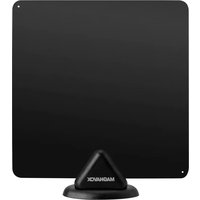
MC323 - TV antenna MAGNAVOX - Free user manual and instructions
Find the device manual for free MC323 MAGNAVOX in PDF.


| Product Type | TV Antenna |
| Brand | Magnavox |
| Model | MC323 |
| Frequency Coverage | VHF 174-230 MHz, UHF 470-952 MHz |
| Impedance | 75 Ω |
| Coaxial Cable Length | 15 feet (4.6 m) |
| Mounting Options | Wall mount and adhesive mount |
| Included Accessories | Antenna, plastic stand, screw sleeves, screws, hook & loop tape, cable clip |
| Warranty | 180 days from date of purchase |
| Manufacturer | Craig Electronics Inc. |
| Licensing | Licensed under Koninklijke Philips N.V. |
| Intended Use | Indoor TV antenna |
| Signal Type | Digital TV (ATSC) |
| Power Requirement | Passive (no external power needed) |
| Connector Type | F-type coaxial connector |
| Country of Origin | China |
| Package Contents | Antenna, stand, mounting hardware, cable clip, manual |
Frequently Asked Questions - MC323 MAGNAVOX
User questions about MC323 MAGNAVOX
0 question about this device. Answer the ones you know or ask your own.
Ask a new question about this device
Download the instructions for your TV antenna in PDF format for free! Find your manual MC323 - MAGNAVOX and take your electronic device back in hand. On this page are published all the documents necessary for the use of your device. MC323 by MAGNAVOX.
USER MANUAL MC323 MAGNAVOX
Craig Electronics warrants this product to be free from manufacturing defects in material and workmanship under normal use for a period of 180 days from date of purchase. If service is required, please return the product to the store where it was purchased for exchange; or, pack the unit in the original packing material with all accessories if applicable, a copy of your sales receipt and a Cashier's check or Money Order for \$15 (to cover shipping and handling costs) payable to Craig Electronics Inc. For consumers in Canada, please make sure that the cashier check or money order is redeemable through a U.S. bank. Ship your product freight pre-paid. Your unit will be repaired, replaced or if the unit cannot be repaired or replaced, a refund will be forwarded to you within four weeks of receipt of your unit. Please ship your unit to:
Craig Electronics Inc 1160 NW 163 Drive Miami, Fl 33169
This warranty is void if the product has been: a) Used in a commercial application or rental. b) Damaged through misuse, negligence, or abuse. c) Modified or repaired by anyone other than an authorized Craig service center. d) Damaged because it is improperly connected to any other equipment.
Note: This warranty does not cover: a) Ordinary adjustments as outlined in the Owner's Manual which can be performed by the customer, b) Damage to equipment not properly connected to the product. c) Any cost incurred in shipping the product for repair. d) Damage to the product not used in the USA.
This warranty is not transferable and only applies to the original purchase. Any implied warranties, including the warranty of merchantability, are limited in duration to the period of this expressed warranty and no warranty whether expressed or implied shall apply to the product thereafter.
Under no circumstance shall Craig be liable for any loss or consequential damage arising out of the use of this product. This warranty gives specific legal rights. However, you may have other rights which may vary from state to state. Some states do not allow limitations on implied warranties or exclusion of consequential damage. Therefore, these restrictions may not apply to you.
This product has been manufactured by and is sold under the responsibility of Craig Electronics Inc, and Craig Electronics Inc is the warrantor in relation to this product, MAGNAVOX and SMART. VERY SMART are registered trademarks of Koninklijke Philips N.V. and are used under license from Koninklijke Philips N.V.
To Obtain Service on your Product email:service@craigelectronics.com
Printed in China
MC323_WC_E0HS1_B0US
Connection

flowchart
graph TD
    A["Computer"] -->|To TV| B["TV1"]
    A -->|To Satellite Receiver VCR| C["TV2"]
    C --> D["SAT"]
Part List
| NO. | Name | Specification | QTY | Image |
| 1 | Antenna | 1 | ||
| 2 | Plastic Stand | 1 | ||
| 3 | Screw sleeve | 2 | ||
| 4 | Screw | M3x20mm | 2 | |
| 5 | Hook & Loop Tape | 30mm | 2(Sets) | |
| 6 | Cable Clip | 1 | ||
| 7 | User's Manual | 1 |
Installation diagram
Table Stand Setup

Wall Mount
-
Drill two 0.236irc depth 1.10irc holes on the wall
-
Insert the supplied sleeves into the holes.
- Secure the supplied screws (x 2) into the sleeves and leave 1/16 - 1/8 inch space.
- Connect the Antenna as illustrated below.

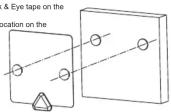
Adhesive Mount
- Apply one-side of the supplied Hook & Eye tape on the
rear of the Antenna. 2. Apply the other side to the desired location on the
-
Apply the other hand to the desired location at the wall.
-
Connect the corresponding Hook & Eye sections as illustrated.
,
FAQs
Q1: Why can't I get any channels from the antenna?
A1.1: Please check to ensure that your TV is set to the correct mode (ANT), and has been properly set to scan for channels. Please refer to your TV's instruction manual for detailed instructions.
A1.2: Please remove any obstructions between your antenna and the signal source. Please try to reposition the antenna and rescan for the desired channels.
Q2: Why am I experiencing poor reception?
A2.: Please remove any obstructions between your antenna and the signal source. Please try to reposition the antenna and rescan for the desired channels. It may help to place the antenna in a higher position or close to a window.
Q3: Why can't I get the channel I am looking for? I know it is available in my area.
A3: There may be obstructions between the antenna and the broadcast tower of your desired channel. Please try to reposition the antenna and rescan for the desired channels. It may help to place the antenna in a higher position or close to a window.
Specifications
| Frequency Coverage | VHF 174-230MHzUHF 470-862MHz |
| Impedance | 75 Ω |
| Coaxial Cable Length | 15 Feet |
SPECIFICATIONS AND ACCESSORIES ARE SUBJECT TO CHANGE WITHOUT NOTICE

Brand : MAGNAVOX
Model : MC323
Category : TV antenna