
THWD-10W - Measuring instrument Amprobe - Free user manual and instructions
Find the device manual for free THWD-10W Amprobe in PDF.


| Product Type | Relative Humidity and Temperature Meter with Wireless Data Transmission (THWD-10W) |
| Dimensions | 160 mm (H) x 83 mm (W) x 38 mm (D) (6.3 x 3.3 x 1.5 in) |
| Weight | Approx. 230 g (0.5 lb) including batteries |
| Power Supply | 4 x 1.5V AAA batteries |
| Battery Life | 200 hours typical with carbon zinc batteries |
| Humidity Measurement Range | 0% to 100% RH |
| Humidity Accuracy | ±2.5% at 25°C (77°F), 10% to 90% RH; ±5% outside this range |
| Temperature Measurement (NTC) | Range: 0°C to 60°C (32°F to 140°F), Accuracy: ±0.5°C typical from 10°C to 45°C |
| Temperature Measurement (K-Type) | Range: -50°C to 1000°C (-50°F to 1832°F), Accuracy: ±(0.1% rdg + 1°C) |
| Wet Bulb / Dew Point | Calculated from NTC temperature and humidity, selectable via WB/DP button |
| Wireless Transmission | Frequency 910~920 MHz, range up to 25 m, low current (<1 mA) |
| Data Storage | Up to 256 data points in non-volatile memory; SAVE and READ functions |
| Special Functions | MAX/MIN/AVG recording, Data Hold, Relative mode, Backlight (30s auto-off), Auto Power Off (15 min, can be disabled) |
| Display | 5-digit LCD with multiple annunciators |
| Input Protection | Maximum 24V AC/DC on any combination of input pins |
| Operating Environment | 0°C to 50°C (32°F to 122°F), <80% RH |
| Storage Environment | -20°C to 60°C (-4°F to 140°F), <70% RH |
| Included Accessories | K-type thermocouple bead wire, Software CD, USB Wireless Antenna (THWD-10W), 4 AAA batteries, manual |
| Cleaning | Wipe with damp cloth and mild detergent; do not use abrasives or solvents |
| Warranty | 1 year limited warranty against defects in material and workmanship |
| Certifications | CE, FCC Part 15 Class B |
Frequently Asked Questions - THWD-10W Amprobe
User questions about THWD-10W Amprobe
0 question about this device. Answer the ones you know or ask your own.
Ask a new question about this device
Download the instructions for your Measuring instrument in PDF format for free! Find your manual THWD-10W - Amprobe and take your electronic device back in hand. On this page are published all the documents necessary for the use of your device. THWD-10W by Amprobe.
USER MANUAL THWD-10W Amprobe
RH Meter with Wireless
Users Manual
- Mode d'emploi
• Bedienungshandbuch - Manual d'Uso
- Manual de uso
THWD-10 THWD-10W
RH Meter RH Meter with Wireless
Users Manual
Limited Warranty and Limitation of Liability
Your Amprobe product will be free from defects in material and workmanship for 1 year from the date of purchase. This warranty does not cover fuses, disposable batteries or damage from accident, neglect, misuse, alteration, contamination, or abnormal conditions of operation or handling. Resellers are not authorized to extend any other warranty on Amprobe's behalf. To obtain service during the warranty period, return the product with proof of purchase to an authorized Amprobe Test Tools Service Center or to an Amprobe dealer or distributor. See Repair Section for details. THIS WARRANTY IS YOUR ONLY REMEDY. ALL OTHER WARRANTIES - WHETHER EXPRESS, IMPLIED OR STAUTORY - INCLUDING IMPLIED WARRANTIES OF FITNESS FOR A PARTICULAR PURPOSE OR MERCHANTABILITY, ARE HEREBY DISCLAIMED. MANUFACTURER SHALL NOT BE LIABLE FOR ANY SPECIAL, INDIRECT, INCIDENTAL OR CONSEQUENTIAL DAMAGES OR LOSSES, ARISING FROM ANY CAUSE OR THEORY. Since some states or countries do not allow the exclusion or limitation of an implied warranty or of incidental or consequential damages, this limitation of liability may not apply to you.
Repair
All test tools returned for warranty or non-warranty repair or for calibration should be accompanied by the following: your name, company's name, address, telephone number, and proof of purchase. Additionally, please include a brief description of the problem or the service requested and include the test leads with the meter. Non-warranty repair or replacement charges should be remitted in the form of a check, a money order, credit card with expiration date, or a purchase order made payable to Amprobe® Test Tools.
In-Warranty Repairs and Replacement – All Countries
Please read the warranty statement and check your battery before requesting repair. During the warranty period any defective test tool can be returned to your Amprobe® Test Tools distributor for an exchange for the same or like product. Please check the "Where to Buy" section on www.amprobe.com for a list of distributors near you. Additionally, in the United States and Canada In-Warranty repair and replacement units can also be sent to a Amprobe® Test Tools Service Center (see address below).
Non-Warranty Repairs and Replacement – US and Canada
Non-warranty repairs in the United States and Canada should be sent to a Amprobe® Test Tools Service Center. Call Amprobe® Test Tools or inquire at your point of purchase for current repair and replacement rates.
In USA In Canada
Amprobe Test Tools Amprobe Test Tools
Everett, WA 98203 Mississauga, ON L4Z 1X9
Tel: 877-AMPROBE (267-7623) Tel: 905-890-7600
Non-Warranty Repairs and Replacement – Europe
European non-warranty units can be replaced by your Amprobe®
Test Tools distributor for a nominalv charge. Please check the
"Where to Buy" section on www.amprobe.com for a list of distributors near you.
European Correspondence Address*
Amprobe® Test Tools Europe
In den Engematten 14
79286 Glottertal, Germany
Tel.: +49 (0) 7684 8009 - 0
*(Correspondence only – no repair or replacement available from this address. European customers please contact your distributor.)
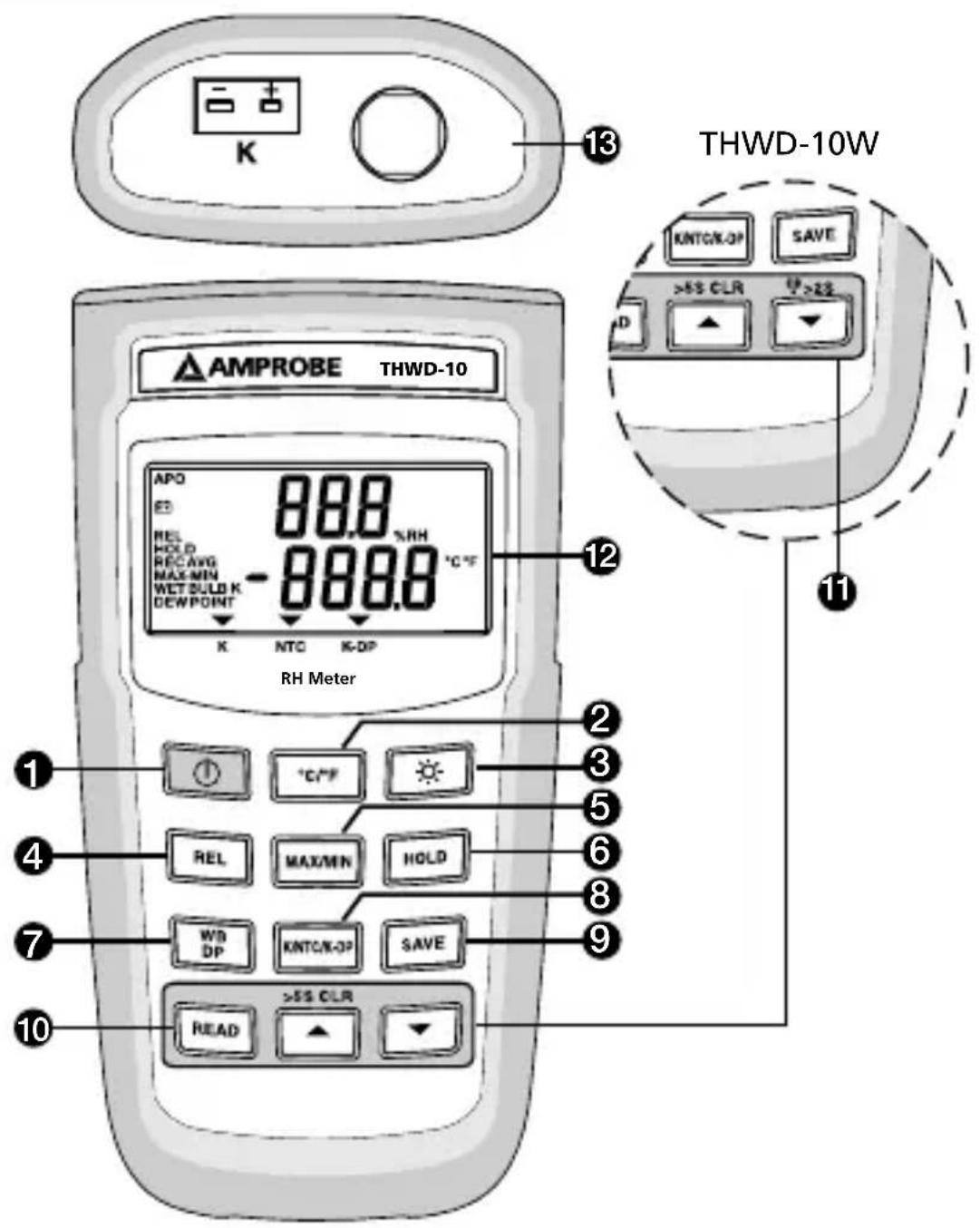
1) "Power
2) ^ C / ^
3) "☀" backlight
4) "REL" Relative
5) "MAX/MIN" Record
6) "HOLD" Data Hold
7) "WB/DP" WB/DP/Ambient temperature
8) "K/NTC/K-DP"
9) "SAVE" data save
10) "READ" data recall
11) Wireless(THWD-10W)
12) Display
13) Input
Screen Display

1) Humidity display
2) Temperature display
3) K type temperature measurement mode
4) NTC temperature measurement mode
5) K type temperature minutes Dew point temperature mode
6) Automatic power off enabled
7) Low battery
8) Relative enabled
9) HOLD enabled
10) Maximum, Minimum, Maximum-Minimum, or average reading displayed
11) Wet bulb or dew point temperature displayed
12) Wireless function enabled (THWD-10W)
CONTENTS
SYMBOLS 2
UNPACKING AND INSPECTION 4
INTRODUCTION ...... 4
Features 4
OPERATION INSTRUCTIONS ....5
"①" Power Switch 5
“°C/°F” Selecting the Temperature Scale ....5
"💡- " Button 5
"REL" Button 5
"MAX/MIN" Button 5
"HOLD" Button 6
"WB/DP" Button 6
"K/NTC/K-DP" Button 6
"SAVE" Button 7
"READ", "▲", "▼ Button .... 7
Wireless Mode 7
SPECIFICATION 8
MAINTENANCE 11
SYMBOLS
 | Caution! Refer to the explanation in this Manual |
 | Complies with European Directives |
 | Tested Comply With FCC Standards |
 | Do not dispose of this clamp meter as unsorted municipal waste. |
⚠ WARNING and PRECAUTIONS
- To avoid electrical shock, do not use this instrument when working voltages at the measurement surface over 24V AC or DC.
- To avoid damage or burns, do not make temperature measurement in microwave ovens.
- Repeated sharp flexing can break the thermocouple leads. To prolong lead life, avoid sharp bends in the leads, especially near the connector.
- Do not immerse the hygrometer sensor head into liquids since this causes permanent damage to the sensor.
Federal Communications Commission
This device THWD-10W complies with Part 15 of the FCC Rules. Operation is subject to the following two conditions: (1) this device may not cause harmful interference, and (2) this device must accept any interference received, including interference that may cause undesired operation.
Note
This equipment THWD-10W has been tested and found to comply with the limits for a Class B digital device, pursuant to Part 15 of the FCC Rules. These limits are designed to provide reasonable protection. This equipment generates, uses and can radiated radio frequency energy and, if not installed and used in accordance with the instructions, may cause harmful interference to radio communications. However, there is no guarantee that interference will not occur in a particular installation if this equipment does cause harmful interference to radio or television reception, which can be determined by turning the equipment off and on, the user is encouraged to try to correct the interference by one or more of the following measures:
- Reorient or relocate the receiving antenna.
- Increase the separation between the equipment and receiver.
- Connect the equipment into an outlet on a circuit different from that to which the receiver is connected.
- Consult the dealer or an experienced radio/TV technician for help.
Shielded interface cables must be used in order to comply with emission limits.
Changes or modifications not expressly approved by the party responsible for compliance could void the user's authority to operate the equipment.
Wireless Note
Wireless receiver must keep a distance at least 40cm from the meter and meter to meter distance must be at least 30cm.
Your shipping carton should include:
1 Meter
4 AAA batteries
1 Software CD ROM (THWD-10W)
1 USB Wireless Antenna (THWD-10W)
1 K type thermocouple
1 Manual
1 Plain white box
If any of the items are damaged or missing, return the complete package to the place of purchase for an exchange.
INTRODUCTION
The instrument hereafter referred to as “the Meter” is a battery powered meter that measures relative humidity and temperature. Through a few easy to use controls, the Meter displays three different temperature points of the air surrounding the meter’s sensor: ambient, wet bulb, and dew point.
Features
- Wireless two ways transmission. (THWD-10W only)
• Highly stable humidity measurement ±2.5%. - Processing %RH and temperature simultaneously.
- Two in one wide range thermometer and humidity function.
- Wet/Dry bulb, dew point and %RH.
- Easy switching between K/NTC/K-DP.
• Max/Min/AVG/REL/HOLD function. - APO function.

Power Switch
The “#” key turns the thermometer on or off. In the SET mode cannot be powered off. Exit SET mode to power off.
APO function mode
Press “power key for more than 4 seconds to disable the auto-power function.
The display will show "APO OFF".
“°C/°F” Selecting the Temperature Scale
Readings are displayed in either degrees Celsius(°C) or degrees Fahrenheit(°F). When the thermometer is turned on, it is set to the temperature scale that was in use when the thermometer was last turned off. To change the temperature scale, press the “°C/°F” key.

Button
Press the “☀️” key to trigger on the backlight function, press the “☀️” key again to cancel the backlight function. The backlight will switch-off automatically after 30 seconds.
"REL" Button
Press the "REL" key to enter Relative mode, zero the display, and store the displayed Reading as a reference value and annunciator REL is displayed. Press "REL" key again to exit the relative mode. In this mode, press "HOLD" key to stop reading, all values are frozen, press "HOLD" key again to restart reading.
"MAX/MIN" Button
Press "MIN/MAX" key to enter the MIN/MAX recording mode and REC shows on the display. The beeper emits a tone when a new minimum or maximum measurement is recorded. Press "MIN/MAX" key again to cycle through
the current readings:
MAX: The highest measurement recorded.
MIN: The lowest measurement recorded.
MAX-MIN: The difference of the highest and the lowest measurement.
AVG: The average values of the measurements.
Press "MIN/MAX" key over two seconds to exit the function. In this mode, press "HOLD" key to stop recording, all values are frozen, press "HOLD" key again to restart recording. In this mode, the APO function and other keys are disabled, excluding "HOLD" and Backlight keys. Press and hold down the "MAX/MIN" key for more than 2 seconds to exit the MAX/MIN function.
"HOLD" Button
Press the "HOLD" key to enter the data hold mode, the "HOLD" annunciator is displayed at the center-left of display. When data hold mode is selected, the meter held the present readings and stops all further measurements. Press the "HOLD" key again to cancel data hold mode, causing meter to resume taking measurements.
"WB/DP" Button
In the NTC data Mode, the Meter displays ambient temperature when first turned on. To display wet bulb(WB) temperature, press "WB/DP" key once. Press the "WB/DP" again to switch to dew point(DP) temperature. Press "WB/DP" a third time returns the Meter to ambient temperature.
"K/NTC/K-DP" Button
Press the "K/NTC/K-DP" key, the meter can cycle through "K-TYPE", "NTC", "KDP".
*K-DP = K-TYPE temperature minutes Dew point temperature.
"SAVE" Button
The save function stores the \%RH, K-TYPE, NTC, Wet bulb, Dew point data in a nonvolatile memory. Press the "SAVE" key to save the current data, the word SAVE is displayed to indicate the data are saved. The build in memory can store up to 256 data.
"READ", "▲", "▼" Button
To recall the readings from memory, press "READ" key. To check the memorized data just to press "▲" or "▼" until the desired memorized data is displayed. To return the meter to normal operation, press "READ" key again. * CLR SAVE DATA:
Pressing the “▲” key for more than 5 seconds to clears all the saved data in memory. And lower display show “Clr” about 2 second.
Wireless Mode: (THWD-10W)
Press the “◀” key for more than two seconds to start wireless function. Press the “◀” key again for another two seconds to stop wireless function. The wireless mode will shut down if there is no wireless signal for two minutes.
To SET CH/ID to 00,00, press the “▼” key and “⏻” power key for more than 6 seconds with the meter powered down. The meter will set channel and ID to 00,00 status. The second display will show 00, which means that the channel and ID has been set to 00.
To check the channel and ID of the meter When the meter is off, press “°C/°F” key and “☐” for 5 seconds, LCD’s main display will show channel number, the second display will show ID number.
Electrical
| Temperature Scale | Celsius or Fahrenheit user-selectable |
| Measurement Range | K-Type -50°C to 1000°C, (-50°F to 1832°F) |
| Resolution 0.1°C or 0.2°F | |
| Accuracy Accuracy is specified for operating temperatures over the range of 18°C to 28°C (64°F to 82°F), for 1 year, not including thermocouple error. ±(0.1% rdg + 1°C) on -50°C to 1000°C ±(0.1% rdg + 2°F) on -50°F to 1832°F ±(0.05% rdg + 1.4°F) -58°F to -328°F | |
| Sensor Thermistor temperature sensor | |
| Range 0°C to 60°C, (32°F to 140°F) | |
| Resolution 0.1°C/°F | |
| Accuracy ±2°C on | 0°C to 10°C ±0.5°C on 10°C to 45°C ±2°C on 45°C to 60°C ±4°F on 32°F to 50°F ±1°F on 50°F to 113°F ±4°F on 113°F to 140°F |
Relative Humidity
| Sensor Capacitive | Humidity Sensor |
| Range 0% to 100% RH | |
| Accuracy ±2.5% at 25°C (77°F), 10% to 90% RH±5% at 25°C (77°F), 0% to 10% RH,90% to 100% RH | |
| Sensor Response Time for 90% of Total Range | 60sec typical. |
| Sensor Hysteresis (excursion of 10% to 90% to 10% RH) | ±1%RH typical |
| Temperature Coefficient | 0.1 times the applicable accuracy specification per °C from 0°C to 18°C and 28°C to 50°C (32°F to 64°F and 82°F to 122°F). |
| Input Protection | 24V dc or 24V ac rms maximum input Voltage on any combination of input pins. |
| Input Connector | Accepts standard miniature thermocouple connectors (flat blades spaced 7.9mm, center to center). |
Environmental
| Ambient Operating Ranges | 0°C to 50°C (32°F to 122°F) <80% R.H. |
| Storage Temperature | -20°C to 60°C (-4°F to 140°F) <70% R.H. |
General
| Display 5 digit liquid crystal display (LCD). | |
| Overload “----.-” or “OL” is display.. | |
| Reading Rate | 1 time per second. |
| Auto power off 1 | 5 minutes, press power key to resume operation. |
| Battery 4 X 1.5V AAA | |
| Battery Life 200 hours typical with carbon zinc battery. | |
| Dimensions 160mm(H) x 83mm(W) x 38mm(D);6.3 in (H) x 3.3 in (W) x 1.5 in (D). | |
| Weight Approx. 230g (0.5lb) including batteries. | |
| Supplied Probe 4 | feet type “K” thermocouple bead wire (Teflon tape insulated). Maximum insulation temperature 260°C (500°F). Wire accuracy ±2.2°C or ±0.75% of reading (whichever is greater) from 0°C to 800°C (32°F to 1472°F). |

Wireless Features
Frequency range 910\~920MHz (THWD-10W)
Low current consumption less than 1mA.
The transmitting distance can reach 25M without magnetic interference.
CE - EMC: Conforms to EN61326-1.
This product complies with requirements of the following European Community Directives: 89/336/EEC (Electromagnetic Compatibility) and 73/23/EEC (Low Voltage) as amended by 93/68/EEC (CE Marking). However, electrical noise or intense electromagnetic fields in the vicinity of the equipment may disturb the measurement circuit. Measuring instruments will also respond to unwanted signals that may be present within the measurement circuit. Users should exercise care and take appropriate precautions to avoid misleading results when making measurements in the presence of electronic interference.
WARNING
To avoid possible electrical shock, disconnect the thermocouple connectors from the thermometer before removing the cover.
Installing and Replacing Battery
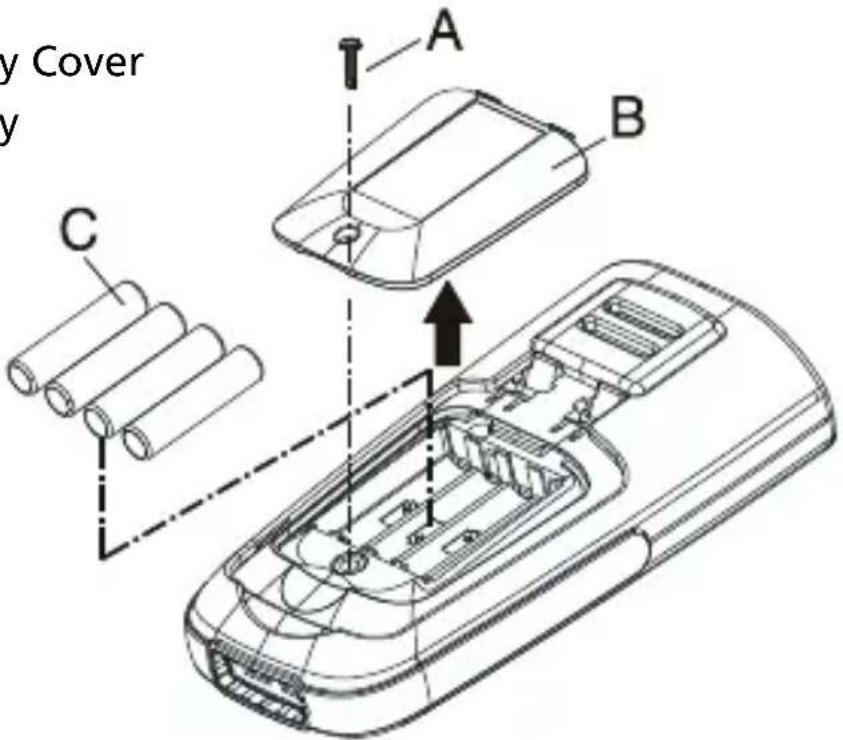
A. Screw
B. Battery Cover
C. Battery
-
Power is supplied by 4pcs 1.5V (SIZE AAA) UM-4 R03.
-
The “+−” appears on the LCD display when replacement is needed. To replace battery remove screw from back of meter and lift off the battery cover.
-
Remove the batteries from the battery compartment and replace them with new ones.
-
When not use for long time, remove the battery.
-
Do not store the unit in place with temperature and humidity beyond the recommended storage temperature.
Cleaning
Periodically wipe the case with a damp cloth and detergent, do not use abrasives or solvents.
Visit www.Amprobe.com for
- Catalog
- Application notes
• Product specifications - User manuals


- RH Meter with Wireless
- Users Manual
- THWD-10 THWD-10W
- RH Meter RH Meter with Wireless
- Limited Warranty and Limitation of Liability
- Repair
- In-Warranty Repairs and Replacement – All Countries
- Non-Warranty Repairs and Replacement – US and Canada
- Non-Warranty Repairs and Replacement – Europe
- Screen Display
- CONTENTS
- SYMBOLS
- ⚠ WARNING and PRECAUTIONS
- Federal Communications Commission
- Note
- Wireless Note
- INTRODUCTION
- Features
- Power Switch
- APO function mode
- “°C/°F” Selecting the Temperature Scale
- Button
- "REL" Button
- "MAX/MIN" Button
- "HOLD" Button
- "WB/DP" Button
- "K/NTC/K-DP" Button
- "SAVE" Button
- "READ", "▲", "▼" Button
- Wireless Mode: (THWD-10W)
- Wireless Features
- CE - EMC: Conforms to EN61326-1.
- WARNING
- Installing and Replacing Battery
- Cleaning
- Visit www.Amprobe.com for
Brand : Amprobe
Model : THWD-10W
Category : Measuring instrument