
GRB350WP - Refrigerator GEMINI - Free user manual and instructions
Find the device manual for free GRB350WP GEMINI in PDF.


| Product Type | Refrigerator |
| Brand | Gemini |
| Model | GRB350WP |
| Energy Class | E (EU energy label) |
| Total Gross Capacity | 350 L |
| Refrigerator Net Capacity | 300 L |
| Freezer Net Capacity | 50 L |
| Climate Class | N-ST |
| Noise Level | 42 dB |
| Dimensions (H x W x D) | 185 x 60 x 65 cm |
| Weight | 65 kg |
| Power Supply | 220-240 V~ |
| Frequency | 50 Hz |
| Power Consumption | 0.85 kWh/24h |
| Refrigerant | R600a |
| Functions | Adjustable thermostat, interior LED light, 4 adjustable glass shelves, door storage for bottles and dairy, vegetable crisper, reversible door hinge design |
| Maintenance | Clean interior with warm water and mild detergent; defrost freezer compartment manually when ice thickness exceeds 5 mm; clean condenser coils annually |
| Safety | Install on a level surface with adequate ventilation; do not block air vents; keep away from heat sources; use dedicated power outlet; ensure children do not play with the appliance |
| Spare Parts | Available door seals, shelves, crisper drawers, thermostat, and LED lamps through authorized service centers |
| Reparability | Repairable by qualified technician; spare parts available for at least 7 years after end of production |
Frequently Asked Questions - GRB350WP GEMINI
User questions about GRB350WP GEMINI
0 question about this device. Answer the ones you know or ask your own.
Ask a new question about this device
Download the instructions for your Refrigerator in PDF format for free! Find your manual GRB350WP - GEMINI and take your electronic device back in hand. On this page are published all the documents necessary for the use of your device. GRB350WP by GEMINI.
USER MANUAL GRB350WP GEMINI
Rechargeable USB Juicer Blender
隨身USB充電式果汁攪拌機
Model No./型號: GRB350WP
Before using your product for first time, please read this instruction manual. 在使用本产品前,编辑编码本说明書并保存好。
SAFETY INSTRUCTION
Attention! When using electric tools, basic safety precautions should be followed to reduce the risk of fire, electric shock and personal injury, including the following:
Read all these instructions before operating this product and keep these instructions for future reference.
-
Read and save these instruction.
-
Check the voltage indicated on the rating plate. This juicer is designed for DC 5V/1A electric supply.
-
Cleaning and user maintenance shall not be made by children without supervision.
-
The appliance is only to be used with the power supply: 5V/2A provided with the appliance.
-
Incorrect operation and improper handling can lead to faults on the appliance and injuries to the user
-
In the event of improper use or incorrect handling, no liability can be accepted for any damage that may occur.
-
Do not operate the appliance if the mains cable or the mains plug show signs of damage, if the appliance has fallen on the floor or has been otherwise damaged. In such cases take the appliance to a specialist for checking and repair if necessary.
-
Never remove the mains adapter & USB outlet from the socket by pulling on the mains cable, or with wet hands.
-
Ensure that the mains cable does not hang over sharp edges or allow it to become trapped.
-
Keep the appliance away from damp, and protect from splashes.
-
Keep the appliance and its cord out of reach of children less than 8 years.
-
Use the appliance on a flat, dry and heat resistance surface.
-
Do not operate the juicer in an area where gasoline painting or such flammable liquids is used or stocked.
-
Do not let hand or other objects put into the bottle when operation the juicer. They could be hurt your finger/hand to causing damage or injuries.
-
Do not use this juicer in a damp area such as bathroom.
-
Do not use this juicer near a window.
-
Use this juicer only as it is describe in this manual.
-
Do not try to disassemble this juicer and fix it by user, If you need maintenance, please send back the juicer to our After-sales Service Center.
-
All components of this juicer must not be replaced by the user.
-
Turns on the machine without fruits / liquid will stop in 5 seconds, the longest juicer time per cycle is 45 seconds, will stops automatic, the spot flashing. Please reset the switch before switching on. Do not continuously squeeze juice to avoid the electronic original load too large and hot, affecting the life of the product.
-
When the juicer battery consumption is insufficient, plug in the charging cable with the adapter / current of more than 5V / 1A (this accessory is not supplied), and use the attached USB charging cable for charging. After full charging, the juicer will working and can be used.
-
The longer the battery is used or placed, the shorter the battery discharge time.
-
During normal use, the motor is locked when the pulp is too large to cause it to stop. The line protection program is turned on and the indicator will flashing and automatically disconnected. After the switch is disconnected, the indicator will stop flashing and double-click the On / Off Button to run again.
-
Do not put any parts of this product into various cleaning equipment such as dish washing machine.
-
Do not use steel ball, abrasive detergent or saprophyte liquid to clean this product.
-
This juicer, should not twist meat, grinding other strong fruit (Such as : Nuts, Chinese medicine, coffee bean).
-
When the juicer is working, it is strictly forbidden to open the upper cover and put the hands or other hard objects into the bottle to prevent accidents.
-
To make baby food, you can put cooked fruits, vegetables, beans and other ingredients into bottle, then add water or milk, and release to make nutritious rice paste and other supplementary food.
WARING
- This appliance can be used by children aged from 8 years and above and persons with reduced physical, sensory or mental capabilities or lack of experience and knowledge if they have been given supervision or instruction concerning use of the appliance in a safe way and understand the hazards involved.
- Children shall not play with the appliance. Cleaning and user maintenance shall not be made by children without supervision
- There are no serviceable parts in this unit. Do not attempt to disassemble.
- Never use this juicer with any solid-state speed control device. Doing so will create fire and/or shock hazards.
- Not allow Children/Baby to put finger inside the juicer bottle or stirrer to avoid injury/danger.
| Model | GRB350WP |
| On / Off Button | Hold the On / Off Button 2-3 Seconds to start operation for up to 45 seconds. The indicator turns to blue during operation. Continuous juicing will cause excessive heating of electronic components and affect the service life of the machine. It is recommended to operation every time for rest about 1 minute. |
| Indicator light | Standby mode, the indicator shows blue flashing, after lock the cup in light position, the indicator turns to blue during operation. Full charging indicator shows blue color. If the red indicator light is flashing, it means the protection alert is ON and the machine cannot be operated, it needs to twist the battle tightly to the base as Standby mode. The red and blue indicator lights flash alternately to indicate the blade is blocked as alert signal. Open the bottle and clear the stuck food on the cutting blade, then the alert signal can be released If the red light is always ON, it means insufficient voltage need to recharge the unit. |
| Type-C port | USB charging port, insert the end of USB port to the port of base, then connect the USB pin to the suitable power plug (DC 5V/1A this part is excluded) for charging |
| Power Supply | DC 5V |
| Input (Micro) | 1A |
| Charging Time | About 3 hours under no battery use condition (with DC5V - 1A)(power adapter not include this part in package) |
| Charging Indicator | Indicator light will be red when charging,Indicator light will be blue when fully charged. |
| Weight | 430g (including bottle) |
| Product Dimensions | 74 Wx200 Hx74 D mm (With plastic bottle) |
| Battery capacity | 2 000mAh Li-battery |
| Motor speed | 14500-15500 r/min |
APPLIANCE COMPONENTS
- Juicing Cup
- Mixing knife
- Base
- On/Off button
- Indicator light
- USB charging cable (not include power plug)

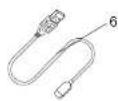
Remark: The product picture is for reference only.
HOW TO USE
Caution :
Clean all parts in direct contact with the food materials first.
The temperature of food and liquid should not exceed 60°C; the capacity should not exceed the maximum.
When mixing, please make sure that the silicone rim is installed in position and tighten the juicing cup Counter clockwise.
Empty operation is prohibited to avoid parts damage or affect service life. It is forbidden to blend dry goods and blend hard Chinese medicinal materials (such as stone swallow, stone lotus seed, etc.) Do not mix carbonated drinks and soda water.
The bottle install and twist tightly on the unit base to avoid water leakage during operation.
Before use of the juicer, make sure that the battery is fully charged and clean.
Counter clockwise the bottle.
1. Wash the fruit and cut it into about 10x 10 x 10 mm cubes. A fruit with a core, hard material, thick-skinned or hard shell which can not be blended, please remove it first. (figure 1)
2. Add the cut fruit, accounting for 40% of the cup capacity. After adding water, The total amount is about 80% of the capacity of the cup (350 ml) (figure 2)
3. Juicer only will work after the bottle is fixed on the base tightly screw the bottle cup and lock in position, Juicer only will work with Hold the On / Off Button 2-3 Seconds and the blue light flashes to start operation. (Figure 3)
Counterclockwise

figure 1

figure 2

3
- Use it for horizontal position as image. Hold the On/Off Button 2-3 Seconds to operate, hold it by hand or place it on the horizontal table surface and hold the product stable. The fruit for apple, pear, citrus, etc. will blend for about 45 seconds. Shake the product lightly at work, the juice effect is better. (figure 4)
- After the juice is done, turn off the power switch, shake horizontally or tilt the unit to avoid blades getting stuck during opening. If there is more fruit drags, please use filter before drinking. (figure 5)

Indicator status description
- After the juicing cup is tightened to the base, the blue indicator flashes 5 times without operation.
- After the juicing cup is tightened to the base, when the switch is pressed for 2 seconds, the blue indicator flashes for 3 times, and the blue indicator lights up when the machine works until the process is finished.
- After taking out the juicing cup, the red indicator light flashes 5 times
- When the charging cable is plugged in for charging, the red light is always on; Charging is complete, and the blue light is always on.
- When charging, press and hold the switch for a long time, indicating that it cannot be started.
- When the added water is lower than the blade height, start the automatic shutdown protection for 5 seconds, and the red light flashes 3 times.
Suggested to user
- Juicer will stop automatically after 45 seconds of operation. If you need to blend more finely, you can press the On / Off button for 2-3 seconds to continue blend again.
- To stop blending, hold the On / Off button 2-3 seconds to stop the operation.
- If the blade is blocked or stuck during the use of the product, clean the whole machine upside down to ensure that the mixing blade is not blocked by food and restart.
- It is forbidden to store alcohol containing liquid into the juicing cup of this product, and it is forbidden to contain alcohol containing materials or edible alcohol.
Charging
Available with power bank or product adapter 5V / 1A to charging this product.. (this accessory is not supplied)

natural_image
Simple line drawing of a cylindrical device connected to a vertical tube with a outlet, showing internal components (no text or symbols)4
NOTE
- When the battery is exhausted, the juicer will automatically turn off to protect the equipment.
- The battery is not detachable. Please do not squeeze or remove the battery. This may lead to environmental pollution or even explosion.
- When the ambient temperature exceeds 50°C / 140°F, it is strictly prohibited to use the fan.
- Before seasonal storage, please charge the battery to 75% at least and suggest to charge the battery once in every 2 months in order to prolong the service life.
- If the juicer stops working in long time, please keep charging the battery fully charged.
- If you put the product in a wet place, its life will be shortened.
- For your safety, please do not put your fingers or any foreign matters into the cutting blades, juicer cup or USB charging port.
- Bottle capacity is 350ml, and the maximum capacity is recommended not to exceed 350ml when releasing food materials.
- When the machine is working, do not open the bottle to add ingredients or extend your hand into the bottle.
- May get dyeing on the silicone rim for discolouring fruits. Pay attention and do not touch the blades when bottle is detached.
- Open the silicone cover with care at lack for charging to avoid damage.
- Do not splash or rinse water on silicone cover/USB port at the back.
- Please do not use sharp utensils or steel ball to rub on the Juicer panel to avoid damage to the screen printing pattern. Do not use corrosive cleaner, electric oil, alcohol, etc. to clean the panel of Juicer to avoid damage to screen printing pattern.
WHAT'S IN THE BOX
| Juicer base with blades | 1 |
| Bottle | 1 |
| USB charging cable | 1 |
| User manual | 1 |
5
HOW TO CLEAN
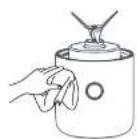
- Must be turn off the Juicer before cleaning. Do not press / touch with the On / Off button. Close the USB port cover tightly before cleaning.
- After use every time, please clean in time, do not immerse the juicer base into water when cleaning, the power supply must be cut off first. After clean the whole product, wipe clean with a dry cloth.
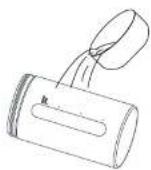
- All parts should not be cleaned with hot water up to 60°C or prohibited to place in a high-temperature sterilizer. Use warm water with a proper amount of detergent Wash with a brush and rinse under tap water.
Remove and clean with the following steps:
• Over-charge protection: When voltage reaches 4.2V, it will automatically stop charging and prevents the damage caused by the over charging of the battery.
• Over-discharge protection: When the battery is depleted. This product will automatically stop.
- Over-voltage protection: When the external charging voltage is higher than 4.2V, it will automatically stop charging.

This marking indicates that this product should not be disposed with other household wastes.
To prevent possible harm to the environment or human health from uncontrolled waste disposal, recycle it responsibly to promote the sustainable reuse of material resources. To return your used device, please use the return and collection systems or contact the retailer where the product was purchased. They can take this product for environmental safe recycling.
PRODUCT SPECIFICATION
Model: GRB350WP
Working Voltage: DC5V/1A
Power: 35W
Battery capacity: 2000mAh Li-battery
Maximum capacity: 350ml bottle
Product size: 74 Wx200 Hx74 D mm (With plastic bottle)
* The final product specification may be varied according to a different lot of material and actual input voltage power if the usage area.
重要安全事项
注意:
natural_image
Simple line drawing of a cylindrical device connected to a vertical container with a bulb and tubing (no text or symbols)10 11
注意事项
Proudly Serviced by:
ToolBox
a Gilman Group Company
太平家庭電器
14
Brand : GEMINI
Model : GRB350WP
Category : Refrigerator