Freestyle Edge RGB KB975 - Keyboard Kinesis - Free user manual and instructions
Find the device manual for free Freestyle Edge RGB KB975 Kinesis in PDF.


| Product Type | Split Ergonomic Mechanical Keyboard |
| Model | Freestyle Edge RGB KB975 |
| Brand | Kinesis |
| Switch Type | Cherry MX Brown (or equivalent) |
| Backlighting | Per-key RGB |
| Connection | USB 2.0 Type-A (detachable cable) |
| Key Rollover | Full N-Key Rollover (NKRO) |
| Programmable Keys | Fully programmable via software |
| Onboard Profiles | 3 onboard profiles |
| Macro Support | Yes (complex macros supported) |
| Split Design | Adjustable split angle (up to 20 degrees) |
| Tenting Option | Compatible with Kinesis Tenting Kit (sold separately) |
| Dimensions (each half) | Approx. 9.5 x 6.5 x 1.5 inches (241 x 165 x 38 mm) |
| Weight (each half) | Approx. 1.5 lbs (0.68 kg) |
| Cable Length | 6 ft (1.8 m) between halves and to computer |
| Operating System | Windows, macOS, Linux |
| Power Source | USB bus power (no external power needed) |
| Wrist Rests | Removable, cushioned wrist rests included |
| Materials | High-grade plastic, aluminum plate |
| Warranty | 2 years limited |
Frequently Asked Questions - Freestyle Edge RGB KB975 Kinesis
User questions about Freestyle Edge RGB KB975 Kinesis
0 question about this device. Answer the ones you know or ask your own.
Ask a new question about this device
Download the instructions for your Keyboard in PDF format for free! Find your manual Freestyle Edge RGB KB975 - Kinesis and take your electronic device back in hand. On this page are published all the documents necessary for the use of your device. Freestyle Edge RGB KB975 by Kinesis.
USER MANUAL Freestyle Edge RGB KB975 Kinesis
THE SMARTSET PROGRAMMING APP
The SmartSet App is unlike any other keyboard
Software. The App doesn't require any special drivers and it doesn't need to run in the
background or sync with the cloud.
Download the Windows or Mac version of the App
unzip the file, and place the App in the folder of
your choice.
- gaining the S&P 500.com's edge
Before launching the SmartSet App, use the
onboard shortcut (see pg. 4) to 'connect' the
v-Drive to your PC so the Apo can read & write to
the keyboard flash memory if the V-DWA is hot
I can't ask the app, I can't call your identity to the keyboard. Note: The active mode only be connected to your PC when you are using the Smart App.
connected to your f c which you be using the SHAR TPE.
Locate the SmartGet App on your PC and double-click the icon to launch the App. The App will
lead the Active Profile for editing, but you can edit any Profile using the drop-down menu.
Use the Layout tab to assign custom key actions or mouse clicks, create and edit macros, or just
re arrange default act one to your exact preferences. Simply click a key in the keyboard diagram
and then chose an action from the menu at left. Custom key actions & macros appear in blue.
Select the Lighting tab to configure the Lighting Effect for that Profile. Choose the desired Effect
from the menu at left, and then customize it using the modules at the bottom of the screen.
With the Freestyle and Breathe Effects, you can assign custom colors to each of the 95 keys.


Click the Save button to save your updated Profile to the v-Drive. You can use the App Refresh
Shortcut to preview your new settings, or simply disconnect the v Drive and resume normal use.
The Smartsion does not dramatically update the ice-band. You must save on a chance to the sun.
and then close the time or use the fresh short to implement your charge on the keyboard.
sure to always sleep their drive on your computer by right closing before a custom matching keyboard.
©2019 Korea Corporation Limited, 4/17/2019

FREESTYLE EDGE
RGB
SPLIT METHANICAL SAINING KEYSOEN
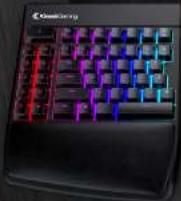
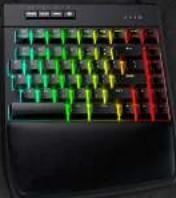
KB975
QUICK START GUIDE

kinesisgaming.com
PACKAGE CONTENTS
Freestyle Edge RGB Split Mechanical Gaming Keyboard
Detachable Cushioned Palm Supports
Quick Start Guide
SYSTEM REQUIREMENTS
PC with full-size USB port
Windows® 7, 8 or 10, MacOS®, Linux®, or Chrome OS®
SmartSet Programming App (Required to customize Lighting Effects)
Windows® 7, 8 & 10 or Mac OS X 10.4+
Internet Connection (for download only)
\~25MB of free hard drive space Standard UF Keyboard Drivers
Standard OS Keyboard Drivers
FEATURES
Cherry MX mechanical key switches, detachable cushioned palm supports, 16.8M color per-key RGB backlighting, 9 customizable Profiles, one-touch key remapping, on-the-fly macro recording, 9 dedicated game keys, multimedia keys, braided cables, NRKO Mode. Game Mode, 100% anti-ghosting, 1ms response time, 4MB onboard memory (the "v-Drive") and much more.
GETTING STARTED
The Freestyle Edge RGB is 100% plug-and-play with all major operating systems and does not require the installation of any software or special drivers for basic keyboard use or onboard programming. Simply plug the Edge in to any full-size USB port on your computer. To customize Lighting Effects download the SmartSet App.
OVERVIEW
The Freestyle Edge RGB is a powerful programmable keyboard. The Edge can be programmed using a variety of convenient Onboard Shortcuts or via the SmartSet App. Please read this Quick Start Guide before attempting to configure the keyboard and refer to the full User Manual for detailed instructions regarding advanced features.
TECHNICAL SUPPORT
To submit a Ticket and access resources like the User Manual, FAQs, Troubleshooting Tips. Firmware Updates, Warranty, Downloads, or Tutorials visit the Freestyle Edge RGB support page.
Support Resources: gaming.kinesis-ergo.com/fs-edge-rgb-support/
CHOOSE YOUR CONFIGURATION
There is no wrong way to set up the Edge. Experiment with different configurations to find the setup that works best for you. Try moving the right module out of the way for one-handed game-play or separating the modules to shoulder-width for a neutral typing posture. Or attach the Lift Kit (sold separately) to put your arms in a more relaxed position for maximum comfort. If you need extra separation, remove the cover on the back of the left module and extend the cable up to 20°. If the Link Cable develops a kink, simply pick up the left module and rotate it.
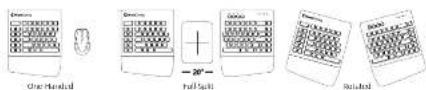
Ergonomics Resources: gaming.kinesis-ergo.com/ergonomics
PROFILE MANAGEMENT
The Edge features 9 fully customizable Profiles which can be loaded on-the-fly (see pg. 4). The key layout of each Profile can be customized using the dedicated REMAP and MACRO onboard programming buttons or via the SmartSet Apps. Every key on the Edge can be reprogrammed and each key can be assigned a unique secondary action accessed via the "Fin" key. The Edge has 9 dedicated Game Keys for macros, but any non-modifier key can also trigger a macro. Up to 100 macros can be saved to each Profile.
DEFAULT LIGHTING EFFECTS
| Profile 1 | Profile 2 | Profile 3 | Profile 4 | Profile 5 | Profile 6 | Profile 7 | Profile 8 | Profile 9 |
| Ride Wave(Rights) | Ride Wave(Cross) | Ride Spectrum | Reactive(Green) | Freestyle | Monochrome(Blue) | Monochrome(Rad) | Monochrome(Green) | Monochrome(Worth) |
Use the SmartSet App to customize the Lighting Effects for any of the nine Profiles. To turn off the backlighting, simply tap the LED key (see pg. 5).
ONBOARD PROGRAMMING
Use the SmartSet Key in combination with other keys to trigger Onboard Shortcuts which can be used to customize certain global keyboard settings.
ONBOARD SHORTCUTS (SEE USER MANUAL FOR ADDITIONAL SHORTCUTS)
| Function Channel Name | Shortcut | Notes |
| Program look about: LSC the image is a key to page up or down to a length | Use the Program Look command to dislose all accessed program coming towards to prevent accidental reprogramming of the keyboard. | |
| Remain Reputation Enter Remain Key, select the Source Key | Enter Remain Model, select the "Source" key action (LED flash rapid), then shoot the physical ("Deutschman" icon). | |
| Readout MasterIcon The Page is for Key, set out of Key, set out of the "Tag" key | Recover: Macro Record Mouse, select the "Tag" key or key come (LED flash rapid), then type-year more (LED flash slow), Tap Macro again to stop recording. | |
| Load Profile? Shift Key: Tap the Profile key to cycle between the three | Tap the Profile key to cycle between the three primary Profiles, Profile 1 + left LED, Profile 2 + right LED and Profile 3 + left LED in light mode. | |
| Load Profile? Shift Key: Take the Time, take on Tap to jump down | Hold the SmartSet Key and tap "1" to Jump directly to any of the time Profiles, then Profiles 4 and see loaded, both of the LEDs will be off. | |
| Blue Status Report: Use the Subject Report to write up to the version of the user. | Use the Status Report to "print-in-the-work" a report of the beginning of current settings. Note: Open a tab with opening window first. | |
| Streamed & Streamed Drive Direction: Use the Regulated a "Big" to "Big" mark | disordered the keyboards's "Writer" to the SmartSet App. Write Sleep and Noise decreased when using App as some keyboard functions are undistated. | |
| Set Digital Master/MyBlock Signal or Mbps per app for Static Data Bus | Inter Macro Speed Mode (LDCs) Read, Chan Step "3" to select a global music playback speed on tap "3" Note: Update the audio mode, please call up. | |
| Basic Basic GameMade: Service Made: double access to a single key | X-Keyboard follows all simultaneous key poses to be registered. X-Keyboard mode is disconnected when the keyboard is unpagged or not to be posted. | |
| Basic Basic GameMade: Service Made: double access to a single key | Game Mode Disbes the Windows key action. Note: The Game Made LED indicator "FD" will indeterminate. | |
| Soft Reset A soft Reset rules: all custom groups programming | A Soft Reset erases all outturn rewards and macros in both layers of the active Profile. | |
| Reset/Reset Perform a Hard Reset while plotting Edge into | Perform a Hard Reset while plugging the Edge into your computer to ensure rewards and macros to all 9 Profiles and recovers the flushes upgraded up to 60. | |
| App Between: The App Repeated: Use the Original System to adjust the Original System | The App Refresh shorturing Imporations All Layout, Lighting and Settings changed saved the SmartSet App without disconnecting the "On-View". | |

Brand : Kinesis
Model : Freestyle Edge RGB KB975
Category : Keyboard