PXCG-USB - Battery Ozito - Free user manual and instructions
Find the device manual for free PXCG-USB Ozito in PDF.


| Product Type | Lithium-Ion Rechargeable Battery |
| Model | PXCG-USB |
| Brand | Ozito |
| Compatibility | Ozito Power X Change (PXC) tools |
| Rated Voltage | 18 V |
| Battery Capacity | 2.0 Ah |
| Energy Content | 36 Wh |
| Cell Type | Lithium-Ion |
| USB Output | 5 V / 2.1 A |
| Charge Time | Approx. 1 hour with fast charger |
| Dimensions (L x W x H) | 150 x 80 x 60 mm |
| Weight | 0.5 kg |
| Main Functions | Powers PXC tools; integrated USB port charges smartphones and tablets |
| Maintenance & Cleaning | Wipe with dry cloth; store in cool, dry place |
| Safety | Do not expose to water or fire; avoid short circuits |
| Spare Parts & Repairability | Non-user-serviceable; contact Ozito support |
| General Information | 2-year limited warranty |
Frequently Asked Questions - PXCG-USB Ozito
User questions about PXCG-USB Ozito
0 question about this device. Answer the ones you know or ask your own.
Ask a new question about this device
Download the instructions for your Battery in PDF format for free! Find your manual PXCG-USB - Ozito and take your electronic device back in hand. On this page are published all the documents necessary for the use of your device. PXCG-USB by Ozito.
USER MANUAL PXCG-USB Ozito
USB POWER STATION
5V DC
INSTRUCTION MANUAL
SPECIFICATIONS
Input: 18V DC
Output: 5V DC 2.1A,
5V DC 1.0A
Compatible Batteries: PXBP-150 (18V 1.5Ah)
PXBP-300 (18V 3.0Ah)
PXBP-520 (18V 5.2Ah)
ozito.com.au
1 Charging Light
2 On/Off Button
3 Output 1.0A
4 Output 2.1A
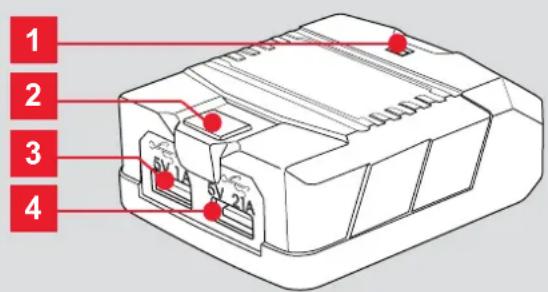
PXCG-USB
DESCRIPTION OF SYMBOLS
| V | Volts | Hz | Hertz |
| A | Amps | Ah | Amp Hour |
 | Read the manual | [S472] | Indoor use only |
| Warning | [9740] | Do not dispose of in rubbish |
CARING FOR THE ENVIRONMENT
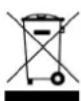
Power tools that are no longer usable should not be disposed of with household waste but in an environmentally friendly way. Please recycle where facilities exist. Check with your local council authority for recycling advice.

Recycling packaging reduces the need for landfill and raw materials. Reuse of recycled material decreases pollution in the environment. Please recycle packaging where facilities exist. Check with your local council authority for recycling advice.
USB CHARGER SAFETY WARNINGS
THIS MANUAL CONTAINS IMPORTANT SAFETY AND OPERATING INSTRUCTIONS FOR YOUR BATTERY CHARGER.
- Before using the charger read all instructions and cautionary markings on the charger, battery pack and the product using the battery pack.
- Do not place any object on top of the charger or place the charger on a soft surface that may result in excessive internal heat. Place the charger in a position away from any heat source.
- Do not operate the charger if it has received a sharp blow, been dropped or otherwise damaged in any way.
- Do not disassemble charger.
- Never attempt to connect 2 chargers together.
- DO NOT store or use the tool and battery pack in locations where the temperature may reach or exceed 40^ C (such as inside sheds or metal buildings in summer).
- Do not incinerate the battery pack even if it is seriously damaged or is completely worn out. The battery can explode in a fire.
- Never attempt to open the battery pack for any reason. If the plastic housing of the battery pack breaks or cracks, immediately discontinue use and do not recharge.
- Only use USB charging cables in good working condition
- Never attempt to modify the charger in any way
- Refer to the charging instructions and rating of your electronic appliance before using with this device.

ELECTRICAL SAFETY

WARNING! When using tools, basic safety precautions including the following should always be followed to reduce risk of fire, electric shock, personal injury and material damage.
Read the whole manual carefully and make sure you know how to switch the tool off in an emergency, before operating the tool.
Save these instructions and other documents supplied with this tool for future reference.
This appliance is not intended for use by persons (including children) with reduced physical, sensory or mental capabilities, or lack of experience and knowledge, unless they have been given supervision or instruction concerning use of the appliance by a person responsible for their safety.
Children should be supervised to ensure that they do not play with the appliance.
CHARGING CAPACITY
Note: PXCG-USB is suitable to charge USB compatible devices such as a mobile phone, tablet, camera or MP3 player via the USB ports. Two devices can be charged simultaneously.
| Suggested Charging Capacity by Battery Power | |
| Output | Suitable power to charge |
| 1.0Amp | Mobile phone, camera, MP3 players, small devices. |
| 2.1Amp | Tablet computer, mobile phone, camera, MP3 players, devices requiring more power. |
| Battery Type | Charging Capacity |
| PXBP-150 1.5Ah 18V Lithium Ion Battery | 2 x Mobile phone |
| PXBP-300 3.0Ah 18V Lithium Ion Battery | 4 x Mobile phoneor 1 x Tablet computer |
| PXBP-520 5.2Ah 18V Lithium Ion Battery | 6 x Mobile phoneor 1 x Tablet computeror 2 x Mobile phone and 1 x Tablet computer |
Note: The above charging capacity is based on the following devices - iPhone 6 (2014) and iPad 4th Gen (2012).
Charging capacity will vary based on your device.
ONLINE MANUAL
Scan this QR Code with your mobile device to take you to the online manual.

1. CHARGING A DEVICE 2. MAINTENANCE
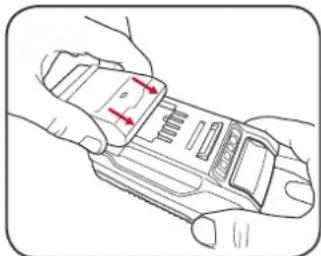
Connecting USB Power Station to battery pack
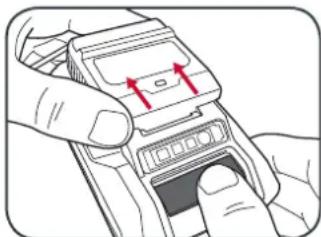
1 With the battery sitting on a flat surface, align the raised ribs on the battery with the recess in the charger and slide onto the battery ensuring a firm connection.
natural_image
Line drawing of hands holding a device with red arrows indicating movement or force (no text or symbols)Connecting USB device to USB Power Station
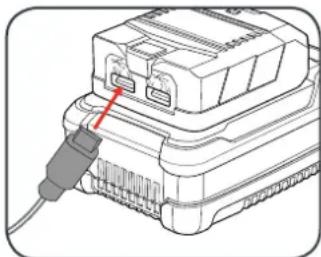
1 Connect the device to be charged via USB cord to the USB Power Station outlet.
natural_image
Illustration of a connector with a red cable inserted, showing internal components (no text or symbols)2 Push the On/Off button to turn on
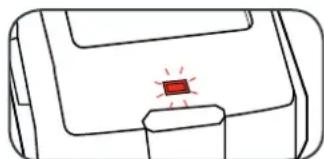
3 The LED will illuminate red showing power is being supplied to the USB Power Station.
natural_image
Simple line drawing of a device with a red indicator light on the screen (no text or symbols)Note: If no device is connected, the USB Power Station will turn off. The red LED light will no longer be illuminated.
4 To remove, push the on/off switch into the off position, then press the battery release tab and slide the USB Power Station from its position.
natural_image
Illustration of hands inserting a device into a mobile phone (no text or symbols visible)Note: For best results ensure the battery is fully charged.
- Disconnect the charger from power source before cleaning.
- Keep the charger in a dry place out of reach of children.
- If the enclosure of the charger requires cleaning, do not use solvents. Use a dry, soft cloth only to wipe down the surface. Never let any liquid get inside the charger.
- There are no parts inside the charger which require maintenance. Do not take the charger apart. If the charger is damaged, contact your supplier or the manufacturer.
WARRANTY
IN ORDER TO MAKE A CLAIM UNDER THIS WARRANTY YOU MUST RETURN THE PRODUCT TO YOUR NEAREST BUNNINGS WAREHOUSE WITH YOUR BUNNINGS REGISTER RECEIPT. PRIOR TO RETURNING YOUR PRODUCT FOR WARRANTY PLEASE TELEPHONE OUR CUSTOMER SERVICE HELPLINE:
Australia 1800 069 486
New Zealand 0508 069 486
TO ENSURE A SPEEDY RESPONSE PLEASE HAVE THE MODEL NUMBER AND DATE OF PURCHASE AVAILABLE. A CUSTOMER SERVICE REPRESENTATIVE WILL TAKE YOUR CALL AND ANSWER ANY QUESTIONS YOU MAY HAVE RELATING TO THE WARRANTY POLICY OR PROCEDURE.
The benefits provided under this warranty are in addition to other rights and remedies which are available to you at law.
Our goods come with guarantees that cannot be excluded at law. You are entitled to a replacement or refund for a major failure and for compensation for any other reasonably foreseeable loss or damage. You are also entitled to have the goods repaired or replaced if the goods fail to be of acceptable quality and the failure does not amount to a major failure.
Generally you will be responsible for all costs associated with a claim under this warranty, however, where you have suffered any additional direct loss as a result of a defective product you may be able to claim such expenses by contacting our customer service helpline above.
3 YEAR REPLACEMENT WARRANTY
Your product is guaranteed for a period of 36 months from the original date of purchase and is intended for DIY (Do It Yourself) use only. If a product is defective it will be replaced in accordance with the terms of this warranty. Warranty excludes consumable parts.
WARNING
The following actions will result in the warranty being void.
- If the tool has been operated on a supply voltage other than that specified on the tool.
- If the tool shows signs of damage or defects caused by or resulting from abuse, accidents or alterations.
- Failure to perform maintenance as set out within the instruction manual.
• If the tool is disassembled or tampered with in any way.
• Professional, industrial or high frequency use.
OZITO Australia/New Zealand (Head Office)
1-23 Letcon Drive, Bangholme, Victoria, Australia 3175.

- USB POWER STATION
- INSTRUCTION MANUAL
- SPECIFICATIONS
- ozito.com.au
- DESCRIPTION OF SYMBOLS
- CARING FOR THE ENVIRONMENT
- USB CHARGER SAFETY WARNINGS
- ELECTRICAL SAFETY
- CHARGING CAPACITY
- CHARGING A DEVICE 2. MAINTENANCE
- Connecting USB Power Station to battery pack
- Connecting USB device to USB Power Station
- WARRANTY
- Australia 1800 069 486
- New Zealand 0508 069 486
- YEAR REPLACEMENT WARRANTY
- WARNING
- The following actions will result in the warranty being void.
Brand : Ozito
Model : PXCG-USB
Category : Battery