UltraSlim SP-1X2SL18G - Separator KanexPro - Free user manual and instructions
Find the device manual for free UltraSlim SP-1X2SL18G KanexPro in PDF.


| Product Type | HDMI Splitter |
| Model | UltraSlim SP-1X2SL18G |
| Inputs | 1 x HDMI (Type A, female) |
| Outputs | 2 x HDMI (Type A, female) |
| Supported Resolution | Up to 4K@60Hz (3840x2160) |
| Bandwidth | 18 Gbps |
| HDCP Compliance | HDCP 2.2 / 1.4 |
| Power Supply | 5V DC, 1A (USB powered, cable included) |
| Dimensions (L x W x H) | 80 x 60 x 15 mm |
| Weight | 100 g |
| Material | Aluminum alloy housing |
| Operating Temperature | 0°C to 45°C |
| Storage Temperature | -20°C to 60°C |
| Supported Audio Formats | LPCM 7.1, Dolby TrueHD, DTS-HD Master Audio |
| 3D Support | Yes |
| EDID Bypass | Built-in EDID management |
| LED Indicators | Power and signal status |
| Cleaning | Wipe with a soft, dry cloth; do not use liquids |
| Safety | Do not expose to moisture or extreme temperatures |
| Repairability | No user-serviceable parts; refer to qualified service |
Frequently Asked Questions - UltraSlim SP-1X2SL18G KanexPro
User questions about UltraSlim SP-1X2SL18G KanexPro
0 question about this device. Answer the ones you know or ask your own.
Ask a new question about this device
Download the instructions for your Separator in PDF format for free! Find your manual UltraSlim SP-1X2SL18G - KanexPro and take your electronic device back in hand. On this page are published all the documents necessary for the use of your device. UltraSlim SP-1X2SL18G by KanexPro.
USER MANUAL UltraSlim SP-1X2SL18G KanexPro
Version: SP-1X2SL18G_2016V1.0
Preface
Read this user manual carefully before using this product. Pictures shown in this manual is for reference only, different model and specifications are subject to real product.
This manual is only for operation instruction only, not for any maintenance usage. The functions described in this version are updated till December 2016. In the constant effort to improve our product, we reserve the right to make functions or parameters changes without notice or obligation. Please refer to the dealers for the latest details.
All product function is valid till 2016-12-14.
Trademarks
Product model and logo are trademarks. Any other trademarks mentioned in this manual are acknowledged as the properties of the trademark owner. No part of this publication may be copied or reproduced without the prior written consent.
FCC Statement
This equipment generates, uses and can radiate radio frequency energy and, if not installed and used in accordance with the instructions, may cause harmful interference to radio communications. It has been tested and found to comply with the limits for a Class B digital device, pursuant to part 15 of the FCC Rules. These limits are designed to provide reasonable protection against harmful interference in a commercial installation.
Operation of this equipment in a residential area is likely to cause interference, in which case the user at their own expense will be required to take whatever measures may be necessary to correct the interference.
Any changes or modifications not expressly approved by the manufacture would void the user's authority to operate the equipment.

SAFETY PRECAUTIONS
To insure the best from the product, please read all instructions carefully before using the device. Save this manual for further reference.
- Unpack the equipment carefully and save the original box and packing material for possible future shipment
- Follow basic safety precautions to reduce the risk of fire, electrical shock and injury to persons.
- Do not dismantle the housing or modify the module. It may result in electrical shock or burn.
- Using supplies or parts not meeting the products' specifications may cause damage, deterioration or malfunction.
● Refer all servicing to qualified service personnel. - To prevent fire or shock hazard, do not expose the unit to rain, moisture or install this product near water.
- Do not put any heavy items on the extension cable in case of extrusion.
- Do not remove the housing of the device as opening or removing housing may expose you to dangerous voltage or other hazards.
- Install the device in a place with fine ventilation to avoid damage caused by overheat.
- Keep the module away from liquids.
- Spillage into the housing may result in fire, electrical shock, or equipment damage. If an object or liquid falls or spills on to the housing, unplug the module immediately.
- Do not twist or pull by force ends of the optical cable. It can cause malfunction.
- Do not use liquid or aerosol cleaners to clean this unit. Always unplug the power to the device before cleaning.
● Unplug the power cord when left unused for a long period of time.
● Information on disposal for scrapped devices: do not burn or mix with general household waste, please treat them as normal electrical wastes.
Contents
- Introduction......1
1.1 Introduction to SP-1X2SL18G....1
1.2 Features....1
1.3 Packing List....1
- Panel Description .... 2
- System Connection ....4
3.1 Usage Precautions....4
3.2 System Diagram....4
3.3 Connection Procedures....4
3.4 EDID Management....5
3.5 Application....5
- Specification 6
4.1 Supported Input Video Formats 7 - Panel Drawing....8
- Troubleshooting & Maintenance....9
- After-sales Service ....10
1. Introduction
1.1 Introduction to SP-1X2SL18G
SP-1X2SL18G is a HDMI splitter featuring the capability to repeat HDMI or DVI source to 2 displays synchronously. Compliance with HDMI2.0& HDCP2.2, SP-1X2SL18G provides comprehensive resolution capacities up to 4K& 1080p 3D. It's capable to automatically recognize the resolution and HDCP compliant status of the input signal. Input signal will be automatically equalized for reliable transmission with proper EDID Management.
Moreover, SP-1X2SL18G supports convenient online update through USB port.
1.2 Features
● 2 simultaneous HDMI outputs
- Support Hot-plug
- Support HDMI2.0& HDCP2.2 and is backwards compatible with all previous HDMI standards
● The highest resolution is up to 4Kx2K@60Hz 4:4:4
● Transmit 4Kx2K signal for 10m via AWG24 HDMI cable
● High bandwidth: 18Gbps
● Auto-identify input resolution
- Support EDID management, automatically adopt the resolution of the first detected display from port 1\~2
- Intuitive indicator for connection status& input HDCP compliance status
● Convenient online firmware update
1.3 Packing List
- 1 x SP-1X2SL18G
- 2 x Mounting ears
- 4 x Screws
- 4 x Plastic cushions
● 1 x Power Adapter (DC 5V 2A) - 1 x User Manual
Notes: Please confirm if the product and the accessories are all included, if not, please contact with the dealers.
2. Panel Description
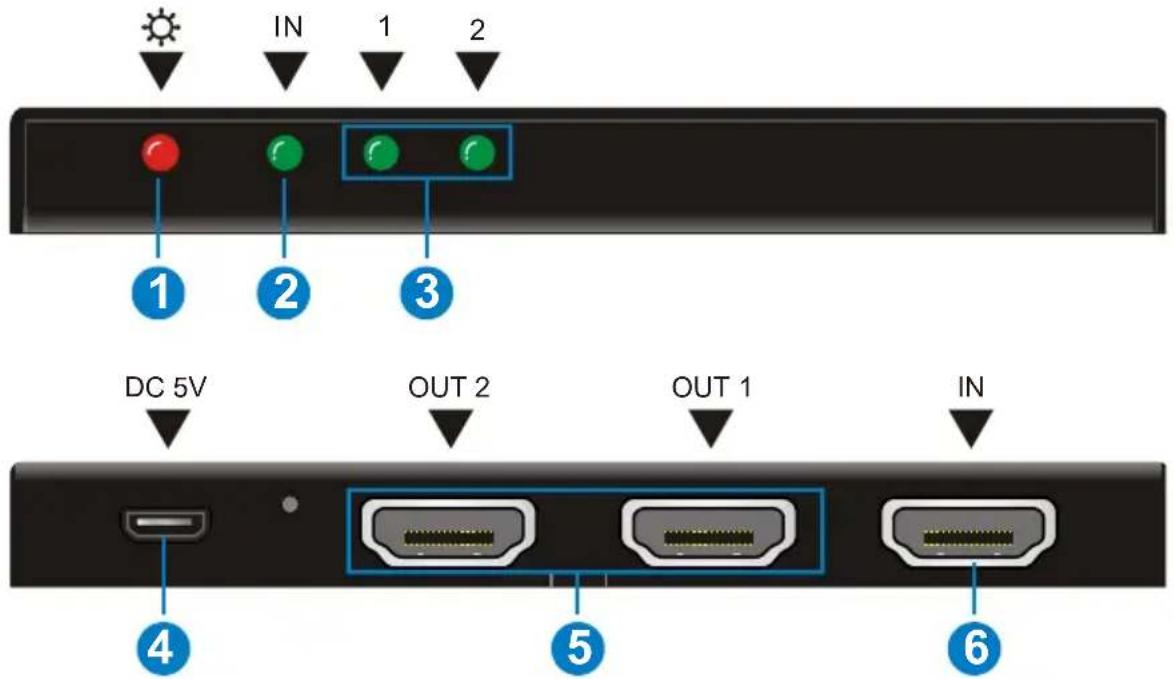
| No. | Name | Description |
| 1 | Power indicator | Illuminate red once powered on |
| 2 | Input HDCP compliant Indicator | Indicate the HDCP compliant status of the input signalOFF: No HDMI traffic (no picture) or abnormal linkGREEN: Traffic with HDCPBlinking GREEN: Traffic without HDCP |
| 3 | Output signal Indicators | Illuminate green when there is HDMI output, correspond to HDMI OUTPUT 1~2 separately |
| 4 | DC 5V | Micro USB port, plug a DC 5V power adapter for power or plug a U-disk for firmware updating.Note: Firmware updated need auxiliary equipment, please contact with our after-sales department for more details. |
| 5 | OUT1& OUT2 | HDMI output ports, connect to HDMI displays, automatically capture the input resolution |
| 6 | IN | HDMI input port. connect with HDMI or DVI source device such as Blu-ray DVD |
Note:
a) Pictures shown in this manual are for reference only, different model and specifications are subject to real product.
b) Output HDCP compliant status depends on input signal. When the input signal is with HDCP, then output signal is with HDCP and vice versa.
c) HDMI signal contains both HDMI video signal and embedded audio signal (PCM, Dolby Digital, DTS, DTS-HD), while DVI signal contains solely video signal.
d) SP-1X2SL18G is capable to switch input signal format according to the displays. For example, when the input signal is HDMI and the display can only support DVI signal, SP-1X2SL18G will switch the signal into DVI format.
e) EDID Management: automatically manage output signal (e.g. output resolution) to fit all displays.
3. System Connection
3.1 Usage Precautions
1) System should be installed in a clean environment and has a prop temperature and humidity.
2) All of the power switches, plugs, sockets and power cords should be insulated and safe.
3) All devices should be connected before power on.
3.2 System Diagram
The following diagram illustrates typical input and output connections that can be utilized with SP-1X2SL18G:
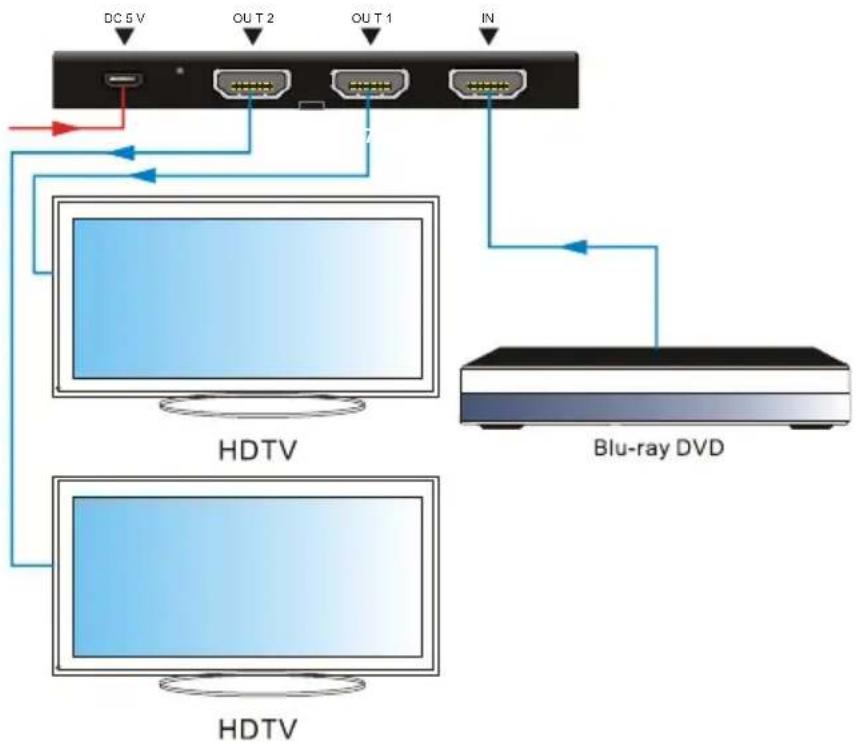
flowchart
graph TD
    A["DC 5V"] --> B["Switch"]
    C["OUT 2"] --> B
    D["OUT 1"] --> B
    E["IN"] --> B
    B --> F["HDTV"]
    G["Blu-ray DVD"] --> F
    F --> H["HDTV"]
3.3 Connection Procedures
Step1. Connect a HDMI/ DVI source device (e.g. Blue-ray DVD) to the IN socket of SP-1X2SL18G with HDMI cable.
Step2. Connect HDMI displays to OUT 1 and OUT 2 sockets of SP-1X2SL18G with HDMI cables.
Step3. Plug a DC 5V 2A power adapter to the power port of SP-1X2SL18G.
Note: All the ports support hot-plug. It's important to know that hot plugging a display may result in splash screen at output ends.
3.4 EDID Management
SP-1X2SL18G comprises 1 HDMI input port & 2 HDMI output ports, and it possess built-in EDID management function.
- When all output ports are connected with displays, the source device will gain the EDID data from the display connected output 1 port. At this point, if you disconnect the output 1 display and want the source device to gain the EDID from the output 2, the SP-1X2SL18G need to be restarted.
- All connected displays should be compatible, for example: when output 1 connects with a 1080p display, SP-1X2SL18G will select 1080p as output resolution and distribute 1080p signal to displays connected to output 1\~2. If the display connected to output 2 don't support 1080p signal, there will be no output on the display.
3.5 Application
SP-1X2SL18G has a good application in various occasions, such as computer realm, monitoring, conference room, big screen displaying, television education, command & control center and smart house etc.
4. Specification
| Video Input | |
| Input | 1 HDMI |
| Input Connector | 1 female type A HDMI 2.0 |
| Video Output | |
| Output | 2 HDMI |
| Output Connector | 1 female type A HDMI 2.0 |
| Video General | |
| Max data rate | 18Gbit/s |
| Max Resolution | 4Kx2K@60Hz 4:4:4 |
| HDCP | Compliant with HDCP2.2,and is backward compatible to HDCP1.4 |
| EDID | In-built EDID management |
| HDMI Embedded Audio | Support Dolby D (True HD)/ DTS (HD-Master Audio)/ PCM |
| General | |
| Temperature | 0~55°C |
| Reference Humidity | 10% ~ 90% |
| Power Supply | Input:100V~240V ACOutput: DC5V 2A |
| Power Consumption | 4.5W(Max) |
| Weight | 97g |
| Dimension (W*H*D) | 102mmx 11mmx 70mm |
4.1 Supported Input Video Formats
| Input Resolution | HDMI | DVI |
| 720 x 480@60Hz | ☑ | ☑ |
| 720 x 480I@30Hz | ☑ | ☑ |
| 720 x 576@50Hz | ☑ | ☑ |
| 720 x 576I@25Hz | ☑ | ☑ |
| 1280 x720@50Hz | ☑ | ☑ |
| 1280 x720@60Hz | ☑ | ☑ |
| 1920 x 1080@25Hz | ☑ | ☑ |
| 1920 x 1080@50Hz | ☑ | ☑ |
| 1920 x 1080@60Hz | ☑ | ☑ |
| 1920 x 1080I@25Hz | ☑ | ☑ |
| 1920 x 1080I@30Hz | ☑ | ☑ |
| 3840 x 2160@25Hz | ☑ | |
| 3840 x 2160@30Hz | ☑ | |
| 3840 x 2160@60Hz | ☑ | |
| 1080P 3D@60Hz | ☑ |
Note: SP-1X2SL18G supports 4k& 3D HDMI signals, please adopt quality HDMI cables compliant with HDMI2.0 for better transmission when connecting 4K or 3D sources.
5. Panel Drawing
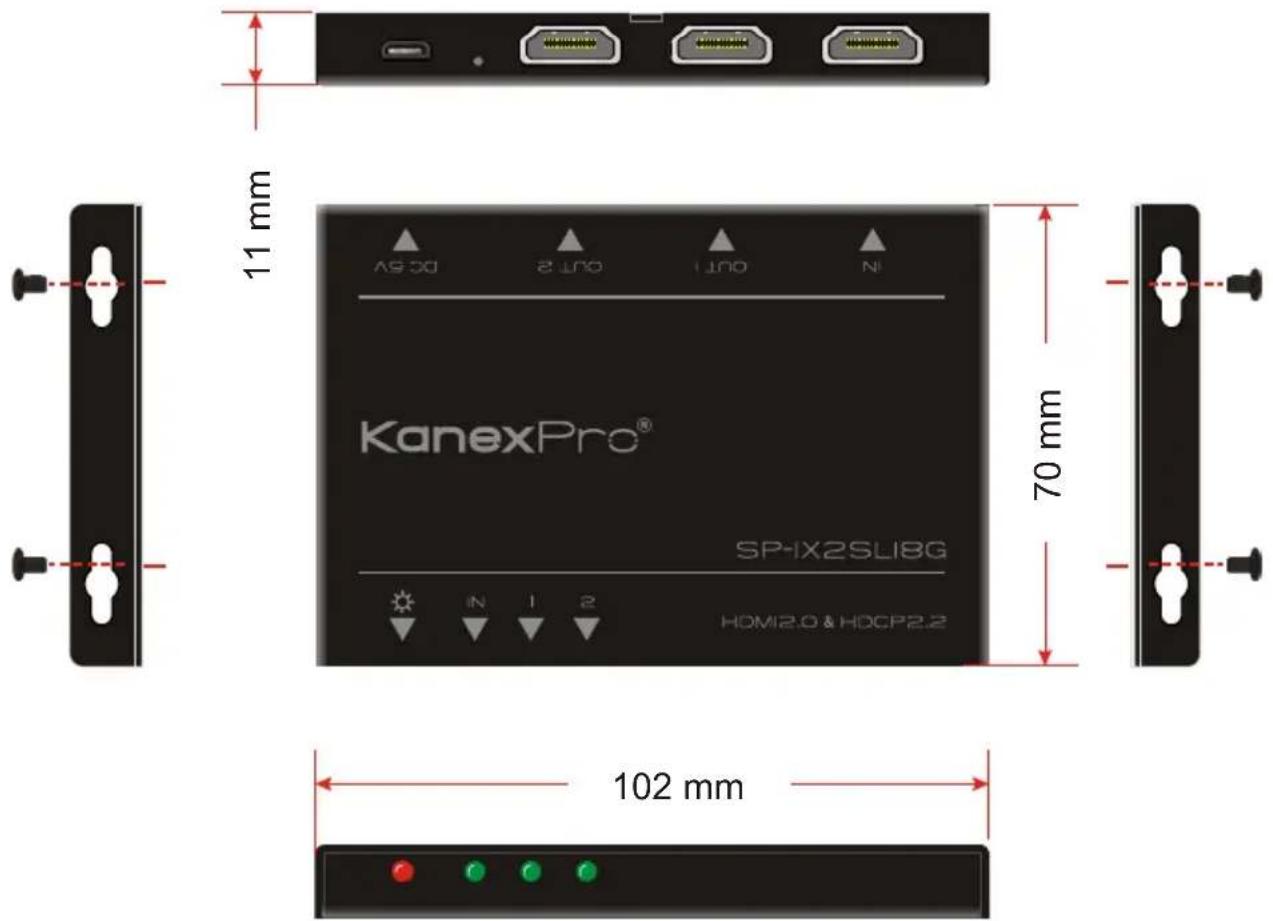
6. Troubleshooting & Maintenance
| Problems | Causes | Solutions |
| Color losing or no video signal output in HDMI display | The connecting cables may not be connected correctly or it may be broken. | Check whether the cables are connected correctly and in working condition. |
| The display is not compatible with the present output resolution. | Make sure the resolution of the display(s) is compatible with the present resolution. | |
| No HDMI signal output in SP-1X2SL18G while local HDMI input is in normal working state | The connecting cables may not be connected correctly or it may be broken. | Check whether the cables are connected correctly and in working condition. |
| Splash screen in output devices | Poor quality of the connecting cable | Change for another cable of good quality. |
| Static becomes stronger when connecting the video connectors | Bad grounding | Check the grounding and make sure it is connected well. |
If your problem persists after following the above troubleshooting steps, seek further help from authorized dealer or our technical support.
7. After-sales Service
If there appear some problems when running SP-1X2SL18G, please check and deal with the problems referring to this user manual. Any transport costs are borne by the users during the warranty.
1) Product Limited Warranty: We warrants that its products will be free from defects in materials and workmanship for two years, which starts from the first day you buy this product (The purchase invoice shall prevail).
Proof of purchase in the form of a bill of sale or receipted invoice which is evidence that the unit is within the Warranty period must be presented to obtain warranty service.
2) What the warranty does not cover (servicing available for a fee):
- Warranty expiration.
● Factory applied serial number has been altered or removed from the product.
● Damage, deterioration or malfunction caused by:
● Normal wear and tear
● Use of supplies or parts not meeting our specifications
- No certificate or invoice as the proof of warranty.
- The product model showed on the warranty card does not match with the model of the product for repairing or had been altered.
● Damage caused by force majeure.
● Servicing not authorized
● Any other causes which does not relate to a product defect
● Delivery, installation or labor charges for installation or setup of the product
3) Technical Support: Email to our after-sales department or make a call, please inform us the following information about your cases.
● Product version and name.
● Detailed failure situations.
● The formation of the cases.
Remarks: For any questions or problems, please try to get help from your local distributor.
KanexPro
Brea, California
KanexPro.com
MPN: SP-1X2SL18G
HDMI® and HDBaseT™ are trademarks or registered trademarks of HDMI Licensing LLC & HDBaseT Alliance respectively in the United States and other countries. KanexPro is a trademark of Apogee Inc., registered trademarks in the US.

- Preface
- Trademarks
- FCC Statement
- SAFETY PRECAUTIONS
- Contents
- Introduction
- Introduction to SP-1X2SL18G
- Features
- Packing List
- Panel Description
- Note:
- System Connection
- Usage Precautions
- System Diagram
- Connection Procedures
- EDID Management
- Application
- Specification
- Supported Input Video Formats
- Panel Drawing
- Troubleshooting & Maintenance
- After-sales Service
- KanexPro
Brand : KanexPro
Model : UltraSlim SP-1X2SL18G
Category : Separator