
KP400P2 - Home Automation TP-LINK - Free user manual and instructions
Find the device manual for free KP400P2 TP-LINK in PDF.
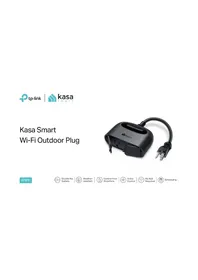


| Type de produit | Smart Wi-Fi Plug |
| Marque | TP-Link |
| Modèle | KP400P2 |
| Tension d'entrée | 120V AC, 60Hz |
| Courant maximal | 15A |
| Puissance maximale | 1800W |
| Connectivité | Wi-Fi 2.4GHz (802.11 b/g/n) |
| Portée Wi-Fi | Jusqu'à 30 m (100 pi) à l'intérieur |
| Assistants vocaux | Amazon Alexa, Google Assistant, IFTTT |
| Fonctionnalités | Commande vocale, contrôle à distance, programmation, minuterie, mode vacances, surveillance énergétique |
| Dimensions (par prise) | 94 x 66 x 38 mm (3.7 x 2.6 x 1.5 po) |
| Poids (par prise) | 88 g (3.1 oz) |
| Matériau | Plastique ignifuge PC/ABS |
| Température de fonctionnement | 0°C à 40°C (32°F à 104°F) |
| Humidité de fonctionnement | 10% à 90% sans condensation |
| Certifications | ETL, FCC |
| Garantie | 2 ans |
| Contenu de l'emballage | 2 x KP400, guide de démarrage rapide |
| Nettoyage | Chiffon doux sec ; ne pas utiliser de liquides |
| Sécurité | Ne pas immerger ; utiliser dans un endroit sec ; ne pas dépasser 1800W |
| Réparabilité | Non réparable par l'utilisateur ; contacter le support TP-Link |
Frequently Asked Questions - KP400P2 TP-LINK
User questions about KP400P2 TP-LINK
0 question about this device. Answer the ones you know or ask your own.
Ask a new question about this device
Download the instructions for your Home Automation in PDF format for free! Find your manual KP400P2 - TP-LINK and take your electronic device back in hand. On this page are published all the documents necessary for the use of your device. KP400P2 by TP-LINK.
USER MANUAL KP400P2 TP-LINK
Kasa Smart Wi-Fi Outdoor Plug
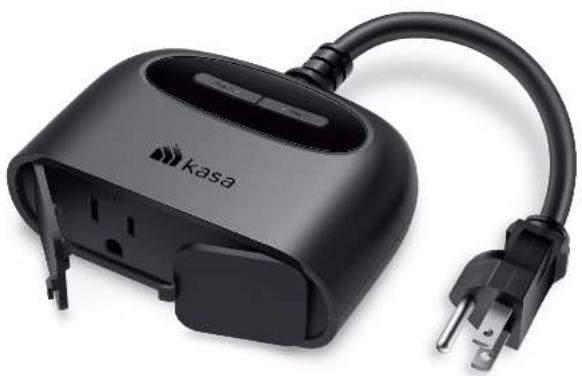
KP400

Double the Outlets

Weather-resistant

Control from Anywhere

Voice Control

No Hub Required

Scheduling
Highlights
Control Your Outdoor Devices
Extend your smart home outdoors with the weather-resistant smart outdoor plug. Power on your patio lights, holiday decorations, and more from the convenience of your smartphone. Turn each outlet on/off individually, set schedules, or use simple voice commands with Alexa or Google Assistant to control all of your connected devices.
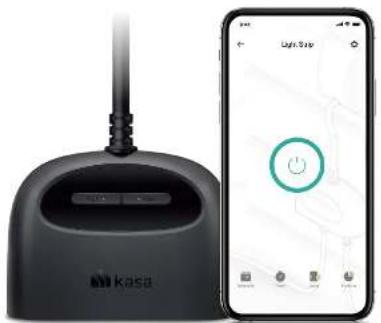
Note: The app screen depicted is for visual reference only and does not necessarily represent actual product operation or app appearance.
Made for the Outdoors
The Kasa Smart Wi-Fi Outdoor Plug has an IP64 rating that ensures your device is protected from dust and splashes of water from any direction. When not in use, the sockets should remain capped with the included weather-resistant cover.
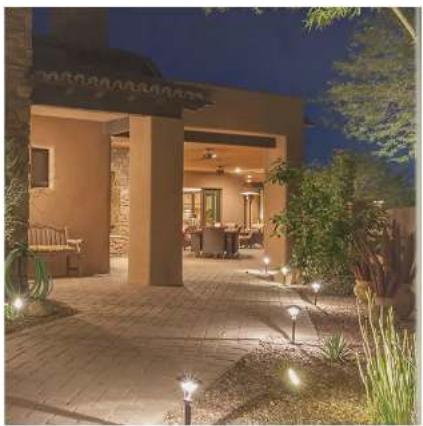
TP-Link Kasa Smart Wi-Fi Outdoor Plug KP400
Highlights
Control Even with Your Hands Full
Enjoying a barbecue outdoors and have your hands full of condiments or food? Just use a simple voice command with your outdoor plug and Alexa or Google Assistant to control your stereo. Even turn outdoor lights on or off from the comfort of your couch with a simple command.

Works with Hey Google, WORKS WITH Alexa, works with SmartThings
Your Home. One App.
Turn your home into a true smart home with Kasa Smart. Automate your lights and appliances with smart plugs, bulbs, and switches. Secure your home with Kasa cameras. Control it all from the Kasa Smart app.
![graph TD A["Security Cameras"] --> B["Smart Lighting"] B --> C["Smart Switches"] C --> D["Smart Plugs"] D --> E["House with Lighting System"] style A fill:#f9f,stroke:#333 style B fill:#ccf,stroke:#333 style C fill:#cfc,stroke:#333 style D fill:#fcc,stroke:#333 style E fill:#ffc,stroke:#333](/content/2026/05/1055575/images/d9c352cd152aeb435444a04261db6c866ba357504f325e7e27299444b221daa5.jpg)
Learn more at KasaSmart.com
TP-Link Kasa Smart Wi-Fi Outdoor Plug KP400
Features
Double the Outlets
Access and use two outdoor devices from anywhere, together or individually—all with one smart plug.
Weather-Resistant
The IP64 rating and weather-resistant cover* ensure protection against dust intrusion and splashes of water.
*When not in use, the outdoor plug's sockets should remain capped with the weather-resistant cover.
Control From Anywhere
Turn your outlets on/off or set schedules from anywhere using your Kasa Smart app.
Voice Control
Use simple voice commands with Alexa or Google Assistant to control your connected devices. You can give each outlet a unique name and use them separately.
No Hub Required
The outdoor smart plug works with a secured 2.4 GHz wireless network without needing a separate hub.
Set Schedules
Individually schedule each device connected to the plug to automatically switch on or off when you're home or away.
Device Grouping
Group your Kasa Smart light bulbs, plugs and switches for seamless control. Ideal for controlling all your devices simultaneously with a single tap.
Easy Setup
Be up and running with your new smart plug in less than 5 minutes! Plug in the weather-resistant plug, follow the setup instructions on the Kasa Smart app, name your plug, and you're good to go!
ETL Certified
ETL certified to provide peace of mind that quality and safety are standards we strive for.
Specifications
Working Status
- Input: 125V~, 60Hz, 15A • Output: 15A maximum load in total • Maximum Power: 1.875 KW
- Weatherproof Rating: IP64
Requirements
- Existing secured Wi-Fi network (2.4 GHz Wi-Fi Only, 802.11 b/g/n) The free Kasa Smart app and account required
- Must plug into GFCI receptacles if used outdoor or in wet locations
General
- Package Contents: 1× Smart Outdoor Plug with 6-inch Cable 1× Clamp and Screw 1× Quick Start Guide
- Dimensions: • Certifications: RoHS, FCC, IC, ETL, IP64
- Operating Temperature: -20°C~50°C (-4°F~122°F)
- Operating Humidity: 10%~90%RH, Non-condensing
4.3 x 1.5 x 3.2 in (110 x 39 x 81 mm)
Specifications are subject to change without notice. All brands and product names are trademarks or registered trademarks of their respective bodies. ©2021 IP Link
www.tp-link.com

- KASA SMART WI-FI OUTDOOR PLUG
- HIGHLIGHTS
- CONTROL YOUR OUTDOOR DEVICES
- MADE FOR THE OUTDOORS
- CONTROL EVEN WITH YOUR HANDS FULL
- YOUR HOME. ONE APP
- FEATURES
- DOUBLE THE OUTLETS
- WEATHER-RESISTANT
- CONTROL FROM ANYWHERE
- VOICE CONTROL
- NO HUB REQUIRED
- SET SCHEDULES
- DEVICE GROUPING
- EASY SETUP
- ETL CERTIFIED
- SPECIFICATIONS
- WORKING STATUS
- REQUIREMENTS
- GENERAL
Brand : TP-LINK
Model : KP400P2
Category : Home Automation