
HEPAtech 30378 - Air purifier HUNTER - Free user manual and instructions
Find the device manual for free HEPAtech 30378 HUNTER in PDF.


| Product Type | HEPAtech Air Purifier |
| Brand | Hunter |
| Model | 30378 / 30379 |
| Power Supply | 120V, 60Hz |
| Filtration System | True HEPA filter (99.97% of particles ≥0.3 microns) + Activated Carbon Pre-Filter + Ionizer |
| Filter Life (Carbon Pre-Filter) | Approximately 1400 hours (~3 months) |
| Filter Life (HEPAtech Filter) | Approximately 2800 hours (~4-6 months) |
| Replacement Pre-Filter | Hunter 30901 |
| Replacement HEPA Filter | Hunter 30931 |
| Control Type | Electronic keypad with UP/DOWN speed control, ionizer, and filter reset buttons |
| Display Features | Filter life percentage indicators (Pre-Filter and HEPA), keypad lock indicator |
| Ionizer | Yes, on/off with indicator |
| Keypad Lock | Yes, press and hold UP/DOWN keys for 2-3 seconds |
| Safety Features | Polarized plug; unit will not operate if front grill is not properly installed; automatic shutoff when unplugged |
| Cleaning | Unplug before cleaning; wipe unit with soft damp cloth; front grill can be washed in soapy water (ensure dry before reinstallation) |
| Placement | Firm, level surface; at least 6 inches from walls; 3 ft from heat sources |
| Warranty | 5-year limited on motor; 1-year on other components (parts and labor) |
| Technical Support | USA: 1-888-830-1326; Canada: 1-866-268-1936 |
| Manual Form Number | 41773-01 (©2010 Hunter Fan Co.) |
Frequently Asked Questions - HEPAtech 30378 HUNTER
User questions about HEPAtech 30378 HUNTER
0 question about this device. Answer the ones you know or ask your own.
Ask a new question about this device
Download the instructions for your Air purifier in PDF format for free! Find your manual HEPAtech 30378 - HUNTER and take your electronic device back in hand. On this page are published all the documents necessary for the use of your device. HEPAtech 30378 by HUNTER.
USER MANUAL HEPAtech 30378 HUNTER
natural_image
White industrial air purifier unit with horizontal slats and control panel (no visible text or symbols)English
Model
30378
30379
Form# 41773-01
20100609
©2010 Hunter Fan Co.
HUNTER SINCE 1886
Table of Contents INTRODUC
Introduction 2
Safety Instructions 3
Using Your Air Purifier.... 3
How the HEPAtech™ System Works ...... 4
Operating Your Air Purifier 4
Using The Ionizer 4
Locking the Air Purifier.... 5
Filter Replacement 5
Changing the Pre-Filter 5
Changing the HEPAtech™ Filter 6
Maintenance 6
Troubleshooting 7
Technical Support 7
Filter Ordering.... 7
Warranty 7
ION
Thank you for purchasing the HEPAtech™
Air Purification System from Hunter Fan Company. You have purchased our latest development in portable Air Purification
Systems. This system has been developed to improve the quality of the air you breathe.
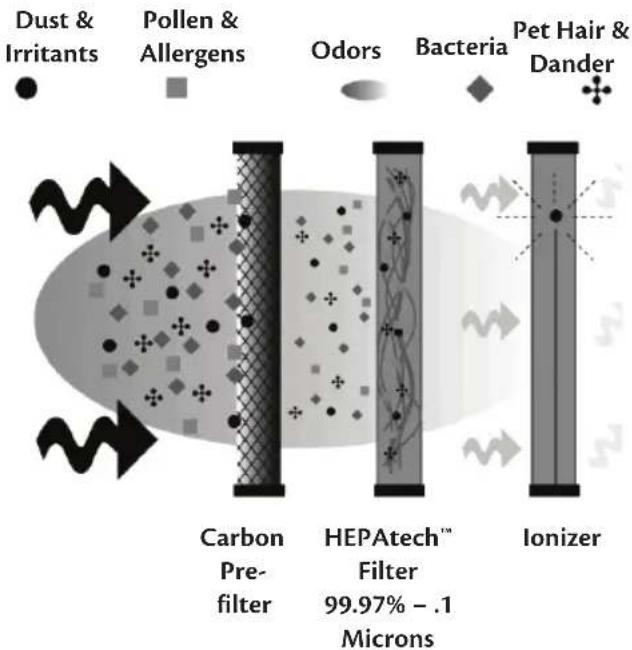
Our HEPAtech™ Air Purification System out performs other air purification systems by quickly and effectively removing dust, smoke, and pollen particles as small as .3 microns in size. Room air is pulled in through the front right grill and cleaned across the HEPAtech™ filter. Clean air is then released out the front left grill in order to avoid stirring up settled particles.
The following innovative features are included in your Hunter Air Purifier.
• High Particulate Efficiency: The
HEPAtech™ filter will remove 99.97% of particles as small as 0.3 micron particles from the air that passes through the filter.
- Odor Removal: The activated carbon prefilter helps remove odors such as cooking, smoke, and pet smells from the air. It also traps lint, hair, and other large particles to help extend the life and performance of the HEPAtech™ filter.
- Ionizer: The ionizer improves the quality of air in the room by releasing negative ions into the air that attract positively charged dust, smoke, and pollen particles.
- Filter Calendar: Filter maintenance is critical to the performance of the air purifier. To help you determine when to change the pre-filter and clean the HEPAtech™ filter, the unit has a built in Filter Calendar Dial that keeps track of the life remaining on each filter.
SafeTy InSTruCTlonS

Save These Important Instructions
- This Air Purifier is designed for use on a flat, level surface and may not work properly on an uneven surface. ALWAYS place this Air Purifier on a firm, level surface. ALWAYS place the Air Purifier at least six (6) inches away from walls and three (3) Ft. from heat sources such as stoves, radiators, or heaters.
- Place the Air Purifier in an area that is out of the reach of children.
- Before using the Air Purifier, extend the cord and inspect for any signs of damage. DO NOT use the product if the cord has been damaged.
- To reduce the risk of electric shock, this product has a polarized plug (one blade is wider than the other) as a safety feature. This plug will fit into a polarized outlet only one way. If the plug does not fit fully into the outlet, reverse the plug. If it still does not fit, contact a qualified electrician. DO NOT attempt to defeat or override this safety feature.
- ALWAYS UNPLUG the Air Purifier when it is not in operation, while the filter is being changed, and while it is being cleaned.
- DO NOT tilt or move the Air Purifier while it is in operation. Shut off and unplug before moving.
- DO NOT immerse the Air Purifier in water as permanent damage will occur. Refer to and follow the CLEANING AND FILTER REPLACEMENT instructions.
- DO NOT run the ionizer if tobacco smoke, air fresheners, dripless wax candles, or grease from cooking is present.
uSInG your alr Purlfler
- Take the air purifier out of the box and remove the clear plastic protective bag. Place the unit on a firm level floor.
- Before turning on the air purifier, you need to confirm that the filters are firmly in place and have not become loose during shipping. To check the filters, first open the
front grill. Release the front grill by placing your fingers behind the tabs and pulling forward.
- Next, check the HEPAtech™ filter by pressing firmly on all four corners of the filter to ensure that it is fully inserted into the filter opening.

Figure 1.
- The carbon pre-filter is mounted inside the front grill with hook tape. Confirm that it properly covers the grill vents. You may notice a few black particles coming off the pre-filter. Those particles are part of the odor-removing activated carbon and will be collected on the filter during use.
- Place the front grill back onto the unit. First, line up the tabs on the bottom of the grill with the openings on the purifier base and then push the top of the grill forward until it is closed.
NOTE: This unit will not operate unless the grill is in the correct position.
- Plug the unit into a 120V electrical outlet.
HoW THE HePaTeCH™ SySTem WorKS
flowchart
graph LR
    A["Dust & Irritants"] --> B["Carbon Prefilter"]
    C["Pollen & Allergens"] --> B
    D["Odors"] --> E["HEPAtech™ Filter 99.97% - .1 Microns"]
    F["Bacteria"] --> G["Ionizer"]
    G --> H["Pet Hair & Dander"]
Figure 2.
The above is an illustration of how the HEPAtech™ air purification system works. Dust and other irritants are pulled into the air purification system and cleaned through the Carbon Pre-Filter, HEPAtech™ Filter, and by the ionizer. Clean, purified air is then released into the room through the top grill.
oPeraTInG your alr Purlfler
The display and control keys allow for easy operation of the air purifier.

UP/DOWN KEYS: Adjusts the blower speed and turns the unit on and off.
Pre-filter Reset: Resets the Carbon Pre-Filter Life Counter.
FILTER RESET: Resets the HEPAtech® Filter Life Counter.

IONIZER KEY: Turns the ionizer on f.
Use the UP/DOWN keys to adjust the blower speed to the desired level

uSInG THE IonIZer
Using the ionizer improves the quality of air in the room. Negative ions are released into the air and positively charged dust, smoke, and pollen particles are attracted to the negative ions. These particles settle out of the air and can be vacuumed up during normal cleaning. These particles are also more easily captured by the HEPAtech™ filter as they pass through the HEPAtech™ Air Purification System. To ensure the best air circulation in the room, we recommend that you place your air purifier six (6) inches away from any walls.
NOTE: DO NOT run the ionizer if tobacco smoke, air fresheners, dripless wax candles, or grease from cooking is present.
-
To turn the ionizer on, press the IONIZER key. The Ionizer Indicator will appear on the display. Refer to Figure 3.
-
To turn the ionizer off, press the IONIZER key. The Ionizer Indicator will disappear.

Figure 3.
IoCKInG THE alr Purlfler
Once you enter the desired speed, you may want to lock the keypad to prevent accidental changing of the speed. When the keypad is locked, all keys will be disabled. If you press a key, the Keypad Locked Indicator will be displayed on the screen for 1-2 seconds.
- To lock the keypad, press and hold the UP/DOWN keys simultaneously for 2-3 seconds. The Keypad Locked Indicator will appear on the display. Refer to Figure 4. After releasing the keys, the Keypad Locked Indicator will disappear.

Figure 4.
fllTer rePlaCemenT
The pre-filter and filter are critical to the proper operation of the air purifier. To help you know when to change the filters, your Hunter Air Purifier has Filter Life Counters that will monitor the percentage of life your filter has left. Although the exact life of the filters depends on the environment, the table below gives typical usage times of the filters.
| Filter Type Typical Usage | |
| Carbon Pre-Filter 1400 Hours | |
| HEPAtechTM Filter 2800 Hours |
The display shows the percentage of life left since the counter was reset.
NOTE: The percentage level drops in 5% increments.
The values of the Pre-Filter and Filter Life Counters are stored in the air purifier's memory.
Note: The unit may be unplugged and moved or stored without losing the Pre-Filter and Filter Counter values.
To properly track filter usage, the Pre-Filter and Filter Life Counters should be reset each time the filters are changed.
CHanGInG THE Pre-fllTer
When the Pre-Filter exceeds 1400 hours (refer to Filter Life Counters for additional information), the Pre-Filter Life Counter will display 0% life remaining and the Pre-Filter indicator will flash as a reminder that you should replace the pre-filter. To maintain proper odor-removing capability and overall filtration performance, the pre-filter should be changed every 1400 hours (approximately 3 months of use). If necessary, the pre-filter can be changed more often. Proper maintenance of the pre-filter will help extend the life of the HEPAtech™ filter.
- First, turn off and unplug the air purifier.
- Next, remove the front grill. Place your fingers in the recesses on either side of the top of the grill and pull firmly.
- The pre-filter is attached to the inside of the grill with hook tape. Pull gently on the pre-filter to remove it.
- If needed, use a soft damp cloth to wipe off the grill.
- Install the new pre-filter by placing it in the grill and pressing gently on the pre-filter so that it adheres to the hook tape. You may notice a few black particles coming off the pre-filter. Those particles are part of the odor-removing activated carbon and will be collected on the filter during regular use.
- Install the grill back onto the unit. First, line up the tabs on the bottom of the grill with the openings on the purifier base and then push the top of the grill forward until it is closed.
- Plug in the air purifier.
NOTE: This unit will not operate unless the grill is in the correct position.
- Finally, reset the Pre-Filter Counter by pressing the PRE-FILTER RESET key for 2 seconds. The Pre-Filter Counter will return to 100% and the Pre-Filter indicator will stop flashing.
CHanGInG THE HePaTeCH™ fillTer
When the filter exceeds 2800 hours (approximately 4 to 6 months of use), the Filter Life Counter will display 0% life remaining and the Filter indicator will flash. This is a reminder that you should check the filter and replace if necessary. The proper time to change the filter depends on usage and the environment. Use the following list to help determine if the filter should be changed:
- Compare the color of the filter to the color coded chart on the inside of the housing. If the filter color matches the darkest color on the chart, you should replace the filter.
- If you notice a decrease in air output or an increase in noise at any time during normal operation, the filter may be clogged. Replace the filter to return to normal operation.
To change the filter and reset the Filter Life Counter:
- First, turn off and unplug the air purifier.
- Next, remove the front grill. Place your fingers in the recesses on either side of the top of the grill and pull firmly.
- Gently pull on the filter to remove it from the unit. While removing the filter, note the directional arrows printed on the side of the filter. The new filter will be installed with the same orientation. Once removed, the used filter can be discarded.
- Remove the new filter from its wrapping and look at the directional arrows printed on the side of the filter. Install the filter with arrows pointing towards the unit. Press the filter firmly into the air purifier. To avoid damaging the filter media, you should press on the frame of the filter only.
- Reinstall the grill by first lining up the tabs on the bottom of the grill with the openings on the air purifier base and then pushing the top of the grill forward until it is closed.
- Plug in the unit.
NOTE: This unit will not operate unless the grill is in the correct position.
- To reset the filter counter, press the FILTER RESET key for 2 seconds. The Filter Counter will return to 100% and the Filter indicator will stop flashing.
malnTenanCe
NOTE: To avoid risk of electric shock, always unplug the unit before cleaning.
- Clean the outside of the unit with a soft, damp cloth. The front grill can be cleaned in soapy water after it has been removed from the unit and the pre-filter has been removed. See Figure 1.
NOTE: Ensure the grill is completely dry before reinstalling it on the unit. Failure to do so could cause damage to the filters or motor.
-
At least every 90 days, open the front grill, remove the carbon pre-filter, and replace it. This is necessary to maintain proper odor-removing and overall filtration performance. If necessary, it can be changed more often. Remember to change the Pre-Filter Calendar Dial to reflect the new Pre-Filters installation to remove any plastic wrapping that may be on the new filter before you place it into the Air Purifier.
-
The HEPAtech™ filter should be removed every 6 months of use and matched to the color indicator on the inside of the filter compartment. When the filter matches the dark, charcoal gray indicator, it should be replaced. Your new HEPAtech™ filter will have an arrow on the side to indicate air flow and the direction the filter should be placed in the unit.
NOTE: This unit will not operate unless the grill is in the correct position.
TROUBLESHOOTING
Problem:
No display or operation.
Solution:
- Confirm that the unit is plugged in.
- Check the installation of the front grill.
- Reset the air purifier by unplugging it for 30 seconds.
Problem:
Keypad does not work.
Solution:
• Key pad has been locked to prevent accidental changes to the programs.
Problem:
Erratic Display or Operation.
Solution:
- Reset the air purifier by unplugging it for 30 seconds.
Problem:
Filter and/or Pre-filter Indicator is Flashing.
Solution:
•The Filter and/or Pre-Filter Life Counters have reached the estimated usage times. Check and replace filters if needed.
Problem:
HEPAtech™ Filter and/or Carbon Pre-Filter Life Counter is flashing 0%.
Solution:
- The Filter and/or Pre-Filter Life Counters have greatly exceeded the estimated usage times. Check and replace the corresponding filters.
Problem:
Unit has reduced air flow or increased noise.
Solution:
- The filter is clogged and should be changed.
TECHNICAL SUPPORT
If you have any additional questions or problems with your Hunter Air Purifier, please call:
USA: 1-888-830-1326
Canada: 1-866-268-1936
Hours of operation are from 7:00 am to 7:00 pm Monday - Friday and 8:00 am to 5:00 pm on Saturday, Central Time. You may also contact us over the Internet at www.hunterfan.com.
FILTER ORDERING
Depending on usage and the environment, your Carbon Pre-Filter should be replaced every three months and your HEPAtech™ filter should be replaced every 6 months. Replacement filters are available at most retailers that carry Hunter Air Purifiers. You may also purchase directly from Hunter Fan Company by:
Phone: 1-888-830-1326
Website: www.hunterfan.com
* Applicable state and local taxes may apply.
* Prices are subject to change without notice.
* All orders will be shipped USPS or UPS Ground, allow 12-15 working days for delivery.
Filter# Type
| 30931HEPAtechTM |
| 30901Pre-Filter |
WARRANTY
Hunter Fan Company HEPAtech™ Air Purification System
5 YEAR LIMITED WARRANTY
The Hunter Fan Company makes the following limited warranty to the original residential user or consumer purchaser of the HEPAtech™ Air Purification System:
If any part of your HEPAtech™ Air Purification System ("Air Purifier") motor fails during the
first five (5) years from the date of installation due to a defect in material or workmanship, we will provide a replacement Air Purifier free of charge. Installation is deemed to occur at the date of purchase.
If the Air Purifier cord, ionizer, or front grill fails any time within one (1) year after installation due to a defect in material or workmanship, we will replace or, at our option, repair the unit free of charge at our nearest service center or at our Service Department in Memphis, Tennessee. You will be responsible for all parts and labor costs after this one-year period.
IF THE ORIGINAL RESIDENTIAL USER OR CONSUMER PURCHASER CEASES TO OWN THE AIR PURIFIER, THIS WARRANTY AND ANY IMPLIED WARRANTY WHICH THEN REMAINS IN EFFECT, INCLUDING BUT NOT LIMITED TO ANY IMPLIED WARRANTY OF MERCHANTABILITY OR FITNESS FOR A PARTICULAR PURPOSE, ARE VOIDED. NO WARRANTY, EXPRESSED OR IMPLIED, INCLUDING ANY WARRANTY OF MERCHANTABILITY OR FITNESS FOR A PARTICULAR PURPOSE, IS MADE IN RESPECT TO THE FILTER MATERIAL OR CARBON FILTER. THIS WARRANTY IS IN LIEU OF ALL OTHER EXPRESS WARRANTIES. THE DURATION OF ANY IMPLIED WARRANTY, INCLUDING BUT NOT LIMITED TO ANY IMPLIED WARRANTY OF MERCHANTABILITY OR FITNESS FOR A PARTICULAR PURPOSE, IN RESPECT TO THE MOTOR IS EXPRESSLY LIMITED TO THE PERIOD OF THE EXPRESS WARRANTY SET FORTH ABOVE.
This warranty is voided if the air purifier is not purchased and used in the USA or Canada.
This warranty excludes and does not cover defects, malfunctions or failures of the Air Purifier which were caused by repairs by persons not authorized by us, use of parts or accessories not authorized by us, mishandling, modifications, or damage to the Air Purifier while in your possession, or unreasonable use, including failure to provide reasonable and necessary maintenance. This warranty does not cover Air Purifiers used in commercial applications. There are no express or implied warranties as to commercial purchasers or users.
To obtain service, contact the nearest Hunter authorized service center or the Hunter Fan Company Service Department, 2500 Frisco Avenue, Memphis, Tennessee 38114, 1-888-830-1326. For the name of our nearest authorized Hunter Fan Company Service Center, write to the Hunter Fan Company at the preceding address. You will be responsible for insurance and freight or other transportation to our factory service center. We will return the Air Purifier freight prepaid. The Air Purifier should be properly packaged to avoid damage in transit since we will not be responsible for any such damage. Proof of purchase is required when requesting warranty service. The purchaser must present sales receipt or other document that establishes proof of purchase.
IN NO EVENT SHALL HUNTER FAN COMPANY BE LIABLE FOR DIRECT, INDIRECT, SPECIAL CONSEQUENTIAL OR INCIDENTAL DAMAGES IN EXCESS OF THE PURCHASE PRICE OF THE AIR PURIFIER. YOUR SOLE REMEDY WILL BE REPAIR OR REPLACEMENT AS PROVIDED ABOVE. SOME AMERICAN STATES AND CANADIAN PROVINCES DO NOT ALLOW LIMITATIONS ON HOW LONG AN IMPLIED WARRANTY LASTS, SO THE ABOVE LIMITATION MAY NOT APPLY TO YOU.
SOME AMERICAN STATES AND CANADIAN PROVINCES DO NOT ALLOW THE EXCLUSION OR LIMITATION OF DIRECT, INDIRECT SPECIAL, INCIDENTAL OR CONSEQUENTIAL DAMAGES, SO THE ABOVE LIMITATION MAY NOT APPLY TO YOU. SOME AMERICAN STATES AND CANADIAN PROVINCES DO NOT ALLOW THE EXCLUSION OR INVALIDITY OF EXPRESS OR IMPLIED WARRANTIES IF THE USER CEASES TO OWN THE AIR PURIFIER, SO THE ABOVE LIMITATION MAY NOT APPLY TO YOU.
THIS WARRANTY GIVES YOU SPECIFIC LEGAL RIGHTS, AND YOU MAY ALSO HAVE OTHER RIGHTS WHICH VARY FROM STATE TO STATE OR PROVINCE TO PROVINCE.
Other Home Comfort Products

natural_image
Simple line drawing of a bathtub sink with a circular vent and central drain (no text or symbols)
To learn more about Hunter Fan Company products, please see our Web page at: www.hunterfan.com
Hunter Fan Company 7130 Goodlett Farms Pkwy, Memphis, Tennessee 38016
- Table of Contents INTRODUC
- ION
- SafeTy InSTruCTlonS
- Save These Important Instructions
- uSInG your alr Purlfler
- HoW THE HePaTeCH™ SySTem WorKS
- oPeraTInG your alr Purlfler
- uSInG THE IonIZer
- IoCKInG THE alr Purlfler
- fllTer rePlaCemenT
- CHanGInG THE Pre-fllTer
- CHanGInG THE HePaTeCH™ fillTer
- malnTenanCe
- TROUBLESHOOTING
- TECHNICAL SUPPORT
- FILTER ORDERING
- WARRANTY
- Hunter Fan Company HEPAtech™ Air Purification System
- YEAR LIMITED WARRANTY
- Other Home Comfort Products
Brand : HUNTER
Model : HEPAtech 30378
Category : Air purifier