
MS-FHM - Remote control Fusion - Free user manual and instructions
Find the device manual for free MS-FHM Fusion in PDF.


| Product Type | Handheld Microphone Remote Control |
| Brand | Fusion |
| Model | MS-FHM |
| Dimensions (H x W x D) | 88 x 60 x 34 mm (3.5 x 2.4 x 1.3 in) |
| Weight | 250 g (8.75 oz) |
| Power and Audio Cable Length | 60 cm (23.6 in) |
| Frequency Response | 100 Hz to 4 kHz |
| Maximum Output | 1 Vrms |
| THD+N (at 1 Vrms, 1 kHz) | Less than 0.1% |
| Gain | +18 ± 0.5 dB |
| Minimum Load Impedance | 10 kΩ |
| Operating Voltage | 10.5 to 32 Vdc |
| Current (at 14.4 Vdc) | 0.005 A |
| Fuse Rating (not included) | 3 A |
| Water Rating | IEC 60529 IPX7 |
| Connection Type | RCA (AUX1) + TELEMUTE wire + Power wires |
| Key Functions | Push-to-talk, TELEMUTE source switching (to AUX1), gain adjustment |
| Compatible Stereos | Fusion stereos with AUX1 input and TELEMUTE capability |
| Installation Requirements | Mounting plate, 16 mm drill bit, 2.5 mm drill bit, marine sealant (optional) |
| Safety Precautions | Disconnect power before installation; wear safety gear; avoid hearing damage |
| Maintenance | Clean with a soft dry cloth; protect connector contacts with weather cap when disconnected |
| Warranty | 1-year limited marine consumer warranty |
Frequently Asked Questions - MS-FHM Fusion
User questions about MS-FHM Fusion
0 question about this device. Answer the ones you know or ask your own.
Ask a new question about this device
Download the instructions for your Remote control in PDF format for free! Find your manual MS-FHM - Fusion and take your electronic device back in hand. On this page are published all the documents necessary for the use of your device. MS-FHM by Fusion.
USER MANUAL MS-FHM Fusion
Failure to follow these warnings and cautions could result in personal injury, damage to the vessel, or poor product performance.
See the Important Safety and Product Information guide in the stereo box for product warnings and other important information.
This device must be installed according to these instructions.
Disconnect the vessel's power supply before beginning to install this product.
CAUTION
To avoid possible personal injury, always wear safety goggles, ear protection, and a dust mask when drilling, cutting, or sanding.
NOTICE
When drilling or cutting, always check what is on the opposite side of the surface to avoid damaging the vessel.
You must read all installation instructions before beginning the installation. If you experience difficulty during the installation, contact Fusion® Product Support.
Tools Needed
- Pencil
- Drill
- 16 mm ( 5/8 in.) drill bit
- 2.5 mm ( 3/32 in.) drill bit
- 16 mm ( 5/8 in.) socket or wrench
• Phillips screwdriver
• Marine sealant (optional)
Installing the Connector Mount
Before drilling a hole to mount the connector, you should verify that the microphone cable is long enough to reach the back of the stereo and the connector mounting location.
You can use the included hardware to mount the connector on the end of the microphone cable onto the dashboard or other mounting surface.
1 Orient the mounting plate with the flat edge of the central hole pointing to the left, and place it on the surface where you plan to mount the connector.
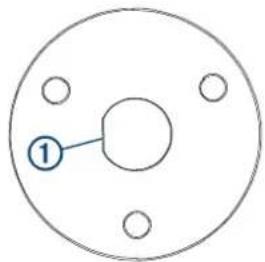
If you orient the plate with the flat surface pointing to any direction other than the left, the microphone cable will not point downward when you connect it.
2 Using the mounting plate ② as a template, trace the cable hole in the center of the mounting plate, and mark the screw locations.
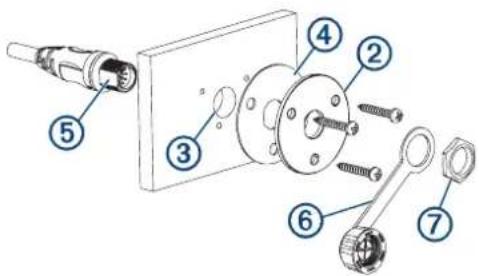
3 Set the mounting plate aside.
Do not drill through the mounting plate.
4 Using a 16 mm ( 5/8 in.) drill bit, drill the center cable hole ③ in the mounting surface.
5 Using a 2.5 mm ( 3/32 in.) drill bit, drill the pilot holes.
6 Place the rubber gasket ④ between the mounting plate and the mounting surface.
7 Using the included screws, attach the mounting plate and gasket to the mounting surface.
8 Route the microphone cable to the back of the stereo and to the connector mount.
9 Feed the connector through the back of the mounting surface.
10 Secure the connector and weather cap ⑥ to the mounting plate using the nut ⑦
NOTICE
If you disconnect the microphone from the connector, you should secure the weather cap to avoid corrosion on the connector contacts.
Mounting the Microphone Hanger
NOTICE
If you are mounting the bracket on fiberglass with screws, it is recommended to use a countersink bit to drill a clearance counterbore through only the top gel-coat layer. This will help to avoid cracking in the gel-coat layer when the screws are tightened.
You can mount the microphone hanger in a convenient location near the radio.
1 Select a mounting location for the microphone within reach of the microphone cable.
2 Using the microphone hanger ⓣ as a template, mark the pilot holes.
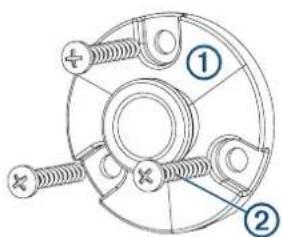
3 Drill the mounting holes using a 3 mm ( 1/8 in.) drill bit.
4 Secure the microphone hanger to the mounting surface using the included screws ②
Connection Diagram
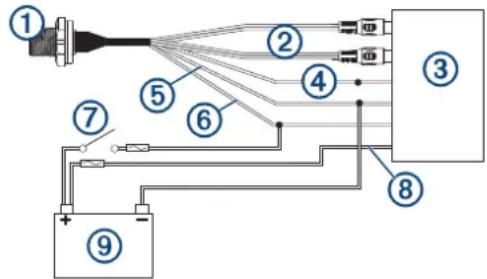
| 1 | Microphone connector | You can securely mount the microphone connector in an accessible location (Installing the Connector Mount, page 1). |
| 2 | RCA connectors | You must connect these to the AUX IN connector on the stereo wiring harness.If the stereo has more than one AUX IN connector, you must connect to the AUX1 connector. |
| 3 | Compatible stereo | |
| 4 | TELEMUTE You | must connect the bare wire from the microphone cable to the TELEMUTE wire on the stereo wiring harness if you want the microphone to change the source when activated(Operating the Handheld Microphone, page 2). |
| 5 | Negative (-) power connection | For the best results, you should connect the negative (-) wire from the microphone to the same negative (-) terminal as the stereo. |
| 6 | Positive (+) ignition power connection | You should connect the positive (+) wire from the handheld microphone to the ignition wire from the stereo to avoid draining the battery.You must route the combined positive (+) and ignition wires through a 3 A fuse before connecting to the ignition or manual switch. |
| 7 | Ignition or manual switch | The ignition or manual switch turns on the stereo and microphone. |
| 8 | Stereo power positive connection | You should not connect the positive (+) wire from the microphone to the constant power cable from the stereo to avoid draining the battery. |
| 9 | Power source |
Operating the Handheld Microphone
You must configure the stereo before you can operate the handheld microphone (Configuring the Fusion Stereo for the Handheld Microphone, page 2).
You can use the handheld microphone from any source on the stereo. If the source is set to anything other than AUX1 when you hold the microphone button, the source switches to AUX1 automatically, and switches back to the original source after you release the button.
NOTE: You should stand behind the speakers that will be broadcasting from the microphone. If you are standing in front of the speakers, the microphone will pick up the broadcast and cause feedback.
1 Select any source on the stereo.
NOTE: If you set the stereo to the AUX1 source, there is no sound until you hold the microphone button and speak.
2 Hold the button on the side of the microphone and speak into it.
NOTE: If the stereo is playing music from a source, you should wait about 2 seconds before speaking to avoid cutting off the beginning of your announcement.
3 After you have finished speaking, release the button.
If the stereo was playing music from a source before you held the button, the stereo switches back to that source automatically.
Configuring the Fusion Stereo for the Handheld Microphone
1 On the stereo, select ⚪ SETTINGS > TELEMUTE.
2 Select AUX1 to fill the check box.
The stereo will now change to the AUX1 source when you hold the button on the side of the handheld microphone.
3 Select ⚫ SETTINGS > SOURCE > AUX1.
4 Select PARTYBUS ENABLED to clear the checkbox.
When you clear the checkbox, the AUX1 source is no longer available for streaming over the Fusion PartyBus ™ network. It is recommended to disable network streaming for the microphone source to avoid feedback caused by the slight delay present when streaming.
Adjusting the Gain of the Handheld Microphone
If the volume of the microphone broadcast is too loud or too quiet in relation to the other sources on the stereo, you can adjust the gain level for the AUX1 source.
1 On the stereo, change the source to AUX1.
2 Adjust the gain to raise or lower the microphone volume in 1 db steps.
A positive (+) gain setting increases the microphone volume, and a negative (-) gain setting decreases the microphone volume.
Specifications
| Microphone dimensions (H×W×D) | 88 × 60 × 34 mm ( 31/2 × 23/8 × 111/32 in.) |
| Power and audio cable length 60 cm | m (23 5/8 in.) |
| Frequency response From 100 Hz | to 4 kHz |
| Microphone weight 250 g (8.75 oz) | |
| Output (max.) 1 Vrms | |
| THD+N (Vo = 1 Vrms, 1 kHz) Less | than 0.1% Vrms |
| Gain +18 ± 0.5 dB | |
| Load impedance (min.) 10k Ohm | |
| Operating voltage From 10.5 to 32 | Vdc |
| Current (at 14.4 Vdc) 0.005 A | |
| Fuse (not included) 3 A | |
| Water rating IEC 60529 IPX7 | 1 |
© 2020 Garmin Ltd. or its subsidiaries
Garmin 3 , the Garmin logo, Fusion 4 , and the Fusion logo, are trademarks of Garmin Ltd. or its subsidiaries, registered in the USA and other countries. These trademarks may not be used without the express permission of Garmin.
M/N: A13014

GARMIN®
Important Safety and Product Information 2
Important Safety and Product Information
WARNING
Failure to heed the following warnings could result in an accident resulting in death or serious injury.
Marine Operation Warnings
- You are responsible for the safe and prudent operation of your vessel. This device does not relieve you from the responsibility of safely operating your vessel. Avoid navigational hazards and never leave the helm unattended.
- Always be prepared to promptly regain control of the vessel. Use caution near hazards in the water, such as docks, pilings and other vessels.
Hearing Damage Warning
Listening to the stereo at high volume can cause damage to your hearing.
Product Environmental Programs
Information about the Garmin ® product recycling program and WEEE, RoHS, REACH, and other compliance programs can be found at www.garmin.com/aboutGarmin/environment.
Declaration of Conformity
Hereby, Garmin declares that this product is in compliance with the Directive 2014/53/EU. The full text of the EU declaration of conformity is available at the following internet address: www.fusionentertainment.com.
Software License Agreement
BY USING THE DEVICE, YOU AGREE TO BE BOUND BY THE TERMS AND CONDITIONS OF THE FOLLOWING SOFTWARE LICENSE AGREEMENT. PLEASE READ THIS AGREEMENT CAREFULLY.
Garmin Ltd. and its subsidiaries ("Garmin") grant you a limited license to use the software embedded in this device (the "Software") in binary executable form in the normal operation of the product. Title, ownership rights, and intellectual property rights in and to the Software remain in Garmin and/or its third-party providers.
You acknowledge that the Software is the property of Garmin and/or its third-party providers and is protected under the United States of America copyright laws and international copyright treaties. You further acknowledge that the structure, organization, and code of the Software, for which source code is not provided, are valuable trade secrets of Garmin and/or its third-party providers and that the Software in source code form remains a valuable trade secret of Garmin and/or its third-party providers. You agree not to decompile, disassemble, modify, reverse assemble, reverse engineer, or reduce to human readable form the Software or any part thereof or create any derivative works based on the Software. You agree not to export or re-export the Software to any country in violation of the export control laws of the United States of America or the export control laws of any other applicable country.
Limited 1-Year Marine Consumer Warranty
Garmin New Zealand Limited, trading as FUSION Entertainment ("FUSION"), warrants that this FUSION Marine product is free from defects in material and workmanship, according to the following terms and conditions:
- The initial limited warranty for the FUSION product purchased extends to the first 12 months beginning on the date of purchase of the product.
- The limited warranty extends only to the original consumer purchaser (consumer) of the product and is not assignable or transferable to any subsequent purchaser/end user.
- The limited warranty extends only to consumers who purchase the product in one of the countries (or areas) set forth on www.fusionentertainment.com. The limited warranty is only valid in FUSION's intended country (or area) of sale of the product.
- During the limited warranty period, FUSION or its authorised service network will repair or replace (at FUSION's discretion), any defective product or parts thereof with new and return the product to the consumer in working condition. No charge will be made to the consumer for either parts or labour in repairing or replacing the product. All replaced parts and cosmetic parts should be free of defects at the time of shipment and, therefore shall not be covered under these limited warranty terms.
- Repaired product will be warranted for the balance of the original warranty period or for ninety (90) days from the date of repair, whichever is longer.
- All warranty claims must be accompanied with a copy of this warranty card, and a copy of proof of purchase.
The consumer shall have no coverage or benefits under this limited warranty if any of the following conditions are applicable:
- The product has been subject to: abnormal use, abnormal conditions, improper storage, unauthorised modifications, unauthorised connections, unauthorised repair including but not limited to use of unauthorised spare parts in repairs, misuse, neglect, abuse, accident, alteration, improper installation, acts of God, spill of foods or liquids, maladjustment of
customer controls or other acts which are beyond the reasonable control of FUSION, including deficiencies in consumable parts such as fuses, and breakage or damage to antennae unless caused directly by defects in materials or workmanship, and normal wear and tear of the product.
- FUSION was not notified by the consumer of the alleged defect or malfunction of the product during the applicable limited warranty period.
• The product serial number or the accessory date code has been removed, defaced or altered.
- The product was used with or connected to an accessory not supplied by FUSION or fit for use with FUSION product, or used in a manner other than its intended use.
If a problem develops during the limited warranty period, the consumer should take the following step-by-step procedure: 1 The consumer shall return the product to any authorised FUSION dealer in authorised sales countries for repair or replacement processing. FUSION assumes no freight or shipping responsibility for returning goods to an authorised FUSION dealer, or return freight from an authorised dealer to the consumer submitting the warranty claim.
2 The consumer shall be charged for any parts or labour charges not covered by this limited warranty. The consumer shall be responsible for expenses related to removal and reinstallation of the product.
3 If the product is returned to FUSION after the expiration of the warranty period, FUSION's normal service policies shall apply and the consumer will be charged accordingly.
THE BENEFITS CONFERRED BY THIS LIMITED WARRANTY APPLY TO THE EXTENT THAT THEY ARE NOT SUPERCEDED BY ANY OTHER RIGHTS AND REMEDIES UNDER ANY APPLICABLE LEGISLATION THAT CANNOT BE EXCLUDED. OTHERWISE, TO THE EXTENT PERMITTED BY LAW, ANY IMPLIED WARRANTY IS EXCLUDED AND THE FOREGOING WARRANTY IS THE PURCHASER'S SOLE AND EXCLUSIVE REMEDY AND IS IN LIEU OF ALL OTHER WARRANTIES, EXPRESS OR IMPLIED. TO THE EXTENT PERMITTED BY LAW, FUSION SHALL NOT BE LIABLE FOR INCIDENTAL OR CONSEQUENTIAL DAMAGES OR A LOSS OF ANTICIPATED BENEFITS OR PROFITS, OUT OF USE OR INABILITY TO USE THE PRODUCT.
- Applicable law may not allow the limitation or exclusion of liability in some situations therefore the above limitations or exclusions may not apply to you.
- FUSION neither assumes nor authorises any authorised service centre or any person or entity to assume for it any other obligation or liability beyond that which is expressly provided for in this warranty.
• All warranty information, product features and specifications are subject to change without notice.
Limited 1-Year Marine Consumer Warranty for Australian Consumers
Garmin Australasia, 30 Clay Place, Eastern Creek, NSW 2766, Australia
EMAIL: australi@fusionentertainment.com PHONE: 1800 235 622
THE FUSION PROMISE OF QUALITY LIMITED 1-YEAR CONSUMER WARRANTY
This warranty is given in addition to other rights and remedies available to the consumer under Australian Consumer Law. In addition to the FUSION Warranty, our goods come with guarantees that cannot be excluded under the Australian Consumer Law. You are entitled to a replacement or refund for a major failure and for compensation for any others reasonably foreseeable loss or damage. You are also entitled to have the goods repaired or replaced if the goods fail to be of acceptable quality and the failure does not amount to a major failure.
Garmin New Zealand Limited, trading as FUSION Entertainment ('FUSION'), warrants this FUSION Product including, Speaker, Subwoofer, Amplifier, Head Unit, or genuine FUSION Accessory 'product' is free from defects in materials and workmanship, in accordance with the following terms and conditions:
- The limited warranty for the FUSION product purchased is only available for twelve (12) months after the date of purchase - The limited warranty extends only to the original consumer of the product and may not be assigned or transferred to any other person or consumer without FUSION's prior written consent being provided.
- During the limited warranty period, FUSION or its authorised service network will repair or replace any defective or faulty product or parts at its own cost.
- Repaired or replaced product will be warranted for the balance of the original warranty period or for ninety (90) days after the date of repair, whichever is longer.
- All warranty claims must be notified to FUSION or its authorised Dealer in writing during the warranty period accompanied with a copy of this warranty card, proof of purchase date and the product with an intact and unaltered serial number or accessory date code.
This warranty will not apply if:
The consumer causes the Product to be of unacceptable quality or fails to take steps to prevent the product from becoming of unacceptable quality and/or it is damaged by abnormal use. Examples of goods becoming of unacceptable quality or of abnormal use by the consumer include:
• Storage of product under improper conditions.
• Exposure to excessive moisture or dampness.
- Exposure to excessive temperature extremes or other adverse environmental conditions.
- Unauthorised modifications of product, connections or otherwise unauthorised repairs including, but not limited, to the use of unauthorised parts in the repair of products.
- Improper use of or installation of, or interference with, product adjustments or controls and or including antenna breakage or damage due to misuse.
• Damage caused by consumables or by electricity supply.
- Acts of god (force majeure), exposure of product to food spills, or any other type of fluid ingress.
- Using the product in a way for which was not intended to be used or connecting it to an accessory not supplied by, specified by, or authorised by FUSION.
• Any other abnormal use of or conduct causing product to become of unacceptable quality.
Other exclusions:
- This warranty extends to the repair or replacement of FUSION product only and the consumer is responsible for any expenses relating to the removal or installation of the product or related services including the cost of delivering the product to FUSION or its authorised dealer.
- Repair work conducted by FUSION after this warranty has expired or if this warranty for any other reason this FUSION warranty does not apply is subject to FUSION's normal service policies and FUSION charges for labour and material may apply.
- This is a manufacturer's warranty provided to consumers of FUSION products. Variations to this warranty may only be made by FUSION and will be notified to the customer in writing or issued on the FUSION website. FUSION Dealers, agents and authorised dealers are not authorised to make changes or vary this FUSION warranty.
• All warranty information, product features and specifications are subject to change without notice.
- FUSION is not responsible for replacing or the cost of replacing any consumer data lost occurring either due to equipment failure or during the repair and replacement process.
Supplier's Declaration of Conformity 47 CFR § 2.1077 Compliance Information
Unique Identifier
Trade Name: Fusion
Model No.: A13014/Fusion MS-FHM
Responsible Party – U.S. Contact Information
US Company Name: Garmin International, Inc.
Address: 1200 E.151 st Street Olathe, KS 66062 United States
www.fusionentertainment.com
FCC Compliance Statement
This device complies with Part 15 of the FCC Rules. Operation is subject to the following two conditions: (1) This device may not cause harmful interference, and (2) this device must accept any interference received, including interference that may cause undesired operation.


- CAUTION
- NOTICE
- TOOLS NEEDED
- INSTALLING THE CONNECTOR MOUNT
- MOUNTING THE MICROPHONE HANGER
- OPERATING THE HANDHELD MICROPHONE
- CONFIGURING THE FUSION STEREO FOR THE HANDHELD MICROPHONE
- ADJUSTING THE GAIN OF THE HANDHELD MICROPHONE
- GARMIN®
- IMPORTANT SAFETY AND PRODUCT INFORMATION
- WARNING
- MARINE OPERATION WARNINGS
- HEARING DAMAGE WARNING
- DECLARATION OF CONFORMITY
- SOFTWARE LICENSE AGREEMENT
- LIMITED 1-YEAR MARINE CONSUMER WARRANTY
- LIMITED 1-YEAR MARINE CONSUMER WARRANTY FOR AUSTRALIAN CONSUMERS
- SUPPLIER'S DECLARATION OF CONFORMITY 47 CFR § 2.1077 COMPLIANCE INFORMATION
- UNIQUE IDENTIFIER
- RESPONSIBLE PARTY – U.S. CONTACT INFORMATION
- FCC COMPLIANCE STATEMENT
Brand : Fusion
Model : MS-FHM
Category : Remote control