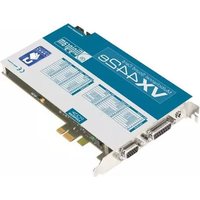
VX442e - Hi-Fi System Digigram - Free user manual and instructions
Find the device manual for free VX442e Digigram in PDF.


| Product Type | Professional Multichannel Sound Card (PCI Express) |
| Model | VX442e |
| Bus Interface | PCI Express x1 (compatible x2, x4, x8, x16, x32) |
| Dimensions (W x D x H) | 168 mm x 111 mm x 20 mm |
| Power Requirements | +3.3V: 2.5 A, +12V: 0.1 A (no +5V or -12V needed) |
| Analog Inputs | 4 balanced mono line inputs, programmable analog/digital gain, max +24 dBu |
| Analog Outputs | 4 servo-balanced mono line outputs, programmable analog/digital gain, max +24 dBu |
| Digital Audio | 2 AES/EBU stereo inputs (up to 192 kHz with SRC), 2 AES/EBU stereo outputs (up to 192 kHz), 1 AES/EBU sync input, 1 Word Clock input/output (up to 96 kHz) |
| Additional Inputs | 1 video sync input, 1 SMPTE/LTC input |
| Sample Rate / Resolution | Up to 192 kHz, 24-bit A/D and D/A converters |
| Supported Audio Formats | PCM (8, 16, 24 bits), Float IEEE754 |
| Digital Signal Processor | Motorola 56321 at 240 MHz, 512 kWords RAM |
| Software Features | Real-time record/playback, low latency DirectSound, Wave, and ASIO drivers, np SDK support for mixing, monitoring, cross-fades, etc. |
| Supported Operating Systems | Windows XP, Server 2003, Server 2008, Vista, Windows 7 (32/64-bit) |
| Connector Type | 68-pin SCSI MDR (for I/O breakout cable) |
| Compliance | FCC Class B, CISPR22 Class B, EMC 89/336/CEE |
| Package Contents (End User) | VX442e card, cables, CD-ROM with drivers and manual |
| Optional Accessories | Breakout cables, 2U 19-inch breakout box (BoB8) |
| Operating Temperature / Humidity | 0°C to +50°C, 5% to 90% non-condensing |
| Storage Temperature / Humidity | -5°C to +70°C, 0% to 95% non-condensing |
Frequently Asked Questions - VX442e Digigram
User questions about VX442e Digigram
0 question about this device. Answer the ones you know or ask your own.
Ask a new question about this device
Download the instructions for your Hi-Fi System in PDF format for free! Find your manual VX442e - Digigram and take your electronic device back in hand. On this page are published all the documents necessary for the use of your device. VX442e by Digigram.
USER MANUAL VX442e Digigram
Professional Multichannel Sound Cards

natural_image
Two identical electronic circuit boards labeled VX442HP and VX442S, shown from different angles (no additional text or symbols visible)User manual
For technical support, please contact your system supplier.

natural_image
Abstract blue square with a white spiral line (no text or symbols)digigram
Digigram S.A.
82/84 Allée Galilée, 38330 Montbonnot-Saint-Martin, FRANCE
Tel: +33 (0)4 76 52 47 47• Fax: +33 (0) 4 76 52 18 44• E-mail: info@digigram.com
Digigram Inc.
2000 North 14th Street - Suite 530, Arlington, VA 22201-USA
Tel: +1 703 875 9100 • Fax: +1 703 875 9161 • E-mail: input@digigram.com
Digigram Asia Pte Ltd.
60 Albert Street - #19-11OG Albert Complex Singapore 189969, Singapore
Tel: +65 6291 2234 • Fax: +65 6291 3433 • E-mail: info_asia@digigram.com
Table of Contents
INFORMATION FOR THE USER 4
IMPORTANT NOTICE....5
CONTENTS OF THIS PACKAGE....5
FEATURES 6
VX442HR and VX442e main hardware features....6
Main software features....6
REQUIREMENTS 7
Minimum hardware requirements....7
Software requirements....7
Supported operating systems 7
HARDWARE INSTALLATION......8
Installing the card 8
Interrupt and memory address....8
SOFTWARE INSTALLATION......8
Standard installation under Windows XP, Windows Server 2003,
Windows Server 2008, Windows Vista et Windows 7....8
Digigram Control Center....11
ASIO Control Panel....12
Removing the driver under Windows XP and Windows Server 2003....12
Removing the driver under Windows Server 2008, Windows Vista, and Windows 7...... 12
HOW TO CHECK THE INSTALLATION....13
THE 'DIGIGRAM HARDWARE SETTINGS' ('DHS')
CONTROL PANEL 14
SPECIFICATIONS....15
Configuration.... 15
Inputs....15
Outputs....16
Connectors....16
Audio specifications....16
Audio performance....17
Development environments....17
APPENDICES 18
VX442HR/e schematic diagram 18
Layout 19
Cable diagram....20
Wiring diagram....21
Adapter cable Sub-D 62 ⇔ SCSI 68 MDR....22
Connection cable VX442e ⇔ BoB8 22
Sub-D 62 ⇔ SCSI 68 MDR wiring diagram....23
VX442HR cable pinout....24
VX442e cable pinout....24
INFORMATION FOR THE USER
This device complies with part 15 of FCC rules. Operation is subject to the following two conditions: (1) This device may not cause harmful interference, and (2) This device must accept any interference received, including interference that may cause undesired operation.
This equipment has been tested and found to comply with the limits for a CLASS B digital device, pursuant to Part 15 of the FCC Rules. These limits are designed to provide reasonable protection against harmful interference in a residential installation. This equipment generates, uses, and can radiate radio frequency energy and, if not installed and used in accordance with the instructions contained in this data sheet, may cause harmful interference to radio and television communications. However, there is no guarantee that interference will not occur in a particular installation.
If this equipment does cause harmful interference to radio or television reception, which can be determined by turning the equipment off and on, the user is encouraged to try to correct the interference by one or more of the following measures:
* reorient or relocate the receiving antenna
* increase the separation between the equipment and the receiver
* connect the equipment into an outlet on a circuit different from that of the receiver
* consult the dealer or an experienced audio television technician.
Note: Connecting this device to peripheral devices that do not comply with CLASS B requirements or using an unshielded peripheral data cable could also result in harmful interference to radio or television reception. The user is cautioned that any changes or modifications not expressly approved by the party responsible for compliance could void the user's authority to operate this equipment. To ensure
that the use of this product does not contribute to interference, it is necessary to use shielded I/O cables.

Warning:
Electrostatic discharge (ESD) can damage several components on the board. To avoid such damage in handling the board, take the following precautions:
Bring the device and everything that contacts it to ground potential by providing a conductive surface and discharge paths. As a minimum, observe these precautions:
• Disconnect all power and signal sources.
- Place the device on a grounded conductive work surface.
• Ground yourself via a grounding wrist strap or by holding a grounded object.
• Ground any tool that will contact the device.
Due to the reduced length of the PCI EXPRESS ^™ bus connector and the resulting lack of mechanical stability, we strongly advise against transporting the PCIe ^® card(s) installed in a computer, unless its chassis or case provides a dedicated support to keep the card securely in place in order to avoid physical damage.
IMPORTANT NOTICE
This card has been tested and found to comply with the following standards:
• International: CISPR22 Class B
• Europe: EMC 89/336/CEE (1992) specifications
• United States: FCC Rules-Part 15-Class B (digital device)
In order to guarantee compliance with the above standards in an installation, the following must be done:
- the provided cable must not be modified
• additional cables used must have their respective shield connected to each extremity
CONTENTS OF THIS PACKAGE
Thank you for purchasing a Digigram VX sound card.
The package consists of the following components:
- a VX442HR or VX442e sound card
The end user version additionally includes:
- cable(s)
- a CD-Rom with drivers, installation notices, FAQs, etc...
For the OEM version, the cables are available optionally.
Also available (optional):
2U 19-inch breakout box allowing straightforward and secure connection to all the cards' I/Os.
FEATURES
The VX442HR is an audio card for PCI bus. It is 'Universal PCI 64-bit/66 MHz' (PCI 2.2), which means it can be plugged in 32-bit/33 MHz 5 V PCI slots as well as in 64-bit/66 MHz 3.3 V keyed PCI slots. The cards is also compatible with PCI-X interfaces.
The VX442e is an audio card for PCI EXPRESS ^TM (PCIe ^® ) bus. It is in PCI EXPRESS ^TM x1 format and can thus be plugged into any PCIe ^® slot (x1, x2, x4, x8, x16, x32).
VX442HR and VX442e main hardware features
- 4 balanced * analog mono line inputs, with software programmable analog and digital gain
- 4 servo-balanced ** analog mono line outputs, with software programmable analog and digital gain
• 192 kHz / 24-bit converters
• Maximum level on analog inputs and outputs: +24 dBu - 2 AES/EBU *** stereo inputs, with hardware sample rate converters (up to 96 kHz on VX422HR, up to 192 kHz on VX422e)
• 2 AES/EBU *** stereo outputs (up to 192 kHz)
• 1 AES/EBU *** stereo sync input (up to 192 kHz)
• 1 standard Word Clock input (up to 96 kHz)
• 1 standard Word Clock output (up to 96 kHz) - 1 video sync input
• 1 SMPTE/LTC (Linear Time Code) input
Main software features
- Real-time, simultaneous record and playback in PCM (8, 16 and 24 bits), Float IEEE754 conversion supported (with 24-bit fixed-point dynamic range)
- When using the np SDK, real-time mixing of several PCM audio streams, direct monitoring, level adjustment, panning, cross-fades, punch-in/punch-out, scrubbing
- Low latency DirectSound, Wave * ***, and ASIO drivers.
REQUIREMENTS
Minimum hardware requirements
VX442HR
PC with one free PCI or PCI-X slot (5 V or 3.3 V).
VX442e
PCI EXPRESS™ (PCIe®) slot (x1, x2, x4, x8, x16 or x32).
CPU power and memory required depend on the operating system and on the audio application used.
Software requirements
To use your VX442HR or VX442e, install the driver from the HR Runtime package version 1.72 or higher. This package includes:
- a Digigram np driver enabling OEM applications to best capitalize on the boards
• a WDM DirectSound driver - a Wave driver * (32 bits, installation optional)
- an ASIO driver (32 bits, installation optional)
Note: the HR Runtime package for Windows Vista does not include a Wave driver. In case your audio application explicitly requires a Wave interface, a Wave driver is available on request. In this case, please contact Digigram.
Supported operating systems
The VX442 HR and VX442e cards run under Windows XP, Windows Server 2003, Windows Server 2008, Windows Vista et Windows 7.
HARDWARE INSTALLATION
Due to the reduced length of the PCI EXPRESS™ bus connector and the resulting lack of mechanical stability, we strongly advise against transporting the PCIe® card(s) installed in a computer, unless its chassis or case provides a dedicated support to keep the card securely in place in order to avoid physical damage.
The card has to be installed in the computer prior to installing its driver.
Installing the card
Gently plug the card in a free PCI slot and press it down to position it firmly. Tighten the screw.
Interrupt and memory address
Hardware interrupt and addresses are automatically set up at start-up by the PCI PnP BIOS.
SOFTWARE INSTALLATION
Note: the installation of the software requires administrator rights on your computer
Please visit the Digigram web site at www.digigram.com for the most recent driver.
In case you run a specific application developed or installed by a Digigram Partner, this application might require the use of a specific driver version. In this case, make sure that the updated driver has been approved by your supplier.
Standard installation under Windows XP, Windows Server 2003, and Windows Vista
If the driver has been downloaded from our web site, it has to be expanded prior to the driver's installation as follows: double-click on the downloaded file (self-expanding). You can use the default destination location (Windows temporary folder) or select another directory.
Important note: this default procedure installs the 'Digigram Hardware Settings' control panel. This application allows the configuration of the hardware resources of Digigram cards for all audio applications. The DHS allows for instance to define the clock of the card, the input source, input and output analog and digital gain, Sample Rate Converters, digital output format, etc...
Please note that, with the DHS installed, controls available through the DirectSound control panel are limited to:
• Volume control for input and output
- Wave control
Under Windows XP and Server 2003 you may also install the driver without installing the DHS control panel, and in this case more controls are available through the DirectSound control panel:
• Volume control for input
- Wave control
• Monitoring control
- Analog input level
- Digital input level
- Clock selection: AES Sync, AES I, Word Clock
• Digital output format: professional, consumer
To do so, install the driver with the command line: "setup x_topology" (not available under Windows Vista). For detailed information, please refer to the dedicated document on our web site.
- Shut down your computer and insert your VX card.
- Restart your computer.
- Click on Cancel if the Found New Hardware Wizard appears.
- Double-click on the HR Runtime vxx.msi/HR Runtime vxx.msi for Vista icon to launch the driver installation.
• A welcome message is displayed, click Next to continue. - The “License Agreement” window appears: read it, and click on “I accept the terms in the license agreement” to approve it.
- Do the same in the next window for Virtual PCX and PC Codec Legal Notice.
- In the “Custom Setup” window, the “Drivers for the HR boards” are displayed; by default, both WDM DirectSound and ASIO HR are installed.
To install the Wave driver ^* , select 'Wave'.
To be able to use your VX card through np, select the 'Digigram np' component option (or make sure that the np application explicitly sets the 'VX_FLAG' with PCXInitialize()).
Next.
- In the “Ready to Install the Program Window”, click on Install to start copying the files.
- Note: In case you use an unsigned driver version, the "Digital Signature Not Found" message may appear because a non-Microsoft software is about to be installed. Click on Continue in the "Hardware installation" window (Windows XP, Server 2003).
- Under Windows Vista: Click Allow in the "User Account Control" window. Click Install in the "Windows Security" window.
- In the "Digigram drivers" window, select the number and the size of buffers required by your applications. Click on Ok.
- Click Finish to complete the driver installation.
Digigram Control Center
This control panel allows to define:
• the number of buffers and their size
• the granularity
Please note that for all sound cards of the VX range, "PCM only" is the only operating mode, therefore this button is not functional in the Digigram control panel (CPL). (To access this control panel, go to

ASIO Control Panel
Note: for most current ASIO applications (e.g. Cubase, Nuendo, etc...) you have the choice between a 32-bit version and a 64-bit version when installing them under Windows ≥ Vista. For operation with your LoLa sound card, make sure to use the 32-bit version!
To launch the ASIO control panel, go to
It allows to:
- set/modify the size of ASIO buffers (and thus latency)
- select the number of bits per sample (16 or 24)
- select the LTC frame rate
- select the I/O used
- enable/disable the hardware monitoring control
For more information on this ASIO control panel, please refer to its online help.
Removing the driver under Windows XP and Windows Server 2003
- Open the Windows Control Panel and double-click on the Add/Remove Software icon.
- Select "Digigram HR Runtime ...", and Change/Remove.
- Select Remove in the HR Runtime window.
- Follow the instructions to finish to remove the driver.
Removing the driver under Windows Vista
- Open the Windows Control Panel and double-click on the Programs and Features icon.
- Select "Digigram HR Runtime for Vista...", and Change/Remove.
- Select Remove in the HR Runtime window.
- Follow the instructions to finish removing the driver.
How to check the installation
Once the cards and the driver have been installed according to the procedure described in this manual, you can verify that the card is properly installed and works fine as follows:
- Menu
Available WDM devices are:
• VX442HR/e 1+2 (WDM) (record and playback)
• VX442HR/e 3+4 (WDM) (record and playback)
- The card is also visible via the np interface: go to
- In the “Digigram drivers” window, select the ‘General Information’ tab. In the “Modules Information” window, you can see the HR Runtime modules that have been installed, and their versions.
- In the “Digigram drivers” window, select the ‘Diagnostics’ tab. You should see here the icons of the cards you have installed.
- If the card you have installed is listed:
- Right click on the icon of the card.
- Select ‘Diagnostics’, and Play Sine. This plays in loop a sine signal on the outputs of the card. You can also select Play file to play in loop a file of your choice (PCM only).
If the playback is correct, the card is correctly installed and works.
- To stop the playback, right click on the card icon, and select Stop Activities.
- If the card is not displayed:
- Make sure that during the HR runtime installation the “Driver for the HR boards” has been selected in the “Select components” window.
- Make sure that the card is correctly inserted in the PCI slot, and screwed on the PC chassis.
- If necessary, uninstall the HR runtime package as described in this manual, and re-install it.
- If the Wave driver has been installed *:
- Go to menu
Available Wave recording and playback devices are:
• VX442HR/e 1+2 (Wave) (record and playback)
• VX442HR/e 3+4 (Wave) (record and playback)
- If the ASIO driver (32 bits) has been installed:
- The card is visible from any ASIO application.
The ‘Digigram Hardware Settings’ (‘DHS’) control panel
Digigram Hardware Settings (DHS) is an application allowing to configure the hardware resources of Digigram cards for all audio applications using them.
A resource being managed by the DHS application can not be modified by any other applications. To enable an audio application to modify a Digigram card resource, this resource must not be managed by the DHS.
Note: As soon as a resource of a card is managed by the DHS, the clock selection of this card MUST be defined in the DHS.
The DHS allows to:
- Select the clock the card uses
- Select the input source
- Adjust analog and digital gains of inputs and outputs
- Enable Sample Rate Converters of an input
- Select the input monitored on an output
- Set the monitoring gains
- Define the digital output format
For more detailed information on how to use this control panel, please refer to its online help.
SPECIFICATIONS
Configuration
| VX442HR VX442e | ||
| Bus/Format | 64-bit/66 Mhz Universal PCI 2.2,PCI-X compatible,master mode | PCI ExpressTM (PCIe®) x1(x2, x4, x8, x16, x32 compatible) |
| Digital Signal Processor Motorola 56321 at 240 MHz | ||
| RAM 512 kWords | ||
| Size | 175 mm × 99 mm x 20 mm | 168 mm × 111 mm x 20 mm |
| Power requirements(+3.3V/+5V / +12V / -12V) | 0 A / 0.7 A / 0.5 A / 0.2 A | 2.5 A / 0 A / 0.1 A / 0 A |
| Operating: temp / humidity(non-condensing) | 0°C/+50°C • 5%/90% | |
| Storage: temp / humidity(non-condensing) | -5°C/+70°C • 0%/95% | |
Inputs
| VX442HR VX442e | ||
| Analog line inputs (mono) | 4 balanced* | |
| Maximum input level/ impedance | +24 dBu/ >10 kΩ | |
| AES/EBU** inputs (stereo) | 2 with switchable hw sample rate converters ratio 1:3 to 3:1, up to 96 kHz | 2 with switchable hw sample rate converters, ratio 1:8 to 7,5:1, up to 192 kHz |
| Programmable input gain | analog: from -94.5dB à +15.5 dB® digital: from -110 dB à +18 dB | |
| Other inputs | AES/EBU Sync (up to 192 kHz), Word clock (up to 96 kHz), LTC, Video | |
| AES11 synchronization Yes | ||
Outputs
| VX442HR VX442e | |
| Analog line outputs (mono) | 4 servo-balanced* |
| Maximum output level / impedance | +24 dBu / <100 Ω |
| Digital outputs (stereo) | 2 AES/EBU**, up to 192 kHz |
| Programmable output gain | analog: from -86 dB to +24 dBdigital: from -110 dB to +18 dB |
| Other output Word clock (up to 96 kHz) | |
Connectors
| VX442HR VX442e | |
| Internal connectors Inter-board Sync | |
| External connector 62-pin HD Sub-D 68-pin SCSI MDR | |
| Digigram accessories available | Breakout cable or 2U 19“ Breakout Box |
Audio specifications
| VX442HR VX442e | |
| Sampling frequencies available | Programmable from 32 to 192 kHz |
| A/D and D/A converter resolution | 24 bits |
| Supported audio formats PCM (8, 16, 24 bits), Float IEEE754 | |
Audio performance
Measurements done at Fs=48 kHz unless stated otherwise, with filter on the 22 Hz - 22 kHz range
| VX442HR VX442e | ||
| Frequency response (record + play) | 20 Hz–20 kHz: ±0.2 dB | |
| Channel phase difference: 20/20kHz | <0.2°/2° | |
| Dynamic range (A-weighted) | Analog In: >104 dBAAnalog Out: >104 dBA | |
| THD + noise 1 kHz at -1 dBfs | Analog In: <-97 dBAnalog Out: <-94 dB | |
| THD + N 1 kHz AES/EBU In w/ SRC | <-110 dB | <-130 dB |
| Crosstalk (Analog in or out) | 1 kHz at 24 dBu: <-100 dB15 kHz at 24 dBu: <-85 dB | |
Development environments
| VX442HR VX442e | ||
| Digigram management | np SDK (HR Runtime, PCM) | |
| Other management | Wave*, ASIO, and DirectSound (all PCM) | |
| OS supported | Windows XP, Windows Server 2003, Windows Server 2008, Windows Vista, and Windows 7 | |
| Main on-board processing features (with np SDK) | PCM play & rec, Float IEEE754, direct monitoring, real-time mixing, level adjustment, panning, cross-fade, punch-in/punch-out, scrubbing | |
APPENDICES
VX442HR/e schematic diagram

flowchart
graph TD
    A["CRYSTAL"] --> B["Video"]
    B --> C["Word Clock"]
    C --> D["AES/EBU Sync"]
    D --> E["RECEIVE"]
    E --> F["CLOCK GENERATION"]
    F --> G["DSP"]
    G --> H["TRANSMIT"]
    H --> I["DAC"]
    I --> J["Level adjust"]
    J --> K["INTERFACE"]
    K --> L["PCI/PCIe BUS"]
    M["AES/EBU IN 1"] --> N["RECEIVE"]
    O["AES/EBU IN 2"] --> N
    P["ANALOG LINE IN 1-2"] --> Q["Level adjust"]
    R["ANALOG LINE IN 3-4"] --> Q
    N --> G
    Q --> G
    G --> H
    H --> I
    I --> J
    J --> K
    K --> L
    L --> M
    M --> N
    N --> F
    F --> G
    G --> H
    H --> I
    I --> J
    J --> K
    K --> L
    L --> M
    M --> N
    N --> O
    O --> P
    P --> Q
    Q --> R
    R --> S["Level adjust"]
    S --> T["TRANSMIT"]
    T --> U["DAC"]
    U --> V["TRANSMIT"]
    V --> W["TRANSMIT"]
    W --> X["TRANSMIT"]
    X --> Y["TRANSMIT"]
    Y --> Z["TRANSMIT"]
    Z --> AA["TRANSMIT"]
    AA --> AB["TRANSMIT"]
    AB --> AC["TRANSMIT"]
    AC --> AD["TRANSMIT"]
    AD --> AE["TRANSMIT"]
    AE --> AF["TRANSMIT"]
    AF --> AG["TRANSMIT"]
    AG --> AH["TRANSMIT"]
    AH --> AI["TRANSMIT"]
    AI --> AJ["TRANSMIT"]
Layout


J1:
• 62-pin HD Sub-D I/O connector (VX442HR)
• 68-pin SCSI MDR I/O connector (VX442e)
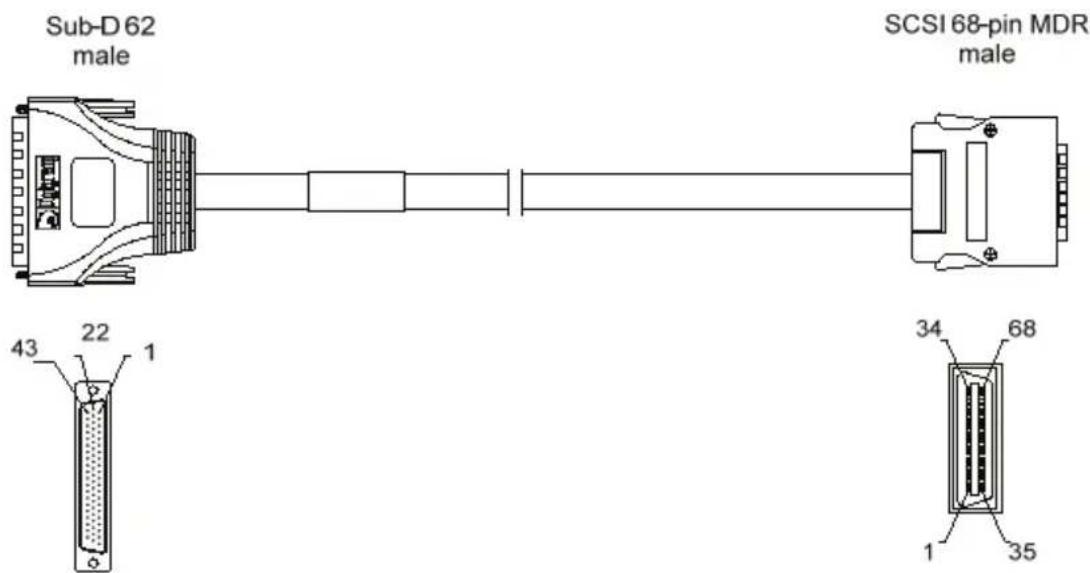
Cable diagram
Schematic diagram of the cable delivered by Digigram*:
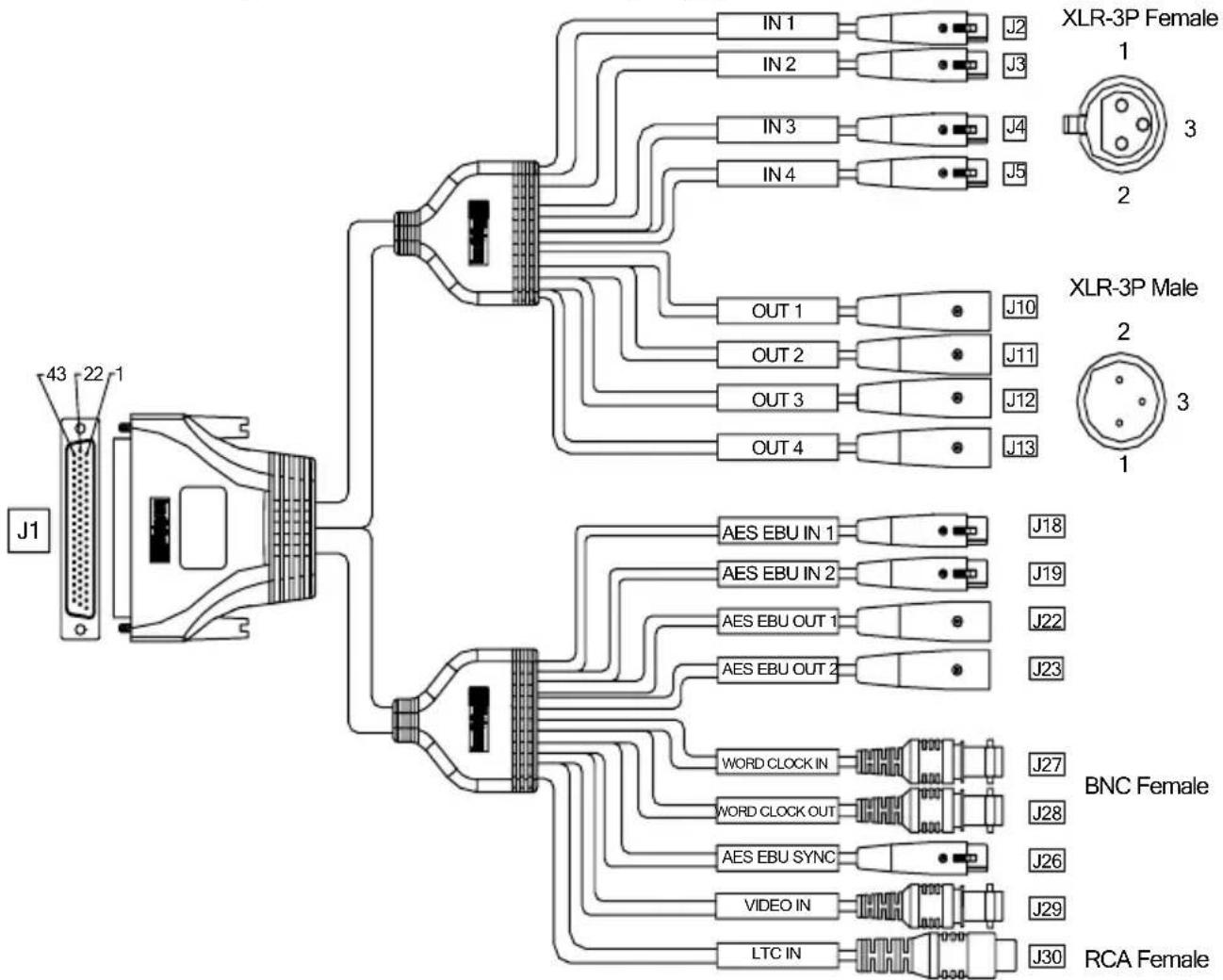
* Your cable may look different if it is not a Digigram cable.
Wiring diagram

line
| J1 | Shell | Center | |----|-------|--------| | 62 | 2 | - | | 61 | 3 | - | | 21 | 2 | - | | 20 | 3 | - | | 60 | 1 | - | | 59 | 2 | - | | 19 | 3 | - | | 18 | 1 | - | | 58 | 2 | - | | 57 | 3 | - | | 17 | 1 | - | | 16 | 2 | - | | 56 | 1 | - | | 55 | 2 | - | | 15 | 3 | - | | 14 | 1 | - | | 44 | 2 | - | | 43 | 1 | - | | 2 | 3 | - | | 1 | 2 | - | | 48 | 1 | - | | 47 | 2 | - | | 8 | 3 | - | | 7 | 1 | - | | 49 | 2 | - | | 50 | - | Center | | 4 | - | Center | | 3 | - | Center | | 23 | - | Center | | 9 | - | Center | | 22,24 | - | Outside | | 27,30 | - | Outside | | 33,36 | - | Outside | | 39,42 | - | Outside | J18 J19 J22 J23 J27 J28 J26 J29 J30Adapter cable Sub-D 62⇔ SCSI 68 MDR
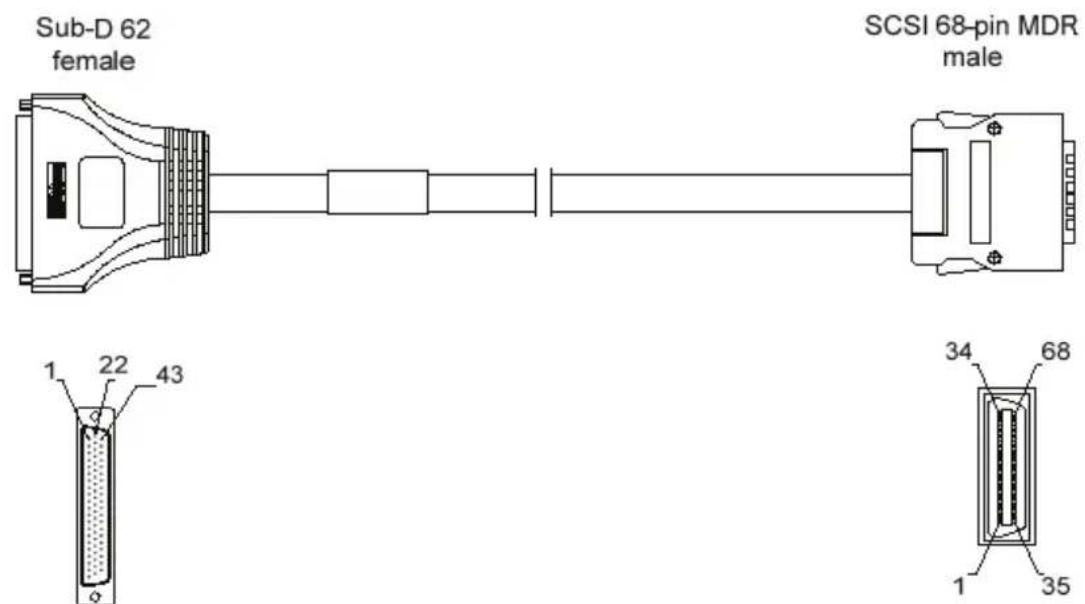
If your card is a VX442e, i.e. has a PCI EXPRESS ^TM (PCIe ^® ) bus, use this adapter cable to connect the audio I/O cable with the card.
Connection cable VX442e ⇔ BoB8
Sub-D 62⇔ SCSI 68 MDR wiring diagram

line
| Time | Value | |------|-------| | 1 | 67 | | 2 | 68 | | 3 | 33 | | 4 | 34 | | 5 | 65 | | 6 | 66 | | 7 | 31 | | 8 | 32 | | 9 | 63 | | 10 | 64 | | 11 | 29 | | 12 | 30 | | 13 | 61 | | 14 | 62 | | 15 | 27 | | 16 | 28 | | 17 | 57 | | 18 | 58 | | 19 | 23 | | 20 | 24 | | 21 | 55 | | 22 | 56 | | 23 | 21 | | 24 | 22 | | 25 | 53 | | 26 | 54 | | 27 | 19 | | 28 | 20 | | 29 | 51 | | 30 | 52 | | 31 | 17 | | 32 | 18 | | 33 | 39 | | 34 | 40 | | 35 | 5 | | 36 | 6 | | 37 | 35 | | 38 | 36 | | 39 | 1 | | 40 | 2 | | 41 | 45 | | 42 | 46 | | 43 | 11 | | 44 | 12 | | 45 | 43 | | 46 | 44 | | 47 | 9 | | 48 | 10 | | 49 | 47 | | 50 | 49 | | 51 | 3 | | 52 | 4 | | 53 | 15 | | 54 | 13 | | 55 | | | 56 | | | 57 | | | 58 | | | 59 | | | 60 | | | 61 | | | 62 | | | Sub-D 62 | Shell | | SCSI 68-pin MDR | - | | Shell: - | - | | Shell: - | - | | Shell: - | - | | Shell: - | - | | Shell: - | - | | Shell: - | - | | Shell: - | - | | Shell: - | - | | Shell: - | - | | Shell: - | - | | Shell: - | - | | Shell: - (Top) | - | | Shell: - (Top) | - | | Shell: - (Top) | - | | Shell: - (Top) | - | | Shell: - (Top) | - | | Shell: - (Top) | - | | Shell: - (Top) | - | | Shell: - (Top) | - | | Shell: - (Top) | - |VX442HR cable pinout
| Pin | Signal | Pin | Signal | Pin | Signal | |
| Digital | 1 | AES/EBU IN 2 - | 22 | GND | 43 | AES/EBU IN 1 - |
| 2 | AES/EBU IN 2 + | 23 | Video IN | 44 | AES/EBU IN 1 + | |
| 3 | AES/EBU SYNC - | 24 | GND | 45 | ||
| 4 | AES/EBU SYNC + | 25 | 46 | |||
| 5 | 26 | 47 | AES/EBU OUT 1 - | |||
| 6 | 27 | GND | 48 | AES/EBU OUT 1 + | ||
| 7 | AES/EBU OUT 2 - | 28 | 49 | Word Clock IN | ||
| 8 | AES/EBU OUT 2 + | 29 | 50 | Word Clock OUT | ||
| Analog | 9 | LTC IN | 30 | GND | 51 | |
| 10 | 31 52 | |||||
| 11 | 32 53 | |||||
| 12 | 33 GND 54 | |||||
| 13 | 34 55 OUT 3 - | |||||
| 14 | OUT 4 - | 35 | 56 | OUT 3 + | ||
| 15 | OUT 4 + | 36 | GND | 57 | OUT 1 - | |
| 16 | OUT 2 - | 37 | 58 | OUT 1 + | ||
| 17 | OUT 2 + | 38 | 59 | IN 3 - | ||
| 18 | IN 4 - | 39 | GND | 60 | IN 3 + | |
| 19 | IN 4 + | 40 | 61 | IN 1 - | ||
| 20 | IN 2 - | 41 | 62 | IN 1 + | ||
| 21 | IN 2 + | 42 GND | ||||
VX442e cable pinout
| Digital | Pin | Signal | Pin | Signal | Pin | Signal |
| 1 | AES/EBU IN 4 + | 11 | AES/EBU OUT 2 + | 41 | GND | |
| 2 | AES/EBU IN 4 - | 12 | AES/EBU OUT 2 - | 42 | GND | |
| 3 | AES/EBU SYNC + | 15 | Video IN | 43 | ||
| 4 | AES/EBU SYNC - | 16 | GND | 44 | ||
| 5 | AES/EBU IN 2 + | 35 | 45 | AES/EBU OUT 1 + | ||
| 6 | AES/EBU IN 2 - | 36 | 46 | AES/EBU OUT 1 - | ||
| 7 | GND | 37 | Reserved | 47 | Word Clock IN | |
| 8 | GND | 38 | Reserved | 48 | GND | |
| 9 | 39 | AES/EBU IN 1 + | 49 | Word Clock OUT | ||
| 10 | 40 | AES/EBU IN 1 - | 50 | GND |
| Analog | Pin | Signal | Pin | Signal | Pin | Signal |
| 13 | LTC IN | 28 | 57 | OUT 1 + | ||
| 14 | GND | 29 | 58 | OUT 1 + | ||
| 17 | 30 | 59 | GND | |||
| 18 | 31 | IN 4 + | 60 | GND | ||
| 19 | 32 | IN 4 - | 61 | |||
| 20 | 33 | IN 2 + | 62 | |||
| 21 | OUT 4 + | 34 | IN 2 - | 63 | ||
| 22 | OUT 4 - | 51 | 64 | |||
| 23 | OUT 2 + | 52 | 65 | IN 3 + | ||
| 24 | OUT 2 - | 53 | 66 | IN 3 - | ||
| 25 | GND | 54 | 67 | IN 1 + | ||
| 26 | GND | 55 | OUT 3 + | 68 | IN 1 - | |
| 27 | 56 | OUT 3 - | ||||
- digigram
- Digigram S.A.
- Digigram Inc.
- Digigram Asia Pte Ltd.
- Table of Contents
- INFORMATION FOR THE USER
- Warning:
- IMPORTANT NOTICE
- CONTENTS OF THIS PACKAGE
- FEATURES
- VX442HR and VX442e main hardware features
- Main software features
- REQUIREMENTS
- Minimum hardware requirements
- Software requirements
- Supported operating systems
- HARDWARE INSTALLATION
- Installing the card
- Interrupt and memory address
- SOFTWARE INSTALLATION
- Standard installation under Windows XP, Windows Server 2003, and Windows Vista
- Digigram Control Center
- ASIO Control Panel
- Removing the driver under Windows XP and Windows Server 2003
- Removing the driver under Windows Vista
- How to check the installation
- The ‘Digigram Hardware Settings’ (‘DHS’) control panel
- The DHS allows to:
- SPECIFICATIONS
- Audio performance
- APPENDICES
- Cable diagram
Brand : Digigram
Model : VX442e
Category : Hi-Fi System