
CZ2 - Electrical cable Bolt - Free user manual and instructions
Find the device manual for free CZ2 Bolt in PDF.


| Product Type | Portable Bluetooth Speaker |
| Brand | Bolt |
| Model | CZ2 |
| Dimensions (H x W x D) | 4.5 x 4.5 x 2.0 in (11.4 x 11.4 x 5.1 cm) |
| Weight | 0.3 lb (136 g) |
| Power Source | Built-in rechargeable battery, 5V USB |
| Battery Type | Lithium-ion 500 mAh |
| Battery Life | Up to 8 hours (50% volume) |
| Charging Time | Approx. 2 hours |
| Bluetooth Version | 5.0 |
| Output Power | 5W RMS |
| Frequency Response | 80 Hz – 20 kHz |
| Controls | Power, Volume +/-, Play/Pause, Call answer |
| Waterproof Rating | IPX5 (splash resistant) |
| Materials | ABS plastic with fabric cover |
| What's in the Box | Speaker, Micro USB charging cable, User manual |
| Warranty | 1 year limited |
| Maintenance | Wipe with dry cloth; keep away from extreme temperatures |
| Safety | Do not disassemble; avoid water immersion |
Frequently Asked Questions - CZ2 Bolt
User questions about CZ2 Bolt
0 question about this device. Answer the ones you know or ask your own.
Ask a new question about this device
Download the instructions for your Electrical cable in PDF format for free! Find your manual CZ2 - Bolt and take your electronic device back in hand. On this page are published all the documents necessary for the use of your device. CZ2 by Bolt.
USER MANUAL CZ2 Bolt
Bolt Locking Flash Cable
User's Guide
This locking flash cable is made with high-quality, wear-resistant insulated wires. It connects your battery pack to your flash. The locking mechanism ensures a secure connection between the battery pack and the cable. This cable is compatible with major battery pack brands, including Quantum, Lumedyne, Dynalite, and Impact.
Warnings
- Use only as instructed. Both terminal connectors output high voltage.
- Only connect your flash unit to your battery pack with a cable that is compatible with both.
- Do not use if any wire is exposed as a result of damage or wear.
- Keep out of reach of children.
- Make sure the cable is firmly connected at both ends when using your battery pack.
- Unplug this cable from the sockets on the battery pack and flash unit when it is not in use.

Connecting Your Battery Pack to Your Flash
natural_image
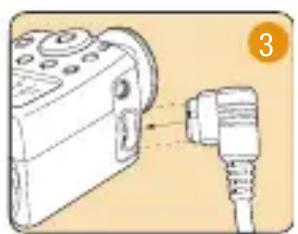
Diagram showing a camera module connected to a cable, with no visible text or symbols- Plug the 5-pin metal connector of the cable firmly into the output socket on your battery.
- Be sure the cable is securely seated in the socket, and rotate the locking collar to the locked position.
- Plug the other end of the cable securely into the compatible power port on your flash unit.
Bolt Locking Flash Cable
For use with other battery pack brands, follow the instructions provided by the battery pack manufacturer.
Important! Load your flash unit with its standard batteries before connecting it to your battery pack. Most compatible flash units require the standard batteries to be installed in order to power the computer functions that allow the flash to work.
One-Year Limited Warranty
This Bolt product is warranted to the original purchaser to be free from defects in materials and workmanship under normal consumer use for a period of one (1) year from the original purchase date or thirty (30) days after replacement, whichever occurs later. The warranty provider's responsibility with respect to this limited warranty shall be limited solely to repair or replacement, at the provider's discretion, of any product that fails during normal use of this product in its intended manner and in its intended environment. Inoperability of the product or part(s) shall be determined by the warranty provider. If the product has been discontinued, the warranty provider reserves the right to replace it with a model of equivalent quality and function. This warranty does not cover damage or defect caused by misuse, neglect, accident, alteration, abuse, improper installation or maintenance. EXCEPT AS PROVIDED HEREIN, THE WARRANTY PROVIDER MAKES NEITHER ANY EXPRESS WARRANTIES NOR ANY IMPLIED WARRANTIES, INCLUDING BUT NOT LIMITED TO ANY IMPLIED WARRANTY OF MERCHANTABILITY OR FITNESS FOR A PARTICULAR PURPOSE. This warranty provides you with specific legal rights, and you may also have additional rights that vary from state to state. To obtain warranty coverage, contact the Bolt Customer Service Department to obtain a return merchandise authorization ("RMA") number, and return the defective product to Bolt along with the RMA number and proof of purchase. Shipment of the defective product is at the purchaser's own risk and expense.
For more information or to arrange service, visit www.boltflashes.com or call Customer Service at 212-594-2353.

Product warranty provided by the Gradus Group.
www.gradusgroup.com
Bolt is a registered trademark of the Gradus Group. © 2014 Gradus Group LLC. All Rights Reserved.
Brand : Bolt
Model : CZ2
Category : Electrical cable