X3 - Processor RGBlink - Free user manual and instructions
Find the device manual for free X3 RGBlink in PDF.


| Product Type | Video Processor / Scaler / Switcher |
| Brand | RGBlink |
| Model | X3 |
| Dimensions (W x D x H) | 200 mm x 150 mm x 45 mm |
| Weight | 1.2 kg |
| Power Supply | DC 12V / 2A (adapter included) |
| Power Consumption | 12W typical |
| Main Functions | Seamless switching, video scaling (up/down), frame sync, picture in picture, chroma key, test pattern generation, USB firmware update |
| Inputs | HDMI, DVI, VGA, Composite, S-Video (depending on model variant) |
| Outputs | HDMI, DVI, VGA, Composite (simultaneous or independent) |
| Supported Resolutions | Up to 1920x1200 @ 60Hz, including 1080p |
| Control | Front panel buttons, RS-232, Ethernet (TCP/IP) |
| Care and Cleaning | Wipe with a soft, dry cloth. Do not use liquids or sprays. |
| Safety Precautions | Use only supplied power adapter; avoid moisture and extreme temperatures; do not open device; no user-serviceable parts inside. |
| Spare Parts and Repairability | Contact RGBlink or authorized service centers for replacement parts. Not user repairable. |
| General Information | Professional video processor suitable for live events, broadcast, and AV installations. Firmware upgradeable via USB. |
Frequently Asked Questions - X3 RGBlink
User questions about X3 RGBlink
0 question about this device. Answer the ones you know or ask your own.
Ask a new question about this device
Download the instructions for your Processor in PDF format for free! Find your manual X3 - RGBlink and take your electronic device back in hand. On this page are published all the documents necessary for the use of your device. X3 by RGBlink.
USER MANUAL X3 RGBlink
natural_image
Exterior view of a black RER link rack with multiple ports and a digital display (no visible text or symbols on the equipment body)Application
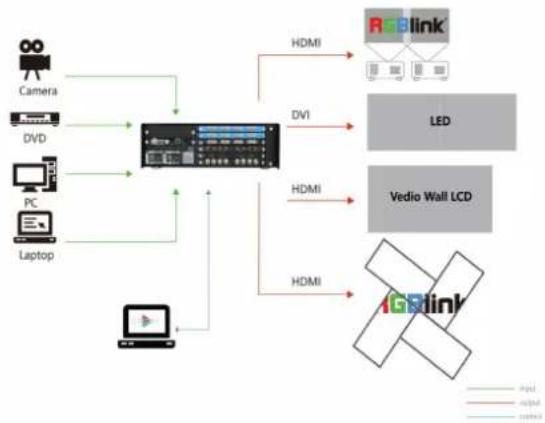
flowchart
graph TD
    A["Camera"] --> D["Central Display"]
    B["DVD"] --> D
    C["PC"] --> D
    E["Laptop"] --> D
    D --> F["HDMI"]
    D --> G["DV1"]
    D --> H["HDMI"]
    D --> I["HDMI"]
    F --> J["LED"]
    G --> J
    H --> K["Vedio Wall LCD"]
    I --> L["1Glink"]
    style J fill:#cccccc,stroke:#333
    style K fill:#ffffff,stroke:#333
    style L fill:#ffffff,stroke:#333
Order Codes
| Product Code Item | |
| 310-0003-10-0 | X3 |
| 190-0003-01-0 | Quad DVI Input Module |
| 190-0003-02-0 | Quad HDMI Input Module |
| 190-0003-03-0 | Quad VGA Input Module |
| 190-0003-04-0 | Quad 3G SDI (SCALE) Input Module |
| 190-0003-06-0 | Octuple CVBS Input Module |
| 190-0003-07-0 | Quad USB Input Module |
| 190-0003-11-0 | 4K@30 Digital Input Module |
| 190-0003-13-0 | Quad H.264 Input Module |
| 190-0003-15-0 | 4K@60 Digital Input Module |
| 190-0003-17-0 | 12G SDI Input Module |
| 190-0003-18-0 | Quad HDBaseT Input Module |
Key Features
- Support for HDR
- Modular Design throughout for input and output
- Hot swap input and output modules
- 4K@60 inputs compatible including HDMI 2.0, DisplayPort1.2
- Up to 12G-SDI Input option
• 4K/2K EDID Management
• Multiple operation modes
- Support for 3D signal
• Control via XPOSE and T series consoles
- Redundant hot swap PSU option
Dimensions
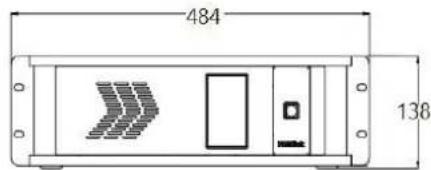
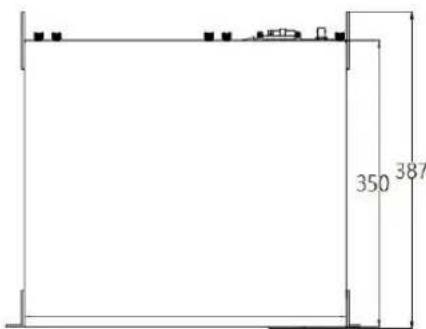
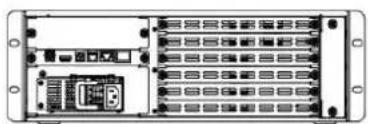
natural_image
Back view of a rack-mounted server or network unit with multiple ports and connectors (no visible text or labels)Product Code Item
| 190-0003-21-0 | Quad DVI Output Module |
| 190-0003-22-0 | Quad 2K HDMI Output Module |
| 190-0003-24-0 | Quad 3G SDI Output Module |
| 190-0003-25-0 | Quad HDBaseT Output Module |
| 190-0003-28-0 | ARO Rotation Module |
| 190-0003-38-0 | 4K HDMI Output Module |
| 950-0001-00-0 | Power Supply 200W |
Specification
| Connectors Input | 4 slots, up to 16 inputsSelect from 4K@60 Module 1 x DVI-I | 2 x HDMI-A | 1 x DisplayPort4K@30 Module 2 x DVI-I | 2x HDMI-A (1 In/1 Loop) | 2x DisplayPort (1 In/1Loop)12G SDI Module 4 x BNC (1 x 12G SDI input, or 4x3G SDI Input)3G SDI Module 8 x BNC (4 In | 4 Loop)HDMI Module 4 x HDMI-ADVI Module 4 x DVI-IH.264 Module 4 x RJ 45HDBaseT Module 4 x RJ 45VGA Module 4 x DB15CVBS Module 8 x BNCUSB Module 4 x USB-A | |
| Output | 2 slots, up to 8 outputsSelect from HDMI Module 4 x HDMI-ADVI Module 4 x DVI-IHDBaseT Module 4 x RJ 454K HDMI Module 2 x HDMI-ARO Rotation Module 4 x DVI-I | |
| Communication | LAN 1 x RJ 45RS 232 1 x RJ 111 x USB 1 x USB-BGenlock/Sync 1 x BNC | 1 x HDMI-A | |
| Power | 2 slots Up to 2 power Inputs IEC | |
| Performance Input Resolutions | SDISMPTE 480i | 576i | 720p@23.98/24/25/29.97/30/50/59.94/60 | 1080i@59.94/60 | 1080p@23.98/24/25/29.97/30/50/59.94/60 |1080psf@23.8/24/25/29.7/30DVI | HDMISMPTE 720p@23.98/24/25/29.97/30/50/59.94/60 | 1080p@239.98/24/25/29.97/30/50/59.94/60 | 1080psf@23.8/24/25/29.7/30VESA 800x600@60 | 1024x768@60 | 1280x768@60 | 1280x960@60 | 1280x1024@60 | 1360x768@60 | 1440x900@60 | 1400x1050@60 |1600x1200@60 | 1680x1050@60 | 1920x1080@60 | 2048x1080@60 | 2048x1152@60 | 2560x960@60HDBaseT 720p@50/60 | 1080p@24/25/30/50/60VESA 800x600@60/75/85 | 1024x768@60/75/85 | 1280x768@60 | 1280x800@60 | 1280x1024@60/75/85 |1360x768@60 | 1366x768@60 | 1400x900@60 | 1400x1050@60 | 1680x1050@60 |1920x1080@60 | 1920x1200@60 | 2048x1152@60 | 2560x812@60 | 2048x816@60CVBSSMPTE 480i | 576iVAGVESA 800x600@60 | 1024x768@60 | 1280x960@60 | 1280x1024@60 | 1360x768@60 | 1400x1050@60 |1440x900@60 | 1600x1200@60 | 1680x1050@60 | 1920x1080@60 | |
| H.264176x144 | 240x180 | 320x180 | 320x240 | 320x256 | 352x228 | 352x480 | 400x224 | 400x320 | 480x272 |480x320 | 480x360 | 480x480 | 544x480 | 608x448 | 640 x 360 | 640x480 | 704x576 | 720x404 | 720x480 | 720x540 |1280x720 | 720x576 | 850x480 | 1024x576 | 1680x1056 | 1920x10804K@30SMPTE 480p| 576p| 720p@23.98/24/25/29.97/30/50/59.94/60 | 1080p@23.98/24/25/29.97/30/50/59.94/60 | 2160p@30VESA 800x600@60 | 1024x768@60 | 1280x800@60 | 1280x1024@60 | 1400x1050@60 | 1440x900@60 | 1680x1050@60 |1920x1080@60 | 2048x1080@60 | 2048x1152@60 | 2560x1600@60 | 3840 x 2160@304K@60SMPTE 720p@23.98/24/25/29.97/30/50/59.94/60 | 1080p@50/59.94/60 | 2160p@30/60VESA 800x600@60 | 1024x768@60 | 1280x768@60 | 1280x800@60 | 1280x1024@60 | 1360x768@60 | 1366x768@60 | 1400x900@60 |1600x1050@60 | 1600x1200@60 | 1680x1050@60 | 1920x1080@60 | 1920x1200@60 | 2048x1080@60 | 2048x1152@60 |2560x812@60 | 2560x960@60 | 2560x1600@60 | 3840x1080@60 | 3840x2160@30 | 3840x2160@6012G SDISMPTE 720p@50/59.94/60 | 1080p@23.98/24/25/29.97/30/50/59.94/60 | 2160p@23.98/24/25/29.97/30/50/59.94/60 | ||
| Output Resolutions Select from below or configure customizedSDISMPTE 720p@23.98/24/25/29.97/30/50/59.94/60 | 1080p@23.98/24/25/29.97/30/50/59.94/60 | 1080psf@23.8/24/25/29.7/30DVI | HDMIISMPTE 720p@23.98/24/25/29.97/30/50/59.94/60 | 1080p@23.98/24/25/29.97/30/50/59.94/60VESA 800x600@60 | 1024x768@60 | 1280x800@60 | 1280x960@60 | 1280x1024@60 | 1360x768@60 | 1440x900@60 |1400x1050@60 | 1600x1200@60 | 1680x1050@60 | 1920x1080@60 | 2048x1152@60HDBaseT 720p@50/59.94/60 | 1080i@50/59.94/60 | 1080p@23.98/24/25/29.97/30/50/59.94/60 |1080p@23.98/24/25/29.97/30/50/59.94/60800x600@60 | 1024x768@60 | 1280x800@60 | 1280x1024@60/75/85 | 1360x768@60 | 1366x768@60 |1400x900@60 | 1600x1050@60 | 1680x1200@60 | 1680x1050@60 | 1920x1080@60 | 1920x1200@60 |1920x1080@60 | 2560x812@60 | 2048x816@604K HDMI SMPTE 720p@25/30/50/60 | 1080p@23.98/24/25/29.97/30/50/59.94/60 | 2160p@23.98/24/25/29.97/30/50/60800x600@60 | 1024x768@60 | 1280x768@60 | 1280x800@60 | 1280x1024@60 | 1360x768@60 | 1366x768@60 |1400x900@60 | 1600x1050@60 | 1680x1200@60 | 1680x1050@60 | 1920x1080@60 | 192X1200@60 | 2048x1152@60 |2560x812@60 | 2560x816@60 | 2560x1600@60 | 3840x1080@60 | 3840x2160@ | 4096x2160@60 | ||
| Supported Standard SDIHDMI 2.0DP 1.2DVIDual LinkHDBaseT 1.0 | ||
| Grey Level 12 bit | ||
| Color Space 4:4:4 | ||
| Power | Input Voltage AC 100V-240V, 50/60Hz | |
| Max Power 205W | ||
| Enviroment | Temperature 0°C~55°C | |
| Hudmidity 10%~90% | ||
| Physical Weight | ||
| Dimension Net 485mmx387mmx135mmPackage 635mmx545mmx275mm | ||
Brand : RGBlink
Model : X3
Category : Processor