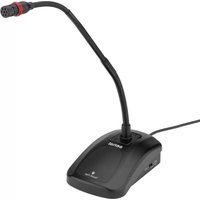
MXGN-12C - Microphone Senal - Free user manual and instructions
Find the device manual for free MXGN-12C Senal in PDF.


| Product Type | Professional Cardioid Gooseneck Microphone with Integrated Base |
| Model | Senal MXGN-12C |
| Transducer | Back Electret Condenser |
| Polar Pattern | Cardioid (included); Omnidirectional and Supercardioid capsules available separately |
| Frequency Response | 50 Hz - 18 kHz |
| Sensitivity | -38 dB ±3 dB (0 dB = 1 V/Pa @ 1 kHz) |
| Maximum Input Level | 120 dB (@ 1 kHz, THD < 1%) |
| Output Impedance | 100 Ω |
| Power Requirements | Phantom Power DC 12 to 48 V |
| Output Connector | XLR 3-pin Male |
| Low-Cut Filter | -20 dB @ 100 Hz (switchable) |
| Mute Control | Programmable Touch Pad (Mute, Talk, Lock modes) |
| LED Indicator | Ring light on gooseneck (on when mic active, off when muted) |
| Housing Material | Metal |
| Base Dimensions (H x W x D) | 1.6 x 3.6 x 5.6 in (4.1 x 9.1 x 14.2 cm) |
| Gooseneck Length | 12 in (30.5 cm) |
| Weight | 1.53 lb (694.6 g) |
| Included Accessories | Foam Windscreen, Cardioid Capsule |
| Optional Accessories | Omnidirectional Capsule (MXGN-ICO), Supercardioid Capsule (MXGN-ICS) |
| Warranty | 2-Year Limited Warranty |
| Intended Use | Video Conferencing, Lectures, Meetings, Live Sound |
Frequently Asked Questions - MXGN-12C Senal
User questions about MXGN-12C Senal
0 question about this device. Answer the ones you know or ask your own.
Ask a new question about this device
Download the instructions for your Microphone in PDF format for free! Find your manual MXGN-12C - Senal and take your electronic device back in hand. On this page are published all the documents necessary for the use of your device. MXGN-12C by Senal.
USER MANUAL MXGN-12C Senal
natural_image
Black desktop computer mouse with a curved black neck and red connector, mounted on a base (no visible text or symbols)USER'S GUIDE
Table of Contents:
Introduction ......2
Precautions ....3
Overview 4
Instructions......5-9
Specifications....10
Troubleshooting .....11
Warranty 12

MXGN SERIES
PROFESSIONAL CARDIOID GOOSENECK MICROPHONE WITH INTEGRATED BASE
Thank you for choosing Senal.
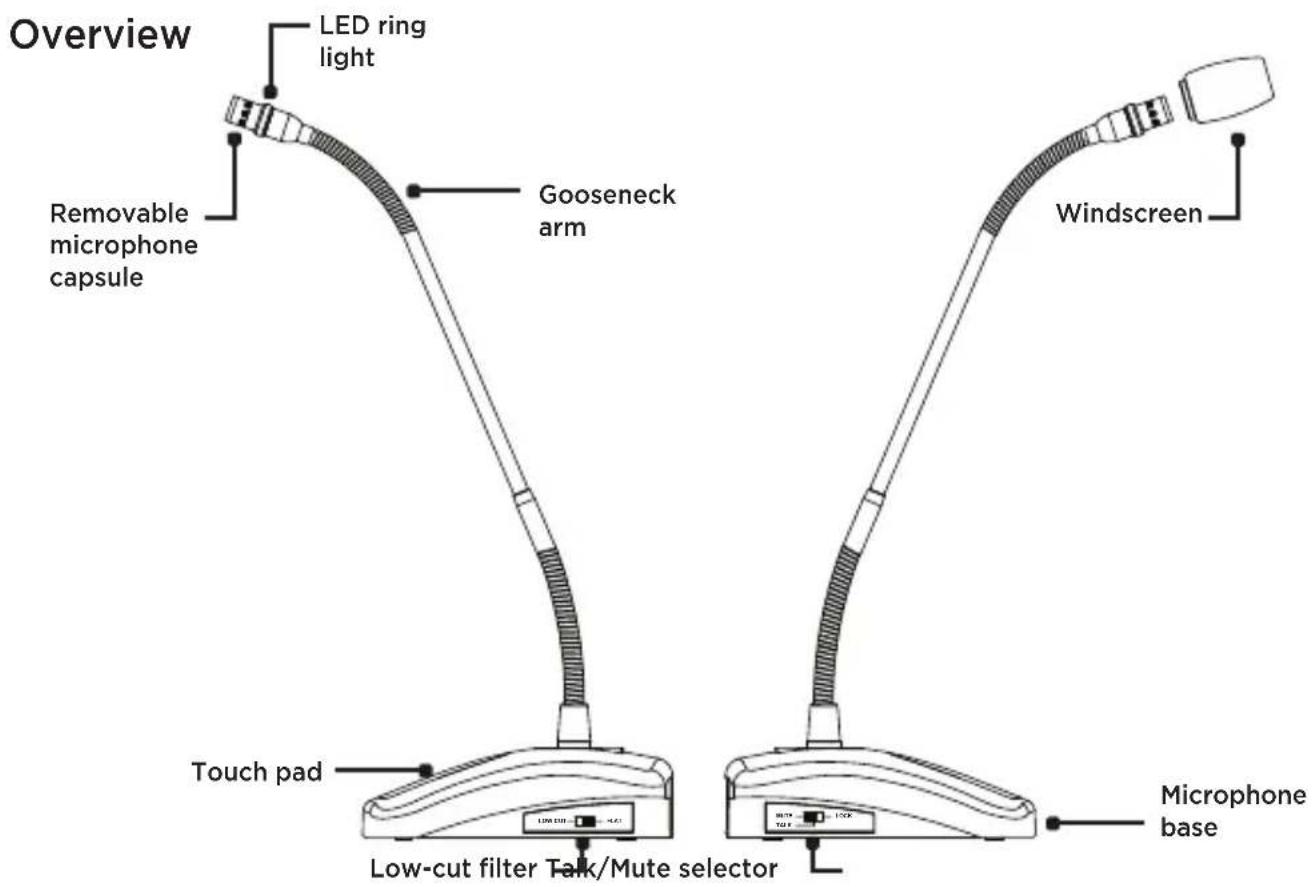
Senal's MXGN-series Professional Gooseneck Microphones are sleek microphones that are designed with optimized frequency response and sensitivity ideal for capturing voices. The included cardioid microphone capsule is perfect for video conferences, lectures, and meetings. To adapt your microphone for other conference, speaking, or desktop applications, the MXGN-series is designed for interchangeable omnidirectional and supercardioid capsules (available separately).
The MXGN-series microphones integrate into most AV conferencing systems or sound systems. For quiet and professional audio, balanced output rejects unwanted RF and EM interference and noise, even over long cable runs, and a low-cut filter minimizes room noise and low-end rumble. A programmable touch pad mutes or activates the microphone with a gentle finger tap, and an LED ring light located on the gooseneck is a visual indicator of the mic's status. For public speaking applications, the microphones' stylish and slim appearance won't obscure or distract attention away from the person behind the microphone.
Precautions ⚠️
- Please read and follow these instructions, and keep this manual in a safe place.
- Keep this product away from water and any flammable gases or liquids.
- Do not attempt to disassemble or repair this product.
- Handle this product with care.
- Use only parts provided by the manufacturer.
- Clean this product with only a soft, dry cloth.
- Make sure that this product is intact and that there are no missing parts.
- All images are for illustrative purposes only.
Setting Up the MXGN Gooseneck Microphone
Each application of the MXGN Microphone will be slightly different. The following scenarios cover frequently used setups.
Live Lecture/Sound Reinforcement
This is ideal in an auditorium or house of worship where a voice needs to be amplified for an audience.
Note: MXGN microphones need phantom power in order to operate.
Video and Audio Conferencing
MXGN microphones are compatible with most audio and video conferencing systems. Refer to the conferencing system's user manual for setup instructions.

flowchart
graph LR
    A["User"] --> B["Mixing console"]
    B --> C["Power amplifier"]
    C --> D["Speaker"]
    E["User"] --> F["Phantom power supply"]
    F --> G["Power amplifier"]
    G --> H["Speaker"]
    I["User"] --> J["Remote video conference system"]
    J --> K["Power amplifier"]
    K --> L["Speaker"]
Powering the MXGN Microphone
The MXGN microphones operate on phantom power. Once connected to the power source, the MXGN mic is ready to work.
Important! When integrating the MXGN microphone into a video or audio conferencing system, or using it with a mixing board, make sure that phantom power is enabled.
Optional Mic Capsules
The MXGN-12 and MXGN-18 include a cardioid mic capsule. Omnidirectional (MXGN-ICO) and supercardioid (MXGN-ICS) capsules are available separately.
To exchange capsules, unscrew the capsule that's attached to the gooseneck, and screw on the replacement capsule. Be sure not to overtighten the capsule when installing it.
Cardioid Polar Pattern
The cardioid capsule lessens off-axis noise. Use it in rooms with inadequate acoustic treatment or in spaces where background noise is problematic. The MXGN will capture the voice of the person sitting directly in front it while it minimizes room noise and reverberation.
Omnidirectional Polar Pattern
The omnidirectional capsule picks up sound in a 360-degree pattern. Use it in quiet rooms with adequate acoustic treatment. The microphone will pick up all participants seated on the same side of a table. Alternatively, it can be used to capture several people seated around the microphone.
Supercardioid Polar Pattern
The supercardioid capsule has a slightly narrower pickup field and rejects more off-axis noise than the cardioid capsule. This capsule is an excellent choice for a stationary lecturer at a podium or for speaking in high-noise environments. It can be used in a multi-microphone setup, providing that it's pointed directly at the person using it.
Using the MXGN Gooseneck Microphone
Using the Windscreen
The MXGN microphone should always be used with the included foam windscreen. It prevents the vocal pops that occur with the letters P and B, and it protects the mic capsule from corrosive moisture.
To install the windscreen, slip it over the microphone capsule.
Microphone Placement
The optimum placement for the microphone is 6 to 12 inches from the source.
Ideally, the microphone should be pointed directly toward the source for capturing the best sound.
Always point the microphones away from speakers and other sources of unwanted noise.
Powering the MXGN Microphone
The MXGN microphones operate on phantom power. Once connected to the power source, the MXGN mic is ready to work.
Important! When integrating the MXGN microphone into a video or audio conferencing system, or using it with a mixing board, make sure that phantom power is enabled.
Low-Cut Filter
Activate the low-cut filter when using the microphone in rooms with inadequate acoustic treatment or constant noise from air conditioning, fans, or lights.
To filter out low frequencies, move the selector switch to the Low Cut position. Moving the selector to the Flat position turns off the low-cut filter.
Talk/Mute
Move the switch to select the talk/mute function of the touch pad.
When the LED ring light is on, the microphone is on.
When is the LED ring light is off, the microphone is muted.
The touch pad on the microphone's base controls the programmable mute function. There are three programming options.
Mute
In Mute mode, the microphone is always active. Touch and hold the sensor pad to mute the microphone, and release to activate the microphone again.
This function is useful for momentarily muting the microphone if you need to cough, or to say something that isn't heard by other participants.
Talk
In Talk mode, the microphone is always muted. Touch and hold the sensor pad to activate the microphone, and release to mute the microphone again.
This function is useful for a participant that needs to speak only occasionally. Keeping the microphone defaulted to mute prevents too many open microphones at one time, and minimizes the chance of feedback, excessive noise, or interference.
Lock
Tap the sensor pad to change the microphone's status. The microphone will stay on or muted until you touch the sensor pad again.
Selecting Lock is ideal for meetings where conversation between participants is expected. Alternatively, each participant can activate the microphone to speak individually, and then mute the microphone to listen to the other remarks.
Specifications
| Transducer | Back electret condenser |
| Polar Pattern | Cardioid |
| Frequency Response | 50 Hz to 18 kHz |
| Maximum Input Level | 120 dB (@1 kHz, THD <1%) |
| Sensitivity | -38 dB ±3 dB (0 dB = 1 V / Pa @1 kHz) |
| Low-Cut Filter | -20 dB @ 100 Hz |
| Output Impedance | 100 Ω |
| Power Requirements | Phantom power DC 12 to 48 V |
| Output Connector | XLR 3-pin male |
| Mute Switch | Programmable touch pad |
| Housing Material | Metal |
| Dimensions (H × W × D) | Base: 1.6 × 3.6 × 5.6 in. (4.1 × 9.1 × 14.2 cm) |
| Gooseneck Length | MXGN-12C: 12 in. (30.5 cm)MXGN-18C: 18 in. (45.7 cm) |
| Weight | MXGN-12C: 1.53 lb. (694.6 g)MXGN-18C: 1.73 lb. (784.7 g) |

line
| Frequency in Hertz | Relative Response in dB (Solid Line) | Relative Response in dB (Dashed Line) | | ------------------ | ------------------------------------ | ------------------------------------- | | 20 | -35 | -55 | | 50 | -36 | -58 | | 100 | -34 | -52 | | 200 | -33 | -48 | | 500 | -32 | -42 | | 1K | -31 | -38 | | 1K2K | -30 | -35 | | 5K | -29 | -32 | | 10K | -28 | -30 | | 20K | -30 | -35 |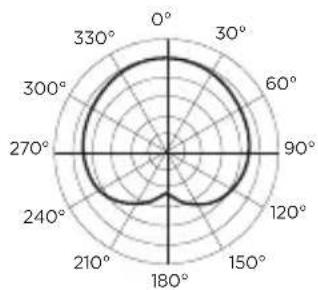
radar
| Angle (degrees) | Value | |---|---| | 0° | 100 | | 30° | 98 | | 60° | 95 | | 90° | 92 | | 120° | 88 | | 150° | 85 | | 180° | 82 | | 210° | 78 | | 240° | 75 | | 270° | 72 | | 300° | 70 | | 330° | 68 |Troubleshooting
| Problem Solution | |
| The microphone is connected, but there's no sound. | Make sure both XLR connectors on the cable are fully inserted into the plugs on the microphone and input device (conferencing system or mixing board).Make sure your microphone is connected to an XLR port with phantom power, and that the phantom power is turned on.If the LED indicator is off, touch the sensor pad to unmute the microphone.See Talk/Mute above about programming the touch pad.Refer to your AV conferencing system's user manual to ensure the input settings are correct. |
Two-Year Limited Warranty
This Senal product is warranted to the original purchaser to be free from defects in materials and workmanship under normal consumer use for a period of two (2) years from the original purchase date or thirty (30) days after replacement, whichever occurs later. The warranty provider's responsibility with respect to this limited warranty shall be limited solely to repair or replacement, at the provider's discretion, of any product that fails during normal use of this product in its intended manner and in its intended environment. Inoperability of the product or part(s) shall be determined by the warranty provider. If the product has been discontinued, the warranty provider reserves the right to replace it with a model of equivalent quality and function.
This warranty does not cover damage or defect caused by misuse, neglect, accident, alteration, abuse, improper installation or maintenance. EXCEPT AS PROVIDED HEREIN, THE WARRANTY PROVIDER MAKES NEITHER ANY EXPRESS WARRANTIES NOR ANY IMPLIED WARRANTIES, INCLUDING BUT NOT LIMITED TO ANY IMPLIED WARRANTY OF MERCHANTABILITY OR FITNESS FOR A PARTICULAR PURPOSE. This warranty provides you with specific legal rights, and you may also have additional rights that vary from state to state.
To obtain warranty coverage, contact the Senal Customer Service Department to obtain a return merchandise authorization (“RMA”) number, and return the defective product to Senal along with the RMA number and proof of purchase. Shipment of the defective product is at the purchaser’s own risk and expense.
For more information or to arrange service, visit www.senalsound.com or call Customer Service at 212-594-2353.
Product warranty provided by the Gradus Group.
www.gradusgroup.com
Senal is a registered trademark of the Gradus Group. © 2019 Gradus Group LLC. All Rights Reserved.

SENAL® A Gradus Group Brand
- USER'S GUIDE
- Table of Contents:
- MXGN SERIES
- Thank you for choosing Senal.
- Precautions ⚠️
- Setting Up the MXGN Gooseneck Microphone
- Live Lecture/Sound Reinforcement
- Video and Audio Conferencing
- Powering the MXGN Microphone
- Optional Mic Capsules
- Cardioid Polar Pattern
- Omnidirectional Polar Pattern
- Supercardioid Polar Pattern
- Using the MXGN Gooseneck Microphone
- Using the Windscreen
- Microphone Placement
- Low-Cut Filter
- Talk/Mute
- Mute
- Talk
- Lock
- Troubleshooting
- Two-Year Limited Warranty
Brand : Senal
Model : MXGN-12C
Category : Microphone