Sonamp ASAP3D S - Receiver SONANCE - Free user manual and instructions
Find the device manual for free Sonamp ASAP3D S SONANCE in PDF.


| Product Type | Multi-channel Amplifier/Receiver |
| Brand | Sonance |
| Model | Sonamp ASAP3D S |
| Amplifier Class | Class D |
| Number of Channels | 3 |
| Power Output (per channel) | 50W RMS @ 8 ohms, 100W RMS @ 4 ohms |
| Total Harmonic Distortion (THD) | <0.05% |
| Frequency Response | 20 Hz - 20 kHz (±0.5 dB) |
| Input Impedance | 47 kOhms |
| Input Connectors | RCA (3 pairs), Euroblock |
| Output Connectors | Binding posts or Euroblock |
| Signal-to-Noise Ratio | >100 dB |
| Dimensions (H x W x D) | 3.5 x 17 x 12 inches (89 x 432 x 305 mm) |
| Weight | 10 lbs (4.5 kg) |
| Power Supply | 100-240V AC, 50/60 Hz |
| Power Consumption | 300W max |
| Standby Power | <0.5W |
| Mounting | Rack-mountable (1U) or freestanding |
| Cooling | Convection (fanless) |
| Protection Features | Short circuit, thermal, overcurrent |
| Compliance | CE, FCC, RoHS |
| Cleaning Instructions | Wipe with dry cloth; do not use liquids |
Frequently Asked Questions - Sonamp ASAP3D S SONANCE
User questions about Sonamp ASAP3D S SONANCE
0 question about this device. Answer the ones you know or ask your own.
Ask a new question about this device
Download the instructions for your Receiver in PDF format for free! Find your manual Sonamp ASAP3D S - SONANCE and take your electronic device back in hand. On this page are published all the documents necessary for the use of your device. Sonamp ASAP3D S by SONANCE.
USER MANUAL Sonamp ASAP3D S SONANCE
Sonamp® ASAP3D SE Application Notes

SONAMP ASAP3D SE (FRONT VIEW)
Sonamp® ASAP3D SE Stereo Power Amplifier Key Features
- SMALL SIZE: 1U HIGH x 12 RACK WIDE CHASSIS
• AUTOMATIC HOUSE/LOCAL SOURCE SWITCHING
• FLEXIBLE AUTOMATIC TRIGGERING - IR CONTROL (INCLUDING VOLUME FUNCTIONS)
- ICEPOWER® DIGITAL AMPLIFICATION; LOW HEAT GENERATION
- BBE® SOUND ENHANCEMENT
• MONO VARIABLE OUTPUT FOR SUBWOOFER
ASAP3D SE Features/Benefits
Feature: Automatic House/Local Source Switching
Benefit:
- Automatically switches a pair of speakers between two different input sources. (Typically between a whole-home audio system that normally plays in the area and a local source, such as a TV set.)
- The ASAP3D SE will automatically override the whole-home system whenever the local source is turned on. One of several different trigger methods can be used.
Typical Application:
A typical application would be to use the ASAP3D SE to power and automatically switch a pair of speakers in a bedroom from playing background music sent by a whole-home audio system to playing the sound of the bedroom TV whenever the TV is switched on. With the ASAP3D SE's Mono Variable Output feeding a local-zone powered subwoofer, this installation would provide much better sound quality than the TV could supply on its own.
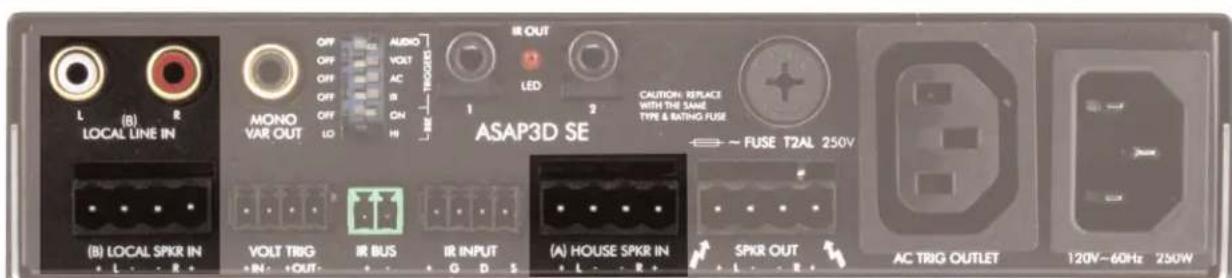
ASAP3D SE LOCAL SOURCE (LEFT) AND HOUSE SOURCE (RIGHT) INPUT CONNECTIONS
Sonamp® ASAP3D SE Application Notes

natural_image
Abstract geometric composition of gray squares arranged diagonally (no text or symbols)Feature: Flexible Automatic Triggering
Benefit:
• Automatic switching from the House to the Local source can be triggered in four different ways:
- By the presence of an audio signal at the Local line or speaker inputs;
- When a TV connected to the ASAP3D SE's AC outlet is turned ON;
- By an external control voltage connected to the amplifier's VOLTAGE TRIGGER input;
- By an IR controller connected to the amplifier's IR input.
- This flexibility allows the ASAP3D SE to be used by installers who perform basic installations (featuring autoformer volume controls), by installers who perform more elaborate installations (featuring remote switching and central preamp control), and by installers who install hi-end systems (featuring IR control).
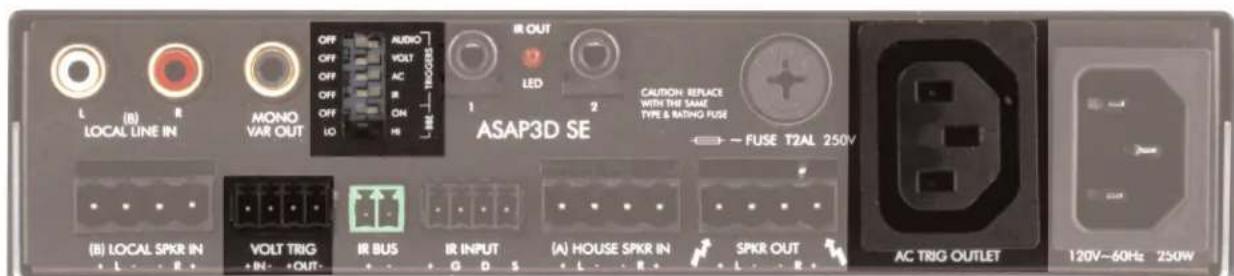
ASAP3D SE VOLTAGE TRIGGER CONNECTIONS (LOWER LEFT), TRIGGER MODE DIP SWITCHES (UPPER LEFT) AND AC TRIGGER OUTLET (RIGHT)
Feature: IR Control
Benefit:
- IR input allows volume, muting and BBE ON/OFF to be controlled by an IR keypad controller. (House/Local input selection can also be made via IR when IR is the sole trigger method selected.)
- IR output allows OptiLinQ® emitters to pass 3rd-party control signals to intended components.
- IR Bus passes IR signals from multiple ASAP3D SEs to single set of emitters.
- Amp can be used in more sophisticated installations.
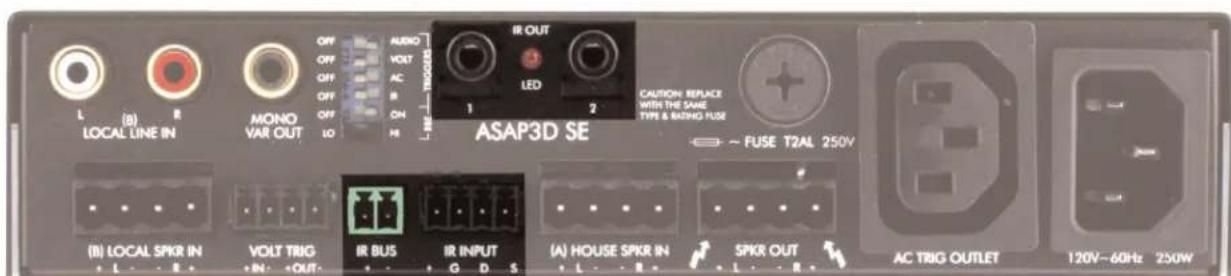
ASAP3D SE IR CONTROL CONNECTIONS
Sonamp® ASAP3D SE Application Notes
Feature: ICEpower Digital Amplification
Benefit:
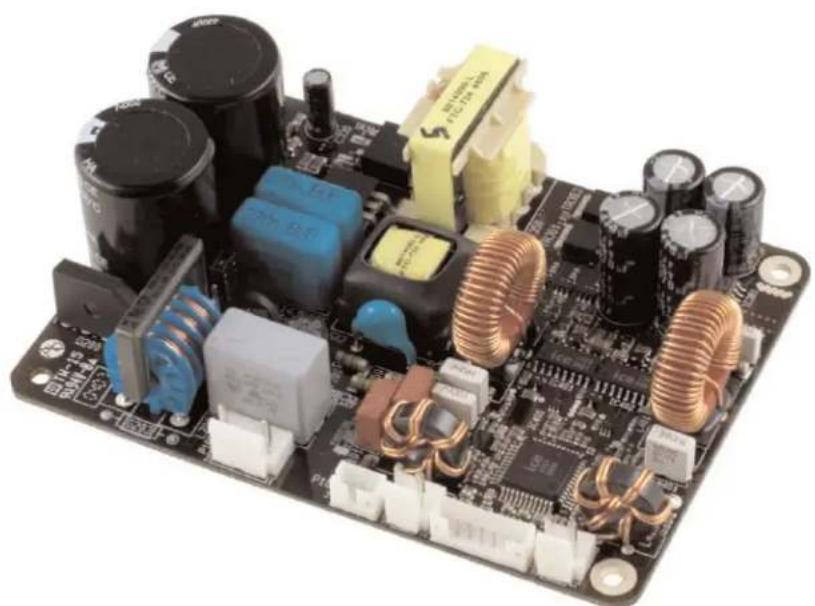
- Highly efficient — produces high power in a 1U high/ 12 rack width package.
• Very little heat generation. - Expands installation options.
- Provides significant energy savings over conventional amplifier designs.
natural_image
Electronic circuit board with various components including capacitors, inductors, and switches (no visible text or labels)ICEPOWER 2 x 25W (8 OHMS) AMPLIFIER MODULE
Feature: BBE Sound Enhancement
Benefit:
- Improves the presence and detail of speakers, especially at lower listening volumes
- Distributed audio systems playing background music sound better at quiet volume levels.
- Restores clarity and definition to spoken voices, making paging systems easier to understand without having to run them at high volumes.
Installation Examples
The next three pages show three examples of different audio and audio/video systems that can be assembled using one or more ASAP3D SE amplifiers.
Sonamp® ASAP3D SE Application Notes
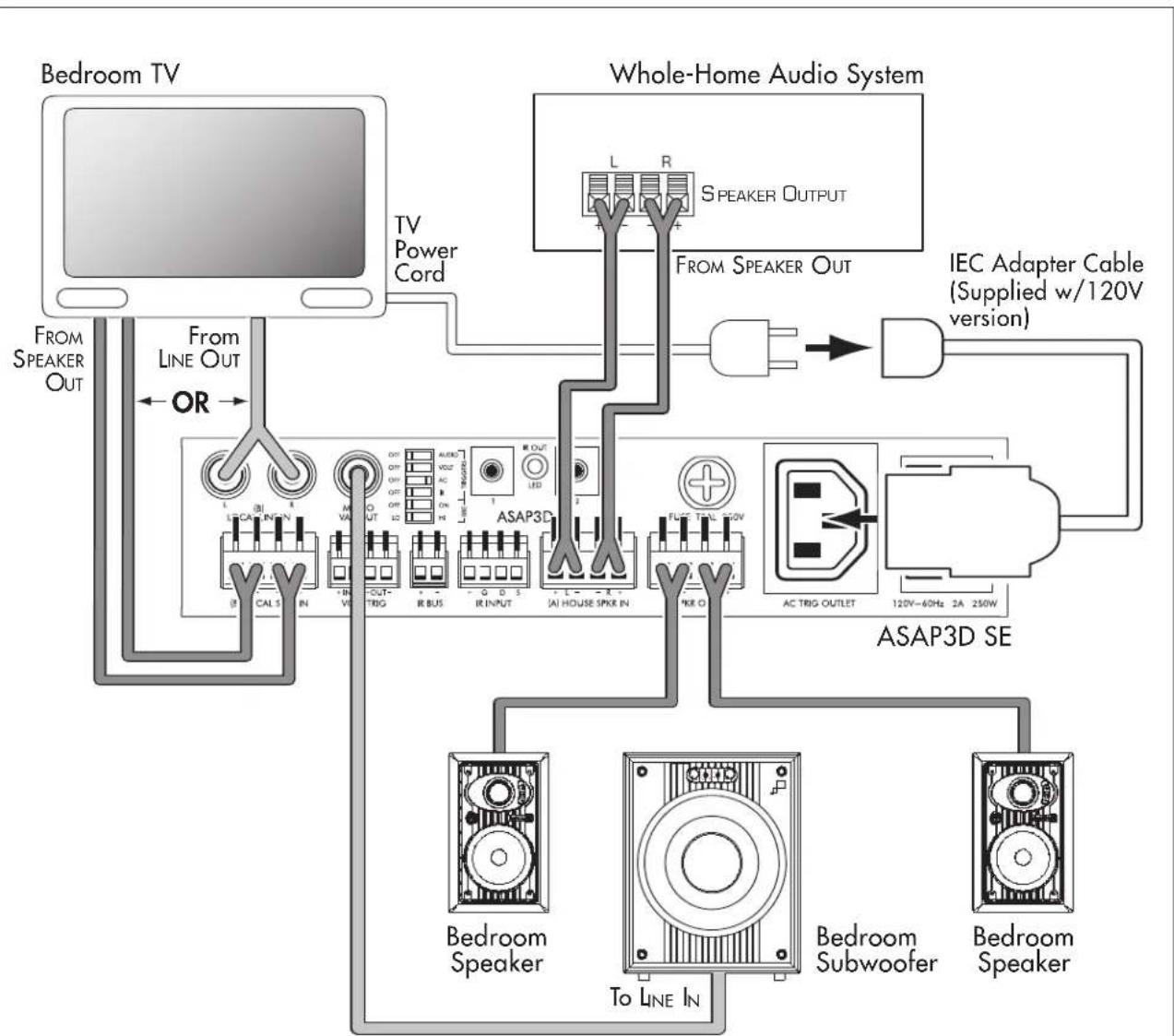
ASAP3D SE System with AC Triggering
- When the TV is turned ON its audio signal overrides the whole-home audio program.
- The local zone (TV) audio signal volume is controlled by the TV remote control.
The illustration below shows the typical system connections when triggering the ASAP3D SE via AC. The LOCAL LINE IN and LOCAL SPEAKER IN connections are both shown for illustrative purposes. Although they both can be used simultaneously, normally only one would be used.
flowchart
graph TD
    A["Bedroom TV"] --> B["TV Power Cord"]
    B --> C["Whole-Home Audio System"]
    C --> D["IEC Adapter Cable (Supplied w/120V version)"]
    D --> E["ASAP3D SE"]
    E --> F["Bedroom Subwoofer"]
    E --> G["Bedroom Speaker"]
    E --> H["To LINE IN"]
    C --> I["ASAP3D"]
    I --> J["ACTRIG OUTLET 120V~60Hz 2A 250W"]
    C --> K["L R SPEAKER OUTPUT"]
    C --> L["R OUT"]
    C --> M["L"]
    C --> N["L"]
    C --> O["L"]
    C --> P["L"]
    C --> Q["L"]
    C --> R["L"]
    C --> S["L"]
    C --> T["L"]
    C --> U["L"]
    C --> V["L"]
    C --> W["L"]
    C --> X["L"]
    C --> Y["L"]
    C --> Z["L"]
    C --> AA["L"]
    C --> AB["L"]
    C --> AC["L"]
    C --> AD["L"]
    C --> AE["L"]
    C --> AF["L"]
    C --> AG["L"]
    C --> AH["L"]
    C --> AI["L"]
    C --> AJ["L"]
    C --> AK["L"]
    C --> AL["L"]
    C --> AM["L"]
    C --> AN["L"]
    C --> AO["L"]
    C --> AP["L"]
    C --> AQ["L"]
    C --> AR["L"]
Sonamp® ASAP3D SE Application Notes

natural_image
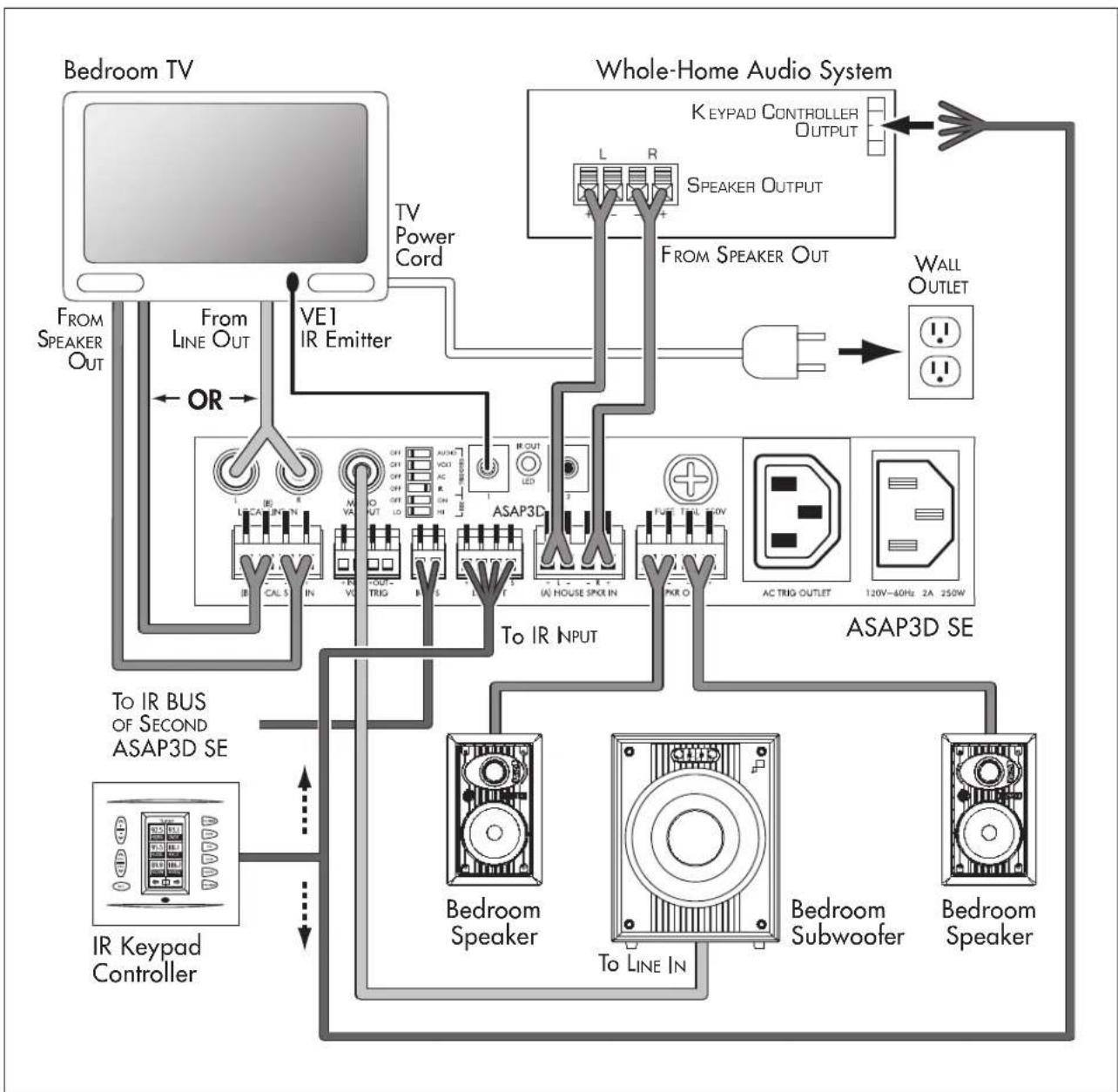
Abstract geometric composition of gray squares arranged in a staggered pattern (no text or symbols)ASAP3D SE System with IR Triggering
- The ASAP3D SE is triggered to switch between the house and local source by a command from the whole-home system control keypad.
- The local zone audio signal volume is controlled by the whole-home system keypad.
The Illustration below shows the typical system connections when triggering the ASAP3D SE via IR from a keypad controller or other IR control device. If multiple ASAP3D SEs are being used their IR BUS connections can be linked, allowing each of their IR control devices to send signals to a single set of IR emitters on a set of source components being shared by all the systems.
flowchart
graph TD
    A["Bedroom TV"] --> B["TV Power Cord"]
    B --> C["Whole-Home Audio System"]
    C --> D["ASAP3D SE"]
    D --> E["Bedroom Subwoofer"]
    D --> F["Bedroom Speaker"]
    D --> G["To IR BUS OF SECOND ASAP3D SE"]
    D --> H["IR Keypad Controller"]
    C --> I["ASAP3D"]
    I --> J["AUXO"]
    I --> K["FUS"]
    I --> L["AC TRIG OUTLET"]
    I --> M["120V-60Hz 2A 250W"]
    C --> N["FROM SPEAKER OUT"]
    C --> O["FROM LINE OUT"]
    C --> P["From SPEAKER OUT"]
    C --> Q["TO IR INPUT"]
    C --> R["TO LINE IN"]
    C --> S["TO IR OUT"]
    style A fill:#f9f,stroke:#333
    style C fill:#ccf,stroke:#333
    style D fill:#cfc,stroke:#333
    style E fill:#fcc,stroke:#333
    style F fill:#fcc,stroke:#333
    style G fill:#fcc,stroke:#333
    style H fill:#fcc,stroke:#333
    style I fill:#cff,stroke:#333
    style J fill:#ffc,stroke:#333
    style K fill:#ffc,stroke:#333
    style L fill:#ffc,stroke:#333
    style M fill:#ffc,stroke:#333
    style N fill:#ffc,stroke:#333
    style O fill:#ffc,stroke:#333
    style P fill:#ffc,stroke:#333
    style Q fill:#ffc,stroke:#333
    style R fill:#ffc,stroke:#333
    style S fill:#ffc,stroke:#333
Sonamp® ASAP3D SE Application Notes

natural_image
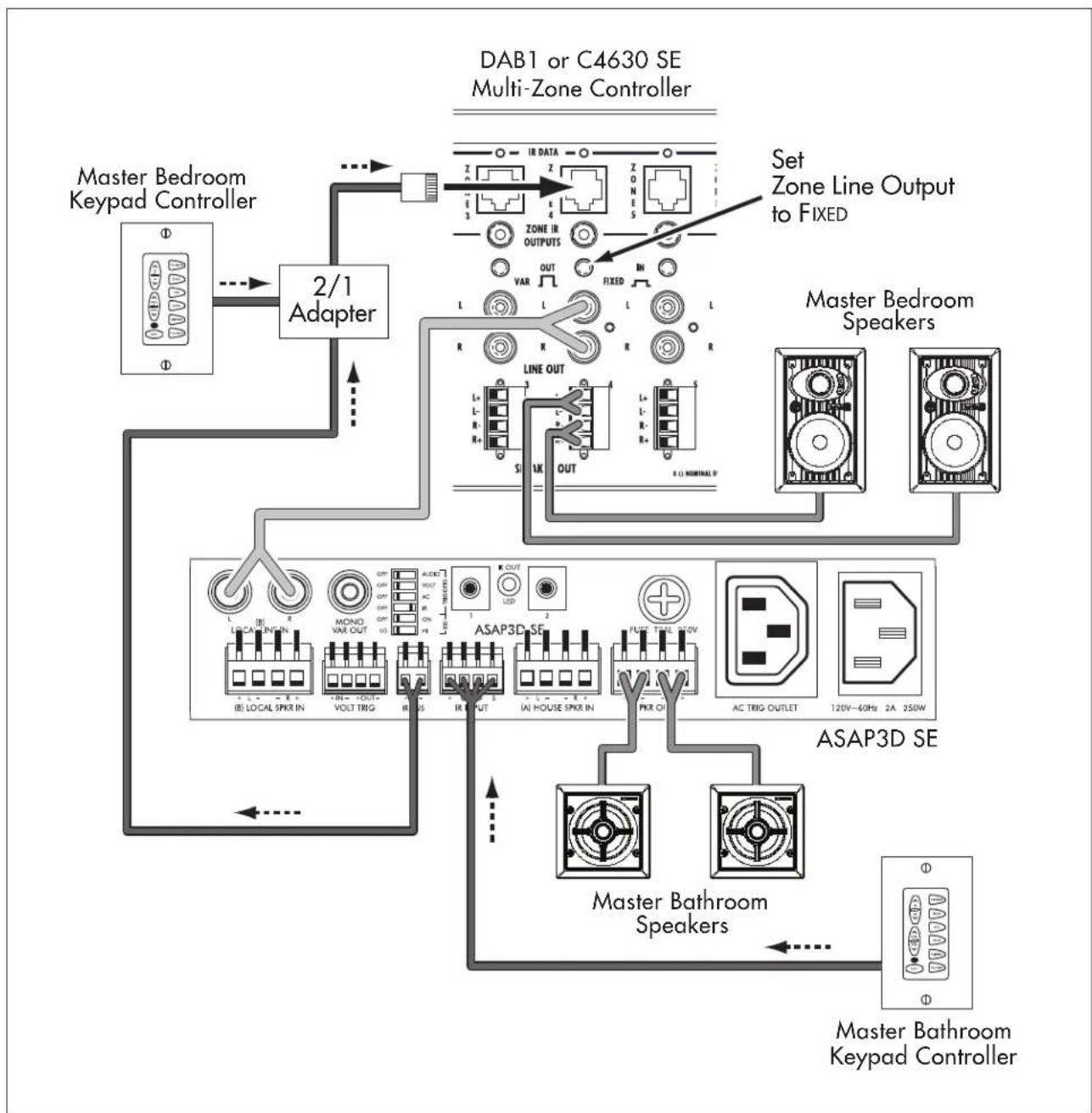
Abstract geometric composition of gray squares arranged diagonally (no text or symbols)ASAP3D SE System with Individual Zone IR Controller
- Adds an audio zone to a whole-home system.
- The local zone audio signal volume is controlled by the local zone keypad.
The Illustration below shows the typical system connections when using the ASAP3D SE as a sub-zone amplifier, being fed by the audio signal from one zone of a multi-zone controller.
flowchart
graph TD
    A["Master Bedroom Keypad Controller"] --> B["2/1 Adapter"]
    B --> C["DAB1 or C4630 SE Multi-Zone Controller"]
    C --> D["Set Zone Line Output to FIXED"]
    D --> E["Master Bedroom Speakers"]
    E --> F["ASAP3D SE"]
    F --> G["Master Bathroom Speakers"]
    G --> H["Master Bathroom Keypad Controller"]
    C --> I["Line OUT"]
    I --> J["ASAP3D SE"]
    J --> K["AC TRIG OUTLET"]
    K --> L["120V~60Hz 2A 250W"]
    style A fill:#f9f,stroke:#333
    style B fill:#ccf,stroke:#333
    style C fill:#cfc,stroke:#333
    style D fill:#fcc,stroke:#333
    style E fill:#cff,stroke:#333
    style F fill:#ffc,stroke:#333
    style G fill:#cfc,stroke:#333
    style H fill:#fcc,stroke:#333
Sonamp® ASAP3D SE Application Notes
Notes:
natural_image
Abstract geometric composition of gray squares arranged diagonally (no text or symbols)
natural_image
Abstract geometric pattern of gray squares arranged diagonally (no text or symbols)SONANCE®
©2008 Sonance. All rights reserved. Sonance, Sonamp and OptiLinQ are registered trademarks of Dana Innovations.
"BBE" and its designs are the registered trademarks of BBE Sound, Inc.
ICEpower is a registered trademark of Bang & Olufsen ICEpower.
Due to continuous product improvement, all features and specifications are subject to change without notice.
For the latest Sonance product specification information visit our website: www.sonance.com
SONANCE • 212 Avenida Fabricante • San Clemente, CA 92672-7531 USA
(800) 582-7777 or (949) 492-7777 • FAX: (949) 361-5151 • Technical Support: (800) 582-0772
www.sonance.com
- Sonamp® ASAP3D SE Application Notes
- Sonamp® ASAP3D SE Stereo Power Amplifier Key Features
- ASAP3D SE Features/Benefits
- Feature: Automatic House/Local Source Switching
- Benefit:
- Typical Application:
- Feature: Flexible Automatic Triggering
- Feature: IR Control
- Feature: ICEpower Digital Amplification
- Feature: BBE Sound Enhancement
- Installation Examples
- ASAP3D SE System with AC Triggering
- ASAP3D SE System with IR Triggering
- ASAP3D SE System with Individual Zone IR Controller
- SONANCE®
Brand : SONANCE
Model : Sonamp ASAP3D S
Category : Receiver