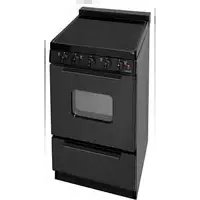
EAS2X0BP - Cooker Premier - Free user manual and instructions
Find the device manual for free EAS2X0BP Premier in PDF.


| Product Type | Freestanding Cooker |
| Brand | Premier |
| Model | EAS2X0BP |
| Width | 60 cm |
| Height | 85 cm |
| Depth | 60 cm |
| Weight | 48 kg |
| Power Supply | 230 V / 50 Hz |
| Energy Rating | A+ |
| Oven Type | Electric Fan Oven |
| Oven Capacity | 65 Liters |
| Hob Type | Ceramic Hob |
| Number of Cooking Zones | 4 |
| Grill Function | Yes |
| Defrost Function | Yes |
| Cleaning Method | Easy-clean Enamel Interior |
| Safety Features | Child Lock, Auto Shut-off |
| Spare Parts Availability | Available through Authorized Service Centers |
| Warranty | 2 Years |
Frequently Asked Questions - EAS2X0BP Premier
User questions about EAS2X0BP Premier
0 question about this device. Answer the ones you know or ask your own.
Ask a new question about this device
Download the instructions for your Cooker in PDF format for free! Find your manual EAS2X0BP - Premier and take your electronic device back in hand. On this page are published all the documents necessary for the use of your device. EAS2X0BP by Premier.
USER MANUAL EAS2X0BP Premier
- Smooth Glass Top Surface
Two 8 Inch Element (2,000w)
Two 6 Inch Elements (1,200w)
ifetime Warranty On Top Burner Elements
.5 Inch Porcelain Backguard
DA Compliant
Hot Surface" Indicator Light
urface Power Light
nterior Oven Light
wo Heavy-Duty Oven Racks With Four Adjustable
ositions
losed Door Broiling
ull Width Storage Drawer
20" Electric Smooth Top Range
Models:
EAS2X0OP - White
EAS2X0BP - Black
EAS7X0BP - Stainless
- 20.125" W, 37.5" H, 25.5" D (including handle)
• Shipping Weight 125 Pounds
- Amps: 36.67
- Leg Levelers
- Anti-Tip Bracket
• Crafted With Pride and MADE IN AMERICA

Brand : Premier
Model : EAS2X0BP
Category : Cooker