
Aqara Smart Curtain Controller - Smart Curtain Controller Xiaomi - Free user manual and instructions
Find the device manual for free Aqara Smart Curtain Controller Xiaomi in PDF.


| Product Type | Smart Curtain Controller |
| Brand | Xiaomi (Aqara) |
| Model | ZNCLDJ11LM |
| Dimensions | 70 x 50 x 267 mm |
| Power Input | 100-240V AC, 50/60 Hz |
| Wireless Interface | ZigBee |
| Lifting Capacity | Up to 50 kg |
| Operating Temperature | -20°C to +55°C |
| Operating Humidity | 10% – 90% RH (non-condensing) |
| Motor Type | Super-quiet motor |
| Control Method | Mi Home app, manual pull, remote switch (optional) |
| Main Functions | Remote open/close, scheduled opening/closing, obstacle detection stop, synchronization with gateway and other smart devices |
| Compatibility | Requires a ZigBee gateway (e.g., Aqara Hub), works with Mi Home ecosystem |
| Installation | Professional installation recommended, video instructions available via QR code |
| Indicator Status | Bluetooth indicator shows power on, network connection, and network status |
| Security Features | Stop function upon resistance, overload protection |
| Material | Aluminum alloy, hard plastic, metal |
| Standards Compliance | Q/QLML006-2017, CMIIT ID: 2016DP0776 |
| Package Contents | Curtain controller, user manual, warranty card |
Frequently Asked Questions - Aqara Smart Curtain Controller Xiaomi
User questions about Aqara Smart Curtain Controller Xiaomi
0 question about this device. Answer the ones you know or ask your own.
Ask a new question about this device
Download the instructions for your Smart Curtain Controller in PDF format for free! Find your manual Aqara Smart Curtain Controller - Xiaomi and take your electronic device back in hand. On this page are published all the documents necessary for the use of your device. Aqara Smart Curtain Controller by Xiaomi.
USER MANUAL Aqara Smart Curtain Controller Xiaomi
User manual and warranty card
Overview
Smart cornice Aqara Intelligent Curtain (ZigBee version for opening and closing curtains), has a super-quiet engine, running through the ZigBee wireless interface, also it has a stop function if there is resistance when the curtain moves, manual opening/closing. In conjunction with equipment having a gateway function, (hereinafter referred to as the "gateway"), you can remotely control, set a time of the opening/closure, synchronize the cornice with the various "smart" devices of the Smart House ecosystem.
* This product and its accessories must be used within the premises, it is recommended to commission the installation of the cornice to a professional contractor. Installation should be carried out only with the main power switch turned off, after installation is completed, turn on the main switch and synchronize the cornice with the gateway through the Mi Home application (see "Installation Instructions" and "Add a Device").
Button

natural_image
Technical line drawing of a rectangular electronic device with internal components and a side-view top view (no text or symbols)Indicator
Installation
Scan the QR code below to view the video instructions for installing the rail guide and the cornice.

Quick settings
This product is compatible with the smart platform Mi Home, it can be controlled via the mobile application Mi Home, supports MIUI system, it can be synchronized with other "smart" Mi Home devices.
1. Download the application
Enter "Mi Home" into the search box of the App Store / Play Market or scan the QR code below to download and install Mi Home application.

2. Adding the device
Open "My devices" page, select the gateway, with which the synchronization will occur, on the "Hardware" page click "Add device", select Aqara Intelligent Curtain (ZigBee version for opening and closing curtains), continue the actions according to the prompts in the application, until you hear a voice notification from the gateway, that the device is successfully connected.
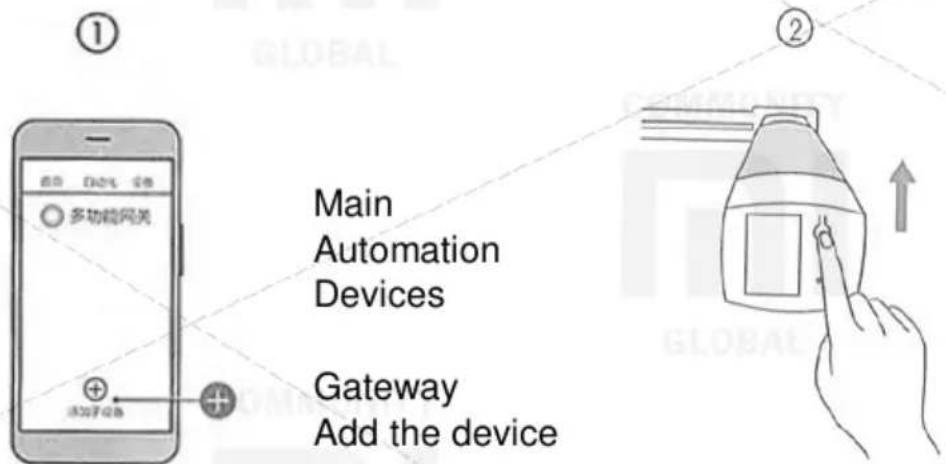
Main
Automation
Devices
Gateway
Add the device
Press "Add the device"
Press and hold the reset button for 5 seconds until the Bluetooth indicator begins to flicker.
3. Buy more
In order to purchase more "smart" devices and other quality items, download the Mi Home application and go to the "Shop" section, or scan the QR code below to view the store website.

Main parameters
| Model: | ZNCLDJ11LM |
| Dimensions: | 70 × 50 × 267 mm |
| Input: | 100-240B ~ , 50/60 Hz |
| Standard: | Q/QLML006-2017 |
| CMIIT ID: | 2016DP0776 |
| Work temperature: | -20°C-+55°C |
| Work humidity: | Relative humidity 10-90%, w/o condency |
| Interface: | ZigBee |
| Lifting capacity: | to 50 kg |
Before use, carefully read the user manual
Hotline support:
Manufacturer:
Address:
400-990-7930
Shenzhen Lumi Lianchuang
Technology Co., LTD
Shenzhen City, Nanshan District, Taoyuan Subdistrict, Liuxian
Avenue, 1 Tangling Road, Jinqi
Zhigu Building, Floor 8
Explanation of the indicator
| Indicator status | Explanation |
| The Bluetooth indicator blinks once | Power on |
| The Bluetooth indicator lights continuously | Successful network connection, cornice works |
| Bluetooth indicator blinks quickly | Connection to network |
| Bluetooth indicator blinks slowly | No network connection (or settings reset to factory default) |
Tips for syncing with other devices
You can synchronize the cornice with even more "smart" devices of the "smart house" ecosystem.
- Wireless cornice control with remote switch

natural_image
Simple line drawing of a two-panel cabinet or shelf (no text or symbols)Remote switch
(2 buttons, attached to the surface on a double-sided adhesive tape)


natural_image
Line drawing of a rectangular electronic device with a flat top and side panel (no text or symbols)Aqara Intelligent Curtain
(ZigBee version for opening and closing curtains)
- Automatic opening of curtains upon return home; automatic closing of curtains after leaving the house;

natural_image
Two simple rounded rectangles, one with a dot and the other with a dashed line (no text or symbols)Sensor for
opening/closing
windows/doors


natural_image
Simple line drawing of a bracket with a circular mark on the side (no text or symbols)Motion Sensor


natural_image
Simple line drawing of a 3D rectangular prism (no text or symbols)Aqara Intelligent Curtain
Name and content of harmful substances in the product
| Name of component | Harmful substances | |||||
| (Pb) | (Hg) | (Cd) | (Cr(VI)) | (PBB) | (PBDE) | |
| Aluminium alloy body | O | O | O | O | O | O |
| Hard plastic | O | O | O | O | O | O |
| Metal | O | O | O | O | O | O |
| Resistor | O | O | O | O | O | |
| Quarz generator | X | O | O | O | O | O |
| Diode | X | O | O | O | O | O |
| This table is created in accordance with the provisions of the standard SJ / T 11364.O: the content of this harmful substance in all the homogeneous materials of this component is within the requirements of the standard GB / T 26572.X: the content of this harmful substance in at least one of the homogeneous materials of this component exceeds the limits of the requirements of the standard GB / T 26572. | ||||||

Brand : Xiaomi
Model : Aqara Smart Curtain Controller
Category : Smart Curtain Controller