Bolt - Wristwatch Daniel Steiger - Free user manual and instructions
Find the device manual for free Bolt Daniel Steiger in PDF.


| Product Type | Wristwatch |
| Brand | Daniel Steiger |
| Model | Bolt |
| Movement | Quartz |
| Case Material | Stainless steel |
| Case Diameter | 42 mm |
| Water Resistance | 10 ATM (100 meters) |
| Crystal | Mineral glass |
| Display | Analog |
| Bracelet Material | Stainless steel |
| Weight | 180 g |
| Power Source | Battery (SR626SW or equivalent) |
| Functions | Hours, minutes, seconds, date |
| Warranty | 2 years |
| Care Instructions | Clean with a soft, dry cloth. Avoid harsh chemicals. |
| Repairability | Battery replacement by a professional. Spare parts available. |
Frequently Asked Questions - Bolt Daniel Steiger
User questions about Bolt Daniel Steiger
0 question about this device. Answer the ones you know or ask your own.
Ask a new question about this device
Download the instructions for your Wristwatch in PDF format for free! Find your manual Bolt - Daniel Steiger and take your electronic device back in hand. On this page are published all the documents necessary for the use of your device. Bolt by Daniel Steiger.
USER MANUAL Bolt Daniel Steiger
5 YEAR WARRANTY This is a genuine item from the Daniel Steiger range.
For all queries call our customer services team toll free -1 888 768 4468
Bolt Watch
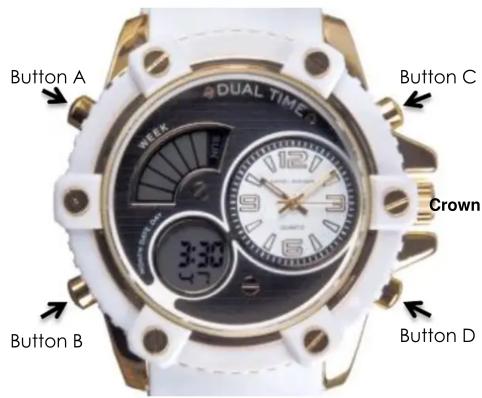
How to set the digital time, date, & day:
First of all, make sure that none of the digits on the face are flashing on/off. Push button B 3 times. You will see the digital seconds, in the bottom dial, flashing on/off. If you wish to reset the seconds to zero, press button C once. Next, push Button D once. You will see the minute digits flashing. To change the minutes, push button C. Once the minutes are correct, push button D once. You will see the hour digit(s) flashing. To change the hour, use button C. You can have the hour in AM/PM format, or 24 hour format. A letter A, P, or H, in the bottom dial, will tell you which format is active. Once set, push button D once again, & you will see the date digit(s) flashing in the bottom dial. Change this with button C. Next, push button D once again to move to the month digit(s), & again change them with button C. Lastly, push button D once. You will see the day dial at the top left, flashing on/off. Use button C to change the day to the correct one. Once everything is set successfully, push button B once to exit the setting mode, & return to the normal time display.
How to operate the chronograph/set the alarm/hourly chime:
From the normal time display, push button B once. Push button C to start, & stop, the chronograph/stopwatch. Once stopped, push button D to reset the stopwatch to zero.
To set the alarm, push button B twice. You will see the alarm hour flashing in the bottom dial. Set this with button C. Push button D once, again, to select alarm minutes, & change these with button C. Push button B once to return to the normal time display.
To turn the alarm on/off, whilst in normal time display, hold down button D, and whilst holding it down, push button C once. A small AL at the top of the bottom dial is displayed when the alarm is on, and disappears when it is off.
To turn the hourly chime on/off, whilst in normal time display, hold down button D, and whilst holding it down, push button B once. When the hourly chime is on, all of the days of the week are illuminated. When it is off, the days of the week are empty.
Warranty:
This warranty service run by: Timepieces International Inc, 12800 NW South River Drive, Medley, FL, 33178, with the authorization of Daniel Steiger. This warranty covers the watch movement against manufacturer's defects for 5 years from date of purchase. Within the period your watch will be repaired free of charge, except for a handling and transportation fee (\$29.95). This fee must be enclosed when returning your watch for service. We cannot accept responsibility for damage or loss caused in transit.
Important: Not covered by warranty
1.) Case, glass and band
2.) Damage caused through accidents, misuse, neglect, or inexpert repairs
3.) Any discoloration, or wear
4.) Any loss or damage whilst the watch is not in our possession, including transit by any means
5.) Any consequential loss whatsoever and how so ever arising, so be accepted by us
6.) Batteries
Brand : Daniel Steiger
Model : Bolt
Category : Wristwatch