JKI9420 - Refrigerator JUNO - Free user manual and instructions
Find the device manual for free JKI9420 JUNO in PDF.


| Product Type | Fridge-freezer combination |
| Climate Class | SN, N, ST, T (10-43 °C ambient) |
| Power Supply | 220-240 V, 50 Hz, fuse min 10 A |
| Refrigerant | R600a (isobutane), flammable |
| Temperature Control | Coin-operated knob, settings 1-4 (0 = off) |
| Superfrost Function | Yes, with yellow indicator light |
| Freezing Capacity | Up to 2 kg per 24 hours |
| Defrost System | Fridge: automatic; Freezer: manual |
| Light Bulb | 220-240 V, max 25 W, E14 base |
| Humidity Control | Adjustable air grille over vegetable drawers |
| Storage Shelves | Adjustable glass shelves, including vario shelf |
| Door Storage | Variable inner door compartments, bottle/can shelf |
| Ice Cube Tray | Included |
| Installation Clearances | Electric cooker: 3 cm; Oil/coal: 30 cm; Side by side: 5 cm |
| Ventilation Requirement | Minimum 200 cm² cross-section for built-in |
| Child Safety | Coin-operated temperature knob; warnings against locking in |
| Energy Saving Tips | Provided in manual (e.g., avoid warm foods, good ventilation) |
| Noise Levels | Clicks, humming, bubbling (normal operation) |
| Rating Plate Location | Inside left wall of appliance |
Frequently Asked Questions - JKI9420 JUNO
User questions about JKI9420 JUNO
0 question about this device. Answer the ones you know or ask your own.
Ask a new question about this device
Download the instructions for your Refrigerator in PDF format for free! Find your manual JKI9420 - JUNO and take your electronic device back in hand. On this page are published all the documents necessary for the use of your device. JKI9420 by JUNO.
USER MANUAL JKI9420 JUNO
Operating Instructions
Dear customer,
Before placing your new refrigerator into operation please read these operating instructions carefully.
They contain important information for safe use, for installation and for care of the appliance.
Please keep these operating instructions for future reference. Pass them on to possible new owners of the appliance.
These operating instructions are for use with several technically comparable models with varying accessories. Please observe the notes which apply to your model.

Notes which are important for your safety or for the proper functioning of the appliance are stressed with a warning triangle and/or with signal words (Warning!, Caution!, Attention!). Please observe the following carefully.
-
Numbered instructions guide you step by step in the operation of the appliance.
-
...

Supplementary information regarding operation and practical applications of the appliance appear after this symbol.

Tips and notes concerning economical and environmentally sound use of the appliance are marked with the cloverleaf.
Explanations of the technical terminology used in the operating instructions can be found at the end in the section "Technical Terminology".
The operating instructions contain instructions for the correction of possible malfunctions by the user in the section "What to do, if ...". If these instructions should not be sufficient, please contact your local Service Force Centre.
Contents
Safety 22
Disposal 23
AppliancePackagingInformation ....
DisposalofoldAppliances....23
Remove Transport Safeguard 23
Installation 24
InstallationLocation....24
YourRefrigeratorneedsVentilation....
Installation 24
Electrical Connection....25
Appliance Description 25
View of Appliance 25
Prior to Initial Start-Up 25
Starting up - Setting the Temperature 26
Switching off the Appliance 27
Interior Accessories 27
Storage Shelves 27
VariableInnerDoor 27
Bottle/CanShelf....28
VariableDoorStorageCompartment ....
Humidity Control 28
Correct Storage 29
Freezing and Storing Frozen Food 30
Preparation of Ice Cubes 30
Defrosting 31
TheFridgedefrostsautomatically ....
DefrostingtheFreezerCompartment ....
Cleaning and Maintenance 32
Energy Saving Tips 32
What to do if ... 33
CorrectingMalfunctions....3
Changingthelightbulb 34
Noises during Operation 34
Regulations, Standards, Guidelines 34
Technical Terminology 35
Customer Service 35

Safety
The safety aspects of our refrigerators comply with accepted technical standards and the German Appliance Safety Law. Nevertheless, we consider it our obligation to make you aware of the following safety information:
Intended Use
- The refrigerator is intended for use in the home. It is suitable for the cooling, freezing and storing of frozen food, as well as for making ice. If the appliance is used for purposes other than those intended or used incorrectly, no liability can be accepted by the manufacturer for any damage that may be caused.
- Alterations or changes to the refrigerator are not permitted for reasons of safety.
- If you use the refrigerator in a commercial application or for purposes other than the cooling, freezing or frozen storage of foods, please observe all valid legal regulations for your application.
Prior to initial Start-up
- Check the refrigerator for transport damage. Under no circumstance should a damaged appliance be plugged in! In the event of damage, please contact the vendor.
Refrigerant
The refrigerant isobutane (R600a) is contained within the refrigerant circuit of the appliance, a natural gas with a high level of environmental compatibility, which is nevertheless flammable.
- Warning - During transportation and installation of the appliance, be certain that none of the components of the refrigerant circuit become damaged.
• If the refrigerant circuit should become damaged:
– avoid open flames and sources of ignition;
– thoroughly ventilate the room in which the appliance is situated.
Safety of Children
- Packaging (e.g. wraps, polystyrene) can be dangerous for children. There is a risk of suffocation! Keep packaging material away from children!
- Please make old appliances unusable prior to disposal. Pull out the mains plug, cut off the mains cable, break or remove spring or bolt catches, if fitted. By doing this you ensure that children cannot lock themselves in the fridge when playing (there is risk of suffocation!) or get themselves into other dangerous situations.
- Often children cannot recognise the hazards present in household appliances. It is therefore important that you ensure adequate supervision and never let children play with the appliance!
Daily Operation
- Containers with flammable gases or liquids can leak at low temperatures. There is a risk of an explosion! Do not store any containers with flammable materials such as, for example, spray cans, fire extinguisher refill cartridges etc in the refrigerator.
- Bottles and cans must not be placed in the freezer compartment. They can burst when the contents freeze, high carbonate content drinks can even explode! Never store lemonade, juices, beer, wine, sparkling wine etc. in the freezer compartment. Exception: high alcohol content spirits can be stored in the freezer compartment.
- Do not put ice creams or ice cubes in the mouth immediately after removal from the freezer compartment. Very cold ice can freeze to the lips or tongue and cause injury.
- Do not touch frozen food with wet hands. Your hands could freeze to the food.
- Warning - Do not operate any electrical appliances in the refrigerator (e.g. electric ice cream makers, mixers etc.).
- Warning - Do not close the ventilation aperture in the appliance casing or in the structure of fitted units.
- Warning - Do not use any mechanical devices or other artificial means to speed up defrosting unless they are recommended by the manufacturer.
- Before cleaning the appliance, always switch off the appliance and unplug it, or pull the house fuse or switch off the circuit breaker.
- When unplugging always pull the plug from the mains socket, do not pull on the cable.
In Case of Malfunction
- If the a malfunction occurs on the appliance, please look first in the "What to do if ..." section of these instructions. If the information given there does not help, please do not perform any further repairs yourself.
- Refrigerators may only be repaired by qualified service engineers. Improper repairs can give rise to significant hazards. If your appliance needs repairing, please contact your specialist dealer or our Customer Service.
Disposal
Appliance Packaging Information
All materials are environmentally sound! They can be dumped or burned at an incinerating plant without danger!
About the materials: The plastics can be recycled and are identified as follows:
PE< for polyethylene, e.g. the outer covering and the bags in the interior.
Disposal of old Appliances
For environmental reasons, refrigeration appliances must be disposed of properly. This applies to your old appliance, and - at the end of its service life - for your new appliance as well.

Warning! Before disposing of old appliances make them inoperable. Remove plug from mains, sever the power cable, remove or destroy any snap or latch closures. This eliminates the danger that playing children lock themselves into the appliance (danger of suffocation!) or place themselves into other life-endangering situations.
PS< for polystyrene foam, e.g. the pads, which are all free of chlorofluorocarbon.
The carton parts are made from recycled paper and should be disposed of at a waste-paper recycling collection location.
Disposal:
- The appliance may not be disposed of with domestic waste or bulky refuse.
- The refrigerant circuit, especially the heat exchanger at the back of the appliance, may not be damaged.
• Information concerning collection schedules or locations can be obtained from the local disposal authorities or town hall.
Remove Transport Safeguard
The appliance and the interior fittings are protected for transport.
- Remove all adhesive tape and packing pieces from the interior of the appliance.

You can remove any remnants of adhesive using white spirit.
Installation
Installation Location
The appliance should be set up in a well ventilated, dry room.
Energy use is affected by the ambient temperature.
The appliance should therefore
– not be exposed to direct sunlight;
- not be installed next to radiators, cookers or other sources of heat;
- only be installed at a location whose ambient temperature corresponds to the climate classification, for which the appliance is designed.
The climate classification can be found on the rating plate, which is located at the left on the inside of the appliance.
The following table shows which ambient temperature is correct for each climate classification:
If installation next to a source of heat is unavoidable, the following minimum clearances must be maintained at the sides of the appliance:
– for electric cookers 3 cm;
– for oil and coal fired ranges 30 cm.
If these clearances cannot be maintained a heat insulating pad is required between the cooker and the refrigeration appliance.
If the refrigeration appliance is installed next to another refrigerator or freezer a clearance of 5 cm at the sides is required, in order to prevent the formation of condensation on the outside of the appliance.
| Climate classification | for an ambient temperature of |
| SN | +10 to +32 °C |
| N | +16 to +32 °C |
| ST | +18 to +38 °C |
| T | +18 to +43 °C |
Your Refrigerator needs Ventilation
The integrated door of the furniture cabinet largely seals the installation recess. i-appliances must therefore be provided with ventilation by having an opening in the furniture plinth. The warmed air must be able to be exhausted upwards through the air shaft on the furniture back. The ventilation cross-sections should be at least 200 cm ^2 .
Important note! In order not to impair the function of the appliance, never cover or obstruct the ventilation openings.

Installation
See „Installation Instructions“ supplied.
Please check whether, after installing your appliance and especially after rehingeing the door, the door seal seals right round. An untight door seal may lead to heavy frosting and thereby to a higher power consumption (see also „What to do if...“).
Electrical Connection
Before initial start-up, refer to the appliance rating plate to ascertain if supply voltage and current values correspond with those of the mains at the installation location.
e.g.: AC 220 ... 240 V 50 Hz or
220 ... 240 V \~50 Hz
(i.e. 220 to 240 volts alternating current, 50 Hertz) The rating plate is inside the appliance on the left.
A correctly installed, earthed socket is required for the electrical supply. The supply must have a fuse rating of at least 10 Amps.
If the socket is not accessible once the appliance is built in, the electrical installation must include suitable means of isolating the appliance from the mains (e.g. fuse, cut-out, current trip or similar with a minimum contact separation of 3 mm).
Attention: The mains connection cable may only be replaced by a skilled electrician. Please contact your dealer or our customer service department for repairs.
Appliance Description
View of Appliance
(various models)

① Control panel
② Butter and cheese compartment with lid
③ Variable door storage compartment
④ Door storage compartment
⑤ Bottle compartment
⑥ Fruit and vegetable trays
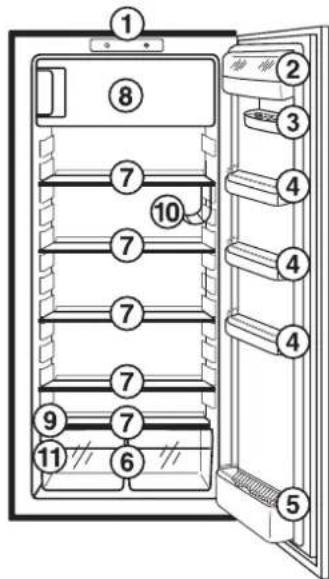
⑦ Shelves
⑧ Freezer compartment (for storage and freezing)
⑨ Humidity control
⑩ Bottle / Can holder
⑪ Rating plate
Prior to Initial Start—Up
- Please clean the appliance interior and all accessories prior to initial start-up (see section: "Cleaning and Maintenance").
Starting up - Setting the Temperature

1 Light switch
2 SUPERFROST-function "on" indicator (yellow) (not on all models)
- SUPERFROST for freezing items quickly in the freezer compartment
3 SUPERFROST button (not on all models)
4 Temperature regulator and ON/OFF switch
The temperature regulator is located at the top of the appliance on the control panel. It is also the ON/OFF switch..
A coin is required to turn the temperature regulator. This makes it more difficult to change the temperature setting accidentally (child safety).
Setting "0" = Refrigeration off
Setting "1" = Warmest interior temperature
Setting "4" = Coldest interior temperature
-
Plug the mains plug into the mains socket.
-
Set the required temperature by turning the temperature regulator. The interior lighting comes on. The compressor starts and then runs automatically.
-
If you want a higher or lower temperature, turn the temperature regulator to a warmer or cooler setting respectively.
Note: When the setting is changed, the compressor does not start immediately if automatic defrosting is currently taking place.

Goods to be refrigerated can be loaded immediately after switching on, because the storage temperature in the refrigerator is quickly reached.
Important! Wait until the freezer compartment has reached a temperature of -18^ , before storing frozen food.

Note: From a food science point of view, +5 °C for the refrigerator compartment and -18 °C for the freezer compartment should be considered cold enough as a storage temperature.
The following effects are of significance in respect of the interior temperature:
- Ambient temperature;
– Quantity and temperature of the food stored;
– Frequency with which the door is opened and how long it is left open - A defect in the appliance.
The temperature regulator setting may therefore need to be adjusted to suit the specific conditions.
Recommendet settings:
Examples:
| Ambient Temperature | Temperature Controller Position |
| Approx. 10 °C | Range up to 1 |
| Approx. 16 °C | Range about 2 |
| Approx. 25 °C | Range about 2 |
| Approx. 32 °C | 2 to 3 |
| Approx. 38 °C | 1 to 2 |
Note: At the setting given under „recommendet settings“ the fridge has an average temperature of approx. +5 °C; the average temperature in the freezer compartment is then approx. -18 °C or colder. These figures apply at ambient temperatures from +10 °C to +38 °C.
At higher ambient temperatures, fresh food is properly frozen with the regulator set to a range about "2", without the fridge becoming too cold.
Important!
High ambient temperatures (e.g. on hot summer days) and a cold setting on the temperature regulator (position "4") can cause the compressor to run continuously.
Reason: when the ambient temperature is high, the compressor must run continuously to maintain the low temperature in the appliance. The fridge will not be able to defrost since automatic defrosting of the fridge is only possible when the compressor is not running (see also "Defrosting" section). The result is the build up of a thick layer of frost on the fridge rear wall.
If this happens, turn the temperature regulator back to a warmer setting (position "3"). At this setting the compressor will be switched on and off as usual and automatic defrosting recommenced.
Switching off the Appliance
- To switch off the appliance, turn the temperature regulator to position "0".
If the appliance is not going to be used for an extended period:
-
Switch off the appliance by turning the temperature regulator to position "0".
-
Remove the mains plug or switch off or turn out the circuit breaker or fuse.
-
Defrost the freezer compartment and clean the appliance thoroughly (see section: "Cleaning and Maintenance").
-
Leave the door open to avoid the build up of odours.
Interior Accessories
Storage Shelves
Your appliance is equipped with glass storage shelves.
- The glass storage shelf above the fruit and vegetable trays must always remain in this position, so that fruits and vegetable remain fresh longer.
The remaining storage shelves can be adjusted to various heights:
-
Pull the storage shelf forward until it can be tipped up or down and removed.
-
To insert at a different height use the same procedure in reverse.
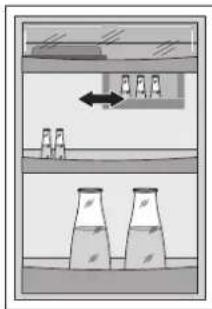
Adjustment for tall goods:
- Remove the front half of the two-part vario glass storage shelf and insert it at a different level. Space is thus gained for storage of tall goods on the underlying storage shelf.

natural_image
Illustration showing a hand placing a tray with an arrow and a bottle on a shelf, no text or symbols present.Variable Inner Door
The door compartments can be pulled up and removed, and inserted at other positions as needed.
Bottle/Can Shelf
Some models are fitted with a bottle/can shelf.
- To insert or move the bottle/can shelf, pull out the corresponding storage shelf.
Ensure that the bottle or cans do not touch the rear wall of the appliance or, when the door is closed, the door shelf.
Always lay bottles in the shelf with the top to the front. Small bottles and cans can be placed crossways in the holder.
Attention! Place only unopened bottles or cans horizontally.

natural_image
Technical line drawing of a mechanical assembly with layered components (no text or symbols)Variable Door Storage Compartment
Your model is equipped with a variable door storage compartment which is fitted under the upper door storage compartment and can be slid sideways.
natural_image
Diagram of a filtration or separation setup with two beakers and a downward arrow, no text or symbols present.Humidity Control
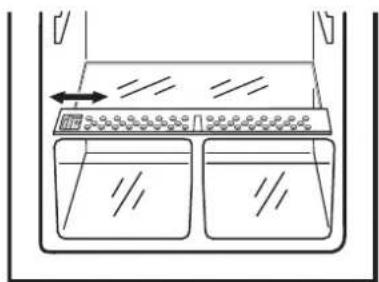
On some models, there is an adjustable air grille in front of the shelf above the fruit and vegetable compartments.
The opening in the ventilation slots can be steplessly adjusted with a slider.
Slider in right position: Ventilation slots opened.
Slider in left position: Ventilation slots closed.
With the ventilation slots open, the stronger air circulation results in a lower air moisture content in the fruit and vegetable compartments.
When the ventilation slots are closed, the natural moisture content of the food in the fruit and vegetable compartments is preserved for longer.
natural_image
Simple line drawing of a container with two side compartments and an upward arrow indicating flow or movement (no text or symbols)Correct Storage
For physical reasons, there are different temperature regions in the fridge. The coldest region is on the lowest storage shelf. Warmer regions are the top storage shelf, the vegetable basket and the storage compartments on the door. The arrangement example shows at which places in the refrigerator suitable temperatures for various types of foods exist.
Tip: Food in the fridge should always be covered or packaged, to prevent drying and tainting of other food.
The following are suited for packaging:
– Polyethylene airtight bags and wraps;
- Plastic containers with lids;
- Special plastic covers with elastic;
- aluminium foil.

Freezing and Storing Frozen Food
The freezer compartment is for freezing and storing of frozen food.
Important!
- The temperature in the freezer compartment must be -18^ or colder before freezing food or storing food already frozen (see chapter "Starting up").
- Please observe indicated freezing capacity on the rating plate. The freezing capacity represents the maximum amount of fresh goods that can be frozen within 24 hours. If you freeze goods on several days, one after the other, freeze amounts equal to 2/3 to 3/4 of the capacity indicated on the rating plate
- Allow warm food to cool down before freezing. The warmth will cause increased ice formation and increase the power consumption.
- Please observe maximum storage times and expiry dates of frozen goods.
- Thawed foods which have not been processed further (cooked into meals) may not under any circumstances be frozen a second time.
- Do not freeze too large quantities at any one time (up to max. 2 kg in 24 hours). You will achieve a better quality if the food is quickly frozen through to the core.
-
Caution! Do not touch frozen food with wet hands. Your hands could freeze to the food.
-
To further lower the temperature of food that is already frozen and make sure it retains its thermal capacity, turn the temperature regulator to setting "4" several hours before freezing fresh items, or press the SUPERFROST button if the model has one. The yellow indicator will light up.
- All foods must be packed air tight prior to freezing, so that they do not dry out or lose their flavour, and so that no flavour contamination of other frozen goods occurs.
- Lay the packaged food on the floor of the freezer compartment. Unfrozen food must not touch items already frozen, otherwise the frozen food could begin to defrost.
- Close the freezer compartment door tightly.
- Depending on the quantity and type of food to be frozen, return the temperature regulator to its normal setting after approx. 6 to 48 hours or switch off the SUPERFROST function. To do that, press the SUPERFROST button again. The yellow indicator will go off.
Tips:
- The following are suited for the packaging of frozen goods:
– freezer bags and polyethylene wraps;
– special cans for frozen goods;
- extra-thick aluminium foil.
- The following are suitable for sealing bags and wrap:
plastic clips, rubber bands or tape.
- Smooth the air out of the bag before sealing; air makes it easier for the frozen food to dry out.
- Make flat packages, because these freeze more quickly.
- Do not fill cans for frozen goods to the brim with liquid or paste—like goods, because liquids expand during freezing.
Preparation of Ice Cubes
- Fill the ice cube tray 3/4 full with cold water, place it in the freezer compartment and leave to freeze.
- To loosen the frozen cubes, either bend the ice cube tray or hold it under running water for a few seconds.
Important! Never try to free an ice tray that is frozen to the freezer compartment using pointed or sharp edged objects. Use a spoon handle or similar.
Defrosting
The Fridge defrosts automatically
The rear wall of the fridge covers with frost when the compressor is running, and defrosts when the compressor is off.
The water from the thawing frost is collected in the drain channel on the rear of the fridge, feed through the drain hole into the collector on the compressor, and then evaporated.
The condensation water drain hole must be cleaned regularly (see the section "Cleaning and Maintenance".
Defrosting the Freezer Compartment
During use and when the freezer compartment door is opened, moisture is deposited in the freezer compartment as frost. Remove this frost from time to time with a soft plastic scraper, e.g. a pastry scraper.
Under no circumstances use hard or pointed objects to remove frost.
The freezer compartment should always be defrosted when the layer of frost has reached a thickness of approx. 4 millimetres; however at least once a year. A good time for defrosting is when the appliance is empty or contains only little food.

Warning!
- Do not use electrical heating appliances or any other mechanical or artificial devices to speed up the defrosting process, with the exception of those recommended in these operating instructions.
- Do not use defrosting sprays, they can be hazardous to your health and/or contain substances that damage plastics.
Caution! Do not touch frozen food with wet hands.
Your hands could freeze to the food.
- A few hours before defrosting, set the temperature controller to 4 or press the SUPERFROST button, if the model has one; in order to create a refrigeration reserve in the frozen food.
- Remove frozen food, wrap it in several layers of newspaper and store it, covered, in a cool place.
- Switch off the appliance and unplug it, or pull the fuse or switch off the circuit breaker.
- Remove the stopper from the melt-water outlet and place a bowl underneath it to catch the melt-water.
Attention! After defrosting, replace the plug in the condensation water drain.

natural_image
Diagram showing a mechanical setup with a piston and a container, no text or symbols presentTip: You can speed up the defrosting process by placing a pan with hot water in the freezer compartment and closing the doors. Remove pieces of ice that have fallen before they completely defrost.
- After defrosting, thoroughly clean the freezer compartment (see "Cleaning and Maintenance" section).
- Put the food inside and put the unit back into operation.
Cleaning and Maintenance
For hygienic reasons the appliance interior, including interior accessories, should be cleaned regularly.

Warning!
- The appliance may not be connected to the mains during cleaning. Danger of electrical shock! Before cleaning switch the appliance off and remove the plug from the mains, or switch off or turn out the circuit breaker or fuse.
- Never clean the appliance with a steam cleaner. Moisture could accumulate in electrical components, danger of electrical shock! Hot vapours can lead to the damage of plastic parts.
- The appliance must be dry before it is placed back into service.
Attention!
- Ethereal oils and organic solvents can attack plastic parts, e.g.
– lemon juice or the juice from orange peals;
- butyric acid;
- cleansers which contain acetic acid. Do not allow such substances to come into contact with appliance parts.
- Do not use any abrasive cleansers.
- Remove frozen food and the food from the refrigerator. Wrap frozen food in several layers of newspaper. Store it in a cool place, well covered.
- Switch the appliance off and remove the plug from the mains, or switch off or turn out the circuit breaker or fuse.
- Defrost the freezer compartment prior to cleaning (see "Defrosting" section).
- Clean the appliance and the interior accessories with a cloth and lukewarm water. Commercially available dish washing detergents may also be used.
- After cleaning wipe with fresh water and rub dry.
- Regularly check the water drain hole on the rear wall of the fridge. Clear a blocked drain hole with the aid of the green strip inserted into the drain hole.

natural_image
Simple line drawing of a mechanical setup with a lever and base, no text or symbols present- After everything is dry place appliance back into service.

Energy Saving Tips
- Do not install the appliance near cookers, radiators or other sources of warmth. High ambient temperatures cause longer, more frequent operation of the compressor.
-
Ensure sufficient air circulation and exhaust at the appliance base and at the back wall of the appliance. Never cover air vent openings.
-
Do not place warm foods into the appliance. Allow warm foods to cool first.
- Only leave door open as long as necessary.
- Do not set temperature any colder than necessary.
- Put frozen food in the fridge to defrost. The cold in the frozen food will then be used to cool the fridge.
What to do if ...
Correcting Malfunctions
A malfunction may be caused by only a minor fault that you can rectify yourself using the following instructions. Do not perform any other work on the appliance if the following information does not provide assistance in your specific case.

Warning! Repairs to refrigerators/freezers may only be performed by qualified service engineers. Improper repairs can give rise to significant hazards for the user. If your appliance needs repairing, please contact your specialist dealer or our Customer Service.
| Malfunction Possible | Cause Remedy | |
| Appliance does not work. | Appliance is not switched on. | Switch on the appliance. |
| Mains plug is not plugged in or is loose. | Insert mains plug. | |
| Fuse has blown or is defective. | Check fuse, replace if necessary. | |
| Socket is defective. | Mains malfunctions are to be corrected by an electrician. | |
| Appliance cools too much. | Temperature is set too cold. | Turn the temperature regulator to a warmer setting temporarily. |
| The food is too warm. | Temperature is not properly adjusted. | Please look in the "Starting Up - Setting the temperature" section. |
| Door was open for an extended period. | Open the door only as long as necessary. | |
| A large quantity of warm food was placed in the appliance within the last 24 hours. | Turn the temperature regulator to a colder setting temporarily. | |
| The appliance is near a heat source. | Please look in the "Installation Location" section. | |
| Interior lighting does not work. | Light bulb is defective. | Please look in the "Changing the Light Bulb" section. |
| Heavy build up of frost, possibly also on the door seal. | Door seal is not air tight (possibly after changing over the hinges). | Carefully warm the leaking sections of the door seal with a hair dryer (not hotter than approx. 50 °C). At the same time shape the warmed door seal by hand such that it sits correctly. |
| The compressor does not start immediately after changing the temperature setting. | This is normal, no error has occurred. | The compressor starts after a period of time. |
| Water on the floor or on storage shelves. | Water drain hole is blocked. | See the "Cleaning and Maintenance" section. |
Changing the light bulb

Warning! There is a risk of electric shocks! Before changing the light bulb, switch off the appliance and unplug it, or pull the fuse or the circuit breaker.
Light bulb data: 220-240 V, max. 25 W, fitting: E 14
- To switch off the appliance, turn the temperature regulator to position "0".
- Unplug the mains plug.
- To change the light bulb, undo the cross head screw, press on the top of the light bulb cover as shown in the figure (arrow) and remove the light bulb cover from the back.
- Change the defective light bulb.
- Refit the light bulb cover and the cross head screw.

natural_image
Diagram of a device with arrows indicating direction, no text or symbols presentNoises during Operation
The following noises are characteristic of refrigeration appliances:
- Clicks
Whenever the compressor switches on or off, a click can be heard.
- Humming
As soon as the compressor is in operation, you can hear it humming.
• Bubbling/Splashing
When refrigerant flows into thin tubes, you can hear bubbling or splashing noises. Even after the compressor has been switched off, this noise can be heard for a short time.
Regulations, Standards, Guidelines
This appliance was designed for household use and was manufactured in accordance with the appropriate standards. The necessary measures in accordance with appliance safety legislation regulations (GSG), accident prevention regulations for refrigeration appliances (VBG 20) and the regulations of the German Society of Electrical Engineers (VDE) were observed in the manufacture of this appliance.
The refrigerant circuit has been checked for leaks.
CE This appliance is in accordance with the following EU guidelines:
- 73/23/EWG dated 19 February 1973 - low voltage guidelines.
- 89/336/EWG dated 3 May 1989 (including guideline change notice 92/31/EWG) - EMV guideline
- 94/2/EG dated 21. 01. 1994 - Directive on Energy Labelling
- 96/57 EG dated 3. 9. 1996 - Energy Efficiency Requirements of Household Electric Refrigerators, Freezers and Combinations Thereof.
Technical Terminology
- Refrigerant
Liquids that can be used to a generate a cooling effect are known as refrigerants. They have a relatively low boiling-point, indeed so low, that the warmth from the food stored in the fridge or freezer can cause the refrigerant to boil and vaporise.
- Refrigerant Circuit
Closed circulation system that contains the refrigerant. The refrigerant circuit comprises primarily of an evaporator, a compressor, a condenser and pipe work.
- Evaporator
The refrigerant is evaporated in the evaporator. Similar to all other liquids, refrigerant requires heat to evaporate. This heat is removed from the interior of the appliance, as a result the interior is cooled. The evaporator is therefore located inside the appliance or placed in foam immediately behind the inner wall and thus not visible.
- Compressor
The compressor looks like a small drum. It is driven by a built-in electric motor and is mounted on the base of the appliance at the rear. The task of the compressor is to draw in vaporised refrigerant from the evaporator, to compress it, and to pass it on to the condenser.
- Condenser
The condenser normally has the form of a grid. The refrigerant compressed in the compressor is liquefied in the condenser. During this process, heat is released to the surrounding air at the surface of the condenser. The condenser is mounted on the base of the appliance.
Customer Service
If you cannot find the remedy for a malfunction in these operating instructions, please contact your dealer or our customer service department. Addresses and telephone numbers are listed in the accompanying booklet "Guarantee Conditions/Customer Service Locations".
Selective ordering of replacement parts can save unnecessary travel and costs. For this reason always provide the following appliance information:
- Model Name
•Model Number (PNC) - Serial Number (S-No.)
This information can be found on the rating plate in the interior at the left of the appliance. We recommend that you enter this information here, so that it is handy if needed.
Note: The customer bears the costs of unjustified customer service calls even during the guarantee period.

natural_image
Grid of gray rectangular blocks with no text or symbols- Dear customer,
- Contents
- Safety
- Intended Use
- Prior to initial Start-up
- Refrigerant
- Safety of Children
- Daily Operation
- In Case of Malfunction
- Disposal
- Appliance Packaging Information
- Disposal of old Appliances
- Disposal:
- Remove Transport Safeguard
- Installation
- Installation Location
- Your Refrigerator needs Ventilation
- Electrical Connection
- Appliance Description
- View of Appliance
- Prior to Initial Start—Up
- Starting up - Setting the Temperature
- Recommendet settings:
- Important!
- Switching off the Appliance
- If the appliance is not going to be used for an extended period:
- Interior Accessories
- Storage Shelves
- Variable Inner Door
- Bottle/Can Shelf
- Variable Door Storage Compartment
- Humidity Control
- Correct Storage
- Freezing and Storing Frozen Food
- Tips:
- Preparation of Ice Cubes
- Defrosting
- The Fridge defrosts automatically
- Defrosting the Freezer Compartment
- Warning!
- Cleaning and Maintenance
- Attention!
- Energy Saving Tips
- What to do if ...
- Correcting Malfunctions
- Changing the light bulb
- Noises during Operation
- - Clicks
- - Humming
- • Bubbling/Splashing
- Regulations, Standards, Guidelines
- Technical Terminology
- - Refrigerant
- - Refrigerant Circuit
- - Evaporator
- - Compressor
- - Condenser
- Customer Service
Brand : JUNO
Model : JKI9420
Category : Refrigerator