
RQ-SX58VA - Cassette player PANASONIC - Free user manual and instructions
Find the device manual for free RQ-SX58VA PANASONIC in PDF.


| Product Type | Cassette Player |
| Brand | Panasonic |
| Model | RQ-SX58VA |
| Playback Media | Compact Cassette (Type I, II, IV) |
| Tape Speed | 4.76 cm/s |
| Frequency Response | 40 Hz – 14 kHz |
| Wow and Flutter | 0.15% WRMS |
| Output Power (Headphones) | 10 mW per channel (3.5 mm stereo jack) |
| Power Supply | 3 V DC (2 × AA batteries, 1.5 V each) |
| Battery Life | Approx. 10 hours (alkaline) |
| Dimensions (W × H × D) | 115 × 80 × 30 mm |
| Weight (without batteries) | 220 g |
| Controls | Play, Stop, Rewind, Fast Forward, Pause, Volume Wheel |
| Auto Stop | Yes (mechanical at tape end) |
| Belt Drive Mechanism | Yes (requires periodic replacement) |
| Playback Only | No recording function |
| Materials | Plastic casing with metal accents |
| Included Accessories | Stereo earphones, wrist strap, user manual |
| Maintenance / Cleaning | Clean tape head and pinch roller with isopropyl alcohol and cotton swab |
| Safety Precautions | Keep away from magnetic fields and moisture; remove batteries if not in use |
| Spare Parts / Repairability | Replacement belts, pinch roller, and tape head available; refer to service manual |
| General Information | Portable stereo cassette player designed for personal listening |
Frequently Asked Questions - RQ-SX58VA PANASONIC
User questions about RQ-SX58VA PANASONIC
0 question about this device. Answer the ones you know or ask your own.
Ask a new question about this device
Download the instructions for your Cassette player in PDF format for free! Find your manual RQ-SX58VA - PANASONIC and take your electronic device back in hand. On this page are published all the documents necessary for the use of your device. RQ-SX58VA by PANASONIC.
USER MANUAL RQ-SX58VA PANASONIC
Operating Instructions
Before connecting, operating or adjusting this product, please read these instructions completely. Please keep this manual for future reference.

Supplied Accessories
- Stereo earphones
Specifications
Radio frequency range:
FM: 87.50–108.00 MHz (0.05 MHz steps)
AM: 522–1629 kHz (9 kHz steps)
520–1630 kHz (10 kHz steps)
Power output: 6 mW+6 mW (RMS...max.)
Frequency range
(Normal, High/Metal): 40–18000 Hz (-6 dB)
Tape speed: 4.8 cm/s
Jack:
Output: PHONES: 16 Ω
Power requirement:
Battery: DC 3 V
(Two R6/LR6, AA, UM-3 batteries)
Dimensions (W×H×D)
111.7×80.1×26.7 mm
Mass (without battery): 140 g
Play time:
(When used in hold mode, at 25 °C, on a flat, stable surface)
Panasonic alkaline dry
cell battery: Tape: About 30 hours
Radio: About 45 hou
The play time may be less depending on the operating conditions.
Note
Specifications are subject to change without notice.
Mass and dimensions are approximate.
Matsushita Electric Industrial Co., Ltd.
Web Site: http://www.panasonic.co.jp/global/


RQTT0511-1G
F1202TJ2014
ONLY FOR AUSTRALIA/NEW ZEALAND
WARRANTY
-
The product is warranted for labour and parts for twelve (12) months from the date of purchase.
-
This Warranty is for normal domestic use only and excludes any defect or injury caused by or resulting from misuse, abuse, neglect, accidental damage, improper voltage, vermin infestation or any alteration which affects the reliability or performance of the unit, not attributable to faulty manufacture, parts and labour.
-
This warranty does not cover the following items unless fault or defect being complained of existed at the time of purchase.
(a) Video or Audio Tapes. (c) Shaver Heads or Cutters.
(b) Video or Audio Heads and Stylus resulting (d) Cabinet parts.
from wear and tear in normal use. (e) Batteries.
- If warranty service is required you should:
- Contact your nearest Panasonic Authorised Service Centre.
● Enclose a copy of your purchase receipt as proof of date of purchase.
- Send or bring the product to Panasonic Authorised Service Centre. Warranty does not include any freight to and from the user or insurance so please arrange this yourself.
- Note that home service is available for following products in the Metropolitan area or the normal operating areas of the nearest Authorised Service Centres.
Television Receivers (screen size greater than 39 cm)
Electronic Organs or Pianos
Microwave Ovens
Washing Machines
Air Conditioners
- The warranties hereby conferred do not extend to any costs associated with the delivery, handling, freighting or transportation of the product or any part thereof or replacement of and do not extend to any damage or loss occurring during, or associated with, transit.
Unless otherwise specified to the consumer the benefits conferred by this express warranty are additional to all other conditions, warranties, guarantees, rights and remedies expressed or implied by the Trade Practices Act 1974 and similar consumer protection provisions contained in legislation of the States and Territories and all other obligations and liabilities on the part of the manufacturer or supplier and nothing contained herein shall restrict or modify such rights, remedies, obligations or liabilities.
THIS WARRANTY CARD SHOULD BE RETAINED BY THE CUSTOMER AT ALL TIMES
IF YOU REQUIRE ASSISTANCE REGARDING WARRANTY CONDITIONS, OR ANY OTHER ENQUIRIES, PLEASE TELEPHONE:
PANASONIC CUSTOMER CARE CENTRE 132 600
PANASONIC AUSTRALIA PTY. LIMITED OFFICE LOCATIONS:
NEW SOUTH WALES
P.O. Box. 505 Frenchs Forest N.S.W. 2086
VICTORIA
Private Mail Bag 13. South Eastern Mail Centre VIC. 3176
SOUTH AUSTRALIA
P.O. Box. 500 Welland 5007
WESTERN AUSTRALIA
P.O. Box. 376 Welshpool 6986
QUEENSLAND
P.O. Box. 260 Nundah QLD. 4012
Panasonic

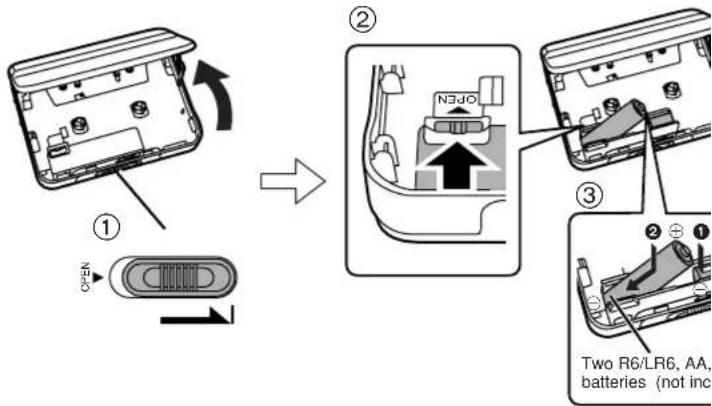

Press in and down towards the minus end.
Battery indicator B
This indicator is displayed when listening to tapes or the radio.
To check while off
Press [PRESET, □].
The indicator lights for about 5 seconds.
When the batteries are weak
a The indicator will flash.
- Leaving the unit in this condition erases the contents of the memory.
●Replacing the batteries within 30 seconds will retain any stored information. - The indicator may show a lower amount of charge during some operations.
Before Operation
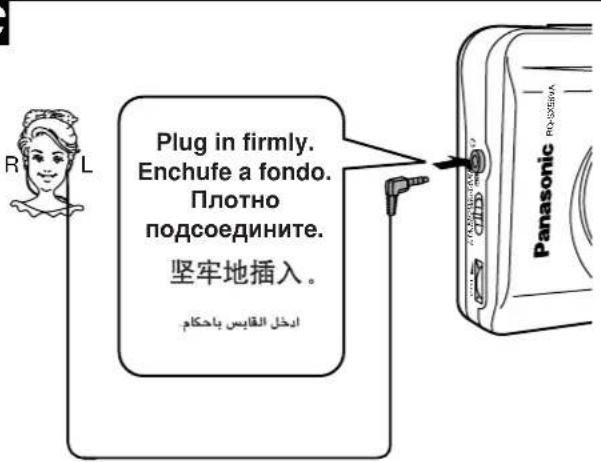
■ Connecting the stereo earphones C
If a gritty noise is heard, wipe away the dirt on the plug.
■ Hold function D
This function prevents the unit from operating in error.
b During hold state
c Release
Cautions
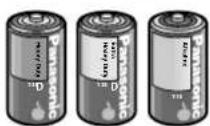
- Align and properly when inserting the batteries.
- Remove all the batteries if you are not going to use the unit for a long time.
- Do not mix old and new batteries or different types of batteries.
- Do not peel off the covering on batteries and do not use if the covering has been peeled off.
Mishandling of battery can cause electrolyte leakage which can damage items the fluid contacts and may cause a fire.
If electrolyte leaks from the battery, consult your dealer.
Wash thoroughly with water if electrolyte comes in contact with any part of your body.
- If rechargeable batteries are to be used, rechargeable batteries manufactured by Panasonic are recommended.
- Do not play your headphones or earphones at a high volume.
- To avoid product damage, do not expose this product to rain, water or other liquids.
- Avoid using or placing this unit near sources of heat. Do not leave it in an automobile exposed to direct sunlight for a long period of time with doors and windows closed.
- Discontinue use if you experience discomfort with the earphones or any other parts that directly contact your skin.
Continued use may cause rashes or other allergic reactions.
- This product may receive radio interference caused by mobile telephones during use. If such interference is apparent, please increase separation between the product and the mobile telephone.
中文
电源 A
向负极端按下插入。
电池指示灯 B
To clean this unit, wipe with a soft, dry cloth.
●Never use alcohol, paint thinner or benzine to clean this unit.
- Before using chemically treated cloth, read the instructions that came with the cloth carefully.
For a cleaner crisper sound
Clean the heads regularly to assure good quality playback. Use a cleaning tape (not included).
e
РУССКИЙ ЯЗЫК
In step 1, tapeslack when you close the cover and play is ready to start from the forward side.
a Forward side
In step
HIGH MTL: Metal and high position tapes NOR: Normal position tapes
Auto reverse
The tape plays up to 3 sides unless you stop it.
Stop: Press [OFF/■].
■ Change sides
During play
Press [TAPE/◄►].
■ Fast-forward and rewind
b Backward: Press [-/REW].
c Forward: Press [+/FF].
Note
Do not open the cassette compartment cover during tape operation.
Listening to the Radio B
Follow steps 1–4
To turn the radio off: Press [OFF/■].
■ Preset tuning C
Frequencies of up to 20 radio stations (10 each for AM and FM) can be stored in memory.
Memory presetting
-
Tune in the station to be stored.
-
Select the Memory channel (1–10).
d Memory channels 1 to 5
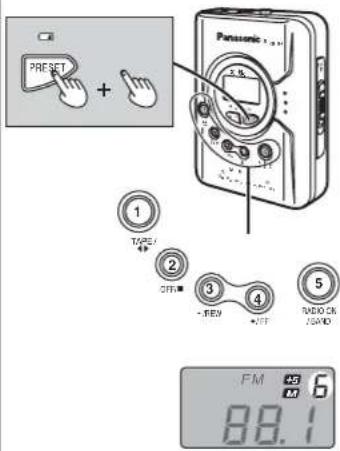
Press [PRESET, ] ☐ so " " Mshes, then press and hold a numeric button
([1]–[5]) for about 2 seconds.
e Memory channels 6 to 10
Press [PRESET, ] twice so " " 10 and "5"ash, then press and hold a numeric button ([1] for 6-[5] for 10) for about 2 seconds.
Three beeps can be heard, and presetting is finished.
To recall a preset station
●Memory channels 1 to 5
Press [PRESET, □] sN" " flashes, then a numeric button ([1]-[5]).
●Memory channels 6 to 10
Press [PRESET, □] twice sM" and 45
flash, then press a numeric button ([1] for
6-[5] for 10).
中文
磁带播放 A
按步骤1-5进行
■ How to change AM step
Before receiving AM broadcasts, be sure to select the correct allocation setting (either 9 kHz or 10 kHz) according to your area.
While playing the radio
Press and hold [PRESET, ☐] for about 3 seconds.
- The changed allocation settings will appear on the display.
Note
Converting the allocation erases the stations previously stored in memory.
■ To obtain better reception D
AM: Try various directions to obtain optimum reception. FM: Extend the earphone cord. To receive FM stereo broadcasts, set [FM MODE/TAPE] to [ST/NOR]. If the reception is poor (excessive noise), set to [MONO/HIGH MTL]. This will reduce noise and provide clear reception, but the broadcasts will not be heard in stereo.
To boost the low frequency range E
While playing a tape or radio, press [XBS, -HOLD].
- If sound distortion occurs, turn down the volume.
- This is on at the time of purchase and after you change the batteries.
c Avance: Pulse [+/FF].
Nota
- Operating Instructions
- Supplied Accessories
- Specifications
- Note
- ONLY FOR AUSTRALIA/NEW ZEALAND
- WARRANTY
- THIS WARRANTY CARD SHOULD BE RETAINED BY THE CUSTOMER AT ALL TIMES
- PANASONIC CUSTOMER CARE CENTRE 132 600
- Panasonic
- Battery indicator B
- When the batteries are weak
- Before Operation
- ■ Connecting the stereo earphones C
- ■ Hold function D
- Cautions
- 中文
- 电源 A
- 电池指示灯 B
- РУССКИЙ ЯЗЫК
- Listening to the Radio B
- 磁带播放 A
- ■ How to change AM step
- While playing the radio
- ■ To obtain better reception D
- To boost the low frequency range E
- Nota
Brand : PANASONIC
Model : RQ-SX58VA
Category : Cassette player