
HUNA 2410-0 - Freezer HOOVER - Free user manual and instructions
Find the device manual for free HUNA 2410-0 HOOVER in PDF.


| Product type | Freezer (upright) |
| Model | HUNA 2410-0 |
| Brand | Hoover |
| Total gross capacity | 200 L |
| Net capacity | 190 L |
| Energy efficiency class | E |
| Annual energy consumption | 250 kWh |
| Freezing capacity | 10 kg/24h |
| Storage time during power failure | 15 h |
| Noise level | 41 dB(A) |
| Dimensions (H x W x D) | 85 x 55 x 60 cm |
| Net weight | 35 kg |
| Voltage / frequency | 220-240 V / 50 Hz |
| Climatic class | SN-T |
| Star rating | 4 stars |
| Defrost type | Manual |
| Interior light | Yes, LED |
| Door reversal | Yes, reversible |
| Counter-depth design | No |
| Controls | Mechanical thermostat |
| Shelves / compartments | 3 freezer drawers, 1 door shelf |
| Fast freeze function | Yes |
| Refrigerant | R600a |
| Handle | Recessed grip |
| Leveling legs | 2 front adjustable |
| Installation | Freestanding |
Frequently Asked Questions - HUNA 2410-0 HOOVER
User questions about HUNA 2410-0 HOOVER
0 question about this device. Answer the ones you know or ask your own.
Ask a new question about this device
Download the instructions for your Freezer in PDF format for free! Find your manual HUNA 2410-0 - HOOVER and take your electronic device back in hand. On this page are published all the documents necessary for the use of your device. HUNA 2410-0 by HOOVER.
USER MANUAL HUNA 2410-0 HOOVER
natural_image
Simple line drawing of a refrigerator with two doors and wheels (no text or symbols)
natural_image
Simple line drawing of a refrigerator with two doors and wheels (no text or symbols)
natural_image
Simple line drawing of a refrigerator with no text or symbols| CONGELATORI VERTICALI LOGIC | IT |
| LOGIC UPRIGHT FREEZERS | GB |
| CONGÉLATEURS VERTICAUX LOGIC | FR |
| GEFRIERSCHRÄNKE LOGIC | DE |
| CONGELADORES VERTICALES LOGIC | ES |
| CONGELADORES VERTICAIS LOGIC | PT |
| OPÓIOI KATAΨYKTEΣ LOGIC | EL |
| ZAMRAŽARKI PIONOWE LOGIC | PL |
| SKRÍNOVÉ MRAZÁKY LOGIC | CZ |
| LOGIC VRIESKASTEN | NL |
| LOGIC KAAPPIPAKASTIMET | FI |
| LOGIC VERTIKALE FRYSESKAP | NO |
| VERTIKALA FRYSAR LOGIC | SV |
| VERTIKALE LOGIC FRYSERE | DA |
CONGELATORI VERTICALI LOGIC
QUADRO COMANDI
natural_image
Pure mechanical diagram showing a lever and shaft assembly without any text, numbers, or symbols
natural_image
Line drawing of a hand holding a document with an arrow pointing to a vertical panel (no text or symbols)natural_image
Simple line drawing of a mechanical clamp or bracket with two screws attached (no text or symbols)natural_image
Technical line drawing of a tool and bracket assembly (no text or symbols)natural_image
Simple line drawing of a mechanical clamp or bracket with two springs attached, no text or symbols present.natural_image
Simple line drawing of a boat with a handle and small boat, no text or symbols presentnatural_image
Pure technical line drawing of a mechanical component without any text, numbers, or symbolsnatural_image
Simple line drawing of a door with arrows indicating direction (no text or symbols)natural_image
Pure mechanical component diagram without any text, numbers, or symbolsOpen the top door of the freezer to access the control panel.

FREEZING

NB. This is the label indicating the maximum quantities of food you can freeze and the information to give our Service Department in the event of a fault.
The preservation of frozen foods is guaranteed in all of the freezer's compartments.
When the freezer is full, it is advised to remove the drawers and place the food directly on the shelves for optimal congelation.
Turn the thermostat clockwise to SUPER and the yellow/orange light will come on (see fig. 1). After 24 hours, put foods directly on the metal rack. Freezing takes 24 hours and you can then put the compartments back and arrange the foods in the freezer. Reset the thermostat to position 2/3.
To test out the freezing and conservation functions remove all the drawers apart from the bottom one.
Some models are equipped with a "Shock Freezing" function which freezes items quickly in less than 4 hours and guarantees better-tasting food (max. 3kg). To use, turn the handle between the first and second compartments until the green indicator is visible.
INVERTING THE DOOR
Tip the refrigerator over onto the floor or to a 45° angle to make working on the bottom section easier.
1
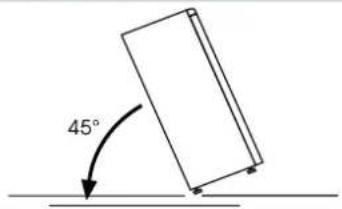
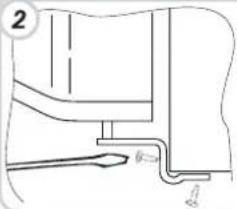
Remove the lower right-hand hinge by unscrewing it and then remove the door.
natural_image
Pure mechanical diagram showing a lever and pipe connection without any text or symbols
natural_image
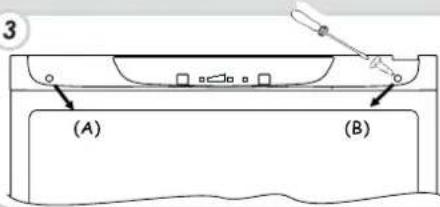
Line drawing of a hand holding a document with an arrow pointing to a vertical panel (no text or symbols)Remove plugs (A) and (B), loosen the screws and partially remove the panel.

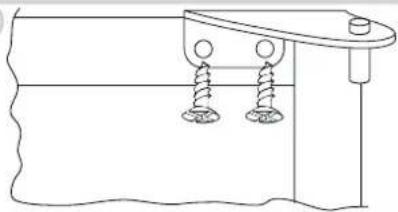
Unscrew the hinge on the right.
4

natural_image
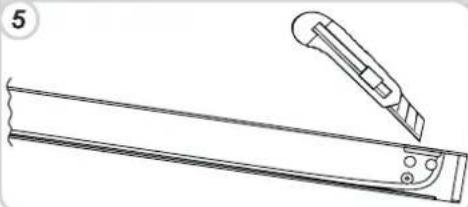
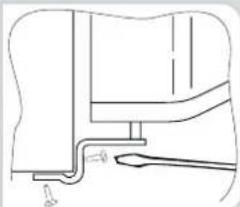
Simple line drawing of a mechanical clamp or bracket with two screws attached (no text or symbols)Cut and break the slot on the left side of the panel, as shown in the diagram.

natural_image
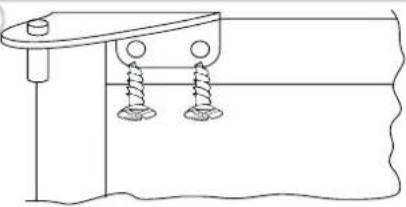
Technical line drawing of a mechanical tool and bracket assembly (no text or symbols)Fit the upper left hinge (found in the accessories kit).
6
natural_image
Simple line drawing of a mechanical clamp or bracket with two springs attached (no text or symbols)Reinstall the panel, securing it with the screws and plugs.

natural_image
Simple line drawing of a boat with a handle and small boat, no text or symbols presentReplace the door and fix the lower hinge.


natural_image
Pure technical line drawing of a mechanical assembly without any text, numbers, or symbolsTo reverse the handles: remove the decorative plugs located on the right-hand side of the door.
9

natural_image
Simple line drawing of a door with arrows indicating direction (no text or symbols)Unscrew the handles from the left side and move them to the right side. Then position the decorative plugs into the holes on the left side of the door.
10


natural_image
Pure mechanical part diagram without any text, numbers, or symbolsReturn the appliance to the upright position and wait two hours before turning it on.
11

CONGÉLATEURS VERTICAUX LOGIC
PANNEAU DE COMMANDE
natural_image
Pure technical line drawing of a mechanical component without any text, numbers, or symbols
natural_image
Simple line drawing of a hand holding a document with an arrow pointing to a vertical panel (no text or symbols)natural_image
Simple line drawing of a mechanical assembly with two screws attached to a base (no text or symbols)natural_image
Technical line drawing of a mechanical tool and bracket assembly (no text or symbols)natural_image
Simple line drawing of a mechanical clamp or bracket with two springs attached to a surface (no text or symbols)natural_image
Simple line drawing of a boat hull with a handle and dock, no text or symbols presentnatural_image
Pure mechanical diagram showing a lever and shaft assembly without any text, numbers, or symbolsnatural_image
Simple line drawing of a door with arrows indicating direction (no text or symbols)natural_image
Pure mechanical diagram showing a circular component with directional arrows, no text or symbols present
natural_image
Pure mechanical part diagram without any text, numbers, or symbolsnatural_image
Simple line drawing of a mechanical assembly with two springs attached to a base (no text or symbols)natural_image
Simple line drawing of a boat hull with a handle and dock, no text or symbols presentnatural_image
Pure technical line drawing of a mechanical component without any text, numbers, or symbols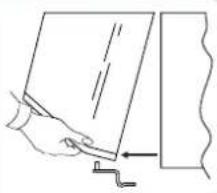
natural_image
Line drawing of a hand holding a document with a ruler, next to a wall (no text or symbols)natural_image
Line drawing of a tool and ruler on a metal base (no text or symbols)natural_image
Pure technical line drawing of a mechanical component without any text, numbers, or symbolsnatural_image
Simple line drawing of a mechanical clamp or bracket with two springs attached (no text or symbols)natural_image
Simple line drawing of a rectangular frame with two arrows pointing outward from the side (no text or symbols)CONGELADORES VERTICALES LOGIC
PANEL DE CONTROL
natural_image
Pure mechanical diagram showing a lever and shaft without any text, numbers, or symbols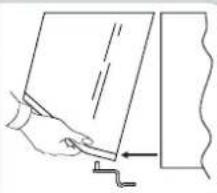
natural_image
Line drawing of a hand holding a document with an arrow pointing to a vertical line (no text or symbols)Desatornille la bisagra de la derecha.
4
natural_image
Simple line drawing of a mechanical assembly with two screws and a handle (no text or symbols)natural_image
Technical line drawing of a mechanical tool with a separate view showing a flat blade and a flat blade with a flat blade (no text or symbols)natural_image
Simple line drawing of a mechanical clamp or bracket with two screws attached (no text or symbols)natural_image
Simple line drawing of a boat hull with a handle and small boat, no text or symbols presentnatural_image
Pure technical line drawing of a mechanical component without any text, numbers, or symbolsnatural_image
Simple line drawing of a rectangular object with two arrows pointing outward from its side (no text or symbols)natural_image
Technical line drawing showing a mechanical assembly and a hand holding a document (no text or symbols present)Retire as tampas (A) e (B), desaparafuse os parafusos e retire parcialmente o painel de comandos.
3

natural_image
Simple line drawing of a mechanical assembly with two screws attached to a base (no text or symbols)Corte e parta a fenda à esquerda do painel na zona moldada.
natural_image
Technical line drawing of a tool and bracket assembly (no text or symbols)natural_image
Simple line drawing of a mechanical clamp or bracket with two screws attached (no text or symbols)natural_image
Simple line drawing of a boat hull with a handle and small boat, no text or symbols presentnatural_image
Simple line drawing of a door with arrows indicating direction (no text or symbols)natural_image
Simple line drawing of a hand holding a document with an arrow pointing to a vertical panel (no text or symbols)natural_image
Simple line drawing of a mechanical assembly with two screws and a handle (no text or symbols)natural_image
Technical line drawing of a mechanical tool and bracket assembly (no text or symbols)natural_image
Simple line drawing of a mechanical clamp or bracket with two screws attached (no text or symbols)natural_image
Simple line drawing of a boat hull with a small rod inserted, no text or symbols presentnatural_image
Pure mechanical diagram showing a lever and pivot point without any text or symbolsnatural_image
Simple line drawing of a rectangular object with two arrows pointing outward from its side (no text or symbols)natural_image
Pure mechanical diagram showing a lever and shaft assembly without any text, numbers, or symbols
natural_image
Simple line drawing of a hand holding a document with an arrow pointing to a vertical panel (no text or symbols)natural_image
Simple line drawing of a mechanical clamp or bracket with two screws attached (no text or symbols)natural_image
Technical line drawing of a mechanical component with a tool and bracket (no text or symbols)natural_image
Simple line drawing of a mechanical clamp or bracket with two springs attached to a surface (no text or symbols)natural_image
Simple line drawing of a boat hull with a handle and dock, no text or symbols presentnatural_image
Pure technical line drawing of a mechanical component without any text, numbers, or symbolsnatural_image
Simple line drawing of a door with arrows indicating direction (no text or symbols)natural_image
Pure mechanical component diagram without any text, numbers, or symbolsnatural_image
Simple line drawing of a mechanical setup with two springs attached to a base plate (no text or symbols)natural_image
Simple line drawing of a boat hull with a handle and small boat, no text or symbols presentnatural_image
Technical line drawing of a mechanical tool and bracket assembly (no text or symbols)natural_image
Simple line drawing of a mechanical clamp or bracket with two screws and a base, no text or symbols present.natural_image
Simple line drawing of a rectangular structure with two arrows pointing outward from its ends (no text or symbols)BEDIENINGSPANEEEL
natural_image
Pure technical line drawing of a mechanical component without any text, numbers, or symbols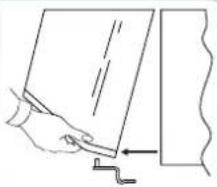
natural_image
Line drawing of a hand holding a document with an arrow pointing to a vertical line (no text or symbols)natural_image
Simple line drawing of a mechanical clamp or bracket with two screws attached (no text or symbols)natural_image
Line drawing of a tool and ruler assembly (no text or symbols)natural_image
Simple line drawing of a mechanical clamp or bracket with two screws attached (no text or symbols)natural_image
Simple line drawing of a boat hull with a handle and dock, no text or symbols presentMonteer de deur weer en zet het onderste scharnier vast.

natural_image
Pure technical line drawing of a mechanical component without any text, numbers, or symbolsnatural_image
Simple line drawing of a rectangular structure with two arrows pointing outward from a vertical wall (no text or symbols)natural_image
Pure mechanical part diagram without any text, numbers, or symbolsnatural_image
Pure technical line drawing of a mechanical component without any text, numbers, or symbols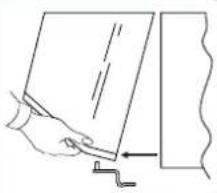
natural_image
Simple line drawing of a hand holding a document with an arrow pointing to a vertical panel (no text or symbols)natural_image
Simple line drawing of a mechanical clamp or bracket with two screws attached (no text or symbols)natural_image
Line drawing of a tool and ruler on a metal bracket (no text or symbols)natural_image
Simple line drawing of a mechanical clamp or bracket with two springs attached (no text or symbols)natural_image
Simple line drawing of a boat hull with a handle and small boat, no text or symbols presentnatural_image
Pure technical line drawing of a mechanical component without any text, numbers, or symbolsnatural_image
Simple line drawing of a rectangular structure with two arrows pointing outward from a vertical wall (no text or symbols)natural_image
Technical line drawing of a mechanical component with no visible text or symbols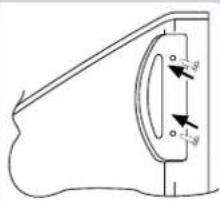
natural_image
Pure mechanical component diagram without any text, numbers, or symbolsnatural_image
Pure technical line drawing of a mechanical component without any text, numbers, or symbols
natural_image
Line drawing of a hand holding a document with an arrow pointing to a vertical line (no text or symbols)natural_image
Simple line drawing of a mechanical assembly with two screws and a handle (no text or symbols)Bryt opp det venstre hullet i dekselet der du ser avtrykket.

natural_image
Technical line drawing of a mechanical tool and bracket assembly (no text or symbols)natural_image
Simple line drawing of a mechanical clamp or bracket with two screws, no text or symbols presentnatural_image
Simple line drawing of a boat hull with a handle and small boat, no text or symbols presentnatural_image
Pure mechanical diagram showing a lever and shaft assembly without any text, numbers, or symbolsnatural_image
Simple line drawing of a door with arrows indicating direction (no text or symbols)natural_image
Pure mechanical part diagram without any text, numbers, or symbolsVERTIKALA FRYSAR LOGIC
KOMMANDOPANEL
natural_image
Pure technical line drawing of a mechanical component without any text, numbers, or symbols
natural_image
Line drawing of a hand holding a document with an arrow pointing to a vertical line (no text or symbols present)natural_image
Simple line drawing of a mechanical assembly with two springs attached to a base (no text or symbols)natural_image
Line drawing of a tool and ruler on a metal bracket (no text or symbols)natural_image
Simple line drawing of a mechanical clamp or bracket with two springs attached (no text or symbols)natural_image
Simple line drawing of a boat on water with a small rod inserted, no text or symbols presentnatural_image
Pure technical line drawing of a mechanical component without any text, numbers, or symbolsnatural_image
Simple line drawing of a rectangular object with two arrows pointing outward from its side (no text or symbols)natural_image
Pure technical line drawing of a mechanical component without any text, numbers, or symbols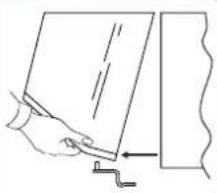
natural_image
Line drawing of a hand holding a document with an arrow pointing to a vertical line (no text or symbols)Fjern propperne (A) og (B), skru skruerne af og tag panelet delvist af.
3
natural_image
Simple line drawing of a mechanical clamp or bracket with two screws attached (no text or symbols)natural_image
Line drawing of a tool and bracket assembly (no text or symbols)natural_image
Simple line drawing of a mechanical clamp or bracket with two screws attached (no text or symbols)natural_image
Simple line drawing of a boat hull with a handle and dock, no text or symbols presentnatural_image
Pure technical line drawing of a mechanical component without any text, numbers, or symbolsnatural_image
Simple line drawing of a door with arrows indicating direction (no text or symbols)natural_image
Technical line drawing of a mechanical component with directional arrows indicating movement (no text or symbols)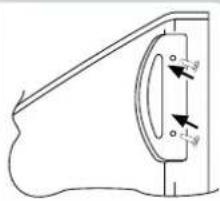
natural_image
Pure mechanical diagram showing a curved component with two circular features and directional arrows, no text or symbols present.Brand : HOOVER
Model : HUNA 2410-0
Category : Freezer