Hurricane 901 - Effects machine Chauvet - Free user manual and instructions
Find the device manual for free Hurricane 901 Chauvet in PDF.


| Product Type | Fog Machine |
| Brand | Chauvet |
| Model | Hurricane 901 |
| Dimensions (L x W x H) | 10.4 x 8.7 x 9.1 in (264 x 221 x 231 mm) |
| Weight | 7.7 lb (3.5 kg) |
| Power Supply Type | Magnetic (internal), fixed voltage |
| Input Voltage | 120 V, 60 Hz or 230 V, 50 Hz (depending on model) |
| Power Consumption | 670 W |
| Operating Current | 5.6 A (120 V) / 2.9 A (230 V) |
| Fuse | F 10 A, 250 V |
| Heat-up Time | 1.5 min |
| Tank Capacity | 1.3 L (0.3 gal) |
| Fog Output | 4,000 cfm |
| Fluid Consumption | 11 ml/min |
| Included Remote | Wired manual remote (FC-M), 15 ft cable |
| Optional Remotes | Wired timer remote (FC-T), wireless remote (FC-W) |
| Recommended Fluid | CHAUVET water-based fog fluid |
| Cleaning Solution | CHAUVET Fog Cleaner Quart (FCQ) |
| Cleaning Interval | Every 40 hours of operation or every 90 days |
| Max Ambient Temperature | 104 °F (40 °C) |
| Cooling System | Convection |
| IP Rating | IP20 (indoor use only) |
| Mounting Options | Floor (rubber feet) or overhead with safety cable |
| Replaceable Fuse | Yes |
| User Serviceable | Limited (fuse replacement, cleaning) |
Frequently Asked Questions - Hurricane 901 Chauvet
User questions about Hurricane 901 Chauvet
0 question about this device. Answer the ones you know or ask your own.
Ask a new question about this device
Download the instructions for your Effects machine in PDF format for free! Find your manual Hurricane 901 - Chauvet and take your electronic device back in hand. On this page are published all the documents necessary for the use of your device. Hurricane 901 by Chauvet.
USER MANUAL Hurricane 901 Chauvet

CHAVET ®
TABLE OF CONTENTS
1. Before you Begin.... 3
What is Included....3
Unpacking Instructions....3
Claims....3
Text Conventions 3
Icons....3
Document Information....3
Product at a Glance 4
Safety Notes......4
2. Introduction .... 5
Product Overview....5
3. Setup 6
AC Power 6
Fuse Replacement....6
Mounting 7
Orientation 7
Rigging....7
4. Operation 8
Manual Local Operation....8
Manual Remote Operation....8
Timer Remote Operation....8
Wireless Remote Operation....10
5. Technical Information ....11
Fogger Maintenance .... 11
Storage....11
General Troubleshooting....12
Returns....13
RMA 13
Contact Us ....14
6. Technical Specifications....15
1. BEFORE YOU BEGIN
What is Included
- Hurricane™ 901
- Wired Remote
-
Power Cord
-
Warranty Card
- Quick Reference Guide
Unpacking Instructions
Immediately upon receiving this product, carefully unpack it and check the container in which you received it. Make sure that you have received all the parts indicated above and that they are all in good condition.
Claims
If the material inside the container (this product and any other accessory included with it) appears damaged from shipping, or if the container shows signs of mishandling, notify the shipper immediately, not Chauvet, upon reception of the damaged merchandise. Failure to do so in a timely manner may invalidate your claim with the carrier. In addition, retain the container and all the packing material for inspection.
For other issues such as missing components or parts, damage not related to shipping, or concealed damage, you should make claims to Chauvet within seven (7) days of receiving the merchandise.
Text Conventions
| Convention Meaning | |
| A key to be pressed on the fixture's control panel | |
| 1-512 | A range of values |
| 50/60 | A set of values of which only one can be chosen |
| Claims | A section or chapter in this document |
| Settings | A menu option not to be modified (for example, showing the operating mode/current status) |
| Menu > Settings | A sequence of menu options to be followed |
| ON | A value to be entered or selected |
Icons
| Icon Meaning | |
| This paragraph contains critical installation, configuration, or operation information. Failure to comply with this information may render the fixture partially or completely inoperative, cause damage to the fixture, or cause harm to the user. | |
| This paragraph contains important installation or configuration information. Failure to comply with this information may prevent the fixture from functioning correctly. | |
| This paragraph reminds you of useful, although not critical, information. | |
Document Information
The information and specifications contained in this document are subject to change without notice. Chauvet assumes no responsibility or liability for any errors or omissions that may appear in this manual. Chauvet reserves the right to update the existing document or to create a new document to correct any errors or omissions.
You can download the latest version of this document from www.chauvetlighting.com.
© Copyright 2014 Chauvet. All rights reserved
Electronically published by Chauvet in the United States of America
| Author Date | Editor Date | ||
| A. Leon | 10/21/14 | M. Trouard | 10/21/14 |
| Product at a Glance | Use on Dimmer | X | Auto Programs | X |
| Outdoor Use | X | Fixed voltage (120 V / 230 V) | P | |
| Sound Activated | X | Replaceable Fuse | P | |
| DMX | X | User Serviceable | X | |
| Master/Slave | X | Duty Cycle | X | |
| Safety Notes | Please read the following notes carefully before starting to work with this product. They include important safety information about its installation, usage, and maintenance. | |||
 | Always connect this product to a grounded circuit to avoid the risk of electrocution.Always disconnect this product from the power source before cleaning it or replacing the fuse.Make sure the power cord is not crimped or damaged.Never disconnect this product from power cord by pulling or tugging on the cord.If mounting this product overhead, always secure it to a fastening device using a safety cable.Make sure there are no flammable materials close to the unit while operating.Do not touch this product's housing when operating because it may be very hot.Do not mount this product on a flammable surface (linoleum, carpet, wood, paper, carton, plastic, etc.)This product's nozzle is very hot during operation and it remains hot for a long time after operation has stopped.The fog exits the nozzle at a very high temperature. Keep a minimum distance of 6.5 ft (2 m) from the nozzle to the nearest object.Do not use this product as a space heater.Do not add flammable liquids (alcohol, perfume, gasoline, kerosene, solvents, etc.) to the flog fluid.Avoid ingesting the fog fluid. If that happens, immediately call the medical emergency number (911 in the US) and seek help. | |||
 | Always make sure that the voltage of the outlet to which you are connecting this product is within the range stated on the decal or rear panel of the fixture.This product is for indoor use only! (IP20) To prevent risk of fire or shock, do not expose this fixture to rain or moisture.Always install this product in a location with adequate ventilation, at least 20 in (50 cm) from adjacent surfaces.Be sure that no ventilation slots on the unit's housing are blocked.Never connect this product to a dimmer pack.Make sure to replace the fuse with another of the same type and rating.Never carry this product from the power cord. Always use the mounting bracket.The maximum ambient temperature (Ta) is 104° F ( 40° C). Do not operate this product at higher temperatures.In the event of a serious operating problem, stop using the unit immediately.Never try to repair this product. Repairs carried out by unskilled people can lead to damage or malfunction. Please contact the nearest authorized technical assistance center.Use only CHAUVET® water-based fog fluid.Drain the tank before transporting the product.To eliminate unnecessary wear and improve its lifespan, during periods of non-use completely disconnect the product from power via breaker or by unplugging it. | |||
 | Keep this User Manual for future consultation. If you sell this product to another user, be sure that they also receive this document. | |||
 | FCQ (Fog Cleaner Quart) was specifically developed by Chauvet to clean your HurricaneTM 1101. Make sure you use FCQ regularly, no longer than 90 days between cleanings, to increase the life of your fogger. | |||
2. INTRODUCTION
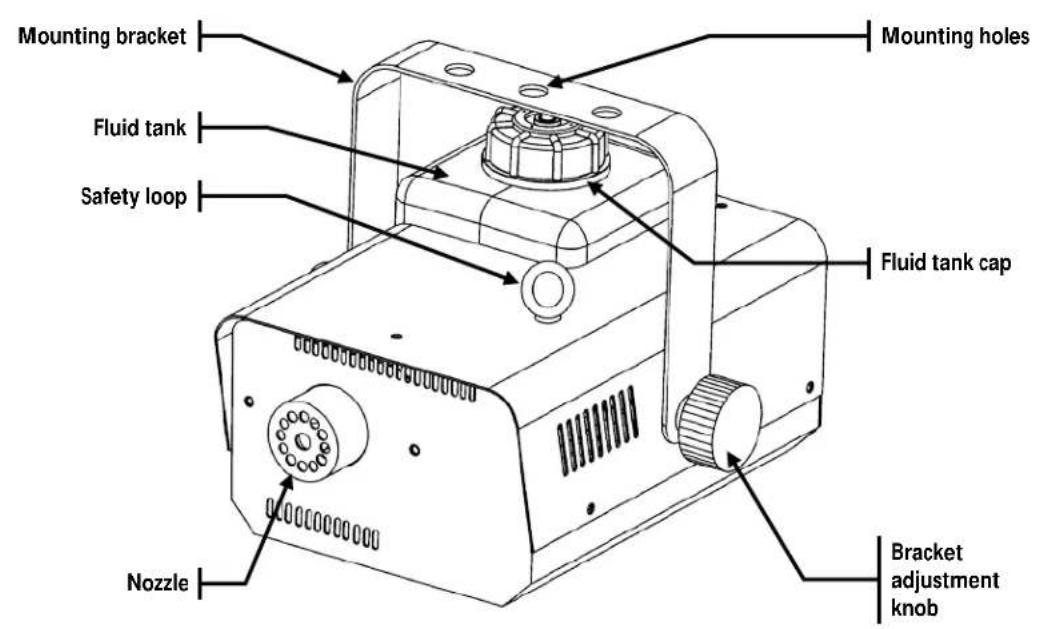
Product Overview

3. SETUP
AC Power
This product has a fixed voltage power supply and it can work with an input voltage of either 120 V, 60 Hz or 230 V, 50 Hz, depending on the specific model.

Make sure that the model of your Hurricane ™ 901 fogger matches the voltage of the power outlet to which you want to connect it, whether 120 V or 230 V. Connecting this product to the wrong input voltage would void its warranty and it may permanently damage the Hurricane ™ 901.
To determine the power requirements for this product (circuit breaker, power outlet, and wiring), use the current value listed on the label affixed to the product's back panel, or refer to the product's specifications chart. The listed current rating indicates the product's average current draw under normal conditions.

Always connect this product to a protected circuit (circuit breaker or fuse), making sure that it has an appropriate electrical ground to avoid the risk of electrocution or fire.

Never connect this product to a rheostat (variable resistor) or dimmer circuit, even if the rheostat or dimmer channel serves only as a 0 to 100% switch.
Fuse Replacement
This product uses an F 10 A, 250 V fuse. Follow the instructions below to change it in case it blows.

Disconnect this product from the power outlet before replacing the fuse.
1) Wedge the tip of a flat head screwdriver into the slot of the fuse holder and pry it out of its housing.
2) Remove the blown fuse from its holder and replace it with a fuse of the exact same type and rating.
3) Insert the fuse holder back into its place, and reconnect power.


Always replace a blown fuse with a good fuse of the same type and rating.

Although the safety cap does have room for a spare fuse, this product ships with no spare fuse.
Mounting
Before mounting this product, read and follow the safety recommendations indicated in the Safety Notes section (page 2 of this manual).
Orientation
The Hurricane™ 901 may be mounted in any position, provided there is adequate room for ventilation around it.
Rigging
Before deciding on a location for this product, always make sure that it will be easy to access the unit for maintenance and fluid replenishment purposes.
Make sure that the structure or surface onto which you are mounting this product can support its weight. Please see the Technical Specifications section of this manual for weight information.
When mounting this product overhead, always use a safety cable. Mount the fixture securely to a rigging point, whether an elevated platform or a truss.
When rigging this product onto a truss, you should use a mounting clamp of appropriate weight capacity. The bracket has three M8 size holes, which are appropriate for this purpose.
The bracket adjustment knobs allow for directional adjustment when aiming the product to the desired angle. Only loosen or tighten the bracket knobs using your bare hands. Using tools could damage the knobs.
The rubber feet allow for surface mounting. When mounting this fixture on the floor, make sure that the fixture and its cables are away from people and vehicles. Refer to the Safety Notes section (page 2 of this manual)
Mounting Diagram

4. OPERATION
Manual Local Operation
To operate the Hurricane™ 901, do the following:
1) Plug the fog machine into power and turn the power switch to the fixture on.
2) Press
3) Release the button to stop the fog output.
Manual Remote Operation
The Hurricane™ 901 comes with a wired manual remote control (model FC-M). This control allows the user to start and stop the fog output.
To operate this product, follow the instructions below:
1) Plug the fog machine into power and turn the power switch to the fixture on.
2) Plug in the wired manual remote FC-M into the Remote Control socket on the rear of the fog machine.
3) Press
4) Release the button to stop the fog output.


The Hurricane™ 901 unit may stop producing fog to allow for fluid reheating after a period of continuous fog output. This is a normal occurrence.
Timer Remote Operation
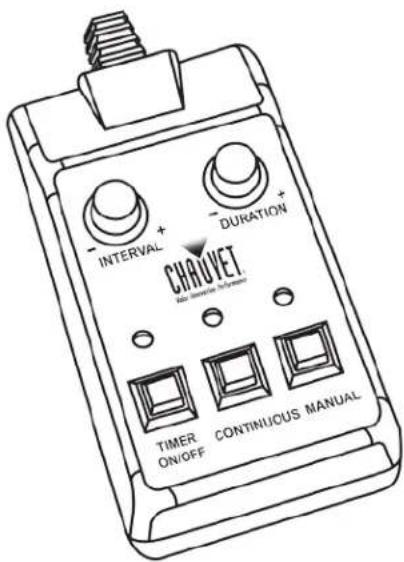
The Hurricane™ 901 can operate with the optional wired timer remote control (model FC-T). This control allows the user to start and stop the fog output manually, as well as to operate the Hurricane™ 901 in timer mode.
To operate this product, follow the instructions below:
1) Plug the fog machine into power and turn the power switch to the fixture on
2) Plug in the wired timer remote FC-T into the Remote Control socket on the rear of the fog machine.
Timer operation
1) Press and latch
2) Use the INTERVAL knob to adjust the time between bursts of fog.
3) Use the DURATION knob to adjust the duration of each burst of fog.
Continues on the next page
Continued from previous page
Timer Remote Operation (Cont.)
Manual Continuous Operation
1) For continuous operation, press and latch
2) The Hurricane™ 901 will continue generating fog until you press

Make sure to press again to stop the fog output.
Manual Burst Operation
1) For burst operation, press
2) The Hurricane™ 901 will continue generating fog until you release

The Hurricane ™ 901 unit may stop producing fog to allow for fluid reheating after a period of continuous fog output. This is a normal occurrence.
Wireless Remote Operation
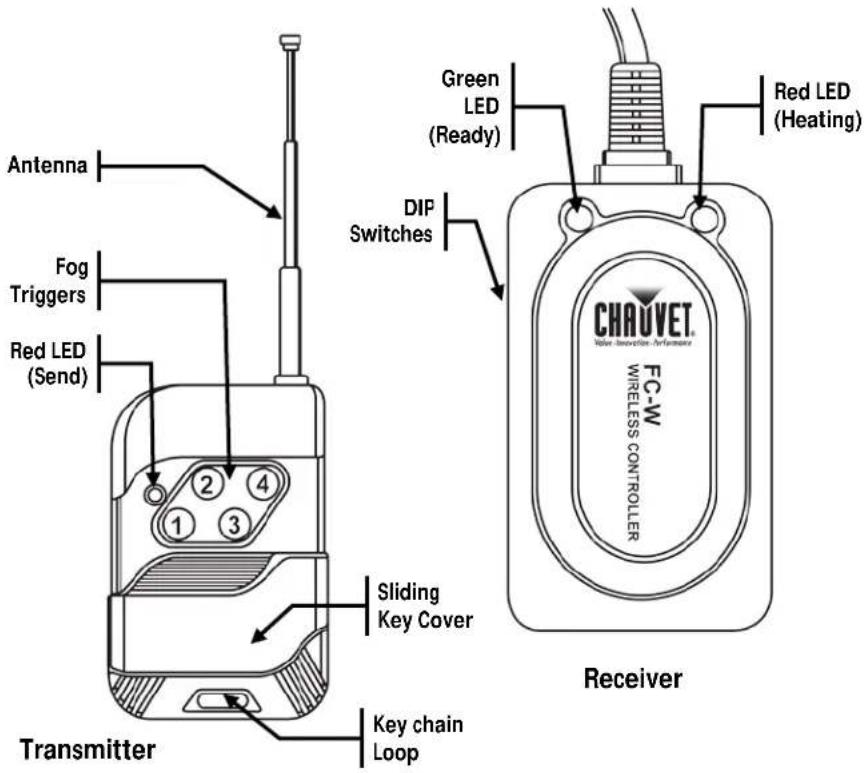
The Hurricane™ 901 can operate with the optional wireless remote control (model FC-W). This control allows the user to start and stop the fog output manually without the limitations of the wired remote controls.
The FC-W consists of a receiver and a key chain transmitter. The transmitter has four control buttons, each of them assigned to a specific channel. The receiver has four DIP switches to tune it on one of those four channels. This allows the operator to control up to four independent Hurricane™ 901 units. It is also possible to control more than four Hurricane™ 901 units by assigning the same receiving channel to more than one Hurricane™ 901 unit.
To operate this product, follow the instructions below:
1) Plug the fog machine into power and turn the power switch to the fixture on.
2) Plug in the wireless remote control receiver FC-W into the Remote Control socket on the rear of the fog machine.
3) Select the receiving channel by configuring the DIP switch as follows:
| Channel | DIP Switches | |||
| 1 2 3 4 | ||||
| 1 ON | Off Off Off | |||
| 2 | Off | ON | Off Off | |
| 3 | Off Off | ON | Off | |
| 4 | Off Off Off | ON | ||
4) Press the corresponding button on the FC-W transmitter and the Hurricane™ 901 will output fog for as long as you keep that button pressed.

The Hurricane ™ 901 unit may stop producing fog to allow for fluid reheating after a period of continuous fog output. This is a normal occurrence.
5. TECHNICAL INFORMATION
Fogger Maintenance
Do not allow the fogger to become clogged. After every 40 hours of continuous operation, use CHAUVET® Fog Cleaner Quart (FCQ) through the system to prevent the accumulation of particulate matter in the heating element.
The recommended cleaning procedure is as follows.
- Unplug the product from power.
- Empty all fog fluid from the machine.
- Add cleaning solution to the tank.
- Connect the product to power and allow it to warm up.
- Run the unit in a well-ventilated area until the tank is almost empty. Do not allow the pump to run dry.
- Refill with fogger fluid to continue using the fogger. Run the machine briefly to clear any remaining cleaning solution from the pump and heater.

Do not operate the machine without fluid at any time.

Fog Cleaner Quart (FCQ) was specifically developed by Chauvet to clean your Hurricane™ 901. Make sure you use FCQ regularly, no longer than 90 days between cleanings, to increase the life of your product.
Storage
Before storing the fogger, run FCQ through the system as described in the cleaning procedure above; however, only follow steps 1 through 5 Do not refill the tank with fog fluid if storing the fogger. Cleaning the system prior to storage will help prevent any particles from condensing inside the pump or heater while not in use.

Test-run your Hurricane™ 901 on a monthly basis to achieve the best performance.
General Troubleshooting
| Symptom | Possible Cause | Possible Action |
| No output or fog machine is spitting fluid | Incorrect fluid | Clean thoroughly with CHAUVET® FCQ. For full instructions, see Fogger Maintenance. Refill with CHAUVET® water-based fog fluid. |
| Blocked pipe or failing part | Contact Customer Service | |
| Circuit breaker or fuse keeps blowing | Excessive load on the circuit | Make sure that the total load does not exceed 80% of the breaker or fuse nominal current |
| Short circuit along the power lines | Check the power lines and power cords | |
| Product does not power up | No energy on power outlet | Check power outletChange to another outlet |
| Loose or damaged power cord | Check the power cord | |
| Blown fuse | Replace blown fuse with a good one of the same type and rating | |
| Internal problem | Send product for repair | |
| Product does not output fog | No fluid | Turn the product off and replenish the fog fluid (use only Chauvet fog fluid) |
| Heater or pump clogged | Use Chauvet cleaner to free the path. | |
| Wired remote disconnected or defective | Make sure that the remote is connected Try the remote on another HURRICANETM 901 | |
| Inappropriate wired remote operation | Read the instructions for both wired remote units | |
| Wireless remote receiver not connected | Make sure that the wireless remote receiver is connected | |
| Wireless remote transmitter ran out of battery | Replace battery on wireless remote transmitter | |
| Wireless remote pair needs configuration | Make sure to configure the wireless remote pair as per the instructions in this manual | |
| Internal problem | Send the product for repair |

If you still experience problems after trying the above solutions, contact Chauvet Technical Support. See Contact Us.
RETURNS
To return a product or request support:
• In the U.S., contact Chauvet World Headquarters (see Contact Us).
• In the UK or Ireland, contact Chauvet Europe Ltd. (see Contact Us).
• In Mexico, contact Chauvet Mexico (see Contact Us).
• In any other country, DO NOT contact Chauvet. Contact your distributor. See www.chauvetlighting.com for distributors outside the U.S., United Kingdom, Ireland, or Mexico.

If you live outside the U.S., United Kingdom, Ireland, or Mexico, contact your distributor of record and follow their instructions on how to return Chauvet products to them. Visit our website for contact details.
RMA
Call the corresponding Chauvet Technical Support office and request a Return Merchandise Authorization (RMA) number before shipping the product. Be prepared to provide the model number, serial number, and a brief description of the cause for the return.
You must send the merchandise prepaid, in its original box, and with its original packing and accessories. Chauvet will not issue call tags.
Clearly label the package with the RMA number. Chauvet will refuse any product returned without an RMA number.

Write the RMA number on a properly affixed label. DO NOT write the RMA number directly on the box.
Before sending the product, clearly write the following information on a piece of paper and place it inside the box:
- Your name
- Your address
- Your phone number
- RMA number
• A brief description of the problem
Be sure to pack the product properly. Any shipping damage resulting from inadequate packaging will be your responsibility. FedEx packing or double-boxing are recommended.

Chauvet reserves the right to use its own discretion to repair or replace returned product(s).
CONTACT Us
WORLD HEADQUARTERS - Chauvet
General Information
Address: 5200 NW 108th Avenue
Sunrise, FL 33351
Voice: (954) 577-4455
Fax: (954) 929-5560
Toll free: (800) 762-1084
UNITED KINGDOM AND IRELAND - Chauvet Europe Ltd.
General Information
Address: Unit 1C
Brookhill Road Industrial Estate
Pinxton, Nottingham, UK
NG16 6NT
Voice: +44 (0)1773 511115
Fax: +44 (0)1773 511110
MEXICO - Chauvet Mexico
General Information
Address: Av. Santa Ana 30
Parque Industrial Lerma
Lerma, Mexico C.P. 52000
Voice: +52 (728) 285-5000
Outside the U.S., United Kingdom, Ireland, or Mexico, contact your dealer. Follow their instructions to request support or to return a product. Visit our website for contact details.
Technical Support
Voice: (954) 577-4455 (Press 4)
Fax: (954) 756-8015
Email: tech@chauvetlighting.com
World Wide Web www.chauvetlighting.com
Technical Support
Email: uktech@chauvetlighting.com
World Wide Web www.chauvetlighting.co.uk
Technical Support
Email: servicio@chauvet.com.mx
World Wide Web www.chauvet.com.mx
6. TECHNICAL SPECIFICATIONS
| Dimensions and Weight | Length | Width | Height | Weight |
| 10.4 in (264 mm) | 8.7 in (221 mm) | 9.1 in (231 mm) | 7.7 lb (3.5 kg) | |
| Note: Dimensions in inches rounded to the nearest decimal digit. | ||||
| Power | Power Supply Type | Range | Voltage Selection | |
| Magnetic (internal) | 120 V, 60 Hz or 230 V, 50 Hz | Fixed (per model) | ||
| Parameter | 120 V, 60 Hz | 230 V, 50 Hz | ||
| Consumption | 670 W | 670 W | ||
| Operating Current | 5.6 A | 2.9 A | ||
| Fuse | F 10 A, 250 V | F 10 A, 250 V | ||
| Power I/O | US/Worldwide | UK/Europe | ||
| Power input connector | IEC | IEC | ||
| Power Cord plug | Edison (US) | Local plug | ||
| Operation | Heat-up Time | Tank Capacity | ||
| 1.5 min | 1.3 liter | |||
| Remote Controllers | Remote Control | Cable Length | Included/Optional | |
| FC-M | 15 ft (462 cm) | Included | ||
| FC-T | 15 ft (462 cm) | Optional | ||
| FC-W | N/A | Optional | ||
| Fog Production | Output | Fluid Consumption | Tank Capacity | |
| 4,000 cfm | 11 ml/min | 0.3 gal (1.3 l) | ||
| Thermal | Max. External Temperature | Cooling System | Indoor/Outdoor | |
| 104° F (40°C) | Convection | Indoor only | ||
| Ordering | ||||
| Product | Product Name | Item Code | Item Number | |
| Hurricane 901 (120 V) | 09070324 | H901 | ||
| Hurricane 901 (230 V) | 09070325 | 220VH901 | ||
| Optional Remotes | Product Name | Item Code | Item Number | |
| Fogger Timer Remote | 05080150 | FC-T | ||
| Fogger Wireless Remote | 05080151 | FC-W | ||


- TABLE OF CONTENTS
- BEFORE YOU BEGIN.... 3
- INTRODUCTION .... 5
- SETUP 6
- OPERATION 8
- TECHNICAL INFORMATION ....11
- RETURNS....13
- CONTACT US ....14
- TECHNICAL SPECIFICATIONS....15
- BEFORE YOU BEGIN
- WHAT IS INCLUDED
- UNPACKING INSTRUCTIONS
- CLAIMS
- TEXT CONVENTIONS
- ICONS
- DOCUMENT INFORMATION
- INTRODUCTION
- PRODUCT OVERVIEW
- SETUP
- AC POWER
- FUSE REPLACEMENT
- MOUNTING
- ORIENTATION
- RIGGING
- MOUNTING DIAGRAM
- OPERATION
- MANUAL LOCAL OPERATION
- MANUAL REMOTE OPERATION
- TIMER REMOTE OPERATION
- TIMER OPERATION
- CONTINUED FROM PREVIOUS PAGE
- TIMER REMOTE OPERATION (CONT.)
- MANUAL CONTINUOUS OPERATION
- MAKE SURE TO PRESS AGAIN TO STOP THE FOG OUTPUT
- MANUAL BURST OPERATION
- THE HURRICANE ™ 901 UNIT MAY STOP PRODUCING FOG TO ALLOW FOR FLUID REHEATING AFTER A PERIOD OF CONTINUOUS FOG OUTPUT. THIS IS A NORMAL OCCURRENCE
- WIRELESS REMOTE OPERATION
- TECHNICAL INFORMATION
- FOGGER MAINTENANCE
- STORAGE
- RETURNS
- RMA
- CONTACT US
- TECHNICAL SPECIFICATIONS
Brand : Chauvet
Model : Hurricane 901
Category : Effects machine