
T8123-E - Network Card/Adapter AXIS - Free user manual and instructions
Find the device manual for free T8123-E AXIS in PDF.


| Product Type | Network Card / Adapter |
| Brand | AXIS |
| Model | T8123-E |
| Form Factor | Internal PCI Express |
| Dimensions (W x H x D) | 120 mm x 20 mm x 100 mm |
| Weight | 100 g |
| Power Consumption | 5 W (typical) |
| Input Voltage | 3.3 V DC (PCIe), optional PoE |
| Interface | 1 x RJ-45 10/100/1000 Mbps, 1 x SFP slot |
| Supported Protocols | IEEE 802.3, TCP/IP, UDP, DHCP, DNS |
| Operating Temperature | 0°C to 55°C (32°F to 131°F) |
| Storage Temperature | -40°C to 85°C (-40°F to 185°F) |
| Humidity | 10% to 85% non-condensing |
| LED Indicators | Link, Activity, PoE status |
| Compliance | CE, FCC, RoHS |
| Mounting | PCI Express slot (half-height bracket included) |
| Maintenance | Clean with dry cloth; avoid liquids and abrasives |
| Safety | Operate within specified temperature and voltage; do not open device |
| Spare Parts | Contact AXIS support for replacement brackets or cables |
| Repairability | Not user-serviceable; return to manufacturer for repair |
Frequently Asked Questions - T8123-E AXIS
User questions about T8123-E AXIS
0 question about this device. Answer the ones you know or ask your own.
Ask a new question about this device
Download the instructions for your Network Card/Adapter in PDF format for free! Find your manual T8123-E - AXIS and take your electronic device back in hand. On this page are published all the documents necessary for the use of your device. T8123-E by AXIS.
USER MANUAL T8123-E AXIS
AXIS T81B22 DC 30W Midspan
About this Document
This document includes instructions for installing AXIS T81B22 on your network. Previous experience of networking will be beneficial when installing the product.
Electromagnetic Compatibility (EMC)
This equipment has been designed and tested to fulfill applicable standards for:
- Radio frequency emission when installed according to the instructions and used in its intended environment.
- Immunity to electrical and electromagnetic phenomena when installed according to the instructions and used in its intended environment.
USA – This equipment has been tested using a shielded network cable (STP) and found to comply with the limits for a Class B digital device, pursuant to part 15 of the FCC Rules. These limits are designed to provide reasonable protection against harmful interference in a residential installation.
Canada - This Class B digital apparatus complies with Canadian ICES-003.
Europe - This digital equipment fulfills the requirements for RF emission according to the Class B limit of EN 55022.
Australia – This digital equipment fulfills the requirements for RF emission according to the Class B limit of AS/NZS CISPR 22.
This product complies to EN/IEC 60950-1, 2nd edition, Safety of Information Technology Equipment.
The product's data and data/power
interfaces are qualified as SELV (Safety Extra-Low Voltage) circuits according to IEC 60950. These interfaces can only be connected to SELV interfaces on other equipment.
WEEE Directive
The European Union has enacted a Directive 2002/96/EC on Waste Electrical and Electronic Equipment (WEEE Directive). This directive is applicable in the European Union member states.
The WEEE marking on this product (see right) or its documentation indicates that the product must not be disposed of together with household waste. To prevent possible harm to human health and/or the environment, the product must be disposed of in an approved and environmentally safe recycling process. For further information on how to dispose of this product correctly, contact the product supplier, or the local authority responsible for waste disposal in your area. Business users should contact the product supplier for information on how to dispose of this product correctly. This product should not be mixed with other commercial waste.
Support
Should you require any technical assistance, please contact your Axis reseller. If your questions cannot be answered immediately, your reseller will forward your queries through the appropriate channels to ensure a rapid response. If you are connected to the Internet, you can:
- download user documentation and firmware updates
- find answers to resolved problems in the FAQ database. Search by product, category, or phrases
- report problems to Axis support by logging in to your private support area at www.axis.com/techsup.

Safeguards
Please read through this Installation Guide carefully before installing the product. Keep the Installation Guide for further reference.
Caution!
- Store the Axis product in a dry and ventilated environment.
- Use only accessories that comply with technical specification of the product. These can be provided by Axis or a third party.
- Do not attempt to repair the product by yourself, contact Axis or your Axis reseller for service matters.

IMPORTANT!
- This product is intended for indoor use.
- DC Power Cable Set – the power cable must be rated for a minimum current capacity of 3 amps (minimum 0.5mm2, AWG24).
- Use a limited power source, such as a mains adaptor, with rated power output not exceeding either 100 W or 5 A.
- The DC power source must be near the AXIS Midspan and easily accessible. You can disconnect DC power from the AXIS Midspan by disconnecting the DC power cable from either the power source or the AXIS Midspan.
- Voltage mismatch can cause equipment damage and may pose a fire hazard. If voltage indicated on the label is different from power source voltage, do not connect the Midspan to this power source.
- The Midspan "Data In" and "Data & Power Out" ports are shielded RJ-45 data sockets. They cannot be used as Plain Old Telephone Service (POTS) telephone sockets. Only RJ-45 data connectors may be connected to these sockets.
Liability
Every care has been taken in the preparation of this document. Please inform your local Axis office of any inaccuracies or omissions. Axis Communications AB cannot be held responsible for any technical or typographical errors and reserves the right to make changes to the product and documentation without prior notice. Axis Communications AB makes no warranty of any kind with regard to the material contained within this document, including, but not limited to, the implied warranties of merchantability and fitness for a particular purpose. Axis Communications AB shall not be liable nor responsible for incidental or consequential damages in connection with the furnishing, performance or use of this material. This product is only to be used for its intended purpose.
AXIS T81B22 DC 30W Midspan
The AXIS T81B22 DC 30W Midspan injects 51V DC power into the spare pairs of the Ethernet cabling. It complies with both IEEE802.3af and IEEE802.3at standards. These power levels allow a new range of Ethernet-based applications such as PTZ Cameras to use the Midspan.
Package contents
| AXIS Midspan AXIS T81B22 | DC 30W Midspan |
| Power connections Terminal | block |
| Printed material Installation | guide (this document) Warranty document |
Installation
- Set the Power Selector to the correct setting (15/30W).
- Connect the AXIS T81B22 to a DC limited power source (LPS, 12/24V DC).
- Connect the unit Data In jack (In) to your remote Ethernet network switch using a shielded Ethernet cable.
- Connect the Data & Power Out jack (Out) to your Axis splitter or camera, using a shielded Ethernet cable.


Power Selector
Important!
Before the unit is powered on, the power selector must be set in the correct position.
| Power selector PoE standard Power | ||
| 30W | IEEE802.3at | 38W (12V DC source only) |
| 15W | IEEE802.3af 20W | |
Indicators
| LED Color Indication | ||
| Port Unlit No | No camera connected | |
| Steady green Camera connected, normal behavior802.3af (15W) | ||
| Steady yellow Camera connected, normal behavior802.3at (30W) | ||
| Green/yellow 1 Hz blinking Over current or short circuit condition on the port | ||
| Green/yellow 4 Hz blinking PSE input voltage out of range or other internal fault | ||
| DC input Steady green DC power connected | ||
Mounting instructions
The AXIS T81B22 may be wall or bench mounted using the rear side holes. It can also be mounted on a DIN rail.
Note the following before mounting the AXIS T81B22:
- Do not cover the midspan or block the airflow to the product with any foreign object. Keep the midspan away from excessive heat and humidity, and free from vibration and dust.
- Ensure that the cable length from the Ethernet network source to your Axis video product does not exceed 100 meters (330 feet). See page 9 for information on cable lengths. The midspan is not a repeater and does not amplify the Ethernet data signal.
- Use a splitter if required, but ensure that the splitter is connected close to your Axis video product and not to the Midspan.
- There is no "on-off" switch; simply plug the AXIS T81B22 into a DC power outlet.
To mount:
- Install two screws vertically at a distance of 65 mm (2.5") on the wall or shelf.
- Align the AXIS T81B22 mounting slots to capture the surface screws
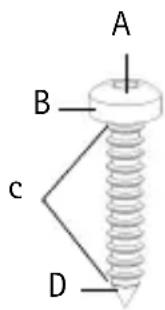
| A 6 to 7 mm (0.23" to 0.27") | |
| B max | 2.5 mm |
| C 2 mm to 3 mm (0.059" to 0.098") | |
| D 3.0 | mm (0.12") |
Specifications
Environmental
| Mode Temperature Humidity | ||
| Operating -20 to 65°C | -4 to 149°F | max 95% (non-condensing) |
| Storage -40 to 74°C | -24 to 158°F | |
Electrical
| DC Input voltage 12VDC (10.2-14.4V DC), max. 38W24VDC (20.4-28.8V DC), max. 20W |
| Input current Max. 3.2A @ 12V DCMax. 1.6A @ 24V DC |
| Maximum available output power 52V DC @ 12/24V DC in (max. 30/15W) |
| Nominal output voltage 51V DC @ 12/24V DC |
| Ethernet cable length 802.3at device:70m/230ft (Cat5)100m/330ft (Cat5e/6)802.3af device: 100m |
Ethernet interface
| Input (Data In): Shielded RJ-45 | EIA 568A and 568B |
| Output (Data & Power Out): Shielded RJ-45 EIA 568A and 568B | |
| Wiring Data provided over pairs | 1/2 and 3/6 for 10/100EthernetPower over spare pairs 4/5 (+) and 7/8 (-) |
| Network cable Shielded category | 5 (or higher)Using a Cat 5e/6 is recommended while powering an 802.3at device. |
Troubleshooting
| Symptom Corrective steps | |
| Midspan does not power up | 1. Verify that the voltage at the power inlet is either 12V DC or 24V DC for Input voltage.2. Remove and re-apply power to the device and check the LED indicators during power up sequence. |
| A port indicator is not lit and the PD (powered device) does not operate | 1. The Midspan did not detect a PD; and the port is not enabled.2. Verify that the PD is designed for PoE operation.3. Verify that you are using a standard Category 5/5e/6, straight-wired cable, with four pairs.4. If there is an external PoE device connected, replace it to verify that it is functioning properly.5. Ensure that the input Ethernet cable is connected to the Data In port.6. Verify that the PD is connected to the Data & Power port.7. Try to reconnect the same PD into a different Midspan. If it works, there is probably a faulty port or RJ-45 connection.8. Verify that there is no shortcut over any of the twisted pair cables or over the RJ45 connectors. |
| The end device operates, but there is no data link | 1. Verify that the port indicator on the front panel is continuously lit.2. If an external PoE device is in use, replace it with a good PoE device.3. Verify that for this link, you are using standard UTP/FTP Category 5 straight (non-crossover) cabling, with all four pairs.4. Verify that the Ethernet cable length is less than 100 meters (333 feet) from the Ethernet source to the powered device. See Ethernet interface, on page 9.5. Try to reconnect the same PD into a different Midspan. If it works, there is probably a faulty port or RJ-45 connection. |
Installation Guide Ver.1.0
AXIS T81B22 DC 30W Midspan Printed: March 2012
© Axis Communications AB, 2012 Part No. 46921
Brand : AXIS
Model : T8123-E
Category : Network Card/Adapter