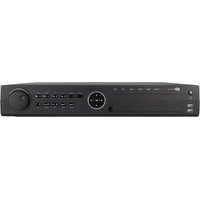
KNR-p16Px16 - Video recorder KT&C - Free user manual and instructions
Find the device manual for free KNR-p16Px16 KT&C in PDF.


| Product Type | Network Video Recorder (NVR) |
| Model | KNR-p16Px16 |
| Brand | KT&C |
| Number of Channels | 16 channels |
| PoE Ports | 16 PoE ports (802.3af/at) |
| Max Recording Resolution | Up to 8MP (4K) |
| Compression Formats | H.265, H.264, MJPEG |
| Storage Capacity | Supports up to 2 HDDs (up to 10TB each) |
| Dimensions (W x D x H) | 440mm x 280mm x 44mm (1U) |
| Weight | Approx. 3.0 kg |
| Power Supply | 48V DC, 4A |
| Power Consumption | Less than 20W (without HDDs) |
| Operating Temperature | 0°C to 40°C (32°F to 104°F) |
| Network Interface | 1x RJ45 10/100/1000 Mbps |
| Supported Protocols | TCP/IP, DHCP, DDNS, NTP, SMTP, etc. |
| Remote Access | Via web browser, mobile app, CMS |
| Video Output | 1x HDMI, 1x VGA |
| Audio Support | 1x audio input, 1x audio output |
| Alarm I/O | 4x alarm input, 2x alarm output |
| Maintenance | Clean with dry cloth; avoid moisture and dust |
| Security | Password protection, user management, firmware update |
| Spare Parts & Repairability | Power adapter, network cables, hard drives (user-replaceable) |
Frequently Asked Questions - KNR-p16Px16 KT&C
User questions about KNR-p16Px16 KT&C
0 question about this device. Answer the ones you know or ask your own.
Ask a new question about this device
Download the instructions for your Video recorder in PDF format for free! Find your manual KNR-p16Px16 - KT&C and take your electronic device back in hand. On this page are published all the documents necessary for the use of your device. KNR-p16Px16 by KT&C.
USER MANUAL KNR-p16Px16 KT&C
Scalable IP Solutions

KNR-p16Px16
KNR-p32Px16
Network Video Recorder
User Manual
Regulatory information FCC information
FCC compliance: This equipment has been tested and found to comply with the limits for a digital device, pursuant to part 15 of the FCC Rules. These limits are designed to provide reasonable protection against harmful interference when the equipment is operated in a commercial environment. This equipment generates, uses, and can radiate radio frequency energy and, if not installed and used in accordance with the instruction manual, may cause harmful interference to radio communications. Operation of this equipment in a residential area is likely to cause harmful interference in which case the user will be required to correct the interference at his own expense.
FCC conditions
This device complies with part 15 of the FCC Rules. Operation is subject to the following two conditions:
- This device may not cause harmful interference.
- This device must accept any interference received, including interference that may cause undesired operation.
EU Conformity Statement

This product and - if applicable - the supplied accessories too are marked with "CE" and comply therefore with the applicable harmonized European standards listed under the Low Voltage Directive 2006/95/EC, the EMC Directive 2004/108/EC, the RoHS Directive 2011/65/EU.

2012/19/EU (WEEE directive): Products marked with this symbol cannot be disposed of as unsorted municipal waste in the European Union. For proper recycling, return this product to your local supplier upon the purchase of equivalent new equipment, or dispose of it at designated collection points. For more information see: www.recyclethis.info.

2006/66/EC (battery directive): This product contains a battery that cannot be disposed of as unsorted municipal waste in the European Union. See the product documentation for specific battery information. The battery is marked with this symbol, which may include lettering to indicate cadmium (Cd), lead (Pb), or mercury (Hg). For proper recycling, return the battery to your supplier or to a designated collection point. For more information see: www.recyclethis.info.
Preventive and Cautionary Tips
Before connecting and operating your device, please be advised of the following tips:
- Ensure unit is installed in a well-ventilated, dust-free environment.
- Unit is designed for indoor use only.
- Keep all liquids away from the device.
- Ensure environmental conditions meet factory specifications.
- Ensure unit is properly secured to a rack or shelf. Major shocks or jolts to the unit as a result of dropping it may cause damage to the sensitive electronics within the unit.
- Use the device in conjunction with an UPS if possible.
• Power down the unit before connecting and disconnecting accessories and peripherals. - A factory recommended HDD should be used for this device.
- Improper use or replacement of the battery may result in hazard of explosion. Replace with the same or equivalent type only. Dispose of used batteries according to the instructions provided by the battery manufacturer.
Thank you for purchasing our product. If there is any question or request, please do not hesitate to contact dealer. This manual is applicable to the models listed in the following table.
| Series | Model | Type |
| Omni IP | KNR-p16Px16KNR-p32Px16 | Network Video Recorder |
Product Key Features
General
- Connectable to network cameras, network domes and encoders.
- Connectable to the third-party network cameras like ACTI, Arecont, AXIS, Bosch, Brickcom, Canon, PANASONIC, Pelco, SAMSUNG, SANYO, SONY, Vivotek and ZAVIO, and cameras that adopt ONVIF or PSIA protocol.
- Connectable to the smart IP cameras.
● PAL/NTSC adaptive video inputs.
● Each channel supports dual-stream.
● Up to 16/32 network cameras can be connected - Independent configuration for each channel, including resolution, frame rate, bit rate, image quality, etc.
Local Monitoring
● Simultaneous HDMI, VGA and CVBS outputs.
- HDMI output and VGA output at up to 1920×1080 resolution.
● Multiple screen display in live view is supported, and the display sequence of channels is adjustable.
- Live view screen can be switched in group, and manual switch and automatic cycle live view are also provided, and the interval of automatic cycle can be adjusted.
- Quick setting menu is provided for live view.
● Motion detection, video tampering, video exception alert and video loss alert functions.
- Privacy mask.
● Multiple PTZ protocols supported; PTZ preset, patrol and pattern.
- Zooming in by clicking the mouse and PTZ tracing by dragging mouse.
HDD Management
- Up to 4 SATA hard disks and 1 eSATA disk can be connected. (Each disk with a maximum of 4TB storage capacity.)
- 8 network disks (8 NAS disks, or 7 NAS disks+1 IP SAN disk) can be connected.
● Supports eSATA disks for recording or backup.
● Supports S.M.A.R.T. and bad sector detection. - HDD group management.
● Supports HDD standby function. - HDD property: redundancy, read-only, read/write (R/W).
- HDD quota management; different capacity can be assigned to different channel.
● Support disk clone to the eSATA disk.
Recording, Capture and Playback
- Holiday recording schedule configuration.
● Continuous and event video recording parameters. - Multiple recording types: manual, continuous, alarm, motion, motion | alarm, motion & alarm.
● 8 recording time periods with separated recording types. - Pre-record and post-record for alarm, motion detection for recording, and pre-record time for schedule and manual recording.
- Searching record files and captured pictures by events (alarm input/motion detection).
- Tag adding for record files, searching and playing back by tags.

INNOVRTIVE
- Locking and unlocking record files.
- Local redundant recording and capture.
- Provide new playback interface with easy and flexible operation.
- Searching and playing back record files by channel number, recording type, start time, end time, etc.
● Smart search for the selected area in the video. - Zooming in when playback.
- Reverse playback of multi-channel.
● Supports pause, play reverse, speed up, speed down, skip forward, and skip backward when playback, and locating by dragging the mouse. - Up to 16-ch synchronous playback at 4CIF real time.
● Manual capture, continuous capture of video images and playback of captured pictures.
Backup
- Export video data by USB, SATA or eSATA device.
- Export video clips when playback.
● Management and maintenance of backup devices. - Either Normal or Hot Spare working mode is configurable to constitute an N+1 hot spare system.
Alarm and Exception
- Configurable arming time of alarm input/output.
- Alarm for video loss, motion detection, tampering, abnormal signal, video input/output standard mismatch, illegal login, network disconnected, IP confliction, abnormal record/capture, HDD error, and HDD full, etc.
- Alarm triggers full screen monitoring, audio alarm, notifying surveillance center, sending email and alarm output.
● Automatic restore when system is abnormal.
Other Local Functions
- Operable by front panel, mouse, remote control, and control keyboard.
- Three-level user management; admin user is allowed to create many operating accounts and define their operating permission, which includes the limit to access any channel.
● Operation, alarm, exceptions and log recording and searching.
● Manually triggering and clearing alarms. - Import and export of device configuration information.
Network Functions
● Self-adaptive 10M/100M/1000M network interface
- Up to 16 independent PoE network interfaces are provided for in these Omni IP NVRs
- IPv6 is supported.
- TCP/IP protocol, PPPoE, DHCP, DNS, DDNS, NTP, SADP, SMTP, SNMP, NFS, and iSCSI are supported.
- TCP, UDP and RTP for unicast.
● Auto/Manual port mapping by UPnP TM .
- Remote web browser access by HTTPS ensures high security.
● Remote reverse playback via RTSP.
● ONVIF camera support
- Remote search, playback, download, locking and unlocking of the record files, and support download files transfer resumption if the connection is broken and restored.
- Remote parameters setup; remote import/export of device parameters.

INNOVRTIVE
- Remote viewing of the device status, system logs and alarm status.
● Remote keyboard operation. - Remote locking and unlocking of control panel and mouse.
- Remote HDD formatting and program upgrading.
● Remote system restart and shutdown.
● RS-232, RS-485 transparent channel transmission.
● Alarm and exception information can be sent to the remote host
● Remotely start/stop recording.
● Remotely start/stop alarm output. - Remote PTZ control.
- Remote JPEG capture.
- Virtual host function is provided to access and manage the IP cameras directly from a LAN/WAN connected PC
● Two-way audio and voice broadcasting. - Embedded WEB server.
TABLE OF CONTENTS
Chapter 1 Introduction....10
1.1 Front Panel 11
1.2 Rear Panel 17
Chapter 2 Getting Started ....18
2.1 Starting Up and Shutting Down the NVR.... 19
2.2 Using the Wizard for Basic Configuration....21
2.3 Adding and Connecting the IP Cameras 24
2.3.1 Adding the Online IP Cameras.... 24
2.3.2 Editing the Connected IP Cameras and Configuring Customized Protocols.... 27
2.3.3 Editing IP Cameras Connected to the PoE Interfaces 30
Chapter 3 Live View 33
3.1 Introduction of Live View 34
3.2 Operations in Live View Mode....35
3.2.1 Front Panel Operation on Live View....35
3.2.2 Using the Mouse in Live View....36
3.2.3 Using an Auxiliary Monitor 37
3.2.4 Quick Setting Toolbar in Live View Mode 37
3.3 Adjusting Live View Settings....40
3.4 Channel-zero Encoding 42
3.5 User Logout....43
Chapter 4 PTZ Controls....44
4.1 Configuring PTZ Settings....45
4.2 Setting PTZ Presets, Patrols & Patterns....46
4.2.1 Customizing Presets....46
4.2.2 Calling Presets 47
4.2.3 Customizing Patrols....47
4.2.4 Calling Patrols 49
4.2.5 Customizing Patterns 50
4.2.6 Calling Patterns....51
4.3 PTZ Control Panel....52
Chapter 5 Recording and Capture Settings....53
5.1 Configuring Parameters....54
5.2 Configuring Recording/Capture Schedule....57
5.3 Configuring Motion Detection Recording and Capture 61
5.4 Configuring Alarm Triggered Recording and Capture....63
5.5 Manual Recording and Continuous Capture....65
5.6 Configuring Holiday Recording and Capture 66
5.7 Configuring Redundant Recording and Capture....68
5.8 Configuring HDD Group for Recording and Capture....70
5.9 Files Protection....71
5.9.1 Locking the Recording Files....71
5.9.2 Setting HDD Property to Read-only 73
Chapter 6 Playback....75
6.1 Playing Back Record Files 76
6.1.1 Playing Back by Channel....76
6.1.2 Playing Back by Time....78
6.1.3 Playing Back by Event Search....80
6.1.4 Playing Back by Tag 82
6.1.5 Smart Playback....85
6.1.6 Playing Back by System Logs 86
6.1.7 Playing Back External Files....88
6.2 Auxiliary Functions During Playback 89
6.2.1 Playing Back Frame by Frame....89
6.2.2 Smart Search....89
6.2.3 Digital Zoom....91
6.2.4 Reverse Playback of Multi-channel 91
6.3 Picture Playback....93
Chapter 7 Backup 95
7.1 Backing up Record Files 96
7.1.1 Quick Export....96
7.1.2 Backing up by Normal Video Search....97
7.1.3 Backing up by Event Search....104
7.1.4 Backing up Video Clips 106
7.2 Backing up Pictures....109
7.3 Managing Backup Devices.... 111
7.4 Hot Spare Device Backup.... 114
7.4.1 Setting Hot Spare Device.... 114
7.4.2 Setting Working Device....115
7.4.3 Managing Hot Spare System....115
Chapter 8 Alarm Settings....118
8.1 Setting Motion Detection Alarm.... 119
8.2 Setting Sensor Alarms 121
8.3 Detecting Video Loss Alarm....124
8.4 Detecting Video Tampering Alarm 126
8.5 Detecting VCA Alarm (for supported cameras)....128
8.6 Handling Exceptions Alarm....130
8.7 Setting Alarm Response Actions 131
8.8 Triggering or Clearing Alarm Output Manually 134
Chapter 9 Network Settings....135
9.1 Configuring General Settings.... 136
9.2 Configuring Advanced Settings....137
9.2.1 Configuring PPPoE Settings.... 137
9.2.2 Configuring DDNS 137
9.2.3 Configuring NTP Server 141
9.2.4 Configuring SNMP 142
9.2.5 Configuring Remote Alarm Host 142

INNOVATIVE
9.2.6 Configuring Multicast....143
9.2.7 Configuring RTSP....143
9.2.8 Configuring Server and HTTP Ports....144
9.2.9 Configuring HTTPS Port 144
9.2.10 Configuring Email 146
9.2.11 Configuring NAT 147
9.2.12 Configuring High-speed Download 150
9.2.13 Virtual Host Settings 151
9.2.14 Telnet Settings.... 152
9.3 Checking Network Traffic 153
9.4 Configuring Network Detection 154
9.4.1 Testing Network Delay and Packet Loss.... 154
9.4.2 Exporting Network Packet....154
9.4.3 Checking the Network Status....155
9.4.4 Checking Network Statistics....156
Chapter 10 Upgrading Firmware....159
10.1 Upgrading Firmware 159
Chapter 11 HDD Management .... 161
11.1 Initializing HDDs 162
11.2 Managing Network HDD 164
11.3 Managing cSATA 166
11.4 Managing HDD Group 167
11.4.1 Setting HDD Groups.... 167
11.4.2 Setting HDD Property....168
11.5 Configuring Quota Mode....170
11.6 Configuring Disk Clone 172
11.7 Checking HDD Status 174
11.8 HDD Detection....176
11.9 Configuring HDD Error Alarms 178
Chapter 12 Camera Settings....179
12.1 Configuring OSD Settings....180
12.2 Configuring Privacy Mask.... 181
12.3 Configuring Video Parameters 182
Chapter 13 NVR Management and Maintenance .... 183
13.1 Viewing System Information.... 184
13.1.1 Viewing Device Information.... 184
13.1.2 Viewing Camera Information....184
13.1.3 Viewing Record Information 184
13.1.4 Viewing Alarm Information....185
13.1.5 Viewing Network Information 185
13.1.6 Viewing HDD Information 186
13.2 Searching & Export Log Files 187
13.3 Importing/Exporting IP Camera Info.... 190
13.4 Importing/Exporting Configuration Files 191

INNOVRTIVE
13.5 Upgrading System....192
13.5.1 Upgrading by Local Backup Device 192
13.5.2 Upgrading by FTP 192
13.6 Restoring Default Settings.... 194
Chapter 14 Other Settings....195
14.1 Configuring RS-232 Serial Port.... 196
14.2 Configuring General Settings.... 197
14.3 Configuring DST Settings....198
14.4 Configuring More Settings for Device Parameters.... 199
14.5 Managing User Accounts....200
14.5.1 Adding a User 200
14.5.2 Deleting a User 202
14.5.3 Editing a User 202
Appendix 204
Glossary 205
Troubleshooting 206
List of Compatible IP Cameras 212
Chapter 1 Introduction
1.1 Front Panel
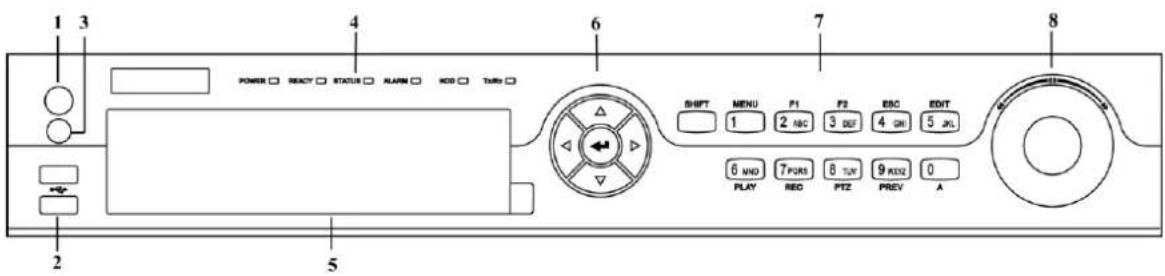
Figure 1.1 KVR-p16Px16 & KVR-p32Px16
Table 1.1 Description of Control Panel Buttons
| No. | Name | Function Description |
| 1 | POWER ON/OFF | Power on/off switch. |
| 2 | USB Interface | Connect to USB mouse or USB flash memory. |
| 3 | IR Receiver | Receiver for IR remote control devices. |
| 4 | POWER | Power indicator lights in green when NVR is powered up. |
| READY | Ready indicator is normally green, indicating that the NVR is functioning properly. | |
| STATUS | Indicator turns green when NVR is controlled by an IR remote control with the address from 1~254;Indicator turns red when the SHIFT button is used;Indicator does not light when the NVR is controlled by a keyboard or by the IR remote control with the address of 255;Indicator turns green when the NVR is controlled by IR remote control (with the address from 1~254) and keyboard at the same time, and the SHIFT button is not used;Indicator turns orange : (a) when the NVR is controlled by IR remote control (with the address from 1~254) and keyboard at the same time and the SHIFT button is used as well; (b) when the NVR is controlled by IR remote control (with the address from 1~254) and the SHIFT button is used. | |
| ALARM | Alarm indicator turns red when a sensor alarm is detected. | |
| HDD | HDD indicator blinks in red when data is being read from or written to HDD. | |
| Tx/Rx | TX/RX indicator blinks in green when network connection is functioning properly. | |
| 5 | DVD-ROM | Slot for DVD-ROM. |
| 6 | DIRECTION | The DIRECTION buttons are used to navigate between different fields and items in menus.In Playback mode, the Up and Down button is used to speed up and slow down recorded video.In All-day Playback mode, the Left/Right button can be used to select the recorded video of next/previous day; in Playback by Normal Video Search, the Left/Right button can be used to select the next/previous recorded file.In Live View mode, the directional buttons can be used to cycle through channels.In PTZ control mode, it can control the movement of the PTZ camera. |
| ENTER | Confirm selection in any of the menu modes. It can also be used to tick checkbox fields.In Playback mode, it can be used to play or pause the video.In Single-frame Playback mode, pressing the ENTER button will advance the video by a single frame.In Auto-switch mode, it can be used to stop /start auto switch. | |
| 7 | SHIFT | Switch of compound keys between the numeric/letter input and functional control. |
| 1/MENU | Enter numeral “1”;Access the main menu interface. | |
| 2ABC/F1 | Enter numeral “2”;Enter letters “ABC”;The F1 button can be used to select all items on the list;In PTZ Control mode, the F1 button can be used to zoom out (zoom-) the PTZ camera;In live view or playback mode, the F1 button can be used to switch between main and spot video output. | |
| 3DEF/F2 | Enter numeral “3”;Enter letters “DEF”;In PTZ Control mode, the F1 button can be used to zoom in (zoom+) the PTZ camera;The F2 button can be used to cycle through tab pages. | |
| 4GHI/ESC | Enter numeral “4”;Enter letters “GHI”;Exit and back to the previous menu. | |
| 5JKL/EDIT | Enter numeral “5”;Enter letters “JKL”;Delete characters before cursor;Select the checkbox and ON/OFF switch;Start/stop record clipping in playback. | |
| 6MNO/PLAY | Enter numeral “6”;Enter letters “MNO”;In Playback mode, it is used for direct access to playback interface. | |
| 7PQRS/REC | Enter numeral “7”;Enter letters “PQRS”;Manual record, for direct access to manual record interface; manually enable/disable record. | |
| 8TUV/PTZ | Enter numeral “8”;Enter letters “TUV”;Access PTZ control interface. | |
| 9WXYZ/PREV | Enter numeral “9”;Enter letters “WXYZ”;Multi-camera display in live view;In Playback mode or Menu→Playback→Tag playback interface, this button can be used to delete the selected tag. | |
| 0/A | Enter numeral “0”;Switch between input methods (upper and lowercase alphabet, symbols and numeric input).In Playback mode, this button can be used to add the default tag. | |
| 8 | JOG SHUTTLE Control | Move the active selection in a menu. The inner ring will move the selection up and down; the outer ring will move it left and right.In Playback mode, the inner ring is used to jump 30s forward/backward in video files. The outer ring can be used to speed up/slow down the video.In Live View mode, it can be used to cycle through different channels.In PTZ control mode, in can control the movement of the PTZ camera. |
IR Remote Control Operations
The NVR may also be controlled with the included IR remote control, shown in Figure 1.2.

Batteries (2×AAA) must be installed before operation.

Figure 1.2 Remote Control
The keys on the remote control closely resemble the ones on the front panel. See Table 1.2.
Table 1.2 Description of the IR Remote Control Buttons
| No. | Name | Description |
| 1 | POWER | Power on/off the device. |
| 2 | DEV | Enables/Disables Remote Control. |
| 3 | Alphanumeric Buttons | Same as Alphanumeric buttons on front panel. |
| 4 | EDIT Button | Same as EDIT/IRIS+ button on front panel. |
| 5 | A Button | Same as A/FOCUS+ button on front panel. |
| 6 | REC Button | Same as REC/SHOT button on front panel. |
| 7 | PLAY Button | Same as the PLAY/AUTO button on front panel. |
| 8 | INFO Button | Reserved. |
| 9 | VOIP/MON Button | Same as the MAIN/SPOT/ZOOM- button on front panel. |
| 10 | MENU Button | Same as the MENU/WIPER button on front panel. |
| 11 | PREV Button | Same as the PREV/FOCUS- button on front panel. |
| 12 | DIRECTION/ENTER Buttons | Same as the DIRECTION/ENTER buttons on front panel. |
| 13 | PTZ Button | Same as the PTZ/IRIS- button on front panel. |
| 14 | ESC Button | Same as the ESC button on front panel. |
| 15 | RESERVED | Reserved for future usage. |
| 16 | F1 Button | Same as the F1/LIGHT button on front panel. |
| 17 | PTZ Control Buttons | Buttons to adjust the iris, focus and zoom of a PTZ camera. |
| 18 | F2 Button | Same as the F2/AUX button on front panel. |
Troubleshooting Remote Control:

Make sure you have installed batteries properly in the remote control. And you have to aim the remote control at the IR receiver in the front panel.
If there is no response after you press any button on the remote, follow the procedure below to troubleshoot.
Steps:
- Go to Menu > Settings > General > More Settings by operating the front control panel or the mouse.
- Check and remember NVR ID#. The default ID# is 255. This ID# is valid for all the IR remote controls.
- Press the DEV button on the remote control.
- Enter the NVR ID# you set in step 2.
- Press the ENTER button on the remote.
If the Status indicator on the front panel turns blue, the remote control is operating properly. If the Status indicator does not turn blue and there is still no response from the remote, please check the following:
- Batteries are installed correctly and the polarities of the batteries are not reversed.
- Batteries are fresh and not out of charge.
- IR receiver is not obstructed.
If the remote still can't function properly, please change a remote and try again, or contact the device provider.
USB Mouse Operation
A regular 3-button (Left/Right/Scroll-wheel) USB mouse can also be used with this NVR. To use a USB mouse:
- Plug USB mouse into one of the USB interfaces on the front panel of the NVR.
- The mouse should automatically be detected. If in a rare case that the mouse is not detected, the possible reason may be that the two devices are not compatible, please refer to the recommended the device list.
The operation of the mouse:
Table 1.3 Description of the Mouse Control
| Name | Action | Description |
| Left-Click | Single-Click | Live view: Select channel and show the quick set menu.Menu: Select and enter. |
| Double-Click | Live view: Switch between single-screen and multi-screen. | |
| Click and Drag | PTZ control: pan, tilt and zoom.Video tampering, privacy mask and motion detection: Select target area.Digital zoom-in: Drag and select target area.Live view: Drag channel/time bar. | |
| Right-Click | Single-Click | Live view: Show menu.Menu: Exit current menu to upper level menu. |
| Scroll-Wheel | Scrolling up | Live view: Previous screen.Menu: Previous item. |
| Scrolling down | Live view: Next screen.Menu: Next item. |

INNOVATIVE
Input Method Description
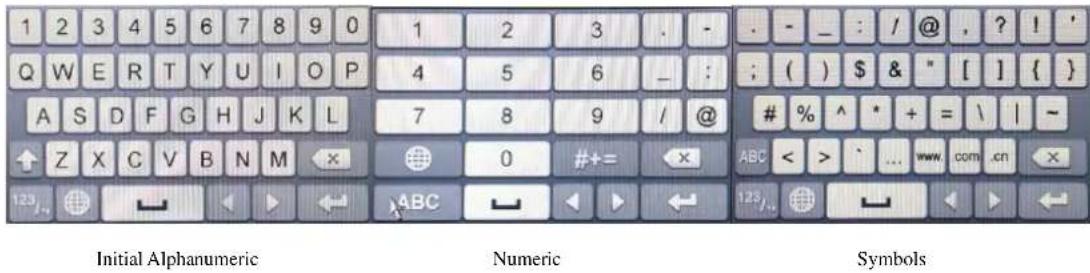
Figure 1.3 Soft Keyboards
Description of the buttons on the soft keyboard:
Table 1.4 Description of the Soft Keyboard Icons
| Icon | Description | Icon | Description |
 | Caps Lock (Yellow when active) |  | Switch to Alphanumeric Keyboard |
 | Switch to Numeric Keyboard |  | Switch to Symbols Keyboard |
 | Move cursor left/right |  | Backspace |
 | Space |  | Enter/Done |
1.2 Rear Panel

Figure 1.4 KVR-p16Px16 & KVR-p32Px16
Table 1.5 Description of Rear Panel Interfaces
| No. | Item | Description |
| 1 | VIDEO OUT | BNC connector for video output. |
| 2 | CVBS AUDIO OUT | BNC connector for audio output. This connector is synchronized with CVBS video output. |
| VGA AUDIO OUT | BNC connector for audio output. This connector is synchronized with VGA video output. | |
| 3 | LINE IN | BNC connector for audio input. |
| 4 | RS-232 Interface | Connector for RS-232 devices. |
| 5 | VGA | DB9 connector for VGA output. Display local video output and menu. |
| 6 | HDMI | HDMI video output connector. |
| 7 | eSATA (Optional) | Connects external SATA HDD, CD/DVD-RM. |
| 8 | Network Interface | 10/100/1000 LAN/WAN Ethernet port |
| 9 | Termination Switch | RS-485 termination switch.Up position is not terminated.Down position is terminated with 120Ω resistance. |
| 10 | RS-485 Interface | Connector for RS-485 devices. |
| Controller Port | D+, D- pin connects to Ta, Tb pin of controller. For cascading devices, the first NVR's D+, D- pin should be connected with the D+, D- pin of the next NVR. | |
| ALARM IN | Connector for alarm input. | |
| ALARM OUT | Connector for alarm output. | |
| 11 | GROUND | Ground (should to be connected when NVR starts up). |
| 12 | AC 100V ~ 240V | AC 100V ~ 240V power supply. |
| 13 | POWER | Switch for turning on/off the device. |
| 14 | USB interface | Universal Serial Bus (USB) ports for additional devices such as USB mouse and USB Hard Disk Drive (HDD). |
| 15 | Network Interfaces with PoE function | Network interface for the cameras and to provide power over Ethernet. |
Chapter 2 Getting Started
2.1 Starting Up and Shutting Down the NVR
Purpose:
Proper startup and shutdown procedures are crucial to long term reliable operation of the NVR.
Before you start:
Check that the voltage of the extra power supply is the same with the NVR's requirement, and the ground connection is working properly.
Starting up the NVR:
Steps:
- Check the power supply is plugged into an electrical outlet. It is HIGHLY recommended that an Uninterruptible Power Supply (UPS) be used in conjunction with the device. The Power indicator LED on the front panel should be red, indicating the device gets the power supply.
- Press the POWER button on the front panel. The Power indicator LED should turn green indicating that the unit begins to start up.
- After startup, the Power indicator LED remains green. A splash screen with the status of the HDD appears on the monitor. The row of icons at the bottom of the screen shows the HDD status. 'X' means that the HDD is not installed or cannot be detected.
Shutting down the NVR
Steps:
There are two proper ways to shut down the NVR.
• OPTION 1: Standard shutdown
- Enter the Shutdown menu.
Menu > Shutdown

Figure 2.1 Shutdown Menu
- Click the Shutdown button.
- Click the Yes button.
• OPTION 2: By operating the front panel
- Press and hold the POWER button on the front panel for 3 seconds.
- Enter the administrator's username and password in the dialog box for authentication.
- Click the Yes button.

Do not press the POWER button again when the system is shutting down.
Rebooting the NVR
In the Shutdown menu, you can also reboot the NVR.
Steps:
- Enter the Shutdown menu by clicking Menu > Shutdown.
- Click the Logout button to lock the NVR or the Reboot button to reboot the NVR.
2.2 Using the Wizard for Basic Configuration
By default, the Setup Wizard starts once the NVR has loaded, as shown in Figure 2.2.
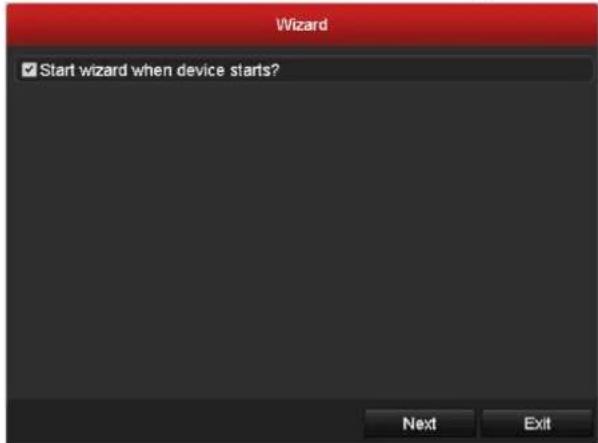
Figure 2.2 Start Wizard Interface
Operating the Setup Wizard:
- The Setup Wizard can walk you through some important settings of the NVR. If you don't want to use the Setup Wizard at that moment, click the Cancel button. You can also choose to use the Setup Wizard next time by leaving the "Start wizard when the device starts?" checkbox checked.
- Click Next button on the Wizard window to enter the Login window, as shown in Figure 2.3.

Figure 2.3 Login Window
- Enter the admin password. By default, the password is 12345.
- To change the admin password, check the New Admin Password checkbox. Enter the new password and confirm the password in the given fields.
- Click the Next button to enter the date and time settings window, as shown in Figure 2.4.
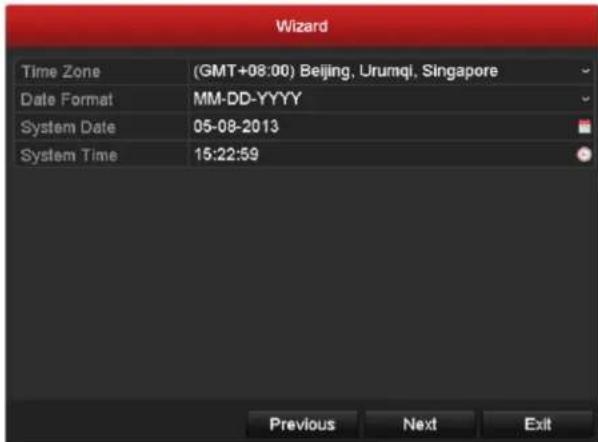
Figure 2.4 Date and Time Settings
- After the time settings, click Next button which takes you back to the Network Setup Wizard window, as shown in Figure 2.5.

Figure 2.5 KVR-p16Px16 & KVR-p32Px16 Network Configuration
- Click Next button after you configured the network parameters, which takes you to the HDD Management window, shown in Figure 2.6.
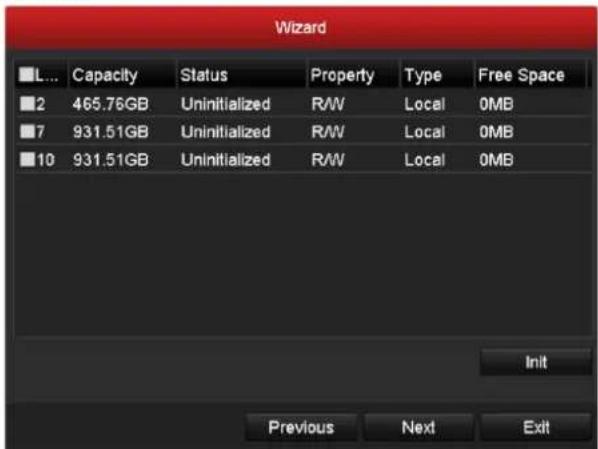
Figure 2.6 HDD Management
- To initialize the HDD, click the Init button. Initialization removes all the data saved in the HDD.
- Click Next button. You enter the Adding IP Camera interface.
- Click Search to find online IP Camera. Select the IP camera to be added, and click the Add button.

Figure 2.7 Search for IP Cameras
- Click Next button. Configure the recording for the searched IP Cameras.

Figure 2.8 Record Settings
- Click Copy to copy the settings to other channels, as shown in Figure 2.9.
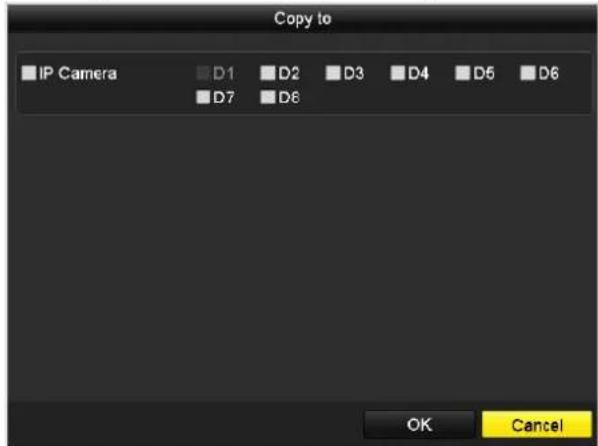
Figure 2.9 Copy Record Settings
- Click OK to complete the startup Setup Wizard.
2.3 Adding and Connecting the IP Cameras
2.3.1 Adding the Online IP Cameras
Purpose:
The main function of the NVR is to connect the network cameras and record the video got from it. So before you can get a live view or record of the video, you should add the network cameras to the connection list of the device.
Before you start:
Ensure the network connection is valid and correct. For detailed checking and configuring of the network, please see Chapter Checking Network Traffic and Chapter Configuring Network Detection.
• OPTION 1:
Steps:
- Right-click the mouse when you in the live view mode to show the right-click menu.

Figure 2. 10 Right-click Menu
- Select Add IP Camera in the pop-up menu to enter the IP Camera Management interface.
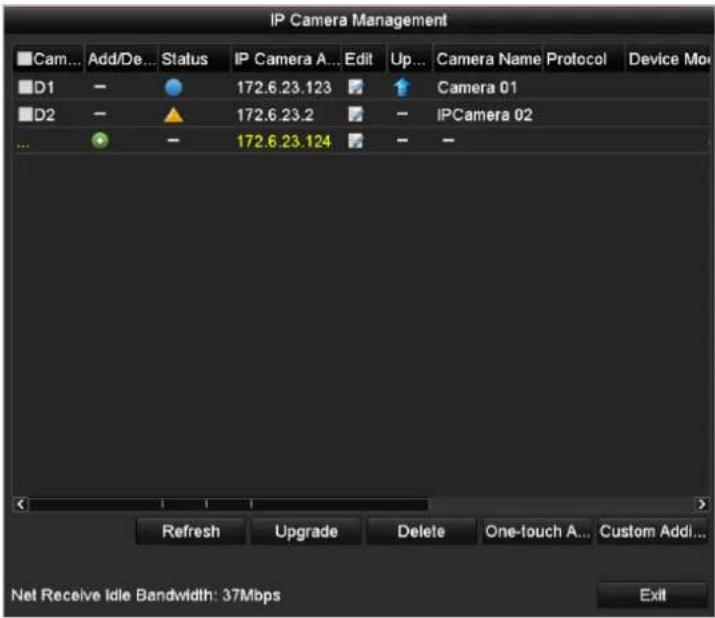
Figure 2.11 Adding IP Camera Interface
- The online cameras with same network segment will be displayed in the camera list. Click the button to add the camera.
Or you can click the One-touch Adding button to add all the online IP cameras.
Table 2.1 Explanation of the icons
| Icon | Explanation | Icon | Explanation |
| [3648] | Edit basic parameters of the camera | Add the detected IP camera. | |
 | The camera is connected. | The camera is disconnected; you can click the icon to get the exception information of camera. | |
| [BT20] | Delete the IP camera | Advanced settings of the camera. |
- To add other IP cameras:
1) Click the Custom Adding button to pop up the Add IP Camera (Custom) interface.

Figure 2.12 Custom Adding IP Camera Interface

INNOVATIVE
2) You can edit the IP address, protocol, management port, and other information of the IP camera to be added.
3) Click Add to add the camera.
• OPTION 2:
Steps:
- Enter the Camera Management interface.
Menu> Camera> Camera

Figure 2.13 Main Menu
- Repeat the step 3 and 4 of OPTION 1 to add the camera.

Figure 2.14 IP Camera Management Interface
Table 2.2 Explanation of the icons
| Icon | Explanation | Icon | Explanation |
| [5ZZ8] | Edit basic parameters of the camera |  | Add the detected IP camera. |
| [4G7A] | The camera is connected; you can click the icon to get the live view of the camera. | [1637] | The camera is disconnected; you can click the icon to get the exception information of camera. |
| Delete the IP camera | Advanced settings of the camera. |
(For the encoders with multiple channels only) check the checkbox of Channel No. in the pop-up window, as shown in the following figure, and click OK to finish adding.

Figure 2.15 Selecting Multiple Channels
2.3.2 Editing the Connected IP Cameras and Configuring Customized Protocols
After the adding of the IP cameras, the basic information of the camera lists in the page, you can configure the basic setting of the IP cameras.
Steps:
- Click the icon to edit the parameters; you can edit the IP address, protocol and other parameters.

Figure 2.16 Edit the Parameters
Channel Port: If the connected device is an encoding device with multiple channels, you can choose the channel to connect by selecting the channel port No. in the dropdown list.
Transfer Protocol: Auto, TCP and UDP are selectable; you can select the transfer protocol according to the network condition.
- Click OK to save the settings and exit the editing interface.
To edit advanced parameters:
Steps:
- Drag the horizontal scroll bar to the right side and click the icon.
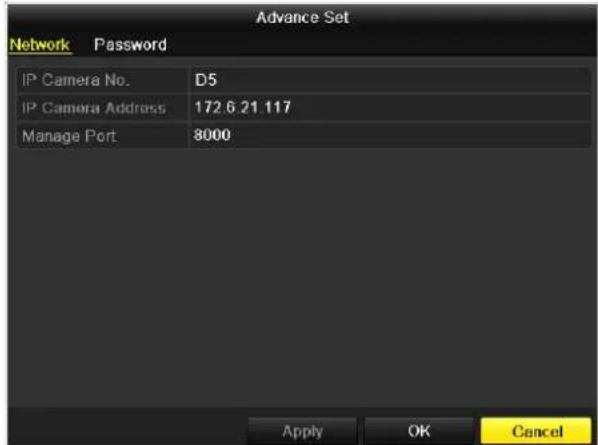
Figure 2.17 Network Configuration of the Camera
- You can edit the network information and the password of the camera.
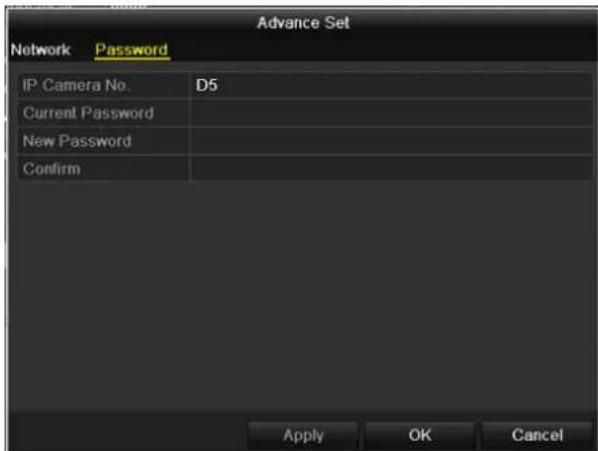
Figure 2.18 Password Configuration of the Camera
- Click Apply to save the settings and click OK to exit the interface.
Configuring the customized protocols
Purpose:
To connect the network cameras which are not configured with the standard protocols, you can configure the customized protocols for them.
Steps:
- Click the Protocol button in the custom adding IP camera interface to enter the protocol management interface.
![Protocol Management Custom Protocol Custom Protocol 1 Protocol Name ipc Stream Type Main Stream Substream Enable Substream Type RTSP RTSP Transfer Protocol Auto Auto Port 554 554 Path Example: [Type]://[IP Address];[Port]/[Path] rtsp://192.168.0.1:554/ch1/main/av_stream Apply OK Cancel](/content/2026/05/1047595/images/8a157ebe2b01ff62b4f2349ba066072d962aecd7a762b8151a7d4f9d6247609a.jpg)
Figure 2.19 Protocol Management Interface
There are 16 customized protocols provided in the system, you can edit the protocol name; and choose whether to enable the sub-stream.
- Choose the protocol type of transmission and choose the transfer protocols.

Before customizing the protocol for the network camera, you have to contact the manufacturer of the network camera to consult the URL (uniform resource locator) for getting main stream and sub-stream.
Example: The format of the URL is: [Type]://[IP Address of the network camera]:[Port]/[Path]. E.g., rtsp://192.168.1.55:554/ch1/main/av_stream.
- Protocol Name: Edit the name for the custom protocol.
- Enable Substream: If the network camera does not support sub-stream or the sub-stream is not needed leave the checkbox empty.
- Type: The network camera adopting custom protocol must support getting stream through standard RTSP.
• Transfer Protocol: Select the transfer protocol for the custom protocol.
• Port: Set the port No. for the custom protocol. - Path: Set the resource path for the custom protocol. E.g., ch1/main/av_stream.

The protocol type and the transfer protocols must be supported by the connected network camera.
After adding the customized protocols, you can see the protocol name is listed in the dropdown list, please refer to Figure 2.20.

Figure 2. 20 Protocol Setting
- Choose the protocols you just added to validate the connection of the network camera.
2.3.3 Editing IP Cameras Connected to the PoE Interfaces

This chapter applies to the Plug and Play PoE interfaces
The PoE interfaces enables the NVR system to pass electrical power safely, along with data, on Ethernet cabling to the connected network cameras.
The KVR-p16Px16 & KVR-p32Px16 NVRs provides 16 PoE interfaces which can connect to 16 network cameras directly; and if you disable the PoE interface, you can also connect to the online network cameras. And the PoE interface supports the Plug-and-Play function.
Example:
For a KVR-p16Px16 NVR, when you want to connect 2 online cameras and connect 16 network cameras via PoE interfaces, you must disable 2 PoE interfaces in the Edit IP Camera menu.
To add Cameras for NVR supporting PoE function:
Before you start:
Connect the network cameras via the PoE interfaces.
Steps:
- Enter the Camera Management interface.
Menu> Camera> Camera

Figure 2.21 List of Connected Cameras

The cameras connecting to the PoE interface cannot be deleted in this menu.
- Click the button, and select the Adding Method in the drop-down list.
- Plug-and-Play: It means that the camera is connected to the PoE interface, so in this case, the parameters of the camera can't be edited. The IP address of the camera can only be edited in the Network Configuration interface, see Chapter 9.1 Configuring General Settings for detailed information.
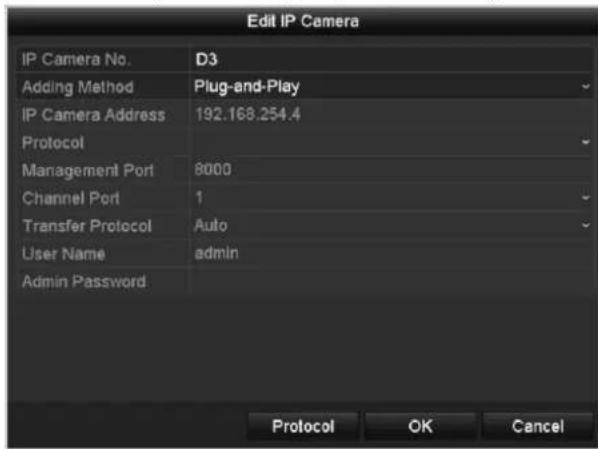
Figure 2.22 Edit IP Camera Interface - Plug-and-Play
- Manual: You can disable the PoE interface by selecting the manual while the current channel can be used as a normal channel and the parameters can also be edited.
Input the IP address, the user name and password of administrator manually, and click OK to add the IP camera.

Figure 2. 23 Edit IP Camera Interface - Manual
Chapter 3 Live View
3.1 Introduction of Live View
Live view shows you the video image getting from each camera in real time. The NVR automatically enters Live View mode when powered on. It is also at the very top of the menu hierarchy, thus pressing the ESC many times (depending on which menu you're on) brings you to the Live View mode.
Live View Icons
In the live view mode, there are icons at the upper-right of the screen for each channel, showing the status of the record and alarm in the channel, so that you can know whether the channel is recorded, or whether there are alarms occur as soon as possible.
Table 3.1 Description of Live View Icons
| Icons | Description |
| Alarm (video loss, video tampering, motion detection or sensor alarm) | |
| Record (manual record, schedule record, motion detection or alarm triggered record) | |
| Alarm & Record | |
| Event/Exception (motion detection, sensor alarm or exception information, appears at the lower-left corner of the screen. Please refer to Chapter 8.7 Setting Alarm Response Actions for details.) |
3.2 Operations in Live View Mode
In live view mode, there are many functions provided. The functions are listed below.
• Single Screen: showing only one screen on the monitor.
• Multi-screen: showing multiple screens on the monitor simultaneously.
- Auto-switch: the screen is auto switched to the next one. And you must set the dwell time for each screen on the configuration menu before enabling the auto-switch.
Menu>Configuration>Live View>Dwell Time.
- Start Recording: continuous record and motion detection record are supported.
• Output Mode: select the output mode to Standard, Bright, Gentle or Vivid.
- Add IP Camera: the shortcut to the IP camera management interface.
- Playback: playback the recorded videos for current day.
- Aux/Main output switch: the NVR checks the connection of the output interfaces to define the main and auxiliary output interfaces. The priority level for the main and aux output is HDMI>VGA>CVBS. This means if the HDMI is used, it will be the main output. If the HDMI is not used, the VGA output will be the main output. See the table below.
Table 3.2 Priorities of Interfaces
| HDMI | VGA | CVBS | Main output | Auxiliary output | |
| 1 | HDMI | VGA | |||
| 2 | × | HDMI | CVBS | ||
| 3 | × | VGA | CVBS | ||
| 4 | × | × | CVBS |
- √ means the interface is in use, × means the interface is out of use or the connection is invalid. And the HDMI, VGA and CVBScan be used at the same time.
When the aux output is enabled, the main output can't do any operation, and you can do some basic operation on the live view mode for the Aux output.
3.2.1 Front Panel Operation on Live View
Table 3. 3 Front Panel Operation in Live View
| Functions | Front Panel Operation |
| Show single screen | Press the corresponding Alphanumeric button. E.g. Press 2 to display only the screen for channel 2. |
| Show multi-screen | Press the PREV/FOCUS- button. |
| Manually switch screens | Next screen: right/down direction button.Previous screen: left/up direction button. |
| Auto-switch | Press Enter button. |
| Playback | Press Play button. |
| Switch between main and aux output | Press Main/Aux button. |
3.2.2 Using the Mouse in Live View
Table 3.4 Mouse Operation in Live View
| Name | Description |
| Menu | Enter the main menu of the system by right clicking the mouse. |
| Single Screen | Switch to the single full screen by choosing channel number from the dropdown list. |
| Multi-screen | Adjust the screen layout by choosing from the dropdown list. |
| Previous Screen | Switch to the previous screen. |
| Next Screen | Switch to the next screen. |
| Start/Stop Auto-switch | Enable/disable the auto-switch of the screens. |
| Start Recording | Start continuous recording or motion detection recording of all channels. |
| Add IP Camera | Enter the IP Camera Management interface, and manage the cameras. |
| Playback | Enter the playback interface and start playing back the video of the selected channel immediately. |
| Output Mode | Four modes of output supported, including Standard, Bright, Gentle and Vivid. |
| Aux Monitor | Switch to the auxiliary output mode and the operation for the main output is disabled. |
NOTE
- The dwell time of the live view configuration must be set before using Start Auto-switch.
- If you enter Aux monitor mode and the Aux monitor is not connected, the mouse operation is disabled; you need to switch back to the Main output with the MAIN/AUX button on the front panel or remote.
- If the corresponding camera supports intelligent function, the Reboot Intelligence option is included when right-clicking mouse on this camera.

Figure 3.1 Right-click Menu
3.2.3 Using an Auxiliary Monitor
Certain features of the Live View are also available while in an Aux monitor. These features include:
- Single Screen: Switch to a full screen display of the selected camera. Camera can be selected from a dropdown list.
- Multi-screen: Switch between different display layout options. Layout options can be selected from a dropdown list.
- Next Screen: When displaying less than the maximum number of cameras in Live View, clicking this feature will switch to the next set of displays.
- Playback: Enter into Playback mode.
• PTZ: Enter PTZ Control mode.
• Main Monitor: Enter Main operation mode.

In the live view mode of the main output monitor, the menu operation is not available while Aux output mode is enabled.
3.2.4 Quick Setting Toolbar in Live View Mode
On the screen of each channel, there is a quick setting toolbar which shows when you single click the mouse in the corresponding screen.

Figure 3.2 Quick Setting Toolbar
Table 3.5 Description of Quick Setting Toolbar Icons
| Icon | Description | Icon | Description | Icon | Description |
 | Enable/Disable Manual Record |  | Instant Playback |  | Mute/Audio on |
 | Capture |  | PTZ Control |  | Digital Zoom |
 | Image Settings |  | Live View Strategy |  | Stream Information |
 | Close |

Instant Playback only shows the record in last five minutes. If no record is found, it means there is no record during the last five minutes.

Digital Zoom can zoom in the selected area to the full screen. You can left-click and draw to select the area to

INNOVATIVE
zoom in, as shown in Figure 3.3.
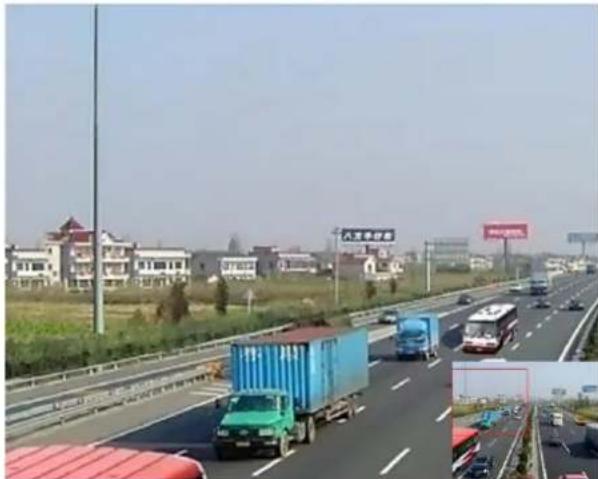
Figure 3.3 Digital Zoom

Image Settings icon can be selected to enter the Image Settings menu.
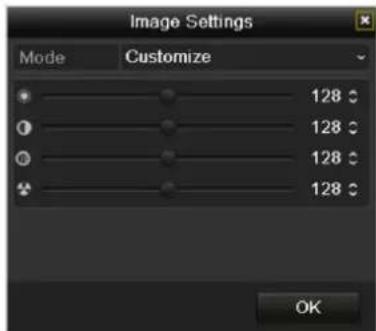
Figure 3.4 Image Settings- Preset
You can also choose the Customize mode to set the image parameters like brightness, contrast, saturation and hue.

Figure 3.5 Image Settings- Customization

Live View Strategy can be selected to set strategy, including Real-time, Balanced, Fluency.

Figure 3.6 Live View Strategy
Move the mouse onto the icon to show the real-time stream information, including the frame rate, bitrate and resolution.
![Information [25fps] [103Kbps] [352x288]](/content/2026/05/1047595/images/172aaed5b77e82f570357a46ba3da98eff96d1351a5bc1bfacbad7c94e874d7f.jpg)
Figure 3.7 Information
3.3 Adjusting Live View Settings
Purpose:
Live View settings can be customized according to different needs. You can configure the output interface, dwell time for screen to be shown, mute or turning on the audio, the screen number for each channel, etc.
Steps:
- Enter the Live View Settings interface.
Menu> Configuration> Live View

Figure 3.8 Live View-General
The settings available in this menu include:
- Video Output Interface: Designates the output to configure the settings for. Outputs include HDMI (depends on the model), VGA, Main CVBS and Spot Output.
• Live View Mode: Designates the display mode to be used for Live View. - Dwell Time: The time in seconds to dwell between switching of channels when enabling auto-switch in Live View.
-
Enable Audio Output: Enables/disables audio output for the selected video output.
• Volume: Adjust the volume of live view, playback and two-way audio for the selected output interface.
• Event Output: Designates the output to show event video.
• Full Screen Monitoring Dwell Time: The time in seconds to show alarm event screen. -
Setting Cameras Order

Figure 3.9 Live View- Camera Order
1) Select a View mode in □□□□□□□□□□□□□□□□□□□□□□□□□□□□□□□□□□□□□□□□□□□□□□□□□□□□□□□□□□□□□□□□□□□□□□□□□□□□□□□□□□□□□□□□□□□□□□□□□□□□□○ including 1/4/6/8/16/25/32/36-window division modes are supported.
2) Select the small window, and double-click on the channel number to display the channel on the window.
You can click 📋 button to start live view for all the channels and click 🔒 to stop all the live view.
3) Click the Apply button to save the setting.
You can also click-and-drag the camera to the desired window on the live view interface to set the camera order.
3.4 Channel-zero Encoding
Purpose:
Sometimes you need to get a remote view of many channels in real time from web browser or CMS (Client Management System) software, in order to decrease the bandwidth requirement without affecting the image quality, channel-zero encoding is supported as an option for you.
Steps:
- Enter the Live View Settings interface.
Menu > Configuration> Live View
- Select the Channel-Zero Encoding tab.

Figure 3.10 Live View- Channel-Zero Encoding
- Check the checkbox after Enable Channel Zero Encoding.
- Configure the Frame Rate, Max. Bitrate Mode and Max. Bitrate.
After you set the Channel-Zero encoding, you can get a view in the remote client or web browser of 16 channels in one screen.
3.5 User Logout
Purpose:
After logging out, the monitor turns to the live view mode and if you want to do some operation, you need to enter user name and password tog in again.
Steps:
- Enter the Shutdown menu.
Menu>Shutdown

Figure 3.11 Shutdown
- Click Logout.

After you have logged out the system, menu operation on the screen is invalid. It is required to input a user name and password to unlock the system.
Chapter 4 PTZ Controls
4.1 Configuring PTZ Settings
Purpose:
Follow the procedure to set the parameters for PTZ. The configuring of the PTZ parameters should be done before you control the PTZ camera.
Before you start:
Check that the PTZ and the NVR are connected properly through RS-485 interface.
Steps:
- Enter the PTZ Settings interface.
Menu >Camera> PTZ
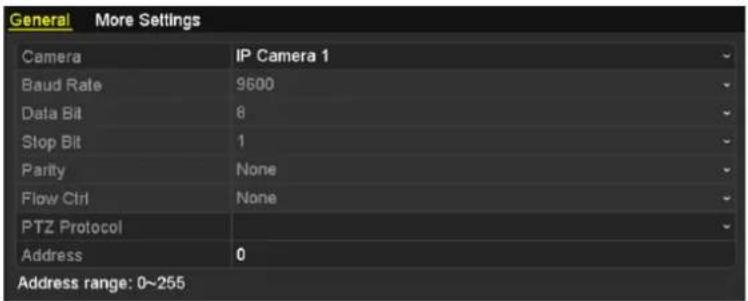
Figure 4.1 PTZ-General
- Choose the camera for PTZ setting in the Camera dropdown list.
- Enter the parameters of the PTZ camera.

All the parameters should be exactly the same as the PTZ camera parameters.
- Click Apply button to save the settings.
4.2 Setting PTZ Presets, Patrols & Patterns
Before you start:
Please make sure that the presets, patrols and patterns should be supported by PTZ protocols.
4.2.1 Customizing Presets
Purpose:
Follow the steps to set the Preset location which you want the PTZ camera to point to when an event takes place.
Steps:
- Enter the PTZ Control interface.
Menu>Camera>PTZ>More Settings
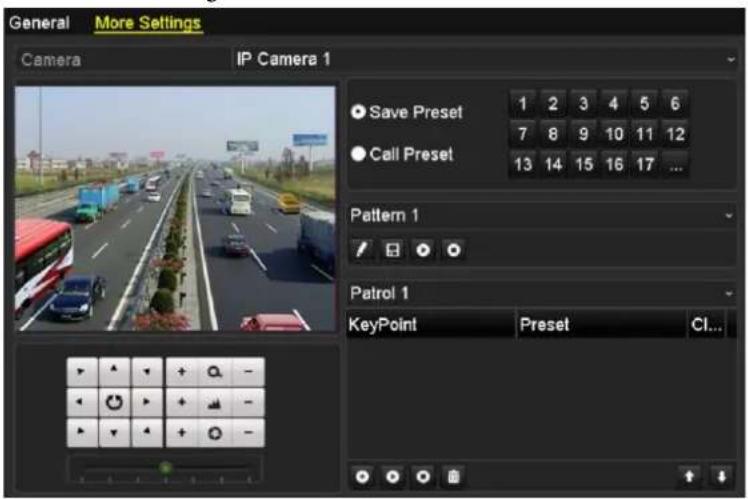
Figure 4.2 PTZ-More Settings
- Use the directional button to wheel the camera to the location where you want to set preset.
- Click the round icon before Save Preset.
- Click the preset number to save the preset.
Repeat the steps2-4 to save more presets. If the number of the presets you want to save is more than 17, you can click [...] and choose the available numbers.

Figure 4.3 More Presets
4.2.2 Calling Presets
Purpose:
This feature enables the camera to point to a specified position such as a window when an event takes place.
Call preset in the PTZ setting interface:
Steps:
-
Enter the PTZ Control interface. Menu>Camera>PTZ>More Settings
-
Check the round icon of Call Preset.

Figure 4.4 PTZ-Call Preset
- Choose the preset number.
Call preset in live view mode:
Steps:
- Click the button PTZ in the lower-right corner of the PTZ setting interface;
Or press the PTZ button on the front panel or click the PTZ Control icon in the quick setting bar to enter the PTZ setting menu in live view mode.

Figure 4.5 PTZ Panel
-
Choose Camera in the list on the menu.
-
Double click the preset in the Preset list to call it.
4.2.3 Customizing Patrols
Purpose:
Patrols can be set to move the PTZ to different key points and have it stay there for a set duration before moving

INNOVATIVE
on to the next key point. The key points are corresponding to the presets. The presets can be set following the steps above in Customizing Presets.
Steps:
- Enter the PTZ Control interface.
Menu>Camera>PTZ>More Settings - Select patrol number in the drop-down list of patrol.
- Select the ⊕ under Patrol option box to add key points for the patrol.

Figure 4.6 PTZ- Add Key Point
- Configure key point parameters, such as the key point No., duration of staying for one key point and speed of patrol. The key point is corresponding to the preset. The Key Point No. determines the order at which the PTZ will follow while cycling through the patrol. The Duration refers to the time span to stay at the corresponding key point. The Speed defines the speed at which the PTZ will move from one key point to the next.
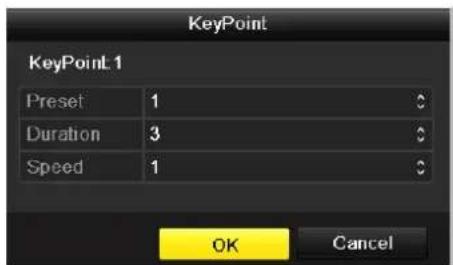
Figure 4.7 Key point Configuration
- Click OK to save the key point to the patrol.
Repeat the above steps to add more key points.
You can also delete all the key points by clicking the trash icon
Select a key point, then click ↑ or ↓ button to adjust the order of the key points.
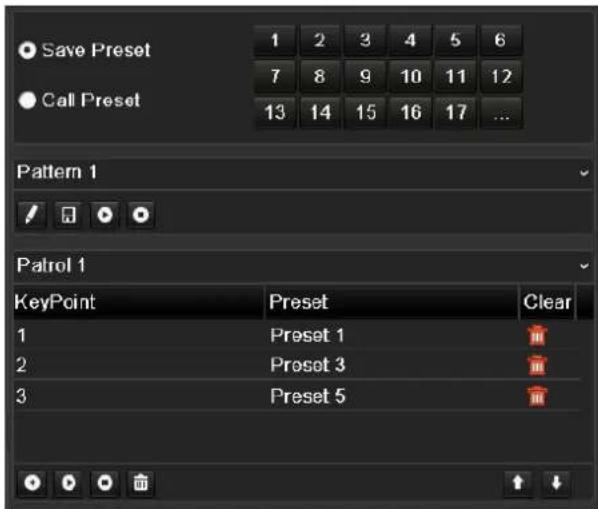
Figure 4.8 KeyPoints Deletion
4.2.4 Calling Patrols
Purpose:
Calling a patrol makes the PTZ to move according the predefined patrol path.
Calling patrol in the PTZ setting interface:
Steps:
- In the PTZ setting interface.
Menu> Camera> PTZ> More Settings - Select the patrol number, and then click ▶ to call the patrol.
- Click ☐ to stop it.
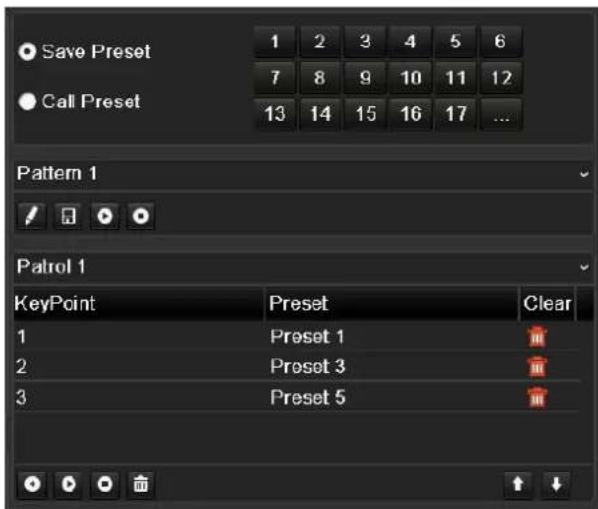
Figure 4.9 Calling Patrol
Calling patrol in live view mode:
Steps:
- Click the button PTZ in the lower-right corner of the PTZ setting interface;
Or press the PTZ button on the front panel or click the PTZ Control icon in the quick setting bar to enter the PTZ setting menu in live view mode.
- Choose Patrol on the control bar.
- Double click the patrol or select the patrol and click 📋 to call it.

Figure 4. 10 PTZ Panel- Patrol
4.2.5 Customizing Patterns
Purpose:
Patterns can be set by recording the movement of the PTZ. You can call the pattern to make the PTZ movement according to the predefined path.
Steps:
- Enter the PTZ Control interface.
Menu > Camera > PTZ > More Settings
- Choose pattern number in the option box.

Figure 4.11 PTZ-Pattern
- Click 📋 and use your mouse to drag the image or click the eight directional buttons in the control box

INNOVATIVE
under the image to move the PTZ camera.
The movement of the PTZ is recorded as the pattern.
- Click ☐ to save the pattern.
4.2.6 Calling Patterns
Purpose:
Follow the procedure to move the PTZ camera according to the predefined patterns.
Calling pattern in the PTZ setting interface
Steps:
- Enter the PTZ Control interface.
Menu>Camera>PTZ>More Settings - Select the pattern number.
- Click ▶, then the PTZ moves according to the pattern. Click ◦ to stop it.

Figure 4.12 PTZ- Calling Pattern
Call pattern in live view mode.
Steps:
- Click the button PTZ in the lower-right corner of the PTZ setting interface;
Or press the PTZ button on the front panel or click the PTZ Control icon in the quick setting bar to enter the PTZ setting menu in live view mode.
- And then choose Pattern on the control bar.
- Double click the pattern or select the pattern and click 📋 to call it.
4.3 PTZ Control Panel
To enter the PTZ control panel, there are two ways supported.
OPTION 1:
In the PTZ settings interface, click the PTZ button on the lower-right corner which is next to the Back button.
OPTION 2:
In the Live View mode, you can press the PTZ Control button on the front panel or on the remote control, or
choose the PTZ Control icon
Click the Configuration button on the control panel, and you can enter the PTZ Settings interface.

In PTZ control mode, the PTZ panel will be displayed when a mouse is connected with the device. If no mouse is connected, the PTZ icon appears in the lower-left corner of the window, indicating that this camera is in PTZ control mode.
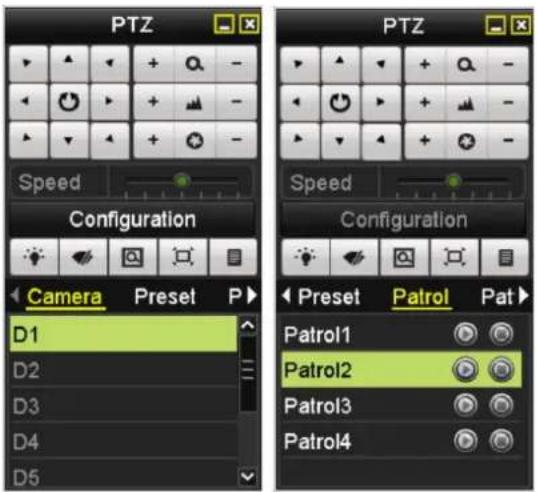
Figure 4.13 PTZ Panel
Table 4.1 Description of the PTZ panel icons
| Icon | Description | Icon | Description | Icon | Description |
 | Direction button and the auto-cycle button | [6242] | Zoom+, Focus+, Iris+ | [XX27] | Zoom-, Focus-, Iris- |
| The speed of the PTZ movement | [741X] | Light on/off | [6048] | Wiper on/off | |
| 3D-Zoom | [932X] | Image Centralization |  | Preset | |
 | Patrol | [543D] | Pattern |  | Menu |
| [644W] | Previous item |  | Next item |  | Start pattern/patrol |
| [872S] | Stop the patrol or pattern movement | [WDKC] | Minimize windows | [7802] | Exit |
Chapter 5 Recording and Capture Settings
5.1 Configuring Parameters
Purpose:
By configuring the parameters you can define the parameters which affect the image quality, such as the transmission stream type, the resolution and so on.
Before you start:
- Make sure that the HDD has already been installed. If not, please install a HDD and initialize it. (Menu>HDD>General)

Figure 5.1 HDD- General
- Check the storage mode of the HDD
1) Click Advanced to check the storage mode of the HDD.
2) If the HDD mode is Quota, please set the maximum record capacity and maximum picture capacity. For detailed information, see Chapter Configuring Quota Mode.
3) If the HDD mode is Group, you should set the HDD group. For detailed information, see Chapter Configuring HDD Group for Recording and Capture.

Figure 5.2 HDD- Advanced
Steps:
- Enter the Record settings interface to configure the recording parameters:
Menu>Record>Parameters

Figure 5.3 Recording Parameters

INNOVATIVE
2. Parameters Setting for Recording
1) Select Record tab page to configure. You can configure the stream type, the resolution, and other parameters on your demand.
- Pre-record: The time you set to record before the scheduled time or event. For example, when an alarm triggered the recording at 10:00, if you set the pre-record time as 5 seconds, the camera records it at 9:59:55.
- Post-record: The time you set to record after the event or the scheduled time. For example, when an alarm triggered the recording ends at 11:00, if you set the post-record time as 5 seconds, it records till 11:00:05.
- Expired Time: The expired time is the longest time for a record file to be kept in the HDD, if the deadline is reached, the file will be deleted. You can set the expired time to 0, and then the file will not be deleted. The actual keeping time for the file should be determined by the capacity of the HDD.
- Redundant Record/ Capture: Enabling redundant record or capture means you save the record and captured picture in the redundant HDD. See Chapter Configuring Redundant Recording and Capture.
- Record Audio: Check the checkbox to enable or disable audio recording.
- Video Stream: Main stream and sub-stream are selectable for recording. When you select sub-stream, you can record for a longer time with the same storage space.
2) Click Apply to save the settings.

- The redundant record/capture is to decide whether you want the camera to save the record files or captured pictures in the redundant HDD. You must configure the redundant HDD in HDD settings. For detailed information, see Chapter 11.4.2.
• The parameters of Main Stream (Event) are read-only.
- Parameters Settings for Sub-stream
1) Enter the Sub-stream tab page.

Figure 5.4 Sub-stream Parameters
2) Configure the parameters of the camera.
3) Click Apply to save the settings.
- Parameters Settings for Capture
1) Select the Capture tab.

Figure 5.5 Capture Parameters
2) Configure the parameters.
3) Click Apply to save the settings.

The interval is the time period between two capturing actions. You can configure all the parameters on this menu on your demand.
5.2 Configuring Recording/Capture Schedule
Purpose:
Set the record schedule, and then the camera automatically starts/stops recording according to the configured schedule.

In this chapter, we take the record schedule procedure as an example, and the same procedure can be applied to configure schedule for both recording and capture. To schedule the automatic capture, you need to choose the Capture tab in the Schedule interface.
Steps:
- Enter the Record Schedule interface.
Menu>Record/Capture>Schedule
- Configure Record Schedule
1) Select Record/Capture Schedule.

Figure 5.6 Record Schedule
2) Choose the camera you want to configure.
3) Select the check box after the Enable Schedule item.
4) Click Edit button or click on the color icon under the edit button and draw the schedule line on the panel.
Edit the schedule:
I. In the message box, you can choose the day to which you want to set schedule.

Figure 5.7 Recording Schedule Interface
You can click the button to set the accurate time of the schedule.
II. To schedule an all-day recording, check the checkbox after the All Day item.
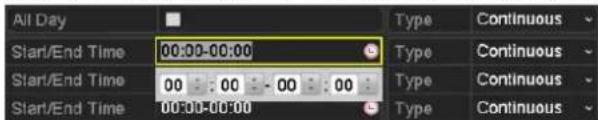
Figure 5.8 Edit Schedule
III. To arrange other schedule, leave the All Day checkbox blank and set the Start/End time.

Up to 8 periods can be configured for each day. And the time periods can't be overlapped each other.
IV. Select the record type in the dropdown list.

- To enable Motion, Alarm, M | A (motion or alarm), M & A (motion and alarm) and VCA (Video Content Analysis) triggered recording and capture, you must configure the motion detection settings, alarm input settings or VCA settings as well. For detailed information, refer to Chapter 8.1, Chapter 8.2 and Chapter 8.5.
● The VCA settings are only available to the smart IP cameras.
Repeat the above edit schedule steps to schedule recording or capture for other days in the week. If the schedule can also be applied to other days, click Copy.

Figure 5.9 Copy Schedule to Other Days
V. Click OK to save setting and back to upper level menu.
VI. Click Apply in the Record Schedule interface to save the settings.
Draw the schedule:
I. Click on the color icons, you can choose the schedule type as continuous or event.

Figure 5.10 Draw the Schedule
Descriptions of the color icons are shown in the figure below.

Figure 5.11 Descriptions of the color icons
II. Click the Apply button to validate the settings.
- (Optional) If the settings can also be used to other channels, click Copy, and then choose the channel to which you want to copy.

INNOVATIVE
- Click Apply to save the settings.

Figure 5.12 Copy Schedule to Other Channels
5.3 Configuring Motion Detection Recording and Capture
Purpose:
Follow the steps to set the motion detection parameters. In the live view mode, once a motion detection event takes place, the NVR can analyze it and do many actions to handle it. Enabling motion detection function can trigger certain channels to start recording, or trigger full screen monitoring, audio warning, notify the surveillance center and so on. In this chapter, you can follow the steps to schedule a record which triggered by the detected motion.
Steps:
- Enter the Motion Detection interface.
Menu>Camera>Motion
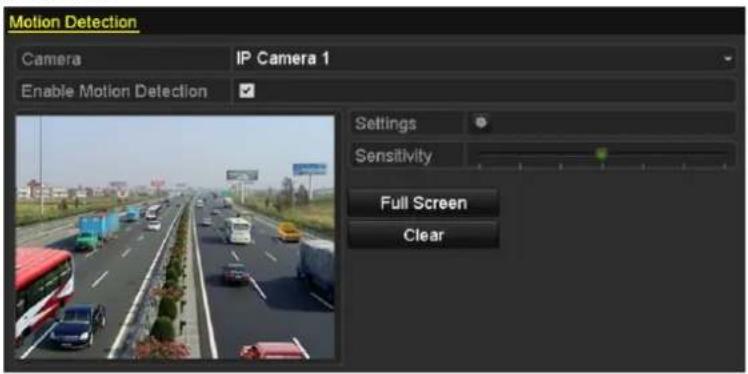
Figure 5.13 Motion Detection
- Configure Motion Detection:
1) Choose camera you want to configure.
2) Check the checkbox after Enable Motion Detection.
3) Drag and draw the area for motion detection by mouse. If you want to set the motion detection for all the area shot by the camera, click Full Screen. To clear the motion detection area, click Clear.

Figure 5.14 Motion Detection-Mask
4) Click Settings, and the message box for channel information pop up.
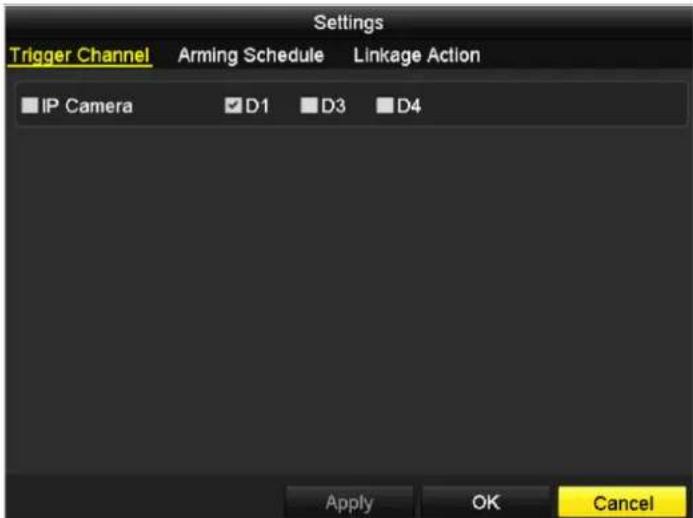
Figure 5.15 Motion Detection Handling
5) Select the channels which you want the motion detection event to trigger recording.
6) Click Apply to save the settings.
7) Click OK to back to the upper level menu.
8) Exit the Motion Detection menu.
- Edit the Motion Detection Record Schedule. For the detailed information of schedule configuration, see Chapter Configuring Recording/Capture Schedule.
5.4 Configuring Alarm Triggered Recording and Capture
Purpose:
Follow the procedure to configure alarm triggered recording or capture.
Steps:
- Enter the Alarm setting interface.
Menu> Configuration> Alarm

Figure 5.16 Alarm Settings
- Click Alarm Input.

Figure 5.17 Alarm Settings- Alarm Input
1) Select Alarm Input number and configure alarm parameters.
2) Choose N.O (normally open) or N.C (normally closed) for alarm type.
3) Check the checkbox for Setting.
4) Click Settings.
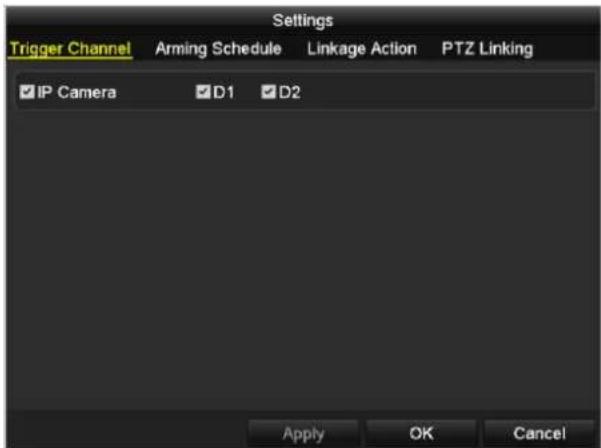
Figure 5.18 Alarm Settings
5) Choose the alarm triggered recording channel.
6) Check the checkbox to select channel.
7) Click Apply to save settings.
8) Click OK to back to the upper level menu.
Repeat the above steps to configure other alarm input parameters.
If the settings can also be applied to other alarm inputs, click Copy and choose the alarm input number.
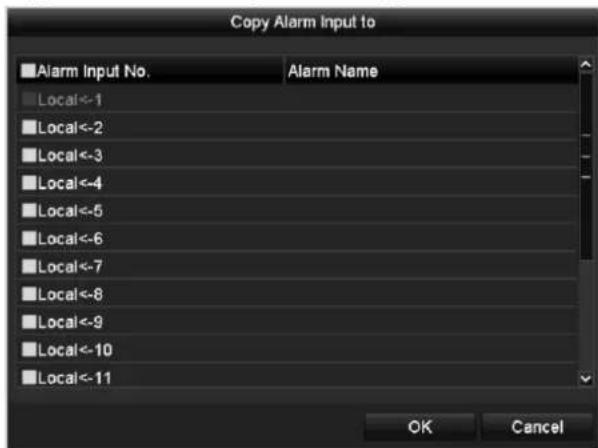
Figure 5.19 Copy Alarm Input
- Edit the Alarm triggered record in the Record/Capture Schedule setting interface. For the detailed information of schedule configuration, see Chapter Configuring Recording/Capture Schedule.
5.5 Manual Recording and Continuous Capture
Purpose:
Follow the steps to set parameters for the manual recording and continuous capture. Using manual recording and continuous capture, you need to manually cancel the record and capture. The manual recording and manual continuous capture is prior to the scheduled recording and capture.
Steps:
- Enter the Manual settings interface.
Menu> Manual
Or press the REC/SHOT button on the front panel.

Figure 5.20 Manual Record
- Enable the Manual Recording.
1) Select Record on the left bar.
2) Click the status button before camera number to change

- Disable manual record.
Click the status button to change ON. OFF

Green icon ON means that the channel is configured the record schedule. After rebooting, all the manual records enabled will be canceled.
- Enabling and disabling the continuous capture
1) Select Continuous Capture on the left bar.
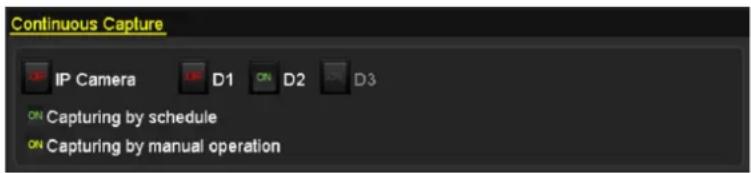
Figure 5.21 Continuous Capture
2) Click the status button before camera number to change

3) Disable continuous capture.
4) Click the status button to change


Green icon ON means that the channel is configured the capture schedule. After rebooting, all the continuous capture will be canceled.
5.6 Configuring Holiday Recording and Capture
Purpose:
Follow the steps to configure the record or capture schedule on holiday for that year. You may want to have different plan for recording and capture on holiday.
Steps:
- Enter the Record setting interface.
Menu > Record > Holiday

Figure 5.22 Holiday Settings
- Enable Edit Holiday schedule.
1) Click to enter the Edit interface.
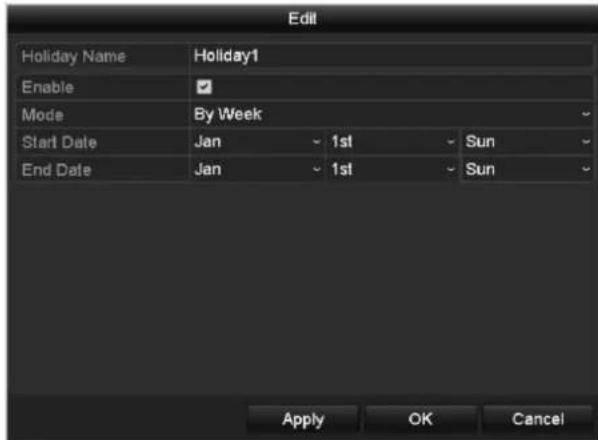
Figure 5.23 Edit Holiday Settings

INNOVRTIVE
2) Check the checkbox after Enable Holiday.
3) Select Mode from the dropdown list.
There are three different modes for the date format to configure holiday schedule.
4) Set the start and end date.
5) Click Apply to save settings.
6) Click OK to exit the Edit interface.
- Enter Record/Capture Schedule settings interface to edit the holiday recording schedule. See Chapter 6.2
Configuring Recording/Capture Schedule.
5.7 Configuring Redundant Recording and Capture
Purpose:
Enabling redundant recording and capture, which means saving the record files and captured pictures not only in the R/W HDD but also in the redundant HDD, will effectively enhance the data safety and reliability.
Steps:
- Enter HDD Information interface.
Menu> HDD

Figure 5.24 HDD General
- Select the HDD and click 📋 to enter the Local HDD Settings interface.
1) Set the HDD property to Redundancy.

Figure 5. 25 HDD General-Editing
2) Click Apply to save the settings.
3) Click OK to back to the upper level menu.

You must set the Storage mode in the HDD advanced settings to Group before you set the HDD property to Redundant. For detailed information, please refer to Chapter 11.4.1 Setting HDD Property. There should be at least another HDD which is in Read/Write status.
- Enter the Record setting interface.
Menu> Record> Parameters
1) Select Record tab.

Figure 5.26 Record Parameters
2) Select Camera you want to configure in the drop-down list.
3) Check the checkbox of Redundant Record/Capture.
4) Click OK to save settings and back to the upper level menu.
Repeat the above steps for configuring other channels.
5.8 Configuring HDD Group for Recording and Capture
Purpose:
You can group the HDDs and save the record files and captured pictures in certain HDD group.
Steps:
- Enter HDD setting interface.
Menu>HDD

Figure 5.27 HDD General
- Select Advanced on the left side menu.
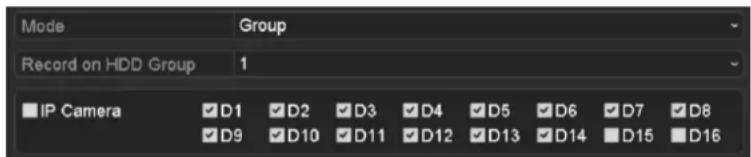
Figure 5.28 Storage Mode
Check whether the storage mode of the HDD is Group. If not, set it to Group. For detailed information, please refer to Chapter 11.4 Managing HDD Group.
- Select General in the left side menu
- Click ☐ to enter editing interface.
- Configuring HDD group.
1) Choose a group number for the HDD group.
2) Click Apply and then in the pop-up message box, click Yes to save your settings.
3) Click OK to back to the upper level menu.
Repeat the above steps to configure more HDD groups.
- Choose the Channels which you want to save the record files and captured pictures in the HDD group.
1) Select Advanced on the left bar.
2) Choose Group number in the dropdown list of Record on HDD Group
3) Check the channels you want to save in this group.
4) Click Apply to save settings.

After having configured the HDD groups, you can configure the Recording and Capture settings following the procedure provided in Chapter 5.2-5.7.
5.9 Files Protection
Purpose:
You can lock the recording files or set the HDD property to Read-only to protect the record files from being overwritten.
5.9.1 Locking the Recording Files
Lock File when Playback
Steps:
- Enter Playback interface.
Menu>Playback
- Check the checkbox of channel(s) in the channel list and then double-click to select a date on the calendar.

Figure 5.29 Normal Playback
- During playback, click the button to lock the current recording file.

In the multi-channel playback mde, clicking the button will lock all the record files related to the playback channels.
- You can click the ⚙ button to pop up the file management interface. Click the Locked File tab to check and export the locked files.

Figure 5.30 Locked File Management
In the File Management interface, you can also click 🔒 to change it to 🔒 to unlock the file and the file is not protected.
- Lock File when Export
Steps:
- Enter Export setting interface.
Menu> Export
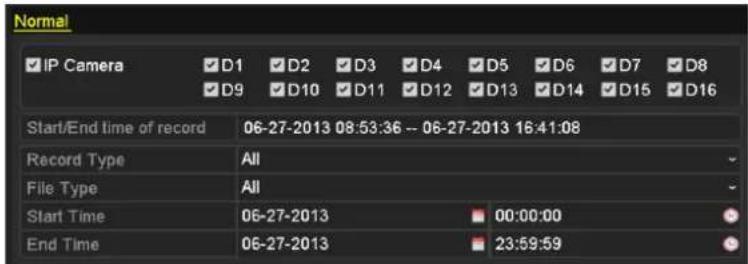
Figure 5.31 Export
- Select the channels you want to investigate by checking the checkbox to
- Configure the record type, file type start/end time.
- Click Search to show the results.
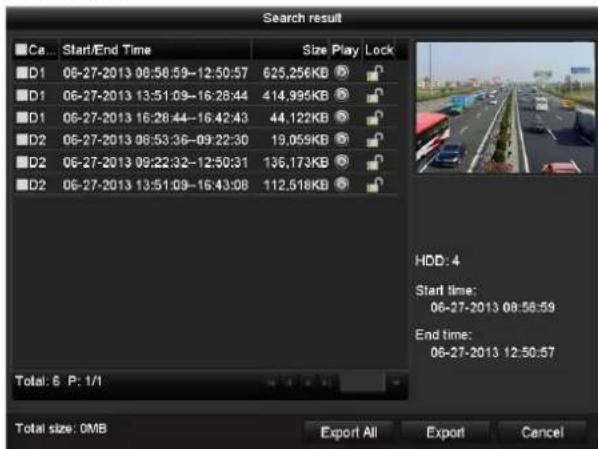
Figure 5.32 Export- Search Result
5. Protect the record files.
1) Find the record files you want to protect, and then click the 📁 icon which will turn to 📄 indicating that the file is locked.

The record files of which the recording is still not completed cannot be locked.
2) Click 🔍 to change it to 🔍 to unlock the file and the file is not protected.

Figure 5.33 Unlocking Attention
5.9.2 Setting HDD Property to Read-only
Steps:
- Enter HDD setting interface.
Menu> HDD

Figure 5.34 HDD General
- Click ☐ to edit the HDD you want to protect.

Figure 5. 35 HDD General- Editing

To edit HDD property, you need to set the storage mode of the HDD to Group. See Chapter Managing HDD Group.
- Set the HDD property to Read-only.

INNOVATIVE
- Click OK to save settings and back to the upper level menu.

- You cannot save any files in a Read-only HDD. If you want to save files in the HDD, change the property to R/W.
- If there is only one HDD and is set to Read-only, the NVR can't record any files. Only live view mode is available.
- If you set the HDD to Read-only when the NVR is saving files in it, then the file will be saved in next R/W HDD. If there is only one HDD, the recording will be stopped.
Chapter 6 Playback
6.1 Playing Back Record Files
6.1.1 Playing Back by Channel
Purpose:
Play back the recorded video files of a specific channel in the live view mode. Channel switch is supported.
Instant playback by channel
Steps:
Choose a channel in live view mode using the mouse and click the button in the quick setting toolbar.

In the instant playback mode, only record files recorded during the last five minutes on this channel will be played back.

Figure 6.1 Instant Playback Interface
Playback by channel
- Enter the Playback interface.
Mouse: right click a channel in live view mode and select Playback from the menu, as shown in Figure 6.2.

Figure 6.2 Right-click Menu under Live View

INNOVATIVE
Front Panel: press PLAY button to play back record files of the channel under single-screen live view mode.

Pressing numerical buttons will switch playback to the corresponding channels during playback process.
2. Playback management.
The toolbar in the bottom part of Playback interface can be used to control playing progress, as shown in
Figure 6.3.
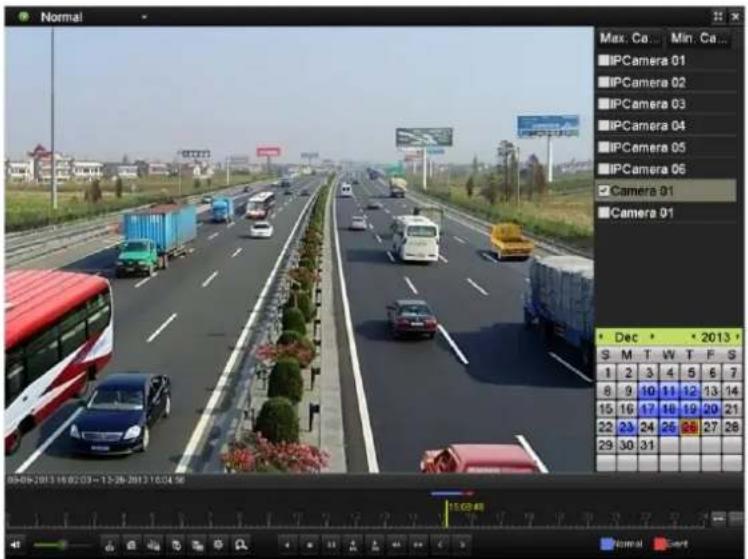
Figure 6.3 Playback Interface
Click the channel(s) to execute simultaneous playback of multiple channels.

Figure 6.4 Toolbar of Playback

The 06-27-2013 08:58:59 - 06-27-2013 09:44:02 indicates the start/end time of the record.
- About video type bar: ■ represents normal recording (manual or schedule); ■ represents event recording (motion, alarm, motion | alarm, motion & alarm, VCA).
- Playback progress bar: use the mouse to click any point of the progress bar to locate special frames, and drag the cursor to show the thumbnail of the current time.
Table 6.1 Detailed Explanation of Playback Toolbar
| Button | Operation | Button | Operation | Button | Operation | Button | Operation |
 | Audio on/Mute | [0ZYD] | Adjust volume |  | Start/Stop clipping | [70x7] | Capture |
 | File lock |  | Add default tag |  | Add customized tag |  | File Management |
| Digital Zoom |  | Pause reverse play/Reverse play/Single-frame reverse play |  | Stop | [XBTC] | Pause play/Play/Single-frame play | |
| [X0Y3] | 30s forward |  | 30s reverse | [KBXO] | Speed down |  | Speed up |
 | Previous day | [42XX] | Next day |  | Scaling up/down the time line |  | Process bar |
 | Video type bar |  | Playback type / picture |  | Full screen | [0Y8K] | Exit |
6.1.2 Playing Back by Time
Purpose:
Play back video files recorded in specified time duration. Multi-channel simultaneous playback and channel switch are supported.
Steps:
- Enter playback interface.
Menu>Playback
- Check the checkbox of channel(s) in the channel list and then double-click to select a date on the calendar.

Figure 6.5 Playback Calendar

If there are record files for that camera in that day, in the calendar, the icon for that day is displayed as 10. Otherwise it is displayed as 10
In the Playback interface:
The toolbar in the bottom part of Playback interface can be used to control playing process, as shown in Figure 6. 6.

Figure 6.6 Interface of Playback by Time

Figure 6.7 Toolbar of Playback by Time
NOTE
The 06-27-2013 08:58:59 - 06-27-2013 09:44:02 indicates the start/end time of the record.
- About video type bar: ■ represents normal recording (manual or schedule); ■ represents event recording (motion, alarm, motion | alarm, motion & alarm, VCA).
- Playback progress bar: use the mouse to click any point of the progress bar to locate special frames, and drag the cursor to show the thumbnail of the current time.
Table 6.2 Detailed Explanation of Playback-by-time Interface
| Button | Operation | Button | Operation | Button | Operation | Button | Operation | |
 | Audio on/ Mute |  | Adjust volume |  | Start/Stop clipping | [17CA] | Capture | |
 | File lock | [06HW] | Add default tag |  | Add customized tag | [0CZ65] | File Management | |
 | Digital Zoom | [7048] | Pause reverse play/ Reverse play/ Single-frame reverse play | [TWS0] | Stop |  | Pause play/ Play/ Single-frame play | |
| [WAZK] | 30s forward | [WXTA] | 30s reverse | [SYXB] | Speed down |  | Speed up | |
 | Previous day |  | Next day | [OADA] | Scaling up/down the time line | [COA3] | Process bar | |
 | Video type bar |  | Playback type / picture | [YHH] | Full screen | [XDFY] | Exit | |
6.1.3 Playing Back by Event Search
Purpose:
Play back record files on one or several channels searched out by restricting event type (e.g. alarm input and motion detection).
Steps:
- Enter the Playback interface.
Menu>Playback
- Select the Event in the drop-down list on the top-left side.
- Select Alarm Input, Motion or VCA as the event type, edit the Start time and End time.

Here we take playback by motion as the example.

Figure 6.8 Motion Search Interface
- Click Search button to get the search result information. You may refer to the right-side bar for the result.

Figure 6.9 Search Result Bar(Motion)
- Click 🎨 button to play back the file.
You can click the Back button to back to the search interface.

Pre-play and post-play can be configured.
- Playback interface.
The toolbar in the bottom part of Playback interface can be used to control playing process.

Figure 6. 10 Interface of Playback by Event

INNOVATIVE

Figure 6.11 Toolbar of Playback by Event

● The 06-27-2013 08:58:59 - 06-27-2013 09:44:02 indicates the start/end time of the record.
- About video type bar: ■ represents normal recording (manual or schedule); ■ represents event recording (motion, alarm, motion | alarm, motion & alarm, VCA).
- Playback progress bar: use the mouse to click any point of the progress bar to locate special frames.
Table 6.3 Detailed Explanation of Playback-by-event Toolbar
| Button | Operation | Button | Operation | Button | Operation | Button | Operation |
 | Audio on/ Mute | [CK2S] | Adjust volume |  | Start/Stop clipping |  | Capture |
 | File lock |  | Add default tag |  | Add customized tag | [SACX] | File Management |
| [7AA3] | Digital Zoom | [CRW5] | Pause reverse play/ Reverse play/ Single-frame reverse play | [7766] | Stop | [66DS] | Pause play/ Play/ Single-frame play |
 | 30s forward | [X00D] | 30s reverse | [00C3] | Speed down |  | Speed up |
| [XXBG] | Previous day |  | Next day |  | Scaling up/down the time line | [28WC] | Process bar |
 | Video type bar | [BWTA] | Playback type / picture |  | Full screen |  | Exit |
6.1.4 Playing Back by Tag
Purpose:
Video tag allows you to record related information like people and location of a certain time point during playback. You are also allowed to use video tag(s) to search for record files and position time point.
Before playing back by tag:
-
Enter Playback interface. Menu>Playback
-
Search and play back the record file(s). Refer to Chapter 6.1.1 for the detailed information about searching and playback of the record files.

Figure 6.12 Interface of Playback by Time
Click button to add default tag.
Click button to add customized tag and input tag name.

Max. 64 tags can be added to a single video file.
- Tag management.
1) Click button to enter the file management interface.
2) Click the Tag tab, and you can check, edit and delete tag(s).

Figure 6.13 Tag Management Interface
Steps:
- Select the Tag from the drop-down list in the Playback interface.
- Choose channels, edit start time and end time, and then click Search to enter Search Result interface.

You can enter keyword in the textbox Keyword to search the tag on your demand.

Figure 6.14 Video Search by Tag
3. Click button to play back the file.
You can click the Back button to back to the search interface.

Pre-play and post-play can be configured.

Figure 6.15 Interface of Playback by Tag

Figure 6.16 Toolbar of Playback by Tag

INNOVATIVE

The 06-27-2013 08:58:59 - 06-27-2013 09:44:02 indicates the start/end time of the record.
- About video type bar: ■ represents normal recording (manual or schedule); ■ represents event recording (motion, alarm, motion | alarm, motion & alarm, VCA).
- Playback progress bar: use the mouse to click any point of the progress bar to locate special frames.
Table 6.4 Detailed Explanation of Playback-by-tag Toolbar
| Button | Operation | Button | Operation | Button | Operation | Button | Operation | |
 | Audio on/ Mute |  | Adjust volume |  | Start/Stop clipping |  | Capture | |
| [7KCZ] | File lock | [AX6A] | Add default tag |  | Add customized tag |  | File Management | |
 | Digital Zoom | [CWZZ] | Pause reverse play/ Reverse play/ Single-frame reverse play | [XAZZ] | Stop | [HK0Z] | Pause play/ Play/ Single-frame play | |
| [KXZD] | 30s forward |  | 30s reverse |  | Speed down | [7Y34] | Speed up | |
| [00TA] | Previous day | [0AX7] | Next day | [0W5H] | Scaling up/down the time line |  | Process bar | |
 | Video type bar |  | Playback type / picture |  | Full screen |  | Exit | |
6.1.5 Smart Playback
Purpose:
The smart playback function provides an easy way to get through the less effective information. When you select the smart playback mode, the system will analyze the video containing the motion or VCA information, mark it with green color and play it in the normal speed while the video without motion will be played in the 16-time speed.
Steps:
- Enter Playback interface.
Menu>Playback - Select the Smart in the drop-down list on the top-left side.
- Select a camera in the camera list and select a date in the calendar.
- Click the 🎨 button to play.
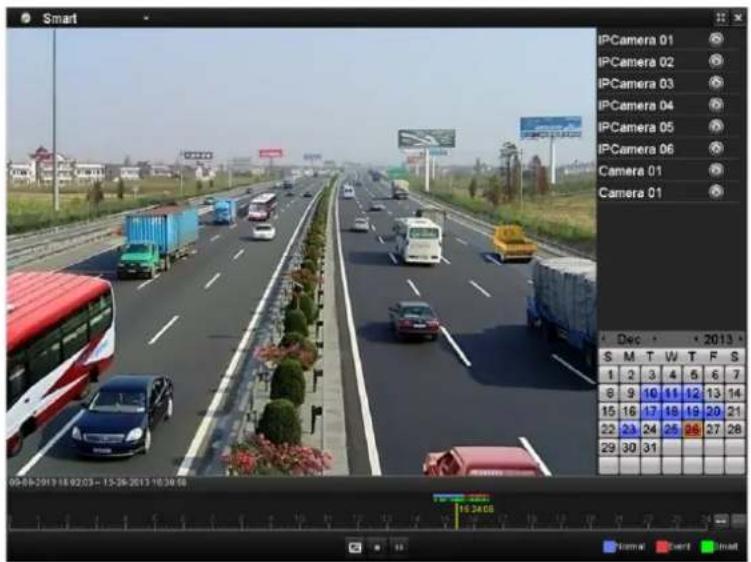
Figure 6.17 Smart Playback Interface

● The 06-27-2013 08:58.59 – 06-27-2013 09:44.02 indicates the start/end time of the record.
- About video type bar: ■ represents normal recording (manual or schedule); ■ represents event recording (motion, alarm, motion | alarm, motion & alarm, VCA); and ■ represents the smart search result.
- Playback progress bar: use the mouse to click any point of the progress bar to locate special frames.
- The smart search area is set as full screen by default. Click the button to enter the search area editing interface, refer to Chapter 6.2.2 for details.
Table 6.5 Detailed Explanation of Smart Playback
| Button | Operation | Button | Operation | Button | Operation |
| [6027] | Smart search |  | Stop |  | Pause play / Play |
 | Process bar | — —  | Scaling up/down the time line |  | Playback type / Picture |
6.1.6 Playing Back by System Logs
Purpose:
Play back record file(s) associated with channels after searching system logs.
Steps:
- Enter Log Information interface.
Menu>Maintenance>Log Information
- Click Log Search tab to enter Playback by System Logs.
Set search time and type and click Search button.

Figure 6.18 System Log Search Interface
- Choose a log with record file and click 📋 button to enter Playback interface.

If there is no record file at the time point of the log, the message box "No result found" will pop up.

Figure 6.19 Result of System Log Search
- Playback interface.
The toolbar in the bottom part of Playback interface can be used to control playing process.

Figure 6. 20 Interface of Playback by Log
6.1.7 Playing Back External Files
Purpose:
Perform the following steps to look up and play back files in the external devices.
Steps:
- Enter Playback interface.
Menu>Playback
- Select the External File in the drop-down list on the top-left side.
The files are listed in the right-side list.
You can click the Refresh refresh the file list.
- Select and click the 🎨 button to play back it. And you can adjust the playback speed by clicking 🎨 and

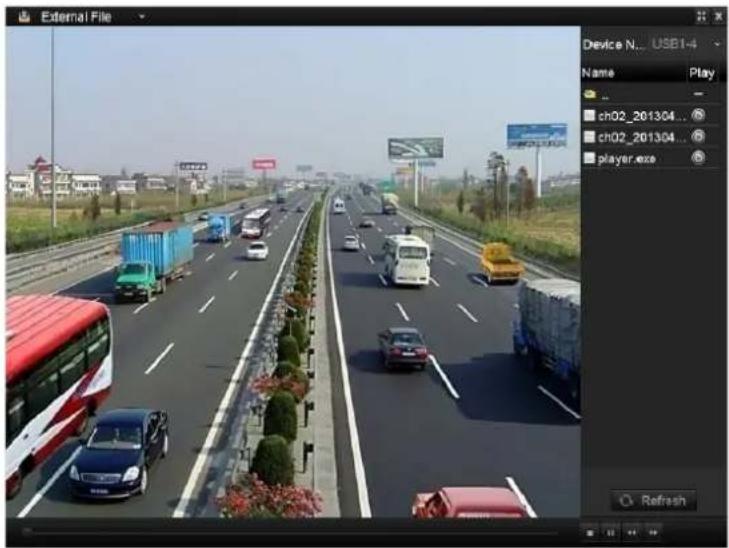
Figure 6.21 Interface of External File Playback
6.2 Auxiliary Functions During Playback
6.2.1 Playing Back Frame by Frame
Purpose:
Play video files frame by frame, in case of checking image details of the video when abnormal events happen.
Steps:
• Using a Mouse:
Go to Playback interface.
If you choose playback of the record file: click button 📄 until the speed changes to Single frame and one click on the playback screen represents playback of one frame.
If you choose reverse playback of the record file: click button until the speed changes to Single frame and one click on the playback screen represents reverse playback of one frame. It is also feasible to use button in toolbar.
• Using the Front Panel:
Rotate and hold the outer ring on Jog Shuttle counter clockwise or click the button to set the speed to Single frame. One click on button, one click on the playback screen or Enter button on the front panel represents playback or reverse playback of one frame.
6.2.2 Smart Search
Purpose:
In order to locate events easily and accurately in the playback progress bar, you are allowed to analyze a certain area (scene) dynamically, and to get all the related events that occurred in this area. The supported smart search rules include intrusion detection and motion detection.
Before you start:
To get the smart search result, the corresponding event type must be enabled and configured on the IP camera. Here we take the intrusion detection as an example.
- Log in the IP camera by the web browser, and enable the intrusion detection by checking the checkbox of it. You may enter the motion detection configuration interface by Configuration> Advanced Configuration> Events> Intrusion Detection.

Figure 6.22 Setting Intrusion Detection on IP Camera
- Configure the required parameters of intrusion detection, including area, arming schedule and linkage methods. Refer to the user manual of smart IP camera for detailed instructions.
Steps:
- Enter the Smart Playback interface and play a record file. Refer to Chapter 6.1.5 for the details.

Figure 6.23 Interface of Smart Playback
- Click the 📋 on the playback control toolbar to enter Smart Search mode.
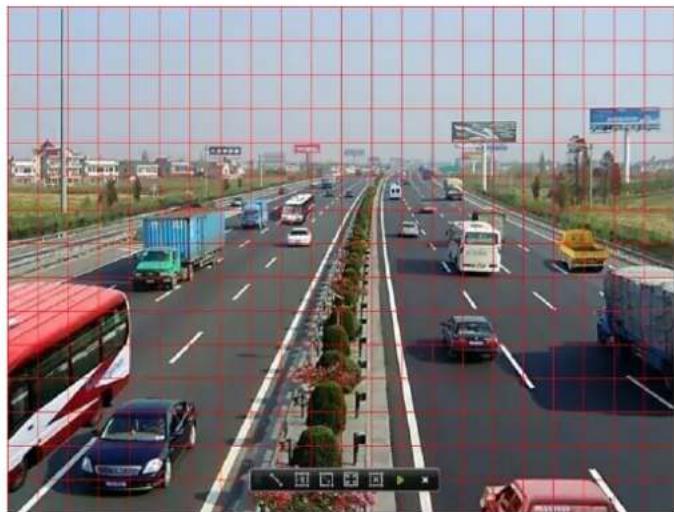
Figure 6.24 Draw Area of Smart Search
- Set the smart search rules.
Intrusion Detection
Click the button, and then specify 4 points to set a quadrilateral region for intrusion detection.

Only one region can be set.
Motion Detection
1) Click the ☐ to set the search area manually, or click the ☐ button to set the full screen as the area.
2) Click and drag the mouse to draw target searching area(s).
- Click the ▶ to search, and then the result will be displayed as ■ in the progress bar of the Smart Playback interface.
Or you can click the button to clear all the set areas.
6.2.3 Digital Zoom
Steps:
- Click the button on the playback control bar to enter Digital Zoom interface.
- Use the mouse to draw a red rectangle and the image within it will be enlarged up to 16 times.

Figure 6.25 Draw Area for Digital Zoom
- Right-click the image to exit the digital zoom interface.
6.2.4 Reverse Playback of Multi-channel
Purpose:
You can play back record files of multi-channel reversely. Up to 16-ch (with 1280*720 resolution) simultaneous reverse playback is supported; up to 4-ch (with 1920*1080P resolution) simultaneous reverse playback is supported and up to 1-ch (with 2560*1920 resolution) reverse playback is supported.
Steps:
- Enter Playback interface.
Menu>Playback - Check more than one checkboxes to select multiple channels and click to select a date on the calendar.

Figure 6.26 4-ch Synchronous Playback Interface

The record files will be marked by two lines on the process bar. The upper one indicates the record files of the selected channel; and the lower one indicates the record files of all the selected channels.
- Click to play back the record files reversely.
6.3 Picture Playback
Purpose:
Search and view captured pictures stored in HDD.
Steps:
- Enter Playback interface.
Menu>Playback
- Select the Picture in the drop-down list on the top-left side.

Figure 6.27 Interface of Playback by Picture
- Choose channels, edit start time and end time, and then click Search to show searching result.
- Choose a picture you want to view and click 📋 button.
You can click the Back button to back to the search interface.
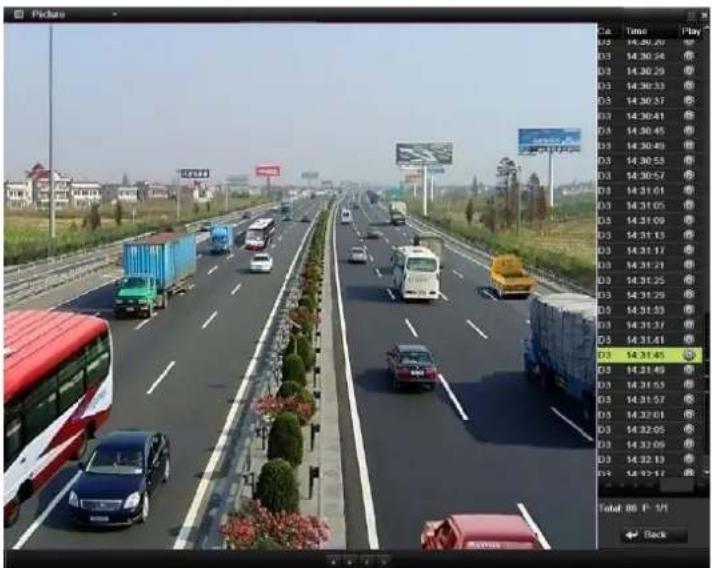
Figure 6.28 Result of Picture Search

INNOVATIVE
- The toolbar in the bottom part of Playback interface can be used to control playing process.

Figure 6.29 Picture Playback Toolbar
Table 6.6 Detailed Explanation of Picture-playback Toolbar
| Button | Function | Button | Function | Button | Function | Button | Function |
| [8250] | Play reverse | [YTBY] | Play | [XT67] | Previous picture |  | Next picture |
Chapter 7 Backup
7.1 Backing up Record Files
7.1.1 Quick Export
Purpose:
Export record files to backup device(s) quickly.
Steps:
- Enter Video Export interface.
Menu>Export>Normal
Choose the channel(s) you want to back up and click Quick Export button.

The time duration of record files on a specified channel cannot exceed one day. Otherwise, the message box "Max. 24 hours are allowed for quick export." will pop up.

Figure 7.1 Quick Export Interface
- Click on the Export button to start exporting.

Here we use USB Flash Drive and please refer to the next section Normal Backup for more backup devices supported by the NVR.

Figure 7.2 Quick Export using USB1-1
Stay in the Exporting interface until all record files are exported.

Figure 7.3 Export Finished
3. Check backup result.
Choose the record file in Export interface and click button to check it.

The Player player.exe will be exported automatically during record file export.
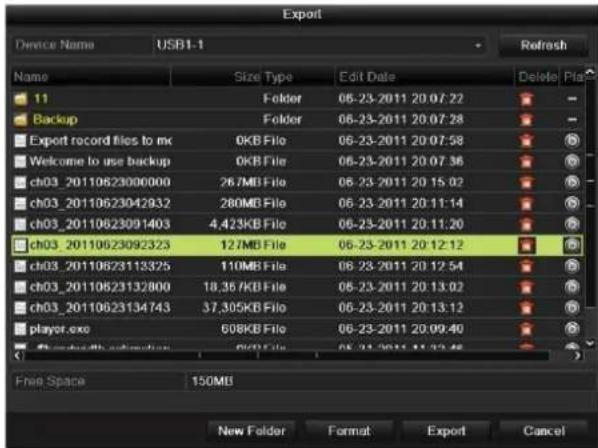
Figure 7.4 Checkup of Quick Export Result Using USB1-1
7.1.2 Backing up by Normal Video Search
Purpose:
The record files can be backup to various devices, such as USB devices (USB flash drives, USB HDDs, USB writer), SATA writer and c-SATA HDD.
Backup using USB flash drives and USB HDDs
Steps:
- Enter Export interface.
Menu>Export>Normal
- Set search condition and click Search button to enter the search result interface.

Figure 7.5 Normal Video Search for Backup
- Select record files you want to back up.
Click to play the record file if you want to check it.
Check the checkbox before the record files you want to back up.

The size of the currently selected files is displayed in the lower-left corner of the window.

Figure 7.6 Result of Normal Video Search for Backup
- Export.
Click Export All button to export all the recording files.
Or you can select recording files you want to back up, and click Export button to enter Export interface.

If the inserted USB device is not recognized:
- Click the Refresh button.
- Reconnect device.
- Check for compatibility from vendor.
You can also format USB flash drives or USB HDDs via the device.
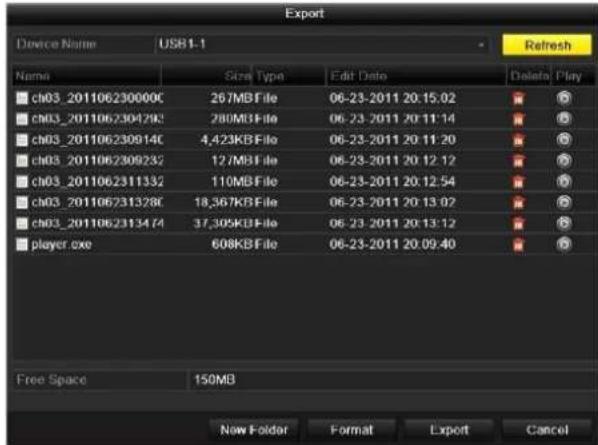
Figure 7.7 Export by Normal Video Search using USB Flash Drive
Stay in the Exporting interface until all record files are exported with pop-up message box "Export finished".
Figure 7.8 Export Finished
5. Check backup result.
Choose the record file in Export interface and click button to check it.

The Player player.exe will be exported automatically during record file export.

Figure 7.9 Checkup of Export Result using USB Flash Drive
Backup using USB writer and SATA writer
Steps:
- Enter Export interface.

INNOVATIVE
Menu>Export>Normal
- Set search condition and click Search button to enter the search result interface.

Figure 7.10 Normal Video Search for Backup
- Select record files you want to back up.
Click button 📄 to play the record file if you want to check it.
Check the checkbox before the record files you want to back up.

The size of the currently selected files is displayed in the lower-left corner of the window.
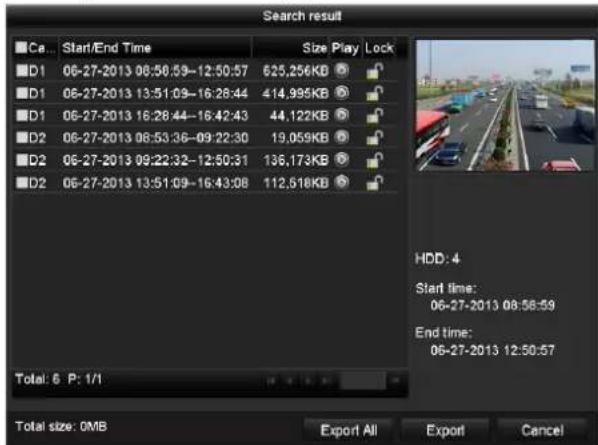
Figure 7.11 Result of Normal Video Search for Backup
- Export.
Click Export button and start backup.

If the inserted USB writer or SATA writer is not recognized:
- Click the Refresh button.
- Reconnect device.
- Check for compatibility from vendor.

Figure 7.12 Export by Normal Video Search using USB Writer
Stay in the Exporting interface until all record files are exported with pop-up message box "Export finished".
Figure 7.13 Export Finished
- Check backup result.
Choose the record file in Export interface and click button to check it.

The Player player.exe will be exported automatically during record file export.
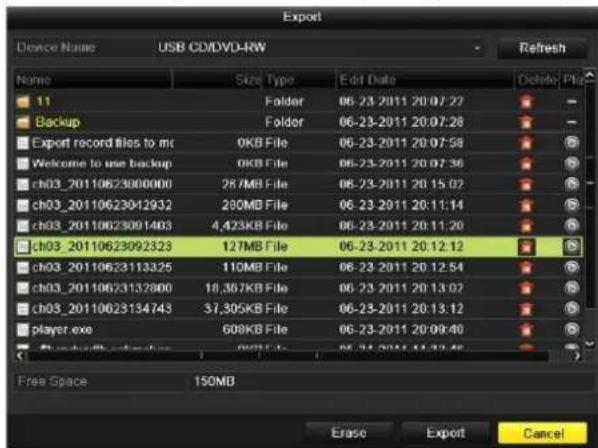
Figure 7.14 Checkup of Export Result using USB Writer
Backup using eSATA HDDs
Steps:
- Enter Record>Advanced and set the usage of eSATA HDD at "Export".

INNOVATIVE
Menu>Record>Advanced
Choose eSATA and set its usage at Export. Click Yes when pop-up message box "System will reboot automatically if the usage of eSATA is changed. Continue?"

The usages of eSATA HDD contain Record/Capture and Export. And changes in usage will take effective after rebooting the device.
- Enter Export interface.
Menu>Export>Normal
Set search condition and click Search button to enter the search result interface.
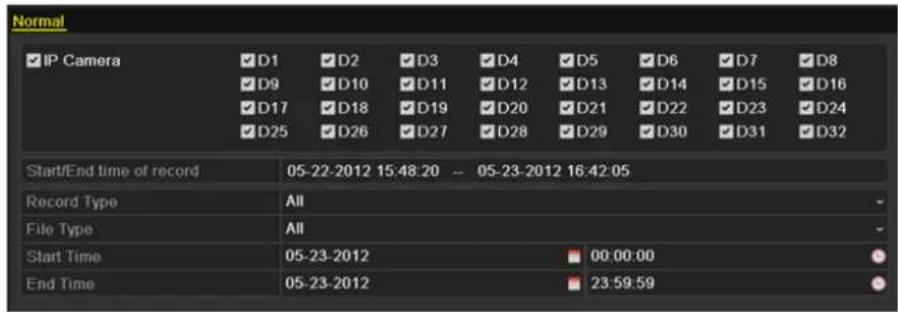
Figure 7.15 Normal Video Search for Backup
- Select record files you want to back up.
Click button play the record file if you want to check it.
Tick record files you want to back up.

The size of the currently selected files is displayed in the lower-left corner of the window.

Figure 7.16 Result of Normal Video Search for Backup
- Export.
Click Export All button to export all the recording files.
Or you can select recording files you want to back up, and click Export button to enter Export interface.


INNOVRTIVE
Please format the eSATA first when using it for the first time. If the inserted eSATA HDD is not recognized:
- Click the Refresh button.
- Reconnect device.
- Check for compatibility from vendor.
You can also format SATA HDD via the device.

Figure 7.17 Export by Normal Video Search Using eSATA HDD
Stay in the Exporting interface until all record files are exported with pop-up message "Export finished".

Figure 7.18 Export Finished
5. Check backup result.
Choose the record file in Export interface and click button to check it.

The Player player.exe will be exported automatically during record file export.

Figure 7.19 Checkup of Export Result Using eSATA HDD
7.1.3 Backing up by Event Search
Purpose:
Back up event-related record files using USB devices (USB flash drives, USB HDDs, USB writer), SATA writer or cSATA HDD. Quick Backup and Normal Backup are supported.
Steps:
1. Enter Export interface.
Menu>Export>Event
1) Select "Alarm Input" from the dropdown list of Event Type.
2) Select the alarm input No. and time.
3) Click Search button to enter the Search Result interface.

Event types contain Alarm Input, Motion and VCA; we take export by alarm input as an example.
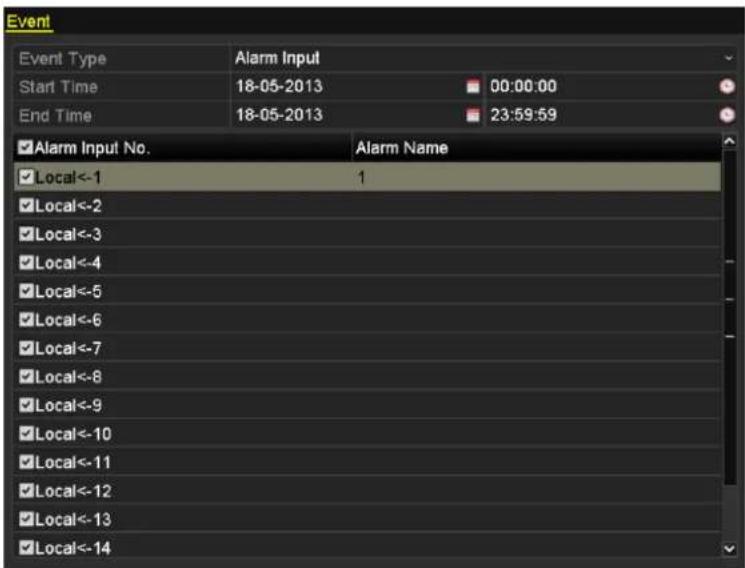
Figure 7.20 Event Search for Backup

INNOVATIVE
2. Select record files to export.
1) Clicking Quick Export button will export record files of all channels triggered by the selected alarm input.

Figure 7.21 Result of Event Search
2) Click Details button to view detailed information of the record file, e.g. start time, end time, file size, etc.

Figure 7.22 Event Details Interface
3. Export.
Click Export All button to export all the recording files.
Or you can select recording files you want to back up, and click Export button to enter Export interface.

If the inserted USB device is not recognized:
- Click the Refresh button.
- Reconnect device.
- Check for compatibility from vendor.
You can also format USB flash drive or USB HDDs via the device.

Figure 7.23 Export by Event Using USB Flash Drive
Stay in the Exporting interface until all record files are exported with pop-up message "Export finished".

Figure 7.24 Export Finished
- Check backup result.

The Player player.exe will be exported automatically during record file export.
7.1.4 Backing up Video Clips
Purpose:
You may also select video clips to export directly during Playback, using USB devices (USB flash drives, USB HDDs, USB writer), SATA writer or eSATA HDD.
Steps:
- Enter Playback interface.
Please refer to Chapter 6.1 Playing Back Record Files.
- During playback, use buttons and in the playback toolbar to start or stop clipping recording file(s).
- Click the button to pop up the file management interface. Click the Video Clips tab to check and export the files.
Or the promption of saving files will pop up when you quit the playback interface.

A maximum of 30 clips can be selected for each channel.

Figure 7.25 Clips Export Interface
- Check the checkbox of files and click Export button and start backup.
Or the click the Export All button to export all the files.

If the inserted USB device is not recognized:
- Click the Refresh button.
- Reconnect device.
- Check for compatibility from vendor.
You can also format USB flash drive or USB HDDs via the device.

Figure 7.26 Export Using USB Flash Drive
Stay in the Exporting interface until all record files are exported with pop-up message "Export finished".
Figure 7.27 Export Finished
- Check backup result.

The Player player.exe will be exported automatically during record file export.
7.2 Backing up Pictures
● Backing up Captured Pictures When Playback
Steps:
- Enter Playback interface.
Please refer to Chapter 6.1 Playing Back Record Files.
-
During playback, click the 📄 button to capture picture.
-
You can click the button to pop up the file management interface. Click the Playback Capture tab to check and export the pictures.
Or the promption of saving pictures will pop up when you quit the playback interface.

Figure 7.28 Captured Pictures Export Interface
- Repeat the steps 4-5 of Chapter 7.1.4 to export the files.
● Backing up All Types of Captured Pictures
Purpose:
Back up pictures using USB devices (USB flash drives, USB HDDs, USB writer), SATA writer or eSATA HDD.
Steps:
- Enter Export interface.
Menu>Export>Picture
Select channel(s), image type, start time and end time, and click Search button to enter the Search Result interface.
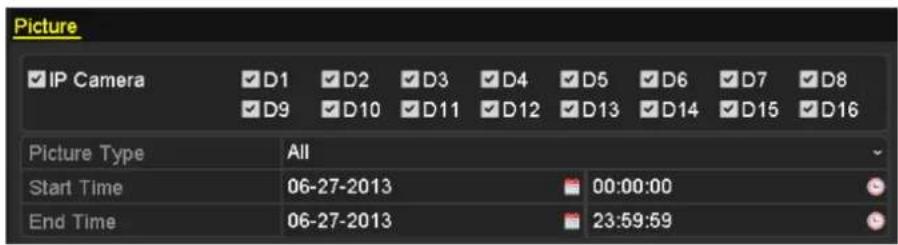
Figure 7.29 Picture Search for Backup
- Select pictures you want to back up.
Check the checkbox before the pictures you want to back up and click Export button.

Here we take USB flash drive as an example. For more backup devices, please refer to Chapter
Backing up by Normal Video Search.

Figure 7.30 Result of Picture Search
3. Export.
Click Export All button to export all the recording files.
Or you can select recording files you want to back up, and click Export button to enter Export interface.

Figure 7.31 Export Pictures Using USB Flash Drive
Stay in the Exporting interface until all record files are exported with pop-up message "Export finished".
- Check backup result.
7.3 Managing Backup Devices
Management of USB flash drives, USB HDDs and eSATA HDDs
Steps:
- Enter Search Result interface of record files.
Menu>Export>Normal
Set search condition and click Search button to enter Search Result interface.

At least one channel shall be selected.
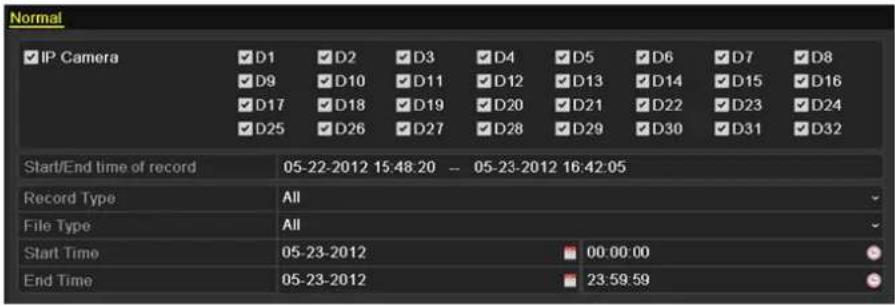
Figure 7.32 Normal Video Search for Backup
- Click Export All button to export all the recording files.
Or you can select recording files you want to back up, and click Export button to enter Export interface.

At least one record file shall be selected.

Figure 7.33 Result of Normal Video Search for Backup
- Backup device management.
Click New Folder button if you want to create a new folder in the backup device.
Select a record file or folder in the backup device and click 📄 button if you want to delete it.
Select a record file in the backup device and click button to play it.
Click Format button to format the backup device.

If the inserted USB device is not recognized:
- Click the Refresh button.
- Reconnect device.
- Check for compatibility from vendor.

Figure 7.34 USB Flash Drive Management
Management of USB writers and DVD-R/W
- Enter Search Result interface of record files.
Menu>Export>Normal
Set search condition and click Search button to enter Search Result interface.

At least one channel shall be selected.

Figure 7.35 Normal Video Search for Backup
- Select record files you want to back up.
Click Export All button to export all the recording files.
Or you can select recording files you want to back up, and click Export button to enter Export interface.

At least one recording file shall be selected.

Figure 7. 36 Result of Normal Video Search for Backup
3. Backup device management.
Click Erase button if you want to erase the files from a re-writable CD/DVD.

- There must be a re-writable CD/DVD when you make this operation.
-
If the inserted USB writer or DVD-R/W is not recognized:
-
Click the Refresh button.
- Reconnect device.
- Check for compatibility from vendor.

Figure 7.37 USB Writer Management
7.4 Hot Spare Device Backup
Purpose:
Several devices, can form an N+1 hot spare system. The system consists of several working devices and a hot spare device; when the working device fails, the hot spare device switches into operation, thus increasing the reliability of the system.

Please contact dealer for details of models which support the hot spare function.
Before you start:
At least 2 devices are online.
A bidirectional connection shown in the figure below is required to be built between the hot spare device and each working device.
![graph LR A["Start Finish"] --> B["Set a hot spare device"] B --> C["Add a hot spare device on normal device"] C --> D["Add the normal device on the hot spare device"] D --> E["End"]](/content/2026/05/1047595/images/eed4de096cf057706186437199f3bcb7e43d3c94b6c0d8d28edb7f2eef6c8271.jpg)
Figure 7.38 Building Hot Spare System
7.4.1 Setting Hot Spare Device

● The camera connection will be disabled when the device works in the hot spare mode.
- It's highly recommended to restore the defaults of the device after switching the working mode of the hot spare device to normal mode to ensure the normal operation afterwards.
Steps:
- Enter the Hot Spare settings interface.
Menu > Configuration > Hot Spare
- Set the Work Mode as Hot Spare Mode, click the Apply button to confirm the settings.
- Reboot the device to make the change take effect.
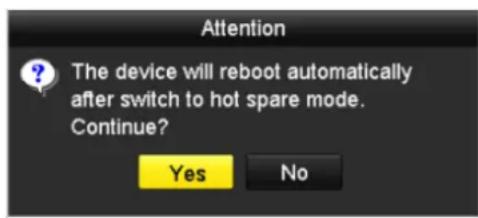
Figure 7.39 Reboot Attention
- Click the Yes button in the pop-up attention box.
7.4.2 Setting Working Device
Steps:
- Enter the Hot Spare settings interface.
Menu > Configuration > Hot Spare
- Set the Work Mode as Normal Mode (default).
- Check the checkbox of Enable to enable the hot spare function.
- Enter the IP address and admin password of hot spare device.
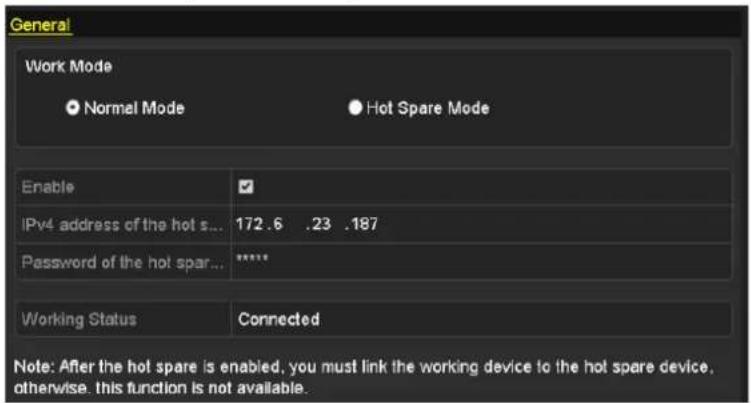
Figure 7.40 Setting Working Mode for Working device
- Click the Apply button to save the settings.
7.4.3 Managing Hot Spare System
Steps:
- Enter the Hot Spare Settings interface of the hot spare device.
Menu > Configuration > Hot Spare
The connected working device is displayed on the device list.
- Check the checkbox to select the working device from the device list, and click the Add button to link the working device to the hot spare device.

A hot spare device can connect up to 32 working devices.

Figure 7.41 Add Working Device
- You can view the working status of the hot spare device on the Working Status list.
When the working device works properly, the working status of the hot spare device is displayed as No record.

Figure 7.42 No Recording
When the working device gets offline, the hot spare device will record the video of the IP Camera connected to the working device for backup, and the working status of the hot spare device is displayed as Backing up.

The record backing up can be functioned for 1 working device at a time.
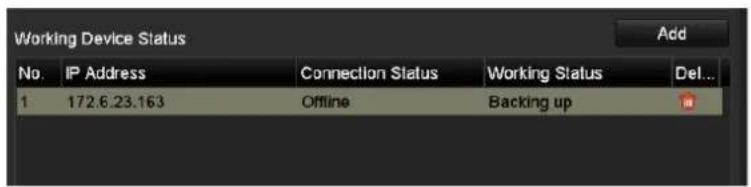
Figure 7.43 Backing up
When the working device comes online, the lost video files will be restored by the record synchronization function, and the working status of the hot spare device is displayed as Synchronizing.

The record synchronization function can be enabled for 1 working device at a time.

Figure 7.44 Synchronizing
Chapter 8 Alarm Settings
8.1 Setting Motion Detection Alarm
Steps:
- Enter Motion Detection interface of Camera Management and choose a camera you want to set up motion detection.
Menu> Camera> Motion

Figure 8.1 Motion Detection Setup Interface
- Set up detection area and sensitivity.
Tick “Enable Motion Detection”, use the mouse to draw detection area(s) and drag the sensitivity bar to set sensitivity.
Click 📄 button and set alarm response actions.
- Click Trigger Channel tab and select one or more channels which will start to record/capture or become full-screen monitoring when motion alarm is triggered, and click Apply to save the settings.

Figure 8.2 Set Trigger Camera of Motion Detection
- Set up arming schedule of the channel.
1) Select Arming Schedule tab to set the arming schedule of handling actions for the motion detection.
2) Choose one day of a week and up to eight time periods can be set within each day.
3) Click Apply to save the settings

Time periods shall not be repeated or overlapped.

Figure 8.3 Set Arming Schedule of Motion Detection
- Click Handling tab to set up alarm response actions of motion alarm (please refer to Chapter Setting Alarm Response Actions).
- If you want to set motion detection for another channel, repeat the above steps or just click Copy in the Motion Detection interface to copy the above settings to it.
8.2 Setting Sensor Alarms
Purpose:
Set the handling action of an external sensor alarm.
Steps:
- Enter Alarm Settings of System Configuration and select an alarm input.
Menu> Configuration> Alarm
Select Alarm Input tab to enter Alarm Input Settings interface.

Figure 8.4 Alarm Status Interface of System Configuration
- Set up the handling action of the selected alarm input.
Check the Enable checkbox and click Settings button to set up its alarm response actions.
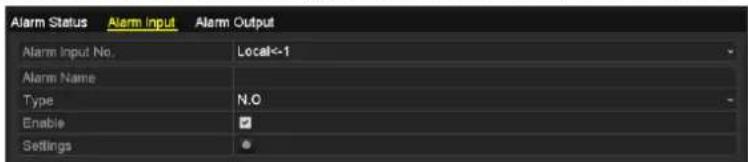
Figure 8.5 Alarm Input Setup Interface
- Select Trigger Channel tab and select one or more channels which will start to record/capture or become full-screen monitoring when an external alarm is input, and click Apply to save the settings.
- Select Arming Schedule tab to set the arming schedule of handling actions.
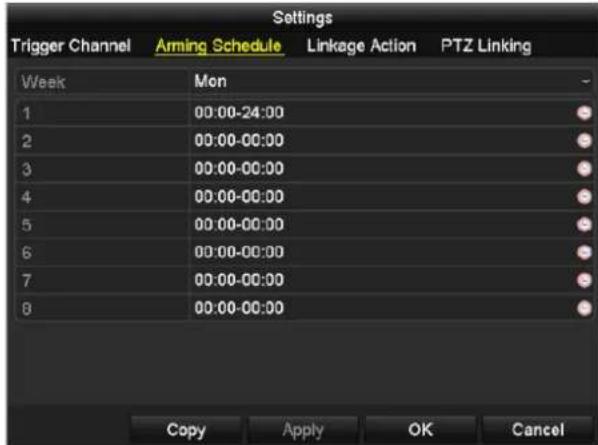
Figure 8.6 Set Arming Schedule of Alarm Input
Choose one day of a week and Max. eight time periods can be set within each day, and click Apply to save the settings.

Time periods shall not be repeated or overlapped.
Repeat the above steps to set up arming schedule of other days of a week. You can also use Copy button to copy an arming schedule to other days.
- Select Linkage Action tab to set up alarm response actions of the alarm input (please refer to Chapter Setting Alarm Response Actions).
- If necessary, select PTZ Linking tab and set PTZ linkage of the alarm input. Set PTZ linking parameters and click OK to complete the settings of the alarm input.

Please check whether the PTZ or speed dome supports PTZ linkage.
One alarm input can trigger presets, patrol or pattern of more than one channel. But presets, patrols and patterns are exclusive.

Figure 8.7 Set PTZ Linking of Alarm Input
- If you want to set handling action of another alarm input, repeat the above steps. Or you can click the Copy button on the Alarm Input Setup interface and check the checkbox of alarm inputs
to copy the settings to them.
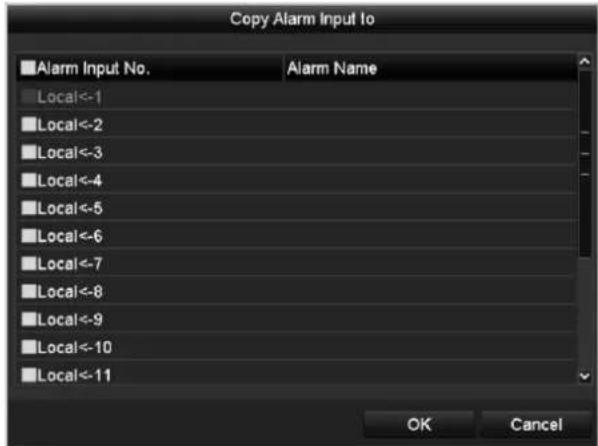
Figure 8.8 Copy Settings of Alarm Input
8.3 Detecting Video Loss Alarm
Purpose:
Detect video loss of a channel and take alarm response action(s).
Steps:
- Enter Video Loss interface of Camera Management and select a channel you want to detect.
Menu> Camera> Video Loss

Figure 8.9 Video Loss Setup Interface
- Set up handling action of video loss.
Check the checkbox of "Enable Video Loss Alarm", and click button to set up handling action of video loss.
- Set up arming schedule of the handling actions.
1) Select Arming Schedule tab to set the channel's arming schedule.
2) Choose one day of a week and up to eight time periods can be set within each day.
3) Click Apply button to save the settings.

Time periods shall not be repeated or overlapped.

Figure 8.10 Set Arming Schedule of Video Loss
-
Select Linkage Action tab to set up alarm response action of video loss (please refer to Chapter Setting Alarm Response Actions).
-
Click the OK button to complete the video loss settings of the channel.
8.4 Detecting Video Tampering Alarm
Purpose:
Trigger alarm when the lens is covered and take alarm response action(s).
Steps:
- Enter Video Tampering interface of Camera Management and select a channel you want to detect video tampering.
Menu> Camera> Video Tampering
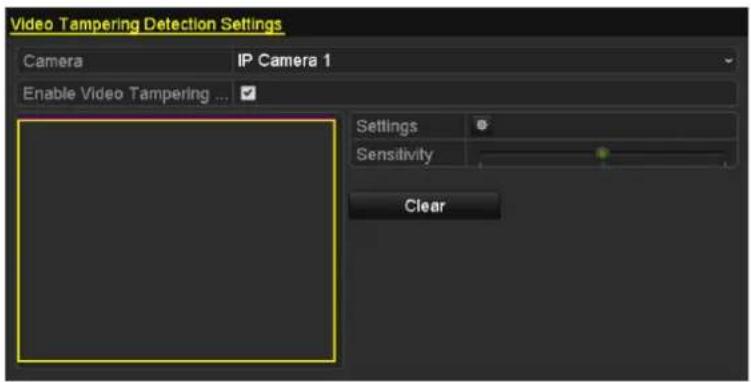
Figure 8.11 Video Tampering Setting Interface
- Set the video tampering handling action of the channel.
Check the checkbox of "Enable Video Tampering Detection".
Drag the sensitivity bar to set a proper sensitivity level. Use the mouse to draw an area you want to detect video tampering.
Click button to set up handling action of video tampering.
- Set arming schedule and alarm response actions of the channel.
1) Click Arming Schedule tab to set the arming schedule of handling actions.
2) Choose one day of a week and Max. eight time periods can be set within each day.
3) Click Apply button to save the settings.

Time periods shall not be repeated or overlapped.
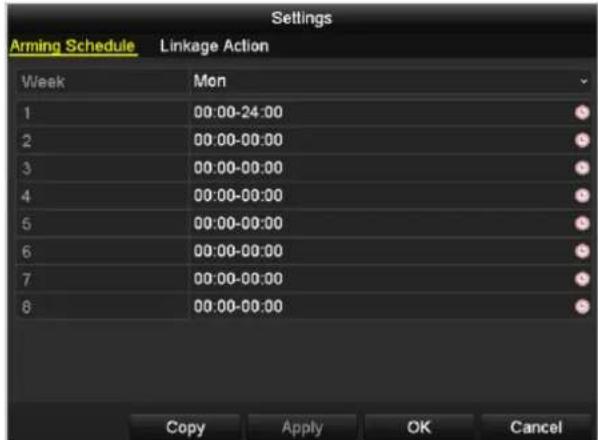
Figure 8.12 Set Arming Schedule of Video Tampering
- Select Linkage Action tab to set up alarm response actions of video tampering alarm (please refer to Chapter Setting Alarm Response Actions).
- Click the OK button to complete the video tampering settings of the channel.
8.5 Detecting VCA Alarm (for supported cameras)
Purpose:
The NVR can receive the VCA alarm sent by IP camera, and the VCA detection must be enabled and configured on the IP camera settings interface first. Refer to the user manual of IP camera for detailed instructions to set the VCA rules.
Steps:
- Enter VCA Alarm interface of Camera Management and select a camera you want to detect VCA alarm. Menu> Camera> VCA

The selected camera must support the VCA function.

Figure 8.13 VCA Alarm Setting Interface
- Check the Enable VCA Alarm checkbox and click Settings button to set up its alarm response actions.
- Select Trigger Channel tab and select one or more channels which will start to record/capture or become full-screen monitoring when a VCA alarm is triggered, and click Apply to save the settings.
- Select Arming Schedule tab to set the arming schedule of handling actions.
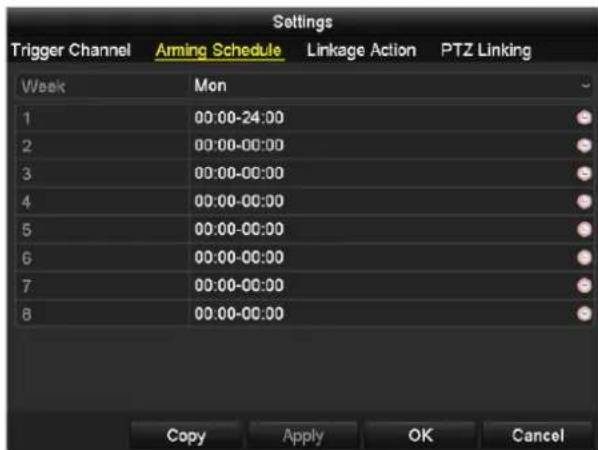
Figure 8.14 Set Arming Schedule of VCA Alarm
Choose one day of a week and Max. eight time periods can be set within each day, and click Apply to save the settings.

Time periods shall not be repeated or overlapped.
Repeat the above steps to set up arming schedule of other days of a week. You can also use Copy button to copy an arming schedule to other days.
-
Select Linkage Action tab to set up alarm response actions of the alarm input (please refer to Chapter 8.7 Setting Alarm Response Actions).
-
If necessary, select PTZ Linking tab and set PTZ linkage of the VCA alarm, refer to step 6 of Chapter 8.2 Setting Sensor Alarms.
-
Click the OK button to complete the VCA alarm settings of the channel.
8.6 Handling Exceptions Alarm
Purpose:
Exception settings refer to the handling action of various exceptions, e.g.
• HDD Full: The HDD is full.
• HDD Error: Writing HDD error or unformatted HDD.
• Network Disconnected: Disconnected network cable.
• IP Conflicted: Duplicated IP address.
- Illegal Login: Incorrect user ID or password.
• Record/Capture Exception: No space for saving recorded files or captured images.
• Hot Spare Exception: Disconnected with the working device.
Steps:
Enter Exception interface of System Configuration and handle various exceptions.
Menu> Configuration> Exceptions
Please refer to Chapter Setting Alarm Response Actions for detailed alarm response actions.
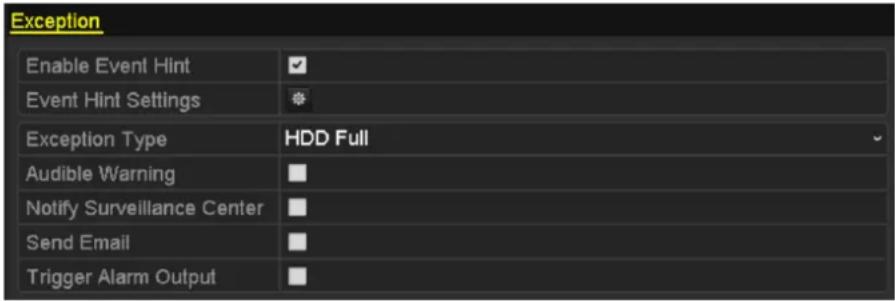
Figure 8.15 Exceptions Setup Interface
8.7 Setting Alarm Response Actions
Purpose:
Alarm response actions will be activated when an alarm or exception occurs, including Event Hint Display, Full Screen Monitoring, Audible Warning (buzzer), Notify Surveillance Center, Upload Picture to FTP, Trigger Alarm Output and Send Email.
Event Hint Display
When an event or exception happens, a hint can be displayed on the lower-left corner of live view image. And you can click the hint icon to check the details. Besides, the event to be displayed is configurable.
Steps:
- Enter the Exception settings interface.
Menu > Configuration > Exceptions
- Check the checkbox of Enable Event Hint.

Figure 8.16 Event Hint Settings Interface
- Click the 📄 to set the type of event to be displayed on the image.
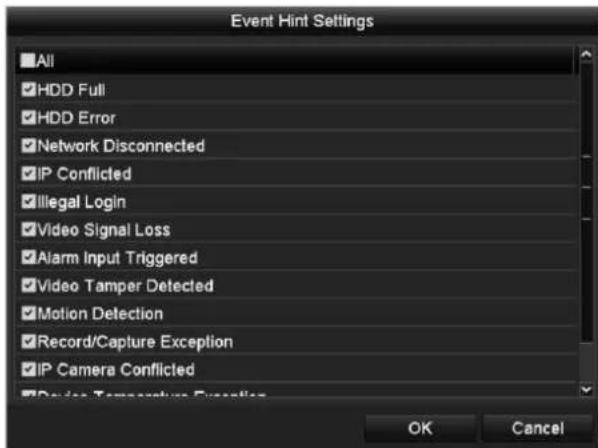
Figure 8.17 Event Hint Settings Interface
- Click the OK button to finish settings.
Full Screen Monitoring
When an alarm is triggered, the local monitor (VGA, HDMI or BNC monitor) display in full screen the video image from the alarming channel configured for full screen monitoring.
If alarms are triggered simultaneously in several channels, their full-screen images will be switched at an interval of 10 seconds (default dwell time). A different dwell time can be set by going to Menu >Configuration>Live View >Full Screen Monitoring Dwell Time.
Auto-switch will terminate once the alarm stops and you will be taken back to the Live View interface.

You must select during "Trigger Channel" settings the channel(s) you want to make full screen monitoring.
Audible Warning
Trigger an audible beep when an alarm is detected.
Notify Surveillance Center
Sends an exception or alarm signal to remote alarm host when an event occurs. The alarm host refers to the PC installed with Remote Client.

The alarm signal will be transmitted automatically at detection mode when remote alarm host is configured. Please refer to Chapter Configuring Remote Alarm Host for details of alarm host configuration.
Email Linkage
Send an email with alarm information to a user or users when an alarm is detected.
Please refer to Chapter 9.2.10 for details of Email configuration.
Trigger Alarm Output
Trigger an alarm output when an alarm is triggered.
- Enter Alarm Output interface.
Menu> Configuration> Alarm> Alarm Output
Select an alarm output and set alarm name and dwell time. Click Schedule button to set the arming schedule of alarm output.

If "Manually Clear" is selected in the dropdown list of Dwell Time, you can clear it only by going to Menu> Manual> Alarm.
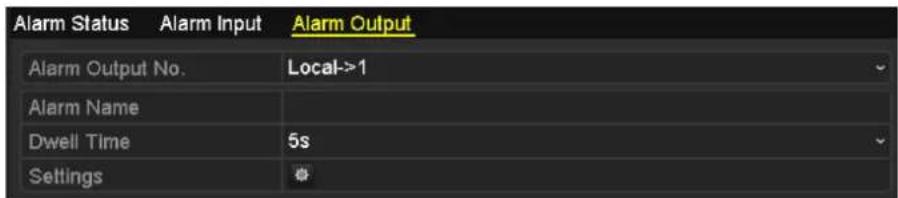
Figure 8.18 Alarm Output Setup Interface
- Set up arming schedule of the alarm output.
Choose one day of a week and up to 8 time periods can be set within each day.

Time periods shall not be repeated or overlapped.
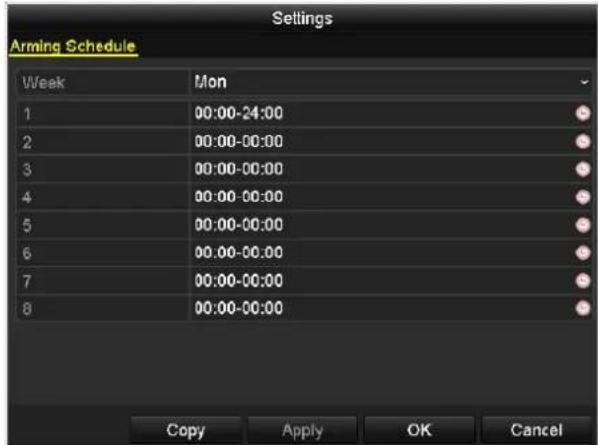
Figure 8.19 Set Arming Schedule of Alarm Output
- Repeat the above steps to set up arming schedule of other days of a week. You can also use Copy button to copy an arming schedule to other days.
Click the OK button to complete the video tampering settings of the alarm output No.
- You can also copy the above settings to another channel.

Figure 8. 20 Copy Settings of Alarm Output
8.8 Triggering or Clearing Alarm Output Manually
Purpose:
Sensor alarm can be triggered or cleared manually. If “Manually Clear” is selected in the dropdown list of dwell time of an alarm output, the alarm can be cleared only by clicking Clear button in the following interface.
Steps:
Select the alarm output you want to trigger or clear and make related operations.
Menu> Manual> Alarm
Click Trigger/Clear button if you want to trigger or clear an alarm output.
Click Trigger All button if you want to trigger all alarm outputs.
Click Clear All button if you want to clear all alarm output.
| Alarm Output No. | Alarm Name | Trigger |
| Local->1 | No | |
| Local->2 | No | |
| Local->3 | No | |
| Local->4 | No | |
| 172.6.23.105:8000->1 | No |
Figure 8.21 Clear or Trigger Alarm Output Manually
Chapter 9 Network Settings
9.1 Configuring General Settings
Purpose:
Network settings must be properly configured before you operate NVR over network.
Steps:
- Enter the Network Settings interface.
Menu >Configuration>Network
- Select the General tab.
| NIC Type | 10M/100M/1000M Self-adaptive |
| Enable DHCP | ■ |
| IPv4 Address | 172.6 .23 .190 |
| IPv4 Subnet Mask | 255 .255 .255 .0 |
| IPv4 Default Gateway | 172.6 .23 .1 |
| IPv6 Address 1 | fe80::212:42ff:efd:ec46/64 |
| IPv6 Address 2 | |
| IPv6 Default Gateway | |
| MAC Address | 00:12:42:fd:ec:46 |
| MTU(Bytes) | 1500 |
| Preferred DNS Server | |
| Alternate DNS Server | |
| Internal NIC IPv4 Address | 192 .168 .254 .1 |
Figure 9.1 Network Settings Interface

In the General Settings interface, you can configure the following settings: DHCP/static IP, IPv4s, IPv4 Gateway, MTU and DNS Server.
If the DHCP server is available, you can click the checkbox of DHCP to automatically obtain an IP address and other network settings from that server.

-
You also need to consider/configure the internal NIC address, so that IP addresses are assigned to the cameras connected to the PoE interfaces.
● The valid value range of MTU is 500 \~ 9676. -
After having configured the general settings, click Apply button to save the settings.
9.2 Configuring Advanced Settings
9.2.1 Configuring PPPoE Settings
Purpose:
Your NVR also allows access by Point-to-Point Protocol over Ethernet (PPPoE).
Steps:
- Enter the Network Settings interface.
Menu >Configuration> Network
- Select the PPPoE tab to enter the PPPoE Settings interface, as shown in Figure 9.2.
| Enable PPPOE | |
| User Name | |
| Password |
Figure 9.2 PPPoE Settings Interface
- Check the PPPoE checkbox to enable this feature.
- Enter User Name, and Password for PPPoE access.

The User Name and Password should be assigned by your ISP.
- Click the Apply button to save and exit the interface.
- After successful settings, the system asks you to reboot the device to enable the new settings, and the PPPoE dial-up is automatically connected after reboot.
You can go to Menu >Maintenance>System Info >Network interface to view the status of PPPoE connection.
Please refer to Chapter Viewing System Information for PPPoE status.
9.2.2 Configuring DDNS
Purpose:
If your ISP connection is set to use DHCP as its default network connection, you should use Dynamic DNS (DDNS) to insure that you can reliably connect to your site. SIMPLEDDNS is highly recommended.
Prior registration with the DDNS service is often required before configuring the system to use DDNS.
Steps:
- Enter the Network Settings interface.
Menu >Configuration> Network
- Select the DDNS tab to enter the DDNS Settings interface, as shown in Figure 9.3.

Figure 9.3 DDNS Settings Interface
- Check the DDNS checkbox to enable this feature.
- Select DDNS Type. Five different DDNS types are selectable: IPServer, DynDNS, PeanutHull, NO-IP and SIMPLEDDNS.
• IPServer: Enter Server Address for IPServer.
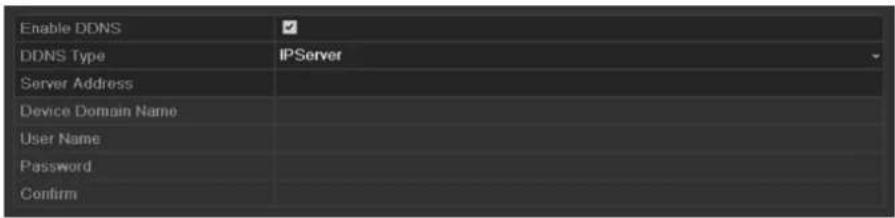
Figure 9.4 IPServer Settings Interface
• DynDNS:
1) Enter Server Address for DynDNS (i.e. members.dyndns.org).
2) In the NVR Domain Name text field, enter the domain obtained from the DynDNS website.
3) Enter the User Name and Password registered in the DynDNS website.
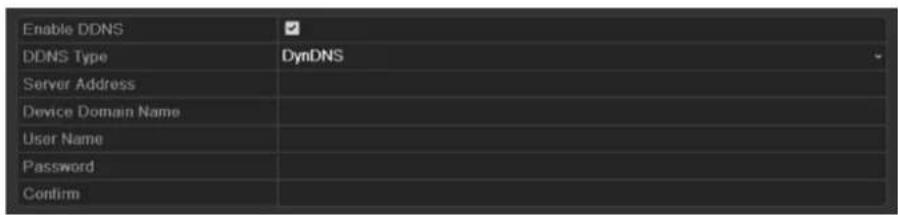
Figure 9.5 DynDNS Settings Interface
- PeanutHull: Enter the User Name and Password obtained from the PeanutHull website.

Figure 9.6 PeanutHull Settings Interface
- NO-IP:
Enter the account information in the corresponding fields. Refer to the DynDNS settings.
1) Enter Server Address for NO-IP.

INNOVATIVE
2) In the NVR Domain Name text field, enter the domain obtained from the NO-IP website (www.no-ip.com).
3) Enter the User Name and Password registered in the NO-IP website.

Figure 9.7 NO-IP Settings Interface
- SIMPLEDDNS:
1) The Server Address of the SIMPLEDDNS server appears by default: www.simpleddns.com.
2) Enter the Device Domain Name. You can use the alias you registered in the SIMPLEDDNS server or define a new device domain name. If a new alias of the device domain name is defined in the NVR, it will replace the old one registered on the server. You can register the alias of the device domain name in the SIMPLEDDNS server first and then enter the alias to the Device Domain Name in the NVR; you can also enter the domain name directly on the NVR to create a new one.

Figure 9.8 SIMPLEDDNS Settings Interface
Register the device on the SIMPLEDDNS server.
1) Go to the SIMPLEDDNS website: www.simpleddns.com. 2) Click Register new user to register an account if you do not have one and use the account to log in.
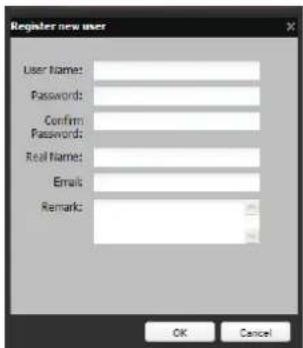
Figure 9.9 Register an Account
3) In the Device Management interface, click Add to register the device.
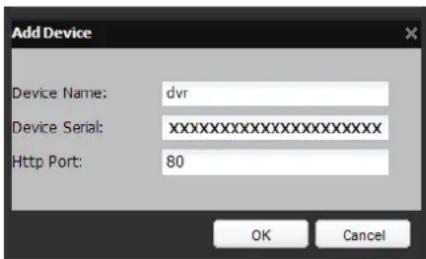
Figure 9.10 Register the Device

Note: The device name can only contain the lower-case English letter, numeric and ‘-’; and it must start with the lower-case English letter and cannot end with ‘-’.
- IF THE WAN PORT USED FOR HTTP ACCESS IS OTHER THAN 80, IT IS ESSENTIAL THAT YOU ENTER THE ACTUAL WAN HTTP PORT INTO THE REGISTRATION DATA.
- Access the Device via Web Browser or Client Software
- After having successfully registered the device on the SIMPLEDDNS server, you can access your device via web browser or Client Software with the Device Domain Name (Device Name).
● Task 1: Access the Device via Web Browser
- Open a web browser, and enter http://www.simpleddns.com/alias in the address bar. Alias refers to the Device Domain Name on the device or the Device Name on the SIMPLEDDNS server.
Example: http://www.simpleddns.com/nvr
- Note: If you mapped the HTTP port on your router and changed it to a port number other than 80, (Refer to Chapter 9.2.10 for the mapped HTTP port number) you must enter the mapped port info into the SIMPLEDDNS setup for the NVR so that port information is included when you are redirected from SIMPLEDDNS.COM/alias to your NVR.
- OPTION 2: Access the devices via CMS
For CMS, in the Add Device window, select and then edit the device information.
Nickname: Edit a name for the device as you want.
Server Address: www.simpleddns.com
Device Domain Name: It refers to the Device Domain Name on the device or the Device Name on the SIMPLEDDNS server you created.
User Name: Enter the user name of the device. By default it is admin.
Password: Enter the password of the device. By default it is 12345.

Figure 9.11 Access Device via CMS
- Click the Apply button to save and exit the interface.
9.2.3 Configuring NTP Server
Purpose:
A Network Time Protocol (NTP) Server can be configured on your NVR to ensure the accuracy of system date/time.
Steps:
- Enter the Network Settings interface.
Menu >Configuration> Network
- Select the NTP tab to enter the NTP Settings interface, as shown in Figure 9. 12.

Figure 9. 12 NTP Settings Interface
-
Check the Enable NTP checkbox to enable this feature.
-
Configure the following NTP settings:
• Interval: Time interval between the two synchronizing actions with NTP server. The unit is minute.
• NTP Server: IP address of NTP server.
• NTP Port: Port of NTP server.
- Click the Apply button to save and exit the interface.

The time synchronization interval can be set from 1 to 10080min, and the default value is 60min. If the NVR is connected to a public network, you should use a NTP server that has a time synchronization function, such as the server at the National Time Center (IP Address: 210.72.145.44). If the NVR is setup in a more customized network, NTP software can be used to establish a NTP server used for time synchronization.
9.2.4 Configuring SNMP
Purpose:
You can use SNMP protocol to get device status and parameters related information.
Steps:
- Enter the Network Settings interface.
Menu >Configuration> Network
- Select the SNMP tab to enter the SNMP Settings interface, as shown in Figure 9.13.
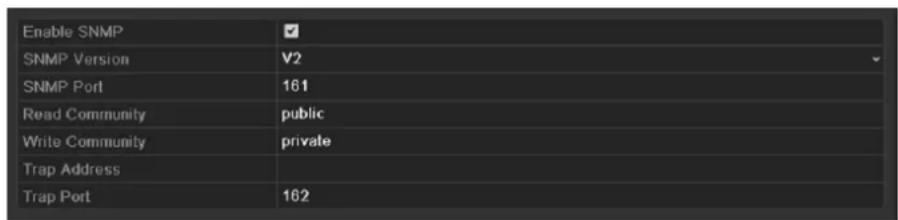
Figure 9.13 SNMP Settings Interface
- Check the SNMP checkbox to enable this feature.
- Configure the following SNMP settings:
- Trap Address: IP Address of SNMP host.
- Trap Port: Port of SNMP host.
- Click the Apply button to save and exit the interface.

Before setting the SNMP, please download the SNMP software and manage to receive the device information via SNMP port. By setting the Trap Address, the NVR is allowed to send the alarm event and exception message to the surveillance center.
9.2.5 Configuring Remote Alarm Host
Purpose:
With a remote alarm host configured, the NVR will send the alarm event or exception message to the host when an alarm is triggered. The remote alarm host must have the Network Video Surveillance software installed.
Steps:
- Enter the Network Settings interface.
Menu >Configuration> Network
- Select the More Settings tab to enter the More Settings interface, as shown in Figure 9.14.
| Alarm Host IP | |
| Alarm Host Port | 0 |
| Server Port | 8000 |
| HTTP Port | 80 |
| Multicast IP | |
| RTSP Port | 554 |
| Enable High-speed Dow... |
Figure 9.14 More Settings Interface
- Enter Alarm Host IP and Alarm Host Port in the text fields.
The Alarm Host IP refers to the IP address of the remote PC on which the Network Video Surveillance Software (e.g., CMS) is installed, and the Alarm Host Port must be the same as the alarm monitoring port configured in the software.
- Click the Apply button to save and exit the interface.
9.2.6 Configuring Multicast
Purpose:
The multicast can be configured to realize live view for more than 128 connections through network for the device. A multicast address spans the Class-D IP range of 224.0.0.0 to 239.255.255.255. It is recommended to use the IP address ranging from 239.252.0.0 to 239.255.255.255.
Steps:
- Enter the Network Settings interface.
Menu >Configuration> Network - Select the More Settings tab to enter the More Settings interface, as shown in Figure 9.14.
- Set Multicast IP, as shown in Figure 9. 15. When adding a device to the Network Video Surveillance Software, the multicast address must be the same as the NVR's multicast IP.
| Server Port | 8000 |
| HTTP Port | 80 |
| Multicast IP | 239.221.2.78 |
Figure 9.15 Configure Multicast
- Click the Apply button to save and exit the interface.

The multicast function should be supported by the network switch to which the NVR is connected.
9.2.7 Configuring RTSP
Purpose:
The RTSP (Real Time Streaming Protocol) is a network control protocol designed for use in communication systems to control streaming media servers.
Steps:

INNOVRTIVE
-
Enter the Network Settings menu
Menu >Configuration> Network -
Select the More Settings tab to enter the More Settings menu, as shown in Figure 9.14.
| RTSP Port | 554 |
Figure 9.16 RTSP Settings Interface
- Enter the RTSP port in the text field of RTSP Service Port. The default RTSP port is 554, and you can change it according to different requirements.
- Click the Apply button to save and exit the menu.
9.2.8 Configuring Server and HTTP Ports
Purpose:
You can change the server and HTTP ports in the Network Settings menu. The default server port is 8000 and the default HTTP port is 80.
Steps:
- Enter the Network Settings interface.
Menu >Configuration> Network
- Select the More Settings tab to enter the More Settings interface, as shown in Figure 9. 14.
- Enter new Server Port and HTTP Port.
| Server Port | 80001 |
| HTTP Port | 80 |
| Multicast IP | 239.221.2.78 |
Figure 9.17 Host/Others Settings Menu
- Enter the Server Port and HTTP Port in the text fields. The default Server Port is 8000 and the HTTP Port is 80, and you can change them according to different requirements.
- Click the Apply button to save and exit the interface.

The Server Port should be set to the range of 2000-65535 and it is used for remote client software access. The HTTP port is used for remote web browser access.
9.2.9 Configuring HTTPS Port
Purpose:
HTTPS provides authentication of the web site and associated web server that one is communicating with, which protects against Man-in-the-middle attacks. Perform the following steps to set the port number of https.
Example:
If you set the port number as 443 and the IP address is 192.0.0.64, you may access the device by inputting https://192.0.0.64:443 via the web browser.

The HTTPS port can be only configured through the web browser.
Steps:
- Open web browser, input the IP address of device, and the web server will select the language automatically according to the system language and maximize the web browser.
- Input the correct user name and password, and click Login button to log in the device.
- Enter the HTTPS settings interface. Configuration > Remote Configuration > Network Settings > HTTPS
- Create the self-signed certificate or authorized certificate.
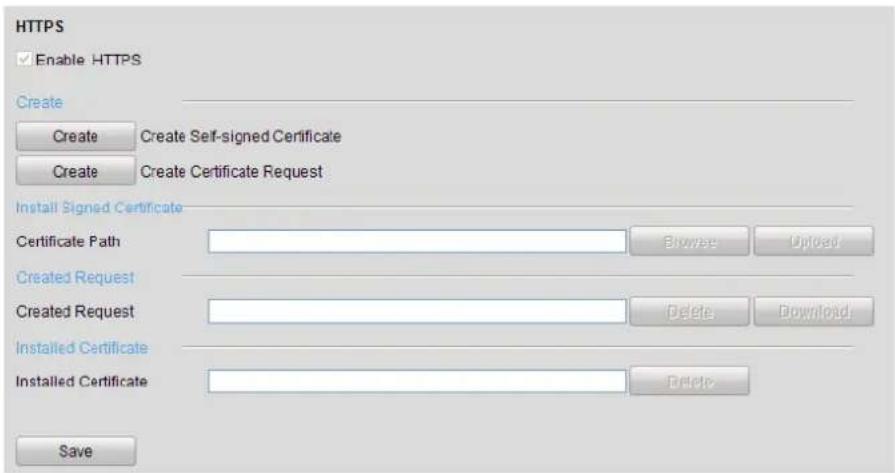
Figure 9.18 HTTPS Settings
OPTION 1: Create the self-signed certificate
1) Click the Create button to create the following dialog box.

Figure 9.19 Create Self-signed Certificate
2) Enter the country, host name/IP, validity and other information.
3) Click OK to save the settings.
OPTION 2: Create the authorized certificate
1) Click the Create button to create the certificate request.
2) Download the certificate request and submit it to the trusted certificate authority for signature.
3) After receiving the signed valid certificate, import the certificate to the device.
- There will be the certificate information after you successfully create and install the certificate.

Figure 9.20 Installed Certificate Property
- Check the checkbox to enable the HTTPS function.
- Click the Save button to save the settings.
9.2.10 Configuring Email
Purpose:
The system can be configured to send an Email notification to all designated users if an alarm event is detected, etc., an alarm or motion event is detected or the administrator password is changed.
Before configuring the Email settings, the NVR must be connected to a local area network (LAN) that maintains an SMTP mail server. The network must also be connected to either an intranet or the Internet depending on the location of the e-mail accounts to which you want to send notification.
Steps:
- Enter the Network Settings interface.
Menu >Configuration> Network
- Set the IPv4 Address, IPv4 Subnet Mask, IPv4 Gateway and the Preferred DNS Server in the Network Settings menu, as shown in Figure 9.21.
| NIC Type | 10M/100M/1000M Self-adaptive | |||
| Enable DHCP | ■ | |||
| IPv4 Address | 172.6 | 23 | 8 | |
| IPv4 Subnet Mask | 255.255 | 255 | 0 | |
| IPv4 Default Gateway | 172.6 | 23 | 1 | |
| IPv6 Address 1 | fe80: 8ee7:48ff fe16:173cf64 | |||
| IPv6 Address 2 | ||||
| IPv6 Default Gateway | ||||
| MAC Address | 8ce7:48:16:17.3c | |||
| MTU(Bytes) | 1500 | |||
| Preferred DNS Server | 10.1.7.88 | |||
| Alternate DNS Server | 10.1.7.77 | |||
| Internal NIC IPv4 Address | 192.168 | 254 | 1 | |
Figure 9.21 Network Settings Interface
- Click Apply to save the settings.
- Select the Email tab to enter the Email Settings interface.

Figure 9.22 Email Settings Interface
- Configure the following Email settings:
Enable Server Authentication (optional): Check the checkbox to enable the server authentication feature.
User Name: The user account of sender's Email for SMTP server authentication.
Password: The password of sender's Email for SMTP server authentication.
SMTP Server: The SMTP Server IP address or host name (e.g., smtp.263xmail.com).
SMTP Port No.: The SMTP port. The default TCP/IP port used for SMTP is 25.
Enable SSL (optional): Click the checkbox to enable SSL if required by the SMTP server.
Sender: The name of sender.
Sender's Address: The Email address of sender.
Select Receivers: Select the receiver. Up to 3 receivers can be configured.
Receiver: The name of user to be notified.
Receiver's Address: The Email address of user to be notified.
Enable Attached Pictures: Check the checkbox of Enable Attached Picture if you want to send email with attached alarm images. The interval is the time of two adjacent alarm images. You can also set SMTP port and enable SSL here.
Interval: The interval refers to the time between two actions of sending attached pictures.
E-mail Test: Sends a test message to verify that the SMTP server can be reached.
-
Click Apply button to save the Email settings.
-
You can click Test button to test whether your Email settings work. The corresponding Attention message box will pop up. Refer to Figure 9. 23.

Figure 9.23 Email Testing Attention
9.2.11 Configuring NAT
Purpose:
Two ways are provided for port mapping to realize the remote access via the cross-segment network, UPnP TM and manual mapping.

INNOVATIVE
• UPnP TM
Universal Plug and Play (UPnPTM) can permit the device seamlessly discover the presence of other network devices on the network and establish functional network services for data sharing, communications, etc. You can use the UPnPTM function to enable the fast connection of the device to the WAN via a router without port mapping.
Before you start:
If you want to enable the UPnPTM function of the device, you must enable the UPnPTM function of the router to which your device is connected. When the network working mode of the device is set as multi-address, the Default Route of the device should be in the same network segment as that of the LAN IP address of the router.
Steps:
- Enter the Network Settings interface.
Menu > Configuration > Network
- Select the NAT tab to enter the port mapping interface.
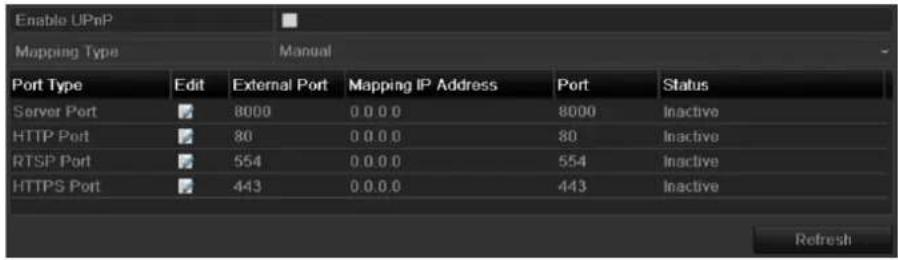
Figure 9.24 UPnP™ Settings Interface
-
Check ☑ checkbox to enable UPnPTM.
-
Select the Mapping Type as Manual or Auto in the drop-down list.
OPTION 1: Auto
If you select Auto, the Port Mapping items are read-only, and the external ports are set by the router automatically.
Steps:
1) Select Auto in the drop-down list of Mapping Type.
2) Click Apply button to save the settings.
3) You can click Refresh button to get the latest status of the port mapping.
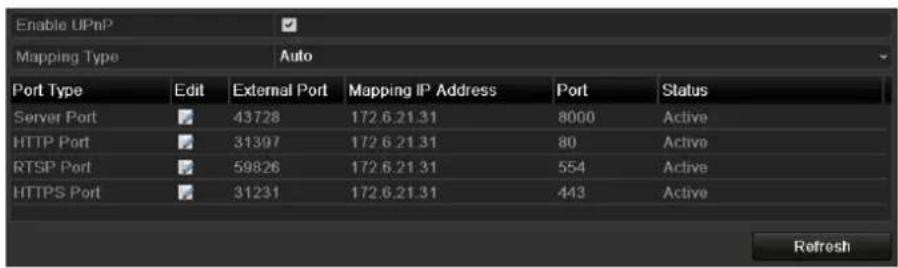
Figure 9. 25 UPnPTM Settings Finished-Auto
OPTION 2: Manual
If you select Manual as the mapping type, you can edit the external port on your demand by clicking to activate the External Port Settings dialog box.
Steps:
1) Select Manual in the drop-down list of Mapping Type.

INNOVATIVE
2) Click ☐ to activate the External Port Settings dialog box. Configure the external port No. for server port, http port, RTSP port and https port respectively.

- You can use the default port No., or change it according to actual requirements.
● External Port indicates the port No. for port mapping in the router. - The value of the RTSP port No. should be 554 or between 1024 and 65535, while the value of the other ports should be between 1 and 65535 and the value must be different from each other. If multiple devices are configured for the UPnPTM settings under the same router, the value of the port No. for each device should be unique.

Figure 9. 26 External Port Settings Dialog Box
3) Click Apply button to save the settings.
4) You can click Refresh button to get the latest status of the port mapping.

Figure 9.27 UPnP™ Settings Finished-Manual
- Manual Mapping
If your router does not support the UPnP TM function, perform the following steps to map the port manually in an easy way.
Before you start:
Make sure the router support the configuration of internal port and external port in the interface of Forwarding.
Steps:
- Enter the Network Settings interface.
Menu > Configuration > Network - Select the NAT tab to enter the port mapping interface.
- Leave the Enable UPnP checkbox unchecked.
- Click ☐ to activate the External Port Settings dialog box. Configure the external port No. for server port, http port, RTSP port and https port respectively.

The value of the RTSP port No. should be 554 or between 1024 and 65535, while the value of the other ports should be between 1 and 65535 and the value must be different from each other. If multiple devices are configured for the UPnPTM settings under the same router, the value of the port No. for each device should be unique.

Figure 9. 28 External Port Settings Dialog Box
- Click OK to save the setting for the current port and return to the upper-level menu.
- Click Apply button to save the settings.
- Enter the virtual server setting page of router; fill in the blank of Internal Source Port with the internal port value, the blank of External Source Port with the external port value, and other required contents.

Each item should be corresponding with the device port, including server port, http port, RTSP port and https port.

Figure 9.29 Setting Virtual Server Item

The above virtual server setting interface is for reference only, it may be different due to different router manufactures. Please contact the manufacture of router if you have any problems with setting virtual server.
9.2.12 Configuring High-speed Download
Purpose:
You can enable the High-speed Download function to widen the outgoing bandwidth of the device. In this way you can speed up the download of record files through web browser or CMS software.

If you enable the high-speed download function, the local menu operation will be affected. It is

INNOVATIVE
recommended to disable this function after finishing the remote downloading of record files.
Steps:
- Enter the Network Settings interface.
Menu >Configuration> Network
- Select the More Settings tab to enter the More Settings interface, as shown in Figure 9. 14.
- Check the checkbox of Enable High-speed Download. And click the OK button in the pop-up message box to confirm the settings.

Figure 9.30 High-speed Download Settings Menu
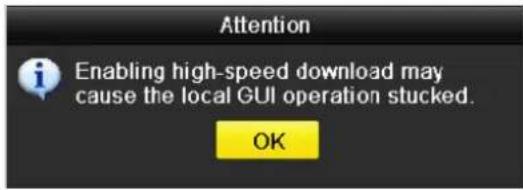
Figure 9.31 Message Box of High-speed Download
- Click Apply button to save and exit the interface.
9.2.13 Virtual Host Settings
Purpose:
You can directly get access to the IP camera management interface after enabling this function.

The Virtual host function can be only configured through the web browser.
Steps:
- Enter the Advanced settings interface, as shown in the Figure 9.32.
Configuration > Remote Configuration > Network Settings > Advanced

Figure 9.32 Advanced Settings Interface
- Check the checkbox of the Enable Virtual Host.
- Click the Save button to save the setting.
- Enter the IP camera management interface of NVR. The Connect column appears on the right-most side of

INNOVATIVE
the camera list, as shown in the Figure 9.33.
Configuration > Remote Configuration > Camera Management > IP Camera

Figure 9.33 Connect to IP Camera
- Click the link and the page of IP camera management appears.
9.2.14 Telnet Settings
Purpose:
Telnet function provides an easy way to get access to the NVR. You can see the advanced information about the device by inputting command; as well the configuration can also be realized through telnet connection.
Steps:
- Enter the Advanced settings interface, as shown in the Figure 9.32.
Configuration > Remote Configuration > Network Settings > Advanced - Check the checkbox of the Enable Telnet.
- Click the Save button to save the setting.
- You can open the Command Prompt window in your PC, and input "telnet IP Address" to connect with the NVR, as shown in the figure below.
Example:
If the IP address of the NVR is 192.0.0.64, you can input "telnet 192.0.0.64" and then press Enter to connect to the NVR.
![Microsoft Windows [Version 6.1.%01] Copyright (c) 2009 Microsoft Corporation. All rights reserved. C:\Users_\telnot 192.8.0.64_](/content/2026/05/1047595/images/74622a0ad82f995f879a319350f329e7ed00684a836d5a0f64f0a3d1a3d080cb.jpg)
Figure 9.34 Connect to NVR
9.3 Checking Network Traffic
Purpose:
You can check the network traffic to obtain real-time information of NVR such as linking status, MTU, sending/receiving rate, etc.
Steps:
- Enter the Network Traffic interface.
Menu > Maintenance > Net Detect
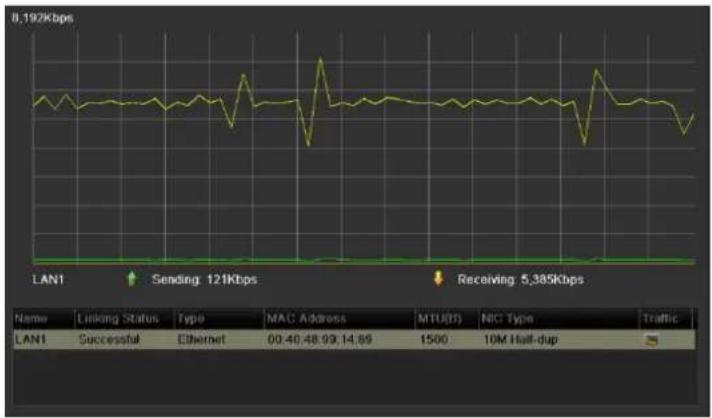
Figure 9.35 Network Traffic Interface
- You can view the sending rate and receiving rate information on the interface. The traffic data is refreshed every 1 second.
9.4 Configuring Network Detection
Purpose:
You can obtain network connecting status of NVR through the network detection function, including network delay, packet loss, etc.
9.4.1 Testing Network Delay and Packet Loss
Steps:
- Enter the Network Traffic interface.
Menu >Maintenance>Net Detect
- Click the Network Detection tab to enter the Network Detection menu, as shown in Figure 9. 36.

Figure 9. 36 Network Detection Interface
- Enter the destination address in the text field of Destination Address.
- Click Test button to start testing network delay and packet loss. The testing result pops up on the window. If the testing is failed, the error message box will pop up as well. Refer to Figure 9. 37.


Figure 9.37 Testing Result of Network Delay and Packet Loss
9.4.2 Exporting Network Packet
Purpose:
By connecting the NVR to network, the captured network data packet can be exported to USB-flash disk, SATA/eSATA, DVD-R/W and other local backup devices.
Steps:
- Enter the Network Traffic interface.
Menu >Maintenance>Net Detect - Click the Network Detection tab to enter the Network Detection interface.
- Select the backup device from the dropdown list of Device Name, as shown in Figure 9. 38.

Click Refresh button if the connected local backup device cannot be displayed. When it fails to detect the backup device, please check whether it is compatible with the NVR. You can format the backup device if the format is incorrect.
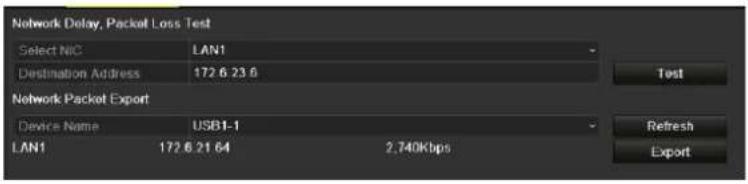
Figure 9.38 Export Network Packet
- Click Export button to start exporting.
- After the exporting is complete, click OK to finish the packet export, as shown in Figure 9.39.


Figure 9.39 Packet Export Attention

Up to 1M data can be exported each time.
9.4.3 Checking the Network Status
Purpose:
You can also check the network status and quick set the network parameters in this interface.
Steps:
Click the Status button on the lower-right corner of the page.
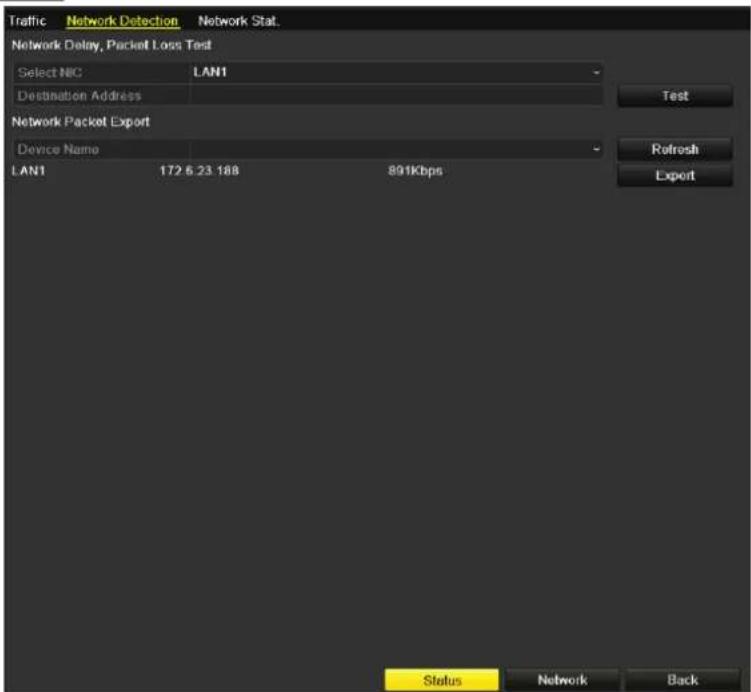
Figure 9. 40 Network Status Checking
If the network is normal the following message box pops out.

Figure 9.41 Network Status Checking Result
If the message box pops out with other information instead of this one, you can click Network button to show the quick setting interface of the network parameters.
9.4.4 Checking Network Statistics
Purpose:
You can check the network status to obtain the real-time information of NVR.
Steps:
- Enter the Network Detection interface.
Menu>Maintenance>Net Detect
- Choose the Network Stat. tab.

Figure 9.42 Network Stat. Interface
- Check the bandwidth of IP Camera, bandwidth of Remote Live View, bandwidth of Remote Playback, bandwidth of Net Receive Idle and bandwidth of Net Send Idle.
- You can click Refresh to get the newest status.
Chapter 10
10.1 Upgrading Firmware
Purpose:
You can view the information of the firmware and upgrade the firmware by local backup device or remote FTP server.
Steps:
- Enter the Firmware interface to check the information of the firmware, including the version, maximum physical disk quantity, maximum array quantity, auto-rebuild status, etc.
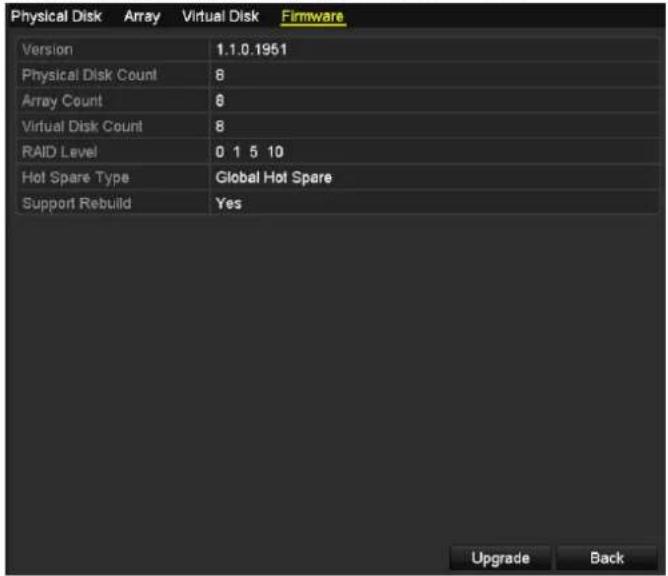
Figure 10.1 Firmware Interface
- You can click Upgrade button to upgrade the firmware. Local upgrade and FTP upgrade are available. Since the upgrading process of the firmware is the same as that of the device firmware, you can refer to Chapter 13.4 for detailed information.

Please contact the dealer immediately if the device cannot work properly after upgrading.
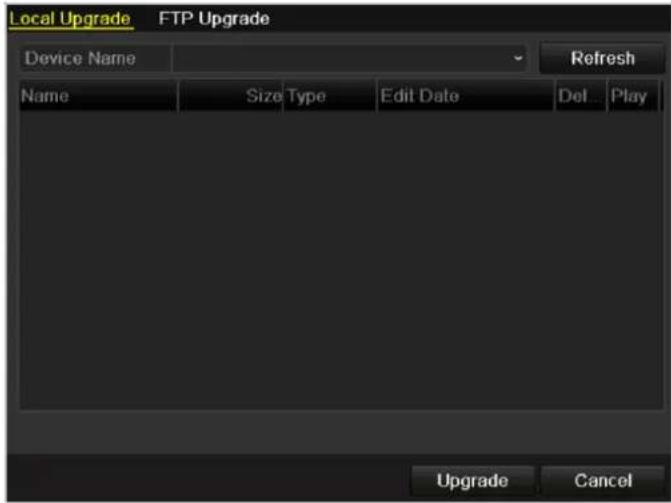
Figure 10.2 Upgrade the Firmware
Chapter 11 HDD Management
11.1 Initializing HDDs
Purpose:
A newly installed hard disk drive (HDD) must be initialized before it can be used with your NVR.

A message box pops up when the NVR starts up if there exits any uninitialized HDD.

Figure 11.1 Message Box of Uninitialized HDD
Click Yes button to initialize it immediately or you can perform the following steps to initialize the HDD.
Steps:
- Enter the HDD Information interface.
Menu > HDD> General

Figure 11.2 HDD Information Interface
- Select HDD to be initialized.
- Click the Init button.
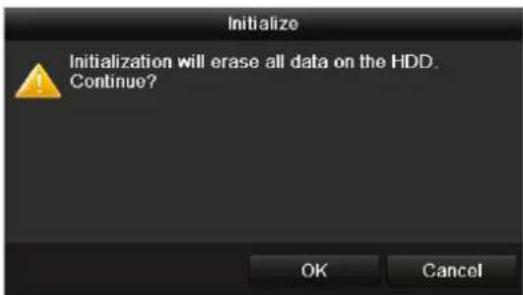
Figure 11.3 Confirm Initialization
- Select the OK button to start initialization.

Figure 11.4 Status changes to Initializing

INNOVATIVE
- After the HDD has been initialized, the status of the HDD will change from Uninitialized to Normal.

Figure 11.5 HDD Status Changes to Normal

Initializing the HDD will erase all data on it.
11.2 Managing Network HDD
Purpose:
You can add the allocated NAS or disk of IP SAN to NVR, and use it as network HDD.
Steps:
- Enter the HDD Information interface.
Menu > HDD>General

Figure 11.6 HDD Information Interface
- Click the Add button to enter the Add NetHDD interface, as shown in Figure 11.7.

Figure 11.7 HDD Information Interface
- Add the allocated NetHDD.
- Select the type to NAS or IP SAN.
- Configure the NAS or IP SAN settings.
- Add NAS disk:
1) Enter the NetHDD IP address in the text field.
2) Click the Search button to search the available NAS disks.
3) Select the NAS disk from the list shown below.
Or you can just manually enter the directory in the text field of NetHDD Directory.
4) Click the OK button to add the configured NAS disk.

Up to 8 NAS disks can be added.

Figure 11.8 Add NAS Disk
- Add IP SAN:
1) Enter the NetHDD IP address in the text field.
2) Click the Search button to search the available IP SAN disks.
3) Select the IP SAN disk from the list shown below.
4) Click the OK button to add the selected IP SAN disk.

Up to 1 IP SAN disk can be added.

Figure 11.9 Add IP SAN Disk
- After having successfully added the NAS or IP SAN disk, return to the HDD Information menu. The added NetHDD will be displayed in the list.

If the added NetHDD is uninitialized, please select it and click the Init button for initialization.
| Label | Capacity | Status | Property | Type | Free Space | Gro... | Edit | Del... |
| 3 | 931.51GB | Normal | R/W | Local | 890GB | 1 | - | |
| 4 | 931.51GB | Normal | R/W | Local | 867GB | 1 | - | |
| 17 | 79,968MB | Normal | R/W | NAS | 79,872MB | 1 |
Figure 11. 10 Initialize Added NetHDD
11.3 Managing eSATA
Purpose:
When there is an external eSATA device connected to NVR, you can configure eSATA for the use of Record/Capture or Export, and you can manage the eSATA in the NVR.
Steps:
- Enter the Advanced Record Settings interface.
Menu >Record>Advanced
- Select the eSATA type to Export or Record/Capture from the dropdown list of eSATA.
Export: use the eSATA for backup. Refer to Backup using eSATA HDDs in Chapter Backing up by Normal Video Search for operating instructions.
Record/Capture: use the eSATA for record/capture. Refer to the following steps for operating instructions.

Figure 11.11 Set eSATA Mode
3. When the eSATA type is selected to Record/Capture, enter the HDD Information interface. Menu > HDD>General
4. Edit the property of the selected eSATA, or initialize it is required.

Two storage modes can be configured for the eSATA when it is used for Record/Capture. Please refer to Chapter Managing HDD Group and Chapter Configuring Quota Mode for details.
| Label | Capacity | Status | Property | Type | Free Space | Gro... | Edit | Del... |
| 4 | 931.51GB | Normal | R/W | Local | 921GB | 1 | - | |
| 18 | 10,048MB | Uninitialized | R/W | NAS | 0MB | 1 | ||
| 25 | 931.51GB | Normal | R/W | eSATA | 894GB | 1 |
Figure 11. 12 Initialize Added eSATA
11.4 Managing HDD Group
11.4.1 Setting HDD Groups
Purpose:
Multiple HDDs can be managed in groups. Video from specified channels can be recorded onto a particular HDD group through HDD settings.
Steps:
- Enter the Storage Mode interface.
Menu > HDD > Advanced > Storage Mode
- Set the Mode to Group, as shown in Figure 11. 13.

Figure 11.13 Storage Mode Interface
- Click the Apply button and the following Attention box will pop up.

Figure 11. 14 Attention for Reboot
- Click the Yes button to reboot the device to activate the changes.
- After reboot of device, enter the HDD Information interface.
Menu > HDD> General
- Select HDD from the list and click icon to enter the Local HDD Settings interface, as shown in Figure 11. 15.

Figure 11. 15 Local HDD Settings Interface
- Select the Group number for the current HDD.

The default group No. for each HDD is 1.
- Click the OK button to confirm the settings.

Figure 11. 16 Confirm HDD Group Settings
- In the pop-up Attention box, click the Yes button to finish the settings.
11.4.2 Setting HDD Property
Purpose:
The HDD property can be set to redundancy, read-only or read/write (R/W). Before setting the HDD property, please set the storage mode to Group (refer to step1-4 of Chapter Setting HDD Groups).
A HDD can be set to read-only to prevent important recorded files from being overwritten when the HDD becomes full in overwrite recording mode.
When the HDD property is set to redundancy, the video can be recorded both onto the redundancy HDD and the R/W HDD simultaneously so as to ensure high security and reliability of video data.
Steps:
- Enter the HDD Information interface.
Menu > HDD> General
- Select HDD from the list and click the icon to enter the Local HDD Settings interface, as shown in Figure 11.17.

Figure 11. 17 Set HDD Property
- Set the HDD property to R/W, Read-only or Redundancy.
- Click the OK button to save the settings and exit the interface.

INNOVATIVE
- In the HDD Information menu, the HDD property will be displayed in the list.

At least 2 hard disks must be installed on your NVR when you want to set a HDD to Redundancy, and there is one HDD with R/W property.
11.5 Configuring Quota Mode
Purpose:
Each camera can be configured with allocated quota for the storage of recorded files or captured pictures.
Steps:
- Enter the Storage Mode interface.
Menu > HDD > Advanced
- Set the Mode to Quota, as shown in Figure 11. 18.

The NVR must be rebooted to enable the changes to take effect.

Figure 11.18 Storage Mode Settings Interface
- Select a camera for which you want to configure quota.
- Enter the storage capacity in the text fields of Max. Record Capacity (GB) and Max. Picture Capacity (GB), as shown in Figure 11. 19.

Figure 11.19 Configure Record/Picture Quota
- You can copy the quota settings of the current camera to other cameras if required. Click the Copy button to enter the Copy Camera menu, as shown in Figure 11. 20.
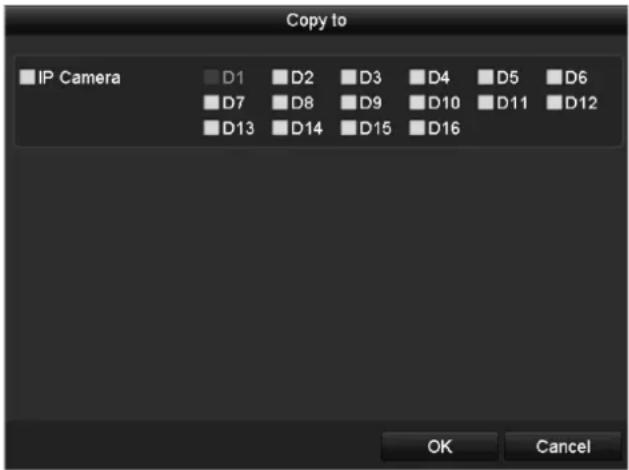
Figure 11. 20 Copy Settings to Other Camera(s)
- Select the camera (s) to be configured with the same quota settings. You can also click the checkbox of IP Camera to select all cameras.
- Click the OK button to finish the Copy settings and back to the Storage Mode interface.
- Click the Apply button to apply the settings.

If the quota capacity is set to 0, then all cameras will use the total capacity of HDD for record and picture capture.
11.6 Configuring Disk Clone
Purpose:
If the S.M.A.R.T. detection result declares the HDD is abnormal, you can choose to clone all the data on the HDD to an inserted eSATA disk manually. Refer to Chapter 11.8 HDD Detection for details of S.M.A.R.T detection.
Before you start:
An eSATA disk should be connected to the device.
Steps:
- Enter the HDD Advanced Setting interface:
Menu > HDD > Advanced
- Click the Disk Clone tab to enter the disk clone configuring interface.
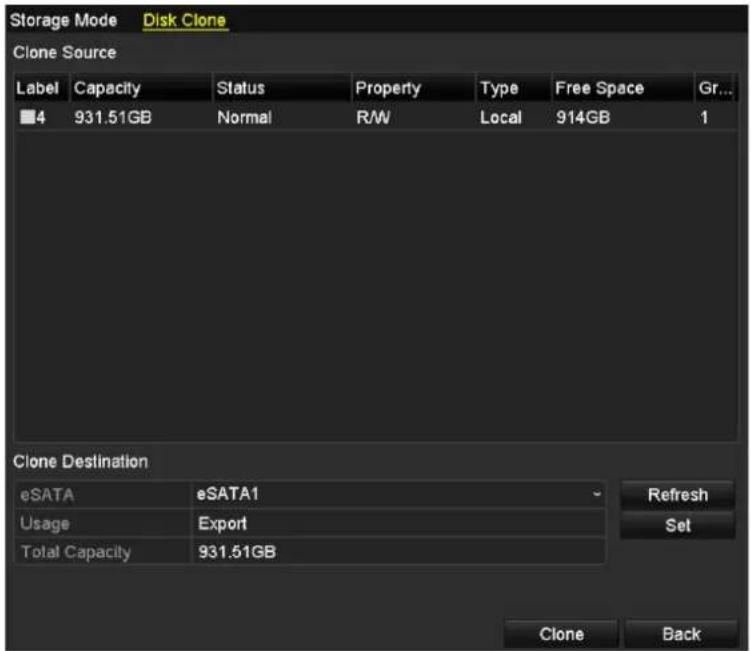
Figure 11.21 Disk Clone Configuration Interface
- Make sure the usage of the eSATA disk is set as Export.
If not, click the Set button to set it. Choose Export and click the OK button.
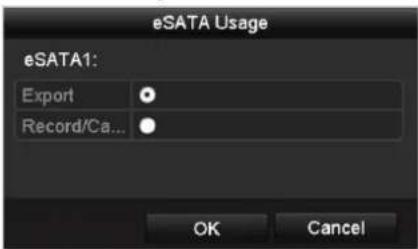
Figure 11.22 Setting eSATA Usage

The capacity of destination disk must be the same as that of the clone source disk.
- Check the checkbox of the HDD to be cloned in the Clone Source list.

INNOVATIVE
- Click the Clone button and a message box pops up.
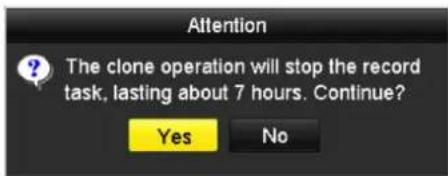
Figure 11. 23 Message Box for Disk Clone
- Click the Yes button to continue.
You can check the clone progress in the HDD status.

Figure 11. 24 Check Disk Clone Progress
11.7 Checking HDD Status
Purpose:
You may check the status of the installed HDDs on NVR so as to take immediate check and maintenance in case of HDD failure.
Checking HDD Status in HDD Information Interface
Steps:
- Enter the HDD Information interface.
Menu > HDD>General
- Check the status of each HDD which is displayed on the list, as shown in Figure 11. 25.
| HDD Information | ||||||||
| Label | Capacity | Status | Property | Type | Free Space | Gro... | Edit | Del |
| 4 | 931.51GB | Normal | R/W | Local | 921GB | 1 | ||
| 18 | 10,048MB | Uninitialized | R/W | NAS | 0MB | 1 | ||
| 25 | 931 51GB | Normal | R/W | eSATA | 894GB | 1 | ||
| Total Capacity | 1,872GB | |||||||
| Free Space | 1,815GB | |||||||
Figure 11.25 View HDD Status (1)

If the status of HDD is Normal or Sleeping, it works normally. If the status is Uninitialized or Abnormal,
please initialize the HDD before use. And if the HDD initialization is failed, please replace it with a new one.
Checking HDD Status in HDD Information Interface
Steps:
- Enter the System Information interface.
Menu >Maintenance > System Info
- Click the HDD tab to view the status of each HDD displayed on the list, as shown in Figure 11. 26.

Figure 11.26 View HDD Status (2)
11.8 HDD Detection
Purpose:
The device provides the HDD detection function such as the adopting of the S.M.A.R.T. and the Bad Sector Detection technique. The S.M.A.R.T. (Self-Monitoring, Analysis and Reporting Technology) is a monitoring system for HDD to detect and report on various indicators of reliability in the hopes of anticipating failures.
S.M.A.R.T. Settings
Steps:
- Enter the S.M.A.R.T Settings interface.
Menu > Maintenance > HDD Detect
- Select the HDD to view its S.M.A.R.T information list, as shown in Figure 11. 27.
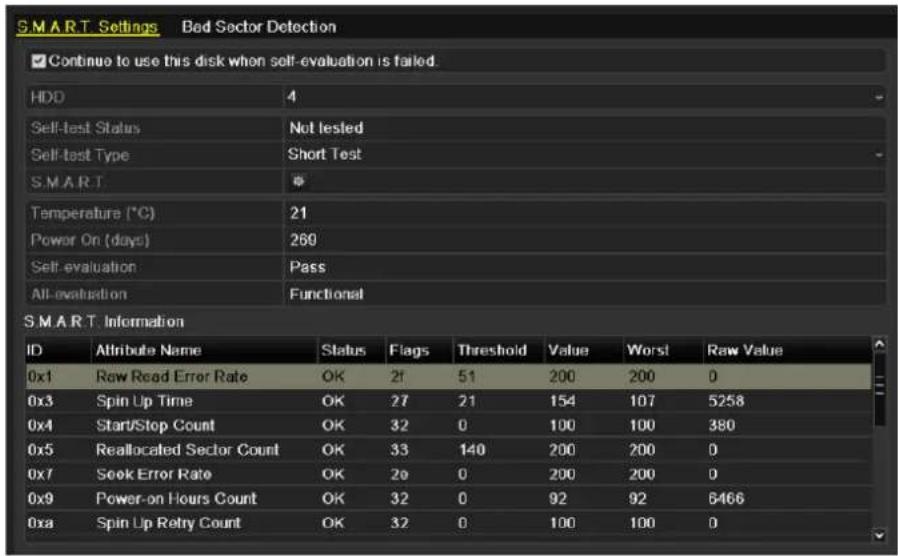
Figure 11. 27 S.M.A.R.T Settings Interface
The related information of the S.M.A.R.T. is shown on the interface.
You can choose the self-test types as Short Test, Expanded Test or the Conveyance Test.
Click the start button to start the S.M.A.R.T. HDD self-evaluation.


If you want to use the HDD even when the S.M.A.R.T. checking is failed, you can check the checkbox of the Continue to use the disk when self-evaluation is failed item.
Bad Sector Detection
Steps:
- Click the Bad Sector Detection tab.
- Select the HDD No. in the dropdown list you want to configure, and choose All Detection or Key Area Detection as the detection type.
- Click the Detect button to start the detection.

Figure 11.28 Bad Sector Detection
And you can click Error info button to see the detailed damage information.
And you can also pause/resume or cancel the detection.
11.9 Configuring HDD Error Alarms
Purpose:
You can configure the HDD error alarms when the HDD status is Uninitialized or Abnormal.
Steps:
- Enter the Exception interface.
Menu > Configuration > Exceptions
- Select the Exception Type to HDD Error from the dropdown list.
- Click the checkbox(s) below to select the HDD error alarm type (s), as shown in Figure 11. 29.

The alarm type can be selected to: Audible Warning, Notify Surveillance Center, Send Email and Trigger Alarm Output. Please refer to Chapter Setting Alarm Response Actions.
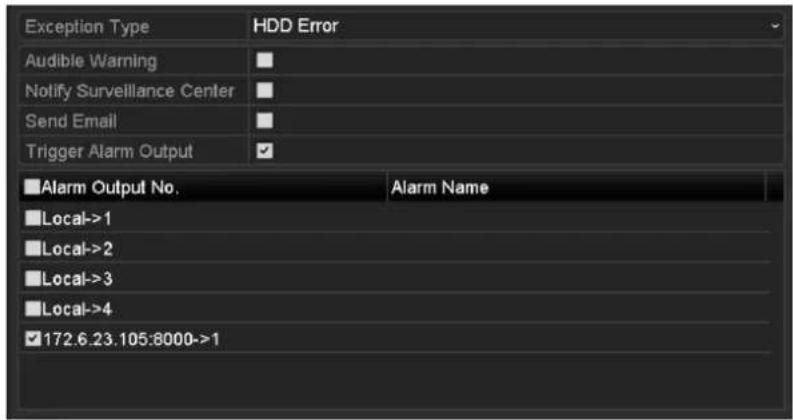
Figure 11.29 Configure HDD Error Alarm
- When the Trigger Alarm Output is selected, you can also select the alarm output to be triggered from the list below.
- Click the Apply button to save the settings
Chapter 12 Camera Settings
12.1 Configuring OSD Settings
Purpose:
You can configure the OSD (On-screen Display) settings for the camera, including date /time, camera name, etc.
Steps:
- Enter the OSD Configuration interface.
Menu > Camera > OSD - Select the camera to configure OSD settings.
- Edit the Camera Name in the text field.
- Configure the Display Name, Display Date and Display Week by clicking the checkbox.
- Select the Date Format, Time Format and Display Mode.
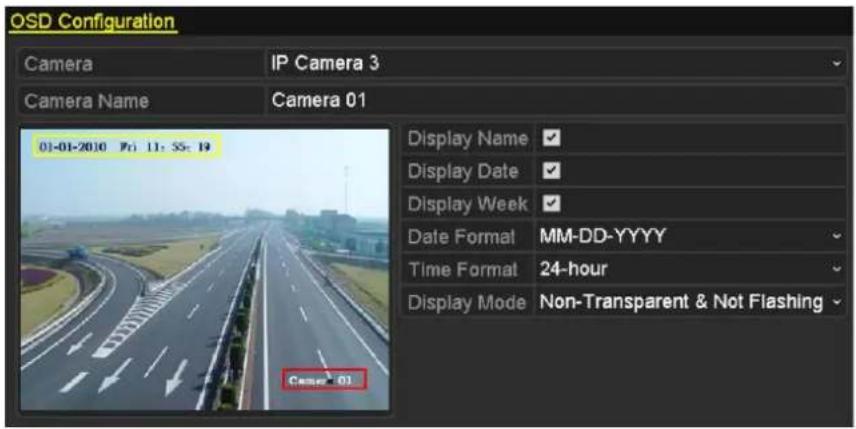
Figure 12.1 OSD Configuration Interface
- You can use the mouse to click and drag the text frame on the preview window to adjust the OSD position.
- Click the Apply button to apply the settings.
12.2 Configuring Privacy Mask
Purpose:
You are allowed to configure the four-sided privacy mask zones that cannot be viewed by the operator. The privacy mask can prevent certain surveillance areas to be viewed or recorded.
Steps:
- Enter the Privacy Mask Settings interface.
Menu > Camera > Privacy Mask - Select the camera to set privacy mask.
- Click the checkbox of Enable Privacy Mask to enable this feature.
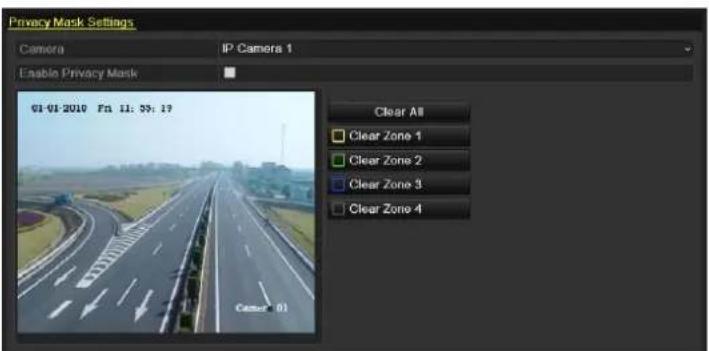
Figure 12.2 Privacy Mask Settings Interface
- Use the mouse to draw a zone on the window. The zones will be marked with different frame colors.

Up to 4 privacy masks zones can be configured and the size of each area can be adjusted.
- The configured privacy mask zones on the window can be cleared by clicking the corresponding Clear Zone1-4 icons on the right side of the window, or click Clear All to clear all zones.
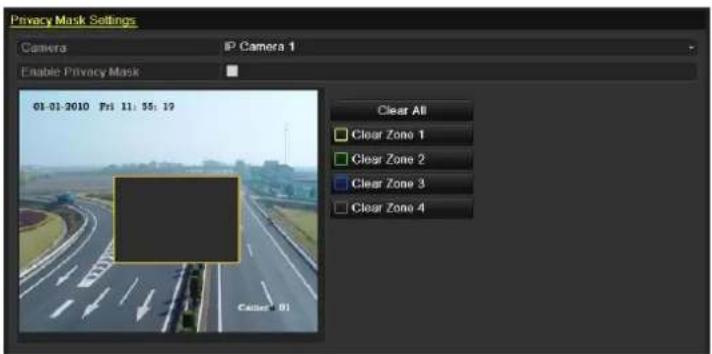
Figure 12.3 Set Privacy Mask Area
- Click the Apply button to save the settings.
12.3 Configuring Video Parameters
Steps:
- Enter the Image Settings interface.
Menu > Camera > Image
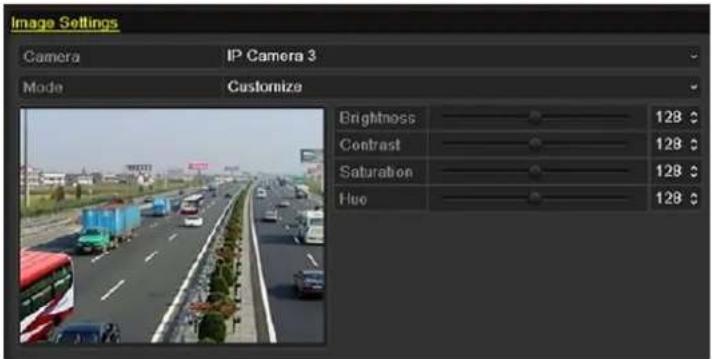
Figure 12.4 Image Settings Interface
- Select the camera to set image parameters.
- You can click on the arrow to change the value of each parameter.
- Click the Apply button to save the settings.
Chapter 13 NVR Management and Maintenance
13.1 Viewing System Information
13.1.1 Viewing Device Information
Steps:
- Enter the System Information interface.
Menu >Maintenance>System Info
- Click the Device Info tab to enter the Device Information menu to view the device name, model, serial No., firmware version and encode version, as shown in Figure 13.1.
| Device Info Camera Record Alarm Network HDD | |
| Device Name | Embedded Net DVR |
| Model | |
| Serial No. | 1620120518BBRR408508857WCVU |
| Firmware Version | |
| Encoding Version | V1.0, Build 121210 |
Figure 13.1 Device Information Interface
13.1.2 Viewing Camera Information
Steps:
- Enter the System Information interface.
Menu >Maintenance>System Info
- Click the Camera tab to enter the Camera Information menu to view the status of each camera, as shown in Figure 13.2.
| Device Info | Camera Record Alarm Network HDD | ||||
| Camera ... | Camera Name | Status | Motion Detection | Tamper-proof | Video Loss |
| D1 | Camera02 | Connected | Occur | Used | Not used |
| D2 | Camera 01 | Disconnected | Not supported | Not supported | Not supported |
| D3 | Camera03 | Disconnected | Not supported | Not supported | Not supported |
| D4 | Camera04 | Disconnected | Not supported | Not supported | Not supported |
| D5 | Camera05 | Disconnected | Not supported | Not supported | Not supported |
Figure 13.2 Camera Information Interface
13.1.3 Viewing Record Information
Steps:
- Enter the System Information interface.
Menu >Maintenance>System Info
- Click the Record tab to enter the Record Information menu to view the recording status and parameters of each camera, as shown in Figure 13.3.
| Device Info | Camera | Record | Alarm | Network | HDD | |||
| Camera No | Recording | Stream Typ | Frame Rate | Bitrate(Kbps) | Resolution | Record Typ | Encoding P | Redundant |
| D1 | Used | Video & Au-30fps | 2048 | 704*576(4CIF) | Manual | Event | No | |
| D2 | Used | Video | 30fps 2048 | 1600*1200(UXG Manual | Normal | No | ||
| D3 | Not used | Video & Au-30fps | 2048 | 704*576(4CIF) | Normal | No | ||
| D5 | Not used | Video | 30fps 2048 | 4CIF | Normal | No | ||
| D6 | Not used | Video & Au-30fps | 2048 | 4CIF | Normal | No | ||
| D7 | Not used | Video | 30fps 2048 | 4CIF | Normal | No | ||
Figure 13.3 Record Information Interface
13.1.4 Viewing Alarm Information
Steps:
- Enter the System Information interface.
Menu >Maintenance>System Info
- Click the Alarm tab to enter the Alarm Information menu to view the alarm information, as shown in Figure 13.4.

Figure 13.4 Alarm Information Interface
13.1.5 Viewing Network Information
Steps:
- Enter the System Information interface.
Menu >Maintenance>System Info
- Click the Network tab to enter the Network Information menu to view the network information, as shown in Figure 13.5.
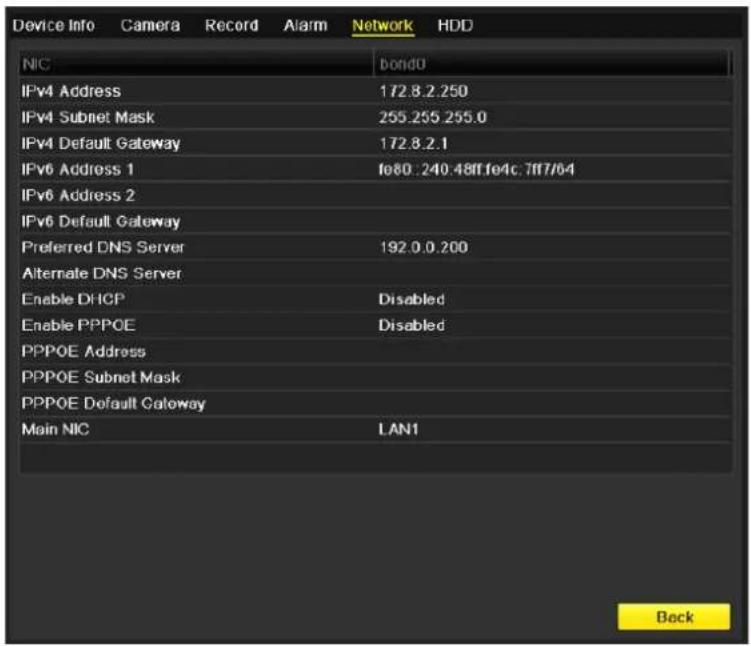
Figure 13.5 Network Information Interface
13.1.6 Viewing HDD Information
Steps:
- Enter the System Information interface.
Menu > Maintenance > System Info
- Click the HDD tab to enter the HDD Information menu to view the HDD status, free space, property, etc., as shown in Figure 13. 6.

Figure 13.6 HDD Information Interface
13.2 Searching & Export Log Files
Purpose:
The operation, alarm, exception and information of the NVR can be stored in log files, which can be viewed and exported at any time.
Steps:
- Enter the Log Search interface.
Menu > Maintenance > Log Information

Figure 13.7 Log Search Interface
- Set the log search conditions to refine your search, including the Start Time, End Time, Major Type and Minor Type.
- Click the Search button to start search log files.
- The matched log files will be displayed on the list shown below.

Figure 13.8 Log Search Results

Up to 2000 log files can be displayed each time.
- You can click the button of each log or double click it to view its detailed information, as shown in Figure 13.9. And you can also click the button to view the related video files if available.
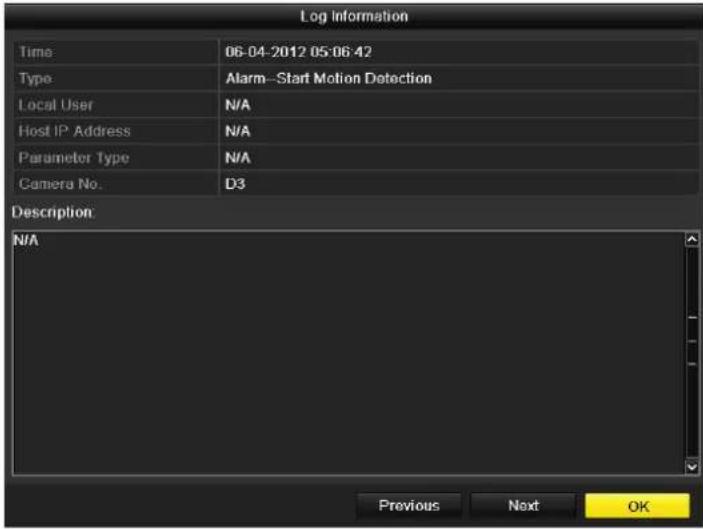
Figure 13.9 Log Details
- If you want to export the log files, click the Export button to enter the Export menu, as shown in Figure 13.10.
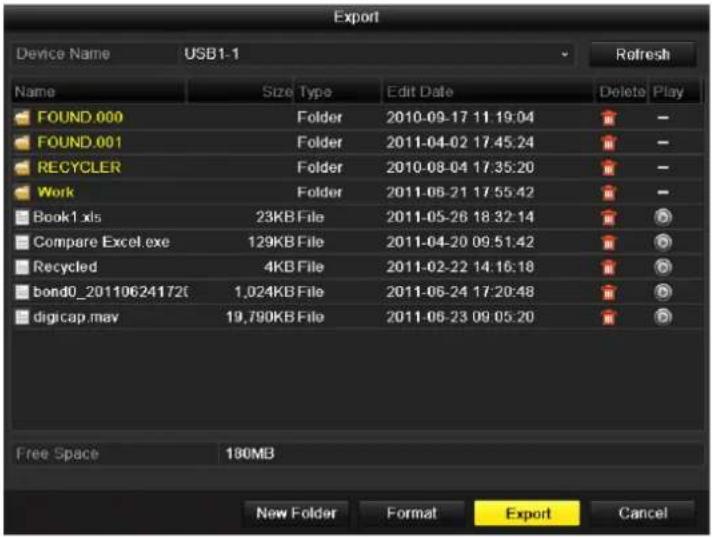
Figure 13.10 Export Log Files
- Select the backup device from the dropdown list of Device Name.
- Click the Export to export the log files to the selected backup device.
You can click the New Folder button to create new folder in the backup device, or click the Format button to format the backup device before log export.

- Please connect the backup device to NVR before operating log export.
- The log files exported to the backup device are named by exporting time, e.g., 20110514124841logBack.txt.
To export all the log files:
Steps:
-
Enter the Log Information interface.
Menu> Maintenance> Log Information> Log Export -
Click the Log Export tab.

Figure 13.11 Log Export Interface
- You can check the checkbox of the HDD.
- Click the Export button to export all the log files stored in the HDD.
13.3 Importing/Exporting IP Camera Info
Purpose:
The information of added IP camera can be generated into an excel file and exported to the local device for backup, including the IP address, manage port, password of admin, etc.. And the exported file can be edited on your PC, like adding or deleting the content, and copy the setting to other devices by importing the excel file to it.
Steps:
- Enter the camera management interface.
Menu > Camera > IP Camera Import/Export
- Click the IP Camera Import/Export tab, the content of detected plugged external device appears.
- Click the Export button to export configuration files to the selected local backup device.
- To import a configuration file, select the file from the selected backup device and click the Import button. After the importing process is completed, you must reboot the NVR.
13.4 Importing/Exporting Configuration Files
Purpose:
The configuration files of the NVR can be exported to local device for backup; and the configuration files of one NVR can be imported to multiple NVR devices if they are to be configured with the same parameters.
Steps:
- Enter the Import/Export Configuration File interface.
Menu > Maintenance > Import/Export
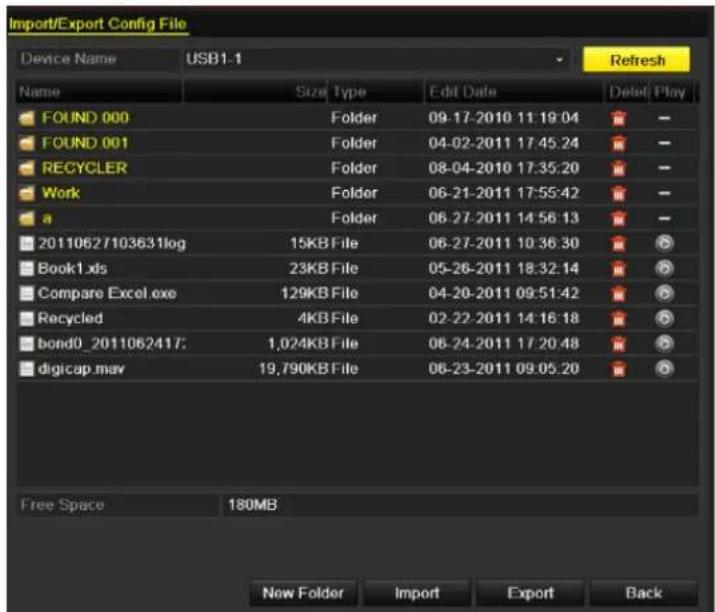
Figure 13.12 Import/Export Config File
- Click the Export button to export configuration files to the selected local backup device.
- To import a configuration file, select the file from the selected backup device and click the Import button. After the import process is completed, you must reboot the NVR.

After having finished the import of configuration files, the device will reboot automatically.
13.5 Upgrading System
Purpose:
The firmware on your NVR can be upgraded by local backup device or remote FTP server.
13.5.1 Upgrading by Local Backup Device
Steps:
- Connect your NVR with a local backup device where the update firmware file is located.
- Enter the Upgrade interface.
Menu >Maintenance>Upgrade - Click the Local Upgrade tab to enter the local upgrade menu, as shown in Figure 13. 13.

Figure 13. 13 Local Upgrade Interface
- Select the update file from the backup device.
- Click the Upgrade button to start upgrading.
- After the upgrading is complete, reboot the NVR to activate the new firmware.
13.5.2 Upgrading by FTP
Before you start:
Configure PC (running FTP server) and NVR to the same Local Area Network. Run the 3 rd -party TFTP software on the PC and copy the firmware into the root directory of TFTP.
Steps:
- Enter the Upgrade interface.
Menu >Maintenance>Upgrade - Click the FTP tab to enter the local upgrade interface, as shown in Figure 13. 14.

Figure 13. 14 FTP Upgrade Interface
- Enter the FTP Server Address in the text field.
- Click the Upgrade button to start upgrading.
- After the upgrading is complete, reboot the NVR to activate the new firmware.
13.6 Restoring Default Settings
Steps:
- Enter the Default interface.
Menu > Maintenance > Default

Figure 13.15 Restore Factory Default
- Click the OK button to restore the default settings.

Except the network parameters (including IP address, subnet mask, gateway, MTU, NIC working mode, default route and server port), all other parameters of the device will be restored to factory default settings.
Chapter 14 Other Settings
14.1 Configuring RS-232 Serial Port
Purpose:
The RS-232 port can be used in two ways:
- Parameters Configuration: Connect a PC to the NVR through the PC serial port. Device parameters can be configured by using software such as HyperTerminal. The serial port parameters must be the same as the NVR's when connecting with the PC serial port.
- Transparent Channel: Connect a serial device directly to the NVR. The serial device will be controlled remotely by the PC through the network and the protocol of the serial device.
Steps:
- Enter the RS-232 Settings interface.
Menu >Configuration> RS-232

Figure 14.1 RS-232 Settings Interface
- Configure RS-232 parameters, including baud rate, data bit, stop bit, parity, flow control and usage.
- Click the Apply button to save the settings.
14.2 Configuring General Settings
Purpose:
You can configure the BNC output standard, VGA output resolution, mouse pointer speed through the Menu > Configuration > General interface.
Steps:
-
Enter the General Settings interface.
Menu >Configuration> General -
Select the General tab.

Figure 14.2 General Settings Interface
- Configure the following settings:
• Language: The default language used is English.
- CVBS Output Standard: Select the CVBS output standard to NTSC or PAL, which must be the same with the video input standard.
- VGA Resolution: Select the VGA output resolution, which must be the same with the resolution of the monitor screen.
- HDMI Resolution: Select the HDMI resolution, which must be the same with the resolution of the monitor screen.
• Time Zone: Select the time zone.
- Date Format: Select the date format.
• System Date: Select the system date.
- System Time: Select the system time.
- Mouse Pointer Speed: Set the speed of mouse pointer; 4 levels are configurable.
- Enable Wizard: Enable/disable the Wizard when the device starts up.
- Enable Password: Enable/disable the use of the login password.
- Click the Apply button to save the settings.
14.3 Configuring DST Settings
Steps:
-
Enter the General Settings interface.
Menu >Configuration>General -
Choose DST Settings tab.

Figure 14.3 DST Settings Interface
You can check the checkbox before the Auto DST Adjustment item.
Or you can manually check the Enable DST checkbox, and then you choose the date of the DST period.
14.4 Configuring More Settings for Device Parameters
Steps:
-
Enter the General Settings interface.
Menu >Configuration>General -
Click the More Settings tab to enter the More Settings interface, as shown in Figure 14.4.

Figure 14. 4 More Settings Interface
- Configure the following settings:
• Device Name: Edit the name of NVR.
- Device No.: Edit the serial number of NVR. The Device No. can be set in the range of 1\~255, and the default No. is 255. The number is used for the remote and keyboard control.
• CVBS Output Brightness: Adjust the video output brightness.
- Auto Logout: Set timeout time for menu inactivity. E.g., when the timeout time is set to 5 Minutes, then the system will exit from the current operation menu to live view screen after 5 minutes of menu inactivity.
- Enable HDMI/VGA Simultaneous Output: By default, the video outputs from HDMI and VGA interfaces can be operated separately. You can set the simultaneous output for the HDMI and VGA by checking the checkbox of the option. By unchecking this box, you may use the HDMI and VGA monitors independently, to display different live views, or to display live video on one monitor and playback on the other, etc. CVBS can also be configured as an independent 'call' monitor
- Menu Output Mode: You can choose the menu display on different video output. There are auto, HDMI, VGA and Main CVBS selectable.
- Click the Apply button to save the settings.
14.5 Managing User Accounts
Purpose:
There is a default account in the NVR: Administrator. The Administrator user name is admin and the password is 12345. The Administrator has the permission to add and delete user and configure user parameters.
14.5.1 Adding a User
Steps:
- Enter the User Management interface.
Menu >Configuration>User
| User Management | ||||||
| No. | User Name | Level | User's MAC Address | Pe.. | Edit | Del.. |
| 1 | admin | Admin | 00:00:00:00:00:00 | - | ||
Figure 14.5 User Management Interface
- Click the Add button to enter the Add User interface.

Figure 14.6 Add User Menu
- Enter the information for new user, including User Name, Password, Level and User's MAC Address.
Level: Set the user level to Operator or Guest. Different user levels have different operating permission.
- Operator: The Operator user level has permission of Two-way Audio in Remote Configuration and all operating permission in Camera Configuration by default.
- Guest: The Guest user has no permission of Two-way Audio in Remote Configuration and only has the local/remote playback in the Camera Configuration by default.
User's MAC Address: The MAC address of the remote PC which logs onto the NVR. If it is configured and enabled, it only allows the remote user with this MAC address to access the NVR.
- Click the OK button to save the settings and go back to the User Management interface. The added new user will be displayed on the list, as shown in Figure 14.7.

Figure 14.7 Added User Listed in User Management Interface
- Select the user from the list and then click the button to enter the Permission settings interface, as shown in Figure 14.8.
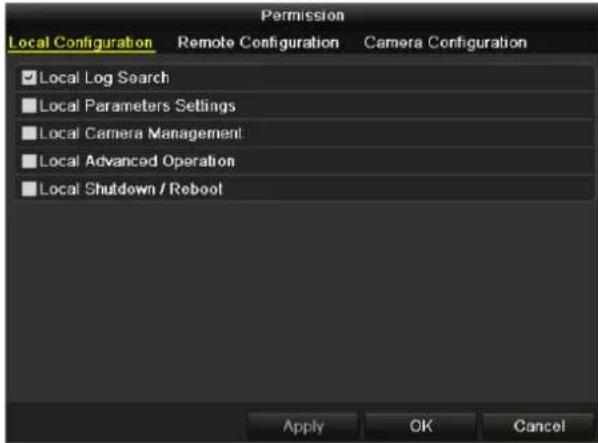
Figure 14.8 User Permission Settings Interface
- Set the operating permission of Local Configuration, Remote Configuration and Camera Configuration for the user.
Local Configuration
- Local Log Search: Searching and viewing logs and system information of NVR.
- Local Parameters Settings: Configuring parameters, restoring factory default parameters and importing/exporting configuration files.
- Local Camera Management: The adding, deleting and editing of IP cameras.
- Local Advanced Operation: Operating HDD management (initializing HDD, setting HDD property), upgrading system firmware, clearing I/O alarm output.
- Local Shutdown Reboot: Shutting down or rebooting the NVR.
Remote Configuration
- Remote Log Search: Remotely viewing logs that are saved on the NVR.
- Remote Parameters Settings: Remotely configuring parameters, restoring factory default parameters and importing/exporting configuration files.
- Remote Camera Management: Remote adding, deleting and editing of the IP cameras.
- Remote Serial Port Control: Configuring settings for RS-232 and RS-485 ports.
- Remote Video Output Control: Sending remote button control signal.
- Two-Way Audio: Realizing two-way radio between the remote client and the NVR.
- Remote Alarm Control: Remotely arming (notify alarm and exception message to the remote client) and controlling the alarm output.
- Remote Advanced Operation: Remotely operating HDD management (initializing HDD, setting HDD property), upgrading system firmware, clearing I/O alarm output.
- Remote Shutdown/Reboot: Remotely shutting down or rebooting the NVR.
Camera Configuration

INNOVRTIVE
- Remote Live View: Remotely viewing live video of the selected camera (s).
- Local Manual Operation: Locally starting/stopping manual recording, picture capturing and alarm output of the selected camera (s).
- Remote Manual Operation: Remotely starting/stopping manual recording, picture capturing and alarm output of the selected camera (s).
- Local Playback: Locally playing back recorded files of the selected camera (s).
- Remote Playback: Remotely playing back recorded files of the selected camera (s).
- Local PTZ Control: Locally controlling PTZ movement of the selected camera (s).
- Remote PTZ Control: Remotely controlling PTZ movement of the selected camera (s).
-
Local Video Export: Locally exporting recorded files of the selected camera (s).
-
Click the OK button to save the settings and exit interface.

Only the admin user account has the permission of restoring factory default parameters.
14.5.2 Deleting a User
Steps:
- Enter the User Management interface.
Menu >Configuration>User - Select the user to be deleted from the list, as shown in Figure 14.9.
Figure 14.9 User List
- Click the 📄 icon to delete the selected user.
14.5.3 Editing a User
Steps:
- Enter the User Management interface.
Menu >Configuration>User - Select the user to be edited from the list, as shown in Figure 14.9.
- Click the icon to enter the Edit User interface, as shown in Figure 14. 10.

The admin user can also be edited.

Operator and Guest

Admin
Figure 14.10 Edit User Interface
- Edit the corresponding parameters.
- Operator and Guest
You can edit the user information, including user name, password, permission level and MAC address. Check the checkbox of Change Password if you want to change the password, and input the new one in the text field of Password and Confirm.
- Admin
You are only allowed to edit password and MAC address. Check the checkbox of Change Password if you want to change the password, and the input the correct old password, and the new one in the text field of Password and Confirm.
- Click the OK button to save the settings and exit the menu.
Appendix
Glossary
- Dual Stream: Dual stream is a technology used to record high resolution video locally while transmitting a lower resolution stream over the network. The two streams are generated by the NVR, with the main stream having a maximum resolution of 4CIF and the sub-stream having a maximum resolution of CIF.
- HDD: Acronym for Hard Disk Drive. A storage medium which stores digitally encoded data on platters with magnetic surfaces.
- DHCP: Dynamic Host Configuration Protocol (DHCP) is a network application protocol used by devices (DHCP clients) to obtain configuration information for operation in an Internet Protocol network.
- HTTP: Acronym for Hypertext Transfer Protocol. A protocol to transfer hypertext request and information between servers and browsers over a network
- PPPoE: PPPoE, Point-to-Point Protocol over Ethernet, is a network protocol for encapsulating Point-to-Point Protocol (PPP) frames inside Ethernet frames. It is used mainly with ADSL services where individual users connect to the ADSL transceiver (modem) over Ethernet and in plain Metro Ethernet networks.
- DDNS: Dynamic DNS is a method, protocol, or network service that provides the capability for a networked device, such as a router or computer system using the Internet Protocol Suite, to notify a domain name server to change, in real time (ad-hoc) the active DNS configuration of its configured hostnames, addresses or other information stored in DNS.
• Hybrid DVR: A hybrid DVR is a combination of a DVR and NVR. - NTP: Acronym for Network Time Protocol. A protocol designed to synchronize the clocks of computers over a network.
- NTSC: Acronym for National Television System Committee. NTSC is an analog television standard used in such countries as the United States and Japan. Each frame of anNTSC signal contains 525 scan lines at 60Hz.
- NVR: Acronym for Network Video Recorder. An NVR can be a PC-based or embedded system used for centralized management and storage for IP cameras, IP Domes and other NVRs.
- PAL: Acronym for Phase Alternating Line. PAL is also another video standard used in broadcast televisions systems in large parts of the world. PAL signal contains 625 scan lines at 50Hz.
- PTZ: Acronym for Pan, Tilt, Zoom. PTZ cameras are motor driven systems that allow the camera to pan left and right, tilt up and down and zoom in and out.
- USB: Acronym for Universal Serial Bus. USB is a plug-and-play serial bus standard to interface devices to a host computer.
Troubleshooting
- No image displayed on the monitor after starting up normally.
Possible Reasons:
a) No VGA or HDMI connections.
b) Connection cable is damaged.
c) Input mode of the monitor is incorrect.
Steps
- Verify the device is connected with the monitor via HDMI or VGA cable.
If not, please connect the device with the monitor and reboot. - Verify the connection cable is good.
If there is still no image display on the monitor after rebooting, please check if the connection cable is good, and change a cable to connect again. - Verify Input mode of the monitor is correct.
Please check the input mode of the monitor matches with the output mode of the device (e.g. if the output mode of NVR is HDMI output, then the input mode of monitor must be the HDMI input). And if not, please modify the input mode of monitor. - Check if the fault is solved by the step 1 to step 3.
If it is solved, finish the process.
If not, please contact the engineer from our company to do the further process.
- There is an audible warning sound "Di-Di-Di-DiDi" after a new bought NVR starts up.
Possible Reasons:
a) No HDD is installed in the device.
b) The installed HDD has not been initialized.
c) The installed HDD is not compatible with the NVR or is broken-down.
Steps
- Verify at least one HDD is installed in the NVR.
1) If not, please install the compatible HDD.

Please refer to the "Quick Operation Guide" for the HDD installation steps.
2) If you don't want to install a HDD, select "Menu>Configuration > Exceptions", and uncheck the Audible Warning checkbox of "HDD Error".
- Verify the HDD is initialized.
1) Select "Menu>HDD>General".
2) If the status of the HDD is "Uninitialized", please check the checkbox of corresponding HDD and click the "Init" button.
- Verify the HDD is detected or is in good condition.
1) Select "Menu>HDD>General".
2) If the HDD is not detected or the status is "Abnormal", please replace the dedicated HDD according to the requirement.
- Check if the fault is solved by the step 1 to step 3.
If it is solved, finish the process.
If not, please contact the engineer from our company to do the further process.
- The status of the added IP camera displays as “Disconnected” when it is connected through Private
Protocol. Select "Menu>Camera>Camera>IP Camera" to get the camera status.
Possible Reasons:
a) Network failure and the NVR and IP camera lost connections.
b) The configured parameters are incorrect when adding the IP camera.
c) Insufficient bandwidth.
Steps
- Verify the network is connected.
1) Connect the NVR and PC with the RS-232 cable.
2) Open the Super Terminal software, and execute the ping command. Input "ping IP" (e.g. ping 172.6.22.131).

Simultaneously press Ctrl and C to exit the ping command.
If there exists return information and the time value is little, the network is normal.
- Verify the configuration parameters are correct.
1) Select "Menu>Camera>Camera>IP Camera".
2) Verify the following parameters are the same with those of the connected IP devices, including IP address, protocol, management port, user name and password.
- Verify the whether the bandwidth is enough.
1) Select "Menu >Maintenance >Net Detect >Network Stat.".
2) Check the usage of the access bandwidth, and see if the total bandwidth has reached its limit.
- Check if the fault is solved by the step 1 to step 3.
If it is solved, finish the process. If not, please contact the engineer from our company to do the further process.
- The IP camera frequently goes online and offline and the status of it displays as “Disconnected”.
Possible Reasons:
a) The IP camera and the NVR versions are not compatible.
b) Unstable power supply of IP camera.
c) Unstable network between IP camera and NVR.
d) Limited flow by the switch connected with IP camera and NVR.
Steps
- Verify the IP camera and the NVR versions are compatible.
1) Enter the IP camera Management interface "Menu > Camera > Camera>IP Camera", and view the firmware version of connected IP camera.
2) Enter the System Info interface "Menu>Maintenance>System Info>Device Info", and view the firmware version of NVR.
- Verify power supply of IP camera is stable.
1) Verify the power indicator is normal.
2) When the IP camera is offline, please try the ping command on PC to check if the PC connects with the IP camera.
- Verify the network between IP camera and NVR is stable.
1) When the IP camera is offline, connect PC and NVR with the RS-232 cable.
2) Open the Super Terminal, use the ping command and keep sending large data packages to the connected IP camera, and check if there exists packet loss.

Simultaneously press Ctrl and C to exit the ping command.
Example: Input ping 172.6.22.131 -l 1472 -f.

INNOVRTIVE
- Verify the switch is not flow control.
Check the brand, model of the switch connecting IP camera and NVR, and contact with the manufacturer of the switch to check if it has the function of flow control. If so, please turn it down.
- Check if the fault is solved by the step 1 to step 4.
If it is solved, finish the process.
If not, please contact the engineer from our company to do the further process.
- No monitor connected with the NVR locally and when you manage the IP camera to connect with the device by web browser remotely, of which the status displays as Connected. And then you connect the device with the monitor via VGA or HDMI interface and reboot the device, there is black screen with the mouse cursor.
Connect the NVR with the monitor before startup via VGA or HDMI interface, and manage the IP camera to connect with the device locally or remotely, the status of IP camera displays as Connect. And then connect the device with the CVBS, and there is black screen either.
Possible Reasons:
After connecting the IP camera to the NVR, the image is output via the main spot interface by default.
Steps:
- Enable the output channel.
- Select "Menu > Configuration > Live View > View", and select video output interface in the drop-down list and configure the window you want to view.

● The view settings can only be configured by the local operation of NVR.
- Different camera orders and window-division modes can be set for different output interfaces separately, and digits like “D1” and “D2” stands for the channel number, and “X” means the selected window has no image output.
- Check if the fault is solved by the above steps.
If it is solved, finish the process.
If not, please contact the engineer from our company to do the further process.
• Live view stuck when video output locally.
Possible Reasons:
a) Poor network between NVR and IP camera, and there exists packet loss during the transmission.
b) The frame rate has not reached the real-time frame rate.
Steps:
- Verify the network between NVR and IP camera is connected.
1) When image is stuck, connect the RS-232 ports on PC and the rear panel of NVR with the RS-232 cable.
2) Open the Super Terminal, and execute the command of "ping 192.168.0.0 -l 1472 -f" (the IP address may change according to the real condition), and check if there exists packet loss.

Simultaneously press Ctrl and C to exit the ping command.
- Verify the frame rate is real-time frame rate.
Select "Menu > Record > Parameters > Record", and set the Frame rate to Full Frame.
- Check if the fault is solved by the above steps.
If it is solved, finish the process.
If not, please contact the engineer from our company to do the further process.

INNOVATIVE
• Live view stuck when video output remotely via the Internet Explorer or platform software.
Possible Reasons:
a) Poor network between NVR and IP camera, and there exists packet loss during the transmission.
b) Poor network between NVR and PC, and there exists packet loss during the transmission.
c) The performances of hardware are not good enough, including CPU, memory, etc..
Steps:
- Verify the network between NVR and IP camera is connected.
1) When image is stuck, connect the RS-232 ports on PC and the rear panel of NVR with the RS-232 cable.
2) Open the Super Terminal, and execute the command of "ping 192.168.0.0 - I 1472 - f" (the IP address may change according to the real condition), and check if there exists packet loss.

Simultaneously press Ctrl and C to exit the ping command.
- Verify the network between NVR and PC is connected.
1) Open the cmd window in the Start menu, or you can press "windows+R" shortcut key to open it.
2) Use the ping command to send large packet to the NVR, execute the command of "ping 192.168.0.0-1 1472 -f" (the IP address may change according to the real condition), and check if there exists packet loss.

Simultaneously press Ctrl and C to exit the ping command.
- Verify the hardware of the PC is good enough.
Simultaneously press Ctrl, Alt and Delete to enter the windows task management interface, as shown in the following figure.

Windows task management interface
- Select the "Performance" tab; check the status of the CPU and Memory.
-
If the resource is not enough, please end some unnecessary processes.
-
Check if the fault is solved by the above steps.
If it is solved, finish the process.
If not, please contact the engineer from our company to do the further process.

INNOVATIVE
- When using the NVR to get the live view audio, there is no sound or there is too much noise, or the volume is too low.
Possible Reasons:
a) Cable between the pickup and IP camera is not connected well; impedance mismatches or incompatible.
b) The stream type is not set as "Video & Audio".
c) The encoding standard is not supported with NVR.
Steps:
- Verify the cable between the pickup and IP camera is connected well; impedance matches and compatible.
Log in the IP camera directly, and turn the audio on, check if the sound is normal. If not, please contact the manufacturer of the IP camera.
- Verify the setting parameters are correct.
Select "Menu > Record > Parameters > Record", and set the Stream Type as "Audio & Video".
- Verify the audio encoding standard of the IP camera is supported by the NVR.
NVR supports G722.1 and G711 standards, and if the encoding parameter of the input audio is not one of the previous two standards, you can log in the IP camera to configure it to the supported standard.
- Check if the fault is solved by the above steps.
If it is solved, finish the process.
If not, please contact the engineer from our company to do the further process.
- The image gets stuck when NVR is playing back by single or multi-channel.
Possible Reasons:
a) Poor network between NVR and IP camera, and there exists packet loss during the transmission.
b) The frame rate is not the real-time frame rate.
c) The NVR supports up to 16-channel synchronize playback at the resolution of 4CIF, if you want a 16-channel synchronize playback at the resolution of 720p, the frame extracting may occur, which leads to a slight stuck.
Steps:
- Verify the network between NVR and IP camera is connected.
1) When image is stuck, connect the RS-232 ports on PC and the rear panel of NVR with the RS-232 cable.
2) Open the Super Terminal, and execute the command of "ping 192.168.0.0 -l 1472 -f" (the IP address may change according to the real condition), and check if there exists packet loss.

Simultaneously press the Ctrl and C to exit the ping command.
- Verify the frame rate is real-time frame rate.
Select "Menu > Record > Parameters > Record", and set the Frame Rate to "Full Frame".
- Verify the hardware can afford the playback.
Reduce the channel number of playback.
Select "Menu > Record > Encoding > Record", and set the resolution and bitrate to a lower level.
- Reduce the number of local playback channel.
Select "Menu > Playback", and uncheck the checkbox of unnecessary channels.
- Check if the fault is solved by the above steps.
If it is solved, finish the process.
If not, please contact the engineer from our company to do the further process.
- No record file found in the NVR local HDD, and prompt "No record file found".

INNOVRTIVE
Possible Reasons:
a) The time setting of system is incorrect.
b) The search condition is incorrect.
c) The HDD is error or not detected.
Steps:
- Verify the system time setting is correct.
Select "Menu > Configuration > General > General", and verify the "Device Time" is correct. - Verify the search condition is correct.
Select "Playback", and verify the channel and time are correct. - Verify the HDD status is normal.
Select "Menu > HDD > General" to view the HDD status, and verify the HDD is detected and can be read and written normally. - Check if the fault is solved by the above steps.
If it is solved, finish the process.
If not, please contact the engineer from our company to do the further process.
List of Compatible IP Cameras

● For the list, our company holds right to interpret.
- ONVIF compatibility refers to the camera can be supported both when it uses the ONVIF protocol and its private protocols. Only ONVIF is supported refers to the camera can only be supported when it uses the ONVIF protocol. Only AXIS is supported refers to the function can only be supported when it uses the AXIS protocol.
| IP Camera Manufacturer or Protocol | Model | Version | Max. Resolution | Sub-stream | Audio |
| ACTI | TCM4301-10D-X-00083 | A1D-310-V4.12.09-AC | 1280×1024 | × | √ |
| TCM5311-11D-X-00023 | A1D-310-V4.12.09-AC | 1280×960 | × | √ | |
| TCM3401-09L-X-00227 | A1D-220-V3.13.16-AC | 1280×1024 | × | × | |
| ARECONT | AV8185DN | 65172 | 1600×1200 | × | × |
| AV1305M | 65175 | 1280×1024 | √ | × | |
| AV2155 | 65143 | 1600×1200 | √ | × | |
| AV2815 | 65220 | 1920×1080 | √ | × | |
| AV3105M | 65175 | 1920×1080 | √ | × | |
| AV5105 | 65175 | 1920×1080 | √ | × | |
| AXIS | M1114 | 5.09.1 | 1024×640 | √ | × |
| M3011(ONVIF compatibility) | 5.21 | 704×576 | √(Only AXIS is supported) | × | |
| M3014(ONVIF compatibility) | 5.21.1 | 1280×800 | √ | × | |
| P3301(ONVIF compatibility) | 5.11.2 | 768×576 | √ | √(Only AXIS is supported) | |
| P3304(ONVIF compatibility) | 5.20 | 1440×900 | √ | √(Only AXIS is supported) | |
| P3343(ONVIF compatibility) | 5.20.1 | 800×600 | √ | √(Only AXIS is supported) | |
| P3344(ONVIF compatibility) | 5.20.1 | 1440×900 | √ | √(Only AXIS is supported) | |
| P5532 | 5.15 | 720×576 | √ | × | |
| Q7404 | 5.02 | 720×576 | √ | √ | |
| P1346 | 5.40.9.2 | 2048×1536 | √ | √ | |
| M3014 | 5.21.1 | 1280×800 | √ | × | |
| Bosch (ONVIF compatibility) | AutoDome Jr 800HD | 39500450 | 1920×1080 | × | √ |
| NBC 265 P | 07500452 | 1280×720 | × | √ | |
| Dinion NBN-921-P | 10500453 | 1280×720 | × | √ | |
| Brickcom | CB-500Ap (ONVIF compatibility) | V3.2.1.3 | 1920×1080 | × | √ |
| WFB-100Ap | V3.1.0.9 | 1280×800 | × | √ | |
| Canon | VB-H410 (ONVIF compatibility) | Ver.+1.0.0 | 1280×960 | × | √ |
| HUNT | HLC_79AD | V1.0.40 | 1600×1200 | √ | × |
| Panasonic | WV-SW559(ONVIF compatibility) | Application:1.30Image data:2.21 | 1920×1080 | √ | √ |
| WV-SP306H(ONVIF compatibility) | Application:1.34Image data:1.06 | 1280×960 | √ | √ | |
| WV-SP336H | Application:1.06Image data:1.06 | 1280×960 | √ | √ | |
| PELCO (ONVIF compatibility) | D5118 | 1.8.2-20120327-2.9310-A1.7852 | 1280×960 | √ | × |
| IXE20DN-AAXVUU2 | 1.8.2-20120327-2.9081-A1.7852 | 1920×1080 | √ | × | |
| IX30DN-ACFZHB3 | 1.8.2-20120327-2.9080-A1.7852 | 2048×1536 | √ | × | |
| SAMSUNG (ONVIF compatibility) | SNB-5000P | V3.10_130416 | 1280×1024 | √ | √ |
| SANYO | VCC-HD2300P | 2.03-02(110318-00) | 1920×1080 | × | × |
| VCC-HD2500P | 2.02-02(110208-00) | 1920×1080 | × | √ | |
| VCC-HD4600P | 2.03-02(110315-00) | 1920×1080 | × | √ | |
| SONY | SNC-CH220 | 1.50.00 | 1920×1080 | × | × |
| SNC-RH124(ONVIF compatibility) | 1.79.00 | 1280×720 | √ | √ | |
| SNC-EP580(ONVIF compatibility) | 1.53.00 | 1920×1080 | √ | √ | |
| SNC-DH220T(Only ONVIF is supported) | 1.50.00 | 2048×1536 | × | × | |
| Vivotek | IP7133 | 0203a | 640×480 | × | × |
| FD8134(ONVIF compatibility) | 0107a | 1280×800 | × | × | |
| IP8161(ONVIF compatibility) | 0104a | 1600×1200 | × | √ | |
| IP8331(ONVIF compatibility) | 0102a | 640×480 | × | × | |
| IP8332(ONVIF compatibility) | 0105b | 1280×800 | × | × | |
| ZAVIO (ONVIF compatibility) | D5110 | MG.1.6.03P8 | 1280×1024 | √ | × |
| F3106 | M2.1.6.03P8 | 1280×1024 | √ | √ | |
| F3110 | M2.1.6.01 | 1280×720 | √ | √ | |
| F3206 | MG.1.6.02c045 | 1920×1080 | √ | √ | |
| F531E | LM.1.6.18P10 | 640×480 | √ | √ |


- SCALABLE IP SOLUTIONS
- REGULATORY INFORMATION FCC INFORMATION
- FCC CONDITIONS
- EU CONFORMITY STATEMENT
- PREVENTIVE AND CAUTIONARY TIPS
- PRODUCT KEY FEATURES
- GENERAL
- LOCAL MONITORING
- HDD MANAGEMENT
- RECORDING, CAPTURE AND PLAYBACK
- BACKUP
- ALARM AND EXCEPTION
- OTHER LOCAL FUNCTIONS
- NETWORK FUNCTIONS
- TABLE OF CONTENTS
- CHAPTER 1 INTRODUCTION....10
- CHAPTER 2 GETTING STARTED ....18
- CHAPTER 3 LIVE VIEW 33
- CHAPTER 4 PTZ CONTROLS....44
- CHAPTER 5 RECORDING AND CAPTURE SETTINGS....53
- CHAPTER 6 PLAYBACK....75
- CHAPTER 7 BACKUP 95
- CHAPTER 8 ALARM SETTINGS....118
- CHAPTER 9 NETWORK SETTINGS....135
- CHAPTER 10 UPGRADING FIRMWARE....159
- CHAPTER 11 HDD MANAGEMENT .... 161
- CHAPTER 12 CAMERA SETTINGS....179
- CHAPTER 13 NVR MANAGEMENT AND MAINTENANCE .... 183
- CHAPTER 14 OTHER SETTINGS....195
- APPENDIX 204
- CHAPTER 1 INTRODUCTION
- 1.1 FRONT PANEL
- TROUBLESHOOTING REMOTE CONTROL
- STEPS
- USB MOUSE OPERATION
- 1.2 REAR PANEL
- CHAPTER 2 GETTING STARTED
- 2.1 STARTING UP AND SHUTTING DOWN THE NVR
- PURPOSE
- BEFORE YOU START
- STARTING UP THE NVR
- SHUTTING DOWN THE NVR
- OPTION 1: STANDARD SHUTDOWN
- OPTION 2: BY OPERATING THE FRONT PANEL
- REBOOTING THE NVR
- 2.2 USING THE WIZARD FOR BASIC CONFIGURATION
- 2.3 ADDING AND CONNECTING THE IP CAMERAS
- 2.3.1 ADDING THE ONLINE IP CAMERAS
- OPTION 2
- 2.3.2 EDITING THE CONNECTED IP CAMERAS AND CONFIGURING CUSTOMIZED PROTOCOLS
- CONFIGURING THE CUSTOMIZED PROTOCOLS
- 2.3.3 EDITING IP CAMERAS CONNECTED TO THE POE INTERFACES
- EXAMPLE
- CHAPTER 3 LIVE VIEW
- 3.1 INTRODUCTION OF LIVE VIEW
- LIVE VIEW ICONS
- 3.2 OPERATIONS IN LIVE VIEW MODE
- 3.2.1 FRONT PANEL OPERATION ON LIVE VIEW
- 3.2.2 USING THE MOUSE IN LIVE VIEW
- NOTE
- 3.2.3 USING AN AUXILIARY MONITOR
- 3.2.4 QUICK SETTING TOOLBAR IN LIVE VIEW MODE
- 3.3 ADJUSTING LIVE VIEW SETTINGS
- 3.4 CHANNEL-ZERO ENCODING
- 3.5 USER LOGOUT
- CHAPTER 4 PTZ CONTROLS
- 4.1 CONFIGURING PTZ SETTINGS
- 4.2 SETTING PTZ PRESETS, PATROLS & PATTERNS
- 4.2.1 CUSTOMIZING PRESETS
- 4.2.2 CALLING PRESETS
- 4.2.3 CUSTOMIZING PATROLS
- 4.2.4 CALLING PATROLS
- 4.2.5 CUSTOMIZING PATTERNS
- 4.2.6 CALLING PATTERNS
- CALLING PATTERN IN THE PTZ SETTING INTERFACE
- 4.3 PTZ CONTROL PANEL
- OPTION 1
- CHAPTER 5 RECORDING AND CAPTURE SETTINGS
- 5.1 CONFIGURING PARAMETERS
- PARAMETERS SETTING FOR RECORDING
- 5.2 CONFIGURING RECORDING/CAPTURE SCHEDULE
- EDIT THE SCHEDULE
- DRAW THE SCHEDULE
- 5.3 CONFIGURING MOTION DETECTION RECORDING AND CAPTURE
- 5.4 CONFIGURING ALARM TRIGGERED RECORDING AND CAPTURE
- 5.5 MANUAL RECORDING AND CONTINUOUS CAPTURE
- 5.6 CONFIGURING HOLIDAY RECORDING AND CAPTURE
- 5.7 CONFIGURING REDUNDANT RECORDING AND CAPTURE
- 5.8 CONFIGURING HDD GROUP FOR RECORDING AND CAPTURE
- 5.9 FILES PROTECTION
- 5.9.1 LOCKING THE RECORDING FILES
- LOCK FILE WHEN PLAYBACK
- LOCK FILE WHEN EXPORT
- PROTECT THE RECORD FILES
- 5.9.2 SETTING HDD PROPERTY TO READ-ONLY
- CHAPTER 6 PLAYBACK
- 6.1 PLAYING BACK RECORD FILES
- 6.1.1 PLAYING BACK BY CHANNEL
- PLAYBACK BY CHANNEL
- PLAYBACK MANAGEMENT
- 6.1.2 PLAYING BACK BY TIME
- 6.1.3 PLAYING BACK BY EVENT SEARCH
- 6.1.4 PLAYING BACK BY TAG
- BEFORE PLAYING BACK BY TAG
- CLICK BUTTON TO PLAY BACK THE FILE
- 6.1.5 SMART PLAYBACK
- 6.1.6 PLAYING BACK BY SYSTEM LOGS
- 6.1.7 PLAYING BACK EXTERNAL FILES
- 6.2 AUXILIARY FUNCTIONS DURING PLAYBACK
- 6.2.1 PLAYING BACK FRAME BY FRAME
- 6.2.2 SMART SEARCH
- 6.2.3 DIGITAL ZOOM
- 6.2.4 REVERSE PLAYBACK OF MULTI-CHANNEL
- 6.3 PICTURE PLAYBACK
- CHAPTER 7 BACKUP
- 7.1 BACKING UP RECORD FILES
- 7.1.1 QUICK EXPORT
- CHECK BACKUP RESULT
- 7.1.2 BACKING UP BY NORMAL VIDEO SEARCH
- 7.1.3 BACKING UP BY EVENT SEARCH
- ENTER EXPORT INTERFACE
- SELECT RECORD FILES TO EXPORT
- EXPORT
- 7.1.4 BACKING UP VIDEO CLIPS
- 7.2 BACKING UP PICTURES
- ● BACKING UP CAPTURED PICTURES WHEN PLAYBACK
- ● BACKING UP ALL TYPES OF CAPTURED PICTURES
- 7.3 MANAGING BACKUP DEVICES
- MANAGEMENT OF USB WRITERS AND DVD-R/W
- BACKUP DEVICE MANAGEMENT
- 7.4 HOT SPARE DEVICE BACKUP
- 7.4.1 SETTING HOT SPARE DEVICE
- 7.4.2 SETTING WORKING DEVICE
- 7.4.3 MANAGING HOT SPARE SYSTEM
- CHAPTER 8 ALARM SETTINGS
- 8.1 SETTING MOTION DETECTION ALARM
- 8.2 SETTING SENSOR ALARMS
- 8.3 DETECTING VIDEO LOSS ALARM
- 8.4 DETECTING VIDEO TAMPERING ALARM
- 8.5 DETECTING VCA ALARM (FOR SUPPORTED CAMERAS)
- 8.6 HANDLING EXCEPTIONS ALARM
- 8.7 SETTING ALARM RESPONSE ACTIONS
- EVENT HINT DISPLAY
- FULL SCREEN MONITORING
- AUDIBLE WARNING
- NOTIFY SURVEILLANCE CENTER
- EMAIL LINKAGE
- TRIGGER ALARM OUTPUT
- 8.8 TRIGGERING OR CLEARING ALARM OUTPUT MANUALLY
- CHAPTER 9 NETWORK SETTINGS
- 9.1 CONFIGURING GENERAL SETTINGS
- 9.2 CONFIGURING ADVANCED SETTINGS
- 9.2.1 CONFIGURING PPPOE SETTINGS
- 9.2.2 CONFIGURING DDNS
- SIMPLEDDNS
- REGISTER THE DEVICE ON THE SIMPLEDDNS SERVER
- 9.2.3 CONFIGURING NTP SERVER
- 9.2.4 CONFIGURING SNMP
- 9.2.5 CONFIGURING REMOTE ALARM HOST
- 9.2.6 CONFIGURING MULTICAST
- 9.2.7 CONFIGURING RTSP
- 9.2.8 CONFIGURING SERVER AND HTTP PORTS
- 9.2.9 CONFIGURING HTTPS PORT
- OPTION 1: CREATE THE SELF-SIGNED CERTIFICATE
- OPTION 2: CREATE THE AUTHORIZED CERTIFICATE
- 9.2.10 CONFIGURING EMAIL
- 9.2.11 CONFIGURING NAT
- UPNP TM
- OPTION 1: AUTO
- OPTION 2: MANUAL
- MANUAL MAPPING
- 9.2.12 CONFIGURING HIGH-SPEED DOWNLOAD
- 9.2.13 VIRTUAL HOST SETTINGS
- 9.2.14 TELNET SETTINGS
- 9.3 CHECKING NETWORK TRAFFIC
- 9.4 CONFIGURING NETWORK DETECTION
- 9.4.1 TESTING NETWORK DELAY AND PACKET LOSS
- 9.4.2 EXPORTING NETWORK PACKET
- 9.4.3 CHECKING THE NETWORK STATUS
- 9.4.4 CHECKING NETWORK STATISTICS
- CHAPTER 10
- 10.1 UPGRADING FIRMWARE
- CHAPTER 11 HDD MANAGEMENT
- 11.1 INITIALIZING HDDS
- 11.2 MANAGING NETWORK HDD
- ADD NAS DISK
- ADD IP SAN
- 11.3 MANAGING ESATA
- 11.4 MANAGING HDD GROUP
- 11.4.1 SETTING HDD GROUPS
- 11.4.2 SETTING HDD PROPERTY
- 11.5 CONFIGURING QUOTA MODE
- 11.6 CONFIGURING DISK CLONE
- 11.7 CHECKING HDD STATUS
- CHECKING HDD STATUS IN HDD INFORMATION INTERFACE
- 11.8 HDD DETECTION
- S.M.A.R.T. SETTINGS
- BAD SECTOR DETECTION
- 11.9 CONFIGURING HDD ERROR ALARMS
- CHAPTER 12 CAMERA SETTINGS
- 12.1 CONFIGURING OSD SETTINGS
- 12.2 CONFIGURING PRIVACY MASK
- 12.3 CONFIGURING VIDEO PARAMETERS
- CHAPTER 13 NVR MANAGEMENT AND MAINTENANCE
- 13.1 VIEWING SYSTEM INFORMATION
- 13.1.1 VIEWING DEVICE INFORMATION
- 13.1.2 VIEWING CAMERA INFORMATION
- 13.1.3 VIEWING RECORD INFORMATION
- 13.1.4 VIEWING ALARM INFORMATION
- 13.1.5 VIEWING NETWORK INFORMATION
- 13.1.6 VIEWING HDD INFORMATION
- 13.2 SEARCHING & EXPORT LOG FILES
- TO EXPORT ALL THE LOG FILES
- 13.3 IMPORTING/EXPORTING IP CAMERA INFO
- 13.4 IMPORTING/EXPORTING CONFIGURATION FILES
- 13.5 UPGRADING SYSTEM
- 13.5.1 UPGRADING BY LOCAL BACKUP DEVICE
- 13.5.2 UPGRADING BY FTP
- 13.6 RESTORING DEFAULT SETTINGS
- CHAPTER 14 OTHER SETTINGS
- 14.1 CONFIGURING RS-232 SERIAL PORT
- 14.2 CONFIGURING GENERAL SETTINGS
- 14.3 CONFIGURING DST SETTINGS
- 14.4 CONFIGURING MORE SETTINGS FOR DEVICE PARAMETERS
- 14.5 MANAGING USER ACCOUNTS
- 14.5.1 ADDING A USER
- LOCAL CONFIGURATION
- REMOTE CONFIGURATION
- CAMERA CONFIGURATION
- 14.5.2 DELETING A USER
- 14.5.3 EDITING A USER
- APPENDIX
- GLOSSARY
- TROUBLESHOOTING
- NO IMAGE DISPLAYED ON THE MONITOR AFTER STARTING UP NORMALLY
- POSSIBLE REASONS
- THERE IS AN AUDIBLE WARNING SOUND "DI-DI-DI-DIDI" AFTER A NEW BOUGHT NVR STARTS UP
- THE STATUS OF THE ADDED IP CAMERA DISPLAYS AS “DISCONNECTED” WHEN IT IS CONNECTED THROUGH PRIVATE
- PROTOCOL. SELECT "MENU>CAMERA>CAMERA>IP CAMERA" TO GET THE CAMERA STATUS
- WINDOWS TASK MANAGEMENT INTERFACE
- LIST OF COMPATIBLE IP CAMERAS
Brand : KT&C
Model : KNR-p16Px16
Category : Video recorder