
19HS5246 - Television THOMSON - Free user manual and instructions
Find the device manual for free 19HS5246 THOMSON in PDF.


| Product Type | LED Television |
| Screen Size | 19 inches (48 cm diagonal) |
| Resolution | 1366 x 768 (HD) |
| Aspect Ratio | 16:9 |
| Brightness | 200 cd/m² |
| Contrast Ratio | 1000:1 (typical) |
| Viewing Angle | 178° horizontal / 178° vertical |
| TV Standard | DVB-T/T2/C |
| USB Input | 1 x USB 2.0 |
| HDMI Input | 1 x HDMI |
| VGA Input | 1 x VGA (PC) |
| Composite Input | 1 x RCA (AV) |
| Headphone Output | 1 x 3.5mm jack |
| Audio Output | 1 x digital optical (SPDIF) |
| Power Supply | AC 100-240V, 50/60Hz |
| Power Consumption | 25W (typical), <0.5W standby |
| Weight (with stand) | 2.3 kg |
| Dimensions (W x H x D, with stand) | 445 x 305 x 150 mm |
| VESA Mount | 75 x 75 mm |
| Remote Control | Included (batteries not included) |
| Warranty | 2 years |
Frequently Asked Questions - 19HS5246 THOMSON
User questions about 19HS5246 THOMSON
0 question about this device. Answer the ones you know or ask your own.
Ask a new question about this device
Download the instructions for your Television in PDF format for free! Find your manual 19HS5246 - THOMSON and take your electronic device back in hand. On this page are published all the documents necessary for the use of your device. 19HS5246 by THOMSON.
USER MANUAL 19HS5246 THOMSON
Important information
Safety
Ensure that your domestic mains supply voltage matches the voltage indicated on the identification sticker located at the back of your set. Where the mains plug or an appliance coupler is used as disconnect device, the disconnect device shall remain readily operable.
On certain models, the light indicator is located at the side of the TV set. The absence of a light indication at the front does not mean that the TV set is fully disconnected from the mains. To disconnect the TV set completely, the mains plug must be pulled out.
The TV set's components are sensitive to heat. The maximum ambient temperature should not exceed 35°C. Do not cover the vents at the back or sides of the TV set. Leave sufficient space around it to allow adequate ventilation. Install the appliance away from any source of heat (fireplace, ...) or appliances creating strong magnetic or electric fields.
Moisture in rooms where the set is installed should not exceed 85% humidity. Apparatus shall not be exposed to dripping or splashing and no objects filled with liquids, such as vases, shall be placed on the apparatus. Moving the set from a cold place to a warm one can cause condensation on the screen (and on some components inside the TV set). Let the condensation evaporate before switching the TV set on again.

WARNING
To prevent the spread of fire, keep candles or other open flames away from this product at all times.
The ⏻ or POWER/⌘ button on the TV set or the ⏻ button on the remote control can be used to switch it on and put it into standby mode. If you are not going to be watching the TV for a lengthy period of time, switch it off completely by removing the plug from the mains power socket.
During thunderstorms, we recommend that you disconnect the TV set from the mains and aerial so that it is not affected by electrical or electromagnetic surges that could damage it. For this reason, keep the mains and aerial sockets accessible so they can be disconnected, if necessary.
Unplug the TV set immediately if you notice it giving off a smell of burning or smoke. You must never, under any circumstances, open the TV set yourself, as you run the risk of an electric shock in doing so.
TV screen
The TV screen used in this product is made of glass. Therefore, it can break when the product is dropped or impacted upon by other objects.
The TV screen is a very high technology product, giving you finely detailed pictures. Occasionally, a few nonactive pixels may appear on the screen as a fixed point of blue, green or red. This does not affect the
performance of your product.
Care
Use a glass-cleaning product to clean the screen and a soft cloth and mild detergent to clean the rest of the set.
Important: Using strong detergents, alcohol-based and abrasive products may damage the screen.
Dust the vents at the back and sides regularly. Using solvents, abrasive or alcohol-based products could damage the TV set. If an object or liquid enters inside the appliance, unplug it immediately and have it checked by an authorized engineer. Never open the appliance yourself since this may put you at risk or damage the appliance.
Hanging the TV set on the wall
Warning: This operation requires two people.
To ensure a safe installation, observe the following safety notes:
Check that the wall can support the weight of the TV set and wall mount assembly.
Follow the mounting instructions provided with the wall mount. For certain models, make sure to screw the hexagonal VESA wall mounting screw bosses (and screws) provided with the set into the nuts for the wall mount at the back of your set before your wall mounting.
The TV set must be installed on a vertical wall. Make sure to use only screws suitable for the material of the wall.
Make sure that the TV set cables are placed so that • there is not danger of tripping over them.
All other safety instructions about our TV sets are also applicable here.
Handling the TV set on the table
Before setting up your television set, make sure that the surface you want to put the set on can support its weight.
Don't place the set on an unstable surface (e.g. moving shelf, very edge of a unit) and make sure that the front of the television set does not overhang the surface it is sitting on.

This product is designed and manufactured with high quality materials and components which can be recycled and reused.
This symbol means that electrical and electronic equipment, at their end-of-life, should be disposed of separately from your household waste.
Please, dispose of this equipment at your local community waste collection/recycling centre. In the European Union there are separate collection systems for used electrical and electronic product. Please, help us to conserve the environment we live in!
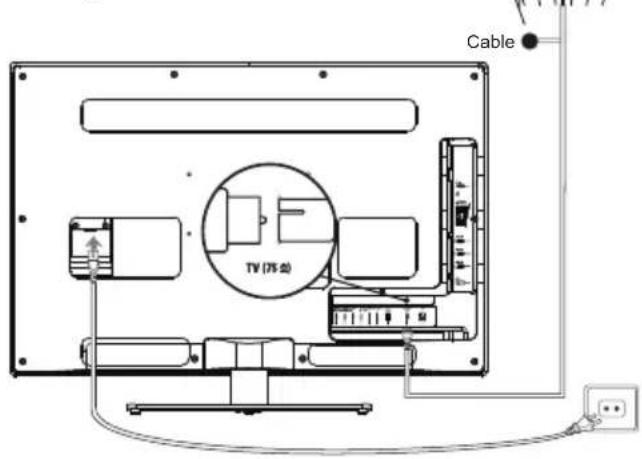
Connect the power and antenna
To switch on TV after connecting power cord, press 📊or POWER/⏻.
Note: Position of power socket varies according to TV model. On certain models, you have to turn on the power switch first.
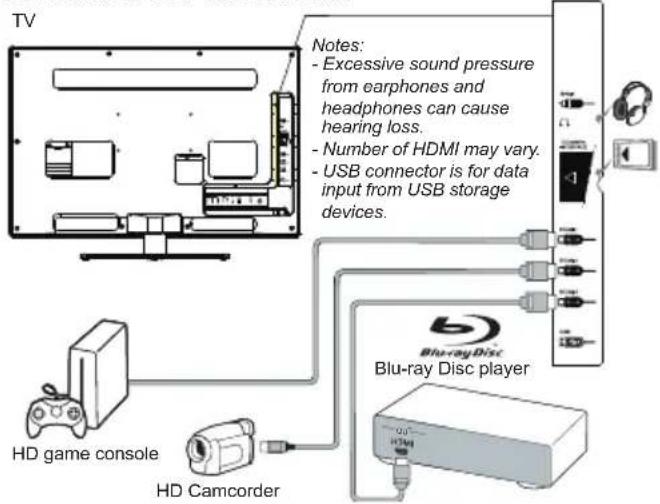
DVD recorder, cable receiver

DVD player, home theatre system Blu-ray Disc

player, headphones, HD game console & HD camcorder
PC

Notes:
- The figures are for representation only.
- Not all connections available on all models.
- The location of the power socket on the TV may vary according to TV model.
- The positions and names of the function buttons and connectors on the TV may vary according to TV model.
Remote control functions
Most of your television's functions are available via the menus that appear on the screen. The remote control supplied with your set can be used to navigate through the menus and to configure all the general settings.
Source To select connected devices.
Standby / quit standby.
0-9 To select a channel, page or setting.
ECO To select desired power saving mode.
Guide To toggle the Electronic Programme Guide on or off (only available for digital channels).
Menu To access the main menu; to return to the previous menu.
Exit To exit the menu structure or Teletext.
▲▼ To navigate in the main menu; to select menu options; to switch to the previous or next photo, song or video in USB function.
◀▶ To navigate in the main menu; to set /*Zoom+/- functions and change values. ▶ can also be used to open the corresponding submenu.
* To select the picture format.
Note: You are recommended to use the full screen mode. Do not use the display mode with black bars on both sides of the picture (such as 4:3) for long time, otherwise the TV screen may be damaged permanently.
OK To open the corresponding submenu and activate a setting in menus; to freeze/
unfreeze the picture in digital TV mode.
Option To display the function menu to perform certain operations; to display the Teletext page in different mode.
Return To return to the previous channel; to return to the previous menu in USB function.
V+/- To control the volume.
Info To display programme information, if available.
Mute To switch the sound off and back on again.
P+/- To change channels.
TEXT To toggle Teletext on or off.
SUBTITLE To select a subtitle language available for selected digital TV programme.
LIST To display channel list.
TV To access TV mode.
Colour To select tasks or Teletext pages. The buttons red button can also be used for MHEG function.
① Lang To select a sound type available for selected analog TV programme; to select an audio language available for selected digital TV programme.
Important:
Battery shall not be exposed to excessive heat such as sunshine, fire or the like. If the batteries in your remote control are run down you can use the buttons on your TV set. In TV mode, they have the same functions as the corresponding buttons on the remote control. In the menus they have the following functions:
For models with OK button on the set:
| PR+ or PR ▲ | ▲ |
| PR- or PR ▼ | ▼ |
| VOL+, △ + or VOL ▶ | ▶ |
| VOL-, △ - or VOL ◀ | ◀ |
| MENU or ≡ | Menu |
| OK OK |
For models without OK button on the set:
| PR+ or PR ▲ | ▶ |
| PR- or PR ▼ | ◀ & OK |
| VOL+, △ + or VOL ▶ | ▲ |
| VOL-, △ - or VOL ◀ | ▼ |
| MENU or ≡ | Menu |
Switching on/off and standby mode
Switch on/off your TV
When powered on, the TV will be turned on directly. To switch it off, unplug the mains socket from the mains outlet.
Switch to standby
Press the ⏻ or POWER/⏻ button on the set or the ⏻ button on the remote control. The TV set remains
powered up, but with low energy consumption.
Switch on from standby
Press the ⏻ or POWER/⌘ button on the set or the ⏻ button on the remote control to switch the television on at the last channel in the last mode, i.e. analog or digital, or AV programme you were watching.
(*On certain models, you have to turn on the power switch first.)
Initial setup
Initial setup involves selecting all the settings required to be able to search for and store all the analog and digital channels you can receive.
Make sure that the television is switched on and follow all the steps in turn specified hereafter.
Note: TV channels search retrieved only the analog channels could be caused by poor broadcasting and therefore is not covered by manufacturer warranty. Manufacturer cannot be held responsible for lack or poor broadcasting in some areas.
The first time you switch the set on, the Initial setup wizard opens, which guides you through the initial setup process. (Refer to Figure 1.) Press OK to start your initial setup.
- Press ▲/▼ to select your language, then press OK/▶ to enter the next step.
- Press ▲/▼ to select your country, then press OK/▶ to enter the next step.
Note: When select France, you will have to enter the Password setting menu here in order to set a password. Use the digit buttons to enter a four-digit number for your password. (0000 is too simple to be set as your password.) Re-enter the same code to confirm the password. After that, you will enter the next step automatically. (In this step, you can only press ◀ to return to the previous step.)
-
Press ▲/▼ to select your tuner mode Air or Cable.
-
Select Air.
- Press OK/▶ to enter.
- Press ▲/▼ to select Scan, then press OK/▶ to automatically start the search relating to initial setup for all DVB-T digital and analog channels.
- Select Cable.
- Press OK/▶ to enter.
-
Press ▲/▼ to select Scan, then press OK/▶ to directly start your initial setup or enter below step.
-
Select Full if available to search for and store all DVB-C digital and analog channels.
- You may select other advanced scan mode if available (for example, Advanced or Quick), then configure proper cable information as described below. Use the digit buttons to adjust the values of frequency, symbol rate and network ID; use ◀/▶ to select certain modulation mode.
- Press OK to start initial setup relating to all DVB-C digital and analog channels.
Note: To prevent the channel setup process from being interrupted, wait for the message
indicating that the setup is complete.
- Before start the scanning, you can also select Skip scan to skip the initial setup progress.
- During the setup, you can follow the hints available at the bottom of the screen to return to the previous step by pressing ◀. Or press Exit to exit or interrupt the search halfway.
- Once the automatic search ends, the set enters the next step automatically. You can press ▲/▼ to select your location Shop or Home. Press OK/▶ to confirm your selection and enter the last step.
-
- In this step, you can press OK to exit the initial setup. The channels are arranged in a preset order. If you wish to skip channels, modify the preset order or rename channels, select Setup > Organiser and press OK/▶ to enter.
- In this step, you can also press ◀ to return to the previous step.
Automatically install channels
This section describes how to search and store channels automatically. Instructions are for both analog and digital channels.
- Press Menu on the remote control and select Setup > Language > Menu language. Press ◀/▶ to select your desired menu language.
- Press Menu to return to Setup, press ▲/▼ to select Country, then press ◀/▶ to select your country. The TV installs and arranges channels according to your country.
- Press ▲/▼ to select Tuner mode, then press ◀/▶ to select Air or Cable.
- Select Air.
- Press ▲/▼ to select Channel install, and press OK/▶ to enter.
- Select Automatic search (Refer to Figure 2.), then press OK/▶ to display Automatic search.
- Press OK to skip the country selection and enter the next step. Or use ◀/▶ to reselect your country, then press OK to enter.
- Select Digital & Analog, Digital or Analog, then press OK/▶ to start the automatic search, which relates to all DVB-T digital and/or analog channels.
- Select Cable.
- Press ▲/▼ to select Channel install, and press OK/▶ to enter.
- Select Automatic search, then press OK/▶ to display Automatic search.
- Press OK to skip the country selection and enter the next step. Or use ◀/▶ to reselect your country, then press OK to enter.
- Select Digital & Analog, then press OK/▶ to enter. Select your scan mode if available and configure proper cable information in the same way as in Initial setup. Select Scan and press
OK/▶ to start your automatic search relating to all DVB-C digital and analog channels.
- Select Digital, then follow the similar process described above to start your automatic search relating to all DVB-C digital channels.
- Select Analog, then press OK/▶ to start your automatic search relating to all analog channels.
- The search may take a few minutes. During the process, you can press Menu to abort halfway.
- Once the automatic search ends, press Menu to return to the previous step or press OK to restart your channel search.
- After the automatic search, channels are arranged in a preset order. You can skip channels, modify the preset order or rename channels.
Use your TV
Access channels
Using the digit buttons: press the corresponding digit buttons to access the channels.
Using the PR+/- or P+/- buttons: scroll through the channels.
Watch connected devices
Press Source on the remote control or OK on the TV set to switch between TV and other input sources. To resume TV viewing, press any digit button to enter the channel, while P+/- will cycle through all TV channels and other input sources.
Note: Not all models have OK button on the set.
Volume
Volume control: use the VOL+/- or VOL◀/▶ buttons on the TV set or V+/- buttons on the remote control to increase or decrease the volume.
Sound mute: press the Mute button to temporarily mute the sound. Press this button again or the V+ button to restore it.
Use TV menus
- Press Menu to display the main menu. (Refer to Figure 3.)
- Press ▲/▼/◄/► to select the desired item, then press OK to open the corresponding submenu.
- In submenus, use ▲/▼ to select menu options, use ◀/► to set functions or change values. Use OK to activate a setting. Use OK/► to open the corresponding submenu.
- Press Menu to return to the previous menu.
- Press Exit to close the menu.
Note: Some options may be not available for certain signal sources.
Select menu language
You can choose your preferred menu language following below instructions.
- Press Menu to display the main menu.
- Press ▲/▼/◄/► to select Setup, then press OK to enter.
- Select Language and press OK/▶ to enter.
- Select Menu language and press ◀/▶ to select your desired language to display the menus.
- Press Exit to close the menu.
Use more of your TV
Setup your favorite channels
You can create four lists of your favorite TV channels.
- Press LIST.
- Press the yellow button to enter Channel list selection. Press ▲/▼ to select the favorite list you want to set up your favorite channels. Then press OK to enter the selected list.
- Press the blue button to start to edit your favorite list. Press ▲/▼ to scroll through the channel list and press OK to select or unselect it.
- Repeat this procedure to setup other favorite channels.
- Press LIST/Exit to exit.
ECO Dynamic backlight
- Press Menu on the remote control and select Picture > ECO Dynamic back light.
- Press ◀/▶ to select desired power saving mode to achieve desired power saving effect. At this time the Picture preset option under Picture will be set at Personal synchronically.
- Press Exit to close the menu.
Shortcut operation: Press ECO on the remote control to perform the same function mentioned above.
PAP function
To display the pictures from different source inputs side by side. Note that one window is for both analog and digital TV inputs, the other is for VGA, HDMI and CMP inputs. (Note: AV input is invalid for both windows.)
- Press Menu to display the main menu.
- Select PAP and press OK to enter.
- Select the PAP option, and press ◀/▶ to turn on/off PAP function.
- Select TV position, press ◀/▶ to reposition the TV window.
- Press ◀/▶ to toggle the focus window.
- When focus on TV window, the digit buttons and P+/- work in TV. When focus on the other window, P+/- can change available extension sources.
Use subtitles
You can enable subtitles for each TV channel. Subtitles are broadcast via Teletext or DVB-T/DVB-C digital broadcasts. With digital broadcasts, you have the additional option of selecting a preferred subtitle language.
Turn on/off subtitles
- Press Menu on the remote control and select Options > Subtitle.
- Press OK/▶ to enter. (Refer to Figure 4.)
- Select the Subtitle option, and press ◀/▶ to select On/Off to turn on/off subtitles.
Enable subtitle languages on digital TV channels
- Press Menu on the remote control and select Options > Subtitle > Digital subtitle language.
- Press ◀/▶ to select a subtitle language as your preferred language.
- Press ▲/▼ to select Digital subtitle language 2nd.
- Press ◀/▶ to select a secondary subtitle language.
- Press Exit to close the menu.
Shortcut operation: Press SUBTITLE on the remote control to directly select a subtitle language available for selected digital TV programme.
Select a subtitle type on digital TV channels
- Press Menu on the remote control and select Options > Subtitle > Subtitle type.
- Press ◀/▶ to select a subtitle type. You can select Hearing impaired to display the hearing impaired subtitle with your selected language.
Select decoding page language in Teletext
Press Menu on the remote control and select Options > Decoding page language. Select a proper type of language in which Teletext will display.
Digital Teletext language
For digital TV channels, your TV could zap to a service with multiple initial Teletext pages in different languages. This function allows you to select an available language as primary language which relates to different initial Teletext page.
Press Menu on the remote control and select Options > Digital teletext language. Press ◀/▶ to select.
SPDIF type
Connect to an audio device through the SPDIF output. Press Menu on the remote control and select Options > SPDIF type. Select a proper sound type from the list for digital programmes.
- If the current programme outputs sound in Dolby D format, then either PCM or Dolby D can be selected.
- If the current programme does not output sound in Dolby D format, only PCM can be selected. Otherwise no sound will be output.
- Select Off to turn off the audio output from the audio device connected to the SPDIF output.
Note: The options you may choose depend on the programme you are watching. If you select PCM and the sound output is prior to the picture, you can select SPDIF Delay from the Options menu and press ◀/▶ to adjust the delay time to synchronize the sound with the picture.
T-Link
To search for CEC devices connected to the HDMI sockets in your TV and enable one-touch play and one-touch standby between CEC devices.
Enable or disable T-Link
- Press Menu on the remote control, then select Options > T-Link.
- Press ◀/▶ to select On or Off.
Use one-touch play
One-touch play enables you to press the play button on, for example, your DVD remote control. This starts playback on your DVD device and automatically switches your TV to the correct source, displaying DVD content.
Use system standby
System standby enables you to press the ⏻ button on, for example, your TV remote control. This switches your TV and all connected HDMI devices to standby mode.
Common interface
Scrambled digital TV channels can be decoded with a common interface module and a card provided by a digital TV service operator.
The common interface module may enable several digital services, depending on the operator and services you choose (for example, pay TV). Contact your digital TV service operator for more information about services and terms.
Use the common interface module
WARNING: Switch off your TV before inserting a common interface module. Be sure to follow the instruction described below. Wrong insertion of a common interface module may damage both the module and your TV.
-
Following the directions printed on the common interface module, gently insert the module into the common interface slot on the TV.
-
Push the module in as far as it will go.
- Turn on the TV and wait for the common interface function to be activated. This may take several minutes.
Note: Do not remove the common interface module from the slot. Removing the module will deactivate the digital services.
Access common interface services
After inserting and activating the common interface module, press Menu on the remote control and select
Options > Common interface.
This menu option is only available if the common interface module is correctly inserted and activated.
On-screen applications and content are provided by your digital TV service operator.
Software update
Press Menu on the remote control and select
Options > Software update. Press OK/▶ to enter. (Refer to Figure 5.)
- Current version: Checks the current version of the software.
- Project name, Serial number: Displays the project name and serial number of your set.
-
OAD(over air download): Enables you to install the latest version of the software if available. Select OAD and press OK/▶ to enter the Setup menu.
-
Use ◀/▶ to select Yes under Auto download to automatically download the latest software if available. After the software has been downloaded successfully, you will be prompted to decide if you want to install it right now. If yes, follow the hints on the screen to complete your installation. You can also select to ignore the installation here.
- Select No under Auto download to decline the automatic download.
- Select Manual OAD download and press OK/▶ to start manual scanning the latest software. Follow the hints on the screen to complete. During the scan, press OK/Exit to cancel or exit the process.
Change to Shop or Home mode
- Press Menu on the remote control and select Options > Location.
- Press ◀/▶ to select your location Shop or Home.
- Press Exit to exit.
MHEG function
Some digital TV broadcasters offer dedicated digital text or interactive services (for example, BBC1).
These services work like normal Teletext with the addition of number, colour and navigation buttons.
- Press Menu on the remote control and select
Options > Subtitle > Subtitle.
- Press ◀/▶ to set Subtitle to Off.
Note: MHEG and subtitles are mutually exclusive and cannot coexist on the same screen. If Subtitle is set to On, MHEG will not appear.
- Press the red button or TEXT on the remote control.
- Press ▲/▼/◄/► to select or highlight items.
- Press OK to confirm or activate.
- Press one of the colour buttons to select an option.
- Press TEXT or Exit to exit.
View photos, play music and watch videos from a USB storage device
Your TV is fitted with a USB connector that enables you to view photos, listen to music or watch videos stored on a USB storage device.
Supported file formats:
Photo JPEG
Music MP3
Video AVI, MP4, MPG, MPEG, TS...
Notes: Some USB keys and USB products like digital cameras or mobile phones are not fully compatible with USB 2.0 standard so it may not work with the TV multimedia player. Not all USB keys or devices are compatible for the USB function. Not all above formats are supported. The encoding formats of your files will determine whether or not they can be used.
When a USB device is detected, it enters the Media center menu directly.
Photo
To display photos if available.
- Select Media center > Photo, then press OK to enter the main file content browser.
- In the main file content browser, use ▲/▼/◄/► to select a photo or an inner file folder.
- Select an inner file folder, press OK to enter a sub file content browser.
-
Use ▲/▼/◄/► to select a photo in either main or sub file content browser, press Menu to display the photo menu in the folder mode.
-
Sort: Sort folders and photos by modification Date or Name.
- Edit: Copy, paste or delete a selected photo.
-
Parser: You can select Recursive to display photos from all sub file folders.
-
Select a photo, press OK to watch, and a slide show begins from the selected photo. Press OK to pause the photo if you want to rotate or zoom the paused photo. Press Menu to display the photo menu in the browser mode. You can play, pause or rotate the photo, select different play mode, zoom
mode and displaying effect, etc..
- Press the related buttons on the remote control to perform the available functions shown on the function bar at the bottom of the TV screen.
Music
To playback music if available.
- Select Media center > Music, then press OK to enter the main file content browser.
- Use ▲/▼/◄/► to select a song in either main or sub file content browser in the same way as in photo display function, press Menu to display the music menu in the folder mode.
- Sort: Sort folders and songs by Name, Genre, Artist or Album.
- Edit: Copy, paste or delete a selected song.
- Parser: You can select Recursive to display songs from all sub file folders.
- Select a song, press OK to play, and an automatic playback begins from the selected song. Press Menu to display the music menu in the browser mode. You can play or pause the song, select different play mode, etc..
- Press the related buttons on the remote control to perform the available functions shown on the function bar at the bottom of the TV screen.
Video
To watch videos if available.
- Select Media center > Video, then press OK to enter the main file content browser.
- Use ▲/▼/◄/► to select a video in either main or sub file content browser in the same way as in photo display function, press Menu to display the video menu in the folder mode.
- Sort: Sort folders and videos by Type, modification Date or Name.
- Edit: Copy, paste or delete a selected video.
- Parser: You can select Recursive to display videos from all sub file folders.
- Select a video, press OK to watch, and an automatic playback begins from the selected video. Press Menu to display the video menu in the browser mode. You can play or pause the video, select different play mode, screen mode and preset picture settings, etc..
- Press the related buttons on the remote control to perform the available functions shown on the function bar at the bottom of the TV screen.
Time detection
You can detect the time from digital channels through following operations.
- Press Menu on the remote control and select Timer > Clock > Auto synchronization.
- Press ◀/▶ to select On.
Assign a channel decoder
Decoders that decode analog channels can be connected to AV connector. Assign the TV channel as a channel to be decoded. Then assign the connection where the decoder is connected.
- Press Menu on the remote control and select Setup > Decode.
- Press OK/▶ to enter the list.
- Press ▲/▼ to select the channel to decode.
- Press OK to select or unselect the channel.
- Press Menu to return to the previous menu.
Diagnostics on digital TV channels
- Press Menu on the remote control and select Setup > Diagnostics.
- Press OK/▶ to display some signal information on current digital channel, such as signal strength, frequency, etc..
Time shift
Allows you to record the TV programme so that you won't miss the favourite part even if you go out. Before you use the function, connect a USB device to the TV first. For the first time, you should do the disk setup for the USB device.
- Press Menu on the remote control and select Setup > Time shift.
- Press ◀/▶ to select On to switch on the time shift function, then press Exit to close the menu.
- Press Option on the remote control and select Time shift, then press OK to confirm.
- Follow the directions on the screen to do the setup.
- After the disk setup is done, press Option and select Time shift.
-
Press OK to display the time shift menu.
-
Press the red button to pause the picture and begin the time shift.
- Press the red button to play the recorded part.
- When the time shift menu disappears and only the timing of the time shift remains on the screen, you can press the red button or OK to call out the time shift menu.
- Press the green button to fast backward or the yellow button to fast forward.
- Press the blue button to quit the time shift function.
Notes:
- Before you plug the USB device to TV, make sure you have backed up the data in the device to avoid the unusual performance make your important data lost.
- We recommend you use a USB device with the free file size bigger than 1Gb and disk speed
faster than 5.0M/sec.
- The bigger file size for time shift, the longer you can record the programme.
- If changing channel in time shifting, a message prompts to let you select Yes or No. You can select Yes to exit the time shift function and execute the channel change.
Reset shop
Allows you to reset the TV to factory default settings.
- Press Menu on the remote control and select Setup, then press OK to confirm.
- Select Reset shop and press OK/▶ to enter.
- Use the digit buttons to enter the password to enter.
- Press ◀/▶ to select OK and press OK to confirm.
- The Initial setup menu appears. Follow the related instructions.
Customising the input settings
You can configure your TV according to the equipment you connect to it.
- Press Menu on the remote control and select Setup > Input settings.
- Press OK/▶ to enter Input settings.
- Press ▲/▼ to select a connector your equipment is connected to.
- Press ◀/▶ to select the type of apparatus attached to this connector.
- Press Menu to return to the Setup menu.
After configuring, the selected source label will be displayed after the name of the related connector in the source list when pressing Source on the remote control or OK on the TV set.
Note: Not all models have OK button on the set.
Use Electronic programme guide
EPG is an on-screen guide that displays scheduled TV programmes. You can navigate, select and view programmes.
-
Press Guide on the remote control, the Now and Next EPG menu will appear, which allows you to get the knowledge about the current or next programme playing on each channel. Navigate through the different programmes using navigation buttons on the remote control.
-
Use the colour buttons to view 8 Days EPG.
-
Prev day(Red): List the previous day's EPG.
- Next day(Green): List the next day's EPG.
- View detail(Yellow): Display the description about this programme if available.
- Type filter(Blue): Programme guide filter for digital TV programmes.
- Press the blue button to display the
programmes's type and subtype list.
- Navigate through the different types and subtypes using navigation buttons on the remote control.
- Select one or more types which you want to highlight from the Type list, press OK to select (or unselect). A checkmark will appear to the left of the type when selected. When you select a type, all its subtypes will be selected accordingly.
- Also, user can select some desired subtypes without selecting any type first.
-
Press the blue button to exit the type and subtype list.
• After filtering, all your desired digital TV programmes will be highlighted. -
Press Guide/Exit to exit the EPG and switch to the selected channel.
PVR(Personal Video Record)
Allows you to record your favourite TV programme. Before you use the function, connect a USB memory device to the set first.
- Press Option on the remote control and select Quick access > PVR.
- Press OK/▶ to enter.
- Press:
- the red button to start recording, the record file is put into a PVR folder in Media center > Video and named after the channel number;
- the green button to stop recording manually; if the recording duration finishes, the recording will stop automatically.
-
▲/▼/◄/► to adjust the recording duration.
-
In recording, PVR mini pane will also show on the screen to indicate the recording progress.
-
To watch the recorded programme, exit PVR mode first and go to Media center > Video. Select the folder PVR, then select the related record file. Press OK to play. (It is the same if you record a digital radio programme).
Notes:
- When CI+ card is used, PVR function will be disabled.
- Only available for digital channels.
- Only support USB memory device of FAT32 format.
- Before you plug the USB memory device to the set, make sure you have backed up the data in the device to avoid the unusual performance which will make your important data lose.
- The bigger size of USB memory device for PVR function, the longer you can record the programme.
- If changing channel or signal source in recording, store the recording data and execute the channel
or signal source change.
- The set can not play files normally if the parameters of the file exceed the limitations of the system, the file format is not supported, the file is damaged, or the file can not be decoded
- Do not unplug the USB memory device when the system is reading a file or transmitting data, otherwise the system or the device may be damaged.
Schedule list
This function is used to perform scheduled recording.
- Press Option on the remote control and select Quick access > Schedule list.
- Press OK/▶ to display the schedule list.
- To add a schedule into your schedule list, press the red button first to display Schedule list. Then, - Channel number: use ◀/▶ to select the channel number.
- Start date: use the digit buttons to set the recording date.
- Start time: set the starting time of recording.
- Stop time: set the stopping time of recording.
- Schedule type:
- set Reminder to inform you that you can switch to the scheduled programme when the time you set comes. When time out and you don't execute any operation, the dialog box will disappear and no further operation will be executed.
- set Record to check if you really want to start your scheduled recording when the time you set comes. When time out and you don't execute any operation, scheduled recording will start automatically.
- Repeat type: set different repeat mode of recording.
-
Press ▲/▼/◄/► to select Add, then press OK to add the schedule you set into your schedule list.
-
Press the red button to repeat above procedures to add another schedule.
-
If you wish to edit or delete a schedule, select it and press OK to enter.
-
Press Exit to close the menu.
Notes for password in Parental Control Lock function:
- The default password is 1234. You can change it to a new one.
- The super password is 0423. If you forget your code, enter the super password to override any existing codes.


- Important information
- Safety
- WARNING
- TV screen
- Care
- Hanging the TV set on the wall
- Handling the TV set on the table
- Connect the power and antenna
- Notes:
- Remote control functions
- Important:
- Switching on/off and standby mode
- Switch on/off your TV
- Switch to standby
- Switch on from standby
- Initial setup
- Automatically install channels
- Use your TV
- Access channels
- Watch connected devices
- Volume
- Use TV menus
- Select menu language
- Use more of your TV
- Setup your favorite channels
- ECO Dynamic backlight
- PAP function
- Use subtitles
- Turn on/off subtitles
- Enable subtitle languages on digital TV channels
- Select a subtitle type on digital TV channels
- Select decoding page language in Teletext
- Digital Teletext language
- SPDIF type
- T-Link
- Enable or disable T-Link
- Use one-touch play
- Use system standby
- Common interface
- Use the common interface module
- Access common interface services
- Options > Common interface.
- Software update
- Change to Shop or Home mode
- MHEG function
- View photos, play music and watch videos from a USB storage device
- Photo
- Music
- Video
- Time detection
- Assign a channel decoder
- Diagnostics on digital TV channels
- Time shift
- Reset shop
- Customising the input settings
- Use Electronic programme guide
- PVR(Personal Video Record)
- Schedule list
Brand : THOMSON
Model : 19HS5246
Category : Television