
VZ-32RTHL - Television ViewZ - Free user manual and instructions
Find the device manual for free VZ-32RTHL ViewZ in PDF.


| Product Type | LED Television |
| Brand | ViewZ |
| Model | VZ-32RTHL |
| Screen Size | 32 inches (81 cm) |
| Resolution | 1366 x 768 (HD Ready) |
| Display Technology | LED |
| Aspect Ratio | 16:9 |
| Refresh Rate | 60 Hz |
| Connectivity | 2 x HDMI, 1 x USB, 1 x AV, 1 x VGA, 1 x Coaxial |
| Power Consumption | 50 W (typical) |
| Weight (with stand) | Approx. 4.5 kg |
| Dimensions (with stand) | 732 x 468 x 180 mm |
| Energy Class | A+ |
| Tuner | DVB-T/T2/C/S2 |
| Features | USB Media Player, EPG, Sleep Timer, Parental Lock |
| Remote Control | Included (batteries not included) |
| Wall Mount Compatibility | VESA 200 x 200 mm |
| Safety | Overvoltage protection, auto standby |
| Cleaning | Wipe with a dry soft cloth; do not use chemical cleaners |
| Spare Parts | Remote control available; contact ViewZ support |
| General Information | 1-year warranty; free manual download at notice-facile.com |
Frequently Asked Questions - VZ-32RTHL ViewZ
User questions about VZ-32RTHL ViewZ
0 question about this device. Answer the ones you know or ask your own.
Ask a new question about this device
Download the instructions for your Television in PDF format for free! Find your manual VZ-32RTHL - ViewZ and take your electronic device back in hand. On this page are published all the documents necessary for the use of your device. VZ-32RTHL by ViewZ.
USER MANUAL VZ-32RTHL ViewZ
24/27/32/42-INCH WUXGA PREMIUM TFT-LED MONITOR

USER MANUAL
CONTENTS
SAFETY INSTRUCTION 2\~3
CAUTIONS 4
FCC RF INTERFERENCE STATEMENT 5
CONNECTING WITH EXTERNAL EQUIPMENT 6
REMOTE FUNCTIONS 7
CONTROLS AND FUNCTIONS 8 \~ 15
MOUNTING GUIDE 16
D-SUB CONNECTOR PIN ASSIGNMENTS 17
POWER MANAGEMENT 18
SPECIFICATIONS 19 \~ 20
TROUBLE SHOOTING GUIDE 21
This Monitor was
Manufactured by ISO 9001
Certified Factory
SAFETY INSTRUCTION
Important Safety Instruction
-
Read these instructions.
-
Keep these Instructions.
-
Heed all warnings.
-
Follow all instructions.
-
Do not use this apparatus near water.
-
Clean only with dry cloth.
-
Do not block any ventilation openings. Install in accordance with the manufacturer's instructions.
-
Do not install near any heat sources such as radiators, heat registers, stoves, or other apparatus (including amplifiers) that produce heat.
-
Do not defeat the safety purpose of the polarized or grounding-type plug.
Apolarized plug has two blades with one wider than the other.
Agrounding type plug has two blades and a third grounding prong.
The wide blade or the third prong are provided for your safety.
If the provided plug does not fit into your outlet, consult an electrician for replacement of the bsolete outlet.
-
Protect the power cord from being walked on or pinched particularly at plugs, convenience receptacles and the point where they exit from the apparatus.
-
Only use attachment/accessories specified by the manufacturer.
-
Use only with the cart, stand, tripod, bracket or table specified by the manufacturer or sold with the apparatus. When a cart is used, use caution when moving the cart/apparatus combination to avoid injury from tip-over.
-
Unplug this apparatus during lightning storms or when unused for long periods of time.
-
Refer all servicing to qualified service personnel. Servicing is required when the apparatus has been damaged in any way, such as power-supply cord or plug is damaged, liquid has been spilled or objects have fallen into the apparatus the apparatus has been exposed to rain or moisture does not operate normally or has been dropped.

SAFETY INSTRUCTION
- The apparatus shall not be exposed to dripping or splashing and that no objects filled with liquids, such as vases, shall be placed no the apparatus.
- Minimum distances(e.g. 10cm) around the apparatus for sufficient ventilation.
"WARNING – To reduce the risk of fire or electric shock, do not expose the apparatus to rain or moisture."
"The apparatus shall not be exposed to dripping or splashing and no objects filled with liquids, such as vases, shall be placed on the apparatus."


This symbol is intended to alert the user to the presence of uninsulated : dangerous voltage with in the product's enclosure that may be of sufficient magnitude to constitute a risk of electric shock to persons.

This symbol is intended to alert the user to the presence of important operating and maintenance(servicing) instructions in the literature accompanying the appliance.
CAUTIONS
CAUTION
The power supply cord is used as the main disconnect device, ensure that the socket-outlet is located/installed near the equipment and is easily accessible.
ATTENTION
POWER SUPPLY CORD IS USED AS MAIN POWER DISCONNECT DEVICE IN THIS PRODUCT. UNPLUG THIS PRODUCT FROM THE WALL OUTLET BEFORE REMOVING THE BACK COVER AND SERVICING
EMISSION CHARACTERISTICS TESTED BY SEMKO
THIS PRODUCT HAS BEEN TESTED AND HAS SHOWN COMPLIANCE WITH THE NATIONAL SPECIFICATIONS SUCH AS SWEDISH MPR 1990.10.(MPR II)
Removal of the back cover should be carried out only by qualified personnel.
DO NOT USE IN HOSTILE ENVIRONMENTS
To prevent shock or fire hazard, do not expose the unit to rain or moisture.
This unit is designed to be used in the office or home. Do not subject the unit to vibrations, dust of corrosive gases.
KEEP IN A WELL VENTILATED PLACE▶
Ventilation holes are provided on the cabinet to prevent the temperature from rising.
Do not cover the unit or place anything on the top of unit.
AVOID HEAT▶
Avoid placing the unit in direct sunshine or near a heating appliance.
TO ELIMINATE EYE FATIGUE▶
Do not use the unit against a bright back ground and where sunlight or other light sources will shine directly on the monitor.
BE CARE▶FUL OF HEAVY OBJECT
Neither the monitor itself nor any other heavy object should rest on the power cord.
Damage to a power cord can cause fire or electrical shock.
FCC RF
INTERFERENCE STATEMENT
NOTE
This equipment has been tested and found to comply with the limits for a Class A digital device, pursuant to Part 15 of the FCC Rules. These limits are designed to provide reasonable protection against harmful interference in a residential installation.
This equipment generates, uses and can radiate radio frequency energy and, if not installed and used in accordance with the instructions, may cause harmful interference to radio communications. However, there is no guarantee that interference will not occur in a particular installation.
If this equipment does cause harmful interference to radio or television reception which can be determined by turning the equipment off and on, the user is encouraged to try to correct the interference by one or more of the following measures.
- Reorient or relocate the receiving antenna.
- Increase the separation between the equipment and receiver.
- Connect the equipment into an outlet on a circuit different from that to which the receiver is connected.
- Consult the dealer or an experienced radio, TV technician for help.
- Only shielded interface cable should be used.
Finally, any changes or modifications to the equipment by the user not expressly approved by the grantee or manufacturer could void the users authority to operate such equipment.
▶ DOC COMPLIANCE NOTICE
This digital apparatus does not exceed the Class A limits for radio noise emissions from digital apparatus set out in the radio interference regulation of Canadian Department of communications.
CONNECTING WITH EXTERNAL EQUIPMENT
1. BACK PANEL CONTROL
1.1. 24 inch

- DC12V OUT(CAMERA USE)
- TRIGGER INPUT
- COMPONENT AUDIO L/R IN & COMPONENT Y/Pb/Pr IN
- AUDIO OUT (Speaker)
- PC AUDIO IN
- PC RGB IN
- DVI IN
- HDMI1 IN
- HDMI2 IN
- AV2 AUDIO R/L IN
- S-VIDEO OUT
- S-VIDEO IN
- AV2 OUT
- AV2 IN
- AV1 OUT
- AV1 IN
-
AC IN (POWER)
-
AV1, S-VIDEO AUDIO R/L IN
1.2. 27/32/42 inch

- TRIGGER INPUT
- COMPONENT AUDIO L/R IN & COMPONENT Y/Pb/Pr IN
- AUDIO OUT (Speaker)
- PC AUDIO IN
- PC RGB IN
- DVI IN
- HDMI1 IN
- HDMI2 IN
- AV2 AUDIO R/L IN
- AV1, S-VIDEO AUDIO R/L IN
- S-VIDEO OUT
- S-VIDEO IN
- AV2 OUT
- AV2 IN
- AV1 OUT
- AV1 IN
- DC12V OUT(CAMERA USE)
- AC IN (POWER)
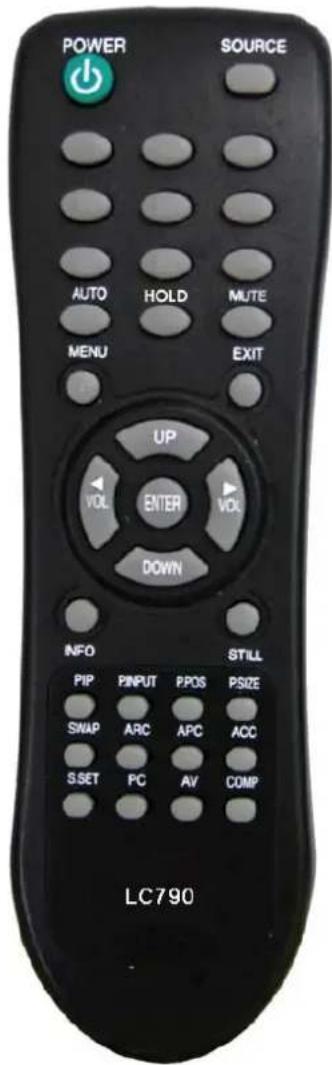
REMOTE FUNCTIONS
REMOTE CONTROLLER(Optional)
1. POWER( ⏻ )
Turns the power ON or OFF. There will be a few seconds delay before the display appears.
2. SOURCE
Selects an input source.
3. AUTO
Auto geometry adjustment in the RGB PC source.
4. HOLD
Stops the Trigger & Auto switching functions.
5. MUTE
Mutes the sound.
6. MENU
Activates and exits the On Screen Display.
7. EXIT
Exits the On Screen Display.
8. VOL( & )◀ ▶
Increases or decreases the level of audio volume.
9. UP/DOWN
Moves upwards or downwards in the OSD menu.
10. ENTER
Enters an OSD submenu or accepts your selection.
11. INFO
Displays the information about input source.
12. STILL
Pauses the picture.
13. PIP (Picture In Picture)
Activates the PIP mode.
14. P. INPUT
Changes the source of sub-picture in the PIP mode.
15. P.POS
Changes the position of sub-picture in the PIP mode.
16. P.SIZE
Changes the sizes of sub and main pictures in the PIP mode.
17. SWAP
Alternates between sub and main pictures in the PIP mode.
18. ARC (Aspect Ratio Control)
Selects a screen ratio.
19. APC (Auto Picture Control)
Selects a picture mode.
20. ACC (Auto Color Control)
Selects a color mode.
21. S.SET
Selects the source of sound between main and sub pictures in the PIP mode.
22. PC
Selects a PC mode(PC, DVI & HDMI).
23. AV
Selects an AV mode(AV1, AV2 & S-Video).
24. COMP
Selects the Component mode.
CONTROLS AND FUNCTIONS
FRONT KEY CONTROL
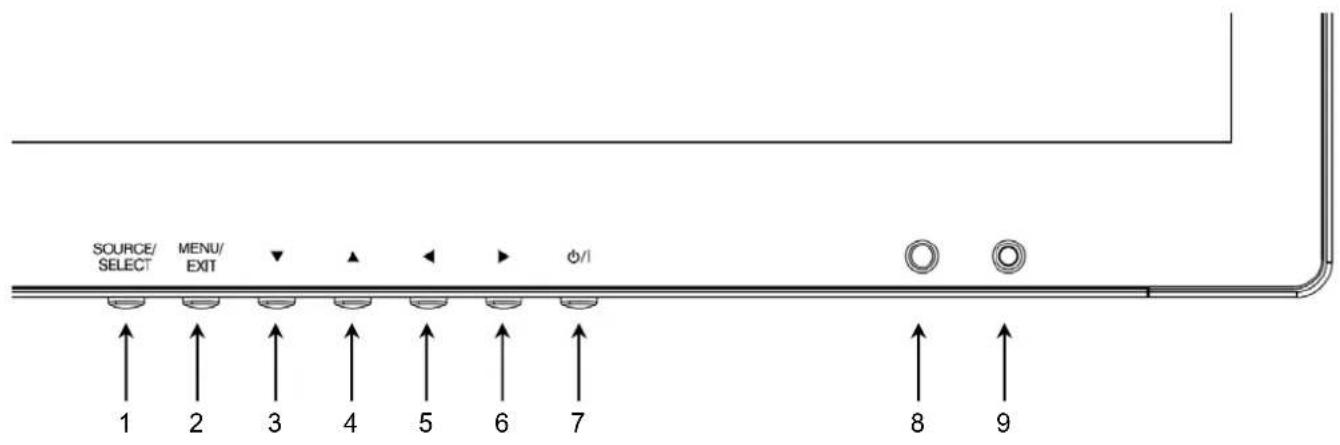
1. SOURCE/SELECT
Select PC or video.
Select On Screen Display menu.
2. MENU/EXIT
Activate and exit the On Screen Display.
3 / 4. ▼ / ▲
These buttons allow user to enter the sub-menu of the activated function.
The up(▲) button is HOLD function and stop the Trigger & Auto switching functions.
5 / 6. ◀ / ▶
Adjust the volume and menu settings.
7. POWER ON/OFF(⏻/I)
Turns the power ON or OFF. There will be a few seconds delay before the display appears.
8. POWER LED
The power LED lights with green when the power is turned ON.
The power is turned off by pressing the power switch again and the power LED goes Red.
9. IR Sensor
Remote controller sensor.
CONTROLS AND FUNCTIONS
OSD MENU DESCRIPTION
All picture, sound settings and setup for the monitor can be adjusted in the OSD menu.
(On Screen Display)
To adjust the OSD screen:
- Press the Menu button to enter the OSD menu.
- Press the ▲/▼ buttons to select the desired option. The selected option is highlighted.
- Press the ▶ button to enter the submenu for adjusting items.
- Change the value you wish to adjust by using the ◀/▶ buttons.
- Press the ◀ button to exit the submenu for adjusting items.
- Press the Menu button to exit the OSD menu.
A. Custom

| Option Function Value | ||
| Brightness Adjusts brightness of the screen. 0 ~ 100 | ||
| Contrast Adjusts intensity of the image. 0 ~ 100 | ||
| Color 1) | Adjusts color of the picture. | 0 ~ 100 |
| Tint 1)2) | Adjusts tint of the picture. | 0 ~ 100 |
| Sharpness 1) | Adjusts sharpness of the picture. 0 | ~ 100 |
1) Unavailable in RGB PC, DVI, HDMI1 and HDMI2.
2) Unavailable in Component mode and PAL system.
CONTROLS AND FUNCTIONS
B. Picture/Sound
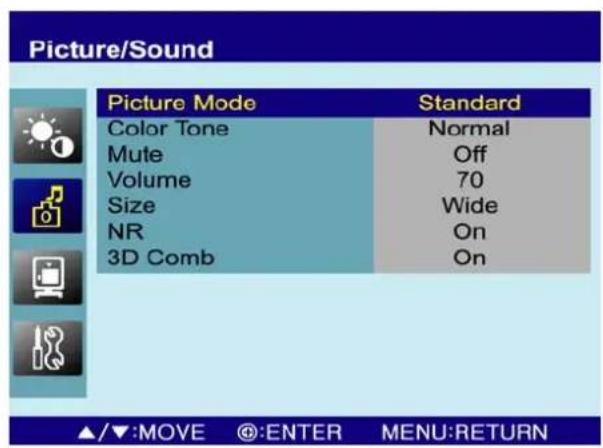

| Option Function Value | |
| Picture Mode Sets picture mode. See table below | |
| Color Tone Sets color tone. See table below | |
| Mute Mutes speaker sound. Off or On | |
| Volume Adjust the level of audio volume. 0 ~ 100 | |
| Size Display picture size. See table below | |
| NR 1) Reduces noise of the picture. On or Off | |
| 3D Comb 2) Activates the 3D comb filter. On or Off | |
| PC 3) See table below. | |
1) Unavailable in RGB PC, DVI, HDMI1 and HDMI2.
2) Unavailable in S-Video, RGB PC, DVI, HDMI1, HDMI2 and Component.
3) Only available in RGB PC.
Picture Mode
| Custom | Applies user selected values.(Brightness, Contrast, Color, Tint and Sharpness) |
| Dynamic | Provides enhanced contrast and sharpness. |
| Standard | Provides standard contrast and sharpness. |
| Movie | Is recommended for viewing film-based content. |
| Mild | Reduces contras and sharpness. |
CONTROLS AND FUNCTIONS
Color Tone
| Cool Gives the white color a bluish tint. |
| Normal Gives the white color a neutral tint. |
| Warm Gives the white color a reddish tint. |
| User To manually adjust the color tones(Red, Green, and Blue). |
Size
| 4:3 Sets the image size to 4:3 |
| Panorama1) Sets the image to panorama |
| Zoom11) Expands the image size about two times to upward and downward |
| Zoom21) Expands the image size about one and half times to upward and downward |
| Wide Sets the image size to wide |
| Under2) Adjusts the image size to display resolution without overscan |
| 1:11) Adjusts the image size to input resolution with overscan |
1) Unavailable in RGB PC, DVI, HDMI1, HDMI2 and Component.
2) Unavailable in RGB PC.
PC
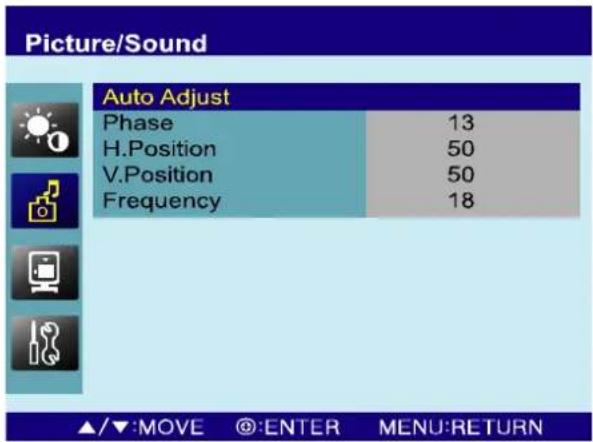
| Option Function Value | |
| Auto Adjust Auto geometry adjustment. | |
| Phase Adjusts the number of horizontal picture elements. 0 ~ 100 | |
| H-Position Adjusts the horizontally picture position. 0 ~ 100 | |
| V-Position Adjusts the vertically picture position. 0 ~ 100 | |
| Frequency Adjusts the vertical noise of screen image. 0 ~ 100 | |
CONTROLS AND FUNCTIONS
C. PIP
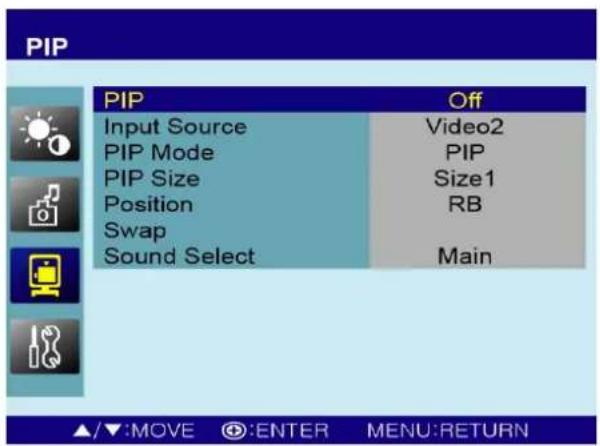
| Option Function Value | ||
| PIP Activates the PIP feature. Off or On | ||
| Input Source Selects the input source for the PIP area. See table below | ||
| PIP Mode | Enables 3 screen size.4:3 side by corner, 4:3 side by 4:3,and full screen side by side. | PIP, PBP1 or PBP2 |
| PIP Size Selects the size of PIP screen. Size1, Size2 or Size3 | ||
| Position | Selects the position of PIP screen. Right of Bottom, Left ofBottom, Left of Top and Right of Top. | RB, LB, LT or RT |
| Swap Alternates between the main and sub picture | ||
| Sound Select Selects the sound source from either the Main or PIP Main or Sub | ||
Input Source
| Main | Sub | |
| Available combination | AV1, AV2 or S-Video AV1, AV2 or S-Video | |
| AV1, AV2 or S-Video | RGB PC, DVI, HDMI1, HDMI2 or Component | |
| RGB PC, DVI, HDMI1, HDMI2 or Component | AV1, AV2 or S-Video | |
| Unavailable combination | RGB PC, DVI, HDMI1, HDMI2 or Component | RGB PC, DVI, HDMI1, HDMI2 or Component |
CONTROLS AND FUNCTIONS
D. Setup
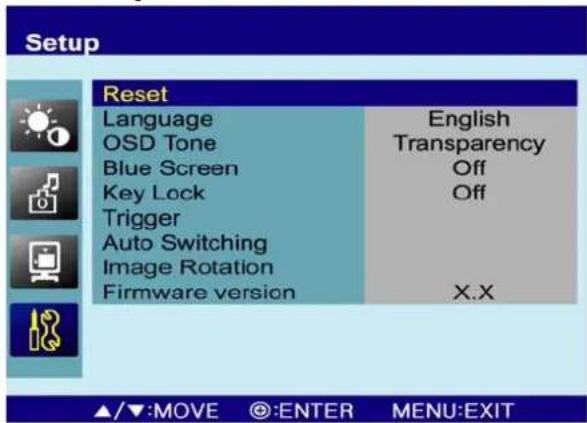
| Option Function Value | ||
| Reset | Resets the monitor settings to their factory default. | |
| Language Sets the | language of the OSD menu. | English, French, Deutsch, Italian, Spanish, Portuguese or Nederland |
| OSD Tone | Changes background of monitor menus.(e.g. input source & information) | Transparency or On |
| Blue Screen | Displays a blue screen if the monitor receives no signal. | Off or On |
| Key Lock 1) | Locks all buttons of the monitor.Note: Use remote controller to unlock. | Off or On |
| Trigger See table below | ||
| Auto Switching See table below | ||
| Image Rotation 2) Activates the Image Rotation function. Off or On | ||
1) How to unlock
① On the front key: Press the MENU and ▲ button at the same time over 3 seconds.
② On the Remote Controller: The Remote Controller operates well because the Key Lock function is only allowed for the front key of this product.
2) The displayed image is slightly moved to prevent image persistence when the Image Rotation function is On. The user is able to adjust the image rotation time from 0\~10Min. in the sub-menu of image rotation.
※ Image persistence
When an LCD panel is continuously displaying the same image(graphic) for a long period of time, a trace of the image can remain visibly. Image persistence is not a product defect, and all LCD products are subject to image persistence.
CONTROLS AND FUNCTIONS
NOTICE: When watching moving images on a computer or a DVR through this monitor using a PC-RGB, DVI or HDMI input, you can see blurred images on the edge of icons and pop-up windows but, this is not a defect. The blur may appear on the fixed images such as another icon and pop-up window because the 120Hz feature is focused on fast moving images to enhance the quality of moving image.
Motion Detection (Built-in PIR sensor; Passive Infra-Red)

| Option Function Value | ||
| Trigger Enable Activates the trigger feature. Off or On. | ||
| Trigger Input Selects the input source for the Trigger. | AV1, AV2, S-Video, RGB PC, DVI, HDMI1, HDMI2 and Component | |
| Buzzer | Activates an audible signal when the monitor receives an trigger signal. | On or Off. |
| Trigger Time | Selects the amount of time, in seconds, that the monitor displays the trigger Input image. | 3 ~ 100. |
| Trigger Option Selects the type of physical trigger input. See table below. | ||
| Display Type | Selects the mode in which the monitor displays the Trigger Input. The monitor takes one of the following actions:- PIP & FULL: Displays the Trigger Input in the PIP of the current video input source.Note: The main video source must support the Trigger Input source as a PIP option. See section “Input Source” in “C. PIP”.- FULL: Switches the display to show the Trigger Input in the full screen. | PIP & FULL or FULL. |
CONTROLS AND FUNCTIONS
| N/C(Normally Closed):The Trigger function is activated when the trigger cable is opened. |  |
| N/O(Normally Opened):The Trigger function is activated when the trigger cable is closed. |  |
| High:The Trigger function is activated when the trigger signal is DC 2~5[V]. |  |
| Low:The Trigger function is activated when the trigger signal is DC 0~0.6[V].Note: In this case, trigger port has high status electrically, so the trigger cable has to have ground( or earth) status to be activated. |  |
Auto Switching

| Option Function Value | ||
| Auto Switching | Activates the Auto Switching feature. Off or On | |
| Input Enable | Opens another menu and you can select the input sources to include in the Auto Switching cycle. | AV1, AV2, S-Video, RGB PC, DVI, HDM1, HDMI2 and Component |
| Time | Selects the amount of time, in seconds, that the monitor displays each selected input source. | 3 ~ 100 |
MOUNTING GUIDE
Wall mounting (Optional)
The LCD monitors are suitable for VESA standard wall mount (not included in the delivery).

- 27/32-inch: VESA 200 mm × 200 mm
- 42-inch: VESA 600mm x 100mm x 100mm.
※ Attention!
- 27/32inch : You must use four M6x8 screws to assemble this monitor and the wall mount bracket.
- 42-inch : You must use six M8x8 screws to assemble this monitor and the wall mount bracket.
※ WARNING!
If user use longer than M6x8(27/32inch), M8x8(42inch) it may cause the damage on the unit. Please follow instructed bolt size & length.
D-SUB CONNECTOR
PIN ASSIGNMENTS
▶ PIN ASSIGNMENTS
- Power cord
- User's manual
- Cable (PC or HDMI)
- Trigger cable (Option)
- Stereo cable (Option)
- Remote controller (Option)
- Batteries (Option)
- Wall mount (Option)
POWER MANAGEMENT
POWER CONSUMPTION
| MODE | POWER CONSUMPTION | |||
| 24” 27” | 32” 42” | |||
| ON | <43W | <48W | <55W <67W | |
| POWER OFF | <1W | |||
LED INDICATOR
The power management feature of the monitor is comprised of four stages:
On(Green) and Unsupported mode(Green).
| MODE LED COLOR MONITOR OPERATION | |||
| ON | GREEN | Normal | Operation |
| UNSUPPORTES MODE | GREEN | Normal operation but the on screenDisplay will show error massage | |
| POWER OFF | RED | Not | Operation |
SPECIFICATIONS
| 24" 27" | |||
| LCD-Type | Type | 24" Diagonal AM-TFT(Active-Matrix) | 27" Diagonal AM-TFT(Active-Matrix) |
| Pixel pitch(mm) | 0.27675(H) x 0.27675(V) 0.3112 | (H) x 0.3112(V) | |
| BRIGHTNESS | 250cd/m2 (Typical) 300cd/m2 | (Typical) | |
| CONTRAST RATIO | 5000:1(Typical) | 3000:1(Typical) | |
| VIEWING ANGLE | 178°/178°(H/V) | ||
| RESPONSE TIME | 12msec (Gray to Gray) | ||
| RESOLUTION (H x V) | 1920X1080 @60Hz | ||
| FREQUENCY | HORIZONTAL: 31~80KHz,VERTICAL: 56~75Hz | ||
| INPUT SIGNAL | VIDEO(2ch input 1.0Vp-p, 75Ω terminated, loop-through out) | ||
| S-VIDEO(1ch input (Y/C), loop-through out) | |||
| COMPONENT (Y,Pb,Pr, Sound L/R) | |||
| DVI (Digital Video Interface) | |||
| HDMI1, HDMI2 (High Definition Multimedia Interface) | |||
| PC RGB | |||
| AV(composite) Sound in/Out | |||
| PC Stereo Sound | |||
| Audio Out | |||
| DC12V OUT (CAMERA USE) | |||
| ACTIVE DISPLAYAREA (W x H) | 531.36 X 298.89 mm 597.6 X | 336.15 mm | |
| PACKING DIMENSIONS(W x H x D) | 715mm X 575mm X 205mm(26.77" X 20.67" X 6.77") | 720mm X 563mm X 180mm(28.35" X 22.17" X 7.09") | |
| WEIGHT | Net | 6.04 kg (13.32 lbs) 10.5 kg | (23.15 lbs) |
| Gross | 8.54 kg (18.83 lbs) 14.6 kg | (32.19 lbs) | |
| ELECTRICAL RATINGS | 100-240V~, 50/60Hz (Auto Switching) | ||
NOTE : Technical specifications are subject to change without notice.
SPECIFICATIONS
| 32" 42" | |||
| LCD-Type | Type | 32" Diagonal AM-TFT(Active-Matrix) | 42" Diagonal AM-TFT(Active-Matrix) |
| Pixel pitch(mm) | 0.36375(H) x 0.36375(V) 0.4845(H) x 0.4845(V) | ||
| BRIGHTNESS | 350cd/m2 (Typical) | ||
| CONTRAST RATIO | 3000:1(Typical) | ||
| VIEWING ANGLE | 178°/178°(H/V) | ||
| RESPONSE TIME | 6.5msec (Gray to Gray) | ||
| RESOLUTION (H x V) | 1920X1080 @60Hz | ||
| FREQUENCY | HORIZONTAL: 31~80KHz,VERTICAL: 56~75Hz | ||
| INPUT SIGNAL | VIDEO(2ch input 1.0Vp-p, 75Ω terminated, loop-through out) | ||
| S-VIDEO(1ch input (Y/C), loop-through out) | |||
| COMPONENT (Y,Pb,Pr, Sound L/R) | |||
| DVI (Digital Video Interface) | |||
| HDMI1, HDMI2 (High Definition Multimedia Interface) | |||
| PC RGB | |||
| AV(composite) Sound in/Out | |||
| PC Stereo Sound | |||
| Audio Out | |||
| DC12V OUT (CAMERA USE) | |||
| ACTIVE DISPLAYAREA (W x H) | 698.4 X 392.85 mm 930.24 X 523.26 mm | ||
| PACKING DIMENSIONS(W x H x D) | 790mm x 580mm x 220mm(31.10" x 22.83" x 8.66") | 1294 x 900 x 320 mm(50.16" x 34.65" x 11.81") | |
| WEIGHT | Net | 13 kg (28.66 lbs) 19.4 kg (42.77 lbs) | |
| Gross | 17.3 kg (38.14 lbs) 27 kg (59.52 lbs) | ||
| ELECTRICAL RATINGS | 100-240V~, 50/60Hz (Auto Switching) | ||
▶▶ NOTE : Technical specifications are subject to change without notice.
TROUBLESHOOTING GUIDE
| TROUBLE | TROUBLESHOOTING TIP |
| No image on display screen | 1. Check that power cord of the Monitor have been connected securely into wall outlet or grounded extension cable or strip.2. Power switch should be in the ON position and LED is lit.3. Check that the Brightness and/or the Contrast adjustments of the Display have not been turned down to minimum levels. |
| “NO SIGNAL” message on screen | 1. The signal cable should be completely connected to the video card/computer.2. The video card should be completely seated in its slot and the computer is switched ON. |
| Display image is not centered, too small or too large in PC mode | Push the down key in front side or Auto key in remote controller. |
| Vertical or Horizontal noise is present in the picture | Adjust Clock and Phase in the OSD. |
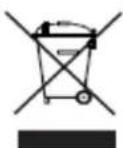
WEEE Symbols
Correct Disposal of This Product (Waste Electrical & Electronic Equipment) (Applicable in the European Union and other European countries with separate collection system
This marking shown on the product or its literature, indicates that it should not be disposed with other household wastes at the end of its working life. To prevent possible harm to the environment or human health from uncontrolled waste disposal, please separate this from other types of wastes and recycle it responsibly to promote the sustainable reuse of material resources. Household users should contact either the retailer where they purchased this product, or their local government office, for details of where and how they can take this item for environmentally safe recycling. Business users should contact their supplier and check the terms and conditions of the purchase contract. This product should not be mixed with other commercial wastes for disposal.
MEMO
MEMO
MEMO
- 24/27/32/42-INCH WUXGA PREMIUM TFT-LED MONITOR
- CONTENTS
- SAFETY INSTRUCTION
- IMPORTANT SAFETY INSTRUCTION
- CAUTIONS
- CAUTION
- ATTENTION
- EMISSION CHARACTERISTICS TESTED BY SEMKO
- DO NOT USE IN HOSTILE ENVIRONMENTS
- KEEP IN A WELL VENTILATED PLACE
- AVOID HEAT
- TO ELIMINATE EYE FATIGUE
- BE CARE▶FUL OF HEAVY OBJECT
- FCC RF
- INTERFERENCE STATEMENT
- NOTE
- DOC COMPLIANCE NOTICE
- CONNECTING WITH EXTERNAL EQUIPMENT
- BACK PANEL CONTROL
- 24 INCH
- 27/32/42 INCH
- REMOTE FUNCTIONS
- REMOTE CONTROLLER(OPTIONAL)
- POWER( ⏻ )
- SOURCE
- AUTO
- HOLD
- MUTE
- MENU
- EXIT
- VOL( & )◀
- UP/DOWN
- ENTER
- INFO
- STILL
- PIP (PICTURE IN PICTURE)
- INPUT
- P.POS
- P.SIZE
- SWAP
- ARC (ASPECT RATIO CONTROL)
- APC (AUTO PICTURE CONTROL)
- ACC (AUTO COLOR CONTROL)
- S.SET
- PC
- AV
- COMP
- CONTROLS AND FUNCTIONS
- SOURCE/SELECT
- MENU/EXIT
- POWER ON/OFF(⏻/I)
- POWER LED
- IR SENSOR
- OSD MENU DESCRIPTION
- CUSTOM
- SETUP
- MOTION DETECTION (BUILT-IN PIR SENSOR; PASSIVE INFRA-RED)
- AUTO SWITCHING
- MOUNTING GUIDE
- WALL MOUNTING (OPTIONAL)
- ※ ATTENTION
- ※ WARNING
- D-SUB CONNECTOR
- PIN ASSIGNMENTS
- POWER MANAGEMENT
- LED INDICATOR
- SPECIFICATIONS
- TROUBLESHOOTING GUIDE
- WEEE SYMBOLS
- MEMO
Brand : ViewZ
Model : VZ-32RTHL
Category : Television