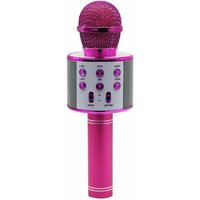
MIC11 - Microphone Manta - Free user manual and instructions
Find the device manual for free MIC11 Manta in PDF.


| Product Type | Multimedia Tablet |
| Brand | Manta |
| Model | MIC11 |
| Display | 10.1-inch IPS LCD, 1280x800 resolution |
| Processor | Quad-core 1.3 GHz |
| RAM | 2 GB |
| Storage | 32 GB, expandable via microSD |
| Operating System | Android 10 (Go Edition) |
| Battery | Lithium-ion 4000 mAh, up to 6 hours usage |
| Camera | Front 2 MP, Rear 5 MP |
| Connectivity | Wi-Fi 802.11 b/g/n, Bluetooth 4.0, Micro USB, 3.5mm audio |
| Dimensions | 240 x 160 x 9 mm (9.4 x 6.3 x 0.35 in) |
| Weight | 450 g (0.99 lbs) |
| Power Input | 5V/2A via Micro USB |
| Main Functions | Web browsing, video playback, e-reading, light gaming, apps |
| Cleaning | Wipe with dry soft cloth; avoid liquids and abrasives |
| Safety | Do not expose to extreme temperatures or moisture; use only supplied charger |
| Spare Parts & Repairability | Battery and screen replaceable by qualified technician; parts available through Manta service |
| General Information | Designed for daily multimedia use; user manual included in box |
Frequently Asked Questions - MIC11 Manta
User questions about MIC11 Manta
0 question about this device. Answer the ones you know or ask your own.
Ask a new question about this device
Download the instructions for your Microphone in PDF format for free! Find your manual MIC11 - Manta and take your electronic device back in hand. On this page are published all the documents necessary for the use of your device. MIC11 by Manta.
USER MANUAL MIC11 Manta
natural_image
Black-and-white photo of a black stand mixer with visible microphone, buttons, and speaker grille (no text or symbols on body)INSTRUKCJA OBSŁUGI
USER'S MANUAL
KORISNIČKI PRIRUČNIK
MANUAL DE USUARIO
GŁOŚNIK BLUETOOTH Z MIKROFONEM
PL
UWAGA!
Before using the device for the first time, please read this manual carefully and keep it for future reference.
- Read all warnings carefully.
- Do not use the device near water. Do not submerge the device under water.
- Do not cover the device's ventilation openings. Installation should be carried out in accordance with the manufacturer's instructions.
- The device power supply must correspond to that stated on the Rating Label.
- Do not place the device near any heat sources such as radiators, heaters, stoves, or other devices (including amplifiers) that produce heat. Do not expose the device to open fire.
- Make sure the power cord is not kinked or pinched; this especially applies to the connection points to the plug and to the outlet of the device.
- Do not use liquid detergents or caustic agents to clean the devices - clean the device with a soft cloth. Before cleaning, disconnect the device from the power supply.
- Do not place heavy objects on the device, otherwise it may be damaged.
- Disconnect the device if there is a lightning storm or if it will not be used for an extended period of time.
- All servicing should may be performed only by authorized technical staff of authorized MANTA S.A service points. Service is required in the event of any damage to the appliance, for example if: the power cord or plug are damaged; Liquid has spilled or an object has fallen into the device; the device has been exposed to rain or moisture; the device is malfunctioning or has been dropped.
- Do not touch the power cord or plug with wet hands when connecting or disconnecting the power cord.
- Damaged power cord presents a high risk of electric shock or fire; never use a damaged cord.
- Do not place the loudspeaker directly next to your ear. It may damage your hearing.
For correctly operating, please read this manual carefully before using. Any content revise of the manual won't declare again, and we are not responsible for consequence caused by fault or oversight of this manual.
BLUETOOTH SPEAKER WITH MICROPHONE
ENG
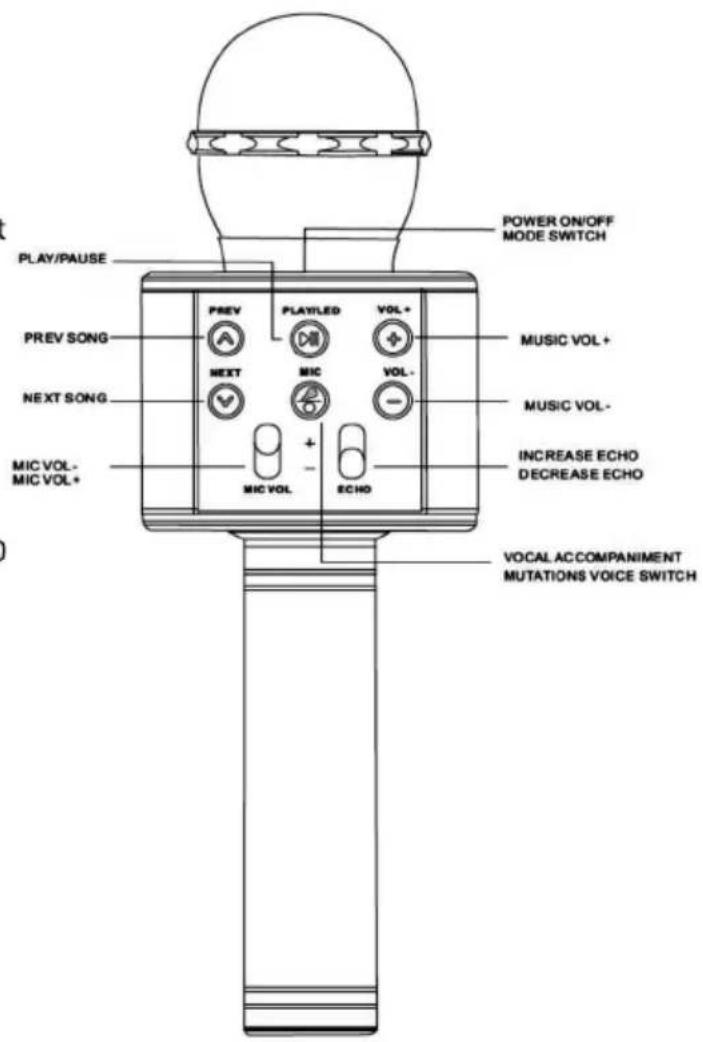
Buttons Operation

Long press to turn the microphone ON/OFF. Short press will change the mode.

Previous song under BT/USB/TF mode.

Next song under BT/USB/TF mode.

Short press Play/Pause.
Longer press: ON/OFF Led (only for models MIC20 and MIC21-PKL)

Short press: Vocal accompaniment Mode
Longer press: Mutations voice switch

Increase volume

Decrease volume

Microphone volume control

Microphone echo level control
Wireless Karaoke
1.Hold ⏻ button to turn device..
2. Select the Bluetooth mode by pressing the button ⏻ . Turn on the Bluetooth function on your mobile device, and then select the "MANTA KARAOKE" device. You will hear a voice prompt about successful connection.
3. Adjust the music volume and the microphone volume to your needs. You can also choose the echo level and the voice modulation mode.
4.Start Karaoke
BLUETOOTH SPEAKER WITH MICROPHONE
SI
POZOR:
Pred prvo uporabo naprave natancno preberite ta prirocnik in ga shranite za poznejšo uporabo.
| Power output | SW (RMS) |
| Playback | MP3 |
| Bluetooth | 5.0 |
| Connectivity | USB/TF/AUX/LINE OUT |
| Functions | Bluetooth Karaoke |
| Frequency response | 100Hz~10KHz |
| Sensitivity | 115dB±3dB |
| Weight | 0,3 kg |
| Dimensions | 230 x 75 x 75 mm |
| Power supply | DC SV Built-in battery 1600mAh Working time in battery mode max. 6h |
| Set contains | Manual, warranty card, MicroUSB/USB cable |
ES
from Monday to Friday, 9:00-17:00
The manufacturer reserves the right to make changes to product specifications without notice.


Made in P.R.C.
FOR MANTA EUROPE
MANTA S.A. hereby declares that appliance MIC10-G, MIC11-PK, MIC12-BK, MIC20-GL, MIC21-PKL is compliant with Directives RED 2014/53/EU, ROHS 2011/65/EU. The full text of the EU declaration of conformity is available at the following internet address: www.manta.com.pl
Brand : Manta
Model : MIC11
Category : Microphone