
Minos SPK1201X500D - Speaker Manta - Free user manual and instructions
Find the device manual for free Minos SPK1201X500D Manta in PDF.


| Product Type | Karaoke Speaker System |
| Model | Minos SPK1201X500D |
| Brand | Manta |
| Power Output (Max) | 2 x 250W |
| Power Output (RMS) | 2 x 120W |
| Drivers | 4 x 12-inch woofer, tweeter |
| Playback Formats | MP3 |
| Bluetooth Version | 5.0 |
| Inputs | USB, SD card, 2 x 6.3mm microphone, 3.5mm AUX, Line input |
| Features | Super Bass, Equalizer, FM Radio, Disco LED lights, Echo effect |
| Frequency Response | 40 Hz – 20 kHz |
| Sensitivity | 93 dB ± 3 dB |
| Dimensions (Right Speaker) | 260 x 363 x 1057 mm (W x D x H) |
| Weight (Right Speaker) | 27.0 kg |
| Weight (Left Speaker) | 25.0 kg |
| Power Supply | 220-240 V, 50-60 Hz |
| Accessories Included | Remote control, wired microphone, user manual, warranty card |
| Cleaning Instructions | Clean with a dry cloth only |
| Safety Features | Overheat protection, fuse (220V F8A) |
| Compliance | RED 2014/53/EU, ROHS 2011/65/EU |
| Warranty | Refer to warranty card for details |
Frequently Asked Questions - Minos SPK1201X500D Manta
User questions about Minos SPK1201X500D Manta
0 question about this device. Answer the ones you know or ask your own.
Ask a new question about this device
Download the instructions for your Speaker in PDF format for free! Find your manual Minos SPK1201X500D - Manta and take your electronic device back in hand. On this page are published all the documents necessary for the use of your device. Minos SPK1201X500D by Manta.
USER MANUAL Minos SPK1201X500D Manta
natural_image
Abstract black-and-white circular logo with interlocking curved shapes (no text or symbols)MANTA
Karaoke Power Audio MINOS
SPK1201X500D
natural_image
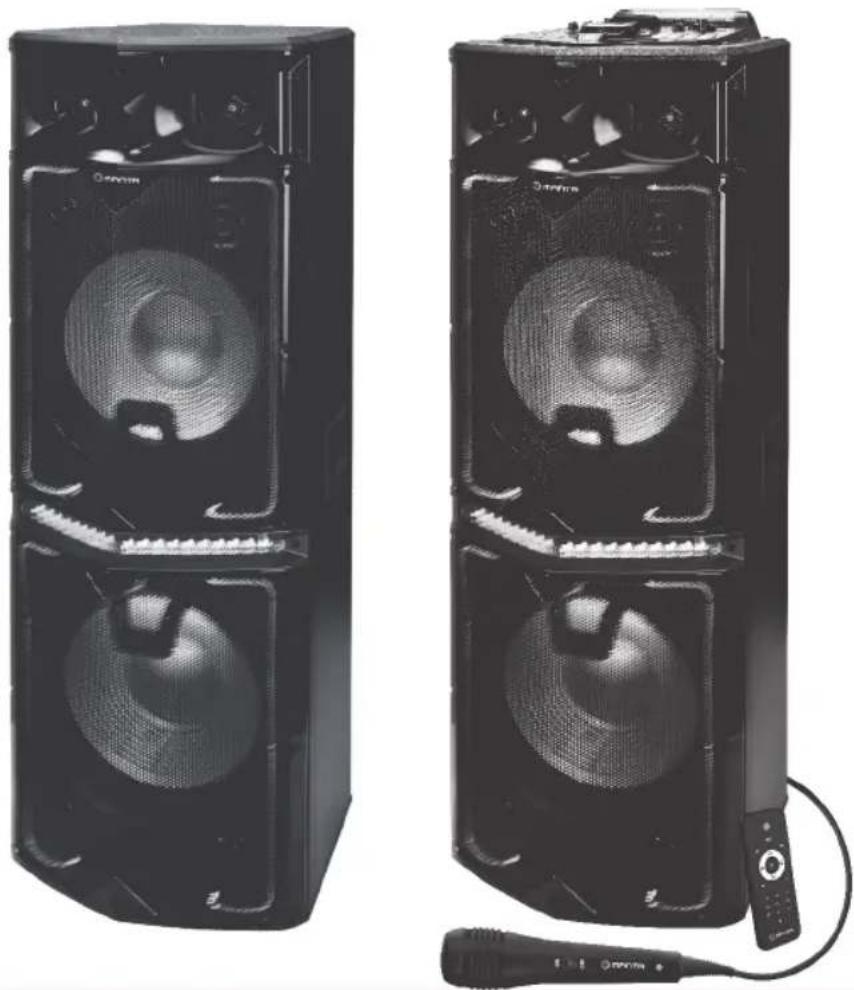
Two black audio/video speakers with sound waves and a microphone, shown from different angles (no text or symbols visible)INSTRUKCJA OBSŁUGI
USER MANUAL
MANUAL DE USUARIO
NAVODILO ZA UPORABO
UPUTE ZA RAD
PL - SPK1201X500D MINOS
ŚRODKI BEZPIECZEŃSTWA

UWAGA!
NIE OTWIERAĆ. RYZYKO PORAŻENIA PRĄDEM
natural_image
Warning symbol of a lightning bolt inside a triangle (no text or numbers)UWAGA: ABY WYNIKNAĆ RYZYKA PORAŻENIA PRĄDEM.
NIE ZDEJMOWAĆ ODBUDOWY.
NIE ZAWIERA ELEMENTÓW OBSŁUGIWANYCH PRZEZ UŻYTKOWNIKA.
NAPRAWY ZLECAJ TYLKO WYKWALIFIKOWANEMU PERSONELOWI.

INSTRUKCJA DLA PANELU TYLNEGO
- Please read the instructions included with the product before using the product.
- Read all warnings carefully.
- Follow all instructions carefully.
- Do not use the device near water, in very dusty places, in places subject to strong vibrations.
- Clean the device with a dry cloth only.
- Do not cover the ventilation openings of the device. Installation should be carried out in accordance with the manufacturer's instructions.
- Place the speaker on an even, flat surface. If placed on an inclined surface, the speaker may tip over or fall, causing injury or malfunction.
- Do not place the speaker near any heat sources such as radiators, heaters, stoves, or other appliances (including amplifiers) that produce heat.
- Protect the power cord from being kinked or pinched; this applies in particular to the point of connection to the plug and the vicinity of the exit from the device. As with all electrical appliances, do not run power cords under carpets or place heavy objects on them.
- Use only attachments/accessories specified by the manufacturer.
- Unplug the device if there is a lightning storm or if it will not be used for an extended period of time. When unplugging the power cord from the AC outlet, never pull on the cord. When you do not plan to use the speaker for an extended period of time, disconnect the plug from the AC power outlet.
- Refer all service activities to qualified service technicians. Service is required if the appliance has been damaged in any way, for example if: the power cord or plug is damaged; liquid has spilled into the device or an object has fallen onto the speaker; the device has been exposed to rain or moisture; the device is not working properly or has been dropped.
- Do not use or store the speaker in very low or very high temperatures (below 5°C and above 35°C). If the speaker is used or left outside the above range, the speaker may be damaged.
- If water enters the device, immediately disconnect it from the AC power source and consult an authorized service center.
CAUTION
• Make sure the power source is correct.
• Do not touch the power cord or plug with wet hands when plugging the cord into or unplugging it.
Before connecting the power cord to the power source, make sure that the main power switch is in the "OFF" position to avoid damage to the device.
• A damaged power cord poses a high risk of electric shock or fire; never use a damaged cord.
• To prevent personal injury or property damage, handle the speaker properly and hold it securely when moving it.
• Use extreme caution when moving the speaker on a slope.
• Do not move the speaker if someone is sitting on it, carrying a bag, etc.
- Keep children and infants away from the speaker when moving it.
The devices are designed for use with AC 220-240 V, \~50/60 Hz directly from the mains or using a dedicated power supply. Connecting to a mains voltage other than that for which the product (power supply) is intended may be a safety and fire hazard and may damage the device. If you have any questions about the voltage requirements for your model or power lines in your area, contact your supplier before plugging the unit into a wall outlet.
Do not use extension cords.
This product (including its hardware) contains magnet(s) that may interfere with pacemakers or other medical devices. Should not be placed product in the vicinity of people who use these medical devices. If these medical devices are used, consult a physician before using this product.
Do not place the product near medical devices.
EPILEPSYWARNING
Some people may experience epileptic seizures due to flashing lights.
EN - SPK1201X500D MINOS
FRONT PANEL INSTRUCTION

- LED LIGHT ON/OFF SWITCH
- POWER ON/OFF SWITCH
- MIC. VOL: MICROPHONE VOLUME CONTROL
- MIC 1/MIC 2 JACK 6.3MM MICROPHONE
- EQUALIZER
- X-BASS VOLUME CONTROL
MODE: USB / SD / LINE(AUDIO INPUT) / BLUETOOTH / FM SELECTION
STOP STOP
PUT A SONG ON REPEAT
VOLUME DECREASE / PREVIOUS
PLAY / PAUSE/FM SEARCHING
NEXT VOLUME INCREASE / NEXT
-
AUX IN: JACK 3.5MM MP3
-
MASTER VOL: MASTER VOLUME CONTROL
- MIC. TREBLE: MICROPHONE TREBLE ADJUST KNOB MIC. BASS: MICROPHONE BASS ADJUST KNOB
MIC. ECHO: MICROPHONE ECHO ADJUST KNOB MIC. DELAY: MICROPHONE DELAY ADJUST KNOB
- USB / TF / SD CARD SLOT
- DISPLAY SCREEN
EN - SPK1201X500D MINOS
REMOTE CONTROL

Standby

USB/SD/LINE/BLUE (Audio input)

Prev/FM CH- button

Play/pause/FM tuner

Next/FM CH+

RPT
Repeat RPT

Stop button

Volume up

Volume down

Mute

Equalizer

Number


USE INSTRUCTION
- Connect the signal cables according to the back panel connection instruction.
- To ensure the correct voltage, insert electronic source cable and turn on the power switch button.
- Adjust function keys to your personal audio preference.
EN - SPK1201X500D MINOS

BACK PANEL INSTRUCTION
BLUETOOTH INSTRUCTION
Change the mode into "BLUE", the bluetooth sign light twinkles, and speaker will give an alarm. Ensure you enable the Bluetooth function on your Bluetooth device. Search for Bluetooth connection until you find device model and pair.
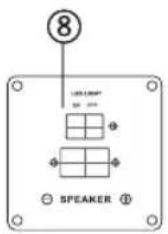
| 1, 8, 9 | LED LIGHTING / SWITCH |
| 2 | FM CONTROL |
| 3 | OUTPUT SPEAKERS |
| 4 | LOW / MEDIUM / HIGH SWITCH: EXTERNAL AUDIO SIGNAL SWITCH SWITCH |
| 5 | EXTERNAL AUDIO INPUT PLUG (DVD / TV / AUX) |
| 6 | FUSE: 220V F8A / AC |
| 7 | AC INPUT: AC 220V 50Hz |
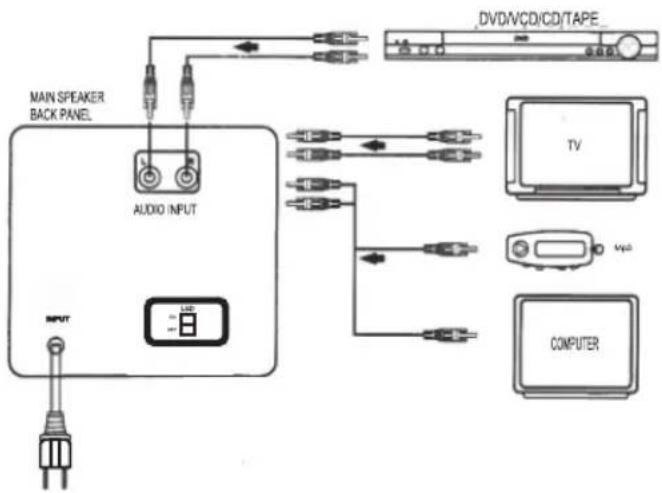
BACK PANEL CONNECTION DIAGRAM
Using Audio cable to connect Audio inoput Jack with Computer Sound card or other Audio outputs.
flowchart
graph TD
    A["MAIN SPEAKER BACK PANEL"] --> B["AUDIO INPUT"]
    B --> C["TV"]
    B --> D["COMPUTER"]
    B --> E["DVD/VCD/CD/TAPE"]
EN - SPK1201X500D MINOS
PRECAUTION
In order to prevent operating problems or serious damage to the device, please comply with the following remarks:
- Hold the electric outlet while pulling out the plug. Do not pull the wire.
- Operating audio appliances should be kept away from heating facilities.
- Do not attempt to fix or revise the circuit.
- Do not touch the internal parts as this may cause an electric shock or serious damage to the device.
- Pull out the plug if not in use for long.
- Ensure the audio product is placed in a ventilated and dry a-rea with about 20mm of space around the unit.
Warning: Do not expose this appliance to rain or moisture or place any vessel containing liquids such as a cup or a vase on or above the appliance
TROUBLESHOOTING
| Symptom | Possible Problem | Solution |
| No Function Light & No Sound | 1. Plug is not well connected | Insert the plug into electric outlet |
| 2. Speaker power button is not turned on | Turn on the button | |
| Function Light on but No Sound | 1. Cable misconnected | Turn o ffthe power and check the input jack to ensure proper audio signal is connected to the relevant input jack |
| 2. Audio signal is not transmitted to speaker | Check all the speakers if there is audio signal output | |
| If the problem exists after performing the related procedures above, please refer to the appointed service agent or professional technician to fix the appliance. Do not attempt to open the cover otherwise we assume no responsibility. | ||
ES - SPK1201X500D MINOS
INSTRUCCIONES DE USO DEL PANEL TRASERO

INSTRUCCIONES DE USO DE BLUETOOTH
NAVODILO ZA ZADNJI PANEL

NAVODILO BLUETOOTH
UPUTE ZA STRAŽNJI PANEL

BLUETOOTH UPUTE
Promijenite način rada u „PLAVI”; Bluetooth indikatorsko svjetlo treperi i zvuk se čuje iz zvučnika. Provjerite je li Bluetooth funkcija na vašem uređaju uključena. Potražite dostupne Bluetooth veze, pronađite model uređaja i uparite ih.
| 1, 8, 9 | PREKIDAČA LED SVJETLA |
| 2 | FM KONTROLA |
| 3 | IZLAZNI ZVUČNICI |
| 4 | NIZAK / SREDNJI / VISOKI PREKIDAČ: PREKIDAČ ZA VANJSKO PRILAGOĐENJE AUDIO SIGNALA |
| 5 | VANJSKI AUDIO ULAZ (DVD / TV / AUX) |
| 6 | OSIGURAČ: 220V F8A / AC |
| 7 | ULAZ AC: AC 220V 50Hz |
ŠEMA SPAJANJA ZA STRAŽNJI PANEL
Korišćenje audio kabla s ciljem spajanja audio ulaznog priključka na zvučnu karticu računala i druge audio izlaze

flowchart
graph TD
    A["MAIN SPEAKER BACK PANEL"] --> B["AUDIO INPUT"]
    B --> C["USB"]
    C --> D["TV"]
    C --> E["MVD"]
    C --> F["COMPUTER"]
HR - SPK1201X500D MINOS
PREDPAZNE MJERE
Kako biste spriječili probleme u radu ili ozbiljno oštećenje uređaja, slijedite ove upute:
| Power output | 2x250W maximum / 2x120W RMS4 x woofer 12"/tweeter |
| Playback | MP3 |
| Bluetooth | 5.0 |
| Connectivity | USB/SD/2xMIC/AUX |
| Features | Super Bass, Bluetooth, Equalizer, FMRadio, Disco LED light effects, Echoeffect |
| Frequency response | 40Hz~20KHz |
| Sensitivity | 93dB±3dB |
| Weight | 27,00 kg right speaker25,00 kg left speaker |
| Dimensions | 260/363x400x1057 |
| Power supply | 220-240V, 50-60Hz |
| Set contains | Remote control, wired microphone,manual, warranty card |
HR-SPK1201X500D
| Ugrađeni zvučnici | 2x250W maximum / 2x120W RMS4 x woofer 12"tweeter |
| Format reprodukcije | MP3 |
| Bluetooth | S.0 |
| Utor | USB/SD/2xMIC/AUX |
| Funkcije | Super Bass, Bluetooth, Equalizer, FMradio prijemnik, Disko-svjetlosniefekti, Eho efekt. |
| Raspon frekvencije | 40Hz-20KHz |
| Osjetljivost | 93dB±3dB |
| Masa | 27,00 kg desni stup25,00 kg lijevi stup |
| Dimenzije | 260/363x400x1057 |
| Napajanje | 220-240V, 50-60Hz |
| Set | Daljinski upravljač, žičani mikrofon,pinučnik, jamstveni list |
FR-SPK1201X500D
MANTA S.A. hereby declares that appliance
SPK1201X500D MINOS
is compliant with Directives RED 2014/53/EU, ROHS 2011/65/EU. The full the EU declaration of conformity is available the following website: www.manta.com.pl
INFOLINIA SERWISOWA
from Monday to Friday, 9:00-17:00
The manufacturer reserves the right to make changes to product specifications without notice.


- MANTA
- Karaoke Power Audio MINOS
- PL - SPK1201X500D MINOS
- ŚRODKI BEZPIECZEŃSTWA
- UWAGA!
- INSTRUKCJA DLA PANELU TYLNEGO
- CAUTION
- Do not use extension cords.
- EN - SPK1201X500D MINOS
- REMOTE CONTROL
- USE INSTRUCTION
- BACK PANEL INSTRUCTION
- BLUETOOTH INSTRUCTION
- BACK PANEL CONNECTION DIAGRAM
- PRECAUTION
- ES - SPK1201X500D MINOS
- INSTRUCCIONES DE USO DEL PANEL TRASERO
- INSTRUCCIONES DE USO DE BLUETOOTH
- NAVODILO ZA ZADNJI PANEL
- NAVODILO BLUETOOTH
- UPUTE ZA STRAŽNJI PANEL
- BLUETOOTH UPUTE
- ŠEMA SPAJANJA ZA STRAŽNJI PANEL
- HR - SPK1201X500D MINOS
- PREDPAZNE MJERE
- INFOLINIA SERWISOWA
Brand : Manta
Model : Minos SPK1201X500D
Category : Speaker