
JS3210 - Charger PHILIPS - Free user manual and instructions
Find the device manual for free JS3210 PHILIPS in PDF.


| Product Type | Jump Starter / Portable Charger |
| Brand | Philips (by Lumileds) |
| Model | JS3210 |
| Dimensions | 180 x 89 x 33.5 mm |
| Weight | 465 g |
| Battery Capacity | 9900 mAh (36.63 Wh) |
| Rated Output Capacity | 5Vdc / 6500 mAh |
| Input | 5V = 2A (via USB-C) |
| Output | 5V = 1A; 5V = 2.4A; 12V Jump Start |
| Full Charging Time | Approximately 4.5 hours |
| Start Current | 250 A |
| Peak Current | 600 A |
| Jump Start Ability | Up to 4.0L gasoline / 3.5T diesel |
| Operating Temperature | -20°C to 55°C |
| Flashlight | LED with 4 modes: normal, strobe, SOS, off |
| Warranty | 1 year limited warranty |
| Included Accessories | Jump starter cables, USB-C charging cable, storage pouch, manual |
Frequently Asked Questions - JS3210 PHILIPS
User questions about JS3210 PHILIPS
0 question about this device. Answer the ones you know or ask your own.
Ask a new question about this device
Download the instructions for your Charger in PDF format for free! Find your manual JS3210 - PHILIPS and take your electronic device back in hand. On this page are published all the documents necessary for the use of your device. JS3210 by PHILIPS.
USER MANUAL JS3210 PHILIPS
natural_image
Black Philips 3.0 electronic device with attached cable and connector (no visible text or symbols on body)JS3210 model name and serial number are printed on the product label.
English
Warranty and service
Lumileds is the warrantor of this product. The limited warranty applies, provided that:
• The product is within the warranty period, which is 1 year from the date of purchase;
• The product is used properly and in line with its intended purpose;
• The product is handled in accordance with its operating instructions;
• The original purchase receipt is presented with the product.
The Lumileds warranty excludes, or does not apply, if:
• The proof-of-purchase document has been altered in any way, or is made illegible;
• The model number, serial number or production date code on the product have been altered, removed, or made illegible;
• The product has been dismantled, repaired, or modified by an unauthorized service provider or person;
• The product does not function properly because it was not originally designed, manufactured or approved for use in the country where you used the product;
• The defect is caused by abuse of the product, or by environmental conditions that do not conform with guidance contained within this user manual (including but not limited to lightning, abnormal voltage, fire, natural disaster, transportation, or water), or by normal wear and tear.
1 △ Important: please read
Please only use the items and accessories supplied in this package to install the device. Please avoid high temperatures and direct sunlight exposure when operating this product outdoors.
For more information and assistance, or for any problem with the product, please visit the Philips website at www.philips.com/automotive, or contact the retail outlet where you purchased the product.
Alternatively, you can also call the customer service hotline:
For China: 400 690 8826
For Japan: 0570-080-123
For Korea: +82-31-620-1600
For Taiwan: 0800 700 168
Manufacturer: Lumileds (Shanghai) Management Co., Ltd.
No. 19-20, Lane 299, Wenshui Road, Jian'An District, Shanghai
Postal code: 200072
- Product Overview:

Included accessories:
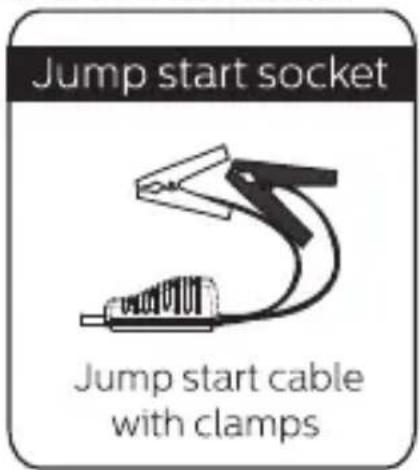


2. Operational guidance
Charging your Jump Starter
How to charge the device:
- Plug the supplied charging cable into the mains electrical supply via a standard USB plug socket (not supplied).
- Connect the other end of the cable into the 5V2A input port on the device.

natural_image
Line drawing of a portable electronic device connected to a wall-mounted power outlet (no text or symbols)Checking the device's battery level:
To check the device's battery life, press the "Power" button. The following number of solid lights indicate how much battery life is remaining:
| Indicator | Unlit | 1 solid | 2 solid | 3 solid | 4 solid |
| Storage level | ≈0% | ≈25% | ≈50% | ≈75% | ≈100% |
When the device is charging, the 4 LED lights will flash one by one. All lights will be off when the charging is paused or completed.
How to jump start a 12V vehicle battery
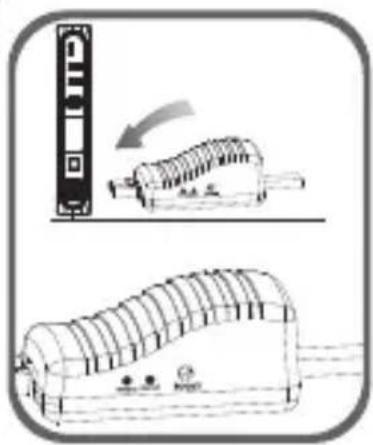
- Connect the blue plug of the jump starter cables into the jump start port on the device (make sure it is fully connected).
- Connect the red clamp to the vehicle's positive (+) battery terminal, and the black clamp to the negative (−) battery terminal.
- Follow the instructions below, depending on what light is showing on the cable indicator.
natural_image
Technical illustration of a portable electronic device with a scroll and control panel, showing internal components (no text or symbols)
natural_image
Simple line drawing of a battery connected to a coil and a resistor, with no text or symbols present.Green light on:
This indicates the connection is correct and the circuit is working, you can turn on the engine to jump-start it.
natural_image
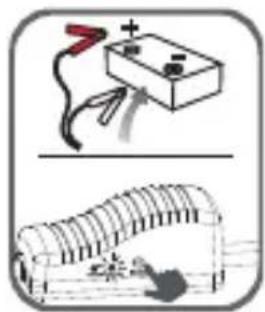
Illustration of a battery connected to wires and a coiled device (no text or symbols)Green light blinking:
This indicates the vehicle battery is low. Press the "BOOST" button and wait until the GREEN LIGHT becomes solid, then turn on the engine within 30 seconds.

Red light on with buzzing:
This indicates the connection is wrong. The buzzing is a warning that the clamps are incorrectly positioned on the battery. Correctly position the clamps (see step 2 above) and wait until the GREEN LIGHT is solid before turning the engine on.

natural_image
Illustration of a battery connected to a wire and plug, above a schematic of a battery cell with a mouse (no text or symbols)No lights, no buzzing: This indicates the vehicle's battery may be damaged. After confirming the clamps are correctly positioned, press the "BOOST" button, wait until the GREEN LIGHT is on, and then turn on the engine within 30 seconds.
-
Start the vehicle.
-
When the vehicle has started, leave the engine running and remove the jump start cable from the vehicle's battery.
How to charge phones or tablets:
- Plug a USB charging cable into the output port on the device.
- Connect the other end to your phone or tablet.
- Press the "Power" button and the connected device will begin charging.

natural_image
Three connected devices showing a mobile phone, a USB drive, and a separate electronic device (no text or symbols visible)How to use the LED flashlight:
- Press and hold the "Power" button for 3 seconds to turn on the LED flash light.
- The LED light has 4 modes, appearing in the following order: normal, strobe, SOS and OFF). Toggle between these modes by pressing the "Power" button lightly.
3. Technical specifications:
| Dimension: 180x89x33.5mm |
| Weight: 465g |
| Battery capacity: 9900mAh(36.63Wh) |
| Rated Output Capacity: 5Vdc/6500mAh |
| Output: 5V=1A;5V=2.4A;12V jump start |
| Input: 5V=2A |
| Full charging time: About 4.5 hours |
| Start current: 250A |
| Peak current: 600A |
| Jump start mode working temperature: -20°C~55°C |
| Jump start ability: up to 4.0L/3.5T gasoline or 3.0L diesel. |
4. Frequently asked questions
Q. How do I turn off this device?
A. Your Jump Starter device will power off automatically when there is no load or charging is completed.
Q. How long does it take to fully charge the device?
A. Approx. 4.5 hours through the 5V/2A input port.
Q. How many times can I charge my phone?
A. This depends on the battery capacity of your phone. The iPhone, for example, can be fully charged about 3 times.
Q. How many times can a fully charged device jump start a 3.0L gasoline engine?
A. Approx. 20 times.
Q. How long does a fully charged battery last after jump starting a car?
A. We recommend you recharge the device every 6 months in order to maximize the life of the product.
5. Troubleshooting:
| Problem | Cause | Solution |
| No response when pressing the power button. | Device's low voltage protection has started.. | Plug the adaptor into the USB-C input port to activate.. |
6.Warning: Please read carefully
-
Read the instruction manual carefully before using this device.
-
DO NOT use it in place of a vehicle's battery.
-
DO NOT use as a toy.
-
To reduce the risk of injury, do not leave children unattended with this device. And closely supervise nearby children when you are operating the device.
-
This device is intended to jump start 12V vehicles only. Using it to jump start vehicles with different battery voltages risks damage to the device.
-
Always use the clamps supplied in the box. To avoid personal injury from fire or electric shock, stop using the clamps or cables if either are damaged in any way.
-
DO NOT connect the two clamps together.
-
Before jump starting, ensure there is no corrosion at the car battery terminals, or that no dirt or other foreign matter has accumulated there.
Ensure you securely attach the clamps to the battery terminals, otherwise the device may not work.
-
After successfully starting the car, please detach the jump starter cable clamps from the car battery within 30 seconds, otherwise it could cause damage.
-
DO NOT jump start more than 3 times in a row, as this could overheat and damage the device. When using the device multiple times, wait at least 2 minutes between each use.
-
DO NOT use the jump starter cable to charge any other equipment. Only use it for starting car batteries.
-
DO NOT store in locations where the temperature may exceed 60°C. Only charge when the ambient temperature is between 0°C and 45°C.
-
DO NOT expose the device to rain or water.
-
DO NOT expose the device to extreme heat or fire.
-
DO NOT operate the device when there is a risk of explosion from the presence of flammable liquids, gasses, or other explosive materials.
-
Whenever jump starting or working with batteries, ensure there is always another person close to you, or within earshot of your voice, so they can come to your aid in the event of an accident.
-
Always remove personal metal items, like rings, bracelets, necklaces and watches, when using the device.
-
To reduce risk of damage to the device's charging cable, pull the plug rather than the cord when disconnecting from the device.
-
NEVER use damaged or modified battery packs. Damage or modification of battery cells can cause unpredictable consequences, and result in fire, explosion, injury and other risks.
-
Please use the charging cable provided with this device. If using another charger, ensure it has the same input i.e. a 5V2A input port.
-
After jump starting the car, do not immediately begin charging the device, wait at least 5 minutes.
-
Never jump start a vehicle while the device is being charged.
-
Under extreme conditions, the battery may leak. In this unlikely event, do not touch the leak directly with your hands or skin. In case of contact, wash immediately with soap or water. In case of contact with eyes, rinse with cold water for at least ten minutes and seek medical attention immediately.
-
This device contains a lithium battery. It should be disposed of according to local regulations at the end of its product life.
Español
Garantía y servicio
natural_image
Pure electrical circuit lines without any symbolsnatural_image
Simple line drawing of a USB cable with two connectors (no text or symbols)natural_image
Line drawing of a portable electronic device connected to a wall-mounted power outlet (no text or symbols)natural_image
Illustration of a device with a vertical scale and a separate view of a rectangular device (no text or symbols)
natural_image
Illustration of a battery connected to a wire with a red lightning bolt, above a curved electrical component (no text or symbols)natural_image
Two technical illustrations: top shows a battery with red and black wires, bottom shows a curved structure with a lightning bolt (no text or symbols)natural_image
Illustration of a battery connected to a switch and its circuit breaker (no text or symbols)natural_image
Three connected devices showing a mobile phone, a physical device with ports, and a separate electronic device (no text or symbols visible)natural_image
Line drawing of a portable electronic device connected to a wall socket (no text or symbols)natural_image
Technical line drawing showing a device with a scroll and a separate view of its internal structure (no text or symbols)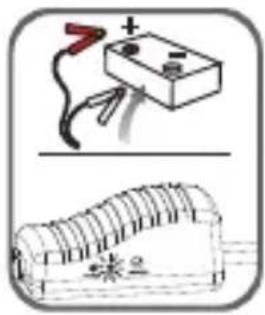
natural_image
Illustration of a battery connected to a wire with a red switch above it, and a rolled-up photo of its cable (no text or symbols)Luz verde acesa:
natural_image
Illustration of a battery connected to a wire with a switch, above a coiled structure (no text or symbols)Luz verde piscando:
natural_image
Illustration of a battery connected to a wire with an arrow indicating electrical connection (no text or symbols)natural_image
Simple line drawing of a smartphone connected to a USB drive (no text or symbols)
natural_image
Line drawing of a device with a cable and connector, no text or symbols presentComo usar a lanterna LED
natural_image
Line drawing of a device connected to a wall-mounted power outlet (no text or symbols)배터리 수준 확인하기
natural_image
Diagram showing a device with a scroll and a separate view of its base (no text or symbols present)
natural_image
Illustration of a battery connected to a roof with wires, and a separate photo of a roof with decorative patterns (no text or symbols)초록등점등:
natural_image
Illustration of a battery connected to a switch and its circuit board with a lightning bolt (no text or symbols)초록등 깜박임:
natural_image
Illustration of a battery connected to a switch and its circuit board (no text or symbols)표시등도 부저 소리도 없습니다:
natural_image
Line drawing of a smartphone connected to a USB drive (no text or symbols)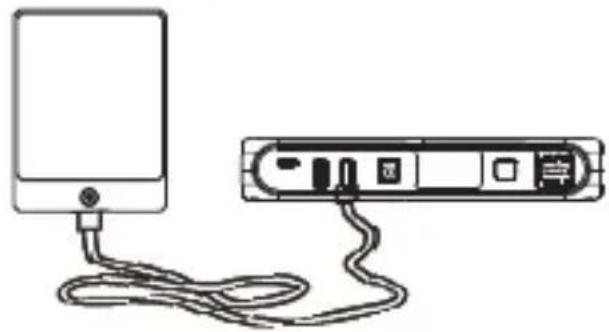
natural_image
Line drawing of a device with cable and connector, no text or symbols presentLED 손전등 사용 방법
www.philips.com/automotive,
或联系您购买产品的零售店。
另外,您也可以拨打客户服务热线:
中国:400 690 8826
日本:0570-080-123
韩国:+82-31-620-1600
台湾: 0800 700 168
生产商:亮锐(上海)管理有限公司
上海市静安区汶水路299弄19-20号
邮编:200072
1. 产品介绍

natural_image
Pure electrical circuit lines without any symbols电瓶夹子
5V2A输入口

natural_image
Simple line drawing of a cable with two connectors (no text or symbols)TYPE-C 充电线
收纳袋

说明书

2. 指示灯说明:
轻触开关按键,电量指示灯指示如下:
natural_image
Line drawing of a device connected to a power outlet cable (no text or symbols)给12V汽车启动
natural_image
Diagram showing a device with a scroll and a separate view of a rack or storage unit (no text or symbols present)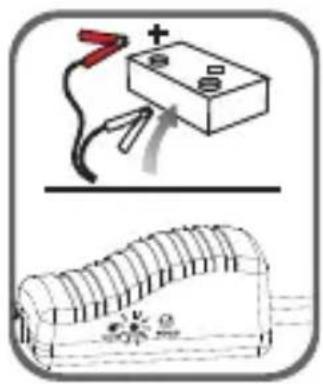
natural_image
Line drawing of a mobile device connected to a rectangular electronic device via cable (no text or symbols)
natural_image
Simple line drawing of a device with a cable and connector (no text or symbols)LED灯不同模式切换
natural_image
Pure electrical circuit lines without any symbols電瓶夹子
5V2A輸入口

natural_image
Simple line drawing of a cable with two connectors (no text or symbols)TYPE-C 充電線
收納袋

說明書
2. 指示燈說明:
輕觸開關按鍵,電量指示燈指示如下:
natural_image
Line drawing of a portable electronic device connected to a wall-mounted power outlet (no text or symbols)給12V汽車啟動

natural_image
Line drawing of a mobile device connected to a rectangular electronic device via cable (no text or symbols)
natural_image
Simple line drawing of a device with a cable and connector (no text or symbols)LED燈不同模式切換
Lumileds is the warrantor of this product.
Philips and the Philips Shield Emblem are registered trademarks of
Koninklijke Philips N.V. and are used under license.
2023©Lumileds Holding B.V. All rights reserved.
亮锐(Lumileds)为此产品提供质保。
- English
- Warranty and service
- △ Important: please read
- Operational guidance
- Charging your Jump Starter
- How to charge the device:
- Checking the device's battery level:
- How to jump start a 12V vehicle battery
- Green light on:
- Green light blinking:
- Red light on with buzzing:
- How to charge phones or tablets:
- How to use the LED flashlight:
- Technical specifications:
- Frequently asked questions
- Troubleshooting:
- 6.Warning: Please read carefully
- Español
- Garantía y servicio
- Luz verde acesa:
- Luz verde piscando:
- Como usar a lanterna LED
- 배터리 수준 확인하기
- 초록등점등:
- 초록등 깜박임:
- 표시등도 부저 소리도 없습니다:
- LED 손전등 사용 방법
- 产品介绍
- 指示灯说明:
- 给12V汽车启动
- LED灯不同模式切换
- 指示燈說明:
- 給12V汽車啟動
- LED燈不同模式切換
Brand : PHILIPS
Model : JS3210
Category : Charger