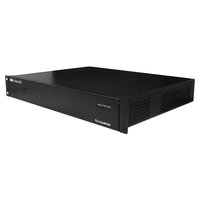
MXWall-LP - Video Processor Smart-AVI - Free user manual and instructions
Find the device manual for free MXWall-LP Smart-AVI in PDF.


| Product Type | Video Wall Processor |
| Brand | Smart-AVI |
| Model | MXWall-LP |
| Dimensions | 17.0 x 8.0 x 1.7 inches (rackmountable) |
| Weight | 5.5 lbs |
| Power Supply | 100-240V AC, 50/60Hz |
| Video Input | HDMI (2 ports) |
| Video Output | HDMI (4 ports) |
| Max Resolution | 1920x1080 @ 60Hz |
| Supported Configurations | 2x2, 1x4, 4x1, 1x2, 2x1 (via DIP switches) |
| Control Method | Front panel buttons, IR remote, RS-232 |
| Bezel Compensation | Yes |
| Video Wall Modes | Full screen, split, PIP, seamless switching |
| Operating Temperature | 32°F to 104°F (0°C to 40°C) |
| Storage Temperature | -4°F to 140°F (-20°C to 60°C) |
| Humidity | 20% to 90% RH (non-condensing) |
| Included Accessories | Remote control, power adapter, mounting ears, user manual |
| LED Indicators | Power, input select, output status |
| Safety Certifications | FCC, CE, RoHS |
| Warranty | 1 year limited |
Frequently Asked Questions - MXWall-LP Smart-AVI
User questions about MXWall-LP Smart-AVI
0 question about this device. Answer the ones you know or ask your own.
Ask a new question about this device
Download the instructions for your Video Processor in PDF format for free! Find your manual MXWall-LP - Smart-AVI and take your electronic device back in hand. On this page are published all the documents necessary for the use of your device. MXWall-LP by Smart-AVI.
USER MANUAL MXWall-LP Smart-AVI
| VIDEO | |
| Video Amplifier Bandwidth | 3.2 Gbps |
| Input Video Signal Video (TMDS) 0.5~1.0Vpp | |
| Input DDC Signal 5 volts | |
| Compliances HDMI 1.4, HDCP | |
| Pixel Rates | Clock frequency beyond 165Mpix/second |
| Format 4:4:4 and 4:2:2 data input formats | |
| Resolution 480p, 720p, 1080i, 1080p | |
| Input Card Format 4-port HDMI card | |
| Output Card Format 4-port HDMI card | |
| Input Slots Up to 8 (1 card) | |
| Output Slots Up to 12 (3 cards) | |
| Video Type | RGB/YCBCR : 24/30/36-bits, YCBCR: 8/10/12/16/20/24-bits |
| CONTROLS | |
| RS 232 | DB9 Female, 115200 BPS, N, 8, 1, No flow control |
| TCP/IP RJ45, UDP | |
| OTHER | |
| Working Temperature 0°C~+55°C | |
| Storage Humidity Up to 95% | |
| Weight 20 lbs | |
| Dimensions 17 in (W) x 3.5 in (H) x 15 in (D) | |
| Power Supply | 50/60Hz, 100~230 VAC |
| Consumption | 300W |
| SOFTWARE | |
| Operating System | Windows 7-10, Android 7 and above |
WHAT'S IN THE BOX
| PART NO. | Q-TY | DESCRIPTION |
| MXWALL-LP | 1 | 8-Input 12-Output Video Wall Processor and Matrix Switch |
| CCPWR06 | 1 | Power supply cord |
| Quick Start Guide | 1 |
NOTICE
The information contained in this document is subject to change without notice. SmartAVI makes no warranty of any kind with regard to this material, including but not limited to, implied warranties of merchantability and fitness for particular purpose. SmartAVI will not be liable for errors contained herein or for incidental or consequential damages in connection with the furnishing, performance or use of this material.
No part of this document may be photocopied, reproduced, or translated into another language without prior written consent from SmartAVI Technologies, Inc.

DESIGNED AND MADE IN THE USA
800.AVI.2131, 702.800.0005
2455 W Cheyenne Ave, Suite 112
North Las Vegas, NV 89032
SmartAVI.com
Smart-AM
SMART AUDIO VIDEO INNOVATION
MXWALL-LP
8-Input and Up to 12-Output Video Wall Processor and Matrix Switch
natural_image
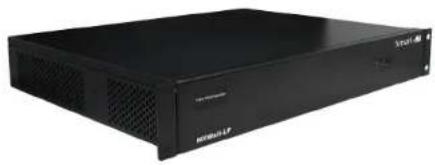
Black industrial server rack with ventilation grilles and ventilation ducts (no visible text or labels)ALL-IN-ONE VIDEO WALL AND MATRIX SOLUTION WITH 1080P FULL HD RESOLUTION OUTPUT, INTEGRATED CONVERTER & SCALER
Quick Start Guide
ABOUT
The MXWall-LP is a video wall processor and matrix switch with up to 12 HDMI outputs. Compact, plug-and-play, and excellent for mid-sized video wall displays between 4-12 screens with resolutions up to 1080p (1920 x 1080 @ 60 Hz) Full HD.
The MXWall-LP is simple to control, outfitted with an easy-to-use front-panel touchscreen controller and optional RS-232 control. Better still, the MXWall-LP comes with SmartAVI's intuitive MXwall Manager software absolutely free! MXwall Manager software lets users manually create and adjust their ideal video wall displays using simple click-and-drag operations: it's fun and great for users of any technical skill level! The MXWall-LP also features TCP/IP web control and a tablet software manager that works over WiFi, giving users more options and greater flexibility in controlling their video wall.
Its compact design and powerful processing power make the MXWall-LP the perfect solution for any video wall installation. Plug-and-play enabled, the MXWall-LP is immediately ready for use as soon as it is connected to an AV set-up: no additional drivers or installers are required. Better still, its exceptional hardware makes for stunning video wall displays in environments like retail spaces, educational facilities, conference rooms, command centers, event halls, entertainment venues, airports, and more!
FEATURES
• Complete hardware solution
- Plug-and-play ready
• 8 HDMI Inputs
• Up to 12 HDMI Outputs
• Supports DVI with adaptors
• 1080p (1920 x 1080 @ 60 Hz) Output Resolution
• Creative video wall display modes
- Easy control (front-panel, software, and RS-232)
• HDCP and HDMI 1.4 compliant
• User-Friendly MXwall Manager Software
• For 8x8, and 8x12 video wall setups
HARDWARE INSTALLATION
- Position MXWall-LP conveniently and keep it unplugged.
- Connect displays to the MXWall-LP and power on the displays.
- Connect any video source to the MXWall-LP.
- Optionally connect an RS-232 cable from a PC to the RS-232 port on the unit for additional control.
- Optionally connect an Ethernet cable to the MXWall-LP for additional control.
- Turn on the MXWall-LP and wait a few seconds for the unit to initialize.

flowchart
graph TD
    A["Smart Wall 3D Computer"] --> B["MXWall-LP"]
    B --> C["Video Con connected via HOURS"]
    B --> D["Video Con connected via HDMI OUT"]
    B --> E["Video Con connected via TCP/IP"]
    C --> F["Laptop"]
    D --> G["HDWR"]
    E --> H["HDWR"]
    style A fill:#f9f,stroke:#333
    style B fill:#ccf,stroke:#333
    style C fill:#cfc,stroke:#333
    style D fill:#fcc,stroke:#333
    style E fill:#cff,stroke:#333
MXWALL-LP FRONT

MXWALL-LP BACK

natural_image
Front view of a black network switch device with multiple ports and connectors (no visible text or labels)Brand : Smart-AVI
Model : MXWall-LP
Category : Video Processor