
HNPL200P4 - Surge Protector Power Strip Hamlet - Free user manual and instructions
Find the device manual for free HNPL200P4 Hamlet in PDF.


| Product Type | Powerline Surge Power Strip with 4-Port HUB |
| Brand | Hamlet |
| Model | HNPL200P4 |
| Ethernet Ports | 4 x RJ45 10/100 Base-T |
| Line Rate | 200 Mbps (Effective TCP up to 65 Mbps, UDP up to 85 Mbps) |
| Frequency Band | 2 - 28 MHz (With Mask) |
| Modulation | OFDM (QAM 1024/256/64/16/8, BPSK, QPSK, ROBO) |
| Encryption | 128-bit AES Link Encryption with optional key management |
| AC Rating | 230V, 10A, 2300W max |
| Surge Protection | Max Surge Voltage 6000V, Max Spike Current 39000A, Joule Rating 1140J |
| EMI/RFI Filtering | Insertion loss 20dB at 150KHz - 30MHz |
| Standards | IEEE 802.3, IEEE 802.3U, HomePlug AV 1.1 |
| Compatible Operating Systems | Windows 98SE/ME/2000/XP/Vista, Mac, Linux |
| Maximum Distance (AC wiring) | 200 meters |
| Number of Addressable Nodes | Up to 4096 devices |
| LED Indicators | Power, PL-ACT, LAN1 - LAN4 |
| Certification | CE |
| Cleaning Instructions | Use a damp cloth; do not use liquid or aerosol cleaners |
| Safety Note | Do not plug into a power strip or UPS with surge protection; avoid noise sources |
Frequently Asked Questions - HNPL200P4 Hamlet
User questions about HNPL200P4 Hamlet
0 question about this device. Answer the ones you know or ask your own.
Ask a new question about this device
Download the instructions for your Surge Protector Power Strip in PDF format for free! Find your manual HNPL200P4 - Hamlet and take your electronic device back in hand. On this page are published all the documents necessary for the use of your device. HNPL200P4 by Hamlet.
USER MANUAL HNPL200P4 Hamlet
thanks for choosing an Hamlet product. Please carefully follow the instructions for its use and maintenance and, once this item has run its life span, we kindly ask You to dispose of it in an environmentally friendly way by putting it in the separate bins for electrical/electronic waste or to bring it back to your retailer who will collect it for free.

We inform You this product is manufactured with materials and components in compliance with ROHS directives: 2002/95/CE; with RAEE Directives: 2003/96/CE, Italian Legislative Decree 2005/151 and below EEC Directives: EN 55022: 2006 Class B, CISPR/I/XX/CDV Opt B, EN 61000-3-2: 2006 Class A, EN 6100-3-3: 1995+A1: 2001+A2: 2005, EN 50412-2-1: 2005, IEC 61000-4-2: 1995+A1: 1998+A2: 2000, IEC 61000-4-3: 2006, IEC 61000-4-4: 2004, IEC 61000-4-5: 2005, IEC 61000-4-6: 2007, IEC 61000-4-8: 1993+A1: 2000, IEC 61000-4-11: 2004.
Trademarks
All trademarks and company names mentioned in this manual are used for description purpose only and remain property of their respective owners.
Changes
The material in this document is for information only and subject to change without notice. Hamlet reserves the right to make changes or revisions in the product design or the product manual without reservation and without obligation to notify any person of such revisions and changes.
Important Notice
Do not plug the Powerline 200M into a power strip or surge protector because these devices may consist of filter and impair signal. Also avoid plugging the device right next to noisy sources such as cell phone charger, Halogen light, Energy saving bulb, noisy desktop computer, vacuum cleaner, etc. Both cases result in poor transmission speed.
PREFACE
This document describes installation of the HNPL200P4 Surge Power Strip with 4-Port HUB product.
Please read this document before installing the product. This publication contains the following sections:
■ Important safety instructions
■ Before installation
■ Product installation guide
■ Specification
IMPORTANT SAFETY INSTRUCTIONS
This product is intended for connection to the AC power line. For installation instructions, refer to the Installation section. The following precautions should be taken when using this product.
- Please read all instructions before installing and operating this product.
- Please keep all instructions for later reference.
- Please follow all warnings and instructions marked on the product.
- Unplug the AC coupler from the wall outlet before cleaning. Use a damp cloth for cleaning. DO NOT use liquid cleaners or aerosol cleaners.
- DO NOT operates this product near water.
- This product should never be placed near or over a radiator, or heat register.
- This product relies on the building's electrical installation for short-circuit (over current) protection.
- Ensure that a fuse or circuit breaker no larger than 230 VAC 10A is used on the phase conductors (all current-carrying conductors).
- Caution Double pole/Neutral fusing
- DO NOT allow anything to rest on the product interconnect cords. DO NOT locates this product where people may walk on the cords.
- Because the product sends data over the powerline, it is recommended that you plug directly into a power outlet. Do not plug the device into a UPS or power strip with surge protection. The product has its own power filter for protection against surges.
- Only a qualified technician should service this product. Opening or removing covers may result in exposure to dangerous voltage points or other risks.
- Unplug the AC coupler from the wall outlet and refer the product to qualified service personnel for the following conditions:
■ When the interconnect cords are damaged or frayed.
■ If liquid has been spilled into the product.
■ If the product has been exposed to rain or water.
■ If the product does not operate normally when the operating instructions are followed.
■ If the product exhibits a distinct change in performance.
HNPL200P4 User Guide
BEFORE INSTALLATION
PC minimum requirements
- Windows 98SE/ME/2000/XP/Vista, Mac and Linux OS
- Pentium 166 MHz processor or higher
- At least one free LAN port
Important Note: To create a Powerline Network, an additional HNPL200P4 or Powerline Adapter (e.g. Hamlet HNPL200MS) is required.
PC must not be configured for another network.
This means that:
- No network clients except for Microsoft Network, Client for Netware Networks, or Microsoft Family Logon are installed
- No network services except file and printer sharing for Microsoft Networks or Personal Web Server are installed
- No network protocols except Microsoft's TCP/IP, IPX/SPX, NetBEUI or Net BIOS support for IPX/SPX are installed
Powerline device connections
The connection diagram below shows an example of use of the HNPL200P4.
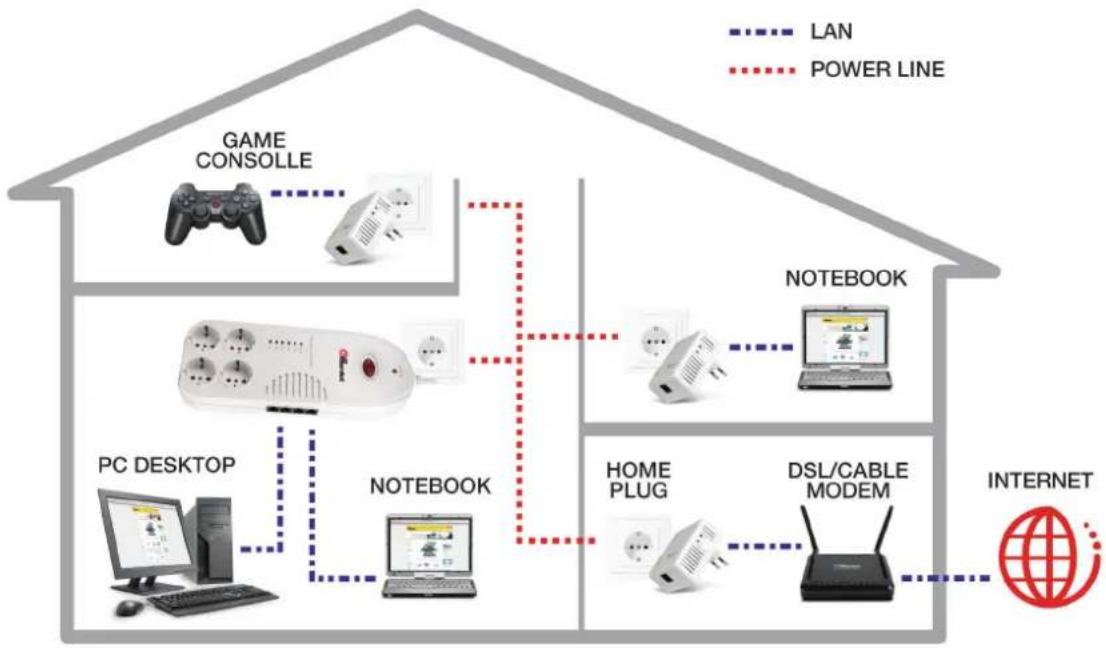
flowchart
graph TD
    A["Game Console"] -->|LAN| B["Notebook"]
    C["PC Desktop"] -->|LAN| D["Notebook"]
    E["Computer"] -->|LAN| F["Notebook"]
    G["Desktop Computer"] -->|LAN| H["Notebook"]
    I["Computer with Phone"] -->|LAN| J["Notebook"]
    K["Home Plug"] -->|LAN| L["Notebook"]
    M["DSL/Cable Modem"] -->|LAN| N["Notebook"]
    O["Internet"] --> P["Power Line"]
    style A fill:#f9f,stroke:#333
    style C fill:#f9f,stroke:#333
    style E fill:#f9f,stroke:#333
    style G fill:#f9f,stroke:#333
    style I fill:#f9f,stroke:#333
    style K fill:#f9f,stroke:#333
    style M fill:#f9f,stroke:#333
    style O fill:#f9f,stroke:#333
Limitation of the Powerline device
To meet the safety regulation, the longest distance between powerline carrier devices will be limited at 200 meter and for in-house use only. More than 200 meter will cause the signal reduction or data loss.
PRODUCT INSTALLATION GUIDE
To install for the PC local Powerline network
- Power on HNPL200P4 power strip
- Use a Category 5 Ethernet cable to connect LAN port on power strip and your PC's Ethernet port.
- You can repeat steps 2 to connect another PC.
- Then you will find the LED of PL-ACT on power strip is light that mean it connects to network.

flowchart
graph LR
    PC["PC"] -->|Data Flow| PC1["Power Strip"]
    PC1 -->|Data Flow| PC2["Laptop"]
    PC2 -->|Data Flow| PC3["PC"]
-
The Power LED, and LANx LED indicator light up when you complete the above connection.
-
The Powerline PL-ACT LED indicator starts blinking when the data communication proceeds on power line.
To share Internet access with a xDSL/Router or cable modem
-
Connect one HNPL200MS Powerline Adapter to the broadband router.
-
Plug one HNPL200MS Powerline Adapter into an AC outlet.
- Plug the Ethernet cable into the RJ45 connector of the HNPL200MS and plug the other end into Ethernet port of the Router.

flowchart
graph LR
    A["HOME PLUG"] --> B["DSL/CABLE MODEM"]
    B --> C["INTERNET"]
    D["HNPL200MS"] -.-> B
- Follow the section "To install for the PC local Powerline network", to connect your PC to the HNPL200P4. You will be able to access the Internet from anywhere through the power line.
As wireless AP (Access Point) Extender
- Connect the other Ethernet port to the AP
- Plug the Ethernet cable into the any RJ45 connector of the HNPL200P4 4-Port HUB and plug the other end of the cable into the Ethernet port on the AP.

SPECIFICATION
| Line Rate 200 Mbps | |
| Effect Data Rate TCP: Up to 65Mbps effective throughputUDP: Up to 85Mbps effective throughput | |
| Frequency Band 2 ~ 28 MHz (With Mask) | |
| Access Methods CSMA/CA channel-access schemes | |
| Qos 4 Levels priority, 8 levels VLAN priority | |
| Modulation OFDM (QAM 1024/256/64/16/8, BPSK, QPSK, ROBO) | |
| Port Four RJ45 for 10/100 Base-T Ethernet | |
| Standards IEEE 802.3, IEEE 802.3U, HomePlug AV 1.1 | |
| Operating System Window 98 SE, Me, NT, 2000, XP, VISTA, MAC, Linux | |
| Nodes Supports up to 4096 addressable devices | |
| IGMP Support lpv4/IGMP v1, v2, v3 snoopingSupport lpv6/MLD v1, v2 snooping | |
| Encryption 128 bit AES Link Encryption with key management (Optional) | |
| Distance | AC Wire: 200 meter |
| LED Power, PL-ACT, LAN1 ~ LAN4 | |
| AC rating 230V, 10A, power consumption @10W Min. | |
| Power | 2300W Max. |
| Surge | Max Surge Voltage: 6000VMax. Spike Current: 39000AJoule rating: 1140J |
| EMI/RFI | Insertion loss 20dB at 150KHz – 30MHz |
| Certification | CE |
LEDs
| Power | On: power onOff: no power |
| PL-ACT | On: Powerline adapter detectedOff: No Powerline adapter detectedBlinking: Powerline traffic detected |
| LAN1 ~ LAN4 | On: Ethernet device linkedOff: No Ethernet device linkedBlinking: Ethernet traffic detected |
- Trademarks
- Changes
- Important Notice
- PREFACE
- IMPORTANT SAFETY INSTRUCTIONS
- BEFORE INSTALLATION
- PC minimum requirements
- PC must not be configured for another network.
- Powerline device connections
- Limitation of the Powerline device
- PRODUCT INSTALLATION GUIDE
- To install for the PC local Powerline network
- To share Internet access with a xDSL/Router or cable modem
- As wireless AP (Access Point) Extender
Brand : Hamlet
Model : HNPL200P4
Category : Surge Protector Power Strip