
Zelig XZR751U - Memory card reader Hamlet - Free user manual and instructions
Find the device manual for free Zelig XZR751U Hamlet in PDF.


| Type de produit | Electronic device |
| Dimensions | 150 x 75 x 8 mm |
| Poids | 180 g |
| Alimentation | Batterie lithium-ion rechargeable, 3.7V, 3000 mAh |
| Fonctions principales | Affichage tactile, connectivité Wi-Fi/Bluetooth, appareil photo, haut-parleur intégré |
| Entretien et nettoyage | Essuyer avec un chiffon doux et sec. Ne pas utiliser de produits abrasifs. |
| Sécurité | Ne pas exposer à l'eau ou à des températures extrêmes. Utiliser uniquement le chargeur fourni. |
| Pièces détachées et réparabilité | Les composants internes ne sont pas remplaçables par l'utilisateur. Contacter le service après-vente. |
| Informations générales | Marque: Hamlet, Modèle: Zelig XZR751U. |
Frequently Asked Questions - Zelig XZR751U Hamlet
User questions about Zelig XZR751U Hamlet
0 question about this device. Answer the ones you know or ask your own.
Ask a new question about this device
Download the instructions for your Memory card reader in PDF format for free! Find your manual Zelig XZR751U - Hamlet and take your electronic device back in hand. On this page are published all the documents necessary for the use of your device. Zelig XZR751U by Hamlet.
USER MANUAL Zelig XZR751U Hamlet
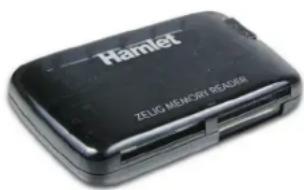
ZELIG READER 75 in 1 Memory Card Reader
User Manual XZR751U
www.hamletcom.com
Dear Customer,
thanks for choosing an Hamlet product. Please carefully follow the instructions for its use and maintenance and, once this item has run its life span, we kindly ask You to dispose of it in an environmentally friendly way, by putting it in the separate bins for electrical/electronic waste, or to bring it back to your retailer who will collect it for free.
We inform You this product is manufactured with materials and components in compliance with RoHS Directives 2011/65/EU & 2015/863/EU, WEEE Directive 2002/96/CE, 2003/108/CE Italian Legislative Decree 2005/151 and EMC Directive 2014/30/EU for the following standards: EN 55032: 2015, EN 55024: 2010 + A1: 2015.

The complete CE declaration of conformity of the product can be obtained by contacting Hamlet at info@hamletcom.com.
Visit www.hamletcom.com for complete information on all Hamlet products and to access downloads and technical support.
Imported by: CARECA ITALIA SPA - Scandiano (RE) . Italy.
All trademarks and company names mentioned in this manual are used for description purpose only and remain property of their respective owners.
The material in this document is for information only. Contents, specifications and appearance of the product are indicative and may change without notice.
Introduction
The new Zelig Memory Reader is a 75 in 1 memory card reader that reads and save data from Compact Flash Type I/II, Micro Drive, Secure Digital, Multi Media Card, Smart Media, Memory Stick, Memory Stick Pro and XD. Its small dimensions make this product ideal also to be carried. Thanks to the USB hot plug, connecting to your computer is easy and no adapter is needed. With the aid of card adapter it can read Mini-SD, Micro SD, MMC mobile, MMC Micro, RS MMC and T-Flash.
System Requirements
• One available USB port
- Windows 7/8 and 10, Mac OS 10.4 or later, Linux (kernel 2.4.0 or later)
Features
• High Speed USB 2.0 interface up to 480 Mbps
• USB 1.1 backward compatible
- USB bus powered
• Plug&Play, supports Hot-Swapping
• LED indicators for power and activity
Installation
Connect the card reader to the PC thought the USB cable; Zelig Reader will be automatically recognized from the system and the icon of the supported memory will be visualized in "Windows Explorer" and on the "Desktop" (Mac OS - when you insert a memory card in the reader).
NB: Support one slot at the time only.
Hamlet
Brand : Hamlet
Model : Zelig XZR751U
Category : Memory card reader