
PPM2702 - Massage device PHILIPS - Free user manual and instructions
Find the device manual for free PPM2702 PHILIPS in PDF.


| Product Type | Handheld Massage Device |
| Model | PPM2702 |
| Brand | Philips |
| Dimensions (approx.) | 25 x 10 x 8 cm |
| Weight | 0.6 kg |
| Power Source | Rechargeable battery (USB-C charging) |
| Battery Life | Up to 2 hours on a full charge |
| Charging Time | Approx. 3 hours |
| Speed Levels | 3 adjustable speed settings |
| Massage Heads | 2 interchangeable heads (kneading and vibration) |
| Functions | Deep tissue massage, relaxation, muscle relief |
| Material | ABS body, silicone massage heads |
| Cleaning & Maintenance | Wipe with damp cloth; do not submerge; clean heads after use |
| Safety Features | Auto shut-off after 15 minutes, overheat protection |
| Spare Parts & Repairability | Replacement heads available; rechargeable battery not user-replaceable |
| Included Accessories | Massage device, USB charging cable, 2 massage heads, user manual |
| Warranty | 2 years limited manufacturer warranty |
Frequently Asked Questions - PPM2702 PHILIPS
User questions about PPM2702 PHILIPS
0 question about this device. Answer the ones you know or ask your own.
Ask a new question about this device
Download the instructions for your Massage device in PDF format for free! Find your manual PPM2702 - PHILIPS and take your electronic device back in hand. On this page are published all the documents necessary for the use of your device. PPM2702 by PHILIPS.
USER MANUAL PPM2702 PHILIPS
There may be certain differences between the content of this manual and your product. Please refer to the actual product. We reserve the right to update the product at any time without prior notice.
© 2023 AquaShield
All rights reserved
Philips and the Philips Shield Emblem are registered trademarks of Koninklijke Philips N.V. and are used under license.
This product has been manufactured by and is sold under the responsibility of Guangdong Deerma Technology Company Limited and Guangdong Deerma Technology Company Limited is the warrantor in relation to this product.
Rev A MAR 23

PHILIPS
Eye Mask Massager
Air Pressure Eye Mask Massager
PPM2702
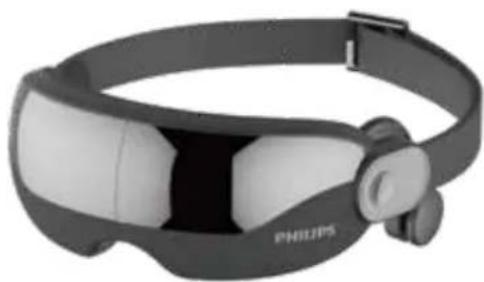
User Manual
Contents
1 Readme
Symbol Description
People Restricted or Prohibited from Use
Precautions for Use
Precautions for the Operation Place
Precautions for Maintenance
2 Product Features
3 Components
4 How to Use
5 Maintenance
Cleaning
Disposal
6 Troubleshooting
7 Technical Parameters
8 Service Guide for Product Warranty
Warranty and Service
Warranty Card
9 Packing List
1 Readme
Please read this manual carefully before using the product and keep it properly. The manual is available at www.philips.com
Symbol Description
To avoid personal injury or property damage, be sure to observe the contents below.
- The following symbols are used to illustrate what you should observe.

Indicates prohibition

Indicates the actions that need to be subject to instructions
People Restricted or Prohibited from Use

Indicates the actions that need to be subject to instructions
For those who are under the treatment at medical institutions or under some of the following conditions, please consult a doctor or a physical therapist for advice before use.
- Take off the contact lenses before use.
- Keep the product away from water, fire and corrosive environment.
- Comply with relevant regulations if it is used in specific environments.
- For children aged 6 to 12, please use the product under the guidance and care of their guardians.
- For people who suffer from sensitive skin or facial allergic dermatitis, or have beauty treatment or plastic surgery materials in their facial part, please use this product under the guidance of a doctor.
- This is a household electronic health care product rather than a medical device, thus it is not suitable for diagnosis, treatment and other commercial purposes.
- Please charge the product with the charging equipment configured by our company only. Be sure to pay attention to the safety in the use of electricity.

The product is not allowed to be used by the following groups/ under the following circumstances
People who are prohibited from doing exercises or stretching exercise as advised by their doctors
For example, people who suffer from thrombosis, severe aneurysm, acute venous aneurysm, all kinds of dermatitis, and all kinds of skin infections, are prohibited from using this Product, as these diseases can easily result in deterioration.
- Do not use the product while driving.
- Do not use the product when you are drunk or feel unwell. • Patients who used to undergo eye surgery or suffer from heart disease are prohibited from using the product.
- People who are in the rehabilitation stage after eye surgery are prohibited from using the product.
- Do not use the product when you have symptoms of glaucoma, cataract, retinal detachment, red eye disease and other eye diseases.
- Pregnant women and women during menstruation are not allowed to use this product.
- Do not use it to massage other parts of the body other than eyes.
- Do not wear the product while sleeping.
- Children under the age of 6 are prohibited from using the product. • Patients who are under medical treatment and feel abnormal in their bodies are prohibited from using the product. • Patients suffering from hypertension, ocular hypertension, arteriosclerosis or cerebral thrombosis are prohibited from using the product. • Patients suffering from high fever, malignant tumors and osteoporosis are prohibited from using the product. • Patients suffering from infectious diseases are prohibited from using the product. • Patients and people without operational capacity are prohibited from using this product.
Precautions for Use
The appliance has a heated surface. Persons insensitive to heat must be careful when using the appliance. This appliance is not intended for use by persons (including children) with reduced physical, sensory or mental capabilities, or lack of experience and knowledge, unless they have been given supervision or instruction concerning use of the appliance by a person responsible for their safety. Children should be supervised to ensure that they do not play with the appliance. If the supply cord is damaged, it must be replaced by a special cord or assembly available from the manufacturer or its service agent. This appliance contains batteries that are only replaceable by skilled persons. Must be only supplied at safety extra low voltage corresponding to the marking on the appliance.
Those who wear glasses, hair accessories, etc. should take them off before use. If it has been left unused for a long time, be sure to check whether the switch is normal in advance before using it again. Close your eyes during use of the product. Blurred vision may occur when you take off the product after use. Just close your eyes for 1 to 3 minutes, and this condition can be eased. Be sure to disconnect the power supply before cleaning the product. Power off the product immediately in case any abnormality occurs during use. Due to the product's lack of waterproof performance, be careful not to let water enter the product during use, nor directly immerse the product in water. If the product falls into the water accidentally when charging, unplug it immediately, and do not directly touch the product falling into the water. The product has built-in lithium batteries. Do not disassemble, modify or toss it to the fire so as to avoid danger. This product has the function of constant temperature heating. Those who use the heating function for a long time or are sensitive to temperature may cause cryogenic burns. Continuous use of this product for a long time is likely to result in the fatigue and discomfort in the massage area. Children should be supervised to ensure that they do not play with the appliance. If the supply cord is damaged, it must be replaced by a special cord or assembly available from the manufacturer or its service agent. Must be only supplied at safety extra low voltage corresponding to the marking on the appliance. Do not exert great force on the product on purpose. Do not use non-specified voltage for power supply, or it is likely to cause damage to the product circuit. Do not drop the product or hit it with strong force, or it is likely to cause damage to the product. Do not disassemble, modify or repair the product by yourself.
Do not pull the product with force, or stab the product with a knife or sharp objects. Do not use the product in places with room temperature above 35°C or in places with direct sunlight.
Precautions for the Operation Place
Do not use the product in environment with humidity, high temperature or high electromagnetic. Do not use the product near a stove, in electric heating quilts or on electric blankets and other heating appliances, otherwise a fire or malfunction may occur. Keep the product away from water, fire and corrosive environments. Do not cover the product with a towel, cloth or other objects during use. Do not use the product near a bathtub, shower, washbasin or other high-humidity vessels that has water in it.
Precautions for Maintenance
Power off the product before maintenance. Be sure to unplug the power cord if the product is not to be used for a long time. Do not pour water on the product. Do not use volatile oil, thinner, strong alkaline detergent, bleach, etc. for cleaning. Clean the surface of the product with a damp cloth. Do not wash it directly with water.
2 Product Features
This product can help relieve eye fatigue in many ways, such as airbag massage and warm compress. Its preset multiple massage modes are suitable for different people to use for eye relaxation. Through its innovative bone conduction music playing technology, users can relax their eyes while enjoying their favorite music.
3 Components
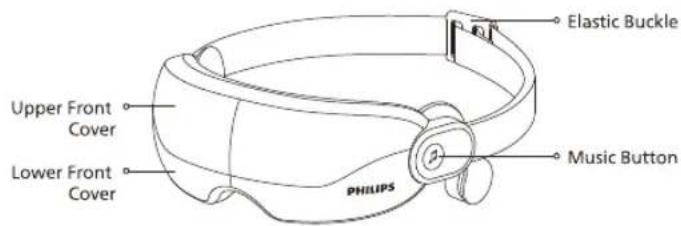
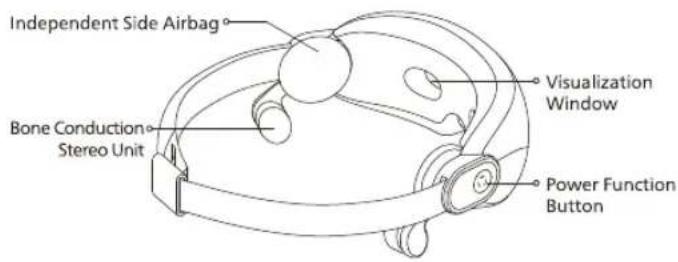
4 How to Use
Precautions before use:
- Check whether the device and its accessories are complete.
- Check whether the product has remaining battery. If the function of the product is turned off or the product cannot be powered on due to low battery, please charge it before use.
- Remove the pendants and accessories around the eyes during use so as not to affect the massage effect.
- Adjust the elastic headband to the size suitable for your head and then turn on the product when it is comfortably worn to your eyes.
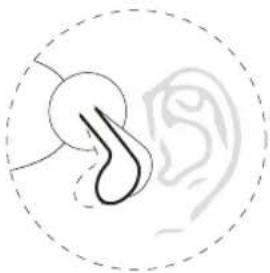
- Wear the bone conduction stereo unit to an area about 0.5-1.5cm in front of your ears. It is recommended to adjust the different angles of the headset bracket according to personal situation to achieve the best sound effect.
Power Function Button
- Press and hold the power function button for 2 seconds to power on the device with voice prompt of "Massage on". Press and hold the power function button for 2 seconds to power off the device with the voice prompt of "Massage off".
- After power-on, the default mode is Eye Beauty Mode, the warm compress is enabled, the built-in music is played automatically, and there is a voice prompt of "Eye Beauty Mode". The power indicator lamp turns orange and the music indicator lamp turns cyan.
- Double click the button (within 0.5 second) to turn off /on the warm compress function and the voice prompts are as follows respectively: "Turn off heating" (power indicator lamp turns green), and "Turn on heating" (power indicator lamp turns orange). After the warm compress is turned off, when the mode is switched to the next one with the warm compress function, the warm compress will be enabled automatically.
- The product is equipped with 5 modes. Press the button to switch these modes circularly in turn with corresponding voice prompts.
Successful Bluetooth Connection State:
Eye Beauty Mode: Air pressure 1 and warm compress. After switching to this mode, the product will be automatically powered off 30 minutes later by default: the air pressure and warm compress functions will stop 15 minutes later, and there will be a voice prompt of "Massage Off"; the music function will continue to operate for another 15 minutes and then the product will be powered off automatically without a voice prompt.
Eye Care Mode: Air pressure 2 and warm compress. After switching to this mode, the product will be automatically powered off 30 minutes later by default: the air pressure and hot compress functions will stop 15 minutes later, and there will be a voice prompt of "Massage Off"; the music function will continue to operate for another 15 minutes and then the product will be powered off automatically without a voice prompt.
Sleep-aid Mode: Air pressure 3 and warm compress. After switching to this mode, the product will be automatically powered off 30 minutes later by default: the air pressure function will stop 15 minutes later, and there will be no voice prompt; the warm compress and music functions will continue to operate for another 15 minutes and then the product will be powered off automatically without a voice prompt.
Eye Warming Mode: Warm compress. After switching to this mode, the product will be automatically powered off 30 minutes later by default: the warm compress function will stop 15 minutes later, and there will be a voice prompt of "Massage Off"; the music function will continue to operate for another 15 minutes and then the product will be powered off automatically without a voice prompt.
Music Mode: Bluetooth music plays. In this mode, there will be no kneading and warm compress. The user can enable the warm compress function by double clicking the power function button (if the warm compress function is enabled, this function will be automatically turned off 15 minutes later,
while the music function will continue to work). There is no voice prompt when pressing the button and powering off the product. No automatic power-off is available, therefore, the user can press and hold the power function button for 2 seconds to turn off the device.
Unsuccessful Bluetooth Connection State
Eye Beauty Mode: Air pressure 1 and warm compress. After switching to this mode, the device will automatically run for 15 minutes, and the volume will be turned down once every 5 minutes. It will be powered off 15 minutes later, and there will be a voice prompt of "Massage Off".
Eye Care Mode: Air pressure 2 and warm compress. After switching to this mode, the device will automatically run for 15 minutes, and the volume will be turned down once every 5 minutes. It will be powered off 15 minutes later, and there will be a voice prompt of "Massage Off".
Sleep-aid Mode: Air pressure 3 and warm compress. After switching to this mode, the device will automatically run for 15 minutes, and the volume will be turned down once every 5 minutes. It will be powered off 15 minutes later, and there will be a voice prompt of "Massage Off".
Eye Warming Mode: Warm compress. After switching to this mode, the device will automatically run for 15 minutes, and the volume will be turned down once every 5 minutes. It will be powered off 15 minutes later, and there will be a voice prompt of "Massage Off".
Music Mode: Built-in music plays. There is no kneading and warm compress in this mode. The user can enable the warm compress function by double clicking the power function button (if the warm compress function is enabled, this function will be automatically turned off 15 minutes later). After switching to this mode, the device will automatically run for 15 minutes and then be powered off 15 minutes later. There will be no voice prompt for power-off.
* The volume will be turned down by 3 levels within 15 minutes. At the 5th-6th minutes and the 10th-11th minutes, the volume will be turned down gradually,
so as to ensure the smooth connection of different levels of volume.

Music Mode
(1) Play the built-in music (No Bluetooth device is connected, the indicator lamp is cyan):
Press: Play the next song
Double click: Turn off/on the music (When the music play is "OFF", the indicator lamp is off, and there will be voice prompts of "Turn OFF / ON Music")
Press and hold: Search for a new Bluetooth device (Music play stops, the blue indicator lamp of the music button flashes, and there will be a voice prompt of "Search for the new Bluetooth device")
(2) Play Bluetooth music (A Bluetooth device is connected and the indicator lamp is blue)
Press: play the next song
Double click: Turn off/on the music (When the music play is "OFF", the indicator lamp is off, and there will be voice prompts of "Turn OFF / ON Music")
Press and hold: Disconnect the currently connected Bluetooth device, search for a new Bluetooth device (Music play stops, the blue indicator lamp of the music button flashes, and there will be a voice prompt of "Search for the new Bluetooth device")
Note:
(1) The time for searching for a new Bluetooth device is 1 minute. Press and hold the button again to stop the search and return to the previous music mode.
(2) In case of pairing failure, the built-in music will be played, the music indicator lamp will change from flashing blue to remaining cyan, and there will be a voice prompt of "The Bluetooth device fails to connect".
(3) If pairing is successful, the audios in the paired device will be played, the music indicator lamp will change from flashing blue to remaining blue, and there will be a voice prompt of "The Bluetooth device is connected successfully".

Bluetooth Music Mode
Bluetooth name: Philips PPM2702
Steps for Bluetooth pairing:
- After power-on, the background system automatically searches for the paired Bluetooth device (the search time is 10 minutes, during which the music indicator lamp is cyan), and connects the paired Bluetooth device automatically.
- After the pairing is successful, the indicator lamp changes from cyan to blue, there will be a voice prompt of "The Bluetooth device is connected successfully", and the audios in the paired device will be played.
- If the pairing fails within 10 minutes, the current light effect (cyan) will be maintained, and the built-in music will continue to be played without any voice prompt.
Charging Method
- Connect the USB charging cable to the charging port of the product.
- The indicator will be in the status of breathing lamp during charging. The indicator lamp will turn green after the charging is complete. 3. Do not power on the product during charging.
- Built-in rechargeable battery is adopted in the main unit, and the charging time is 2 hours.
- If there is a voice prompt of low battery during use, suspend the use of the product until it is fully charged.
- The product supports multiple charging methods: computer USB interface / mobile power supply / power adapter (refer to the product technical parameters to choose).
- When charging, the charging indicator is displayed with a breathing lamp: red breathing lamp (0-9%), orange breathing lamp (10%-50%), green breathing lamp (51%-99%), green lamp remains on if 100% charged.
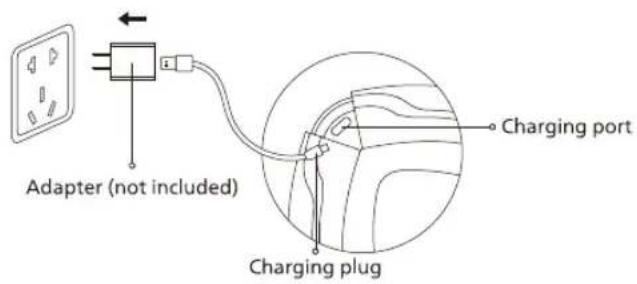
When the battery remaining capacity of the product is low, there will be a voice prompt of "Low battery, please charge it in time". The product will be automatically powered off when it is being charged under the power-on state, and the power-on is not supported under the charging state. The product cannot work during charging. Do not squeeze the USB cable to avoid damage.
5 Maintenance
Cleaning
- In case of oil stains after use of the product, wipe it with a dry soft cloth.
- If the product is particularly dirty, gently wipe the leather sheath with a wet cloth or an alcohol pad.
- Put the product in a safe place after use, and pack it in a bag and put it in the packaging box.
- Do not place heavy objects on the product to avoid moisture and contamination.
Disposal
The lithium-ion battery used in this product is a valuable resource that can be recycled. Take out the lithium-ion battery when it is used up and discarded, and then hand it over to a professional institution that can recycle the rechargeable batteries for disposal.
Precautions for battery disposal
- It is prohibited to replace the battery by users themselves.
- The product must be powered off before the battery is removed;
- The battery must be disposed of in a safe manner.
6 Troubleshooting
This chapter lists the most common problems to the product. If the problems you encounter are not included in the following tables, please call our service hotline or contact the authorized service center in your region.
| Fault Description | Possible Cause | Solution |
| Startup failure | Power function button is not turned on | Press and hold the power function button again |
| Low battery | Charge the product | |
| Set time is up | Press and hold the power function button again | |
| Charge failure | The plug is not inserted properly | Plug in properly |
| The original charging cable is not used | Replace it with the original charging cable of the product | |
| Charge faiCharging duration is too longlure | The corresponding adapter is not used | Replace it with an adapter with an output current ≥500mA |
| No music | Music pause | Press the music play button in the electronic device; or double-click the product's music button to restart the music |
| Aigbag's compress intensity is weak | Headband is too loose | Adjust the length of the headband according to personal situation so that the massager can be comfortably worn on the eyes |
| Fault Description | Possible Cause | Solution |
| Bluetooth connection fails | The distance between the paired electronic device and the massager exceeds the limit | Shorten the distance between the electronic device and the product |
| The music button is pressed by mistake, and the Bluetooth function is turned off | Press the power function button to shut it down, and then restart the Bluetooth function of the massager | |
| Bluetooth connection succeeds, but music play fails | Not connected to the corresponding Bluetooth | Turn on the Bluetooth of the electronic device again and conduct the Bluetooth pairing again |
| Bluetooth plays music with low sound | The playback volume of the electronic device is too low | Adjust the playback volume of the electronic device |
| Shorter use duration | Abnormal temperature | Use it at an ambient temperature of 10°C - 35°C |
| If the product has been left unused for a long time, be sure to con × rm that its functions are normal before using it again | ||
| Regular check | Check for the following faults | |
| · Whether the USB cable or the plug is hot· Whether the USB cable is deeply scratched or deformed, or has a burnt smell· Whether there is abnormal sound or vibration during work· Whether the product can work properly after switch on· Whether there are other abnormalities or faults | In the event of the above faults, stop using the device immediately and cut off the power supply to prevent accidents. Please send it to our maintenance center. | |
Note: If the fault cannot be eliminated or the product still cannot be operated satisfactorily, contact the after-sales service personnel, and do not disassemble or attempt to repair it by yourself.
7 Technical Parameters
| Product Name | Philips Eye Mask Massager |
| Product Model | PPM2702 |
| Operating Voltage | 3.7V === |
| Operating Power | 4W |
| Charging Voltage | 5V === |
| Charging Current | 500mA |
| Product Size | L215×W114×H80mm |
| Net Weight | 365g |
| Battery Capacity | 1200mAh |
| Charging Interface | Type-C |
8 Service Guide for Product Warranty
Warranty and Service
If you need information or have any questions, please visit www.philips.com/support or contact consumer service center in your country/region. If there is no consumer service center in your country/region, please contact your local distributor.
Within two years from the date of purchase, you will receive free warranty service for any damage caused by manufacturing process problems, or any damage to components under normal use conditions confirmed by our maintenance service personnel.
Warranty service excludes frequently replaced consumables, auxiliary equipment, shipping cost and door-to-door service. Please show proof of purchase to service personnel when servicing.
Malaysia Consumer Care: +60-128868274 Email: philips.massage@real™.net
Singapore Consumer Care: +65-89420233 Email: philips.massage@real☒tsg.net
Philippines Consumer Care: +63-9604111314 Email: Philips.massager.ph@orrohome.com
Thailand Consumer Care: +66-20051888 Email: Philips_massager@orrohome.co.th
Indonesia
Consumer Care: +021-39715012 / +021-39715013
Email: Philips_Massager.ID@orrohomeindonesia.com
Vietnam
Consumer Care: +84-909800829
Email: Philips.massager.VN@orrohome.vn
Warranty Card
| Product Model | User Name | |||
| Sales Agency | Phone Number | |||
| Date of Purchase | Serial Number | |||
| Special Technical Service Center | User Address | |||
| Items of Maintenance | Date | Service Personnel | ||
9 Packing List
| Massager | 1× | Type-C charging Cable | 1× |
| Quick Start Guide | 1× | User Manual | 1× |
| Storage Bag | 1× |
Table of Contents
1 User Must Read
Symbol Description
Contraindicated Groups
Usage Precautions
Precautions for Usage Location
Precautions for Maintenance
8 Product Warranty Service Guide
Warranty and Service
Warranty Card
9 Packing List
2 Product Functions
3 Part Names
4 Usage Instructions
5 Maintenance
Cleaning Methods
Disposal Methods
6 Troubleshooting
7 Main Technical Parameters
1 User Must Read
Power Function Key
- PHILIPS
- CONTENTS
- README
- SYMBOL DESCRIPTION
- PEOPLE RESTRICTED OR PROHIBITED FROM USE
- PRECAUTIONS FOR USE
- PRECAUTIONS FOR THE OPERATION PLACE
- PRECAUTIONS FOR MAINTENANCE
- PRODUCT FEATURES
- COMPONENTS
- HOW TO USE
- PRECAUTIONS BEFORE USE
- POWER FUNCTION BUTTON
- MUSIC MODE
- BLUETOOTH MUSIC MODE
- CHARGING METHOD
- MAINTENANCE
- CLEANING
- DISPOSAL
- TROUBLESHOOTING
- TECHNICAL PARAMETERS
- SERVICE GUIDE FOR PRODUCT WARRANTY
- WARRANTY AND SERVICE
- TABLE OF CONTENTS
- USER MUST READ
- POWER FUNCTION KEY
Brand : PHILIPS
Model : PPM2702
Category : Massage device