
ACEPRO 4G Mini PT - Alarm system Godrej - Free user manual and instructions
Find the device manual for free ACEPRO 4G Mini PT Godrej in PDF.


| Product Type | Smart Pan/Tilt 4G Security Camera with Alarm |
| Resolution | 3MP (2304 x 1296) |
| Lens | 4mm @ F1.6, View Angle: 53° Horizontal, 81° Diagonal |
| IR LEDs | 6 LEDs, Range: 30 meters |
| White LEDs | 6 LEDs, Range: 20 meters |
| Night Vision Modes | B/W mode and Full Color mode |
| Pan/Tilt Range | Horizontal: 263°, Vertical: 105° |
| Audio | Two-way audio with built-in microphone and speaker |
| Alert Functions | Human detection, motion detection, siren, push notifications |
| Motion Tracking | Automatic tracking when human is detected |
| 4G Connectivity | FDD-LTE: B1/B3/B5/B8; TDD-LTE: B34/B38/B39/B40/B41 |
| Micro SD Card | Supports up to 256GB (Class 10 or above) |
| Power Input | DC 12V/1A |
| Power Consumption | ≤6W |
| Weatherproof Rating | IP66, 4000V Lightning Protection |
| Working Temperature | 0°C to 50°C, Humidity <95% non-condensing |
| Dimensions (WxHxL) | 132 x 191 x 170 mm |
| Net Weight | 523 g |
| Gross Weight | 600 g |
| App Control | Godrej ACE app (iOS 9.0+/Android 5.0+) and Godrej ACE CMS for PC |
| Maintenance | Clean lens with dry cloth; do not rotate camera manually; power off when not in use |
| Installation | Height 2.5-3m; avoid turbulent airflow, bright lights, mirrors, glass; use screws and hoop |
| Package Contents | Dome camera, quick start guide, mounting screws, hoop |
Frequently Asked Questions - ACEPRO 4G Mini PT Godrej
User questions about ACEPRO 4G Mini PT Godrej
0 question about this device. Answer the ones you know or ask your own.
Ask a new question about this device
Download the instructions for your Alarm system in PDF format for free! Find your manual ACEPRO 4G Mini PT - Godrej and take your electronic device back in hand. On this page are published all the documents necessary for the use of your device. ACEPRO 4G Mini PT by Godrej.
USER MANUAL ACEPRO 4G Mini PT Godrej
Only use a Class 10 and above micro-SD card
While inserting/removing the memory card, ensure camera is in power OFF condition

Always recycle your product in an environment friendly way

Always use Micro 4G SIM to make camera online. Godrej ACE Pro 4G Mini PT support all 4G SIM in india

Place-install your camera on a steady or firm base surface

Switch off the camera if not in use

Godrej Godrej ACE Pro 4G Mini PT camera can be use in indoor as well as outdoor environment
Don't's

In case of dust accumulation on lens protection glass, use a dry cloth to clean the surface

Do not rotate PT camera joints manually. Always use the mobile app to adjust camera angles

Do not install camera in front of a bright light

Do not install the camera upside down
Package Content

natural_image
Simple line drawing of a mechanical device with no text or symbolsDome Camera - 1 no

Quick Start Guide

Mounting Screws

natural_image
Simple line drawing of a circular object with a black arrow pointing to its side (no text or symbols)Hoops - 1 no
Know your product

(*Note: Please open the speaker cover when using the reset button / SD cardslot.)
Button Operations
Press the reset button and hold for 10-15 sec in the power-on state: Reset
Features & Functions
• 3MP Pan/Tilt Smart ACE Pro 4G Mini PT
• Horizontal rotation of 263 degrees, vertical rotation of 105 degrees
• Built-in high-sensitivity Mic and Speaker, Supports two-way audio
- With white light and infrared light, Supports 2 Night Vision modes:
1) B/W mode, 2) Full color mode
• Supports Human Detection - The device can turn on white light when someone is spotted in the monitoring area. And the real-time alarm push information is sent on Godrej ACE mobile app
- Motion Tracking - When a human figure is detected camera will start tracking automatically
• Built-in Siren - Siren will be trigger when human movement is detected. The sound/voice of the siren can be customized.
- Unique All-Time-Color vision
• Supports Micro SD Card Up to 256GB (Micro SD card is not part of package)
• 4G connection - Scan the QR code to easily connect the camera
• Supports Monitoring - PC Client to view via Godrej ACE CMS/Mobile client to via Godrej ACE app
• IP66 Waterproof Rating - 4000 Lightning Protection
Note: Company reserves the right to change the features/specifications of product without notice.
Product Specifications
| Image Sensor | : 1/3” CMOS Sensor |
| Resolution | : 3MP: 2304 x1296 |
| Lens | : 4mm @ F1.6, View Angle: 53°(Horizontal), 81° (Diagonal) |
| IR LED | : 6 LED |
| IR Distance | : 30 Meter |
| White LED | : 6 LED |
| White LED Distance | : 20 Meter |
| Video Encode Stream | : 2304 x1296\15FPS; Substream: 640 x 360\15FPS |
| Audio input\Output | : Supports Two-Way Audio, Built-In Microphone and Speaker |
| WDR | : Supports DWDR |
| 4G Frequency Band | : FDD-LTE : B1/B3/B5/B8;TDD-LTE : B34/B38/B39/B40/B41 |
| Alarm | : 1. Motion Detection, Alarm Picture Push2. Human Detection |
| Power Input | : DC12V/1A |
| Power Consumption | : ≤6W |
| Working Temp | : 0~500C RH Less Than 95% (No Condensation) |
| Housing Type | : Plastic [IP 66] |
| Dimension | : 132 x191x170mm (WxHxL) |
| Net Weight | : 523gm |
| Gross Weight | : 600gm |
Software Installation
A] APP Download and Installation
Users can search for "Godrej ACE" on App store or Google Play.
You can also install the App by scanning the QR code.


Android App iOS App
Note: The app requires iOS version 9.0 or Android version 5.0 or above.
B] Account Login
Account login: On the login interface, enter the account/ phone number/ email, and the corresponding password, click "Confirm" button to log in.
C] 4G SIM Card Installation
When the device is powered off, insert a 4G card that can access the Internet into the device.
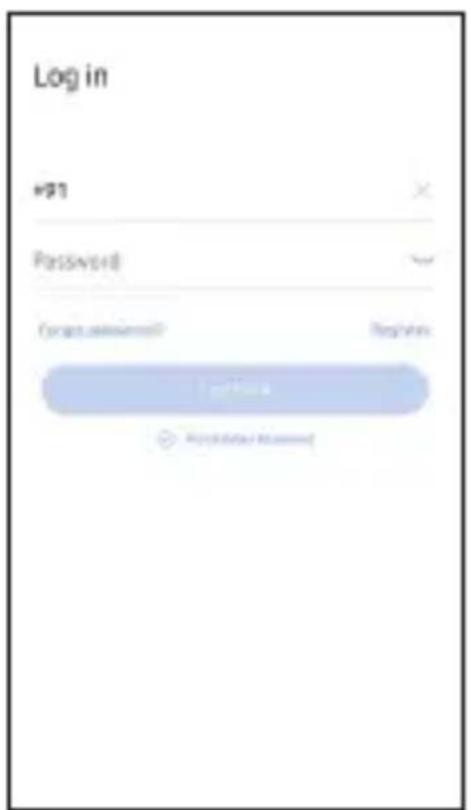

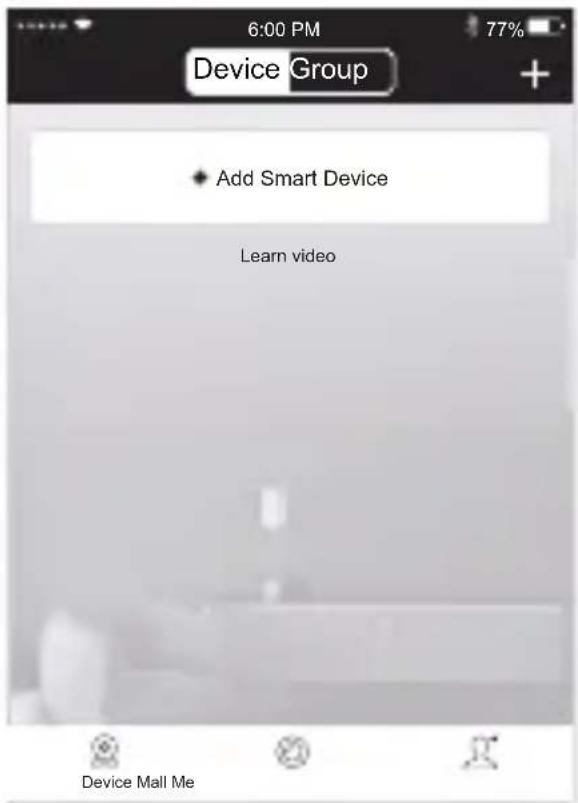
- Connect the device to the power supply. Wait for the successful connection voice prompt.
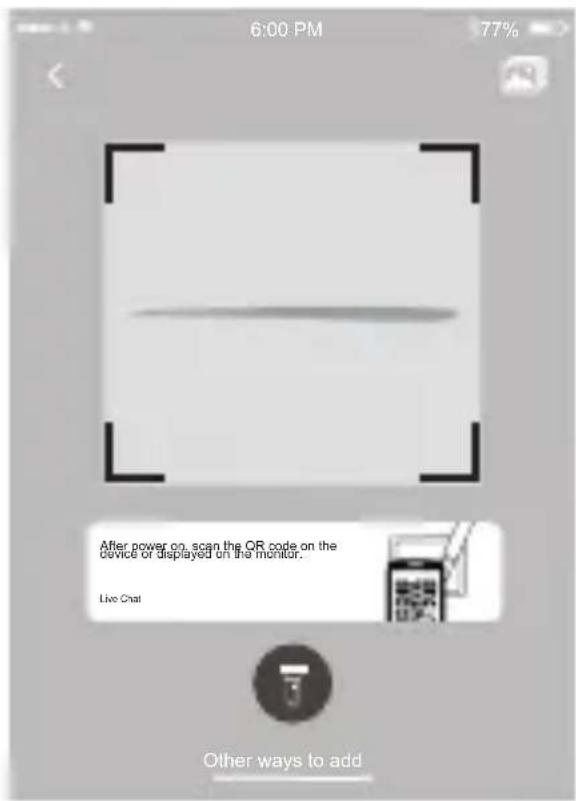
- Scan the QR code on the device.

- In the search device interface, click "Add"

- After setting the name & password for the device, it will be added successfully.
When the QR code scanning fails (or the scan code is unsuccessful)
Standalone camera
Most configured
Kit
Configure all packages
Cloud ID
Device name Device
Battery camera
scan code to add devices
User name admin
Password Input device password
LAN scan
Add by ID/IP
Live Chat
IP/DDNS add
-
Select "Add by ID/IP" under "Other Adding Methods"
-
Enter the device ID and password. Click Finish on the upper right corner to add successfully.
Camera installation - For a smooth camera installation process, refer to our camera screw mount guide to accurately position the holes on your wall. When working with cement walls, utilize our sturdy plastic plugs to securely fasten the camera in place.
Note:
- It is crucial to avoid installing the camera in areas with turbulent airflow. Examples include air conditioner outlets, equipment heat dissipation ports, fan sides, or near curtains. Additionally, please refrain from placing the camera directly in front of glass or mirrors.
- The height of the camera installation should be 2.5M-3M.
- Mounting using the provided mounting screws are recommended, the hoop is for additional support.
Godrej ACE Pro App and Website
To setup your camera's, download the Godrej ACE application and signup. The app will guide you thought the rest. You can view the camera feed using Godrej ACE Mobile application or by login into Godrej ACE CMS via your windows desktop.


Warranty
To avail warranty, please call our customer care number: 1800-209-5511 and produce the invoice details.
Note
We advise buying our products from authorized sellers. Warranty will be void and service will not be provided for products purchased through unauthorized sellers.
Customer shall adhere to all safety norms while installing and operating the product. The company shall not be liable for any damage, personal injury or death caused to the customer or any third party due to the negligence on the part of the customer or such third party, committed by way of improper installation, usage or handling of the product, which is not in accordance with the instructions provided by the company.
Not covered in warranty
Any damage resulting from mishandling or improper usage or lack of maintenance. Gas leakage, fire, burglary, accident, dropping, excessive shock, acts of nature, loss of components or accessories, replacement/repair by anyone other than authorized personnel, consumable parts like lights, batteries, plastic parts and accessories.
Under any circumstances company will not be liable for any damage caused due to power fluctuations / surges, excessive power supply voltage or improper earthing.
Disclaimer
Since the product is an IP based CCTV equipment, the use of the product shall be wholly at your own risk. Godrej & Boyce Mfg Co Ltd will take all reasonable security practices to prevent unauthorised access, damage, misuse or modification of the data stored in the servers in India. Godrej & Boyce Mfg Co Ltd shall not take any responsibility for abnormal operation, privacy leakage or other damages resulting from cyber-attack, hacker attack, virus attack or other internet security risks. However, Godrej & Boyce Mfg Co Ltd will provide timely technical support if required and asked for. In no event will Godrej & Boyce Mfg Co Ltd, its directors officers, employees or agents are liable to you for any consequential, incidental or indirect damages, including among others, damages for loss of business profits, business interruption or loss, damage corruption, recovery of data or documentation, in connection with the use of this product, even if Godrej & Boyce Mfg Co Ltd has been advised of the possibility of such damages.
Godrej & Boyce Mfg Co Ltd disclaims all liabilities connected with and damages arising out of situations wherein the suggested default Passwords or Usernames of all devices like Wi-Fi router to which camera is connected, Camera default password etc, are not changed from their factory default values.
Godrej & Boyce Mfg Co Ltd disclaims camera functionality when android or iOS upgrade their versions. Customer need to upgrade or buy a new camera hardware for availing new features of android / iOS. Under no circumstances Godrej & Boyce Mfg Co Ltd will replace the camera.
Under no circumstances Godrej will take onus to retrieve camera video recordings on cloud or on SD card. Godrej disclaims onus to retrieve cloud or SD card recording.
Important Instructions
- It is advised to power off the camera when not in use to ensure complete privacy. Godrej & Boyce will not be responsible for any unintended recording captured if the camera is powered on.
- All passwords associated directly and indirectly with the functioning of the Wi-Fi Camera system like Wi-Fi router password, Mobile Phone password, Godrej ACE app account password etc must be changed regularly and kept private.
- Do not share your Godrej ACE app account password with anyone.
INFORMATION ON E-WASTE HANDLING AND MANAGEMENT
Dear Customer,
The Ministry of Environment and Forests have published the E-waste (Management and Handling) Rules 2010, which comes in effect from 1st May 2012. E-waste is defined as any electrical or electronic component of products in whole or in part, or rejects from their manufacturing or repair process, which are intended to be discarded. These rules apply to every producer, consumer or bulk consumer involved in the manufacture, sale, and purchase and processing of electrical and electronic equipment or components as specified in Schedule 1 (please refer to our website www.godrej.com in the 'Good & Green' section of CSR module for more details). Under these rules, specific roles and responsibilities are defined for producers, consumers and recyclers handling and managing e-waste.
E-waste is to be managed in an environmentally sound manner, which means taking steps to ensure that health and environment are protected from adverse effects of hazardous substance contained in such wastes.
Rule 6 of the E-waste (Management and Handling) Rules 2010 states that bulk consumers of electrical and electronic equipment shall be responsible for recycling of the e-waste generated by them. Bulk consumer means bulk users of electronic and electrical equipment such as Central Government or State Government Departments, public sector undertakings, banks, educational institutions, multinational organizations, and international agencies, private companies that are registered under the Factories Act, 1948 and Companies Act, 1956. The bulk consumers have to ensure that the e-waste generated by them is channelized to authorized collection centre or is taken back by the producers. They shall maintain records of e-wastegenerated by them in Form 2 and make such records available for scrutiny by the State Pollution Control or the Pollution Control Committee concerned.
All consumers of electrical and electronic equipment, irrespective of their status as bulk consumers or not, shall ensure that e-waste generated by them is channelized to authorizedcollection Centre(s) or registered dismantler(s), or recycler(s) or is returned to the pick-up/take back services provided by the producers. (Please refer to our website www.godrej.com in the 'Good & Green' section of CSR module for more details).
All our products, intended to be recycled under the category of e-waste (as defined above), carry alabel or stamp of the WEEE symbol (A wheelie bin with a cross), which states that it falls under the hazardous waste category and is not to be disposed along with normal garbage. We seek your support in ensuring environmentally sound management of e-waste and aid us in sustaining our earth's natural resources and maintaining the earth's green cover intact for the benefit of our future generations.
NOTE
NOTE
NOTE
Please fill your details below for future reference:
Date of Purchase: ____
Product Model:
Name & Address of Distributor/Dealer: ____
Distributor Phone Number: ____
FOR SAFETY, PLEASE READ THIS MANUAL PRIOR TO USE.


Toll Free: 1800 209 9955 (Sales & Service)

+91 9321665511 (Service)

Email: secure@godrej.com (Sales), secare@godrej.com (Service)

www.godrejsecure.com
Follow us:

GodrejSecure

godrejsecure
- Don't's
- Package Content
- Know your product
- Button Operations
- Features & Functions
- Product Specifications
- Software Installation
- A] APP Download and Installation
- B] Account Login
- C] 4G SIM Card Installation
- When the QR code scanning fails (or the scan code is unsuccessful)
- Note:
- Godrej ACE Pro App and Website
- Warranty
- Note
- Not covered in warranty
- Disclaimer
- Important Instructions
- INFORMATION ON E-WASTE HANDLING AND MANAGEMENT
- Please fill your details below for future reference:
Brand : Godrej
Model : ACEPRO 4G Mini PT
Category : Alarm system