Kontour KRA300B - Laptop stand Chief - Free user manual and instructions
Find the device manual for free Kontour KRA300B Chief in PDF.


| Product Type | Laptop Stand |
| Brand | Chief |
| Model | Kontour KRA300B |
| Color | Black |
| Material | Steel and aluminum |
| Weight Capacity | 15 lbs (6.8 kg) |
| Platform Size | 13.5 x 10.5 inches (34.3 x 26.7 cm) |
| Height Adjustment Range | 7 to 15 inches (17.8 to 38.1 cm) |
| Tilt Range | -5° to +15° |
| Swivel | 360° |
| Rotation | 180° |
| VESA Compatible | No (laptop tray only) |
| Cable Management | Yes, integrated clips |
| Mounting Type | Desk clamp or grommet mount |
| Desk Thickness Range | 0.5 to 3.3 inches (1.3 to 8.4 cm) |
| Product Weight | 8.5 lbs (3.9 kg) |
| Package Dimensions | 16 x 12 x 4 inches (40.6 x 30.5 x 10.2 cm) |
| Power | None (manual adjustment) |
| Maintenance | Wipe with a damp cloth, avoid abrasives |
| Safety | Do not exceed maximum weight capacity; tighten all bolts securely |
| Spare Parts | Available from Chief website or authorized dealers |
| Warranty | 10 years limited warranty |
Frequently Asked Questions - Kontour KRA300B Chief
User questions about Kontour KRA300B Chief
0 question about this device. Answer the ones you know or ask your own.
Ask a new question about this device
Download the instructions for your Laptop stand in PDF format for free! Find your manual Kontour KRA300B - Chief and take your electronic device back in hand. On this page are published all the documents necessary for the use of your device. Kontour KRA300B by Chief.
USER MANUAL Kontour KRA300B Chief
INSTALLATION INSTRUCTIONS
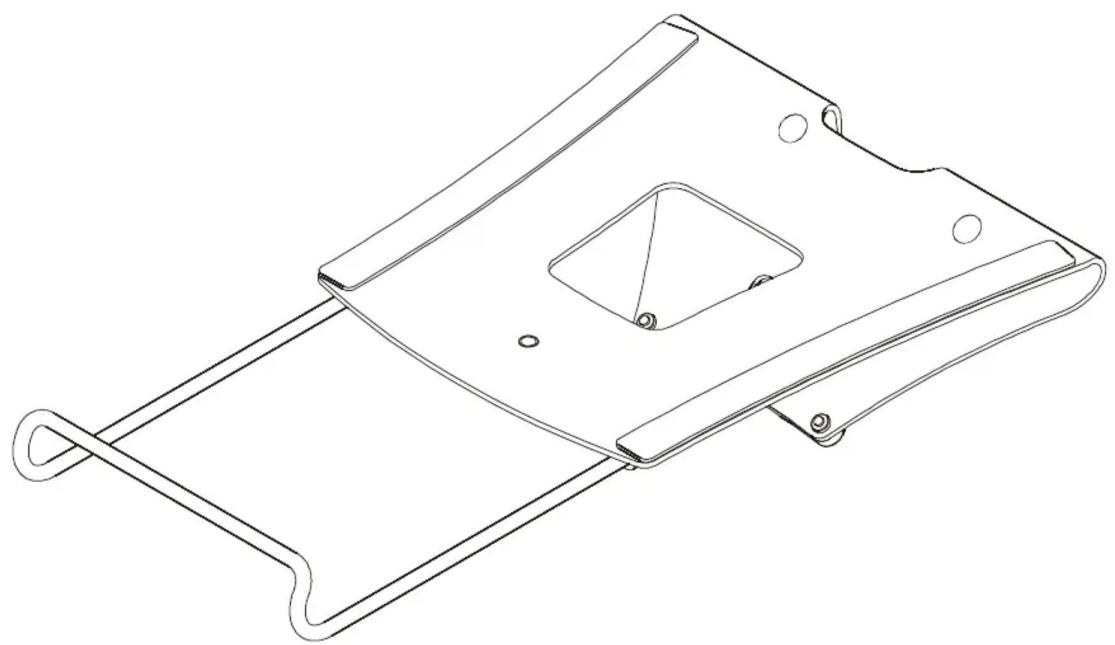
Laptop Tray
DISCLAIMER
Milestone AV Technologies and its affiliated corporations and subsidiaries (collectively “Milestone”), intend to make this manual accurate and complete. However, Milestone makes no claim that the information contained herein covers all details, conditions or variations, nor does it provide for every possible contingency in connection with the installation or use of this product. The information contained in this document is subject to change without notice or obligation of any kind. Milestone makes no representation of warranty, expressed or implied, regarding the information contained herein. Milestone assumes no responsibility for accuracy, completeness or sufficiency of the information contained in this document.
Chief® is a registered trademark of Milestone AV Technologies. All rights reserved.
IMPORTANT SAFETY INSTRUCTIONS!

WARNING: A WARNING alerts you to the possibility of serious injury or death if you do not follow the instructions.

CAUTION: A CAUTION alerts you to the possibility of damage or destruction of equipment if you do not follow the corresponding instructions.

WARNING: Failure to read, thoroughly understand, and follow all instructions can result in serious personal injury, damage to equipment, or voiding of factory warranty! It is the installer's responsibility to make sure all components are properly assembled and installed using the instructions provided.

WARNING: Use this mounting system only for its intended use as described in these instructions. Do not use attachments not recommended by the manufacturer.

WARNING: Exceeding the weight capacity can result in serious personal injury or damage to equipment! It is the installer's responsibility to make sure the combined weight of all components located between the KRA300 up to (and including) the laptop does not exceed 15 lbs (6.8 kg). Use with products heavier than the maximum weight indicated may result in collapse of the mount and its accessories causing possible injury.

WARNING: Never operate this mounting system if it is damaged. Return the mounting system to a service center for examination and repair.

WARNING: Do not use this product outdoors.
--SAVE THESE INSTRUCTIONS--
DIMENSIONS
![9.500 VENTILATION [406.4] 16.00 [241.3] 9.50 EXTENSION RAIL DEPTH ADJUSTMENT KNOB](/content/2026/05/1045600/images/12c2ef94f1e78434d2cc9d7c8ca1f533052e43d99f564171e99ca767c8495e02.jpg)
PARTS
![A (1) [laptop tray] B (4) M4x12mm](/content/2026/05/1045600/images/5cbee88fd0663643e7f91c8f12e5fe28047c97cb9aaf7e69a4dcc3af0b08741f.jpg)
ASSEMBLY AND INSTALLATION
- Remove existing quick release faceplate from monitor arm by pulling quick release lever and lifting faceplate from arm. (See Figure 1)
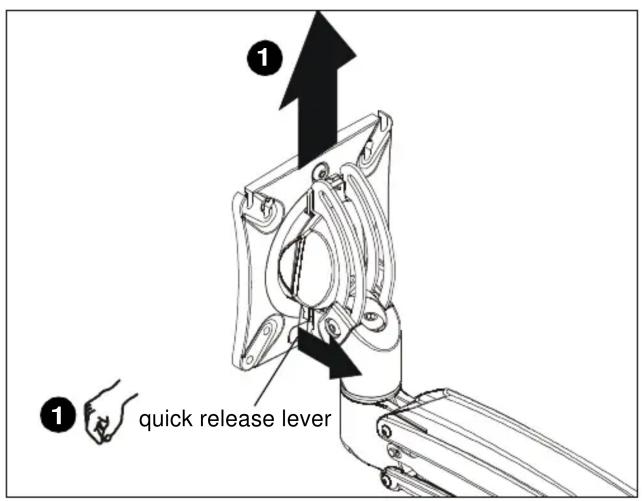
Figure 1
- Use four M4x12mm Phillips pan machine screws (B) to attach laptop tray (A) to removed faceplate. (See Figure 2)
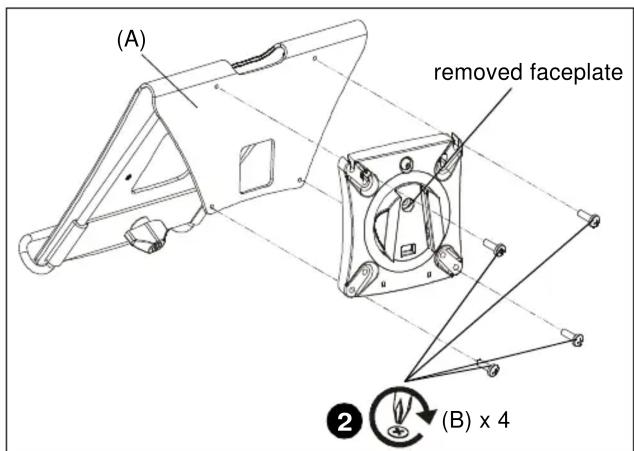
Figure 2
- Slide laptop tray (A) onto mounting head until quick release tab clicks into place. (See Figure 3)
- Adjust mounting arm and tray to desired mounting level. See monitor arm installation instructions for adjustment details. (See Figure 3)

Figure 3
- Turn extension rod tension adjustment knob counterclockwise to decrease tension. (See Figure 3)
- Extend laptop extension rod as desired. (See Figure 3)
- Turn extension rod tension adjustment knob clockwise to tighten extension rod in place.

WARNING: Exceeding the weight capacity can result in serious personal injury or damage to equipment! It is the installer's responsibility to make sure the combined weight of all components located between the KRA300 up to (and including) the laptop does not exceed 15 lbs (6.8 kg). Use with products heavier than the maximum weight indicated may result in collapse of the mount and its accessories causing possible injury.
- Center laptop on tray and adjust pitch tension as needed to hold tray in desired position. (See Figure 3)
Installation Instructions
Brand : Chief
Model : Kontour KRA300B
Category : Laptop stand