617T - Extendeur AV Kramer - Free user manual and instructions
Find the device manual for free 617T Kramer in PDF.


| Product Type | 4K HDR HDMI Transmitter (Tx) over Extended-Reach Multi-Mode Fiber Optic Cable |
| Max Resolution | 4096x2160 @60Hz 4:4:4 |
| Max Distance | 200 m (656 ft) |
| Data Rate | 18 Gbps (6 Gbps per channel) |
| HDMI Compliance | HDMI 2.0, HDCP 2.2, EDID, CEC |
| Video Input | Male HDMI connector |
| Optical Connector | Duplex LC |
| Fiber Type | Dual Multi-mode OM3 (50/125 µm) glass fiber |
| Power Supply | 5V via USB or external power adapter; also from HDMI pin #18 (617T only) |
| Power Consumption | Powered via USB (recommended) or HDMI source |
| Dimensions (W x D x H) each | 2.6 cm x 7.2 cm x 1.5 cm (1" x 2.8" x 0.6") |
| Weight each | 0.12 kg (0.3 lbs) approx. |
| Operating Temperature | 0° to +50°C (32° to 122°F) |
| Storage Temperature | -30° to +70°C (-22° to 158°F) |
| Operating Humidity | 0 to 85% |
| Compliance | CE, FCC Class B, RoHS |
| Safety | Laser Class I; no operator serviceable parts |
| Included Accessories | 2 Micro USB cables, 2 wall-mount power adapters |
| Installation | Plug-and-play; no scaling or compression |
Frequently Asked Questions - 617T Kramer
User questions about 617T Kramer
0 question about this device. Answer the ones you know or ask your own.
Ask a new question about this device
Download the instructions for your Extendeur AV in PDF format for free! Find your manual 617T - Kramer and take your electronic device back in hand. On this page are published all the documents necessary for the use of your device. 617T by Kramer.
USER MANUAL 617T Kramer
Scan for full manual
617T, 617R Installation Instructions
4K HDR HDMI Tx/Rx over Extended-Reach Multi-Mode Fiber Optic Cable
This guide helps you install and use your 617T, 617R for the first time.
Go to https://www.kramerav.com/product/617r/t to download the latest user manual and check if firmware upgrades are available.
617T, 617R 4K HDR HDMI Tx/Rx over Extended-Reach Multi-Mode Fiber Cable
Congratulations on purchasing your Kramer 617T and 617R Plug and Play active 4K HDR HDMI Tx/Rx over Extended-Reach Multi-Mode (MM) Fiber Optic cable. 617T and 617R extend signals of up to 4096x2160 @60Hz (4:4:4), over a distance of up to 200m (656ft) without signal scaling or data compression, providing a maximum data rate of 18Gbps. 617T and 617R are easily and securely connected via a 2LC fiber connector and can be powered from the USB connector. Alternatively, 617T only can be powered from the HDMI interface (pin #18).
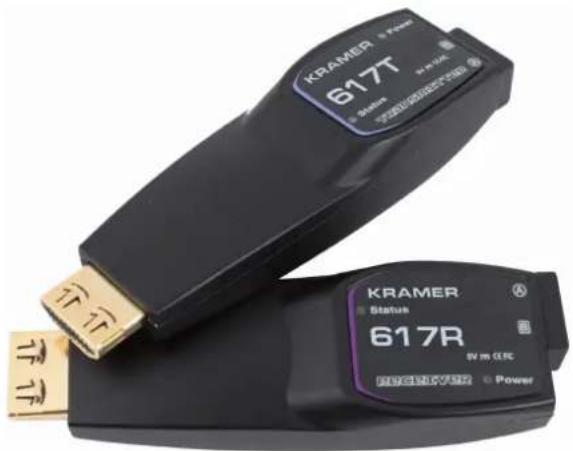
Figure 1: 617T Transmitter and 617R Receiver
Safety

Caution: There are no operator serviceable parts inside the unit.
Warning: Disconnect the power and unplug the unit from the wall before installing.
Warning: Avoid direct eye exposure into the optic connectors when powered, although this product is regulated strictly enough to operate under the Laser Class 3R for eye safety.
See www.KramerAV.com for updated safety information.
Installation
To install 617T and 617R:
- Unpack the contents of the package with care.
We recommend that you save the original box and packaging materials for possible future shipment.
-
Turn on the power to the HDMI source (for example, a laptop) and acceptor (for example, a display).
-
Power the 617T and 617R:
- Connect the micro USB connector on each device to a USB cable (supplied).
- Connect the USB cable either to the wall-mount power adapter (supplied) and to the mains, or to a USB port. The POWER LED lights and the STATUS LED flashes three times.

Although 617T can be powered via pin #18 on the HDMI interface, we recommend that you use the USB power adapter. 617R can only be powered via the USB power adapter.
- Connect the two LC optical fibers between 617T and 617R.
Connect (A) to (A) and (B) to (B). Make sure that the duplex connectors are connected properly. The STATUS LED flashes.

Do not look directly into the LC connectors on the 617T (the transmitter side) when it's powered. This product operates under LASER Class I, classified by CDRH/FDA for eye safety.

We recommend that you avoid using intermediate cables or adapters. Using them may affect the transmission quality.
- Connect 617T to the HDMI connector on the source side and 617R on the acceptor side.

Make sure that the 617T is always connected to the source side and the 617R is connected to the acceptor side.
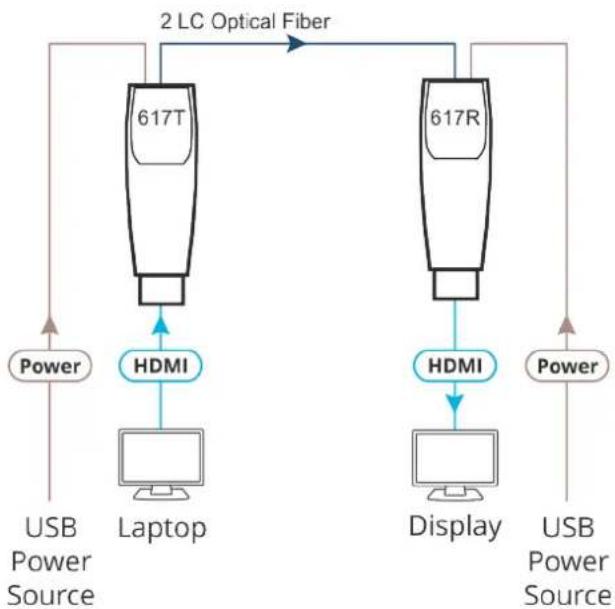
flowchart
graph TD
    A["617T"] -->|2 LC Optical Fiber| B["617R"]
    C["Laptop"] -->|HDMI| A
    D["Display"] -->|HDMI| B
    E["Power"] --> A
    F["USB Power Source"] --> A
    G["Power"] --> B
Once the system is connected the Status LEDs on both 617T and 617R flash.
Troubleshooting
If the display appears black:
- Check that the power source adapters are properly connected on both sides.
- Check that both HDMI connector heads are fully plugged into the devices.
- Check that the source and display devices are both switched on.
- Reboot the system.
- Reset the system by disconnecting and then reconnecting the 617T or 617R, or by disconnecting and then reconnecting the power adapters.
If the image appears distorted and/or there is background noise:
- Go to the display properties and check the settings. Make sure that the resolution is set below 4096x2160 at a 60Hz refresh ratio to check if the graphic resolution is properly defined.
- Reset the system by disconnecting and then reconnecting the 617T or 617R, or by disconnecting and then reconnecting the power adapters.

It is important to connect the devices correctly as marked: 617T to the source side and 617R to the acceptor side.
Specifications
| Video Max. Resolution | 4K @60Hz 4:4:4 (4096x2160) | |
| Data Rate Maximum 6 Gbps per | channel | |
| Compliance Supports HDMI 2.0, H | HDCP 2.2, EDID and CEC | |
| Ports 617T (source end) Male HDMI connector | ||
| Power 5V Via USB source | ||
| Via external source | ||
| From HDMI PIN #18 (617T only) | ||
| Recommended Cable | Structure Dual Multi-mode OM3 (50/125um) glass fiber | |
| Optical Connectors Duplex LC connectors | ||
| Max. Fiber Cable Attenuation (λ=850nm) | 2.5dB/KM | |
| Max. Skew 0.4ns | ||
| Max. Insertion Attenuation 0.5dB | ||
| Total Optical Attenuation 1dB max | @ 656ft/200m extension | |
| Maximum Length | 200m (656ft) | |
| Environmental Conditions | Operating Temperature | 0° to +50°C (32° to 122°F) |
| Storage Temperature | -30° to +70°C (-22° to 158°F) | |
| Operating Humidity | 0 to 85% | |
| Standard Compliance | CE | EN 55032:2012/AC: 2013 (Class A), EN 61000-3-2:2014 EN 61000-3-3:2013, EN 55024:2010 |
| FCC | CFR 47 part 15 SUBPART B Class B, Section 15.101 | |
| Environmental | RoHS (2011/65/ EU) | |
| General | Net Dimensions (W, D, H), each | 2.6cm x 7.2cm x 1.5cm (1" x 2.8" x 0.6") |
| Shipping Dimensions (W, D, H) | 19.3cm x 25.3cm x 62cm (7.6" x 10" x 24.4") | |
| Net Weight, each | 0.12kg (0.3bs) approx. | |
| Shipping Weight | 1.48kg (3.3lbs) approx. | |
| Accessories | Included | 2 Micro USB to USB type-A cables, 2 Wall-mount power adaptors |
Brand : Kramer
Model : 617T
Category : Extendeur AV