
Pyramid Mini - Computer Case Azza - Free user manual and instructions
Find the device manual for free Pyramid Mini Azza in PDF.


| Product Type | Mini-ITX Computer Case |
| Model | Pyramid Mini |
| Brand | Azza |
| Motherboard Support | Mini-ITX |
| Dimensions (H x W x D) | 410 x 410 x 410 mm |
| Weight | 4.5 kg (approx.) |
| Material | Tempered Glass, Steel |
| Side Panel | 3 mm Tempered Glass |
| Power Supply Support | ATX (up to 160 mm length) |
| Maximum GPU Length | 330 mm |
| Maximum CPU Cooler Height | 130 mm |
| Fan Support | 3 x 120 mm |
| Radiator Support | Up to 240 mm |
| Drive Bays | 2 x 2.5" SSD, 1 x 3.5" HDD |
| Expansion Slots | 2 |
| Front I/O Ports | USB 3.0 x 2, Audio x 1 |
| RGB Lighting | Pre-installed RGB fans or strip |
| Dust Filters | Bottom magnetic dust filter |
| Cleaning Instructions | Use a soft, dry cloth. Avoid abrasive cleaners. |
| Safety Precautions | Handle glass panels with care; ensure proper grounding. |
| Spare Parts Availability | Contact Azza support for replacement glass or accessories. |
| Warranty | 1 year limited warranty |
Frequently Asked Questions - Pyramid Mini Azza
User questions about Pyramid Mini Azza
0 question about this device. Answer the ones you know or ask your own.
Ask a new question about this device
Download the instructions for your Computer Case in PDF format for free! Find your manual Pyramid Mini - Azza and take your electronic device back in hand. On this page are published all the documents necessary for the use of your device. Pyramid Mini by Azza.
USER MANUAL Pyramid Mini Azza
natural_image
Exterior view of a modern, triangular industrial machine with internal compartments and mounting base (no visible text or symbols)PYRAMID
MINI 806
USER MANUAL
- Specifications
- Chassis Parts
- Removing The Top Glass Panel
- ITX Motherboard Mount
- Power Supply Installation
- 2.5"SSD Installation
- Fan Installation
- Digital RGB Fan Installation For Motherboard
| Model | |
| Model Name: PYRAMID MINI 806 | |
| Model Number: CSAZ-806 | |
| Specifications | |
| Type: | MINI ITX Tower |
| Material: | 1.5mm SPCC+ 2.0mm Aluminum |
| Side Panel Window: | 4 sides panel are tempered glass |
| Max CPU Cooler Height: | UP to 85mm |
| Max Video Card Length: | Up to 280mm long video card (Horizontal) |
| Power Supply: Support SFX power supply | only |
| Motherboard Compatibility: | Mini ITX |
| Expansion | |
| External 5.25" Drive Bays: | 0 |
| Internal 2.5" Drive Bays: | Up to 2 |
| Internal 3.5" Drive Bays: | 0 |
| Expansion Slots: | 2 |
| Front Ports: | Power Button、1xUSB 3.0、HD Audio |
| Physical Specifications | |
| Metal Chassis Dimensions (HxWxD) 435 x | 368 x 368 mm/17.1 x 14.5 x 14.5 inches |
| Weight: 6.3kg/13 | .9lbs |
| Features | |
| Tempered Glass Side Window: | High-quality tempered glass side window allows for clear visuals to inner components |
| Available Fan Ports: | 1x120mm Fan port in the Top(1x 120mm Hurricane II Digital RGB F an included ) |
| Water Cooling: | Supports radiators up to 120mm on the Top |
| Isolated Chamber: | SFX power is on the bottomPrevent its heat from affecting other components |
| Easy Installation Cooler: | A pre-cut hole for easy installation of CPU Cooler,eliminating the need to remove the motherboard |
| Accessories: | 20cm PCI-E 3.0 Extend cable for VGA card (included) |
※PWM Fan:The model comes with PWM fans and will run at top speed unless connected to a motherboard or controller.
Chassis Parts

| 1 | TOP tempered glass panel cover | 7 | Fan cable management cover |
| 2 | Pyramid structure | 8 | Screws for 2.5" SSD bracket |
| 3 | Fan bracket | 9 | Spring bolt screw of top panel cover |
| 4 | 12cm ARGB Fan | 10 | Removable(magnetic) dust proof mesh |
| 5 | Power supply rack | 11 | 2.5" SSD bracket |
| 6 | PCIe slot | 12 | I/O Ports: Power button,USB 3.0 x 1 , HD Audio |
Lift to remove top panel

natural_image
Technical diagram of a device interior with labeled components and red directional arrows indicating motion (no text or symbols)Loosen the four screws

natural_image
Technical diagram of a computer motherboard layout with highlighted internal components (no text or symbols)SFX Power Supply


natural_image
Interior view of a triangular device showing internal components like CPU, RAM, and motherboard (no text or symbols visible)* Product photos are for reference only.
2.5"SSD Installation
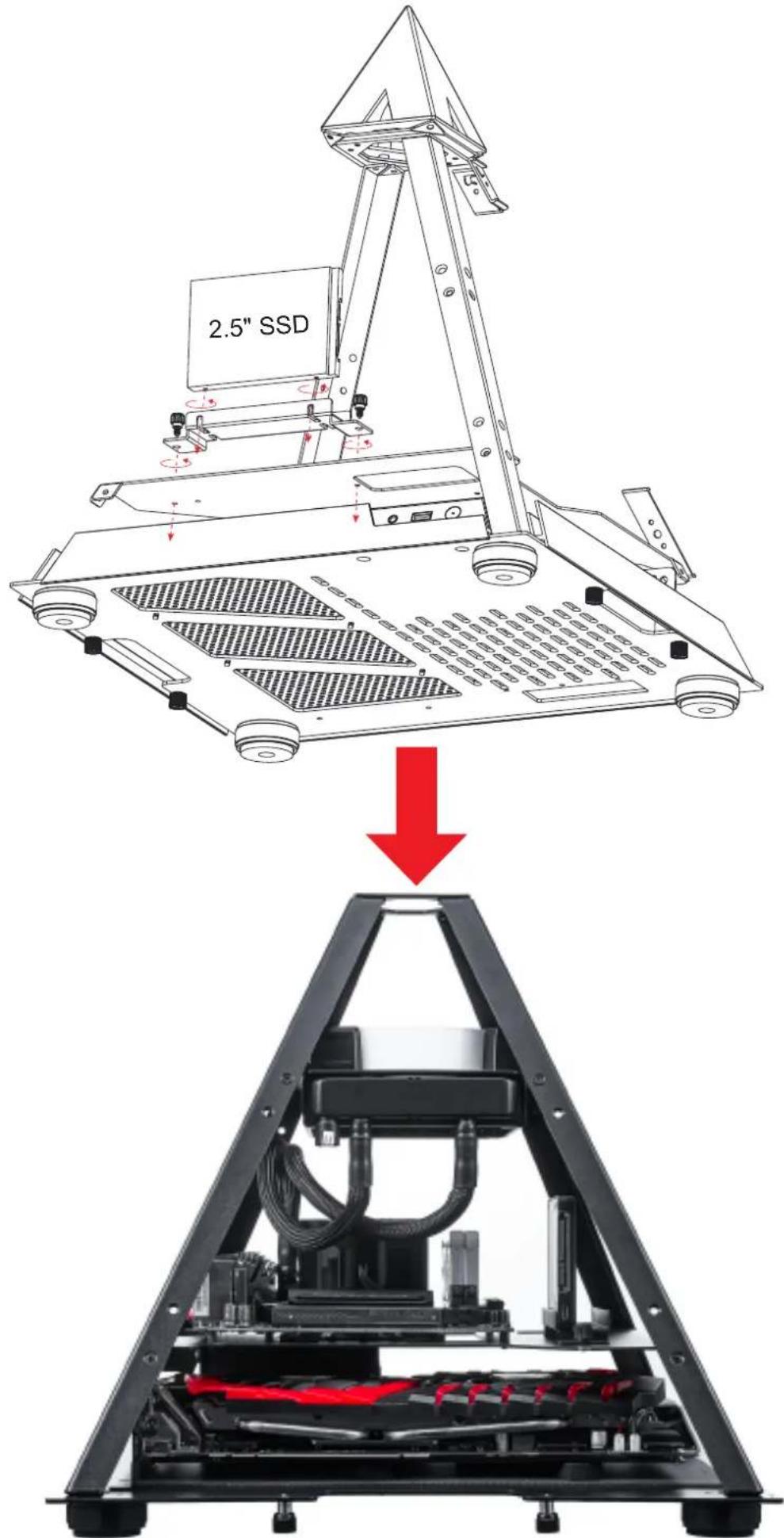
* Product photos are for reference only.

natural_image
Technical illustration of a mechanical assembly showing a circular component being rotated into a triangular frame with red directional arrows indicating rotation (no text or symbols present)■ Fasten the fan screws ■ Secure the fan to the top of the Pyramid.


natural_image
Technical line drawing of a mechanical assembly with a conical frame and internal components (no text or symbols)* Manage the fan cables by hiding cable cover
Digital RGB Fan Installation For Motherboard
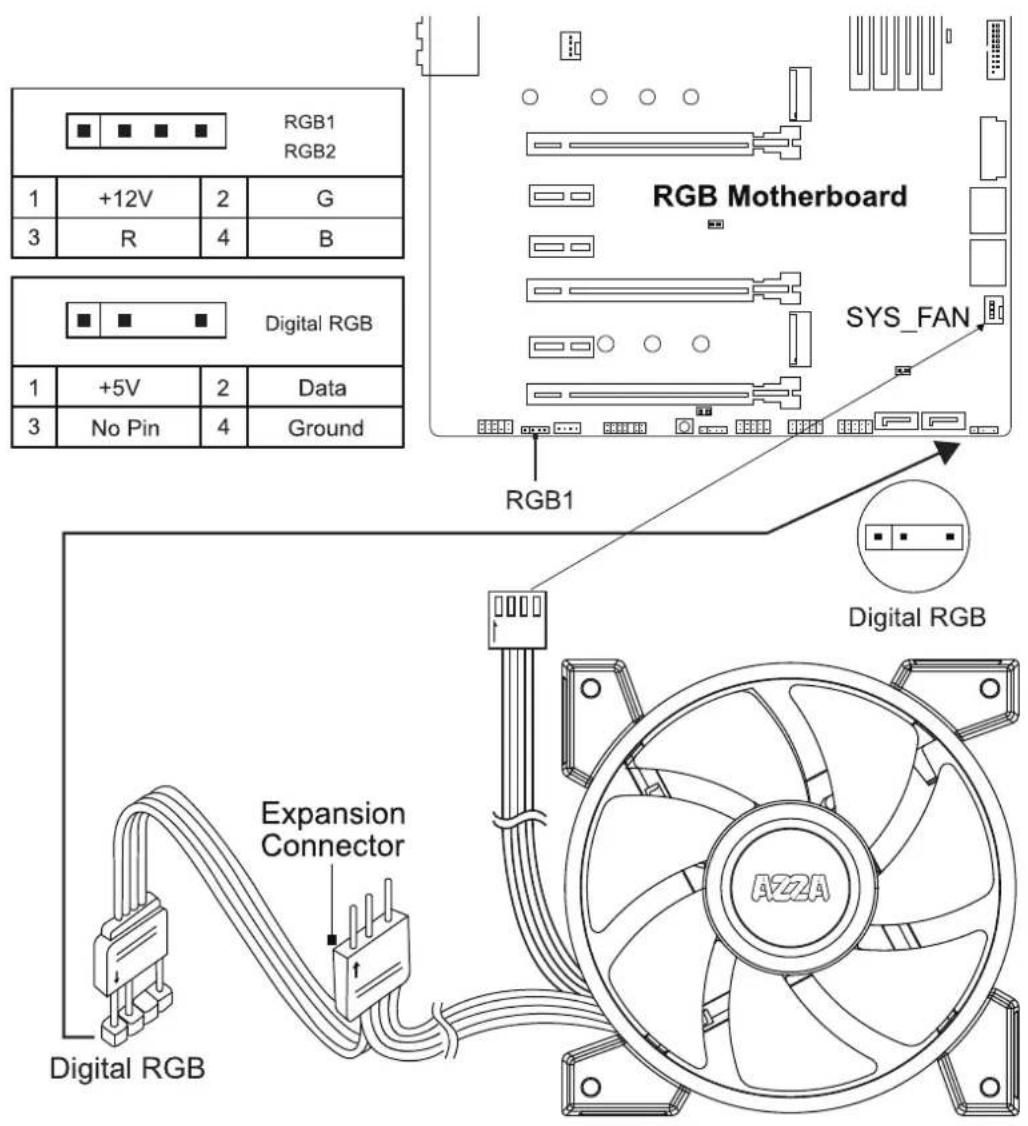
The addressable RGB fans can connect directly to the 5V addressable RGB headers of compatible motherboards, such as those from MSI ^TM , ASUS ^TM , Gigabyte ^TM and AsRock ^TM .
Please note: Only 5V addressable headers from compatible motherboards are supported. Please do NOT connect the fan to a 12V non-addressable header.
Please check your motherboard's specifications before use. Do not go past the motherboard's allowed limits on power rating and LED count when connecting multiple fans/LED strips.
natural_image
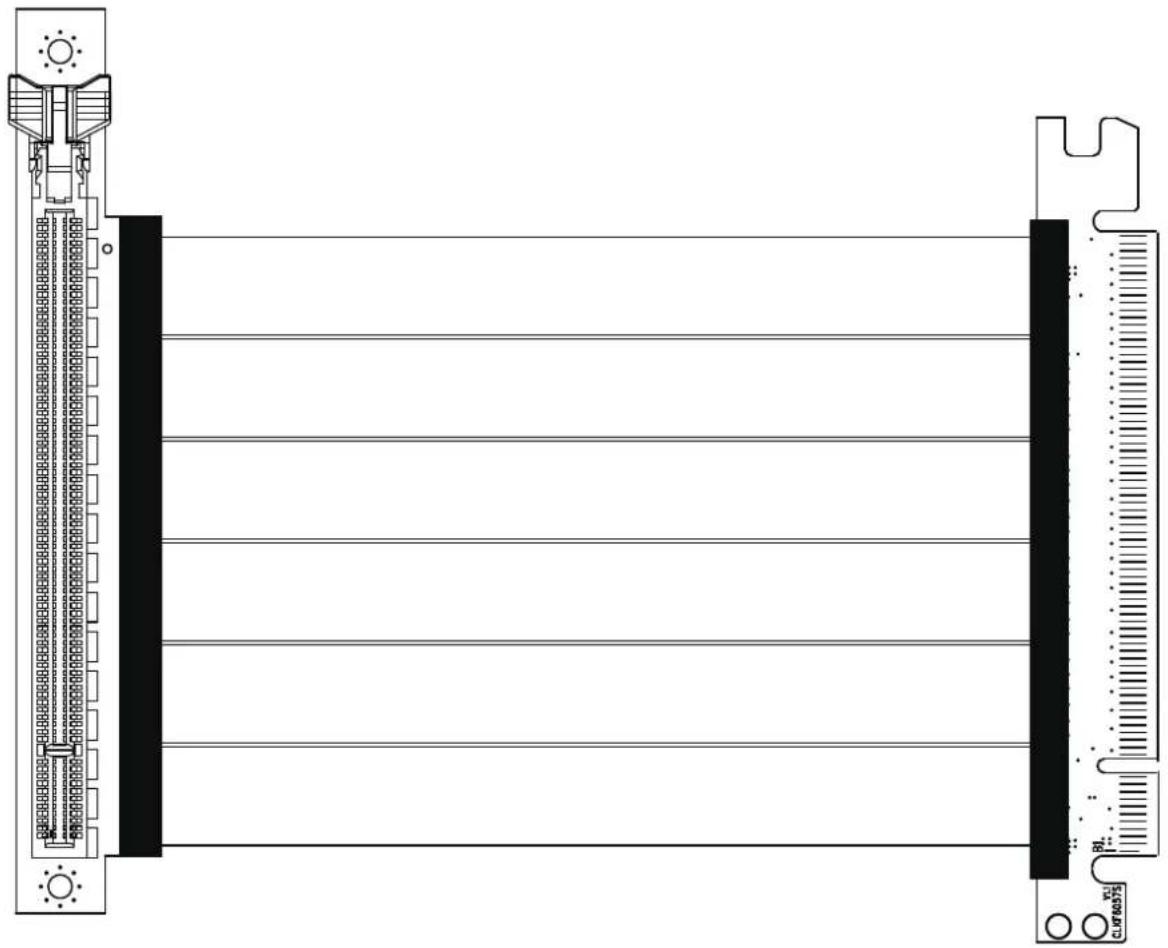
Technical line drawing of a mechanical or electrical component with no visible text, numbers, or symbols.200mm PCI-E 3.0 Extend cable for VGA card
To fix potential compatibility issues with PCI-e Gen 4.0, please connect your graphics card directly to the motherboard, enter the BIOS, and change the PCI-e x16 mode to 3.0 before using the RGB PCI-e cable.

natural_image
Abstract geometric logo design with stylized arrow and diamond shapes above the letters 'AZZA' (no text or symbols beyond the logo)Brand : Azza
Model : Pyramid Mini
Category : Computer Case