
EKI-2428G-4CI-AE - Network switch Advantech - Free user manual and instructions
Find the device manual for free EKI-2428G-4CI-AE Advantech in PDF.


| Product Type | Industrial Managed Gigabit Switch with 10G Uplinks |
| Model Number | EKI-2428G-4CI-AE |
| Port Configuration | 24 x Gigabit Ethernet (10/100/1000 Mbps) + 4 x 10G SFP+ slots |
| Switching Capacity | 128 Gbps |
| Forwarding Rate | 95.2 Mpps |
| MAC Table Size | 16K entries |
| VLAN Support | IEEE 802.1Q VLAN, up to 4094 VLAN groups |
| Quality of Service (QoS) | 8 priority queues, 802.1p, DSCP |
| Management | Web, CLI, SNMP v1/v2c/v3, RMON |
| Security Features | 802.1X, ACL, SSH, SSL, Port Security |
| Dimensions (W x D x H) | 440 x 300 x 44 mm (1U Rackmount) |
| Weight | 4.5 kg |
| Power Input | 100-240 V AC, 50-60 Hz |
| Power Consumption | 40W (typical) |
| Operating Temperature | -40°C to 75°C (Extreme Temperature) |
| Mounting | DIN-rail and Rackmount (kit included) |
| Cooling | Fanless design |
| Maintenance | Clean with dry cloth; do not use liquids or aerosols |
| Safety | Use only certified power supply; ensure proper grounding |
| Spare Parts & Repairability | Contact Advantech support for replacement parts; device is not user-serviceable |
Frequently Asked Questions - EKI-2428G-4CI-AE Advantech
User questions about EKI-2428G-4CI-AE Advantech
0 question about this device. Answer the ones you know or ask your own.
Ask a new question about this device
Download the instructions for your Network switch in PDF format for free! Find your manual EKI-2428G-4CI-AE - Advantech and take your electronic device back in hand. On this page are published all the documents necessary for the use of your device. EKI-2428G-4CI-AE by Advantech.
USER MANUAL EKI-2428G-4CI-AE Advantech
Rackmount Ummanaged Redundant Industrial Switch
Overview
The EKI-2428G is an unmanaged switch with 24 Gigabit ports and 4 Gigabit SFP ports that can provide users with abundant ports to connect many devices. It is designed for rack-mount installation, and suitable for edge to core networks.
Packing List
Before installation, please make sure that you have received the following:
- 1 x EKI-2428G-4FA Rackmount Ummanaged Switch
- 1 x Startup manual If anything is missing or damaged, contact your distributor or sales representative immediately.
Specifications
General
- Compatibility: IEEE 802.3, 802.3u, 802.3x, 802.3ab, 802.3z
• LAN: 10/100/1000 Base-TX
• SFP: Up to 110 km (depends on SFP) - Ethernet RJ-45 Distance: Up to 100 m
- Connectors:
24 x 10/100/1000Base-T/TX RJ-45
4 x SFP(mini-GBIC) port
• Power Requirements: 100\~240V single AC power input
• Power Consumption: 18 W
• Dimensions (W x H x D): 442 x 44 x 211.1 mm
• Enclosure: Metal shell with solid mounting kits - Operating Temperature: 0 \~ 55°C (32 \~ 131°F)
• Storage Temperature: -20 \~ 70°C (-4 \~ 158°F) - Operating Humidity: 10 95% (non-condensing)
- Storage Humidity: 10 \~95% (non-condensing)
• EMC: CE FCC Class A - Warranty: 5years
User Manual
For more detailed information, please refer to the full manual which can be found on the Advantech's website.
Notes
| For more information on this and other Advantech products, please visit our websites at: | |
| http://www.advantech.com/products | |
| For technical support and service: | |
| http://www.advantech.com/support/ | |
| This startup manual is for EKI-2428G-4FA | |
| Part No: | 1st Edition |
| Dec 2017 | |
Overview

Warning: This is a Class A product. In domestic environment this product may cause radio interference in which case the user may be required to take adequate measures.
Safety Instructions
- Read these safety instructions carefully.
- Keep this user manual for later reference.
- Disconnect this equipment from any AC outlet before cleaning. Use damp cloth. Do not use liquid or spray detergents for cleaning.
- For plug-in equipment, the power outlet socke must be located near the equipment and must be easily accessible.
- Keep this equipment away from humidity.
- Put this equipment on a reliable surface during installation. Dropping it or letting it fall may cause damage.
- The openings on the enclosure are fo air convection. Protect the equipment from overheating. DO NOT COVER THE OPENINGS.
- Make sure the voltage of the power source is correct before connecting the equipment to the power outlet.
- Position the power cord so that people cannot step on it. Do not place anything over the power cord.
- All cautions and warning on the equipment should be noted.
- If the equipment is not used for a long time, disconnect it from the power source to avoid damage by transient over voltage.
- Never pour any liquid into an opening. This may cause fire or electrical shock.
- Never open the equipment. For safety reasons, the equipment should be opened only by qualified service personnel.
- If one of the following situations arises, get the equipment checked by service personnel:
• The power cord or plug is damaged. - Liquid has penetrated into the equipment.
- The equipment has been exposed to moisture.
-
The equipment does not work well, or you cannot get it to work according to the user manual.
•The equipment has been dropped and damaged.
• The equipment has obvious signs of breakage. -
Do NOT LEAVE THIS EQUIPMENT IN AN ENVIRONMENT WHERE THE STORAGE TEMPERATURE MAY GO BELOW -20°C (-4°F) OR ABOVE 70°C (158°F) THIS COULD DAMAGE THE EQUIPMENT. THE EQUIPMENT SHOULD BE IN A CONTROLLED ENVIRONMENT.
Rack Mounting
- Position one bracket to align with the holes on one side of the switch and secure it with the bracket screws. Then attach the remaining bracket to the other side of the Switch.
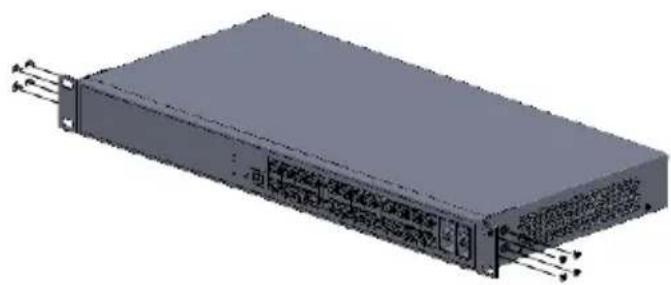
natural_image
3D rendering of a rectangular electronic device with mounting brackets and connectors (no visible text or symbols)- After attaching the mounting brackets, position the EKI-2428G-4FA Ummanaged Switch in the rack by lining up the holes in the brackets with the appropriate holes on the rack. Secure the Switch to the rack by a screw driver with the rack-mounting screws.
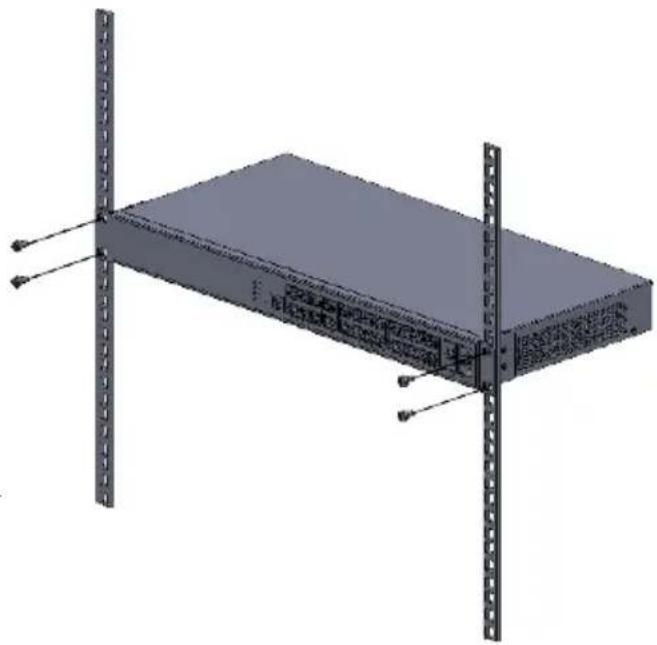
natural_image
3D rendering of a server rack with vertical metal racks and mounting brackets (no text or symbols visible)Brand : Advantech
Model : EKI-2428G-4CI-AE
Category : Network switch